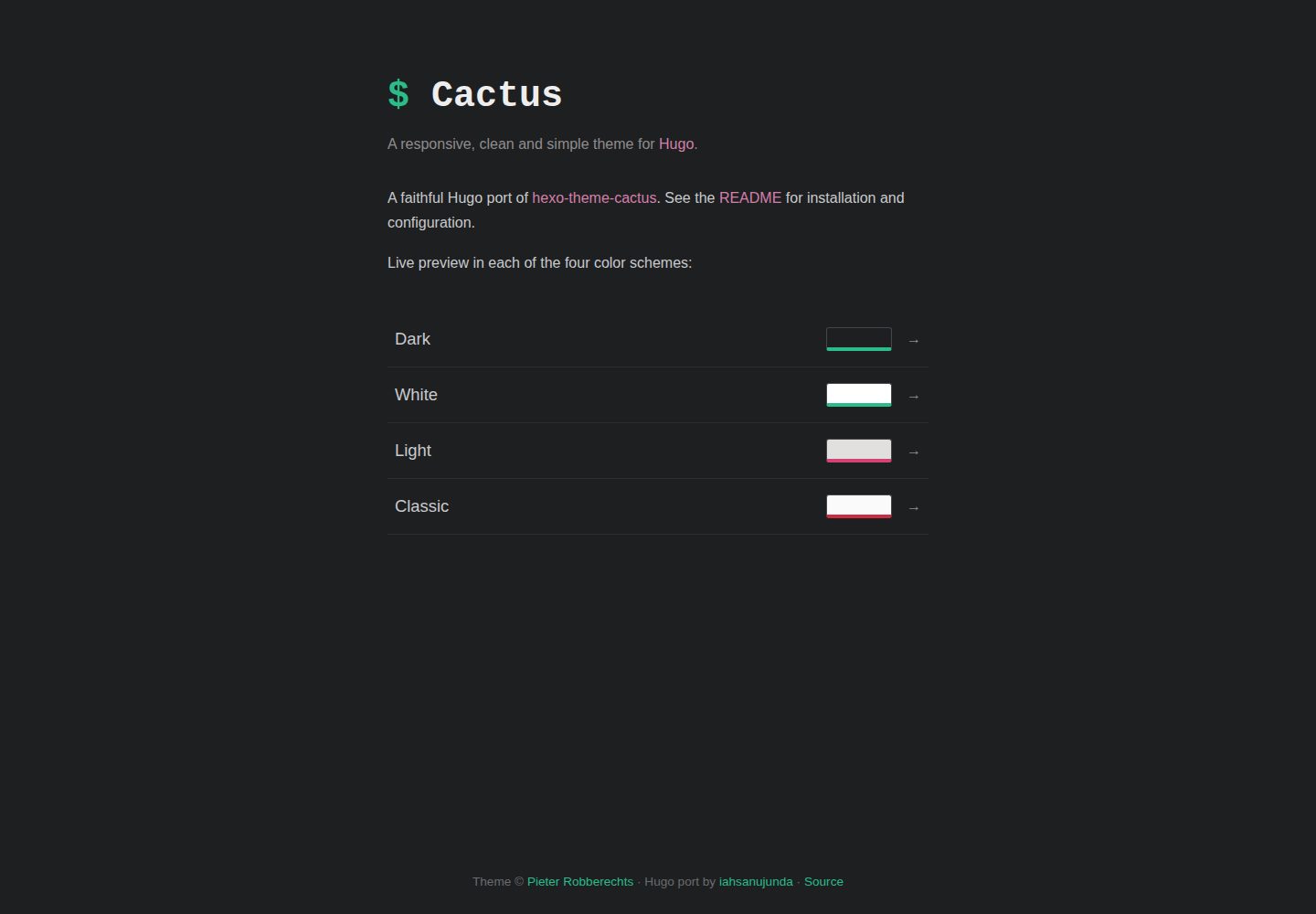
Offers four color schemes: dark, light, classic, and white
HugoHexoStarter
hugo-theme-cactus — Hugo Starter Template
By iahsanujunda
Hugo Theme Cactus is a port of Hexo Theme Cactus, offering four color schemes, responsive layout, tags and categories, archives, client-side search, comments, and analytics—common features for static blogs.
Explore the design
Compare the page layouts and mobile experience. Open any screenshot for a closer look.
Desktop homepage1 / 2
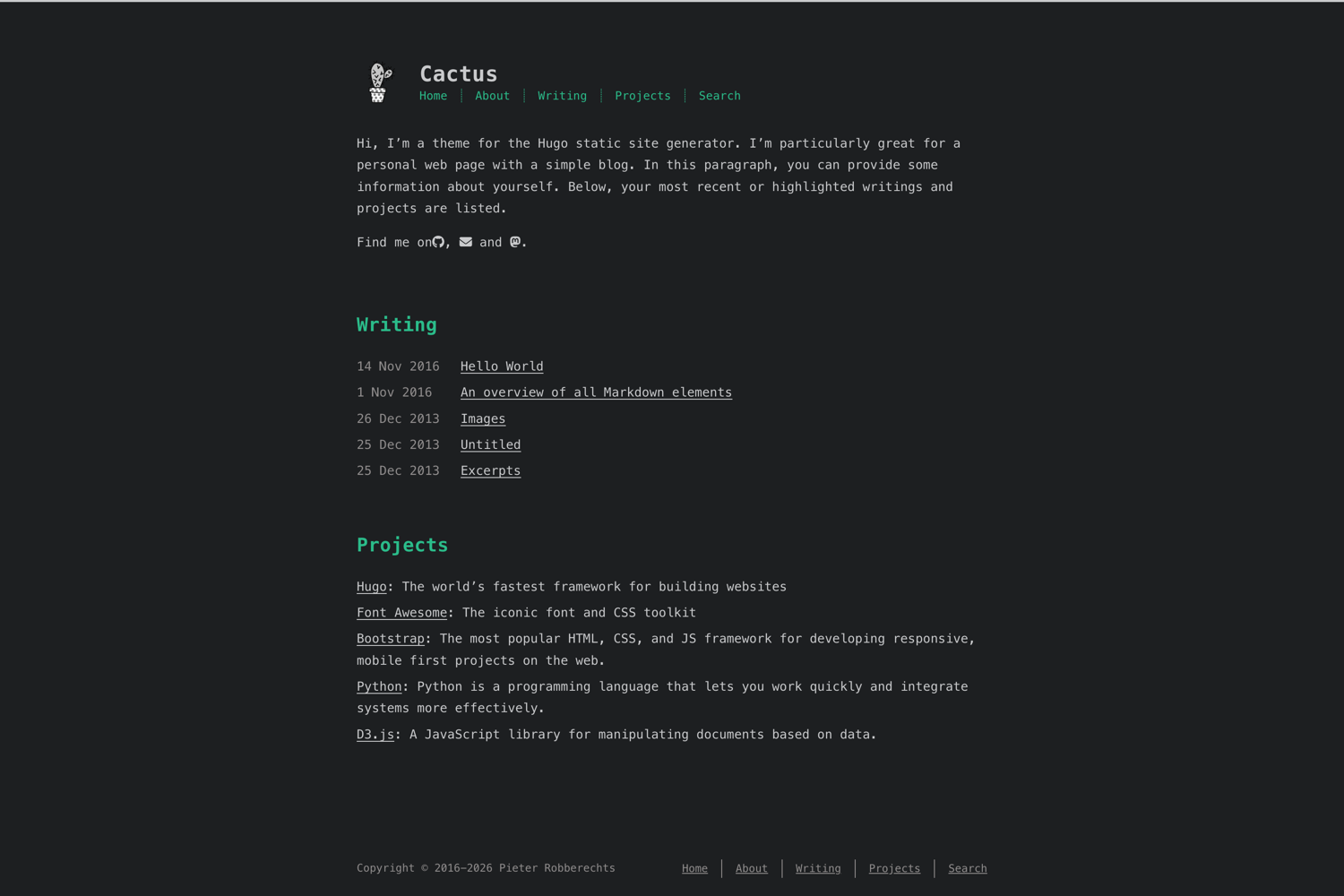
Desktop captureTop of page
Actual screenshot captured by the server browser.
All pages & views 2
Screenshots show visual appearance; interactive behavior may differ.
Recorded 2026-10-03View source
What stands out
A quick read of the recorded project description.
Responsive layout with corresponding article menus for desktop, tablet, and mobile
Supports tags and categories, including a logarithmic-scale tag cloud
Archive pages grouped by year with pagination
Pure client-side search that does not rely on a server or external service
Supports Disqus or utterances comments, plus multiple analytics services
Template Details
This template is a Hugo port of Pieter Robberechts's hexo-theme-cactus. The repository is tagged with both Hugo and Hexo, but it is distributed as a Hugo theme. It targets personal blogs and content sites, providing four color schemes—dark, light, classic, and white. Appearance parameters such as page width are compiled into the stylesheet at build time via Dart Sass.
Feature-wise, it includes a responsive layout (article menus for desktop, tablet, and mobile), tags and categories (with a logarithmic-scale tag cloud), archives grouped by year with pagination, pure client-side search, a table of contents, article galleries, social sharing links, Disqus or utterances comments, Google/Umami/Baidu/Cloudflare analytics, MathJax, Open Graph and Twitter cards, RSS, a 404 page, internationalization for 17 languages, and RTL support (loading the Vazir font).
There are clear usage constraints: it requires Hugo extended 0.158 or later and a separate Dart Sass installation, because the theme styles use Sass modules (@use) and the vars option of css.Sass, which Hugo's built-in LibSass does not support; missing Dart Sass will cause the build to fail. Deployment or CI environments also need it installed. Client-side search depends on the homepage outputting JSON, so JSON must be added to home in outputs. Theme options are centralized under [params], and installation can be done via Git submodule or Hugo Modules. Compared with the original Hexo version, this port removes jQuery in favor of vanilla JavaScript, switches styles from Stylus to SCSS, uses Chroma for syntax highlighting, and fixes the utterances issue-term configuration.
HugoHexoStarter
Is it right for your project?
Use Cases
- Building a personal tech blog or writing site
- Content sites that need multiple color schemes and a responsive reading experience
- Static sites that want pure client-side search without backend services
- Blogs that need multilingual or RTL support
Suitable For
- Users who use Hugo and are willing to install Dart Sass
- Bloggers who prefer a clean, content-first layout
- Long-term content sites that need tags, categories, and archive organization
- Developers who want to add the theme via Git submodule or Hugo Modules
Getting started & customization
Use these recorded setup notes alongside the repository instructions for your chosen version.
- 1
Requires Hugo extended 0.158 or later.
- 2
Dart Sass must be installed separately (e.g., brew install dart-sass, npm install -g sass, or snap install dart-sass); otherwise the build fails with a TOCSS-DART error.
- 3
Deployment or CI environments also need Dart Sass; you can run npm install -g sass before the build command.
- 4
Client-side search requires the homepage to output JSON, so JSON must be added to home in the configured outputs.
- 5
Can be installed via Git submodule or Hugo Modules; copy the configuration from exampleSite/hugo.toml.
License & source material
Usage conditions & limitations
Free to use · keep license noticeThis entry covers the free version under the MIT license in the public repository; the free scope is the code of that version and does not mean external services or third-party assets are free.
Must comply with when using
- You may use, modify, commercialize, and distribute the code of this version for free.
- When distributing copies or substantial portions of the code, retain the original author's copyright notice and the full MIT license notice.
- The code is provided as is; warranties and limitations of liability are governed by the original license and applicable law.
Additional costs & items to verify
- Using this theme requires Hugo extended 0.158 or later; standard Hugo cannot build it.
- Dart Sass must be installed separately; Hugo's built-in LibSass does not support the Sass modules and vars option used by the theme, and the build fails without it.
- Deployment or CI environments also need Dart Sass installed; otherwise online builds fail with a TOCSS-DART error.
- Client-side search depends on the homepage outputting JSON; JSON must be added to home in outputs, or search will not work.
- Comment functionality requires enabling Disqus or utterances and configuring their respective shortname or GitHub repository; these are external services.
- Analytics must be enabled and configured with the corresponding service ID or host address; these are external third-party services.
- RTL direction loads the Vazir font, which is an external font resource.
- Resources such as Font Awesome can be configured to load from a CDN; enabling this relies on an external CDN service.
- Demo images, fonts, icons, and other third-party assets must be checked against their respective licenses; the code's MIT license alone is not sufficient to judge them.
- External services such as domains, hosting, databases, payments, or AI may incur additional charges.
View Original Text Basis
Permission is hereby granted, free of charge
Original License Text
**Hugo extended ≥ 0.158**.
Original README
**Dart Sass** — installed separately.
Original README
Dart Sass is a **build-time** dependency, so your deploy/CI environment must have it too
Original README
# Required for the client-side search index (/index.json)
Original README
Comments via **Disqus** or **utterances**
Original README
Analytics: Google, Umami, Baidu, Cloudflare
Original README
RTL support (loads the Vazir font)
Original README
https://github.com/iahsanujunda/hugo-theme-cactus/blob/main/LICENSEhttps://github.com/iahsanujunda/hugo-theme-cactus/blob/main/README.mdLoad assets from a CDN instead of bundling them locally
Original README
Compiled by DeepSeek based on repository license and README ·2026-10-03. Results only cover the materials read; dependencies, images, fonts, and subsequent term changes are subject to their respective original texts.
Project checks & description sources
Template Information
- Source platforms
- Hugo Themes
- Documentation and maintenance reference score
- More documented · 85 / 100
- Technologies
- Hugo · Hexo
- Website type
- Starter
How this score is calculated
Our heuristic uses license records (up to 30), a demo link (12), a preview (10), stars (15), recorded maintenance (15), description completeness (8), feature records (5) and classification data (5). It is not a code, security or performance test, or a Google score. A link does not establish tested functionality.
What to verify for this project
- Repository update recorded
- 2026-06-26
- Screenshot last checked
- 2026-10-03
A demo link is listed. Check it with your own content and viewport sizes; its presence does not confirm that forms, authentication or payments work.
The catalog identifies Hugo as the primary stack. Check the actual dependency manifest and lockfile for versions and hosting requirements. These notes use recorded metadata, not a code audit or a deployment test.
Use a selection guide →How this description was prepared
AI-assisted description based on catalog records and repository material. Repository authors are not automatically the reviewers of this description.
Review declaration: [email protected] · 2026-10-04
Inspect the recorded source material
SHA-256: ade4a69976ff56edd54e8df4bfea330417c3bd267fb673079460379d1d3e3581
2026-10-03T15:27:34.225Z
Source file / repository# Cactus — Hugo theme
A responsive, clean and simple theme for Hugo. A faithful port of
[hexo-theme-cactus](https://github.com/probberechts/hexo-theme-cactus) by
Pieter Robberechts.
**[▶ Live demo](https://iahsanujunda.github.io/hugo-theme-cactus/)** — preview
all four color schemes (dark · light · classic · white).
[](https://iahsanujunda.github.io/hugo-theme-cactus/dark/)
## Features
- Four color schemes: **dark**, **light**, **classic**, **white**
- Responsive layout (desktop / tablet / mobile post menus)
- Tags & categories with a logarithmic tag cloud
- Year-grouped, paginated archive
- Client-side search (no server, no external service)
- Table of contents, post galleries, social-share links
- Comments via **Disqus** or **utterances**
- Analytics: Google, Umami, Baidu, Cloudflare
- MathJax, Open Graph / Twitter cards, RSS, 404
- Internationalization — 17 languages included
- RTL support (loads the Vazir font)
## Requirements
- **Hugo extended ≥ 0.158**.
- **Dart Sass** — installed separately. The theme's stylesheet uses Sass
modules (`@use`) and the `css.Sass` `vars` option, both of which require the
Dart transpiler; Hugo's bundled LibSass does **not** support them, so the
site will fail to build without Dart Sass. Install it any of these ways:
```sh
brew install dart-sass # macOS / Linux (Homebrew)
npm install -g sass # any platform with Node
snap install dart-sass # Linux (snap)
```
See the [Hugo docs](https://gohugo.io/functions/css/sass/#dart-sass) for more.
## Install
Pick one of the two methods, then copy the annotated configuration from
[exampleSite/hugo.toml](exampleSite/hugo.toml) into your site.
### Option 1 — Git submodule
```sh
git submodule add https://github.com/iahsanujunda/hugo-theme-cactus themes/cactus
```
Then set the theme in your config:
```toml
theme = "cactus"
```
### Option 2 — Hugo Modules
Initialize modules in your site (once), then import the theme:
```sh
hugo mod init github.com/<your-user>/<your-site>
```
```toml
[module]
[[module.imports]]
path = "github.com/iahsanujunda/hugo-theme-cactus"
```
Update later with `hugo mod get -u`.
## Quick start
Prefer to try it first? Run the bundled example site from this repo:
```sh
cd exampleSite
hugo server --themesDir ../..
```
Open <http://localhost:1313>.
## Configuration
All theme options live under `[params]`. The block below lists **every**
available option with its default — copy what you need into your site config.
The same set (with demo values) lives in
[exampleSite/hugo.toml](exampleSite/hugo.toml).
### Site config the theme needs
```toml
[pagination]
pagerSize = 8 # posts per archive page
[taxonomies]
tag = "tags"
category = "categories"
[markup]
[markup.highlight]
style = "monokai" # any Chroma style (hugo gen chromastyles)
noClasses = false
[markup.goldmark.renderer]
unsafe = true # allow raw HTML in Markdown
# Required for the client-side search index (/index.json)
[outputs]
home = ["HTML", "RSS", "JSON"]
# Navigation menu
[menus]
[[menus.main]]
name = "home"
url = "/"
weight = 1
[[menus.main]]
name = "about"
url = "/about/"
weight = 2
[[menus.main]]
name = "articles"
url = "/posts/"
weight = 3
[[menus.main]]
name = "projects"
url = "https://github.com/you"
weight = 4
[[menus.main]]
name = "search"
url = "/search/"
weight = 5
```
### Theme params
```toml
[params]
author = "John Doe"
description = "Your bio. Rendered as **Markdown** on the home page."
dateFormat = "2 Jan 2006" # Go time layout, e.g. "14 Nov 2016"
direction = "ltr" # "rtl" loads the Vazir font
projectsUrl = "https://github.com/you"
# Look & feel (compiled into the stylesheet via Dart Sass)
colorscheme = "dark" # dark | light | classic | white
pageWidth = 48 # page width in rem
rss = true # show the RSS feed link
# Logo / avatar in the header
[params.logo]
enabled = true
width = 50
height = 50
url = "/images/logo.png"
gravatar = false # use your Gravatar instead of `url`
grayout = true # grayscale until hovered
# Favicons
[params.favicon]
[params.favicon.desktop]
url = "/images/favicon.ico"
[params.favicon.android]
url = "/images/favicon-192x192.png"
[params.favicon.apple]
url = "/images/apple-touch-icon.png"
# Gravatar (used by logo/favicon when their `gravatar = true`)
[params.gravatar]
email = "[email protected]"
hash = "" # or an md5 hash instead of the email
# Home page overview
[params.tagsOverview]
enabled = false # show a tag cloud on the home page
[params.postsOverview]
showAllPosts = false # true = paginate all posts; false = recent N
postCount = 5 # N most-recent posts when showAllPosts = false
sortUpdated = false # sort by last-modified instead of date
[params.archive]
sortUpdated = false
[params.post]
showUpdated = false # show "Updated:" date on posts
# Footer copyright years (blank endYear = current year)
[params.copyright]
startYear = 2024
# endYear = 2025
# 404 page
[params.error404]
enabled = true
title = "404 Page Not Found"
description = "The page you are looking for might have been removed."
# Open Graph / social metadata
[params.openGraph]
fbAppId = ""
fbAdmins = ""
twitterId = ""
# Math typesetting
[params.mathjax]
enabled = false
# Comments — Disqus
[params.disqus]
enabled = false
shortname = ""
# Comments — utterances
[params.utterances]
enabled = false
repo = "owner/repo"
issueTerm = "pathname" # pathname | url | title | …
label = "Comment"
theme = "github-dark"
# Analytics
[params.googleAnalytics]
enabled = false
id = ""
[params.baiduAnalytics]
enabled = false
id = ""
[params.cloudflareAnalytics]
enabled = false
id = ""
[params.umamiAnalytics]
enabled = false
id = ""
host = "https://analytics.example.com"
scriptName = "umami.js"
# Load assets from a CDN instead of bundling them locally
[params.cdn]
enable = true
fontAwesome = "https://cdnjs.cloudflare.com/ajax/libs/font-awesome/6.4.0/css/all.min.css"
# Social links — repeat the block per account.
# `icon` is a Font Awesome brand name (or "mail" / "rss"); `label` is optional.
[[params.socialLinks]]
icon = "github"
link = "https://github.com/you"
[[params.socialLinks]]
icon = "mail"
link = "mailto:[email protected]"
[[params.socialLinks]]
icon = "mastodon"
label = "mastodon.social"
link = "https://mastodon.social/@you"
```
### Per-page front matter
```yaml
thumbnail: "/images/cover.jpg" # share image (falls back to `banner`)
banner: "/images/cover.jpg"
photos: ["/img/1.jpg", "/img/2.jpg"] # renders a justified gallery
comments: true # enable comments on this post
link: "https://example.com" # "link post" — title links off-site in lists
layout: search # turn a page into the search page
```
## Deployment
Dart Sass is a **build-time** dependency, so your deploy/CI environment must
have it too (the CSS is pre-compiled so the browser never needs it). The most
portable way to add it is via npm, which is available on virtually every build
image:
```sh
npm install -g sass
```
- **GitHub Actions** — after installing Hugo **extended**, add a step before the
build:
```yaml
- run: npm install -g sass
- run: hugo --minify
```
- **Netlify / Cloudflare Pages / Vercel** — use a Hugo **extended** version and
prepend the Sass install to the build command:
```sh
npm install -g sass && hugo --minify
```
If a build fails with a `TOCSS-DART` error or a message about installing Dart
Sass, the transpiler is missing from that environment.
## Differences from the Hexo theme
This is a faithful clone, with a few deliberate modernizations:
- **Zero jQuery** — `main.js` is vanilla; the gallery is a vanilla justified
layout and the copy button uses the native Clipboard API.
- Stylus → **SCSS** (Dart Sass via Hugo Pipes); dynamic config flows through the
`css.Sass` `vars` option.
- Syntax highlighting via **Chroma** instead of the 70 bundled Stylus themes.
- The utterances `issue-term` now honors the configured value (upstream
hard-coded it to `pathname`).
## License
MIT — see [LICENSE](LICENSE). Original theme © Pieter Robberechts.
Explore similar templates
Compare previews and descriptions within the same stack and category.

hugo-xmin
hugo-xmin is an extremely minimal Hugo theme written by Yihui Xie for template beginners. HTML and CSS total about 140 lines, with no external dependencies, and it uses the MIT license.
Hugo · Starter

hugo-theme-gallery
A Hugo Extended photo gallery theme that organizes images with Page Bundles, automatically generating album lists and gallery pages with a Justified layout and PhotoSwipe lightbox.
Hugo · Starter

reveal-hugo
reveal-hugo is a Hugo theme that converts Markdown content into Reveal.js-based HTML presentations. It supports slide separation with `---`, shortcodes for fragments, slides, sections, notes, Markdown, and MathJax, and organizes content as root or section presentations with order controlled by weight.
Hugo · Starter

anatole
Anatole is a minimalistic two-column Hugo theme ported from farbox-theme-Anatole, featuring dark mode, multilingual and RTL support, and optional portfolio, comments, analytics, KaTeX, and Mermaid integrations. It suits personal blogs, portfolios, or documentation sites built with Hugo.
Hugo · Starter

hugo-theme-diary
A Hugo diary-style theme ported from the Hexo theme Journal, with a grid homepage for essays and daily notes. It supports six languages, dark mode, table-of-contents scroll positioning, reading time, code highlighting, and configurable sidebar, fonts, and colors.
Hugo · Starter

risotto
risotto is a minimalist, responsive Hugo theme inspired by terminal ricing aesthetics. It uses semantic HTML and pure CSS with no JavaScript, and its layout relies on CSS Grid for native responsiveness without manual breakpoints.
Hugo · Starter