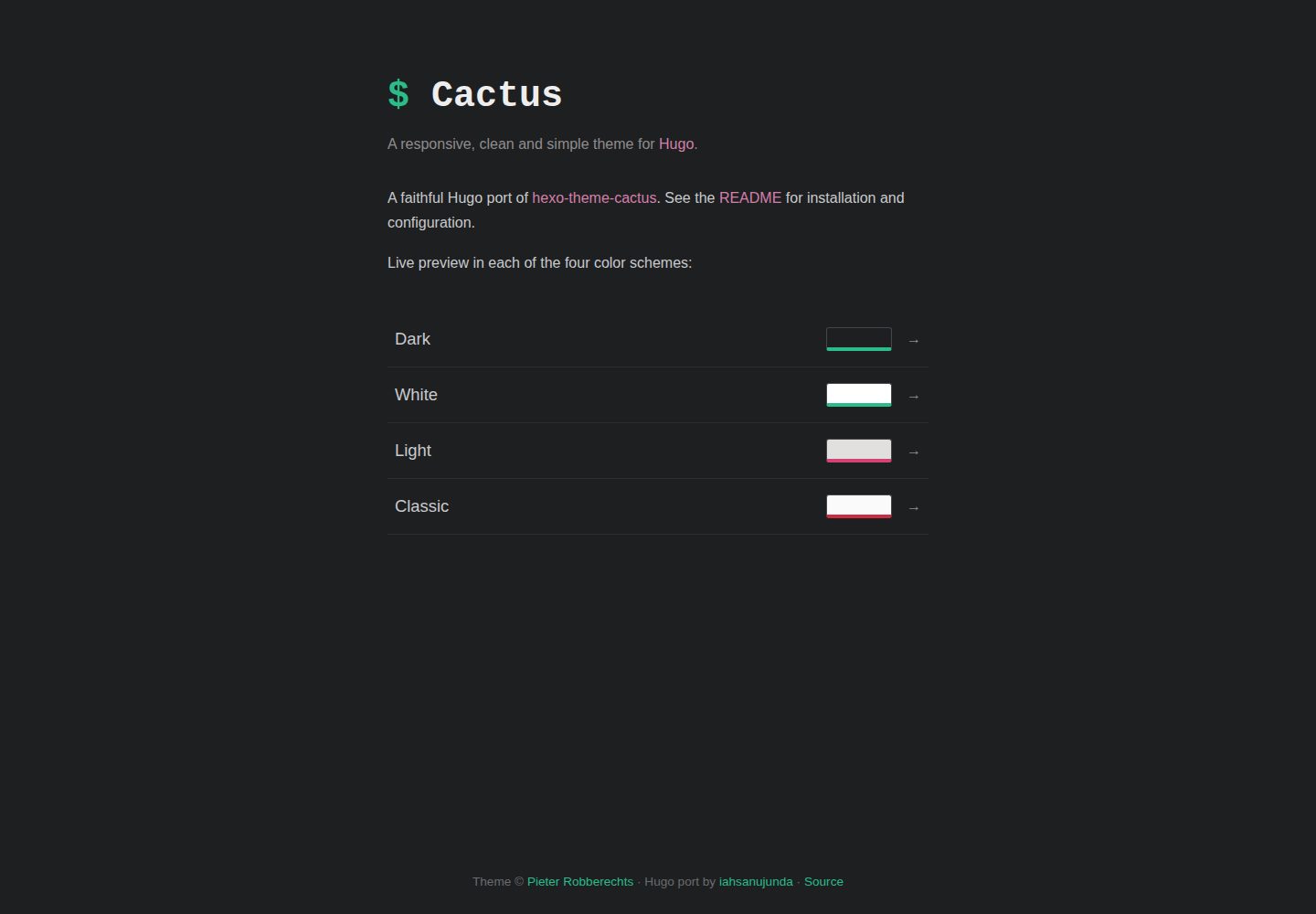
提供 dark、light、classic、white 四种配色方案
HugoHexo启动器
hugo-theme-cactus — Hugo 启动器模板
作者 iahsanujunda
Hugo 主题 Cactus 是 Hexo Theme Cactus 的移植版本,提供四种配色、响应式布局、标签与分类、归档、客户端搜索、评论与统计等静态博客常用功能。
看看你的网站会是什么样
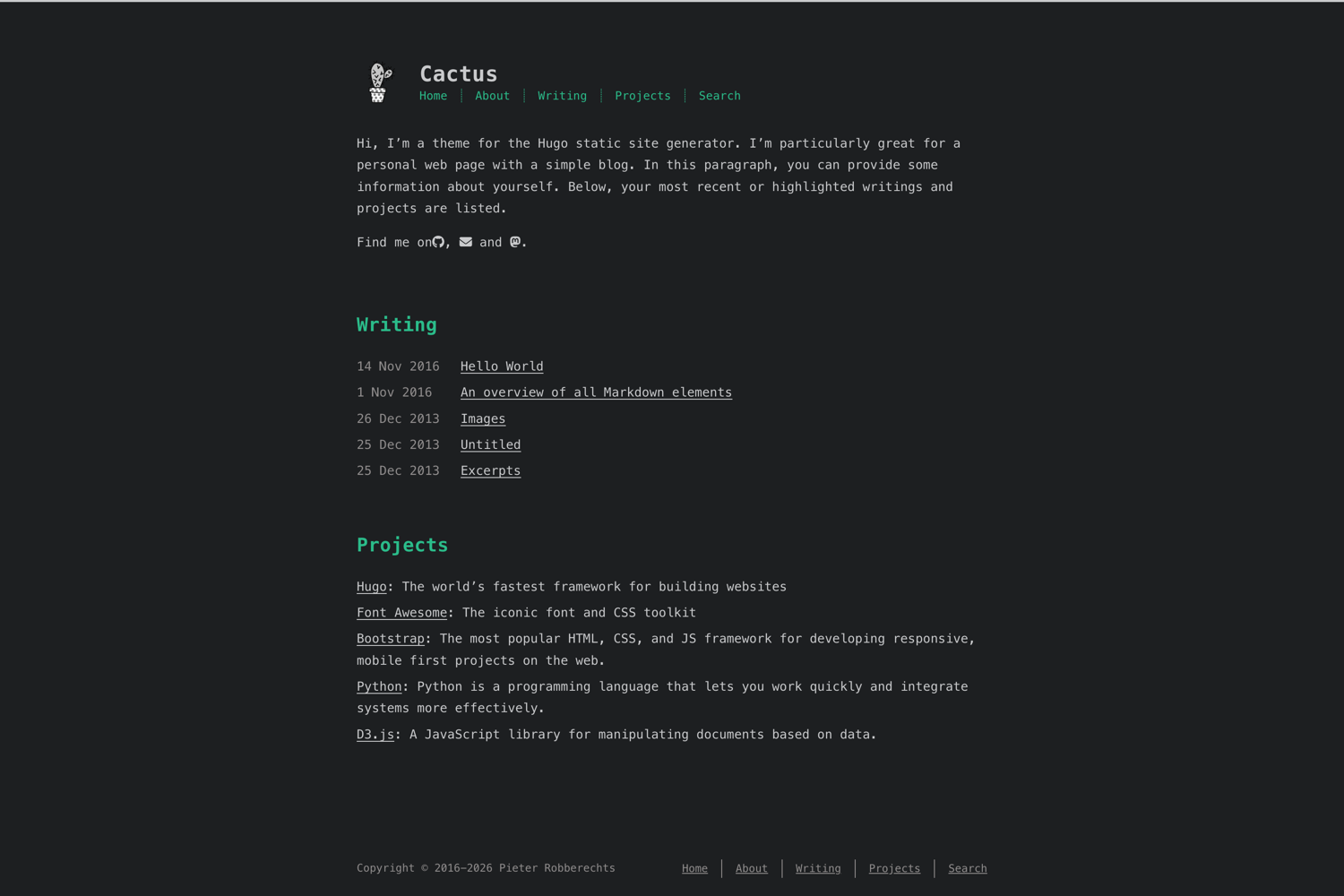
浏览真实页面截图,比较内容排版与手机效果。点击下方缩略图切换,放大查看整页细节。
全部页面与视图 2
截图用于了解视觉与布局,交互效果请以实际项目为准。
采集于 2026-10-03查看来源
值得关注的模板亮点
从已有项目资料中,快速了解它的特点。
响应式布局,桌面、平板与手机端均有对应文章菜单
标签与分类支持,并带对数刻度标签云
按年份分组、可分页的归档页面
纯客户端搜索,不依赖服务器或外部服务
支持 Disqus 或 utterances 评论,以及多种统计服务
模板详细介绍
该模板是 Pieter Robberechts 的 hexo-theme-cactus 在 Hugo 上的移植版本,仓库中同时标注 Hugo 与 Hexo 标签,实际以 Hugo 主题形式分发。它面向个人博客与内容站点,提供 dark、light、classic、white 四套配色,页面宽度等外观参数通过 Dart Sass 在构建时编译进样式表。
功能层面包含响应式布局(桌面、平板、手机端文章菜单)、标签与分类(含对数刻度标签云)、按年份分组并分页的归档、纯客户端搜索、目录、文章相册、社交分享链接、Disqus 或 utterances 评论、Google/Umami/百度/Cloudflare 统计、MathJax、Open Graph 与 Twitter 卡片、RSS、404 页面、17 种语言国际化以及 RTL 支持(加载 Vazir 字体)。
使用上有明确限制:需要 Hugo extended 0.158 及以上版本,并单独安装 Dart Sass,因为主题样式使用 Sass 模块(@use)与 css.Sass 的 vars 选项,Hugo 内置的 LibSass 不支持,缺少 Dart Sass 会导致构建失败;部署或 CI 环境同样需要安装。客户端搜索依赖首页输出 JSON,需在 outputs 中为 home 增加 JSON。主题选项集中在 [params] 下,安装方式可选 Git 子模块或 Hugo Modules。与 Hexo 原版相比,该移植版移除了 jQuery,改用原生 JavaScript,样式由 Stylus 改为 SCSS,语法高亮改用 Chroma,并修正了 utterances 的 issue-term 配置。
HugoHexo启动器
适合你的项目吗?
适用场景
- 搭建个人技术博客或写作站点
- 需要多套配色与响应式阅读体验的内容站点
- 希望使用纯客户端搜索、无需后端服务的静态站点
- 需要多语言或 RTL 支持的博客
适合人群
- 使用 Hugo 并愿意安装 Dart Sass 的用户
- 偏好简洁、内容优先布局的博客作者
- 需要标签、分类与归档组织的长期内容站点
- 希望以 Git 子模块或 Hugo Modules 方式引入主题的开发者
上手与定制指南
结合仓库当前版本的说明,按下面的资料检查内容、配置与运行要求。
- 1
需要 Hugo extended 0.158 或更高版本。
- 2
必须单独安装 Dart Sass(如 brew install dart-sass、npm install -g sass 或 snap install dart-sass),否则构建会因 TOCSS-DART 错误失败。
- 3
部署或 CI 环境同样需要 Dart Sass,可在构建命令前执行 npm install -g sass。
- 4
客户端搜索要求首页输出 JSON,需在配置的 outputs 中为 home 添加 JSON。
- 5
可通过 Git 子模块或 Hugo Modules 安装,并参考 exampleSite/hugo.toml 复制配置。
授权与来源资料
使用条件与限制
免费使用 · 保留许可声明本次收录的是公开仓库中采用 MIT 许可的免费版本;免费范围为该版本代码,不代表外部服务或第三方素材免费。
使用时需要遵守
- 允许免费使用、修改、商用和分发该版本代码。
- 分发代码副本或实质性部分时,保留原作者版权声明和完整 MIT 许可声明。
- 代码按现状提供;担保与责任限制以原许可证及适用法律为准。
额外费用与待核对事项
- 使用本主题必须安装 Hugo extended 0.158 或更高版本,普通版 Hugo 无法构建。
- 必须单独安装 Dart Sass;Hugo 内置 LibSass 不支持主题使用的 Sass 模块与 vars 选项,缺少时构建会失败。
- 部署或 CI 环境同样需要安装 Dart Sass,否则线上构建会因 TOCSS-DART 错误失败。
- 客户端搜索依赖首页输出 JSON,必须在 outputs 中为 home 添加 JSON,否则搜索不可用。
- 评论功能需启用 Disqus 或 utterances,并配置各自的 shortname 或 GitHub 仓库,属于外部服务。
- 统计功能需自行启用并配置对应服务的 ID 或主机地址,属于外部第三方服务。
- RTL 方向会加载 Vazir 字体,属于外部字体资源。
- 可配置从 CDN 加载 Font Awesome 等资源,启用后依赖外部 CDN 服务。
- 演示图片、字体、图标及其他第三方素材需按各自许可核对,不能仅凭代码的 MIT 许可判断。
- 域名、托管、数据库、支付或 AI 等外部服务可能另外收费。
查看原文依据
Permission is hereby granted, free of charge
许可证原文
**Hugo extended ≥ 0.158**.
README 原文
**Dart Sass** — installed separately.
README 原文
Dart Sass is a **build-time** dependency, so your deploy/CI environment must have it too
README 原文
# Required for the client-side search index (/index.json)
README 原文
Comments via **Disqus** or **utterances**
README 原文
Analytics: Google, Umami, Baidu, Cloudflare
README 原文
RTL support (loads the Vazir font)
README 原文
https://github.com/iahsanujunda/hugo-theme-cactus/blob/main/LICENSEhttps://github.com/iahsanujunda/hugo-theme-cactus/blob/main/README.mdLoad assets from a CDN instead of bundling them locally
README 原文
DeepSeek 根据仓库许可证和 README 整理 ·2026-10-03。结果仅覆盖已读取资料,依赖、图片、字体及后续条款变更以各自原文为准。
项目核对记录与介绍依据
模板资料
- 来源平台
- Hugo Themes
- 资料与维护参考分
- 资料较完整 · 85 / 100
- 技术栈
- Hugo · Hexo
- 网站类型
- 启动器
这个分数如何计算
本站按许可资料(最高30分)、演示链接(12分)、预览图(10分)、Star数(15分)、记录的维护时间(15分)、描述完整度(8分)、功能记录(5分)和分类资料(5分)计算。它不是代码、安全或性能测试,也不是 Google 评分;有链接不代表已实测可用。
这个项目需要核对什么
- 记录的仓库更新时间
- 2026-06-26
- 截图检查日期
- 2026-10-03
已收录演示链接。请用你的内容与屏幕尺寸检查;有演示不代表表单、认证或支付已经可用。
目录记录的主要技术栈是 Hugo。请通过依赖清单和锁文件核对实际版本与托管要求。这些说明基于收录资料,不代表代码审计或部署实测。
查看具体选型方法 →介绍的制作与核对状态
介绍由 AI 辅助整理目录与仓库资料。仓库作者不等于这篇介绍的审核者。
审核声明: [email protected] · 2026-10-04
查看当时使用的来源资料
SHA-256: ade4a69976ff56edd54e8df4bfea330417c3bd267fb673079460379d1d3e3581
2026-10-03T15:27:34.225Z
来源文件 / 仓库# Cactus — Hugo theme
A responsive, clean and simple theme for Hugo. A faithful port of
[hexo-theme-cactus](https://github.com/probberechts/hexo-theme-cactus) by
Pieter Robberechts.
**[▶ Live demo](https://iahsanujunda.github.io/hugo-theme-cactus/)** — preview
all four color schemes (dark · light · classic · white).
[](https://iahsanujunda.github.io/hugo-theme-cactus/dark/)
## Features
- Four color schemes: **dark**, **light**, **classic**, **white**
- Responsive layout (desktop / tablet / mobile post menus)
- Tags & categories with a logarithmic tag cloud
- Year-grouped, paginated archive
- Client-side search (no server, no external service)
- Table of contents, post galleries, social-share links
- Comments via **Disqus** or **utterances**
- Analytics: Google, Umami, Baidu, Cloudflare
- MathJax, Open Graph / Twitter cards, RSS, 404
- Internationalization — 17 languages included
- RTL support (loads the Vazir font)
## Requirements
- **Hugo extended ≥ 0.158**.
- **Dart Sass** — installed separately. The theme's stylesheet uses Sass
modules (`@use`) and the `css.Sass` `vars` option, both of which require the
Dart transpiler; Hugo's bundled LibSass does **not** support them, so the
site will fail to build without Dart Sass. Install it any of these ways:
```sh
brew install dart-sass # macOS / Linux (Homebrew)
npm install -g sass # any platform with Node
snap install dart-sass # Linux (snap)
```
See the [Hugo docs](https://gohugo.io/functions/css/sass/#dart-sass) for more.
## Install
Pick one of the two methods, then copy the annotated configuration from
[exampleSite/hugo.toml](exampleSite/hugo.toml) into your site.
### Option 1 — Git submodule
```sh
git submodule add https://github.com/iahsanujunda/hugo-theme-cactus themes/cactus
```
Then set the theme in your config:
```toml
theme = "cactus"
```
### Option 2 — Hugo Modules
Initialize modules in your site (once), then import the theme:
```sh
hugo mod init github.com/<your-user>/<your-site>
```
```toml
[module]
[[module.imports]]
path = "github.com/iahsanujunda/hugo-theme-cactus"
```
Update later with `hugo mod get -u`.
## Quick start
Prefer to try it first? Run the bundled example site from this repo:
```sh
cd exampleSite
hugo server --themesDir ../..
```
Open <http://localhost:1313>.
## Configuration
All theme options live under `[params]`. The block below lists **every**
available option with its default — copy what you need into your site config.
The same set (with demo values) lives in
[exampleSite/hugo.toml](exampleSite/hugo.toml).
### Site config the theme needs
```toml
[pagination]
pagerSize = 8 # posts per archive page
[taxonomies]
tag = "tags"
category = "categories"
[markup]
[markup.highlight]
style = "monokai" # any Chroma style (hugo gen chromastyles)
noClasses = false
[markup.goldmark.renderer]
unsafe = true # allow raw HTML in Markdown
# Required for the client-side search index (/index.json)
[outputs]
home = ["HTML", "RSS", "JSON"]
# Navigation menu
[menus]
[[menus.main]]
name = "home"
url = "/"
weight = 1
[[menus.main]]
name = "about"
url = "/about/"
weight = 2
[[menus.main]]
name = "articles"
url = "/posts/"
weight = 3
[[menus.main]]
name = "projects"
url = "https://github.com/you"
weight = 4
[[menus.main]]
name = "search"
url = "/search/"
weight = 5
```
### Theme params
```toml
[params]
author = "John Doe"
description = "Your bio. Rendered as **Markdown** on the home page."
dateFormat = "2 Jan 2006" # Go time layout, e.g. "14 Nov 2016"
direction = "ltr" # "rtl" loads the Vazir font
projectsUrl = "https://github.com/you"
# Look & feel (compiled into the stylesheet via Dart Sass)
colorscheme = "dark" # dark | light | classic | white
pageWidth = 48 # page width in rem
rss = true # show the RSS feed link
# Logo / avatar in the header
[params.logo]
enabled = true
width = 50
height = 50
url = "/images/logo.png"
gravatar = false # use your Gravatar instead of `url`
grayout = true # grayscale until hovered
# Favicons
[params.favicon]
[params.favicon.desktop]
url = "/images/favicon.ico"
[params.favicon.android]
url = "/images/favicon-192x192.png"
[params.favicon.apple]
url = "/images/apple-touch-icon.png"
# Gravatar (used by logo/favicon when their `gravatar = true`)
[params.gravatar]
email = "[email protected]"
hash = "" # or an md5 hash instead of the email
# Home page overview
[params.tagsOverview]
enabled = false # show a tag cloud on the home page
[params.postsOverview]
showAllPosts = false # true = paginate all posts; false = recent N
postCount = 5 # N most-recent posts when showAllPosts = false
sortUpdated = false # sort by last-modified instead of date
[params.archive]
sortUpdated = false
[params.post]
showUpdated = false # show "Updated:" date on posts
# Footer copyright years (blank endYear = current year)
[params.copyright]
startYear = 2024
# endYear = 2025
# 404 page
[params.error404]
enabled = true
title = "404 Page Not Found"
description = "The page you are looking for might have been removed."
# Open Graph / social metadata
[params.openGraph]
fbAppId = ""
fbAdmins = ""
twitterId = ""
# Math typesetting
[params.mathjax]
enabled = false
# Comments — Disqus
[params.disqus]
enabled = false
shortname = ""
# Comments — utterances
[params.utterances]
enabled = false
repo = "owner/repo"
issueTerm = "pathname" # pathname | url | title | …
label = "Comment"
theme = "github-dark"
# Analytics
[params.googleAnalytics]
enabled = false
id = ""
[params.baiduAnalytics]
enabled = false
id = ""
[params.cloudflareAnalytics]
enabled = false
id = ""
[params.umamiAnalytics]
enabled = false
id = ""
host = "https://analytics.example.com"
scriptName = "umami.js"
# Load assets from a CDN instead of bundling them locally
[params.cdn]
enable = true
fontAwesome = "https://cdnjs.cloudflare.com/ajax/libs/font-awesome/6.4.0/css/all.min.css"
# Social links — repeat the block per account.
# `icon` is a Font Awesome brand name (or "mail" / "rss"); `label` is optional.
[[params.socialLinks]]
icon = "github"
link = "https://github.com/you"
[[params.socialLinks]]
icon = "mail"
link = "mailto:[email protected]"
[[params.socialLinks]]
icon = "mastodon"
label = "mastodon.social"
link = "https://mastodon.social/@you"
```
### Per-page front matter
```yaml
thumbnail: "/images/cover.jpg" # share image (falls back to `banner`)
banner: "/images/cover.jpg"
photos: ["/img/1.jpg", "/img/2.jpg"] # renders a justified gallery
comments: true # enable comments on this post
link: "https://example.com" # "link post" — title links off-site in lists
layout: search # turn a page into the search page
```
## Deployment
Dart Sass is a **build-time** dependency, so your deploy/CI environment must
have it too (the CSS is pre-compiled so the browser never needs it). The most
portable way to add it is via npm, which is available on virtually every build
image:
```sh
npm install -g sass
```
- **GitHub Actions** — after installing Hugo **extended**, add a step before the
build:
```yaml
- run: npm install -g sass
- run: hugo --minify
```
- **Netlify / Cloudflare Pages / Vercel** — use a Hugo **extended** version and
prepend the Sass install to the build command:
```sh
npm install -g sass && hugo --minify
```
If a build fails with a `TOCSS-DART` error or a message about installing Dart
Sass, the transpiler is missing from that environment.
## Differences from the Hexo theme
This is a faithful clone, with a few deliberate modernizations:
- **Zero jQuery** — `main.js` is vanilla; the gallery is a vanilla justified
layout and the copy button uses the native Clipboard API.
- Stylus → **SCSS** (Dart Sass via Hugo Pipes); dynamic config flows through the
`css.Sass` `vars` option.
- Syntax highlighting via **Chroma** instead of the 70 bundled Stylus themes.
- The utterances `issue-term` now honors the configured value (upstream
hard-coded it to `pathname`).
## License
MIT — see [LICENSE](LICENSE). Original theme © Pieter Robberechts.
看看同类模板
对比同技术栈与用途的模板,找到更适合的视觉与内容结构。

hugo-xmin
eXtremely Minimal Hugo theme: about 140 lines of code in total, including HTML and CSS (with no dependencies)
Hugo · 启动器

hugo-theme-gallery
Gallery Theme for Hugo
Hugo · 启动器

reveal-hugo
📽️ Create rich HTML-based presentations with Hugo and Reveal.js
Hugo · 启动器

anatole
Anatole is a minimalistic two-column theme for Hugo.
Hugo · 启动器

hugo-theme-diary
Moments piled up. A Hugo theme ported from SumiMakito/hexo-theme-Journal.
Hugo · 启动器

risotto
A minimalist, responsive hugo theme inspired by terminal ricing aesthetics.
Hugo · 启动器