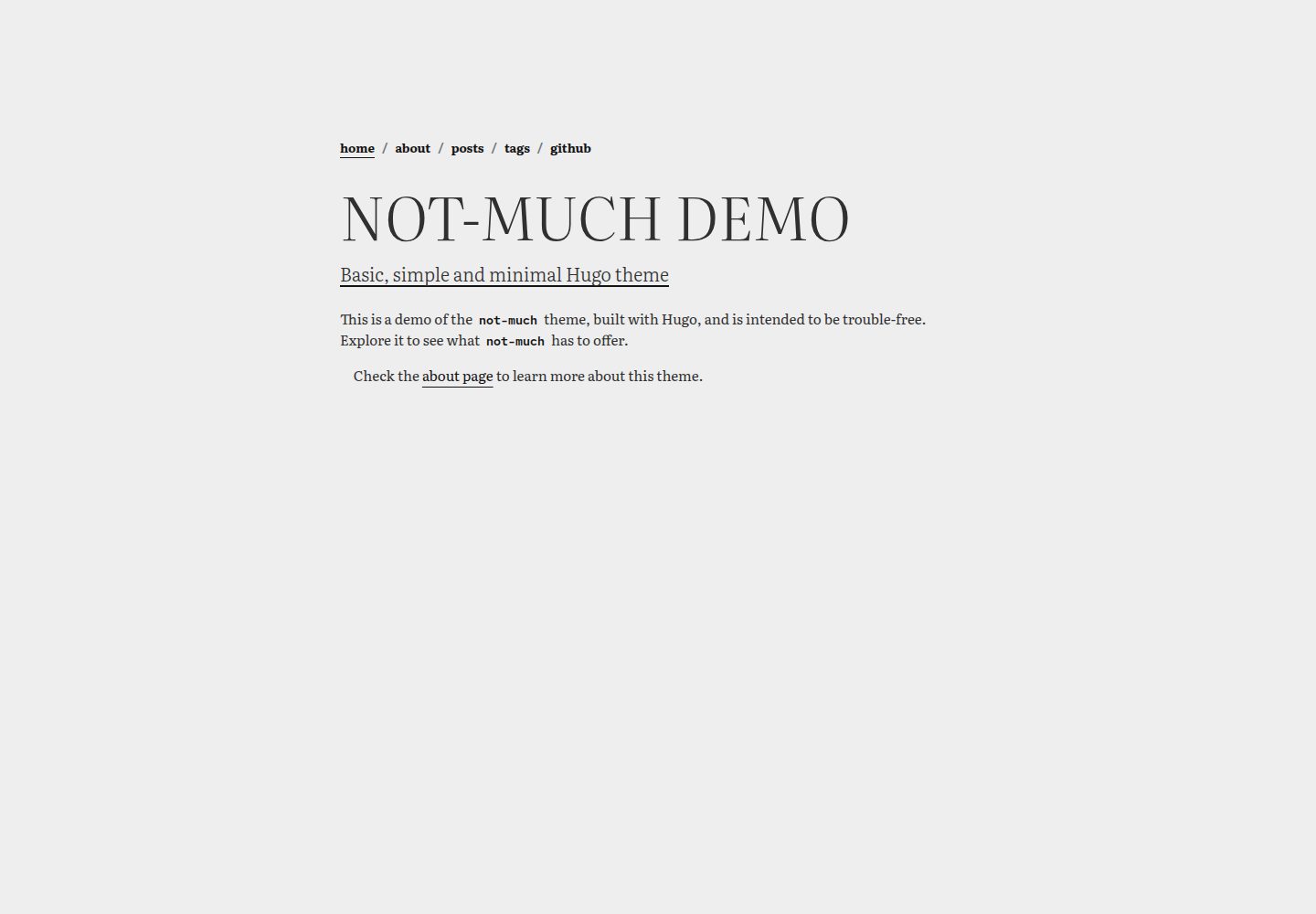
Hugo theme, used by the author, positioned as basic, simple, minimal
HugoStarter
not-much — Hugo Starter Template
By imgios
not-much is a Hugo theme aimed at simplicity and minimalism, used by the author for a personal website, without fancy shortcodes or extra features.
Explore the design
Compare the page layouts and mobile experience. Open any screenshot for a closer look.
Desktop homepage1 / 3
Desktop captureTop of page
Actual screenshot captured by the server browser.
All pages & views 3
Screenshots show visual appearance; interactive behavior may differ.
Recorded 2026-10-03View source
What stands out
A quick read of the recorded project description.
No fancy shortcodes or extra features
Includes an exampleSite that can be previewed locally with hugo server -D
Supports two installation methods: git submodule or placing directly into the themes directory
Configuration and customization instructions are documented separately in configuration.md
MIT licensed, with SemVer versioning
Template Details
not-much is a Hugo theme positioned as "basic, simple, minimal." In the README, the author states that it is used for their personal website and has no fancy shortcodes or useless features. The theme provides an example site in the repository's exampleSite directory, which can be previewed locally with hugo server -D. There are two installation methods: add it to a Hugo site repository as a git submodule, or place the theme directory directly into the site's themes directory; the former does not allow direct template editing, while the latter provides the full theme structure for customization as needed. After installation, set the theme parameter to not-much in the site configuration file. Configuration and customization details are documented in the repository's configuration.md. Technically, the README lists Hugo, Bootstrap, the Literata font, and the Red Hat Mono font. Versioning uses SemVer, and the repository provides tags. The license is MIT, permitting free use, modification, commercial use, and distribution of this version of the code; when distributing copies or substantial portions of the code, the copyright notice and the full MIT license notice must be retained. Third-party assets such as demo images, fonts, and icons must be checked separately under their respective licenses.
HugoLauncher
Is it right for your project?
Use Cases
- Building a minimal Hugo site for a personal website
- Previewing the theme locally via exampleSite
- Adding the theme to an existing Hugo project as a git submodule
- Copying the theme directory into the site's themes directory for template customization
Suitable For
- Individual developers building static sites with Hugo
- Users who prefer a minimal style and do not need complex shortcodes
- Those who want to customize by directly modifying the theme's template structure
Getting started & customization
Use these recorded setup notes alongside the repository instructions for your chosen version.
- 1
Git and Hugo must be installed beforehand
- 2
After cloning the repository, enter the exampleSite directory and run hugo server -D to preview locally
- 3
For deployment, add the theme to the site with git submodule add, or place the theme directory into the themes directory
- 4
After installation, set the theme parameter to not-much in the site configuration file
- 5
See configuration.md in the repository for configuration and customization details
License & source material
Usage conditions & limitations
Free to use · keep license noticeThis listing covers the free version in the public repository under the MIT license; the free scope applies to this version of the code and does not mean external services or third-party assets are free.
Must comply with when using
- Free use, modification, commercial use, and distribution of this version of the code are permitted.
- When distributing copies or substantial portions of the code, retain the original author's copyright notice and the full MIT license notice.
- The code is provided as is; warranties and liability limitations are governed by the original license and applicable law.
Additional costs & items to verify
- Demo images, fonts, icons, and other third-party assets must be checked under their respective licenses and cannot be judged solely by the code's MIT license.
- External services such as domains, hosting, databases, payments, or AI may incur separate charges.
View Original Text Basis
https://github.com/imgios/not-much/blob/main/LICENSEhttps://github.com/imgios/not-much/blob/main/README.mdPermission is hereby granted, free of charge
Original License Text
Compiled by DeepSeek based on repository license and README ·2026-10-03. Results only cover the materials read; dependencies, images, fonts, and subsequent term changes are subject to their respective original texts.
Project checks & description sources
Template Information
- Source platforms
- Hugo Themes
- Documentation and maintenance reference score
- More documented · 87 / 100
- Technologies
- Hugo
- Website type
- Starter
How this score is calculated
Our heuristic uses license records (up to 30), a demo link (12), a preview (10), stars (15), recorded maintenance (15), description completeness (8), feature records (5) and classification data (5). It is not a code, security or performance test, or a Google score. A link does not establish tested functionality.
What to verify for this project
- Repository update recorded
- 2026-09-14
- Screenshot last checked
- 2026-10-03
A demo link is listed. Check it with your own content and viewport sizes; its presence does not confirm that forms, authentication or payments work.
The catalog identifies Hugo as the primary stack. Check the actual dependency manifest and lockfile for versions and hosting requirements. These notes use recorded metadata, not a code audit or a deployment test.
Use a selection guide →How this description was prepared
AI-assisted description based on catalog records and repository material. Repository authors are not automatically the reviewers of this description.
Automatically checked against source and license rules; no manual editorial review.
Inspect the recorded source material
SHA-256: 058b253394c543daee9c287b0221c81d00f152f9dc2ecb437ffd016994f92dcd
2026-10-03T00:27:38.676Z
Source file / repository<a id="readme-top"></a>
# not much
<img src="https://raw.githubusercontent.com/imgios/not-much/main/images/tn.png" />
`not-much` is a minimal Hugo theme that I use for my personal website. It doesn't have any fancy shortcode or useless feature.
**It's basic, simple and minimal.**
> 🧪 Demo: https://imgios.github.io/not-much/
<p align="right">(<a href="#readme-top">back to top</a>)</p>
## Getting Started
These instructions will get you a copy of the project up and running on your local machine for development and testing purposes. See deployment for notes on how to deploy the project on a live system.
<p align="right">(<a href="#readme-top">back to top</a>)</p>
### Prerequisites
- Git
- Hugo
### Installing
Clone this repository in your machine:
```shell
$ git clone https://github.com/imgios/not-much.git
```
Change the workdir to `not-much/exampleSite` and start the Hugo server:
```shell
$ cd not-much/exampleSite
$ hugo server -D
hugo server -D
Watching for changes in \not-much\{archetypes,assets,exampleSite,i18n,layouts,static}
Watching for config changes in \not-much\exampleSite\config.toml
Start building sites …
...
Web Server is available at http://localhost:1313/ (bind address 127.0.0.1)
Press Ctrl+C to stop
```
Now you are ready to update the theme and see the changes live @ [localhost](http://localhost:1313/).
<p align="right">(<a href="#readme-top">back to top</a>)</p>
## Deployment
The theme can be installed in two different ways:
1. By adding `not-much` as submodule in your Hugo website repository
```shell
$ cd your-hugo-website
$ git submodule add https://github.com/imgios/not-much.git themes/not-much
```
2. By adding the `not-much` theme dir in `/your-hugo-website/themes/*`
The first option is quite limited as you won't be able to edit the templates if you wanted to. The second option, on the other hand, gives you the entire structure of the theme and allows you to customise it as you wish.
Once done, update (or add) the `theme` parameter in your website configuration file to `theme = not-much`.
<p align="right">(<a href="#readme-top">back to top</a>)</p>
### Configuration
Once installed, you can configure and customise the theme as you wish - read the [configuration.md](https://github.com/imgios/not-much/blob/main/configuration.md) for more details.
<p align="right">(<a href="#readme-top">back to top</a>)</p>
## Built With
* [Hugo](https://gohugo.io/) - The static site generator framework
* [Bootstrap](https://getbootstrap.com/) - Free and open-source CSS library
* [Literata](https://fonts.google.com/specimen/Literata) - Used as main theme font
* [RedHat Mono](https://fonts.google.com/specimen/Red+Hat+Mono) - Used as theme code-related font
<p align="right">(<a href="#readme-top">back to top</a>)</p>
## Contributing
Any contributions you make are **greatly appreciated**.
If you have a suggestion that would make this better, please discuss and propose it with the owner. You can also simply open an issue with the tag "enhancement".
Please read [CONTRIBUTING.md](https://github.com/imgios/not-much/blob/main/CONTRIBUTING.md) for details on our code of conduct, and the process for submitting pull requests to this project.
<p align="right">(<a href="#readme-top">back to top</a>)</p>
## Versioning
We use [SemVer](http://semver.org/) for versioning. For the versions available, see the [tags on this repository](https://github.com/imgios/not-much/tags).
<p align="right">(<a href="#readme-top">back to top</a>)</p>
## License
This project is licensed under the MIT License - see the [LICENSE](LICENSE) file for details.
<p align="right">(<a href="#readme-top">back to top</a>)</p>Explore similar templates
Compare previews and descriptions within the same stack and category.

hugo-xmin
hugo-xmin is an extremely minimal Hugo theme written by Yihui Xie for template beginners. HTML and CSS total about 140 lines, with no external dependencies, and it uses the MIT license.
Hugo · Starter

hugo-theme-gallery
A Hugo Extended photo gallery theme that organizes images with Page Bundles, automatically generating album lists and gallery pages with a Justified layout and PhotoSwipe lightbox.
Hugo · Starter

reveal-hugo
reveal-hugo is a Hugo theme that converts Markdown content into Reveal.js-based HTML presentations. It supports slide separation with `---`, shortcodes for fragments, slides, sections, notes, Markdown, and MathJax, and organizes content as root or section presentations with order controlled by weight.
Hugo · Starter

anatole
Anatole is a minimalistic two-column Hugo theme ported from farbox-theme-Anatole, featuring dark mode, multilingual and RTL support, and optional portfolio, comments, analytics, KaTeX, and Mermaid integrations. It suits personal blogs, portfolios, or documentation sites built with Hugo.
Hugo · Starter

hugo-theme-diary
A Hugo diary-style theme ported from the Hexo theme Journal, with a grid homepage for essays and daily notes. It supports six languages, dark mode, table-of-contents scroll positioning, reading time, code highlighting, and configurable sidebar, fonts, and colors.
Hugo · Starter

risotto
risotto is a minimalist, responsive Hugo theme inspired by terminal ricing aesthetics. It uses semantic HTML and pure CSS with no JavaScript, and its layout relies on CSS Grid for native responsiveness without manual breakpoints.
Hugo · Starter