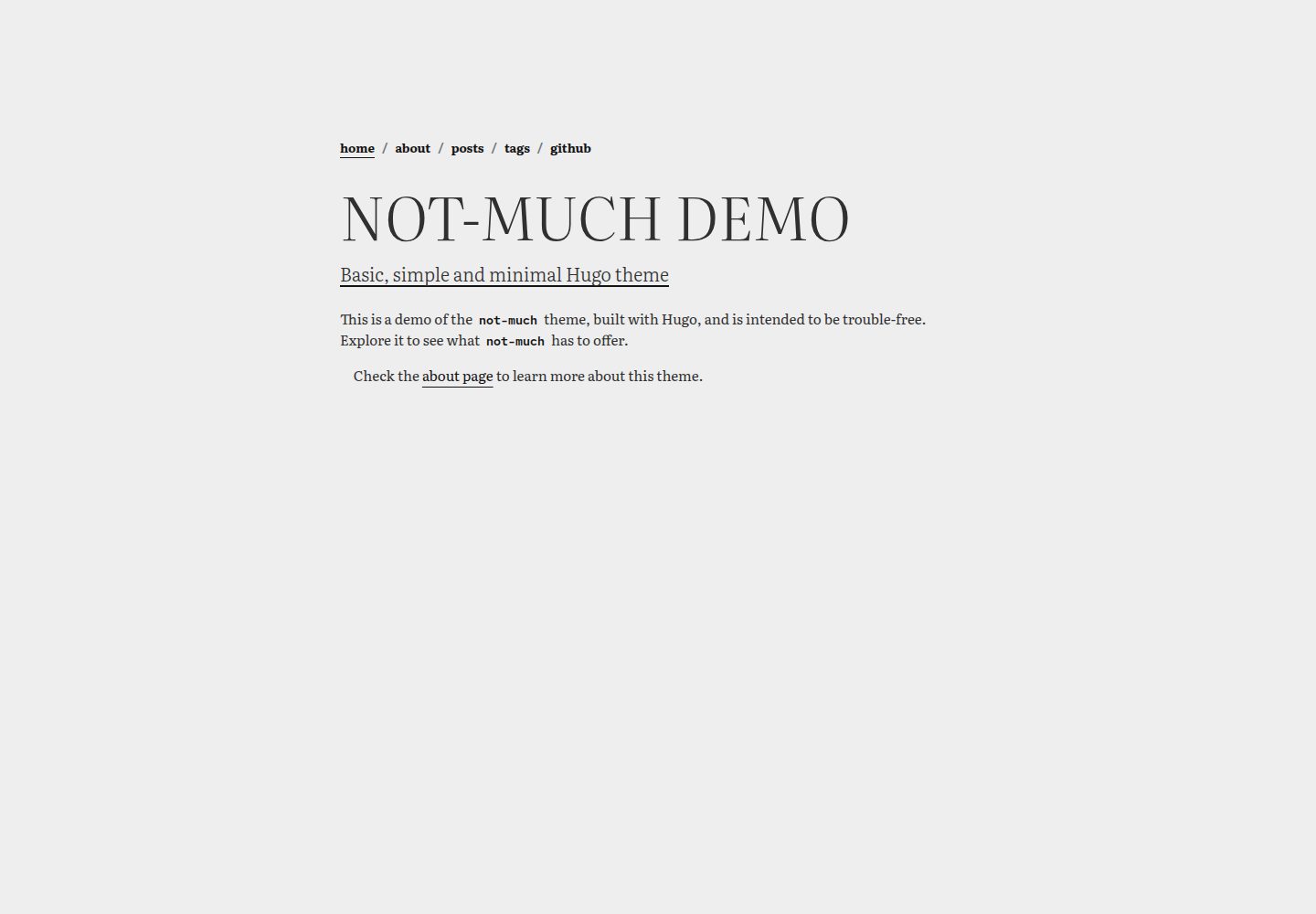
Hugo 主题,作者自用,定位基础、简单、极简
Hugo启动器
not-much — Hugo 启动器模板
作者 imgios
not-much 是一个以简洁和极简为目标的 Hugo 主题,作者用于个人网站,不包含花哨的 shortcode 或多余功能。
看看你的网站会是什么样
浏览真实页面截图,比较内容排版与手机效果。点击下方缩略图切换,放大查看整页细节。
全部页面与视图 3
截图用于了解视觉与布局,交互效果请以实际项目为准。
采集于 2026-10-03查看来源
值得关注的模板亮点
从已有项目资料中,快速了解它的特点。
不包含花哨的 shortcode 或多余功能
提供 exampleSite,可在本地用 hugo server -D 预览
支持 git submodule 或直接放入 themes 目录两种安装方式
配置与自定义说明单独记录在 configuration.md
采用 MIT 许可,使用 SemVer 版本管理
模板详细介绍
not-much 是一个 Hugo 主题,定位为“基础、简单、极简”。作者在 README 中说明它用于自己的个人网站,并且没有花哨的 shortcode 或无用功能。主题提供示例站点,位于仓库的 exampleSite 目录,可通过 hugo server -D 在本地预览。安装方式有两种:以 git submodule 形式加入 Hugo 站点仓库,或直接把主题目录放入站点的 themes 目录;前者无法直接编辑模板,后者可以获得完整主题结构并按需定制。安装后需要在站点配置文件中把 theme 参数设为 not-much。主题的配置与自定义细节记录在仓库的 configuration.md 中。技术构成方面,README 列出 Hugo、Bootstrap、Literata 字体和 Red Hat Mono 字体。版本管理使用 SemVer,仓库提供 tags。许可为 MIT,允许免费使用、修改、商用和分发该版本代码,分发代码副本或实质性部分时需保留版权声明和完整 MIT 许可声明;演示图片、字体、图标等第三方素材需按各自许可单独核对。
Hugo启动器
适合你的项目吗?
适用场景
- 为个人网站搭建一个极简的 Hugo 站点
- 在本地通过 exampleSite 预览主题效果
- 以 git submodule 方式把主题接入已有 Hugo 项目
- 把主题目录复制到站点 themes 目录后进行模板定制
适合人群
- 使用 Hugo 构建静态网站的个人开发者
- 偏好极简风格、不需要复杂 shortcode 的用户
- 希望直接修改主题模板结构进行定制的人
上手与定制指南
结合仓库当前版本的说明,按下面的资料检查内容、配置与运行要求。
- 1
需要预先安装 Git 和 Hugo
- 2
克隆仓库后进入 exampleSite 目录执行 hugo server -D 即可本地预览
- 3
部署时可用 git submodule add 把主题加入站点,或把主题目录放入 themes 目录
- 4
安装后在站点配置文件中将 theme 参数设为 not-much
- 5
配置与自定义细节参见仓库中的 configuration.md
授权与来源资料
使用条件与限制
免费使用 · 保留许可声明本次收录的是公开仓库中采用 MIT 许可的免费版本;免费范围为该版本代码,不代表外部服务或第三方素材免费。
使用时需要遵守
- 允许免费使用、修改、商用和分发该版本代码。
- 分发代码副本或实质性部分时,保留原作者版权声明和完整 MIT 许可声明。
- 代码按现状提供;担保与责任限制以原许可证及适用法律为准。
额外费用与待核对事项
- 演示图片、字体、图标及其他第三方素材需按各自许可核对,不能仅凭代码的 MIT 许可判断。
- 域名、托管、数据库、支付或 AI 等外部服务可能另外收费。
查看原文依据
https://github.com/imgios/not-much/blob/main/LICENSEhttps://github.com/imgios/not-much/blob/main/README.mdPermission is hereby granted, free of charge
许可证原文
DeepSeek 根据仓库许可证和 README 整理 ·2026-10-03。结果仅覆盖已读取资料,依赖、图片、字体及后续条款变更以各自原文为准。
项目核对记录与介绍依据
模板资料
- 来源平台
- Hugo Themes
- 资料与维护参考分
- 资料较完整 · 87 / 100
- 技术栈
- Hugo
- 网站类型
- 启动器
这个分数如何计算
本站按许可资料(最高30分)、演示链接(12分)、预览图(10分)、Star数(15分)、记录的维护时间(15分)、描述完整度(8分)、功能记录(5分)和分类资料(5分)计算。它不是代码、安全或性能测试,也不是 Google 评分;有链接不代表已实测可用。
这个项目需要核对什么
- 记录的仓库更新时间
- 2026-09-14
- 截图检查日期
- 2026-10-03
已收录演示链接。请用你的内容与屏幕尺寸检查;有演示不代表表单、认证或支付已经可用。
目录记录的主要技术栈是 Hugo。请通过依赖清单和锁文件核对实际版本与托管要求。这些说明基于收录资料,不代表代码审计或部署实测。
查看具体选型方法 →介绍的制作与核对状态
介绍由 AI 辅助整理目录与仓库资料。仓库作者不等于这篇介绍的审核者。
已完成服务器许可规则与 AI 来源核对;未经过人工编辑审核。
查看当时使用的来源资料
SHA-256: 058b253394c543daee9c287b0221c81d00f152f9dc2ecb437ffd016994f92dcd
2026-10-03T00:27:38.676Z
来源文件 / 仓库<a id="readme-top"></a>
# not much
<img src="https://raw.githubusercontent.com/imgios/not-much/main/images/tn.png" />
`not-much` is a minimal Hugo theme that I use for my personal website. It doesn't have any fancy shortcode or useless feature.
**It's basic, simple and minimal.**
> 🧪 Demo: https://imgios.github.io/not-much/
<p align="right">(<a href="#readme-top">back to top</a>)</p>
## Getting Started
These instructions will get you a copy of the project up and running on your local machine for development and testing purposes. See deployment for notes on how to deploy the project on a live system.
<p align="right">(<a href="#readme-top">back to top</a>)</p>
### Prerequisites
- Git
- Hugo
### Installing
Clone this repository in your machine:
```shell
$ git clone https://github.com/imgios/not-much.git
```
Change the workdir to `not-much/exampleSite` and start the Hugo server:
```shell
$ cd not-much/exampleSite
$ hugo server -D
hugo server -D
Watching for changes in \not-much\{archetypes,assets,exampleSite,i18n,layouts,static}
Watching for config changes in \not-much\exampleSite\config.toml
Start building sites …
...
Web Server is available at http://localhost:1313/ (bind address 127.0.0.1)
Press Ctrl+C to stop
```
Now you are ready to update the theme and see the changes live @ [localhost](http://localhost:1313/).
<p align="right">(<a href="#readme-top">back to top</a>)</p>
## Deployment
The theme can be installed in two different ways:
1. By adding `not-much` as submodule in your Hugo website repository
```shell
$ cd your-hugo-website
$ git submodule add https://github.com/imgios/not-much.git themes/not-much
```
2. By adding the `not-much` theme dir in `/your-hugo-website/themes/*`
The first option is quite limited as you won't be able to edit the templates if you wanted to. The second option, on the other hand, gives you the entire structure of the theme and allows you to customise it as you wish.
Once done, update (or add) the `theme` parameter in your website configuration file to `theme = not-much`.
<p align="right">(<a href="#readme-top">back to top</a>)</p>
### Configuration
Once installed, you can configure and customise the theme as you wish - read the [configuration.md](https://github.com/imgios/not-much/blob/main/configuration.md) for more details.
<p align="right">(<a href="#readme-top">back to top</a>)</p>
## Built With
* [Hugo](https://gohugo.io/) - The static site generator framework
* [Bootstrap](https://getbootstrap.com/) - Free and open-source CSS library
* [Literata](https://fonts.google.com/specimen/Literata) - Used as main theme font
* [RedHat Mono](https://fonts.google.com/specimen/Red+Hat+Mono) - Used as theme code-related font
<p align="right">(<a href="#readme-top">back to top</a>)</p>
## Contributing
Any contributions you make are **greatly appreciated**.
If you have a suggestion that would make this better, please discuss and propose it with the owner. You can also simply open an issue with the tag "enhancement".
Please read [CONTRIBUTING.md](https://github.com/imgios/not-much/blob/main/CONTRIBUTING.md) for details on our code of conduct, and the process for submitting pull requests to this project.
<p align="right">(<a href="#readme-top">back to top</a>)</p>
## Versioning
We use [SemVer](http://semver.org/) for versioning. For the versions available, see the [tags on this repository](https://github.com/imgios/not-much/tags).
<p align="right">(<a href="#readme-top">back to top</a>)</p>
## License
This project is licensed under the MIT License - see the [LICENSE](LICENSE) file for details.
<p align="right">(<a href="#readme-top">back to top</a>)</p>看看同类模板
对比同技术栈与用途的模板,找到更适合的视觉与内容结构。

hugo-xmin
eXtremely Minimal Hugo theme: about 140 lines of code in total, including HTML and CSS (with no dependencies)
Hugo · 启动器

hugo-theme-gallery
Gallery Theme for Hugo
Hugo · 启动器

reveal-hugo
📽️ Create rich HTML-based presentations with Hugo and Reveal.js
Hugo · 启动器

anatole
Anatole is a minimalistic two-column theme for Hugo.
Hugo · 启动器

hugo-theme-diary
Moments piled up. A Hugo theme ported from SumiMakito/hexo-theme-Journal.
Hugo · 启动器

risotto
A minimalist, responsive hugo theme inspired by terminal ricing aesthetics.
Hugo · 启动器