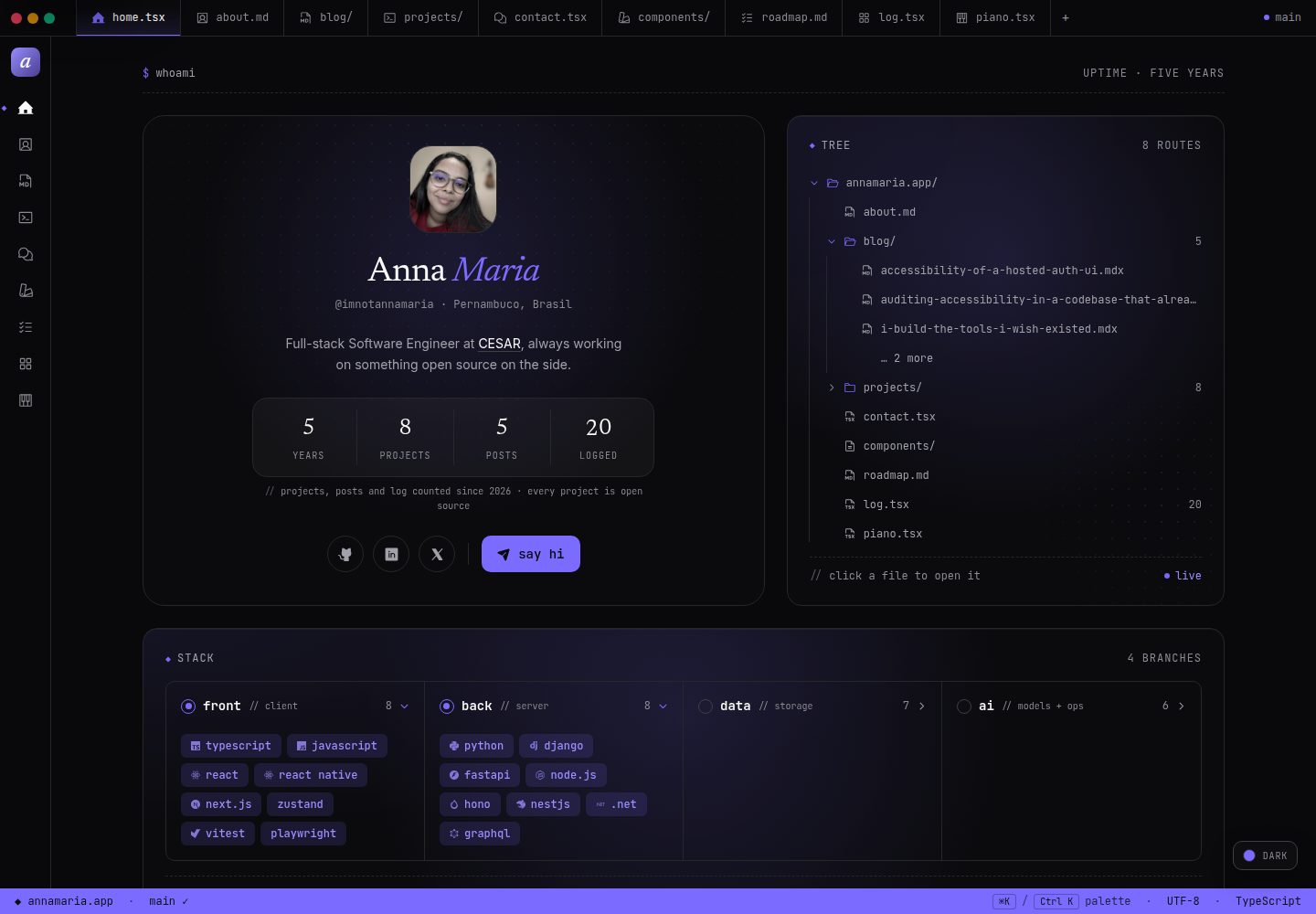
Uses a code editor as the interface metaphor, including tabs, a sidebar, a status bar, and a ⌘K command palette
Next.jsReactPortfolio
anna.maria.dev — Next.js Portfolio Template
By imnotannamaria
A personal portfolio and open source template that uses a code editor as its interface metaphor, built on Next.js, including a blog, project case studies, a log, a roadmap, a contact form, and a protected admin dashboard.
Explore the design
Compare the page layouts and mobile experience. Open any screenshot for a closer look.
Desktop homepage1 / 3
Desktop captureTop of page
Actual screenshot captured by the server browser.
All pages & views 3
Screenshots show visual appearance; interactive behavior may differ.
Recorded 2026-10-06View source
What stands out
A quick read of the recorded project description.
The homepage bento grid integrates a profile, selected work, open source projects, a Spotify playlist, Apple Watch activity rings, and a GitHub contribution graph
The blog and projects are written in MDX, with tag filtering, Shiki highlighting, and a reading progress bar
The log and roadmap are powered by Postgres and provide an admin dashboard protected by WorkOS AuthKit and an email allowlist
Provides six light and dark brand themes, dynamic OG images, a sitemap, and canonical links
Optional features such as Spotify, Apple Watch, log, and roadmap show empty states when keys are missing, without affecting the build
Template Details
anna.maria.dev is a personal portfolio website that also serves as an open source template for full-stack engineers. Its interface adopts a code editor metaphor: top tabs, a side icon bar, a bottom status bar, and a ⌘K command palette, with each page opening like a file.
The site includes multiple pages: the homepage is a bento grid showing a profile, selected work, open source projects, a Spotify playlist, Apple Watch activity rings, and a GitHub contribution graph; /about contains a bio, career timeline, interactive tech stack diagram, and contribution calendar; /blog groups MDX articles by year with tag filtering, Shiki code highlighting, and a reading progress bar; /projects presents project case studies with cover images, side metadata, and MDX body content; /log aggregates completed records for movies, TV series, books, albums, podcasts, and games with ratings; /roadmap shows to-do, in-progress, and shipped items in a kanban format; /contact sends forms via Resend and React Email with a honeypot field; /components displays various states of the site's own cards; /piano is a two-octave Web Audio piano; /admin provides CRUD for the log and roadmap, protected by WorkOS AuthKit and an email allowlist.
The site includes six light and dark brand themes, dynamic OG images, a sitemap, and canonical links. Spotify, Apple Watch cards, log, and roadmap are optional features: the site still builds without the corresponding keys, and each feature shows an empty state.
As a template, it uses Next.js App Router, React, TypeScript strict mode, Tailwind, and the entrepta design system. Content is processed as MDX via Velite and Shiki, animations use Motion, the database connects to Postgres via Drizzle, the API uses Hono, the admin dashboard uses WorkOS AuthKit, email uses Resend, and it deploys on Vercel.
Usage limitations: the code is MIT licensed and may be used, modified, commercialized, and distributed for free, provided the copyright notice and license notice are retained. Demo images, fonts, icons, and other third-party assets must be checked against their respective licenses. External services such as domains, hosting, databases, payments, or AI may incur additional charges.
Next.jsReactPortfolio
Is it right for your project?
Use Cases
- A full-stack engineer building a personal portfolio website to showcase projects, blog posts, and career experience
- Using it as an open source template for secondary development, replacing name, content, and keys before deployment
- Integrating a Spotify playlist, Apple Watch activity data, and a GitHub contribution graph into a personal site
- Maintaining personal log and roadmap content through the admin dashboard
- Learning how to build a Next.js application using an editor interface metaphor
Suitable For
- Full-stack engineers familiar with Next.js, React, and TypeScript
- Developers who want a customizable portfolio template quickly
- Individuals building a personal site who need a blog, project case studies, and a content management dashboard
- Users willing to configure external services such as Postgres, WorkOS, and Resend themselves
Getting started & customization
Use these recorded setup notes alongside the repository instructions for your chosen version.
- 1
After cloning the repository, run npm install and copy .env.example to .env.local
- 2
At minimum, configure the two environment variables RESEND_API_KEY and NEXT_PUBLIC_BASE_URL
- 3
Optional features require additional configuration: Spotify, Postgres, WorkOS, GitHub token, etc.
- 4
Use npm run dev:local to start local development; npm run dev reads secrets through Infisical
- 5
The admin dashboard must set the ADMIN_EMAILS allowlist; otherwise any user who registers within the WorkOS organization may gain access
License & source material
Usage conditions & limitations
Free to use · keep license noticeThis entry covers the free version under the MIT license in the public repository; the free scope applies to that version's code and does not mean external services or third-party assets are free.
Must comply with when using
- The code of this version may be used, modified, commercialized, and distributed for free.
- When distributing copies or substantial portions of the code, retain the original author's copyright notice and the complete MIT license notice.
- The code is provided as is; warranties and limitations of liability are governed by the original license and applicable law.
Additional costs & items to verify
- Demo images, fonts, icons, and other third-party assets must be checked against their respective licenses and cannot be judged solely by the code's MIT license.
- External services such as domains, hosting, databases, payments, or AI may incur additional charges.
- Only RESEND_API_KEY and NEXT_PUBLIC_BASE_URL are required environment variables; all other feature variables are optional.
- Spotify, Postgres (log/roadmap/Apple Watch), the WorkOS admin dashboard, and the GitHub token contribution graph are all optional features and require configuring the corresponding external services and keys yourself.
- Enabling the Spotify playlist requires creating an app in the Spotify developer dashboard and configuring the client ID, secret, and public playlist ID yourself.
- The log and roadmap features require your own Postgres database (such as Supabase), setting DATABASE_URL, and running the provided SQL migration scripts.
- The admin dashboard requires creating an app in WorkOS, registering the callback URL, and configuring the four WORKOS_* variables.
- The admin email must be added to the ADMIN_EMAILS allowlist; otherwise any user who registers within the WorkOS organization may gain access to the admin dashboard.
- The Apple Watch activity rings card depends on the same database and writes data through an iOS shortcut.
- Regenerating sound effects requires your own ElevenLabs API key and running the generation script; the committed sound files do not require that key.
- Running the full test suite requires Docker or OrbStack to be running locally.
- Integration and end-to-end tests write to and clear the database, and are only allowed to run when DATABASE_URL points to localhost.
- Deployment requires importing the repository into Vercel and configuring environment variables yourself; hosting services may incur costs.
View Original Text Basis
Permission is hereby granted, free of charge
Original License Text
Only two variables are required:
Original README
Everything else in `.env.example` is optional and switches on one feature: Spotify, Postgres for the log, roadmap and Apple Watch card, WorkOS for the admin, a GitHub token for the contributions grid.
Original README
Create an app in the [Spotify Developer Dashboard](https://developer.spotify.com/dashboard), then set `SPOTIFY_CLIENT_ID`, `SPOTIFY_CLIENT_SECRET` and the ID of a public playlist in `SPOTIFY_PLAYLIST_ID`.
Original README
Set `DATABASE_URL` (on Supabase, the transaction pooler string on port 6543) and run [docs/sql/001-log-entries.sql](docs/sql/001-log-entries.sql) and [docs/sql/003-roadmap-items.sql](docs/sql/003-roadmap-items.sql) against it.
Original README
For the admin, create an application at [workos.com](https://workos.com), register `<your-domain>/api/auth/callback` as a redirect URI, and fill in the four `WORKOS_*` variables.
Original README
Put your email in `ADMIN_EMAILS`.
Original README
The activity card reads from the same database, fed by an iOS Shortcut.
Original README
To regenerate them, set `ELEVENLABS_API_KEY` and run `npm run generate:sounds`; the prompts live in `lib/sound-effects.ts`.
Original README
Docker or OrbStack has to be running; nothing else needs setting up.
Original README
The integration and e2e suites write to and truncate their database, so both refuse to run unless `DATABASE_URL` points at localhost.
Original README
https://github.com/imnotannamaria/anna.maria.dev/blob/main/LICENSEhttps://github.com/imnotannamaria/anna.maria.dev/blob/main/README.mdImport the repo at [vercel.com/new](https://vercel.com/new), add the environment variables, and deploy.
Original README
Compiled by DeepSeek based on repository license and README ·2026-10-06. Results only cover the materials read; dependencies, images, fonts, and subsequent term changes are subject to their respective original texts.
Project checks & description sources
Template Information
- Source platforms
- GitHub
- Documentation and maintenance reference score
- More documented · 88 / 100
- Technologies
- Next.js · React
- Website type
- Portfolio
How this score is calculated
Our heuristic uses license records (up to 30), a demo link (12), a preview (10), stars (15), recorded maintenance (15), description completeness (8), feature records (5) and classification data (5). It is not a code, security or performance test, or a Google score. A link does not establish tested functionality.
What to verify for this project
- Repository update recorded
- 2026-10-05
- Screenshot last checked
- 2026-10-06
A demo link is listed. Check it with your own content and viewport sizes; its presence does not confirm that forms, authentication or payments work.
The catalog identifies Next.js as the primary stack. Check the actual dependency manifest and lockfile for versions and hosting requirements. These notes use recorded metadata, not a code audit or a deployment test.
Use a selection guide →How this description was prepared
AI-assisted description based on catalog records and repository material. Repository authors are not automatically the reviewers of this description.
Review declaration: [email protected] · 2026-10-06
Inspect the recorded source material
SHA-256: 420d5b00cb4e163a0848772d2623ec3272e05b3028cb203a15b72cb62648c708
2026-10-06T00:08:39.310Z
Source file / repository<p align="center"> <img src="public/images/og-cover.jpg" alt="annamaria.app: a personal site posed as a code editor" width="100%" /> </p> <p align="center"> <a href="https://annamaria.app">Live</a> · <a href="https://annamaria.app/blog">Blog</a> · <a href="https://annamaria.app/projects">Projects</a> · <a href="https://entrepta.vercel.app">entrepta</a> </p> <p align="center"> <a href="https://github.com/imnotannamaria/anna.maria.dev/actions/workflows/test.yml"><img src="https://github.com/imnotannamaria/anna.maria.dev/actions/workflows/test.yml/badge.svg" alt="test" /></a> <img src="https://img.shields.io/badge/Next.js-16-7c6bff" alt="Next.js 16" /> <img src="https://img.shields.io/badge/entrepta-3.0-7c6bff" alt="entrepta 3.0" /> <img src="https://img.shields.io/badge/license-MIT-7c6bff" alt="MIT license" /> </p> # anna.maria.dev A personal site posed as a code editor. Tabs across the top, an icon rail on the side, a status bar at the bottom, and a command palette on ⌘K. Every page reads as an open file. It is also an open source template for full-stack engineers: fork it, swap in your own name, content and keys, and deploy. ## What's inside | Page | What it is | | ------------- | -------------------------------------------------------------------------------------------------------------- | | `/` | A bento grid: profile, featured work, open source, a Spotify playlist, Apple Watch rings, GitHub contributions | | `/about` | Bio, career timeline, the stack as an interactive graph, a contributions calendar | | `/blog` | MDX posts grouped by year, with tag filters, Shiki highlighting and a reading progress bar | | `/projects` | Case studies with a cover, sidebar metadata and MDX | | `/log` | One feed for everything I finish: films, series, books, albums, podcasts, games, with ratings | | `/roadmap` | A board of what the site is going to become: to do, in progress, shipped | | `/contact` | A form sent through Resend and React Email, with a honeypot | | `/components` | The site's own cards, each shown in every state it can be in | | `/piano` | A two-octave Web Audio piano | | `/admin` | CRUD for the log and the roadmap, behind WorkOS AuthKit and an email allowlist | Six brand themes in dark and light, dynamic OG images, a sitemap and canonical URLs come with it. Spotify, the Apple Watch card, the log and the roadmap are all optional: without their keys the site still builds, and each one shows an empty state. ## Stack Next.js 16 (App Router), React 19, TypeScript strict, Tailwind v4 and [entrepta](https://entrepta.vercel.app) for the design system. MDX through Velite and Shiki, Motion for animation, Postgres through Drizzle, a Hono API at `/api/v1`, WorkOS AuthKit for the admin, Resend for email. Deployed on Vercel. ## Built on entrepta The UI runs on [entrepta](https://github.com/imnotannamaria/entrepta), a dark-first design system with the same editor metaphor. entrepta started inside this site, and v2 was built here first. It is not a runtime dependency. Its CLI copies source into the repo, and three places belong to it rather than to the site: - `app/components/entrepta/`, the components - `app/entrepta.css`, the tokens, the six themes, the reset and the loading classes - `lib/utils.ts`, `lib/motion.ts`, `lib/icon.tsx`, `lib/overlay.ts` and the hooks in `hooks/` What the site adds on top lives elsewhere: its CSS in `app/globals.css`, its helpers in `lib/format.ts`, and `components/chrome/`, which binds entrepta's Sidebar, PageOutline and TabNav to the site's routes. To update a component, run `npx @entrepta/cli@latest add <name> --overwrite` and read the diff. To update the tokens, bump `@entrepta/registry` in `devDependencies` and run `npx vitest run lib/entrepta-sync.test.ts`, which lists what changed. **Don't run `entrepta init --overwrite` here.** It rewrites `app/globals.css`, which holds the site's own CSS, and adds a Google Fonts import that fights `next/font`. ## Fork it ### 1. Install ```bash git clone https://github.com/imnotannamaria/anna.maria.dev.git my-site cd my-site npm install ``` ### 2. Environment ```bash cp .env.example .env.local ``` Only two variables are required: ```bash RESEND_API_KEY=re_xxxxxxxxxxxx # resend.com NEXT_PUBLIC_BASE_URL=https://yourdomain.com ``` Everything else in `.env.example` is optional and switches on one feature: Spotify, Postgres for the log, roadmap and Apple Watch card, WorkOS for the admin, a GitHub token for the contributions grid. ### 3. Make it yours | File | What to change | | ---------------------------- | ------------------------------------------- | | `lib/site-config.ts` | Name, email, social handles, theme swatches | | `app/(home)/page.tsx` | The home page sections | | `app/about/page.tsx` | Bio, timeline, stack, interests | | `app/layout.tsx` | Site title and description | | `app/api/contact/route.ts` | The `from` and `to` of contact emails | | `lib/metadata.ts` | The `baseUrl` fallback | | `public/images/og-cover.jpg` | The share image | ### 4. Run ```bash npm run dev:local ``` `npm run dev` is the same thing wrapped in [Infisical](https://infisical.com), which is how the live site keeps its secrets out of the working tree. On a fork, `dev:local` reads your `.env.local` instead. Open [localhost:3000](http://localhost:3000). ## Writing content A post is `content/blog/<slug>.mdx`: ```mdx --- title: "Your post title" description: "A short description for SEO and cards." date: "2026-01-01" tags: ["next.js", "typescript"] published: true --- Your content here. ``` A project is `content/projects/<slug>.mdx`: ```mdx --- title: "Project name" description: "What it does in one sentence." date: "2026-01-01" tags: ["react", "typescript"] github: "https://github.com/you/project" live: "https://project.vercel.app" cover: "/projects/project.png" featured: true published: true --- ## Overview ... ``` `cover` is optional and points at a file in `public/projects/`; without one, the card draws a cover from the slug. The most recent `featured: true` project shows on the home page. ## Optional features ### Spotify playlist Create an app in the [Spotify Developer Dashboard](https://developer.spotify.com/dashboard), then set `SPOTIFY_CLIENT_ID`, `SPOTIFY_CLIENT_SECRET` and the ID of a public playlist in `SPOTIFY_PLAYLIST_ID`. It uses the Client Credentials flow, server to server, so the secret never reaches the browser. ### The log and the roadmap Both read the same Postgres database. 1. Set `DATABASE_URL` (on Supabase, the transaction pooler string on port 6543) and run [docs/sql/001-log-entries.sql](docs/sql/001-log-entries.sql) and [docs/sql/003-roadmap-items.sql](docs/sql/003-roadmap-items.sql) against it. 2. Seed sample data if you like: `npm run seed:log` and `npm run seed:roadmap`. 3. For the admin, create an application at [workos.com](https://workos.com), register `<your-domain>/api/auth/callback` as a redirect URI, and fill in the four `WORKOS_*` variables. 4. Put your email in `ADMIN_EMAILS`. The last step matters. AuthKit decides who is signed in, not who is allowed in; without the allowlist, anyone who signs up in your WorkOS organisation reaches the admin. `lib/auth/require-admin.ts` is the real guard. Roadmap items start as `raw`, which never renders publicly: somewhere to keep an idea before deciding anything about it. The design behind each feature is in [docs/log-plan.md](docs/log-plan.md) and [docs/roadmap-component-plan.md](docs/roadmap-component-plan.md). ### Apple Watch rings The activity card reads from the same database, fed by an iOS Shortcut. [wristkit](https://wristkit-web.vercel.app/) has the full setup: the migration ([docs/sql/002-wristkit-samples.sql](docs/sql/002-wristkit-samples.sql)), the Shortcut, and the sync endpoint at `/api/v1/wristkit/sync`. ### Sound effects A short click plays on buttons and nav controls, and success and error cues play on form submissions and admin actions. The files in `public/sounds/` are generated once with the [ElevenLabs Sound Effects API](https://elevenlabs.io/docs/api-reference/text-to-sound-effects/convert) and committed, so visitors never talk to ElevenLabs. To regenerate them, set `ELEVENLABS_API_KEY` and run `npm run generate:sounds`; the prompts live in `lib/sound-effects.ts`. ## Testing ```bash npm run test:all ``` One command runs every layer: 173 unit tests, 38 integration tests against a real Postgres, and 9 end-to-end tests in a real browser. It starts a throwaway database in Docker, builds what each layer needs and tears it all down afterwards. Docker or OrbStack has to be running; nothing else needs setting up. ```bash npm run test:all -- --keep # leave the database up for a faster rerun npm run test:all -- --no-e2e # skip the browser layer and its production build npm test # unit tests only, no infrastructure ``` The integration and e2e suites write to and truncate their database, so both refuse to run unless `DATABASE_URL` points at localhost. The e2e layer needs a browser once: `npx playwright install --with-deps chromium`. What each test guards against, and why nothing mocks Postgres, is in [docs/tests-plan.md](docs/tests-plan.md). ## Deploy Import the repo at [vercel.com/new](https://vercel.com/new), add the environment variables, and deploy. The sitemap and robots.txt are generated at build time. ## Project structure ``` app/ (home)/ home page, loading and error states about/ blog/ projects/ content pages, lists and [slug] log/ roadmap/ public feeds read from Postgres contact/ piano/ components/ admin/ log and roadmap CRUD, behind AuthKit + the allowlist components/entrepta/ entrepta components, written by its CLI api/ contact, OG images, Spotify, auth callback, the Hono app at v1/ entrepta.css entrepta's tokens and themes globals.css the site's own CSS layout.tsx editor chrome, fonts, theme setup components/ chrome/ titlebar, sidebar, outline, palette, feed shell home/ about/ blog/ projects/ log/ roadmap/ contact/ piano/ spotify/ wristkit/ admin/ ui/ error screen, sound feedback, generated cover, meta grid content/ blog/, projects/ and components/ in MDX emails/ the React Email template lib/ API, auth, database, queries, site config, helpers docs/ design plans and the SQL migrations ``` ## License MIT. Built by [Anna Maria](https://annamaria.app).
Explore similar templates
Compare previews and descriptions within the same stack and category.

react-resume-template
A personal resume website template for software developers, built with Next.js, React, and TypeScript and styled with Tailwind CSS. Site content is driven by a single data file at /src/data/data.tsx, with types in dataDef.ts and images in src/images/.
Next.js · Portfolio

nxt-lnk
nxt-lnk is a Next.js-based bio link page template that manages personal information and links via BioData.js and LinksData.js, positioned as a self-hosted alternative to Linktree. It groups links by type, supports enabling/disabling individual links, and offers hexagonal or oval avatars.
Next.js · Portfolio

sylph
Sylph is a minimal portfolio and blog template built on Next.js, supporting MDX/Markdown writing, light/dark themes, and automatic OG image generation. It includes sitemap, robots.txt, metadata, and syntax highlighting, with automatic blog timestamps.
Next.js · Portfolio

sleek-portfolio
A modern, responsive portfolio template built with Next.js 15, TypeScript, Tailwind CSS, and Shadcn UI. It includes an MDX blog, project showcase, work experience timeline, and a contact form that receives messages via Telegram Bot.
Next.js · Portfolio

research-website-template
A React + Next.js template for research personal websites, aimed at PhD students and researchers. It centralizes publications, projects, and other content in src/data as arrays of objects, with optional fields automatically generating UI components.
Next.js · Portfolio

shadcn-portfolio
A developer portfolio template built with Next.js 15, shadcn/ui, Tailwind CSS, and Framer Motion, featuring an MDX blog, light and dark modes, responsive design, and SEO meta tags.
Next.js · Portfolio