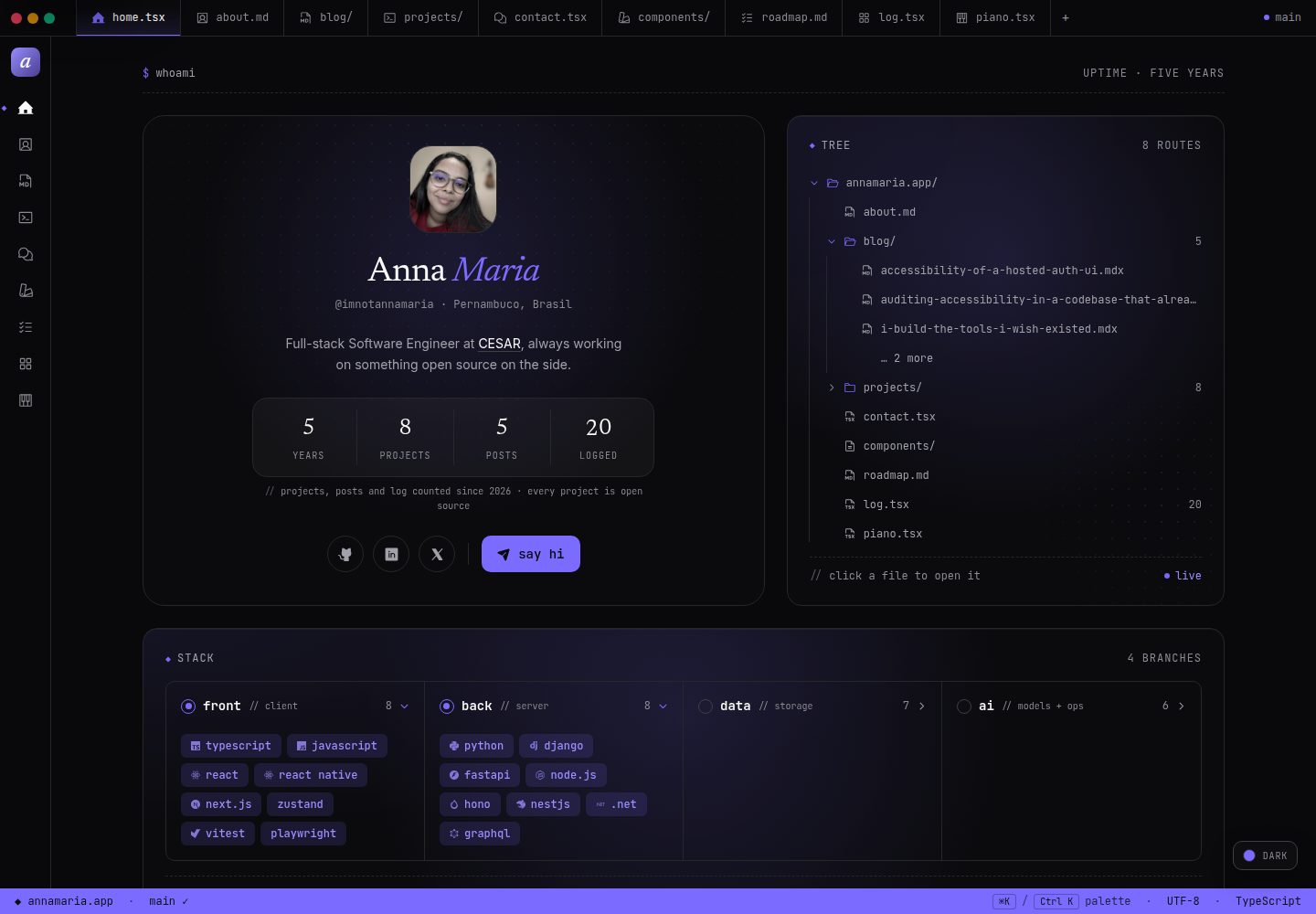
以代码编辑器为界面隐喻,包含标签页、侧边栏、状态栏和 ⌘K 命令面板
Next.jsReact作品集
anna.maria.dev — Next.js 作品集模板
作者 imnotannamaria
以代码编辑器为界面隐喻的个人作品集与开源模板,基于 Next.js,包含博客、项目案例、日志、路线图、联系表单和受保护的管理后台。
看看你的网站会是什么样
浏览真实页面截图,比较内容排版与手机效果。点击下方缩略图切换,放大查看整页细节。
全部页面与视图 3
截图用于了解视觉与布局,交互效果请以实际项目为准。
采集于 2026-10-06查看来源
值得关注的模板亮点
从已有项目资料中,快速了解它的特点。
首页 bento 网格集成个人资料、精选作品、开源项目、Spotify 播放列表、Apple Watch 活动环和 GitHub 贡献图
博客和项目使用 MDX 编写,支持标签筛选、Shiki 高亮和阅读进度条
日志和路线图由 Postgres 驱动,并提供受 WorkOS AuthKit 和邮箱白名单保护的管理后台
提供六套明暗品牌主题、动态 OG 图片、站点地图和规范链接
Spotify、Apple Watch、日志和路线图等可选功能在缺少密钥时显示空状态,不影响构建
模板详细介绍
anna.maria.dev 是一个个人作品集网站,同时作为开源模板提供给全栈工程师使用。它的界面采用代码编辑器隐喻:顶部标签页、侧边图标栏、底部状态栏,以及 ⌘K 命令面板,每个页面都像打开一个文件。
站点包含多个页面:首页为 bento 网格,展示个人资料、精选作品、开源项目、Spotify 播放列表、Apple Watch 活动环和 GitHub 贡献图;/about 包含个人简介、职业时间线、可交互的技术栈图和贡献日历;/blog 按年份分组展示 MDX 文章,支持标签筛选、Shiki 代码高亮和阅读进度条;/projects 展示带封面、侧边元数据和 MDX 正文的项目案例;/log 汇总电影、剧集、书籍、专辑、播客和游戏等完成记录并带评分;/roadmap 以看板形式展示待办、进行中和已发布事项;/contact 通过 Resend 和 React Email 发送表单,并带有蜜罐字段;/components 展示站点自身卡片的各种状态;/piano 是一个两八度的 Web Audio 钢琴;/admin 提供日志和路线图的增删改查,由 WorkOS AuthKit 和邮箱白名单保护。
站点附带六套明暗品牌主题、动态 OG 图片、站点地图和规范链接。Spotify、Apple Watch 卡片、日志和路线图均为可选功能:缺少相应密钥时站点仍可构建,每个功能会显示空状态。
作为模板,它使用 Next.js App Router、React、TypeScript 严格模式、Tailwind 和 entrepta 设计系统。内容通过 Velite 和 Shiki 处理 MDX,动画使用 Motion,数据库通过 Drizzle 连接 Postgres,API 使用 Hono,管理后台使用 WorkOS AuthKit,邮件使用 Resend,部署在 Vercel。
使用限制:代码采用 MIT 许可,可免费使用、修改、商用和分发,但需保留版权声明和许可声明。演示图片、字体、图标及其他第三方素材需按各自许可核对。域名、托管、数据库、支付或 AI 等外部服务可能另外收费。
Next.jsReact作品集
适合你的项目吗?
适用场景
- 全栈工程师搭建个人作品集网站,展示项目、博客和职业经历
- 作为开源模板进行二次开发,替换姓名、内容和密钥后部署
- 在个人站点中集成 Spotify 播放列表、Apple Watch 活动数据和 GitHub 贡献图
- 通过管理后台维护个人日志和路线图内容
- 学习以编辑器界面隐喻构建 Next.js 应用的实现方式
适合人群
- 熟悉 Next.js、React 和 TypeScript 的全栈工程师
- 希望快速获得可定制作品集模板的开发者
- 需要博客、项目案例和内容管理后台的个人站点搭建者
- 愿意自行配置 Postgres、WorkOS、Resend 等外部服务的用户
上手与定制指南
结合仓库当前版本的说明,按下面的资料检查内容、配置与运行要求。
- 1
克隆仓库后运行 npm install,并复制 .env.example 为 .env.local
- 2
至少需要配置 RESEND_API_KEY 和 NEXT_PUBLIC_BASE_URL 两个环境变量
- 3
可选功能需要额外配置:Spotify、Postgres、WorkOS、GitHub token 等
- 4
使用 npm run dev:local 启动本地开发,npm run dev 会通过 Infisical 读取密钥
- 5
管理后台必须设置 ADMIN_EMAILS 白名单,否则任何在 WorkOS 组织内注册的用户都可能进入
授权与来源资料
使用条件与限制
免费使用 · 保留许可声明本次收录的是公开仓库中采用 MIT 许可的免费版本;免费范围为该版本代码,不代表外部服务或第三方素材免费。
使用时需要遵守
- 允许免费使用、修改、商用和分发该版本代码。
- 分发代码副本或实质性部分时,保留原作者版权声明和完整 MIT 许可声明。
- 代码按现状提供;担保与责任限制以原许可证及适用法律为准。
额外费用与待核对事项
- 演示图片、字体、图标及其他第三方素材需按各自许可核对,不能仅凭代码的 MIT 许可判断。
- 域名、托管、数据库、支付或 AI 等外部服务可能另外收费。
- 仅 RESEND_API_KEY 与 NEXT_PUBLIC_BASE_URL 为必需环境变量,其余功能变量均为可选。
- Spotify、Postgres(日志/路线图/Apple Watch)、WorkOS 管理后台、GitHub token 贡献图均为可选功能,需自行配置对应外部服务与密钥。
- 启用 Spotify 播放列表需自行在 Spotify 开发者后台创建应用并配置客户端 ID、密钥及公开播放列表 ID。
- 日志与路线图功能需自备 Postgres 数据库(如 Supabase),设置 DATABASE_URL 并执行提供的 SQL 迁移脚本。
- 管理后台需在 WorkOS 创建应用、注册回调地址并配置四个 WORKOS_* 变量。
- 必须将管理员邮箱填入 ADMIN_EMAILS 白名单,否则任何在 WorkOS 组织内注册的用户都可能进入管理后台。
- Apple Watch 活动环卡片依赖同一数据库,并通过 iOS 快捷指令写入数据。
- 重新生成音效需自备 ElevenLabs API 密钥并运行生成脚本;已提交的音效文件无需该密钥。
- 运行完整测试套件需本地已启动 Docker 或 OrbStack。
- 集成与端到端测试会写入并清空数据库,仅当 DATABASE_URL 指向 localhost 时才允许运行。
- 部署需自行在 Vercel 导入仓库并配置环境变量,托管服务可能产生费用。
查看原文依据
Permission is hereby granted, free of charge
许可证原文
Only two variables are required:
README 原文
Everything else in `.env.example` is optional and switches on one feature: Spotify, Postgres for the log, roadmap and Apple Watch card, WorkOS for the admin, a GitHub token for the contributions grid.
README 原文
Create an app in the [Spotify Developer Dashboard](https://developer.spotify.com/dashboard), then set `SPOTIFY_CLIENT_ID`, `SPOTIFY_CLIENT_SECRET` and the ID of a public playlist in `SPOTIFY_PLAYLIST_ID`.
README 原文
Set `DATABASE_URL` (on Supabase, the transaction pooler string on port 6543) and run [docs/sql/001-log-entries.sql](docs/sql/001-log-entries.sql) and [docs/sql/003-roadmap-items.sql](docs/sql/003-roadmap-items.sql) against it.
README 原文
For the admin, create an application at [workos.com](https://workos.com), register `<your-domain>/api/auth/callback` as a redirect URI, and fill in the four `WORKOS_*` variables.
README 原文
Put your email in `ADMIN_EMAILS`.
README 原文
The activity card reads from the same database, fed by an iOS Shortcut.
README 原文
To regenerate them, set `ELEVENLABS_API_KEY` and run `npm run generate:sounds`; the prompts live in `lib/sound-effects.ts`.
README 原文
Docker or OrbStack has to be running; nothing else needs setting up.
README 原文
The integration and e2e suites write to and truncate their database, so both refuse to run unless `DATABASE_URL` points at localhost.
README 原文
https://github.com/imnotannamaria/anna.maria.dev/blob/main/LICENSEhttps://github.com/imnotannamaria/anna.maria.dev/blob/main/README.mdImport the repo at [vercel.com/new](https://vercel.com/new), add the environment variables, and deploy.
README 原文
DeepSeek 根据仓库许可证和 README 整理 ·2026-10-06。结果仅覆盖已读取资料,依赖、图片、字体及后续条款变更以各自原文为准。
项目核对记录与介绍依据
模板资料
- 来源平台
- GitHub
- 资料与维护参考分
- 资料较完整 · 88 / 100
- 技术栈
- Next.js · React
- 网站类型
- 作品集
这个分数如何计算
本站按许可资料(最高30分)、演示链接(12分)、预览图(10分)、Star数(15分)、记录的维护时间(15分)、描述完整度(8分)、功能记录(5分)和分类资料(5分)计算。它不是代码、安全或性能测试,也不是 Google 评分;有链接不代表已实测可用。
这个项目需要核对什么
- 记录的仓库更新时间
- 2026-10-05
- 截图检查日期
- 2026-10-06
已收录演示链接。请用你的内容与屏幕尺寸检查;有演示不代表表单、认证或支付已经可用。
目录记录的主要技术栈是 Next.js。请通过依赖清单和锁文件核对实际版本与托管要求。这些说明基于收录资料,不代表代码审计或部署实测。
查看具体选型方法 →介绍的制作与核对状态
介绍由 AI 辅助整理目录与仓库资料。仓库作者不等于这篇介绍的审核者。
审核声明: [email protected] · 2026-10-06
查看当时使用的来源资料
SHA-256: 420d5b00cb4e163a0848772d2623ec3272e05b3028cb203a15b72cb62648c708
2026-10-06T00:08:39.310Z
来源文件 / 仓库<p align="center"> <img src="public/images/og-cover.jpg" alt="annamaria.app: a personal site posed as a code editor" width="100%" /> </p> <p align="center"> <a href="https://annamaria.app">Live</a> · <a href="https://annamaria.app/blog">Blog</a> · <a href="https://annamaria.app/projects">Projects</a> · <a href="https://entrepta.vercel.app">entrepta</a> </p> <p align="center"> <a href="https://github.com/imnotannamaria/anna.maria.dev/actions/workflows/test.yml"><img src="https://github.com/imnotannamaria/anna.maria.dev/actions/workflows/test.yml/badge.svg" alt="test" /></a> <img src="https://img.shields.io/badge/Next.js-16-7c6bff" alt="Next.js 16" /> <img src="https://img.shields.io/badge/entrepta-3.0-7c6bff" alt="entrepta 3.0" /> <img src="https://img.shields.io/badge/license-MIT-7c6bff" alt="MIT license" /> </p> # anna.maria.dev A personal site posed as a code editor. Tabs across the top, an icon rail on the side, a status bar at the bottom, and a command palette on ⌘K. Every page reads as an open file. It is also an open source template for full-stack engineers: fork it, swap in your own name, content and keys, and deploy. ## What's inside | Page | What it is | | ------------- | -------------------------------------------------------------------------------------------------------------- | | `/` | A bento grid: profile, featured work, open source, a Spotify playlist, Apple Watch rings, GitHub contributions | | `/about` | Bio, career timeline, the stack as an interactive graph, a contributions calendar | | `/blog` | MDX posts grouped by year, with tag filters, Shiki highlighting and a reading progress bar | | `/projects` | Case studies with a cover, sidebar metadata and MDX | | `/log` | One feed for everything I finish: films, series, books, albums, podcasts, games, with ratings | | `/roadmap` | A board of what the site is going to become: to do, in progress, shipped | | `/contact` | A form sent through Resend and React Email, with a honeypot | | `/components` | The site's own cards, each shown in every state it can be in | | `/piano` | A two-octave Web Audio piano | | `/admin` | CRUD for the log and the roadmap, behind WorkOS AuthKit and an email allowlist | Six brand themes in dark and light, dynamic OG images, a sitemap and canonical URLs come with it. Spotify, the Apple Watch card, the log and the roadmap are all optional: without their keys the site still builds, and each one shows an empty state. ## Stack Next.js 16 (App Router), React 19, TypeScript strict, Tailwind v4 and [entrepta](https://entrepta.vercel.app) for the design system. MDX through Velite and Shiki, Motion for animation, Postgres through Drizzle, a Hono API at `/api/v1`, WorkOS AuthKit for the admin, Resend for email. Deployed on Vercel. ## Built on entrepta The UI runs on [entrepta](https://github.com/imnotannamaria/entrepta), a dark-first design system with the same editor metaphor. entrepta started inside this site, and v2 was built here first. It is not a runtime dependency. Its CLI copies source into the repo, and three places belong to it rather than to the site: - `app/components/entrepta/`, the components - `app/entrepta.css`, the tokens, the six themes, the reset and the loading classes - `lib/utils.ts`, `lib/motion.ts`, `lib/icon.tsx`, `lib/overlay.ts` and the hooks in `hooks/` What the site adds on top lives elsewhere: its CSS in `app/globals.css`, its helpers in `lib/format.ts`, and `components/chrome/`, which binds entrepta's Sidebar, PageOutline and TabNav to the site's routes. To update a component, run `npx @entrepta/cli@latest add <name> --overwrite` and read the diff. To update the tokens, bump `@entrepta/registry` in `devDependencies` and run `npx vitest run lib/entrepta-sync.test.ts`, which lists what changed. **Don't run `entrepta init --overwrite` here.** It rewrites `app/globals.css`, which holds the site's own CSS, and adds a Google Fonts import that fights `next/font`. ## Fork it ### 1. Install ```bash git clone https://github.com/imnotannamaria/anna.maria.dev.git my-site cd my-site npm install ``` ### 2. Environment ```bash cp .env.example .env.local ``` Only two variables are required: ```bash RESEND_API_KEY=re_xxxxxxxxxxxx # resend.com NEXT_PUBLIC_BASE_URL=https://yourdomain.com ``` Everything else in `.env.example` is optional and switches on one feature: Spotify, Postgres for the log, roadmap and Apple Watch card, WorkOS for the admin, a GitHub token for the contributions grid. ### 3. Make it yours | File | What to change | | ---------------------------- | ------------------------------------------- | | `lib/site-config.ts` | Name, email, social handles, theme swatches | | `app/(home)/page.tsx` | The home page sections | | `app/about/page.tsx` | Bio, timeline, stack, interests | | `app/layout.tsx` | Site title and description | | `app/api/contact/route.ts` | The `from` and `to` of contact emails | | `lib/metadata.ts` | The `baseUrl` fallback | | `public/images/og-cover.jpg` | The share image | ### 4. Run ```bash npm run dev:local ``` `npm run dev` is the same thing wrapped in [Infisical](https://infisical.com), which is how the live site keeps its secrets out of the working tree. On a fork, `dev:local` reads your `.env.local` instead. Open [localhost:3000](http://localhost:3000). ## Writing content A post is `content/blog/<slug>.mdx`: ```mdx --- title: "Your post title" description: "A short description for SEO and cards." date: "2026-01-01" tags: ["next.js", "typescript"] published: true --- Your content here. ``` A project is `content/projects/<slug>.mdx`: ```mdx --- title: "Project name" description: "What it does in one sentence." date: "2026-01-01" tags: ["react", "typescript"] github: "https://github.com/you/project" live: "https://project.vercel.app" cover: "/projects/project.png" featured: true published: true --- ## Overview ... ``` `cover` is optional and points at a file in `public/projects/`; without one, the card draws a cover from the slug. The most recent `featured: true` project shows on the home page. ## Optional features ### Spotify playlist Create an app in the [Spotify Developer Dashboard](https://developer.spotify.com/dashboard), then set `SPOTIFY_CLIENT_ID`, `SPOTIFY_CLIENT_SECRET` and the ID of a public playlist in `SPOTIFY_PLAYLIST_ID`. It uses the Client Credentials flow, server to server, so the secret never reaches the browser. ### The log and the roadmap Both read the same Postgres database. 1. Set `DATABASE_URL` (on Supabase, the transaction pooler string on port 6543) and run [docs/sql/001-log-entries.sql](docs/sql/001-log-entries.sql) and [docs/sql/003-roadmap-items.sql](docs/sql/003-roadmap-items.sql) against it. 2. Seed sample data if you like: `npm run seed:log` and `npm run seed:roadmap`. 3. For the admin, create an application at [workos.com](https://workos.com), register `<your-domain>/api/auth/callback` as a redirect URI, and fill in the four `WORKOS_*` variables. 4. Put your email in `ADMIN_EMAILS`. The last step matters. AuthKit decides who is signed in, not who is allowed in; without the allowlist, anyone who signs up in your WorkOS organisation reaches the admin. `lib/auth/require-admin.ts` is the real guard. Roadmap items start as `raw`, which never renders publicly: somewhere to keep an idea before deciding anything about it. The design behind each feature is in [docs/log-plan.md](docs/log-plan.md) and [docs/roadmap-component-plan.md](docs/roadmap-component-plan.md). ### Apple Watch rings The activity card reads from the same database, fed by an iOS Shortcut. [wristkit](https://wristkit-web.vercel.app/) has the full setup: the migration ([docs/sql/002-wristkit-samples.sql](docs/sql/002-wristkit-samples.sql)), the Shortcut, and the sync endpoint at `/api/v1/wristkit/sync`. ### Sound effects A short click plays on buttons and nav controls, and success and error cues play on form submissions and admin actions. The files in `public/sounds/` are generated once with the [ElevenLabs Sound Effects API](https://elevenlabs.io/docs/api-reference/text-to-sound-effects/convert) and committed, so visitors never talk to ElevenLabs. To regenerate them, set `ELEVENLABS_API_KEY` and run `npm run generate:sounds`; the prompts live in `lib/sound-effects.ts`. ## Testing ```bash npm run test:all ``` One command runs every layer: 173 unit tests, 38 integration tests against a real Postgres, and 9 end-to-end tests in a real browser. It starts a throwaway database in Docker, builds what each layer needs and tears it all down afterwards. Docker or OrbStack has to be running; nothing else needs setting up. ```bash npm run test:all -- --keep # leave the database up for a faster rerun npm run test:all -- --no-e2e # skip the browser layer and its production build npm test # unit tests only, no infrastructure ``` The integration and e2e suites write to and truncate their database, so both refuse to run unless `DATABASE_URL` points at localhost. The e2e layer needs a browser once: `npx playwright install --with-deps chromium`. What each test guards against, and why nothing mocks Postgres, is in [docs/tests-plan.md](docs/tests-plan.md). ## Deploy Import the repo at [vercel.com/new](https://vercel.com/new), add the environment variables, and deploy. The sitemap and robots.txt are generated at build time. ## Project structure ``` app/ (home)/ home page, loading and error states about/ blog/ projects/ content pages, lists and [slug] log/ roadmap/ public feeds read from Postgres contact/ piano/ components/ admin/ log and roadmap CRUD, behind AuthKit + the allowlist components/entrepta/ entrepta components, written by its CLI api/ contact, OG images, Spotify, auth callback, the Hono app at v1/ entrepta.css entrepta's tokens and themes globals.css the site's own CSS layout.tsx editor chrome, fonts, theme setup components/ chrome/ titlebar, sidebar, outline, palette, feed shell home/ about/ blog/ projects/ log/ roadmap/ contact/ piano/ spotify/ wristkit/ admin/ ui/ error screen, sound feedback, generated cover, meta grid content/ blog/, projects/ and components/ in MDX emails/ the React Email template lib/ API, auth, database, queries, site config, helpers docs/ design plans and the SQL migrations ``` ## License MIT. Built by [Anna Maria](https://annamaria.app).
看看同类模板
对比同技术栈与用途的模板,找到更适合的视觉与内容结构。

react-resume-template
A personal resume website template built with React.js, Typescript, Next.js, and styled with Tailwind css
Next.js · 作品集

nxt-lnk
Custom bio links for creatives who love coding. A perfect custom alternative for linktree, bio and other short…
Next.js · 作品集

sylph
A minimal portfolio template.
Next.js · 作品集

sleek-portfolio
sleek-portfolio 是一个面向开发者个人品牌展示的现代作品集模板,基于 Next.js 15、TypeScript、Tailwind CSS 和 Shadcn UI 构建。
Next.js · 作品集

research-website-template
React + Next.js template for research websites (for PhD students, researchers, etc)
Next.js · 作品集

shadcn-portfolio
shadcn-portfolio 是一个面向开发者的作品集模板,技术栈为 Next.js 15、shadcn/ui、Tailwind CSS 和 Framer Motion。
Next.js · 作品集