Covers authentication flows including email/password login, Google OAuth, password reset, email verification, changing email and password, and deleting account
ViteReactStarter
react-supabase-auth-starter — Vite Starter Template
By jjmendezrodriguez
An authentication template built on React, TypeScript and Supabase, including email/password login, Google OAuth, password reset, email verification, account management and protected routes, along with i18n, unit tests, E2E tests and a GitHub Actions pipeline.
Explore the design
Compare the page layouts and mobile experience. Open any screenshot for a closer look.
Desktop homepage1 / 2
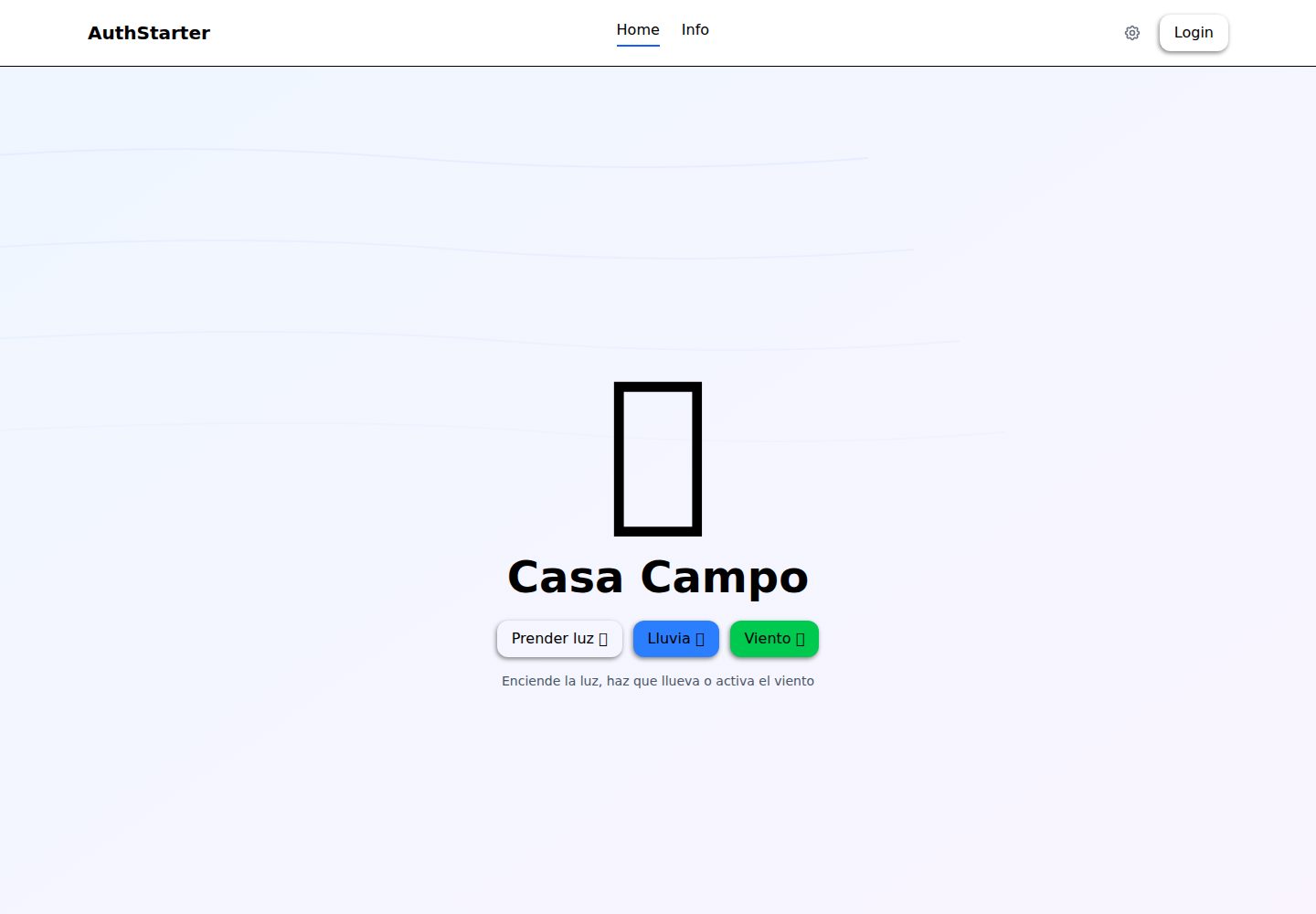
Desktop captureTop of page
Actual screenshot captured by the server browser.
All pages & views 2
Screenshots show visual appearance; interactive behavior may differ.
Recorded 2026-10-16View source
What stands out
A quick read of the recorded project description.
Uses Zustand to manage auth and UI state, providing protected routes, session persistence and automatic token refresh
Built-in English and Spanish internationalization, with language selection persisted to localStorage and the ability to add languages based on JSON
Includes Vitest unit tests and Playwright E2E tests across three browsers, with coverage report support
Provides a GitHub Actions pipeline (lint, test, build, security audit) and Vercel deployment configuration
The README documents security measures such as TypeScript strict mode, input validation, client-side rate limiting, Supabase RLS and security response headers
Template Details
This template provides a complete authentication frontend foundation, built with React, TypeScript, Vite, Tailwind CSS v4 and Zustand, with authentication and data provided by Supabase. The authentication flows listed in the README include: email/password login (with real-time validation), Google OAuth, password reset and email recovery, account creation with email verification, changing email, changing password, deleting account, as well as protected routes, session persistence and automatic token refresh. The interface includes an auth modal, a dashboard (profile and settings), homepage interaction effects, password strength hints, loading and error states, confirmation dialogs, and English and Spanish internationalization, with the language selection saved in localStorage. On security, the README mentions TypeScript strict mode, input validation, client-side rate limiting with exponential backoff, Vercel security response headers, Supabase RLS policies, environment variable management, audit-ci vulnerability scanning, Dependabot and SECURITY.md. On testing and engineering, it includes Vitest and Testing Library unit tests, Playwright E2E tests across Chromium/Firefox/WebKit, coverage reports, and GitHub Actions lint, test, build and security audit workflows plus Vercel deployment. The README does not describe the backend business data model, production operations details, or specific post-deployment availability guarantees.
ViteReactStarter
Is it right for your project?
Use Cases
- Setting up a frontend foundation with Supabase authentication for a new project, reducing the work of writing login, registration and password recovery flows from scratch
- Applications that need both email/password and Google OAuth login methods, and include account settings and protected pages
- Projects that want the frontend to support English/Spanish switching and retain the user's language preference
- Teams that need unit tests, cross-browser E2E tests and a CI pipeline as a starting point
- Projects using Supabase as the authentication and data backend and planning to deploy to Vercel
Suitable For
- Frontend projects developed with React and TypeScript that need ready-made authentication flows
- Applications using Supabase as the authentication backend
- Engineering teams that want the template to include testing, CI and security configuration
- Web applications that need multilingual support (English, Spanish)
- Projects planning to deploy via Vercel and use its security response header configuration
Getting started & customization
Use these recorded setup notes alongside the repository instructions for your chosen version.
- 1
Requires Bun (recommended) or Node.js 18+, and a Supabase account
- 2
After cloning the repository, enter the frontEnd directory and run bun install to install dependencies
- 3
Copy .env.example to .env and fill in Supabase's VITE_SUPABASE_URL and VITE_SUPABASE_ANON_KEY
- 4
Run bun dev to start the development server; the README states the default access address is http://localhost:5174
- 5
The README does not provide complete steps for creating tables, RLS policies or OAuth provider configuration within the Supabase project; refer to documentation such as frontEnd/README.md
License & source material
Usage conditions & limitations
Free to use · keep license noticeThis entry covers the free version of a public repository under the MIT license; the free scope is the code of this version and does not mean external services or third-party assets are free.
Must comply with when using
- Free use, modification, commercial use and distribution of this version's code are permitted.
- When distributing copies or substantial portions of the code, retain the original author's copyright notice and the full MIT license notice.
- The code is provided as is; warranties and limitations of liability are governed by the original license and applicable law.
Additional costs & items to verify
- Demo images, fonts, icons and other third-party assets must be checked against their respective licenses and cannot be judged solely by the code's MIT license.
- External services such as domains, hosting, databases, payments or AI may incur separate charges.
- A Supabase account is required before use (the README states a free tier is available), and authentication and data depend on this external service.
- The Supabase project URL environment variable must be configured, otherwise the application cannot connect to the backend authentication service.
- The Supabase anon key environment variable must be configured, which is an external service credential requirement.
- Credentials must be obtained from the Supabase console, which means registering and logging into a Supabase account.
- The delete account feature depends on deploying a Supabase Edge Function, requiring additional Supabase server-side configuration.
- If branded email delivery is needed, a custom SMTP service must be configured separately, which may incur external service costs.
View Original Text Basis
Permission is hereby granted, free of charge
Original License Text
- Supabase account (free tier available)
Original README
VITE_SUPABASE_URL=https://your-project.supabase.co
Original README
VITE_SUPABASE_ANON_KEY=your-anon-key
Original README
Get your Supabase credentials from: **[Supabase Dashboard → Settings → API](https://supabase.com/dashboard/project/_/settings/api)**
Original README
supabase functions deploy delete-user
Original README
https://github.com/jjmendezrodriguez/react-supabase-auth-starter/blob/main/LICENSEhttps://github.com/jjmendezrodriguez/react-supabase-auth-starter/blob/main/README.md3. _(Optional)_ Configure custom SMTP for branded email delivery under **Project Settings → Auth → SMTP Settings**
Original README
Compiled by DeepSeek based on repository license and README ·2026-10-16. Results only cover the materials read; dependencies, images, fonts, and subsequent term changes are subject to their respective original texts.
Project checks & description sources
Template Information
- Source platforms
- GitHub
- Documentation and maintenance reference score
- More documented · 85 / 100
- Technologies
- Vite · React
- Website type
- Starter
How this score is calculated
Our heuristic uses license records (up to 30), a demo link (12), a preview (10), stars (15), recorded maintenance (15), description completeness (8), feature records (5) and classification data (5). It is not a code, security or performance test, or a Google score. A link does not establish tested functionality.
What to verify for this project
- Repository update recorded
- 2026-06-11
- Screenshot last checked
- 2026-10-16
A demo link is listed. Check it with your own content and viewport sizes; its presence does not confirm that forms, authentication or payments work.
The catalog identifies Vite as the primary stack. Check the actual dependency manifest and lockfile for versions and hosting requirements. These notes use recorded metadata, not a code audit or a deployment test.
Use a selection guide →How this description was prepared
AI-assisted description based on catalog records and repository material. Repository authors are not automatically the reviewers of this description.
Review declaration: codex-user-requested-batch-review-20261017 · 2026-10-16
Inspect the recorded source material
SHA-256: ee1e3b7284b360aa2c31a1bb3c8baea73e86cb52683707194d0413d17b897a34
2026-10-16T16:13:48.339Z
Source file / repository# 🔐 React Supabase Auth Starter > **A production-ready authentication template** built with React 19 + TypeScript + Supabase, following Staff Engineer standards. Secure auth flows, i18n, comprehensive testing, automated CI/CD with security auditing, and enforced code quality — ready to deploy in minutes. [](https://react-supabase-auth-starter.vercel.app/) [](LICENSE) [](https://github.com/jjmendezrodriguez/react-supabase-auth-starter/actions) [](https://react.dev/) [](https://www.typescriptlang.org/) [](https://supabase.com/) [](https://vercel.com/new/clone?repository-url=https%3A%2F%2Fgithub.com%2Fjjmendezrodriguez%2Freact-supabase-auth-starter&env=VITE_SUPABASE_URL,VITE_SUPABASE_ANON_KEY&envDescription=Supabase%20credentials%20needed%20for%20authentication.%20Get%20them%20from%20your%20Supabase%20project%20dashboard.&envLink=https%3A%2F%2Fsupabase.com%2Fdashboard%2Fproject%2F_%2Fsettings%2Fapi&project-name=react-supabase-auth-starter&root-directory=frontEnd) --- ## 🎯 What is This? This is not just another auth boilerplate. It's a **complete foundation** for production web apps, designed with the same standards used at companies like Google, Meta, and Stripe. Every decision — from folder structure to CI pipeline — follows Staff Engineer-level practices documented in 3000+ lines of coding standards. **🚀 Live Demo:** [https://react-supabase-auth-starter.vercel.app/](https://react-supabase-auth-starter.vercel.app/) ### 📸 Screenshots | Home Page | Login Modal | Signup Modal | | :-------------------------------------: | :----------------------------------------------: | :------------------------------------------------: | |  |  |  | | Forgot Password | Dashboard - Profile | Dashboard - Settings | | :------------------------------------------------------: | :----------------------------------------------------------: | :------------------------------------------------------------: | |  |  |  | | Language Switcher | Home (Light On) | Info Page | | :----------------------------------------------------------: | :----------------------------------------------: | :------------------------------------------: | |  |  |  | --- ## ✨ Key Features ### 🔐 Complete Authentication System - ✅ Email/Password login with real-time validation - ✅ Google OAuth integration (extensible to GitHub, Apple, etc.) - ✅ Password reset flow with email recovery - ✅ Account creation with email verification - ✅ Change email, change password, delete account - ✅ Protected routes with Zustand state management - ✅ Session persistence and automatic token refresh - ✅ Client-side rate limiter with exponential backoff ### 🎨 Modern UI/UX - ✅ Clean, responsive design with Tailwind CSS v4 - ✅ Smooth animations (animated tabs, modal transitions) - ✅ Interactive home page (light switch, rain, wind effects) - ✅ Password strength indicator with visual feedback - ✅ Loading states, error handling, and confirmation modals ### 🌍 Internationalization (i18n) - ✅ Full English and Spanish support - ✅ Easy to add new languages (JSON-based) - ✅ Persistent language selection (localStorage) - ✅ Real-time translation without page reload ### 🔒 Security (Staff Engineer Level) - ✅ TypeScript strict mode — zero implicit `any` - ✅ Input sanitization and validation (email, password strength) - ✅ Client-side rate limiter with exponential backoff (brute-force protection) - ✅ Security headers via Vercel (CSP, HSTS, X-Frame-Options, Referrer-Policy) - ✅ RLS (Row Level Security) policies on Supabase - ✅ Environment variables for all secrets (zero hardcoded keys) - ✅ Automated vulnerability scanning (audit-ci in CI pipeline) - ✅ Dependabot for weekly dependency updates - ✅ SECURITY.md with vulnerability reporting process ### 🧪 Comprehensive Testing - ✅ **Unit tests** — Vitest + Testing Library (utils, hooks, components) - ✅ **E2E tests** — Playwright across 3 browsers (Chromium, Firefox, WebKit) - ✅ Test coverage reporting with @vitest/coverage-v8 - ✅ Dedicated test fixtures and helpers ### 🚀 CI/CD & DevOps - ✅ **GitHub Actions** — Lint → Test → Build → Security Audit (every PR) - ✅ **Playwright CI** — E2E tests in 3 browsers with artifact uploads - ✅ **Dependency caching** — 85% faster CI builds - ✅ **Branch protection** — PR required, code owner review, status checks - ✅ **CODEOWNERS** — Automatic review assignment for critical paths - ✅ **PR Template** — Standardized PR descriptions with security checklist - ✅ **Dependabot** — Automated weekly dependency scanning - ✅ **Vercel deployment** — Automatic preview deploys on PRs ### 📖 Professional Documentation - ✅ **AGENTS.md** — 3000+ lines of coding standards (Security, Architecture, Testing, CI/CD, Performance) - ✅ **PROJECT_STRUCTURE.md** — File organization guide with migration paths - ✅ **SECURITY.md** — Vulnerability reporting and security practices - ✅ **CONTRIBUTING.md** — Contribution guidelines and PR standards - ✅ **JSDoc comments** — All exported functions documented - ✅ **Inline comments** — Code explains "why", not just "what" --- ## 🛠 Tech Stack | Category | Technologies | | ---------------- | --------------------------------------------------- | | **Frontend** | React 19, TypeScript 5.9, Vite 7, SWC | | **Styling** | Tailwind CSS v4 (via Vite plugin) | | **State** | Zustand 5 (auth + UI stores) | | **Backend/Auth** | Supabase (Auth, PostgreSQL, RLS, Edge Functions) | | **Runtime** | Bun (package manager + task runner) | | **Unit Testing** | Vitest, Testing Library, jsdom | | **E2E Testing** | Playwright (Chromium, Firefox, WebKit) | | **CI/CD** | GitHub Actions (lint, test, build, audit) | | **Deployment** | Vercel (with security headers) | | **Code Quality** | ESLint, Prettier, Husky, lint-staged | | **Security** | audit-ci, Dependabot, CODEOWNERS, branch protection | | **i18n** | react-i18next, i18next | --- ## 🚀 Quick Start ### Prerequisites - [Bun](https://bun.sh/) (recommended) or Node.js 18+ - Supabase account (free tier available) ### Installation ```bash # Clone the repository git clone https://github.com/jjmendezrodriguez/react-supabase-auth-starter.git cd react-supabase-auth-starter # Navigate to frontend cd frontEnd # Install dependencies bun install # Set up environment variables cp .env.example .env # Edit .env with your Supabase credentials # Start development server bun dev ``` Visit `http://localhost:5174` 🎉 --- ## 📁 Project Structure ```files frontEnd/ ├── src/ │ ├── components/ # React components │ │ ├── auth/ # Authentication modals │ │ └── dashboard/ # User dashboard │ ├── hooks/ # Custom React hooks │ ├── services/ # External integrations │ │ └── supabase/ # Supabase client │ ├── stores/ # Zustand state stores │ ├── utils/ # Pure utility functions │ ├── pages/ # Route pages │ └── locales/ # i18n translations ├── e2e/ # Playwright E2E tests ├── test/ # Vitest unit tests ├── docs/ # Documentation └── .github/workflows/ # CI/CD pipelines ``` See [PROJECT_STRUCTURE.md](frontEnd/PROJECT_STRUCTURE.md) for detailed organization. --- ## 📚 Documentation This project is thoroughly documented — not just code comments, but full engineering guides: | Document | Purpose | | --------------------------------------------------------- | -------------------------------------------------------------------------------------------------- | | **[AGENTS.md](frontEnd/AGENTS.md)** | 3000+ lines of coding standards — security, architecture, testing, CI/CD, performance, scalability | | **[PROJECT_STRUCTURE.md](frontEnd/PROJECT_STRUCTURE.md)** | File organization guide with Type-based → Feature-based migration path | | **[SECURITY.md](SECURITY.md)** | Security practices, vulnerability reporting, and incident response | | **[CONTRIBUTING.md](CONTRIBUTING.md)** | Contribution guidelines, PR standards, and code review process | | **[E2E_TESTING_GUIDE.md](frontEnd/E2E_TESTING_GUIDE.md)** | Playwright E2E testing guide with patterns and best practices | | **[Frontend README](frontEnd/README.md)** | Detailed frontend architecture, Supabase setup, and component docs | --- ## 💡 Why This Template? Most auth templates give you a login form and call it done. This one gives you the **full engineering foundation**: ```txt ❌ Typical auth template: ✅ This template: ───────────────────────── ───────────────────────── Login form Complete auth system (7 flows) No tests Unit + E2E tests (3 browsers) No CI/CD GitHub Actions pipeline (4 stages) No security Rate limiting, CSP, HSTS, audit-ci No docs 3000+ lines of engineering standards "Works on my machine" Vercel deploy in 2 minutes ``` **Time saved:** ~3-4 weeks of setup and security hardening for every new project. --- ## 🧪 Available Scripts ```bash # Development bun dev # Start development server bun build # Build for production bun lint # Run ESLint bun preview # Preview production build # Unit Tests (Vitest) bun test # Run tests in watch mode bun test:run # Run tests once bun test:coverage # Generate coverage report bun test:ui # Open Vitest UI # E2E Tests (Playwright) bun test:e2e # Run all E2E tests bun test:e2e:headed # Run with visible browser bun test:e2e:ui # Open Playwright UI bun test:e2e:debug # Debug mode bun test:e2e:report # View last HTML report bun test:e2e:codegen # Record new tests ``` --- ## 🔧 Environment Setup Create a `.env` file in `frontEnd/` (or copy the example): ```bash cp frontEnd/.env.example frontEnd/.env ``` ```env VITE_SUPABASE_URL=https://your-project.supabase.co VITE_SUPABASE_ANON_KEY=your-anon-key ``` Get your Supabase credentials from: **[Supabase Dashboard → Settings → API](https://supabase.com/dashboard/project/_/settings/api)** --- ## 🗄️ Database Setup ### 1. Create `profiles` table ```sql CREATE TABLE profiles ( id UUID PRIMARY KEY REFERENCES auth.users(id) ON DELETE CASCADE, first_name TEXT, last_name TEXT, email TEXT, avatar_url TEXT, bio TEXT, created_at TIMESTAMPTZ DEFAULT NOW(), updated_at TIMESTAMPTZ DEFAULT NOW() ); ``` ### 2. Enable Row Level Security (RLS) ```sql ALTER TABLE profiles ENABLE ROW LEVEL SECURITY; -- Users can view their own profile CREATE POLICY "Users can view own profile" ON profiles FOR SELECT USING (auth.uid() = id); -- Users can update their own profile CREATE POLICY "Users can update own profile" ON profiles FOR UPDATE USING (auth.uid() = id); -- Users can insert their own profile CREATE POLICY "Users can insert own profile" ON profiles FOR INSERT WITH CHECK (auth.uid() = id); ``` ### 3. Create Database Triggers These triggers keep profiles in sync with Supabase Auth: - **`on_auth_user_created`** — Auto-creates a profile row when a new user signs up - **`on_auth_user_email_updated`** — Syncs email changes from auth to profiles - **`on_profile_name_updated`** — Syncs name changes from profiles to auth.users metadata ### 4. Deploy Edge Function (optional) The `delete-user` Edge Function handles privileged account deletion: ```bash supabase functions deploy delete-user ``` > **See:** [frontEnd/README.md](frontEnd/README.md#supabase-database-setup) for detailed SQL and trigger definitions. --- ## 📧 Email Templates Supabase sends automatic emails for authentication events. To customize them: 1. Go to **Supabase Dashboard → Authentication → Email Templates** 2. Edit these templates to match your brand: | Template | When it's sent | | ------------------ | ------------------------------------- | | **Confirm signup** | After user creates an account | | **Reset password** | When user requests password recovery | | **Magic link** | When using passwordless login | | **Change email** | When user updates their email address | | **Invite user** | When you invite users via dashboard | 3. _(Optional)_ Configure custom SMTP for branded email delivery under **Project Settings → Auth → SMTP Settings** > **Docs:** [Supabase Email Templates](https://supabase.com/docs/guides/auth/auth-email-templates) · [Custom SMTP](https://supabase.com/docs/guides/auth/auth-smtp) --- ## 🤝 Contributing Contributions are welcome! Please read [CONTRIBUTING.md](CONTRIBUTING.md) for details on our code of conduct and development process. --- ## 📄 License This project is licensed under the MIT License - see the [LICENSE](LICENSE) file for details. --- ## 👨💻 Author **Jose Mendez** — Software Engineer Building production-grade tools with Staff Engineer standards. 💼 [LinkedIn](https://linkedin.com/in/jjmendezrodriguez) · 🐙 [GitHub](https://github.com/jjmendezrodriguez) --- ## 🌟 Show Your Support If this template saved you time or taught you something, give it a ⭐️ on GitHub! **Found a bug?** [Open an issue](https://github.com/jjmendezrodriguez/react-supabase-auth-starter/issues) · **Want to contribute?** Read [CONTRIBUTING.md](CONTRIBUTING.md)
Explore similar templates
Compare previews and descriptions within the same stack and category.

cove
Cove is a minimal TanStack Start starter template maintained by mugnavo, integrating React, TanStack Router/Query, Tailwind CSS, shadcn/ui, Drizzle ORM with PostgreSQL, Better Auth, Vite Plus, and Nitro.
Vite · SaaS

vite-react-boilerplate
A production-ready Vite + React starter template with TypeScript, Tailwind CSS, TanStack Router/Query/Table, Storybook, React Hook Form + Zod, Vitest and Playwright testing, plus Husky/Commitizen/Commitlint commit conventions.
Vite · Starter

vital
Vital is a Vite-based React starter template using TypeScript and Tailwind CSS, with an Atomic Design component directory, path aliases and Hero Icons.
Vite · Starter

react-vite-admin
A backend management starter built on Vite and React, integrating Recoil, React Query, TypeScript, and Axios, with Ant Design-style interface screenshots. Suitable as a starting point for management-side projects, licensed under MIT, with Chinese documentation and common scripts.
Vite · Admin dashboard

typescript-react_best_practices-vite_template
A Vite + React + TypeScript starter template by CodelyTV, preconfigured with Jest and React Testing Library unit tests, Cypress end-to-end tests, ESLint and Prettier using Codely's shared configuration, GitHub Actions workflows, a Makefile, and Sass.
Vite · Starter

cloudflare-starter-kit
A Cloudflare Workers project scaffolding template maintained by kriasoft, using Vite and TypeScript, with three built-in workspaces: api, app, and edge, and preconfigured local testing, multiple environments, and a GitHub Actions deployment workflow.
Vite · Starter