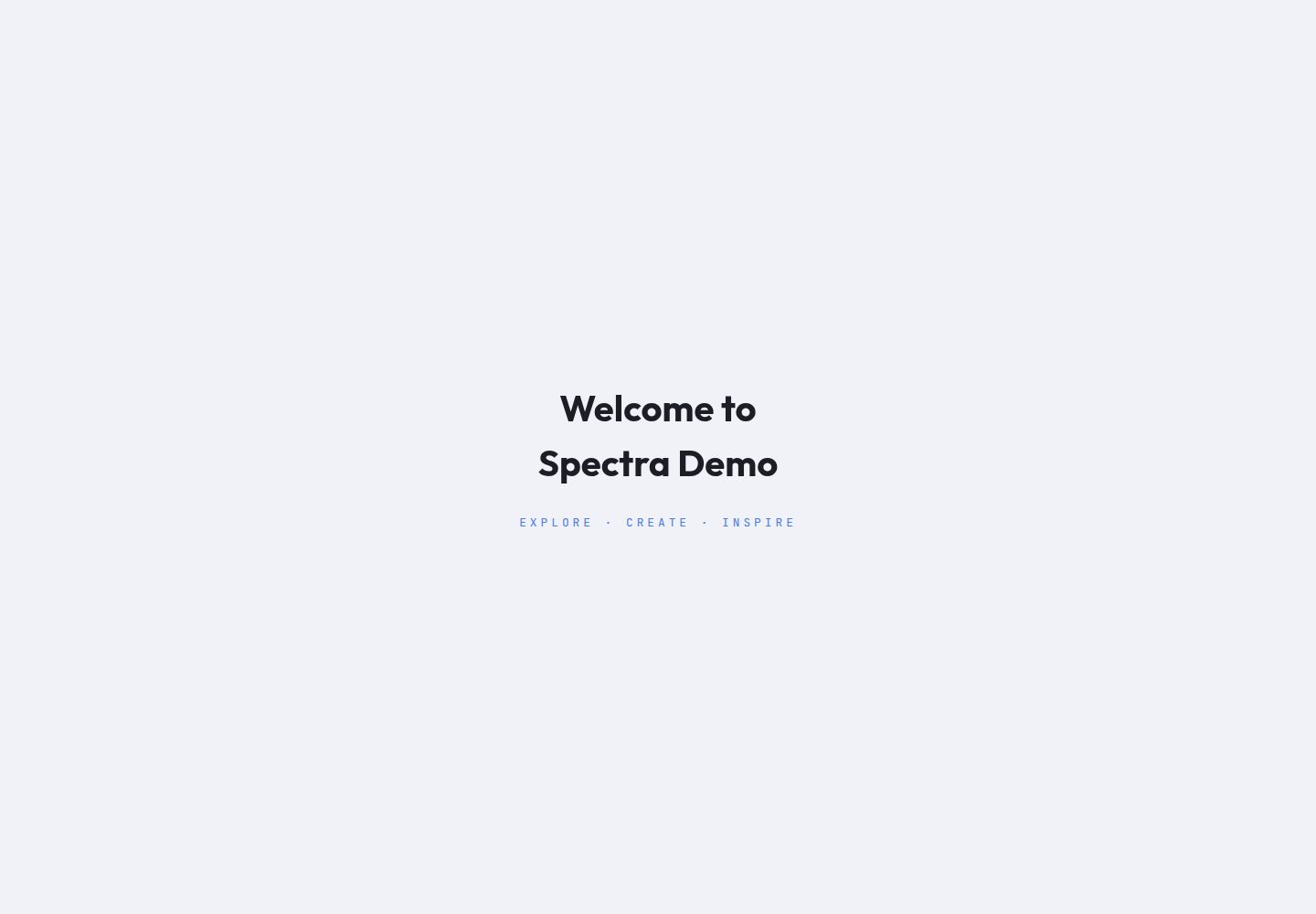
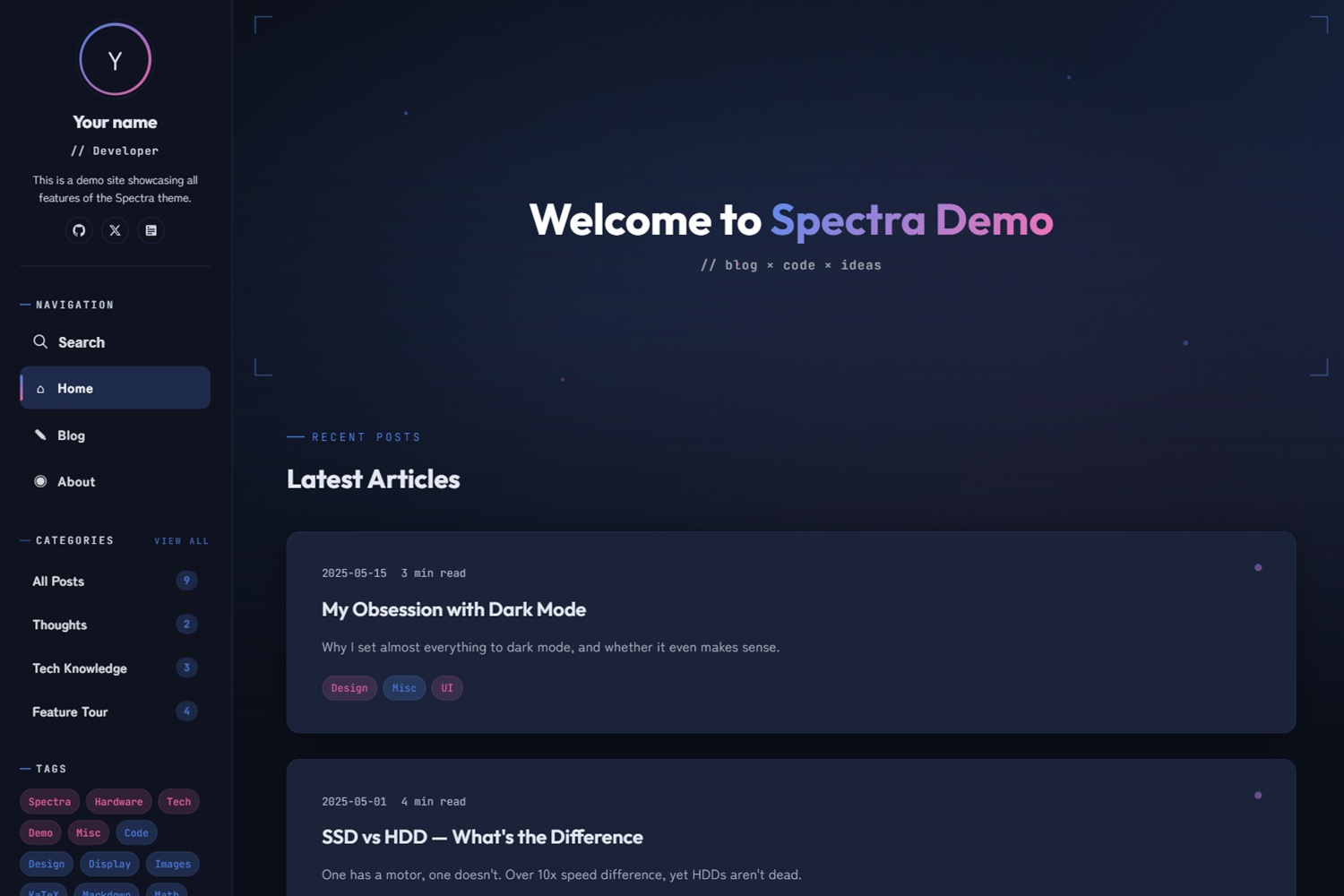
Dark/light mode switching, with a cover banner featuring gradients, floating particles, and L-shaped bracket decorations
HugoStarter
hugo-theme-spectra — Hugo Starter Template
By JoeYang1412
A Hugo-based sci-fi style blog theme offering dark/light mode, a parallax banner, and various page animations.
Explore the design
Compare the page layouts and mobile experience. Open any screenshot for a closer look.
Desktop homepage1 / 3
Desktop captureTop of page
Actual screenshot captured by the server browser.
All pages & views 3
Screenshots show visual appearance; interactive behavior may differ.
Recorded 2026-10-03View source
What stands out
A quick read of the recorded project description.
Opening animation and scroll-in animations for post lists, plus a desktop mouse cursor glow
Code block copy buttons, conditional loading of KaTeX math formulas, and a table of contents with a reading progress bar
Multilingual support via i18n, with independent configuration of parameters, menus, and social links per language
Uses Hugo Pipes to compile SCSS and process JS, no npm required, bundles Anime.js and Fuse.js
Style variables such as colors, fonts, and banner gradients can be overridden in hugo.toml without modifying the theme source
Template Details
Spectra is a Hugo blog theme with an overall sci-fi visual style, including dark/light mode switching, a cover banner with gradients and floating particle effects, an opening animation, and scroll-in animations. The theme processes SCSS and JS via Hugo Pipes, does not rely on npm, and bundles Anime.js and Fuse.js.
Functionally, the theme provides code block copy buttons, conditional loading of KaTeX math formulas, a table of contents with a reading progress bar, multilingual support, a desktop mouse cursor glow, configurable navigation menus and social links (with built-in icons for over 12 platforms), and a responsive layout. The search feature requires configuring the home page output format to include JSON.
Configuration is centralized in hugo.toml, allowing adjustment of the number of posts on the home page, card summary length, number of related posts, image compression quality, banner title and highlighted text, feature toggles, sharing platforms, custom CSS/JS, color and font variables, sidebar display items, code highlighting and table of contents levels, KaTeX delimiters, and more. For multilingual sites, parameters such as description, author, tagline, bio, banner, and avatar can be placed under each language's params, and content files are distinguished by extensions like .zh-tw.md and .en.md.
Before use, note: the theme requires Hugo Extended v0.157.0 or higher; the README states that the theme was developed with AI (Claude Code) assistance, and although the author has reviewed the code, no production environment verification is provided; third-party assets such as demo images, fonts, and icons must be checked separately under their respective licenses.
HugoLauncher
Is it right for your project?
Use Cases
- Building a personal tech blog or notes site that needs a sci-fi visual style and animations
- Running a multilingual blog and wanting to configure site information and navigation menus per language
- Writing long-form articles with math formulas, code snippets, and table of contents navigation
- Displaying related post recommendations at the bottom of articles and organizing previous/next navigation by series
Suitable For
- Bloggers using Hugo who are willing to configure via hugo.toml
- Personal sites that prefer dark interfaces, animations, and a sci-fi visual style
- Sites needing multilingual content and sidebar navigation for categories, tags, and recent posts
- Users who want to override styles such as colors and fonts without modifying the theme source
Getting started & customization
Use these recorded setup notes alongside the repository instructions for your chosen version.
- 1
Requires Hugo Extended v0.157.0 or higher.
- 2
The theme can be installed via Git submodule or Hugo Module, then copy the exampleSite's hugo.toml and content directory.
- 3
The search feature depends on JSON output format; set home = ['HTML', 'RSS', 'JSON'] in the configuration.
- 4
Multilingual parameters should be placed under [languages.xx.params], and content files are distinguished by extensions like .zh-tw.md and .en.md.
- 5
The theme was developed with AI (Claude Code) assistance; it is recommended to review the code before use; third-party assets such as demo images, fonts, and icons must be checked under their respective licenses.
License & source material
Usage conditions & limitations
Free to use · keep license noticeThis entry covers the free version under the MIT license in the public repository; the free scope applies to that version's code and does not imply that external services or third-party assets are free.
Must comply with when using
- Permits free use, modification, commercial use, and distribution of that version's code.
- When distributing copies or substantial portions of the code, retain the original author's copyright notice and the full MIT license notice.
- The code is provided as-is; warranties and limitations of liability are governed by the original license and applicable law.
Additional costs & items to verify
- Using this theme requires Hugo Extended 0.157.0 or higher; standard Hugo cannot compile SCSS.
- The search feature depends on JSON output format; the home page output must be set to include JSON in the site configuration, otherwise search is unavailable.
- The theme was developed with AI (Claude Code) assistance; although the author has reviewed the code, no production environment verification or security guarantee is provided.
- Image compression and WebP conversion only apply to images in Page Bundles and the assets/ directory; images in static/ will not be processed.
- Demo images, fonts, icons, and other third-party assets must be checked under their respective licenses and cannot be judged solely by the code's MIT license.
- External services such as domains, hosting, databases, payments, or AI may incur additional charges.
View Original Text Basis
Permission is hereby granted, free of charge
Original License Text
Hugo Extended v0.157.0+
Original README
The search feature requires JSON output format
Original README
This theme was developed with AI (Claude Code) assistance.
Original README
https://github.com/JoeYang1412/hugo-theme-spectra/blob/main/LICENSEhttps://github.com/JoeYang1412/hugo-theme-spectra/blob/main/README.mdIt is recommended to use Page Bundles or `assets/` for cover images and inline images to benefit from automatic compression and format conversion
Original README
Compiled by DeepSeek based on repository license and README ·2026-10-03. Results only cover the materials read; dependencies, images, fonts, and subsequent term changes are subject to their respective original texts.
Project checks & description sources
Template Information
- Source platforms
- Hugo Themes
- Documentation and maintenance reference score
- More documented · 83 / 100
- Technologies
- Hugo
- Website type
- Starter
How this score is calculated
Our heuristic uses license records (up to 30), a demo link (12), a preview (10), stars (15), recorded maintenance (15), description completeness (8), feature records (5) and classification data (5). It is not a code, security or performance test, or a Google score. A link does not establish tested functionality.
What to verify for this project
- Repository update recorded
- 2026-09-09
- Screenshot last checked
- 2026-10-03
A demo link is listed. Check it with your own content and viewport sizes; its presence does not confirm that forms, authentication or payments work.
The catalog identifies Hugo as the primary stack. Check the actual dependency manifest and lockfile for versions and hosting requirements. These notes use recorded metadata, not a code audit or a deployment test.
Use a selection guide →How this description was prepared
AI-assisted description based on catalog records and repository material. Repository authors are not automatically the reviewers of this description.
Automatically checked against source and license rules; no manual editorial review.
Inspect the recorded source material
SHA-256: 71c1e173a6a3bd6c5c8e64f82caef51ce52f2af14f581178b50d10baad99de13
2026-10-03T03:15:58.275Z
Source file / repository# Spectra — Hugo Theme
A Hugo blog theme blending sci-fi aesthetics with modern UI, featuring animations, dark/light mode toggle, and more.
**[Live Demo](https://joeyang1412.github.io/hugo-theme-spectra/)**
## Table of Contents
- [Features](#features)
- [Requirements](#requirements)
- [Quick Start](#quick-start)
- [Configuration](#configuration)
- [Glossary](#glossary)
- [Basic Parameters](#basic-parameters)
- [Hugo Output Formats](#hugo-output-formats)
- [Content Limits](#content-limits)
- [Banner Customization](#banner-customization)
- [Feature Toggles](#feature-toggles)
- [Share Buttons](#share-buttons)
- [Custom CSS / JS](#custom-css--js)
- [Style Overrides](#style-overrides)
- [Sidebar Settings](#sidebar-settings)
- [Markup Settings](#markup-settings)
- [Multilingual](#multilingual)
- [Navigation Menu](#navigation-menu)
- [Social Links](#social-links)
- [Related Posts](#related-posts)
- [Post Front Matter](#post-front-matter)
- [Image Placement](#image-placement)
- [Theme Defaults](#theme-defaults)
- [License](#license)
---
## Features
- Dark/Light mode
- Cover image with built-in gradient effect, floating particles, and L-bracket decorations
- Opening animation
- Scroll entrance animations for browsing posts
- Code block copy button
- KaTeX math formula support (conditional loading)
- Table of Contents with reading progress bar
- Multilingual support (via i18n)
- Mouse cursor glow effect (desktop)
- Configurable navigation menu
- Configurable social links with 12+ built-in platform icons
- Responsive design
- SCSS compilation and JS handling via Hugo Pipes
- No npm required — uses Anime.js and Fuse.js
## Requirements
- Hugo Extended v0.157.0+
---
> **Disclaimer:** This theme was developed with AI (Claude Code) assistance. The author has reviewed all code and made every effort to ensure all features work correctly and securely. If you find any issues, feel free to submit an Issue.
---
## Quick Start
### 1. Create a New Site and Install the Theme
**Method A: Git Submodule**
```bash
hugo new site my-blog
cd my-blog
git init
git submodule add https://github.com/JoeYang1412/hugo-theme-spectra themes/hugo-theme-spectra
```
**Method B: Hugo Module**
```bash
hugo new site my-blog
cd my-blog
hugo mod init github.com/your-username/my-blog
```
Then add the following to `hugo.toml`:
```toml
[module]
[[module.imports]]
path = "github.com/JoeYang1412/hugo-theme-spectra"
```
> When using Hugo Module, you don't need `theme = '...'` — it is replaced by `[module.imports]`.
### 2. Copy the Example Configuration
**Git Submodule:**
```bash
cp themes/hugo-theme-spectra/exampleSite/hugo.toml .
cp -r themes/hugo-theme-spectra/exampleSite/content ./content
```
**Hugo Module:**
Download the `hugo.toml` and `content/` directory from the [exampleSite](https://github.com/JoeYang1412/hugo-theme-spectra/tree/main/exampleSite) on GitHub to your site root.
### 3. Edit `hugo.toml`
- Change `baseURL` to your website URL
- Update `author`, `description`, `social` under `[languages]` with your own info
- Hugo Module method: remove the `theme = 'hugo-theme-spectra'` line
### 4. Start the Preview
```bash
hugo server
```
## Configuration
The `hugo.toml` you copied comes from `exampleSite/hugo.toml`. The following sections explain each block and what you may need to modify. "Post Front Matter" refers to settings written at the top of each `.md` file and will be noted separately.
> **About theme defaults**: The theme has its own configuration file (`themes/hugo-theme-spectra/hugo.toml`) which Hugo automatically merges. You don't need to modify it. See [Theme Defaults](#theme-defaults) at the end for details.
### Glossary
Some terms can be confusing during configuration, so here are unified definitions:
| Term | Description | Corresponding Setting |
|------|-------------|----------------------|
| Homepage Banner | The large block at the top of the homepage, containing parallax background, floating particles, and title text | `banner` (background image), `showBanner` (toggle), `bannerTitle` (title) |
| Post Cover | The full-width image displayed at the top of a single post page | Front Matter `cover`, `coverImageQuality` (compression quality) |
| Card Thumbnail | The thumbnail displayed at the top of each post card in the post list (sourced from `cover`) | `cardImageQuality` (compression quality) |
| Sidebar | The fixed navigation panel on the left, containing avatar, menu, tag cloud, recent posts, etc. | `[params.sidebar]` block |
| Tags | The tag section in the sidebar — blue for regular tags, pink for popular tags | `[params.sidebar]` `tagsLimit`, `tagWarmThreshold` |
| Categories | The category section in the sidebar, automatically generated from subdirectories under `content/posts/` | `showCategories` (toggle), `categoryLimit` (max count), `categoryList` (specify displayed items) |
| Series | Groups multiple posts into a series with automatic previous/next navigation | Front Matter `series`, `showSeriesNav` (toggle) |
### Basic Parameters
> **Multilingual note**: Parameters like `description`, `author`, `tagline`, `bio`, `banner`, `avatar` should be placed under `[languages.xx.params]` so each language can have different values.
```toml
[languages.zh-tw.params]
description = 'Site description'
author = 'Your Name'
tagline = '// Developer'
bio = 'A short bio about yourself.'
banner = '/images/banner.webp' # Banner background image (optional, uses built-in gradient if not set)
avatar = '/images/avatar.webp' # Sidebar avatar (optional)
[languages.en.params]
description = 'Site description'
author = 'Your Name'
tagline = '// Developer'
bio = 'A short bio.'
```
### Hugo Output Formats
The search feature requires JSON output format:
```toml
[outputs]
home = ['HTML', 'RSS', 'JSON']
```
### Content Limits
```toml
[params]
homepagePostsLimit = 10 # Number of posts displayed on the homepage
cardSummaryLength = 150 # Post card summary character count
relatedPostsLimit = 3 # Number of related posts displayed
cardImageQuality = 80 # Card thumbnail compression quality (1-100)
coverImageQuality = 85 # Post cover image compression quality (1-100)
# contentImageQuality = 90 # Content image compression quality (1-100, requires imageOptimize = true)
```
### Banner Customization
The banner section title text can be customized. If `bannerTitle` / `bannerHighlight` are not set, the site `title` will be used as the default:
```toml
[params]
bannerTitle = 'My' # First part of the title
bannerHighlight = 'Tech Notes' # Highlighted part of the title (gradient color)
```
### Feature Toggles
All features are enabled by default. Set the value to `false` to disable:
```toml
[params]
enableLoadingAnimation = true # Page loading animation
enableMouseGlow = true # Mouse cursor glow effect (desktop only)
showBanner = true # Homepage banner section
showReadingProgress = true # Reading progress bar at the top of post pages
enableLightbox = true # Click to enlarge images
showScrollTop = true # Scroll to top button
enableSearch = true # Search feature (using Fuse.js)
showRelatedPosts = true # Related posts recommendation at the bottom of posts
showSeriesNav = true # Series post previous/next navigation
enableCodeCopy = true # Code block copy button
enableScrollAnimation = true # Scroll entrance animations
```
### Share Buttons
Social share buttons on post pages. You can specify which platforms to display:
```toml
[params]
sharePlatforms = ['twitter', 'facebook', 'linkedin'] # Share platforms
```
### Custom CSS / JS
To load additional styles or scripts, use the following parameters (place files in your site's `static/` directory):
```toml
[params]
customCSS = ['css/custom.css']
customJS = ['js/custom.js']
```
### Style Overrides
Customize colors, fonts, and banner gradient styles without modifying the theme source code:
```toml
[params.style]
colorAccent = '#4a7de0' # Primary color (tech blue)
colorAccentWarm = '#e8609e' # Warm accent (pink)
colorAccentSoft = '#a78bfa' # Soft accent (purple)
fontDisplay = "'Outfit', sans-serif" # Heading font
fontBody = "'Zen Maru Gothic', 'Noto Sans TC', sans-serif" # Body font
fontMono = "'JetBrains Mono', monospace" # Code font
bannerImageText = '#fff' # Banner title text color
# bannerImageSubtitle = 'rgba(255, 255, 255, 0.8)' # Banner subtitle color
bannerImageGradient = 'linear-gradient(135deg, #4a7de0, #e8609e)' # Banner gradient (when no background image)
bannerImageGradientFill = 'transparent' # Banner gradient fill
```
To load custom Google Fonts, override the default font URL with `googleFontsURL`:
```toml
[params]
googleFontsURL = 'https://fonts.googleapis.com/css2?family=Your+Font&display=swap'
```
### Sidebar Settings
```toml
[params.sidebar]
showAllPosts = true # Show all posts link
showCategories = true # Show categories section
showTags = true # Show tags
showRecent = true # Show recent posts
categoryLimit = 5 # Maximum number of categories displayed
tagsLimit = 20 # Number of tags in the tag cloud
recentLimit = 5 # Number of recent posts displayed
# tagWarmThreshold = 3 # Tags with >= this many posts are displayed in pink (auto-calculated if not set)
```
### Markup Settings
Settings related to code highlighting, table of contents levels, and KaTeX math formulas:
```toml
[markup]
[markup.highlight]
guessSyntax = true
noClasses = false
lineNos = false
lineNumbersInTable = true
[markup.tableOfContents]
startLevel = 2
endLevel = 4
[markup.goldmark.renderer]
unsafe = true
[markup.goldmark.extensions.passthrough]
enable = true
[markup.goldmark.extensions.passthrough.delimiters]
block = [['$$', '$$']]
inline = [['$', '$']]
```
### Multilingual
The theme supports full multilingual configuration. Each language can have independent parameters, menus, and social links.
Content files are distinguished by language using filename extensions:
- Traditional Chinese: `my-post.zh-tw.md`
- English: `my-post.en.md`
Configure languages in `hugo.toml`:
```toml
defaultContentLanguage = 'en'
[languages]
[languages.zh-tw]
languageCode = 'zh-tw'
languageName = '繁體中文'
weight = 1
title = 'My Blog'
[languages.zh-tw.params]
description = 'Site description'
author = 'Your Name'
tagline = '// Developer'
bio = 'About me'
[[languages.zh-tw.menus.main]]
name = "Home"
pageRef = "/"
weight = 1
pre = "⌂"
[[languages.zh-tw.params.social]]
name = "GitHub"
url = "https://github.com/your-account"
[languages.en]
languageCode = 'en'
languageName = 'English'
weight = 2
title = 'My Blog'
[languages.en.params]
description = 'Site description'
author = 'Your Name'
tagline = '// Developer'
bio = 'About me'
[[languages.en.menus.main]]
name = "Home"
pageRef = "/"
weight = 1
pre = "⌂"
[[languages.en.params.social]]
name = "GitHub"
url = "https://github.com/your-account"
```
`weight` determines the display order in the language selector. For a complete bilingual configuration example, see `exampleSite/hugo.toml`.
### Navigation Menu
The navigation menu displayed in the sidebar. For multilingual sites, place it under `[[languages.xx.menus.main]]` so each language can have different menu names:
```toml
[[languages.zh-tw.menus.main]]
name = "Home"
pageRef = "/"
weight = 1
pre = "⌂" # Icon displayed before the name
[[languages.zh-tw.menus.main]]
name = "Posts"
pageRef = "/posts"
weight = 2
pre = "✎"
[[languages.zh-tw.menus.main]]
name = "About"
pageRef = "/about"
weight = 5
pre = "◉"
```
| Field | Description |
|-------|-------------|
| `name` | Menu display name |
| `pageRef` | Corresponding page path (prefer `pageRef` over `url` — Hugo automatically handles multilingual paths) |
| `weight` | Sort weight — lower numbers appear first |
| `pre` | Icon before the name — accepts any text or HTML entity |
### Social Links
Social link icons displayed at the bottom of the sidebar. For multilingual sites, place them under `[[languages.xx.params.social]]`:
```toml
[[languages.zh-tw.params.social]]
name = "GitHub"
url = "https://github.com/your-account"
[[languages.zh-tw.params.social]]
name = "Twitter"
url = "https://x.com/your-account"
[[languages.zh-tw.params.social]]
name = "Email"
url = "mailto:[email protected]"
[[languages.zh-tw.params.social]]
name = "RSS"
url = "/index.xml"
```
Built-in icon support for the following platforms (`name` is case-insensitive):
| `name` Value | `url` Example | Notes |
|-------------|---------------|-------|
| `GitHub` | `https://github.com/your-account` | |
| `Twitter` / `X` | `https://x.com/your-account` | Both work, same icon displayed |
| `HackMD` | `https://hackmd.io/@your-account` | |
| `LinkedIn` | `https://linkedin.com/in/your-account` | |
| `Email` | `mailto:[email protected]` | URL uses `mailto:` format |
| `RSS` | `/index.xml` | |
| `Mastodon` | `https://mastodon.social/@your-account` | |
| `YouTube` | `https://youtube.com/@your-channel` | |
| `Instagram` | `https://instagram.com/your-account` | |
| `Facebook` | `https://facebook.com/your-account` | |
| `Discord` | `https://discord.gg/your-invite` | |
| `Threads` | `https://threads.net/@your-account` | |
Names not in the above list will display a generic link icon.
### Related Posts
Related post recommendations at the bottom of posts are based on tag and date similarity:
```toml
[related]
includeNewer = true
threshold = 50
toLower = true
[[related.indices]]
name = "tags"
weight = 80 # Tag match has the highest weight
[[related.indices]]
name = "date"
weight = 10
pattern = "2006" # Same year gives a small bonus
```
### Post Front Matter
> The following settings are written at the top of each post's `.md` file, not in `hugo.toml`.
Each post's Markdown file should include the following metadata at the top:
```yaml
---
title: "Post Title"
date: 2025-01-01
draft: false
tags: [tag1, tag2]
series: [series-name] # Series classification (optional, posts in the same series show previous/next navigation)
math: false # Set to true to enable KaTeX math formulas in this post
cover: "/images/my.webp" # Cover image URL (optional, WebP format recommended, < 200KB)
toc: true # Show table of contents
description: "Post summary" # Used for card summary
---
```
| Field | Type | Default | Description |
|-------|------|---------|-------------|
| `title` | string | (required) | Post title |
| `date` | date | (required) | Publication date, used for sorting |
| `draft` | bool | `false` | When set to `true`, only visible in `hugo server -D` mode |
| `tags` | array | `[]` | Tags, displayed in the sidebar tag cloud |
| `series` | array | `[]` | Series posts — posts in the same series automatically generate previous/next navigation |
| `math` | bool | `false` | Enable KaTeX (only enable when needed to avoid loading extra resources) |
| `cover` | string | `""` | Cover image path |
| `toc` | bool | `true` | Show table of contents on the right side of the post (fixed on desktop, collapsed at the top on mobile) |
| `description` | string | `""` | Post summary |
### Image Placement
The theme supports three image placement methods, differing in whether Hugo's image processing (compression, WebP conversion) is available:
| Location | Image Processing | Best For | Example Path |
|----------|-----------------|----------|-------------|
| Same directory as the post | Yes | Post-specific cover images, inline images | `content/posts/my-post/cover.webp` |
| `assets/images/` | Yes | Images shared across multiple posts | `assets/images/shared-banner.webp` |
| `static/images/` | No | Static images that don't need processing (e.g., favicon) | `static/images/logo.svg` |
**Notes:**
- Compression quality parameters like `cardImageQuality`, `coverImageQuality`, `contentImageQuality` only apply to images in Page Bundles and `assets/`
- Images in `static/` are output as-is without any processing
- It is recommended to use Page Bundles or `assets/` for cover images and inline images to benefit from automatic compression and format conversion
**Page Bundle Example Structure:**
```
content/posts/my-post/
├── index.zh-tw.md
├── index.en.md
├── cover.webp # Cover image
└── screenshot.png # Inline image
```
Reference in Front Matter:
```yaml
cover: "cover.webp"
```
Reference in Markdown content:
```markdown

```
## Theme Defaults
The theme comes with its own configuration file (`themes/hugo-theme-spectra/hugo.toml`) which Hugo automatically merges with your site configuration — **you don't need to modify it**. To override a value, simply set the same key in your `hugo.toml`.
The following are the complete default values provided by the theme:
```toml
[params]
math = false # Global KaTeX toggle (set to true or enable in Front Matter when needed)
share = true # Post share buttons
imageOptimize = true # Enable image compression and WebP conversion
bannerSubtitle = '// blog × code × ideas' # Banner subtitle text
# Feature toggles (all default to true, set to false to disable)
# enableLoadingAnimation / enableMouseGlow / showBanner
# showReadingProgress / enableLightbox / showScrollTop
# enableSearch / showRelatedPosts / showSeriesNav
# enableCodeCopy / enableScrollAnimation
[outputs]
home = ['HTML', 'RSS', 'JSON'] # JSON required for search feature
[pagination]
pagerSize = 10
[taxonomies]
tag = 'tags'
series = 'series'
[related]
includeNewer = true
threshold = 50
toLower = true
[[related.indices]]
name = "tags"
weight = 80
[[related.indices]]
name = "date"
weight = 10
pattern = "2006"
```
## License
[MIT](LICENSE)
Explore similar templates
Compare previews and descriptions within the same stack and category.

hugo-xmin
hugo-xmin is an extremely minimal Hugo theme written by Yihui Xie for template beginners. HTML and CSS total about 140 lines, with no external dependencies, and it uses the MIT license.
Hugo · Starter

hugo-theme-gallery
A Hugo Extended photo gallery theme that organizes images with Page Bundles, automatically generating album lists and gallery pages with a Justified layout and PhotoSwipe lightbox.
Hugo · Starter

reveal-hugo
reveal-hugo is a Hugo theme that converts Markdown content into Reveal.js-based HTML presentations. It supports slide separation with `---`, shortcodes for fragments, slides, sections, notes, Markdown, and MathJax, and organizes content as root or section presentations with order controlled by weight.
Hugo · Starter

anatole
Anatole is a minimalistic two-column Hugo theme ported from farbox-theme-Anatole, featuring dark mode, multilingual and RTL support, and optional portfolio, comments, analytics, KaTeX, and Mermaid integrations. It suits personal blogs, portfolios, or documentation sites built with Hugo.
Hugo · Starter

hugo-theme-diary
A Hugo diary-style theme ported from the Hexo theme Journal, with a grid homepage for essays and daily notes. It supports six languages, dark mode, table-of-contents scroll positioning, reading time, code highlighting, and configurable sidebar, fonts, and colors.
Hugo · Starter

risotto
risotto is a minimalist, responsive Hugo theme inspired by terminal ricing aesthetics. It uses semantic HTML and pure CSS with no JavaScript, and its layout relies on CSS Grid for native responsiveness without manual breakpoints.
Hugo · Starter