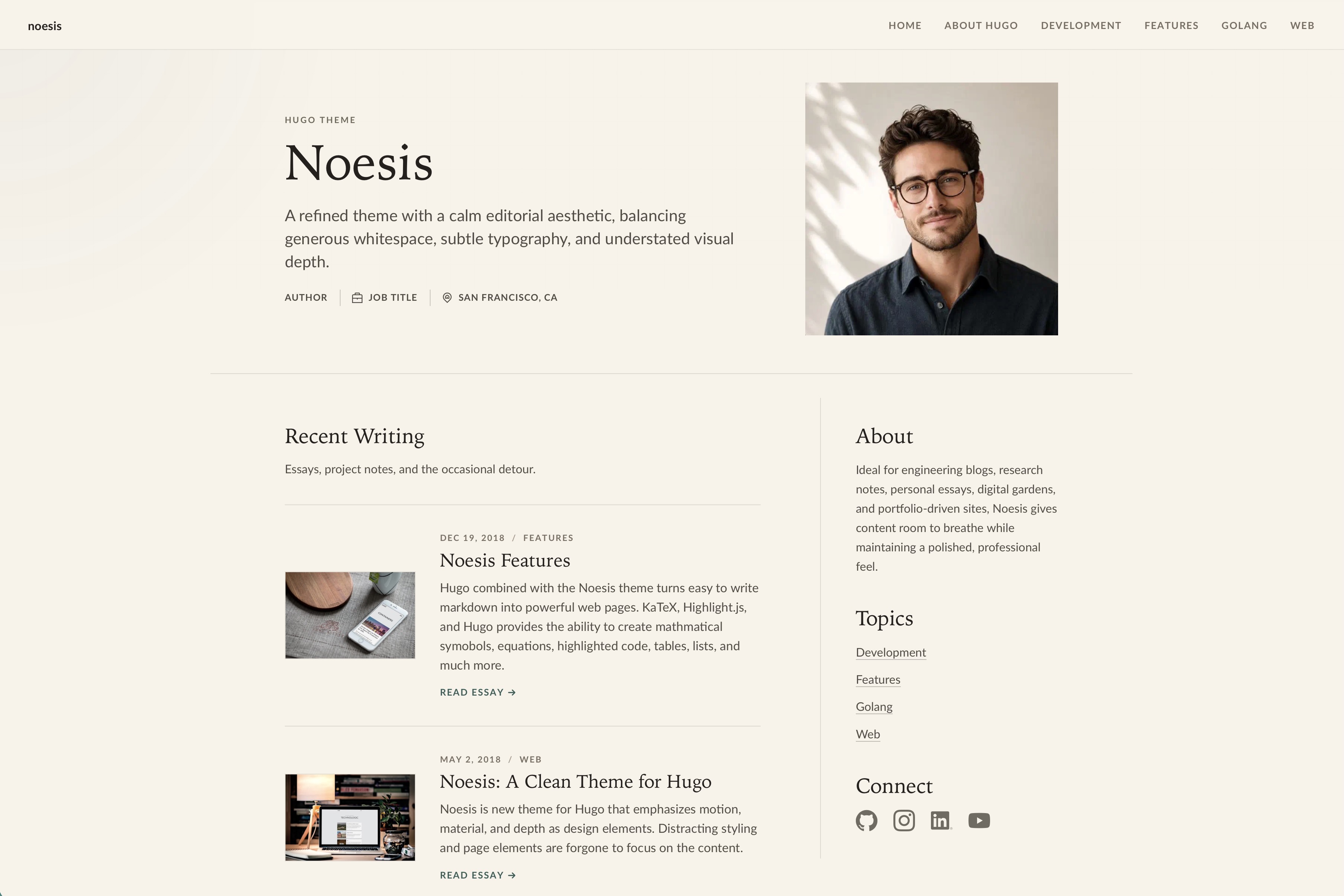
Hugo blog theme that emphasizes motion, layering, and material as design elements
HugoStarter
noesis — Hugo Starter Template
By josephhutch
Noesis is a Hugo blog theme that emphasizes motion, layering, and material feel, aimed at blog sites centered on photography and writing.
Explore the design
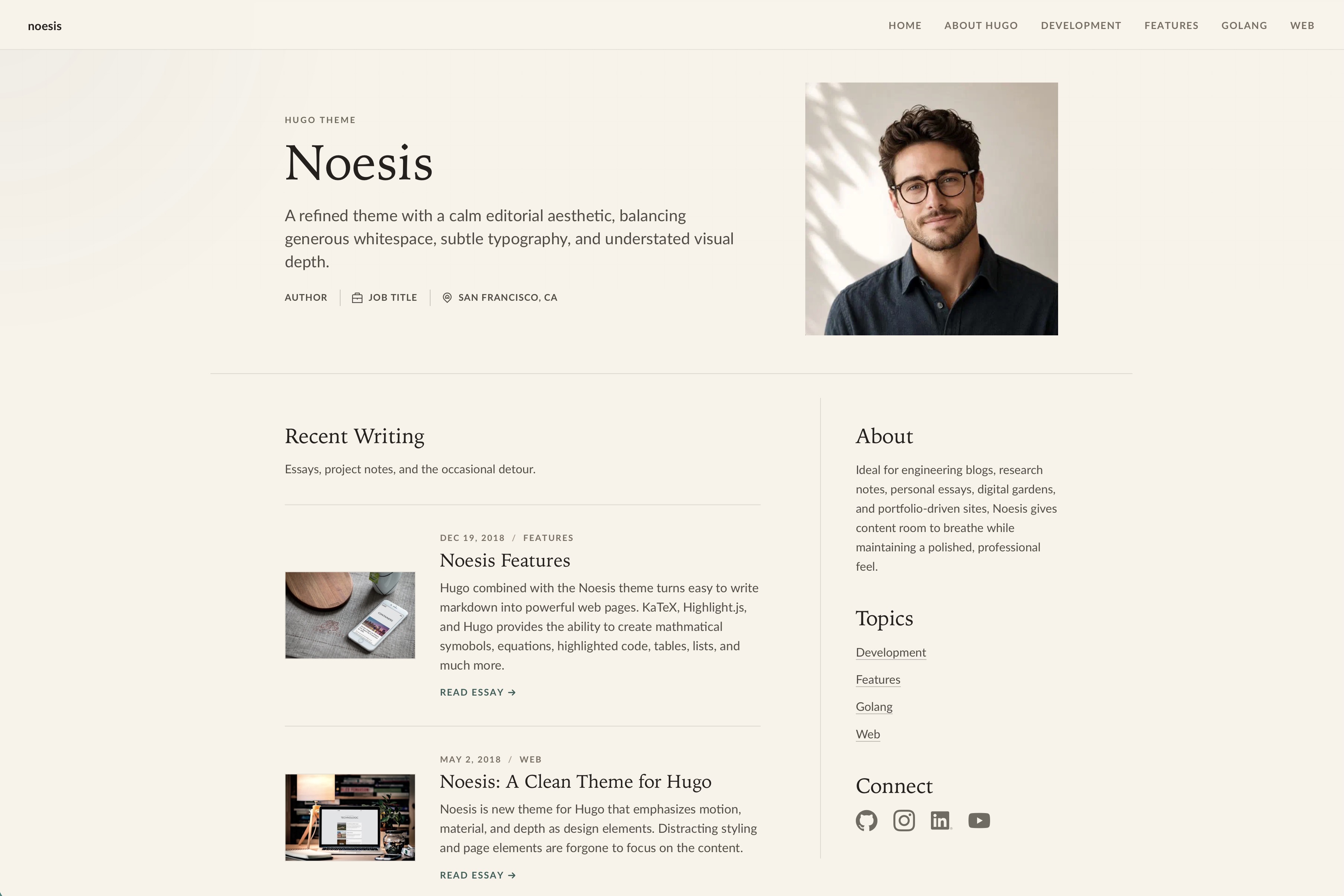
Compare the page layouts and mobile experience. Open any screenshot for a closer look.
Author preview
Author-provided previewTop of page
Preview provided in the project README.
One original preview is available. Open the full image to inspect the design.
Screenshots show visual appearance; interactive behavior may differ.
Recorded 2026-10-03View source
What stands out
A quick read of the recorded project description.
Configure brand, background image, homepage profile, social links, and author information through hugo.toml
Category pages are automatically generated from post categories and added to the menu
Provides raw, image, and smallimg shortcodes, supporting LaTeX math formulas and responsive WebP image output
Integrates Google Analytics, Disqus, and Chroma syntax highlighting, with the evergarden style by default
Requires Hugo 0.157.0 or later and is licensed under MIT
Template Details
Noesis is a Hugo theme hosted on GitHub, authored by josephhutch, and licensed under MIT. It targets blog scenarios, and the README positions it as using motion, layering, and material as design elements, with a clean interface that highlights photography and writing content.
The theme is configured through hugo.toml in the site root, where you can set the brand name, description, main content area, background image, homepage profile (name, role, location, avatar, and alt text), navigation RSS entry, social links, and author information. The homepage title and description come from content/_index.md, and it supports front matter fields such as about, writingTitle, and writingSubtitle. Category pages are automatically generated from post categories and added to the menu, so Hugo's taxonomy and term pages must be retained.
Content is written in Markdown, and posts are organized through page bundles. Front matter includes title, date, description, categories, toc, displayInMenu, displayInList, draft, and the featuredImage resource. The theme provides three shortcodes: raw, image, and smallimg. raw is used to output HTML or LaTeX math formulas as-is; image and smallimg generate responsive images from the current page bundle, produce WebP sources, and write intrinsic dimensions to reduce layout shift. Ordinary Markdown images that point to page bundles or global resources also go through the same image pipeline via Hugo render hooks.
The theme requires Hugo 0.157.0 or later, and installation is done by cloning the repository into the themes directory of a Hugo project. The README states that it supports Google Analytics and Disqus integration, Chroma syntax highlighting (with the evergarden style by default), LaTeX math notation, and a set of favicon files placed according to the real favicon generator naming rules. Social icons are rendered with CSS masks, making it easy to recolor them for dark mode, and missing icons fall back to a generic link icon. The PageSpeed scores and accessibility priorities mentioned in the README are the author's own statements and were not independently verified in this material.
HugoStarter
Is it right for your project?
Use Cases
- Building a personal blog focused on photography and long-form writing
- Content sites that need to automatically aggregate posts by category and generate category pages
- Technical blogs that insert LaTeX math formulas or code highlighting in posts
- Hugo sites that want to use page bundles and shortcodes to output responsive WebP images
Suitable For
- Bloggers who use Hugo and are willing to organize content with page bundles
- Personal site maintainers who need category pages, social links, and an RSS entry
- Users who accept configuration through hugo.toml and content/_index.md
Getting started & customization
Use these recorded setup notes alongside the repository instructions for your chosen version.
- 1
Requires Hugo 0.157.0 or later.
- 2
Install by running git clone https://github.com/josephhutch/noesis.git themes/noesis in the root directory of a Hugo project.
- 3
Set theme = "noesis" in hugo.toml, and fill in baseURL, locale, title, pagination, services, and params configuration as needed.
- 4
Homepage copy and fields such as about, writingTitle, and writingSubtitle are written in content/_index.md.
- 5
Favicon files must be placed in the site's static directory according to the real favicon generator naming rules.
License & source material
Usage conditions & limitations
Free to use · keep license noticeThis entry covers the free version in the public repository under the MIT license; the free scope is the code of that version and does not mean that external services or third-party assets are free.
Must comply with when using
- You are allowed to use, modify, commercialize, and distribute the code of this version for free.
- When distributing copies or substantial portions of the code, retain the original author's copyright notice and the complete MIT license notice.
- The code is provided as-is; warranties and limitations of liability are governed by the original license and applicable law.
Additional costs & items to verify
- Using this theme requires Hugo 0.157.0 or later; it will not run properly on earlier versions.
- If you need Google Analytics statistics, you must provide your own measurement ID and connect to Google's external service.
- If you need comments, you must configure a Disqus shortname; comment data is hosted by Disqus, a third-party external service.
- Third-party front-end assets bundled with the theme have separate licenses listed in THIRD_PARTY_NOTICES.md; you must check their authorization terms before use.
- Demo images, fonts, icons, and other third-party assets must be checked against their respective licenses and cannot be judged solely by the code's MIT license.
- External services such as domains, hosting, databases, payments, or AI may incur additional charges.
View Original Text Basis
Permission is hereby granted, free of charge
Original License Text
Noesis requires Hugo `0.157.0` or later.
Original README
[services.googleAnalytics] id = "Your Google Analytics measurement ID - optional"
Original README
[services.disqus] shortname = "Your shortname for Disqus - optional"
Original README
https://github.com/josephhutch/noesis/blob/main/LICENSE.mdhttps://github.com/josephhutch/noesis/blob/main/README.mdBundled third-party frontend assets are listed in [THIRD_PARTY_NOTICES.md](THIRD_PARTY_NOTICES.md).
Original README
Compiled by DeepSeek based on repository license and README ·2026-10-03. Results only cover the materials read; dependencies, images, fonts, and subsequent term changes are subject to their respective original texts.
Project checks & description sources
Template Information
- Source platforms
- Hugo Themes
- Documentation and maintenance reference score
- Partly documented · 63 / 100
- Technologies
- Hugo
- Website type
- Starter
How this score is calculated
Our heuristic uses license records (up to 30), a demo link (12), a preview (10), stars (15), recorded maintenance (15), description completeness (8), feature records (5) and classification data (5). It is not a code, security or performance test, or a Google score. A link does not establish tested functionality.
What to verify for this project
- Repository update recorded
- 2026-09-24
- Screenshot last checked
- 2026-10-03
No demo link is recorded. Use the repository instructions to evaluate the project locally; the screenshot alone cannot establish interactive behavior.
The catalog identifies Hugo as the primary stack. Check the actual dependency manifest and lockfile for versions and hosting requirements. These notes use recorded metadata, not a code audit or a deployment test.
Use a selection guide →How this description was prepared
AI-assisted description based on catalog records and repository material. Repository authors are not automatically the reviewers of this description.
Review declaration: [email protected] · 2026-10-04
Inspect the recorded source material
SHA-256: 78093dd535b229bc5b90d3cddac74a5cbb9dc6d9ece4a9ffbe7edab589c61628
2026-10-03T15:27:14.240Z
Source file / repository# noesis
[](https://github.com/josephhutch/noesis/actions/workflows/main.yml)
Noesis is a Hugo theme for blogs that emphasizes motion, depth, and material as design elements. Noesis presents your content in a clean interface that highlights good photography and writing.
## Features
- It's **Fast**! PageSpeed scores consistently between 94-100
- Fully **Responsive Design** allowing your site to look good on any size screen
- Responsive image render hooks and shortcodes with WebP output
- **Accessibility** is a priority, making your site easily navigated by screen readers
- Category pages that group similar articles are automatically generated and added to the menu
- Customizable website background image and home button image
- Hugo/Chroma integration provides **beautiful syntax highlighting** for most programming languages and file formats
- Add **math symbols and equations** to your blog posts using LaTeX
- **Google Analytics** and **Disqus** integration
## Installation
Noesis requires Hugo `0.157.0` or later.
In the root directory of your Hugo Project, clone the noesis repo into the themes directory.
```shell session
git clone https://github.com/josephhutch/noesis.git themes/noesis
```
## Usage
### Website Configuration
Customize the look and feel of Noesis through your `hugo.toml` file. Start with this shape and remove settings you do not need.
```toml
baseURL = "https://example.com/"
locale = "en-US"
title = "Your site title"
theme = "noesis"
[pagination]
pagerSize = 10
[services]
[services.googleAnalytics]
id = "Your Google Analytics measurement ID - optional"
[services.disqus]
shortname = "Your shortname for Disqus - optional"
[params]
brand = "The name that is displayed in the top left of the website - optional, title is fallback"
description = "The website's description"
mainSections = ["posts"]
[params.appearance]
backgroundImage = "Path, within the 'assets' folder, of the image used for the page background - optional"
[params.profile]
name = "Name shown in the home page hero - optional"
jobTitle = "Short professional role shown in the home page hero - optional"
location = "Short location shown in the home page hero - optional"
headshotImage = "Path, within the 'assets' folder, of the image used for the home page header - optional"
headshotAlt = "Alt text for the headshotImage - should be used with headshotImage"
[params.navigation]
rssInMenu = true # Show an RSS link in the nav menu and footer - optional
[params.socials]
email = "Email address or mailto: URL, icon link will be included in the home page rail - optional"
discord = "URL to your Discord profile or community - optional"
facebook = "URL to your Facebook account, icon link will be included in the rail and footer - optional"
flickr = "URL to your Flickr account, icon link will be included in the rail and footer - optional"
github = "URL to your GitHub account, icon link will be included in the rail and footer - optional"
instagram = "URL to your Instagram account - optional"
linkedin = "URL to your LinkedIn account, icon link will be included in the rail and footer - optional"
patreon = "URL to your Patreon account - optional"
pinterest = "URL to your Pinterest account - optional"
reddit = "URL to your Reddit account - optional"
snapchat = "URL to your Snapchat account - optional"
soundCloud = "URL to your SoundCloud account, icon link will be included in the rail and footer - optional"
spotify = "URL to your Spotify account, icon link will be included in the rail and footer - optional"
tikTok = "URL to your TikTok account - optional"
tumblr = "URL to your Tumblr account, icon link will be included in the rail and footer - optional"
twitch = "URL to your Twitch account, icon link will be included in the rail and footer - optional"
twitter = "URL to your X/Twitter account, icon link will be included in the rail and footer - optional"
x = "URL to your X account, icon link will be included in the rail and footer - optional"
vimeo = "URL to your Vimeo account, icon link will be included in the rail and footer - optional"
whatsapp = "URL to your WhatsApp contact or channel - optional"
youtube = "URL to your YouTube account, icon link will be included in the footer - optional"
[params.author]
name = "Author name for RSS metadata - optional"
email = "Author email for RSS metadata - optional"
[markup]
[markup.highlight]
style = "evergarden"
```
The `title` parameter is used for each page title, the title that search engines display in search results. If you would like the title shown in the top left of the page to be different from the page title, use the `brand` parameter. For instance, the title parameter for my site is `Joe Hutchinson` but the brand parameter is set to `joehutch`.
Find your `locale` [here](https://www.metamodpro.com/browser-language-codes).
The homepage hero title and description come from `content/_index.md`, along with the optional `about`, `writingTitle`, and `writingSubtitle` front matter fields (see [Homepage content](#homepage-content) below). Use this content file for the main editorial positioning of the site. The optional `profile.name`, `profile.jobTitle`, and `profile.location` site params appear as compact metadata beneath the hero description. The home page writing list uses Hugo's `params.mainSections`, defaulting to the section with the most pages when you do not set it. The rail's topic links are generated from post `categories`, so do not disable Hugo's `taxonomy` or `term` pages if you want those links to resolve. Social links under `params.socials` appear in the rail and footer when configured. Icons are rendered as CSS masks so the theme can recolor them for dark mode. If you need a custom dark-mode shape, add `assets/icons/<service>-dark.svg`; if an icon is missing, the theme falls back to a generic link icon.
The `appearance.backgroundImage` parameter gives you the ability to customize the look of your site further. Noesis is designed to look best with a subtle tiling image for the background. If no background image is specified, the background will be a solid gray color.
Noesis is tuned against Hugo's `evergarden` Chroma style. If you want to change the highlighter theme you can specify a different one from [this list](https://xyproto.github.io/splash/docs/all.html). To configure the syntax highlighter further, such as adding line numbers, check out [this Hugo doc section](https://gohugo.io/getting-started/configuration-markup#highlight).
That is the only configuration required at the site level! You can now begin writing content for your site.
#### Favicons
Noesis supports a large array of favicon formats. Simply add your favicons with the correct file names to the root folder of your site (put them in the static folder). The favicon file names correspond to the files generated by the [real favicon generator](https://realfavicongenerator.net/).
- favicon.ico
- favicon-16x16.png
- favicon-32x32.png
- apple-touch-icon.png
- android-chrome-192x192.png
- android-chrome-384x384.png
- mstile-150x150.png
- safari-pinned-tab.svg
- browserconfig.xml
- site.webmanifest
### Creating content
Make a new blog post by executing `hugo new posts/postnamehere/index.md` in your shell. At the top of the new markdown file is the front matter. The front matter is the page's metadata that determines how Hugo and Noesis generate the HTML for your post. Below you can find the front matter that Noesis uses and what each parameter means.
```yaml
---
title: "The title of the post"
date: date the post was generated (automatically generated)
description: "Description of the post (displayed in the post's card)"
categories: ["Add comma separated categories here", "another category"]
toc: if the post should include a table of contents (true, false)
displayInMenu: if the post should show up in the navigation menu (true, false)
displayInList: if the post should be listed on the home page and category pages (true, false)
draft: if the post is a draft (true, false)
resources:
- name: featuredImage
src: "Filename of the post's featured image, used as the card image and the image at the top of the article"
params:
description: "Description for the featured image, used as the alt text"
attribution:
name: "Name of person to attribute image to"
link: "optional URL to persons site"
---
```
The `displayInMenu` and `displayInList` parameters are used to determine where your content is displayed. Posts typically have displayInMenu set to false so that the post is not a menu option, and displayInList set to true so it shows up on the homepage's list of posts and in category page lists. An About Me page, on the other hand, would have displayInMenu set to true and displayInList set to false. That will allow the About Me page to be accessible from the menu but not displayed in the homepage's list of posts.
The `categories` parameter is used to group similar posts in category pages. Category pages are accessible from the menu and list all posts within the same category.
Add an interesting description and a good image to each post to get the most value from this theme.
Noesis takes advantage of [page bundles](https://gohugo.io/content-management/page-bundles/) to optimize your images for your site. This may require you to update the way your content is structured, also see [content organization](https://gohugo.io/content-management/organization/). Use the `image` and `smallimg` shortcodes to take full advantage of image optimization. Also, the `featuredImage` resource must exist in the post's page bundle.
Posts are written in markdown. You can find how to write in markdown from this [markdown cheatsheet](https://github.com/adam-p/markdown-here/wiki/Markdown-Cheatsheet).
#### Shortcodes
Shortcodes extend markdown to make writing easier and more powerful.
`raw` allows for adding content that Hugo will pass through unmodified. Raw is useful for adding html to your content or **adding math equations in LaTeX**.
```html
{{< raw >}}
\[ S(x) = \frac{1}{1+e^{-x}} \]
{{< /raw >}}
```
`image` adds a responsive, optimized image from the current page bundle. The shortcode creates resized source images, adds a WebP source, and includes intrinsic image dimensions to reduce layout shift. Image just needs the src and alt parameters.
```html
<!--- Will display optimized WebP on supported browsers with a source-format fallback -->
{{< image src="awesome.jpg" alt="An awesome image that will use webp when possible. Much faster!" >}}
```
`smallimg` allows you to add smaller optimized images to your posts that aren't stretched to be as wide as the content area. Smallimg takes the parameters src, alt, smartfloat (optional), width (optional, in pixels only), and clear (optional). The smartfloat parameter can be set to right or left, and it floats the image to the right or left on big enough screens. The clear parameter allows you to clear a previous float which is helpful if you are using multiple smallimgs close to each other.
```html
<!--- smallimg also generates a WebP source and source-format fallback -->
{{< smallimg src="smile.png" alt="A big beautiful smile" smartfloat="left" width="100px" clear="true" >}}
```
Regular Markdown images that point to page-bundle or global assets are optimized with the same image pipeline through Hugo render hooks.
### Further Customization
#### Homepage content
The homepage is configured through `content/_index.md`. In addition to the standard heading and subtext, it supports a few optional front matter fields used by the home layout.
```yaml
---
title: "This is the main heading text in big letters"
date: the date
description: "This is the subtext below the main heading in smaller letters"
about: |
Short bio shown in the home page about rail. Multi-line content is supported via YAML's
literal block scalar (|).
writingTitle: "Heading shown above the home page post list - optional, defaults to Recent Posts"
writingSubtitle: "Short text shown below the home page post-list heading - optional"
---
```
To change the heading and subtext at the top of other list pages, add an `_index.md` file in the folder that the list page is generated from with the `title`, `date`, and `description` fields above.
#### Overriding CSS
To override CSS, you should create file `project_root/assets/css/override.css` and place all your CSS inside it. This file will be merged with standard CSS when the site is generated.
#### Custom Meta Tags
Noesis includes Hugo's embedded Open Graph, Twitter Card, and schema metadata partials by default. You can add optional custom tags by adding `project_root/layouts/_partials/meta-tags.html`.
Refer to [/exampleSite/layouts/_partials](/exampleSite/layouts/_partials) for sample meta configs.
## Helpful Links
[Noesis Blog Post](https://www.joehutch.com/posts/noesis-theme/) - See noesis in action and learn more about the theme
[Hugo Documentation](https://gohugo.io/documentation/) - Learn how to use Hugo
[Markdown Cheatsheet](https://github.com/adam-p/markdown-here/wiki/Markdown-Cheatsheet) - Write in markdown like a pro
[Latex Math Documentation](https://en.wikibooks.org/wiki/LaTeX/Mathematics) - Learn math typesetting with LaTeX (powered by KaTeX)
## Contributing
Noesis is actively maintained and I welcome you to help make it better! Contributions in the way of new features, documentation improvements, bug fixes, and feature requests are appreciated. Please make an individual pull-request/issue for each suggestion. PRs are tested in GitHub Actions to ensure the html and css generated from the example site are valid.
## License
MIT © Joe Hutchinson
Bundled third-party frontend assets are listed in [THIRD_PARTY_NOTICES.md](THIRD_PARTY_NOTICES.md).
Explore similar templates
Compare previews and descriptions within the same stack and category.

hugo-xmin
hugo-xmin is an extremely minimal Hugo theme written by Yihui Xie for template beginners. HTML and CSS total about 140 lines, with no external dependencies, and it uses the MIT license.
Hugo · Starter

hugo-theme-gallery
A Hugo Extended photo gallery theme that organizes images with Page Bundles, automatically generating album lists and gallery pages with a Justified layout and PhotoSwipe lightbox.
Hugo · Starter

reveal-hugo
reveal-hugo is a Hugo theme that converts Markdown content into Reveal.js-based HTML presentations. It supports slide separation with `---`, shortcodes for fragments, slides, sections, notes, Markdown, and MathJax, and organizes content as root or section presentations with order controlled by weight.
Hugo · Starter

anatole
Anatole is a minimalistic two-column Hugo theme ported from farbox-theme-Anatole, featuring dark mode, multilingual and RTL support, and optional portfolio, comments, analytics, KaTeX, and Mermaid integrations. It suits personal blogs, portfolios, or documentation sites built with Hugo.
Hugo · Starter

hugo-theme-diary
A Hugo diary-style theme ported from the Hexo theme Journal, with a grid homepage for essays and daily notes. It supports six languages, dark mode, table-of-contents scroll positioning, reading time, code highlighting, and configurable sidebar, fonts, and colors.
Hugo · Starter

risotto
risotto is a minimalist, responsive Hugo theme inspired by terminal ricing aesthetics. It uses semantic HTML and pure CSS with no JavaScript, and its layout relies on CSS Grid for native responsiveness without manual breakpoints.
Hugo · Starter