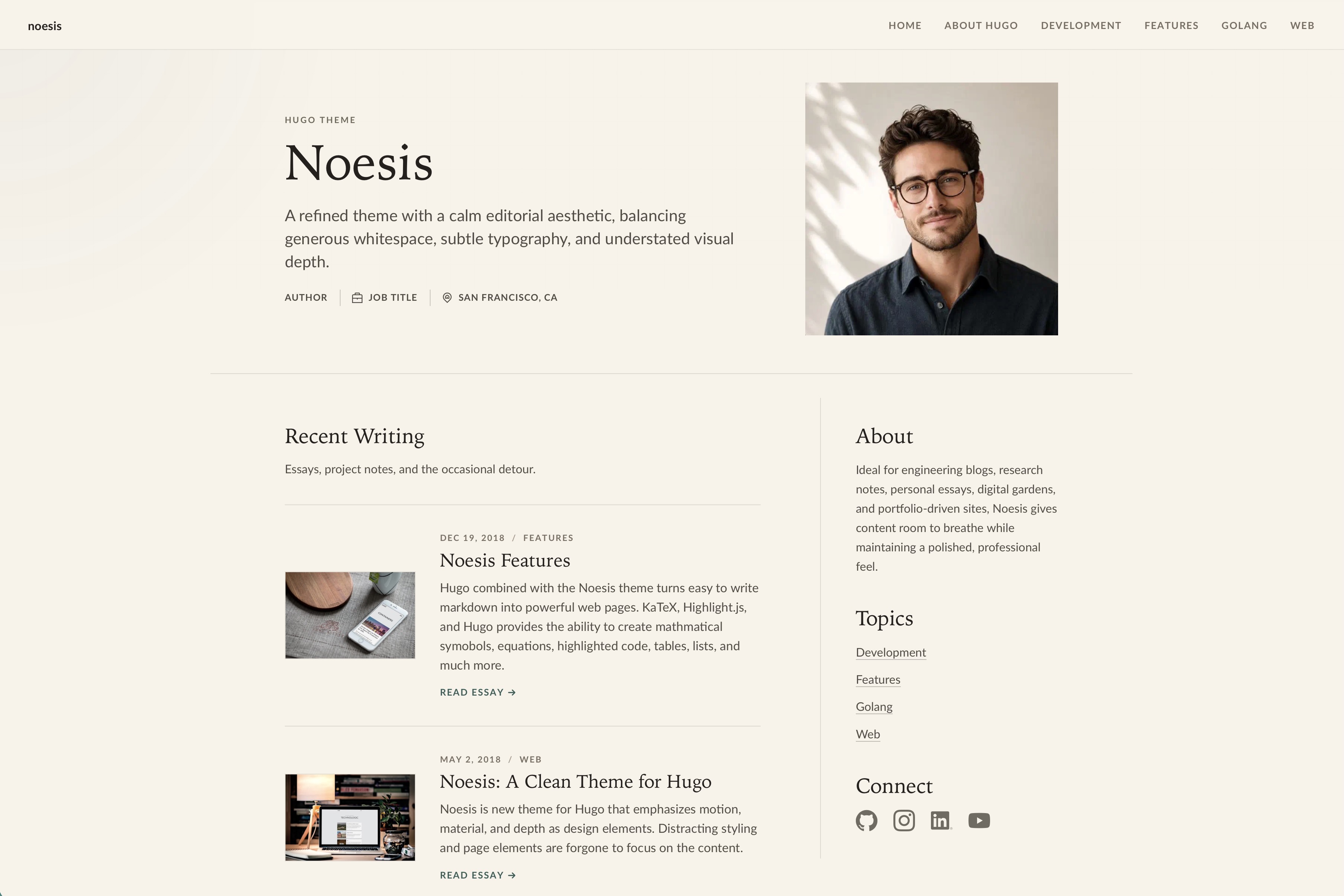
Hugo 博客主题,强调动效、层次与材质作为设计元素
Hugo启动器
noesis — Hugo 启动器模板
作者 josephhutch
Noesis 是一个 Hugo 博客主题,强调动效、层次与材质感,面向以摄影和文字为核心的博客站点。
看看你的网站会是什么样
浏览真实页面截图,比较内容排版与手机效果。点击下方缩略图切换,放大查看整页细节。
目前有 1 张原始预览,可打开完整图片查看设计细节。
截图用于了解视觉与布局,交互效果请以实际项目为准。
采集于 2026-10-03查看来源
值得关注的模板亮点
从已有项目资料中,快速了解它的特点。
通过 hugo.toml 配置品牌、背景图、首页个人资料、社交链接与作者信息
分类页面依据文章 categories 自动生成并加入菜单
提供 raw、image、smallimg 短代码,支持 LaTeX 数学公式与响应式 WebP 图片输出
集成 Google Analytics、Disqus 与 Chroma 语法高亮,默认 evergarden 样式
要求 Hugo 0.157.0 或更高版本,采用 MIT 许可
模板详细介绍
Noesis 是托管在 GitHub 上的 Hugo 主题,作者为 josephhutch,采用 MIT 许可。它面向博客场景,README 将其定位为以动效、层次和材质作为设计元素,用整洁界面突出摄影与写作内容。
主题通过站点根目录的 hugo.toml 配置,可设置品牌名、描述、主内容区、背景图、首页个人资料(姓名、职位、地点、头像及替代文本)、导航 RSS 入口、社交链接与作者信息。首页标题与描述来自 content/_index.md,并支持 about、writingTitle、writingSubtitle 等前置字段。分类页面根据文章 categories 自动生成并加入菜单,因此需要保留 Hugo 的 taxonomy 与 term 页面。
内容使用 Markdown 编写,文章通过 page bundles 组织。前置字段包含 title、date、description、categories、toc、displayInMenu、displayInList、draft 以及 featuredImage 资源。主题提供 raw、image、smallimg 三个短代码:raw 用于原样输出 HTML 或 LaTeX 数学公式;image 与 smallimg 从当前页面包生成响应式图片、WebP 源并写入固有尺寸以减少布局偏移。普通 Markdown 图片若指向页面包或全局资源,也会经 Hugo render hooks 走同一图片管线。
主题要求 Hugo 0.157.0 或更高版本,安装方式是把仓库克隆到 Hugo 项目的 themes 目录。README 说明其支持 Google Analytics 与 Disqus 集成、Chroma 语法高亮(默认 evergarden 样式)、LaTeX 数学符号,以及一组按 real favicon generator 命名规则放置的 favicon 文件。社交图标以 CSS mask 渲染,便于暗色模式重新着色,缺失图标时回退为通用链接图标。README 中提到的 PageSpeed 分数与无障碍优先级属于作者自述,未在本次资料中独立验证。
Hugo启动器
适合你的项目吗?
适用场景
- 搭建以摄影和长文写作为主的个人博客
- 需要按分类自动聚合文章并生成分类页面的内容站点
- 在文章中插入 LaTeX 数学公式或代码高亮的技术博客
- 希望使用页面包与短代码输出响应式 WebP 图片的 Hugo 站点
适合人群
- 使用 Hugo 并愿意按 page bundles 组织内容的博客作者
- 需要分类页面、社交链接与 RSS 入口的个人站点维护者
- 接受通过 hugo.toml 与 content/_index.md 进行配置的用户
上手与定制指南
结合仓库当前版本的说明,按下面的资料检查内容、配置与运行要求。
- 1
需要 Hugo 0.157.0 或更高版本。
- 2
在 Hugo 项目根目录执行 git clone https://github.com/josephhutch/noesis.git themes/noesis 完成安装。
- 3
在 hugo.toml 中设置 theme = "noesis",并按需填写 baseURL、locale、title、分页、服务与 params 配置。
- 4
首页文案与 about、writingTitle、writingSubtitle 等字段写在 content/_index.md。
- 5
favicon 文件需按 real favicon generator 的命名放入站点 static 目录。
授权与来源资料
使用条件与限制
免费使用 · 保留许可声明本次收录的是公开仓库中采用 MIT 许可的免费版本;免费范围为该版本代码,不代表外部服务或第三方素材免费。
使用时需要遵守
- 允许免费使用、修改、商用和分发该版本代码。
- 分发代码副本或实质性部分时,保留原作者版权声明和完整 MIT 许可声明。
- 代码按现状提供;担保与责任限制以原许可证及适用法律为准。
额外费用与待核对事项
- 使用该主题需安装 Hugo 0.157.0 或更高版本,低于此版本无法正常运行。
- 如需 Google Analytics 统计,须自行提供测量 ID 并接入 Google 的外部服务。
- 如需评论功能,须配置 Disqus shortname,评论数据由 Disqus 这一第三方外部服务托管。
- 主题捆绑的第三方前端资源另有许可,列于 THIRD_PARTY_NOTICES.md,使用前需自行核对其授权条款。
- 演示图片、字体、图标及其他第三方素材需按各自许可核对,不能仅凭代码的 MIT 许可判断。
- 域名、托管、数据库、支付或 AI 等外部服务可能另外收费。
查看原文依据
Permission is hereby granted, free of charge
许可证原文
Noesis requires Hugo `0.157.0` or later.
README 原文
[services.googleAnalytics] id = "Your Google Analytics measurement ID - optional"
README 原文
[services.disqus] shortname = "Your shortname for Disqus - optional"
README 原文
https://github.com/josephhutch/noesis/blob/main/LICENSE.mdhttps://github.com/josephhutch/noesis/blob/main/README.mdBundled third-party frontend assets are listed in [THIRD_PARTY_NOTICES.md](THIRD_PARTY_NOTICES.md).
README 原文
DeepSeek 根据仓库许可证和 README 整理 ·2026-10-03。结果仅覆盖已读取资料,依赖、图片、字体及后续条款变更以各自原文为准。
项目核对记录与介绍依据
模板资料
- 来源平台
- Hugo Themes
- 资料与维护参考分
- 资料一般 · 63 / 100
- 技术栈
- Hugo
- 网站类型
- 启动器
这个分数如何计算
本站按许可资料(最高30分)、演示链接(12分)、预览图(10分)、Star数(15分)、记录的维护时间(15分)、描述完整度(8分)、功能记录(5分)和分类资料(5分)计算。它不是代码、安全或性能测试,也不是 Google 评分;有链接不代表已实测可用。
这个项目需要核对什么
- 记录的仓库更新时间
- 2026-09-24
- 截图检查日期
- 2026-10-03
目前没有记录演示链接。请依据仓库说明在本地评估;仅凭截图无法确认交互行为。
目录记录的主要技术栈是 Hugo。请通过依赖清单和锁文件核对实际版本与托管要求。这些说明基于收录资料,不代表代码审计或部署实测。
查看具体选型方法 →介绍的制作与核对状态
介绍由 AI 辅助整理目录与仓库资料。仓库作者不等于这篇介绍的审核者。
审核声明: [email protected] · 2026-10-04
查看当时使用的来源资料
SHA-256: 78093dd535b229bc5b90d3cddac74a5cbb9dc6d9ece4a9ffbe7edab589c61628
2026-10-03T15:27:14.240Z
来源文件 / 仓库# noesis
[](https://github.com/josephhutch/noesis/actions/workflows/main.yml)
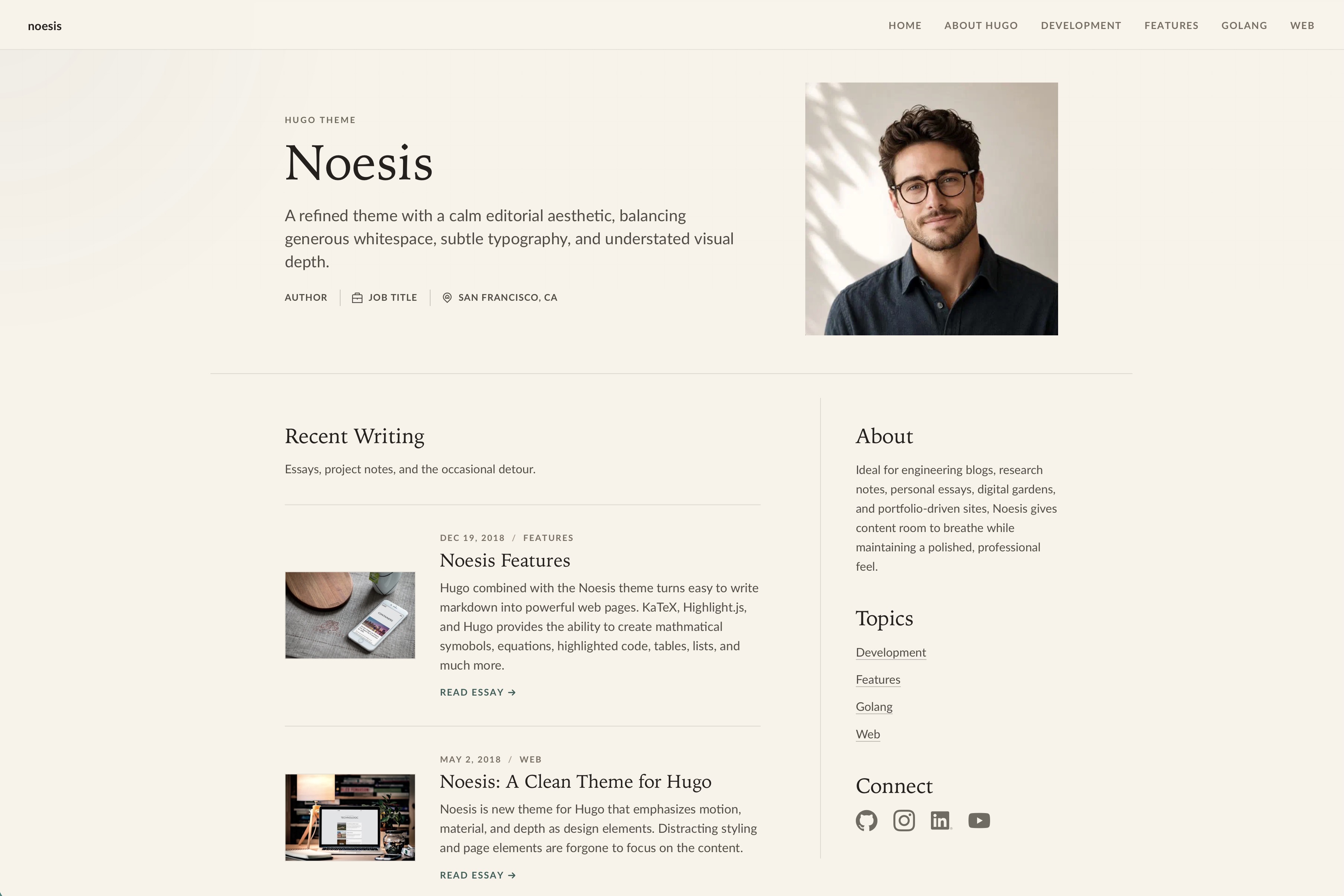
Noesis is a Hugo theme for blogs that emphasizes motion, depth, and material as design elements. Noesis presents your content in a clean interface that highlights good photography and writing.
## Features
- It's **Fast**! PageSpeed scores consistently between 94-100
- Fully **Responsive Design** allowing your site to look good on any size screen
- Responsive image render hooks and shortcodes with WebP output
- **Accessibility** is a priority, making your site easily navigated by screen readers
- Category pages that group similar articles are automatically generated and added to the menu
- Customizable website background image and home button image
- Hugo/Chroma integration provides **beautiful syntax highlighting** for most programming languages and file formats
- Add **math symbols and equations** to your blog posts using LaTeX
- **Google Analytics** and **Disqus** integration
## Installation
Noesis requires Hugo `0.157.0` or later.
In the root directory of your Hugo Project, clone the noesis repo into the themes directory.
```shell session
git clone https://github.com/josephhutch/noesis.git themes/noesis
```
## Usage
### Website Configuration
Customize the look and feel of Noesis through your `hugo.toml` file. Start with this shape and remove settings you do not need.
```toml
baseURL = "https://example.com/"
locale = "en-US"
title = "Your site title"
theme = "noesis"
[pagination]
pagerSize = 10
[services]
[services.googleAnalytics]
id = "Your Google Analytics measurement ID - optional"
[services.disqus]
shortname = "Your shortname for Disqus - optional"
[params]
brand = "The name that is displayed in the top left of the website - optional, title is fallback"
description = "The website's description"
mainSections = ["posts"]
[params.appearance]
backgroundImage = "Path, within the 'assets' folder, of the image used for the page background - optional"
[params.profile]
name = "Name shown in the home page hero - optional"
jobTitle = "Short professional role shown in the home page hero - optional"
location = "Short location shown in the home page hero - optional"
headshotImage = "Path, within the 'assets' folder, of the image used for the home page header - optional"
headshotAlt = "Alt text for the headshotImage - should be used with headshotImage"
[params.navigation]
rssInMenu = true # Show an RSS link in the nav menu and footer - optional
[params.socials]
email = "Email address or mailto: URL, icon link will be included in the home page rail - optional"
discord = "URL to your Discord profile or community - optional"
facebook = "URL to your Facebook account, icon link will be included in the rail and footer - optional"
flickr = "URL to your Flickr account, icon link will be included in the rail and footer - optional"
github = "URL to your GitHub account, icon link will be included in the rail and footer - optional"
instagram = "URL to your Instagram account - optional"
linkedin = "URL to your LinkedIn account, icon link will be included in the rail and footer - optional"
patreon = "URL to your Patreon account - optional"
pinterest = "URL to your Pinterest account - optional"
reddit = "URL to your Reddit account - optional"
snapchat = "URL to your Snapchat account - optional"
soundCloud = "URL to your SoundCloud account, icon link will be included in the rail and footer - optional"
spotify = "URL to your Spotify account, icon link will be included in the rail and footer - optional"
tikTok = "URL to your TikTok account - optional"
tumblr = "URL to your Tumblr account, icon link will be included in the rail and footer - optional"
twitch = "URL to your Twitch account, icon link will be included in the rail and footer - optional"
twitter = "URL to your X/Twitter account, icon link will be included in the rail and footer - optional"
x = "URL to your X account, icon link will be included in the rail and footer - optional"
vimeo = "URL to your Vimeo account, icon link will be included in the rail and footer - optional"
whatsapp = "URL to your WhatsApp contact or channel - optional"
youtube = "URL to your YouTube account, icon link will be included in the footer - optional"
[params.author]
name = "Author name for RSS metadata - optional"
email = "Author email for RSS metadata - optional"
[markup]
[markup.highlight]
style = "evergarden"
```
The `title` parameter is used for each page title, the title that search engines display in search results. If you would like the title shown in the top left of the page to be different from the page title, use the `brand` parameter. For instance, the title parameter for my site is `Joe Hutchinson` but the brand parameter is set to `joehutch`.
Find your `locale` [here](https://www.metamodpro.com/browser-language-codes).
The homepage hero title and description come from `content/_index.md`, along with the optional `about`, `writingTitle`, and `writingSubtitle` front matter fields (see [Homepage content](#homepage-content) below). Use this content file for the main editorial positioning of the site. The optional `profile.name`, `profile.jobTitle`, and `profile.location` site params appear as compact metadata beneath the hero description. The home page writing list uses Hugo's `params.mainSections`, defaulting to the section with the most pages when you do not set it. The rail's topic links are generated from post `categories`, so do not disable Hugo's `taxonomy` or `term` pages if you want those links to resolve. Social links under `params.socials` appear in the rail and footer when configured. Icons are rendered as CSS masks so the theme can recolor them for dark mode. If you need a custom dark-mode shape, add `assets/icons/<service>-dark.svg`; if an icon is missing, the theme falls back to a generic link icon.
The `appearance.backgroundImage` parameter gives you the ability to customize the look of your site further. Noesis is designed to look best with a subtle tiling image for the background. If no background image is specified, the background will be a solid gray color.
Noesis is tuned against Hugo's `evergarden` Chroma style. If you want to change the highlighter theme you can specify a different one from [this list](https://xyproto.github.io/splash/docs/all.html). To configure the syntax highlighter further, such as adding line numbers, check out [this Hugo doc section](https://gohugo.io/getting-started/configuration-markup#highlight).
That is the only configuration required at the site level! You can now begin writing content for your site.
#### Favicons
Noesis supports a large array of favicon formats. Simply add your favicons with the correct file names to the root folder of your site (put them in the static folder). The favicon file names correspond to the files generated by the [real favicon generator](https://realfavicongenerator.net/).
- favicon.ico
- favicon-16x16.png
- favicon-32x32.png
- apple-touch-icon.png
- android-chrome-192x192.png
- android-chrome-384x384.png
- mstile-150x150.png
- safari-pinned-tab.svg
- browserconfig.xml
- site.webmanifest
### Creating content
Make a new blog post by executing `hugo new posts/postnamehere/index.md` in your shell. At the top of the new markdown file is the front matter. The front matter is the page's metadata that determines how Hugo and Noesis generate the HTML for your post. Below you can find the front matter that Noesis uses and what each parameter means.
```yaml
---
title: "The title of the post"
date: date the post was generated (automatically generated)
description: "Description of the post (displayed in the post's card)"
categories: ["Add comma separated categories here", "another category"]
toc: if the post should include a table of contents (true, false)
displayInMenu: if the post should show up in the navigation menu (true, false)
displayInList: if the post should be listed on the home page and category pages (true, false)
draft: if the post is a draft (true, false)
resources:
- name: featuredImage
src: "Filename of the post's featured image, used as the card image and the image at the top of the article"
params:
description: "Description for the featured image, used as the alt text"
attribution:
name: "Name of person to attribute image to"
link: "optional URL to persons site"
---
```
The `displayInMenu` and `displayInList` parameters are used to determine where your content is displayed. Posts typically have displayInMenu set to false so that the post is not a menu option, and displayInList set to true so it shows up on the homepage's list of posts and in category page lists. An About Me page, on the other hand, would have displayInMenu set to true and displayInList set to false. That will allow the About Me page to be accessible from the menu but not displayed in the homepage's list of posts.
The `categories` parameter is used to group similar posts in category pages. Category pages are accessible from the menu and list all posts within the same category.
Add an interesting description and a good image to each post to get the most value from this theme.
Noesis takes advantage of [page bundles](https://gohugo.io/content-management/page-bundles/) to optimize your images for your site. This may require you to update the way your content is structured, also see [content organization](https://gohugo.io/content-management/organization/). Use the `image` and `smallimg` shortcodes to take full advantage of image optimization. Also, the `featuredImage` resource must exist in the post's page bundle.
Posts are written in markdown. You can find how to write in markdown from this [markdown cheatsheet](https://github.com/adam-p/markdown-here/wiki/Markdown-Cheatsheet).
#### Shortcodes
Shortcodes extend markdown to make writing easier and more powerful.
`raw` allows for adding content that Hugo will pass through unmodified. Raw is useful for adding html to your content or **adding math equations in LaTeX**.
```html
{{< raw >}}
\[ S(x) = \frac{1}{1+e^{-x}} \]
{{< /raw >}}
```
`image` adds a responsive, optimized image from the current page bundle. The shortcode creates resized source images, adds a WebP source, and includes intrinsic image dimensions to reduce layout shift. Image just needs the src and alt parameters.
```html
<!--- Will display optimized WebP on supported browsers with a source-format fallback -->
{{< image src="awesome.jpg" alt="An awesome image that will use webp when possible. Much faster!" >}}
```
`smallimg` allows you to add smaller optimized images to your posts that aren't stretched to be as wide as the content area. Smallimg takes the parameters src, alt, smartfloat (optional), width (optional, in pixels only), and clear (optional). The smartfloat parameter can be set to right or left, and it floats the image to the right or left on big enough screens. The clear parameter allows you to clear a previous float which is helpful if you are using multiple smallimgs close to each other.
```html
<!--- smallimg also generates a WebP source and source-format fallback -->
{{< smallimg src="smile.png" alt="A big beautiful smile" smartfloat="left" width="100px" clear="true" >}}
```
Regular Markdown images that point to page-bundle or global assets are optimized with the same image pipeline through Hugo render hooks.
### Further Customization
#### Homepage content
The homepage is configured through `content/_index.md`. In addition to the standard heading and subtext, it supports a few optional front matter fields used by the home layout.
```yaml
---
title: "This is the main heading text in big letters"
date: the date
description: "This is the subtext below the main heading in smaller letters"
about: |
Short bio shown in the home page about rail. Multi-line content is supported via YAML's
literal block scalar (|).
writingTitle: "Heading shown above the home page post list - optional, defaults to Recent Posts"
writingSubtitle: "Short text shown below the home page post-list heading - optional"
---
```
To change the heading and subtext at the top of other list pages, add an `_index.md` file in the folder that the list page is generated from with the `title`, `date`, and `description` fields above.
#### Overriding CSS
To override CSS, you should create file `project_root/assets/css/override.css` and place all your CSS inside it. This file will be merged with standard CSS when the site is generated.
#### Custom Meta Tags
Noesis includes Hugo's embedded Open Graph, Twitter Card, and schema metadata partials by default. You can add optional custom tags by adding `project_root/layouts/_partials/meta-tags.html`.
Refer to [/exampleSite/layouts/_partials](/exampleSite/layouts/_partials) for sample meta configs.
## Helpful Links
[Noesis Blog Post](https://www.joehutch.com/posts/noesis-theme/) - See noesis in action and learn more about the theme
[Hugo Documentation](https://gohugo.io/documentation/) - Learn how to use Hugo
[Markdown Cheatsheet](https://github.com/adam-p/markdown-here/wiki/Markdown-Cheatsheet) - Write in markdown like a pro
[Latex Math Documentation](https://en.wikibooks.org/wiki/LaTeX/Mathematics) - Learn math typesetting with LaTeX (powered by KaTeX)
## Contributing
Noesis is actively maintained and I welcome you to help make it better! Contributions in the way of new features, documentation improvements, bug fixes, and feature requests are appreciated. Please make an individual pull-request/issue for each suggestion. PRs are tested in GitHub Actions to ensure the html and css generated from the example site are valid.
## License
MIT © Joe Hutchinson
Bundled third-party frontend assets are listed in [THIRD_PARTY_NOTICES.md](THIRD_PARTY_NOTICES.md).
看看同类模板
对比同技术栈与用途的模板,找到更适合的视觉与内容结构。

hugo-xmin
eXtremely Minimal Hugo theme: about 140 lines of code in total, including HTML and CSS (with no dependencies)
Hugo · 启动器

hugo-theme-gallery
Gallery Theme for Hugo
Hugo · 启动器

reveal-hugo
📽️ Create rich HTML-based presentations with Hugo and Reveal.js
Hugo · 启动器

anatole
Anatole is a minimalistic two-column theme for Hugo.
Hugo · 启动器

hugo-theme-diary
Moments piled up. A Hugo theme ported from SumiMakito/hexo-theme-Journal.
Hugo · 启动器

risotto
A minimalist, responsive hugo theme inspired by terminal ricing aesthetics.
Hugo · 启动器