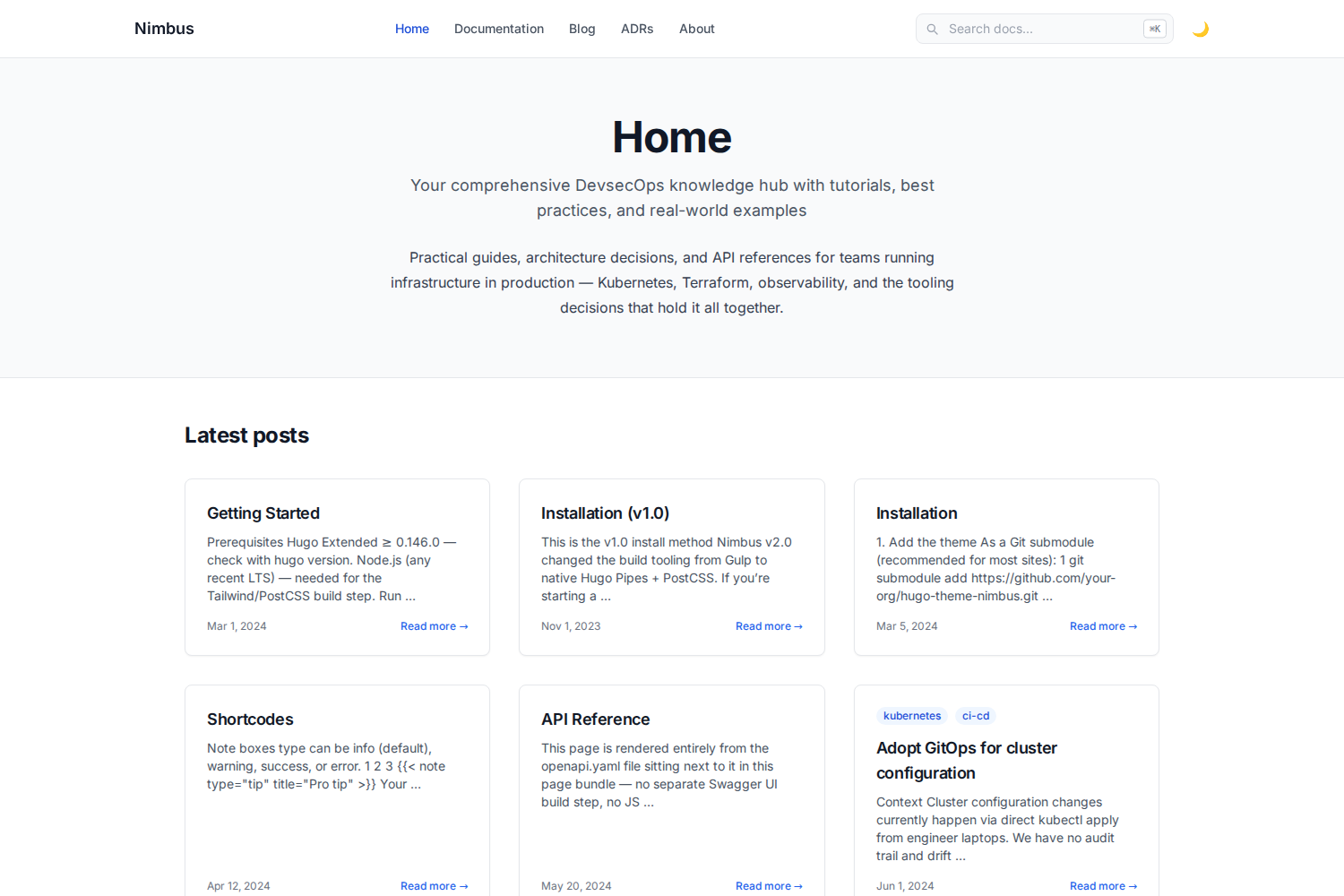
Tailwind CSS-based Hugo theme for DevOps knowledge bases, supporting blogs, sidebar documentation, and runbooks
HugoStarter
hugo-nimbus — Hugo Starter Template
By k-s-pavan-kumar
Nimbus is a Tailwind CSS-based Hugo theme for DevOps knowledge bases, combining blog posts, sidebar-navigated documentation, and runbooks in a single theme.
Explore the design
Compare the page layouts and mobile experience. Open any screenshot for a closer look.
Author preview
Author-provided previewTop of page
Preview provided in the project README.
One original preview is available. Open the full image to inspect the design.
Screenshots show visual appearance; interactive behavior may differ.
Recorded 2026-10-03View source
What stands out
A quick read of the recorded project description.
Native OpenAPI specification rendering: parsed by Hugo at build time from YAML/JSON to generate collapsible endpoint documentation without Swagger UI
Treats Architecture Decision Records (ADRs) as a first-class content type, with status badges, a timeline index, and an archetype
diff shortcode builds on the Chroma diff lexer, providing a filename header bar and full-line red/green backgrounds
Client-side search uses locally vendored Lunr.js; core search does not depend on third-party CDNs
Keyboard-first navigation: Cmd/Ctrl+K or / to focus search, arrow keys to move, Enter to open, Esc to close
Template Details
Nimbus is an MIT-licensed Hugo theme built with Tailwind CSS, positioned as a DevOps knowledge base that hosts blog posts, sidebar-navigated reference documentation, and runbooks. The theme defaults to a white/light design and offers a working dark mode: persisted via localStorage, following system preference on first visit, with no theme flash on load.
For content organization, Nimbus provides a sidebar-navigated documentation layout with automatic table of contents and previous/next page links; built-in tags, categories, authors, and a tech taxonomy; and support for Open Graph, Twitter Cards, and JSON-LD structured data. Code blocks use Chroma highlighting with light and dark color schemes and support multi-language tabbed code blocks. Shortcodes include terminal, note/warning/tip callouts, badge, and Mermaid diagrams.
Nimbus's differentiating capabilities center on three areas: first, native OpenAPI specification rendering—after placing a spec file in a page bundle, Hugo's own YAML/JSON parser generates interactive, collapsible endpoint documentation at build time, including method badges, parameters, and request/response schemas, without relying on Swagger UI or additional JS components; second, treating Architecture Decision Records (ADRs) as a first-class content type, with an adr block featuring status badges (proposed/accepted/deprecated/superseded), a timeline index, and an archetype, so you can use hugo new adr/000x-title.md to generate Context/Decision/Consequences format; third, a diff shortcode that builds on Hugo's built-in Chroma diff lexer to add a filename header bar and full-line red/green backgrounds for rendering true unified diffs.
Search is client-side, using a locally vendored Lunr.js, so core search does not depend on third-party CDNs. Keyboard navigation supports Cmd/Ctrl+K or / to focus search, ↑/↓ to move through results, Enter to open, and Esc to close. The theme requires Hugo Extended ≥ 0.146.0 and Node.js (for the Tailwind/PostCSS build step). The CSS build is a one-time CLI call that compiles Tailwind to assets/css/tailwind.built.css and commits it to the repository; Hugo only minifies and fingerprints that file. Therefore, as long as the file exists, hugo server -D and hugo --minify do not depend on Node.js; you only need to run the npm scripts when modifying styles or Tailwind content sources. Mermaid diagrams are the only remaining external runtime dependency, loading mermaid.min.js from the jsdelivr CDN, and only on pages that contain diagrams. The example site disables enableGitInfo by default because it causes build failures in non-git checkout environments.
HugoStarter
Is it right for your project?
Use Cases
- Building a DevOps knowledge base site that includes blog posts, reference documentation, and runbooks
- Rendering OpenAPI specifications directly in a Hugo site to generate collapsible API endpoint documentation
- Recording architecture decisions in ADR format and managing them with status badges and a timeline index
- Displaying unified diffs in documentation with a filename header bar and full-line red/green backgrounds
- Writing tutorial content with multi-language tabbed code blocks, terminal output, and Mermaid diagrams
Suitable For
- Developers using Hugo who want to customize styles with Tailwind CSS
- DevOps teams that need blogs, documentation, and runbooks on the same site
- Projects that need to render OpenAPI specifications at build time without introducing Swagger UI
- Teams that want to manage architecture decisions with ADRs and need status and timeline views
Getting started & customization
Use these recorded setup notes alongside the repository instructions for your chosen version.
- 1
Requires Hugo Extended ≥ 0.146.0 and Node.js (for the Tailwind/PostCSS build step)
- 2
The example site embeds a copy of the theme in exampleSite/themes/nimbus; after cloning, enter exampleSite and run npm install and hugo server -D to preview
- 3
To use it in your own site, add the repository as a themes/nimbus submodule, set theme = "nimbus" in hugo.toml, and copy the exampleSite's package.json, postcss.config.js, and tailwind.config.js, then run npm install
- 4
Tailwind is compiled via a one-time CLI into assets/css/tailwind.built.css and committed to the repository; when that file exists, Hugo builds do not require Node.js—only run npm run watch-css or npm run build-css when modifying styles or Tailwind content sources
- 5
Mermaid diagrams load mermaid.min.js from the jsdelivr CDN, and only on pages that contain diagrams; the example site disables enableGitInfo by default, and enabling it in a non-git checkout environment will cause build failures
License & source material
Usage conditions & limitations
Free to use · keep license noticeThis entry covers the free version under the MIT license in the public repository; the free scope is the code of this version and does not mean external services or third-party assets are free.
Must comply with when using
- You may use, modify, commercialize, and distribute the code of this version for free.
- When distributing copies or substantial portions of the code, retain the original author's copyright notice and the full MIT license notice.
- The code is provided as is; warranties and limitations of liability are governed by the original license and applicable law.
Additional costs & items to verify
- Demo images, fonts, icons, and other third-party assets must be checked against their respective licenses; they cannot be judged solely by the code's MIT license.
- External services such as domains, hosting, databases, payments, or AI may incur additional charges.
- When using Mermaid diagrams, pages load mermaid.min.js from the jsdelivr CDN, the only remaining external runtime dependency in the theme; if you need full offline operation or want to avoid third-party CDNs, you must handle this dependency yourself.
- The example site disables enableGitInfo by default; enabling this option in a non-git checkout environment will cause build failures, so use it in a git repository or keep it disabled.
- Node.js is only needed when modifying styles or Tailwind content sources; if tailwind.built.css already exists, Hugo builds themselves do not depend on Node.js.
View Original Text Basis
Permission is hereby granted, free of charge
Original License Text
Mermaid diagrams load `mermaid.min.js` from the jsdelivr CDN (only on pages that actually contain a diagram) — this is the one remaining external runtime dependency in the theme.
Original README
`enableGitInfo` is off by default in `exampleSite/hugo.toml` (commented out) because it hard-fails the build on a non-git checkout
Original README
https://github.com/k-s-pavan-kumar/hugo-nimbus/blob/main/LICENSEhttps://github.com/k-s-pavan-kumar/hugo-nimbus/blob/main/README.mdYou only need Node when you actually change styles or Tailwind content sources:
Original README
Compiled by DeepSeek based on repository license and README ·2026-10-04. Results only cover the materials read; dependencies, images, fonts, and subsequent term changes are subject to their respective original texts.
Project checks & description sources
Template Information
- Source platforms
- Hugo Themes
- Documentation and maintenance reference score
- Partly documented · 63 / 100
- Technologies
- Hugo
- Website type
- Starter
How this score is calculated
Our heuristic uses license records (up to 30), a demo link (12), a preview (10), stars (15), recorded maintenance (15), description completeness (8), feature records (5) and classification data (5). It is not a code, security or performance test, or a Google score. A link does not establish tested functionality.
What to verify for this project
- Repository update recorded
- 2026-07-26
- Screenshot last checked
- 2026-10-04
No demo link is recorded. Use the repository instructions to evaluate the project locally; the screenshot alone cannot establish interactive behavior.
The catalog identifies Hugo as the primary stack. Check the actual dependency manifest and lockfile for versions and hosting requirements. These notes use recorded metadata, not a code audit or a deployment test.
Use a selection guide →How this description was prepared
AI-assisted description based on catalog records and repository material. Repository authors are not automatically the reviewers of this description.
Review declaration: [email protected] · 2026-10-04
Inspect the recorded source material
SHA-256: b9ebf374c7ba0002ca9c535ed77395e3e78544ecbebd4631d14dcb24d91ec35e
2026-10-04T15:30:22.043Z
Source file / repository<img src="https://raw.githubusercontent.com/k-s-pavan-kumar/hugo-nimbus/main/images/logo.svg" alt="Nimbus logo" width="64" height="64"> # Nimbus A Tailwind CSS Hugo theme for DevOps knowledge hubs — blog posts, sidebar-navigation reference docs, and runbooks, all in one theme. 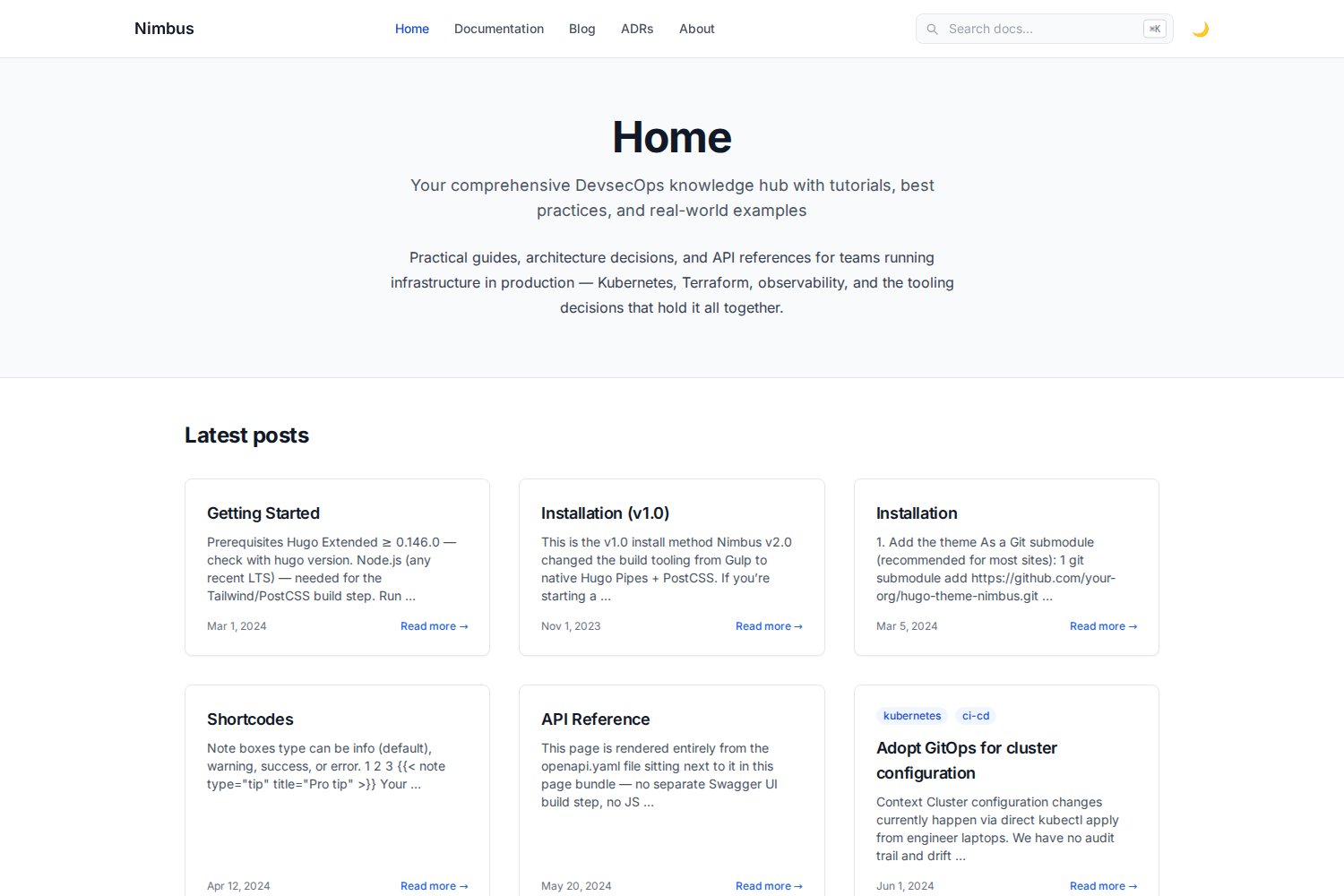 ## Features - ⚪ Clean, white/light-first design by default, with a genuinely working dark mode (persisted via `localStorage`, respects system preference on first visit, no flash-of-wrong-theme on load) - ⌨️ Keyboard-first navigation: `Cmd/Ctrl+K` or `/` to jump to search, `↑`/`↓` to move through results, `Enter` to open, `Esc` to close - 🔍 Client-side search (Lunr.js, vendored locally — no third-party CDN dependency for core search to keep working) - 📚 Sidebar-navigation docs layout with auto table-of-contents and prev/next - 🎨 Syntax-highlighted code blocks (Chroma, light + dark variants) and tabbed multi-language code blocks - 🖥️ Terminal, note/warning/tip callout, badge, and Mermaid-diagram shortcodes - 🏷️ Tags, categories, authors, and technologies taxonomies - 🔗 Open Graph, Twitter Card, and JSON-LD structured data out of the box - 📱 Responsive, accessible (visible focus rings for keyboard users) ### What sets Nimbus apart - 🧩 **Native OpenAPI spec rendering** — drop a spec file into a page bundle and get interactive, collapsible endpoint docs (method badges, parameters, request/response schemas). Rendered entirely by Hugo's own YAML/JSON parser at build time — no Swagger UI bundle, no JS widget, nothing to keep in sync separately. See `/docs/api-reference/`. - 📋 **Architecture Decision Records as a first-class content type** — a dedicated `adr` section with status badges (proposed / accepted / deprecated / superseded), a timeline index, and an archetype so `hugo new adr/000x-title.md` scaffolds the Context/Decision/Consequences format for you. See `/adr/`. - 🔀 **Real diff rendering** — a `diff` shortcode wraps Hugo's built-in Chroma diff lexer with a file-name header bar and full-row red/green backgrounds, for genuine unified-diff syntax (not just a side-by-side code comparison). See the Shortcodes doc page. ## Quickstart ```bash git clone https://github.com/k-s-pavan-kumar/hugo-nimbus.git cd hugo-nimbus/exampleSite npm install hugo server -D ``` Open `http://localhost:1313`. The example site embeds a working copy of the theme at `exampleSite/themes/nimbus`, so no extra flags are needed. See [`exampleSite/content/docs/`](exampleSite/content/docs/) for full installation and usage docs (also rendered live at `/docs/` when you run the example site). ## Requirements - Hugo **Extended** ≥ 0.146.0 - Node.js (any current LTS) — for the Tailwind/PostCSS build step ## Using Nimbus in your own site ```bash cd your-site git submodule add https://github.com/k-s-pavan-kumar/hugo-nimbus.git themes/nimbus ``` Set `theme = "nimbus"` in your `hugo.toml`, then copy `package.json`, `postcss.config.js`, and `tailwind.config.js` from `exampleSite/` into your site root and run `npm install`. Full walkthrough: `/docs/installation/` in the example site. ## How the CSS build works Tailwind is compiled to `assets/css/tailwind.built.css` by a plain, one-shot CLI call — **not** through Hugo's PostCSS pipeline. Hugo only minifies and fingerprints that already-compiled file using its own native (Go) minifier at build time. This means `hugo server -D` and `hugo --minify` have **no Node.js dependency at all** once `tailwind.built.css` exists — it's a plain, portable, committed file, so a fresh clone/unzip works immediately even before running `npm install`. You only need Node when you actually change styles or Tailwind content sources: ```bash npm install npm run watch-css # recompiles on change, run alongside `hugo server -D` # or npm run build-css # one-shot recompile ``` We deliberately avoided Hugo's built-in `css.PostCSS` pipeline (and the "commit a pre-built `/resources` cache" pattern some Hugo showcase submissions use) after hitting two separate classes of fragility with it: a resource-cache content hash that didn't match across OS/npm versions, and an upstream Node 24 permission-model bug in `browserslist` that Hugo's persistent PostCSS process triggers (tracked at [browserslist/browserslist#899](https://github.com/browserslist/browserslist/issues/899)). A plain committed CSS file sidesteps both. ## License MIT — see [LICENSE](LICENSE). ## Submitting to the Hugo themes showcase **Correction:** an earlier version of this README pointed at `gohugoio/hugoThemes` and described adding this repo as a git submodule there. That repo was archived in 2021 and is read-only. The current process lives at [`gohugoio/hugoThemesSiteBuilder`](https://github.com/gohugoio/hugoThemesSiteBuilder) and is much simpler — verified directly against that repo's own README rather than assumed: 1. **Push a tagged release.** The showcase build picks up config/images from your latest semver-tagged release (e.g. `v1.0.0`) if one exists, falling back to the latest commit otherwise. A real tag is more reliable: ```bash git tag v1.0.0 git push --tags ``` 2. **Add the `hugo-theme` topic** to your repo (Settings → gear icon next to About → Topics). 3. **Fork and clone `hugoThemesSiteBuilder`:** ```bash git clone https://github.com/<you>/hugoThemesSiteBuilder.git cd hugoThemesSiteBuilder ``` 4. **Add one line to `themes.txt`** — your repo URL in lexicographical order with the rest of the file, e.g.: ``` github.com/k-s-pavan-kumar/hugo-nimbus ``` 5. **Commit and open a PR:** ```bash git add themes.txt git commit -m "Add theme hugo-nimbus" git push ``` Then open the PR against `gohugoio/hugoThemesSiteBuilder` and confirm the Netlify deploy preview succeeds before asking for review. Requirements this repo already meets, per that README: `theme.toml` in the root with `demosite` set, root-level `hugo.toml` declaring supported Hugo versions, `images/screenshot.png` + `images/tn.png` at 3:2 aspect ratio (1500×1000 and 900×600 here), an OSI-approved LICENSE (MIT), and absolute (not relative) image URLs in this README. A few honest notes for whoever reviews this: - Mermaid diagrams load `mermaid.min.js` from the jsdelivr CDN (only on pages that actually contain a diagram) — this is the one remaining external runtime dependency in the theme. Everything else (search, fonts, syntax highlighting, CSS) is self-hosted with zero CDN calls. - `enableGitInfo` is off by default in `exampleSite/hugo.toml` (commented out) because it hard-fails the build on a non-git checkout — see the comment there before turning it on.
Explore similar templates
Compare previews and descriptions within the same stack and category.

hugo-xmin
hugo-xmin is an extremely minimal Hugo theme written by Yihui Xie for template beginners. HTML and CSS total about 140 lines, with no external dependencies, and it uses the MIT license.
Hugo · Starter

hugo-theme-gallery
A Hugo Extended photo gallery theme that organizes images with Page Bundles, automatically generating album lists and gallery pages with a Justified layout and PhotoSwipe lightbox.
Hugo · Starter

reveal-hugo
reveal-hugo is a Hugo theme that converts Markdown content into Reveal.js-based HTML presentations. It supports slide separation with `---`, shortcodes for fragments, slides, sections, notes, Markdown, and MathJax, and organizes content as root or section presentations with order controlled by weight.
Hugo · Starter

anatole
Anatole is a minimalistic two-column Hugo theme ported from farbox-theme-Anatole, featuring dark mode, multilingual and RTL support, and optional portfolio, comments, analytics, KaTeX, and Mermaid integrations. It suits personal blogs, portfolios, or documentation sites built with Hugo.
Hugo · Starter

hugo-theme-diary
A Hugo diary-style theme ported from the Hexo theme Journal, with a grid homepage for essays and daily notes. It supports six languages, dark mode, table-of-contents scroll positioning, reading time, code highlighting, and configurable sidebar, fonts, and colors.
Hugo · Starter

risotto
risotto is a minimalist, responsive Hugo theme inspired by terminal ricing aesthetics. It uses semantic HTML and pure CSS with no JavaScript, and its layout relies on CSS Grid for native responsiveness without manual breakpoints.
Hugo · Starter