基于 Tailwind CSS 的 Hugo 主题,面向 DevOps 知识库,同时支持博客、侧边栏文档与 runbooks
Hugo启动器
hugo-nimbus — Hugo 启动器模板
作者 k-s-pavan-kumar
Nimbus 是一个基于 Tailwind CSS 的 Hugo 主题,面向 DevOps 知识库,将博客、侧边栏导航文档与运维手册整合在同一主题中。
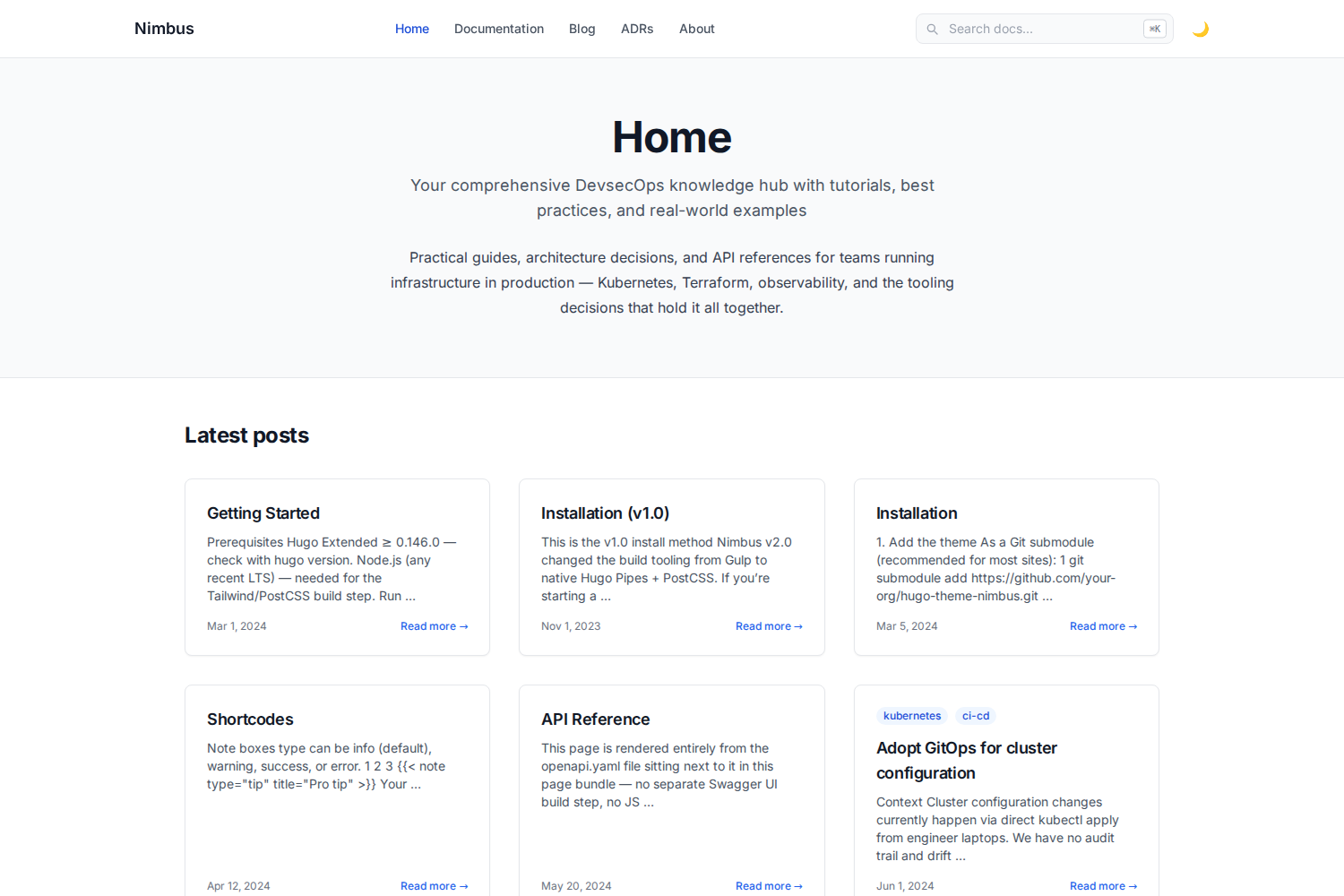
看看你的网站会是什么样
浏览真实页面截图,比较内容排版与手机效果。点击下方缩略图切换,放大查看整页细节。
目前有 1 张原始预览,可打开完整图片查看设计细节。
截图用于了解视觉与布局,交互效果请以实际项目为准。
采集于 2026-10-03查看来源
值得关注的模板亮点
从已有项目资料中,快速了解它的特点。
原生 OpenAPI 规范渲染:由 Hugo 构建时解析 YAML/JSON,生成可折叠的端点文档,无需 Swagger UI
将架构决策记录(ADR)作为一等内容类型,带状态徽章、时间线索引和 archetype
diff 短代码基于 Chroma diff 词法分析器,提供文件名标题栏和整行红/绿背景
客户端搜索使用本地 vendored 的 Lunr.js,核心搜索不依赖第三方 CDN
键盘优先导航:Cmd/Ctrl+K 或 / 聚焦搜索,方向键移动,Enter 打开,Esc 关闭
模板详细介绍
Nimbus 是采用 MIT 许可的 Hugo 主题,使用 Tailwind CSS 构建,定位为 DevOps 知识库,同时承载博客文章、侧边栏导航的参考文档和 runbooks。主题默认采用白/浅色设计,并提供可用的暗色模式:通过 localStorage 持久化,首次访问遵循系统偏好,加载时不会出现主题闪烁。
内容组织方面,Nimbus 提供侧边栏导航的文档布局,带自动目录和上一页/下一页;内置标签、分类、作者和技术 taxonomy;支持 Open Graph、Twitter Card 与 JSON-LD 结构化数据。代码块使用 Chroma 高亮,提供明暗两套配色,并支持多语言标签页代码块。短代码包括终端、note/warning/tip 提示框、badge 和 Mermaid 图表。
Nimbus 的差异化能力集中在三处:一是原生 OpenAPI 规范渲染,将规范文件放入页面 bundle 后,由 Hugo 自身的 YAML/JSON 解析器在构建时生成可交互、可折叠的端点文档,包含方法徽章、参数与请求/响应 schema,不依赖 Swagger UI 或额外 JS 组件;二是将架构决策记录(ADR)作为一等内容类型,提供带状态徽章(proposed/accepted/deprecated/superseded)的 adr 区块、时间线索引和 archetype,可用 hugo new adr/000x-title.md 生成 Context/Decision/Consequences 格式;三是 diff 短代码,在 Hugo 内置 Chroma diff 词法分析器基础上增加文件名标题栏和整行红/绿背景,用于渲染真正的 unified diff。
搜索为客户端实现,使用本地 vendored 的 Lunr.js,核心搜索不依赖第三方 CDN。键盘导航支持 Cmd/Ctrl+K 或 / 聚焦搜索、↑/↓ 移动结果、Enter 打开、Esc 关闭。主题要求 Hugo Extended ≥ 0.146.0 以及 Node.js(用于 Tailwind/PostCSS 构建步骤)。CSS 构建方式为一次性 CLI 调用,将 Tailwind 编译为 assets/css/tailwind.built.css 并提交到仓库,Hugo 仅对该文件做压缩和指纹处理;因此只要该文件存在,hugo server -D 和 hugo --minify 不依赖 Node.js,仅在修改样式或 Tailwind 内容源时才需要运行 npm 脚本。Mermaid 图表是唯一保留的外部运行时依赖,从 jsdelivr CDN 加载 mermaid.min.js,且仅在包含图表的页面加载。示例站点默认关闭 enableGitInfo,因为在非 git 检出环境下会导致构建失败。
Hugo启动器
适合你的项目吗?
适用场景
- 搭建包含博客、参考文档和运维手册的 DevOps 知识库站点
- 在 Hugo 站点中直接渲染 OpenAPI 规范,生成可折叠的 API 端点文档
- 使用 ADR 格式记录架构决策,并通过状态徽章和时间线索引进行管理
- 在文档中展示带文件名标题栏和整行红/绿背景的 unified diff
- 编写包含多语言标签页代码块、终端输出和 Mermaid 图表的教程内容
适合人群
- 使用 Hugo 并希望以 Tailwind CSS 定制样式的开发者
- 需要将博客、文档和运维手册放在同一站点的 DevOps 团队
- 需要在构建时渲染 OpenAPI 规范而不引入 Swagger UI 的项目
- 希望用 ADR 管理架构决策并需要状态与时间线视图的团队
上手与定制指南
结合仓库当前版本的说明,按下面的资料检查内容、配置与运行要求。
- 1
需要 Hugo Extended ≥ 0.146.0 以及 Node.js(用于 Tailwind/PostCSS 构建步骤)
- 2
示例站点在 exampleSite/themes/nimbus 内嵌了主题副本,克隆后进入 exampleSite 执行 npm install 和 hugo server -D 即可预览
- 3
在自己的站点中使用时,将仓库添加为 themes/nimbus 子模块,在 hugo.toml 设置 theme = "nimbus",并复制 exampleSite 的 package.json、postcss.config.js 和 tailwind.config.js 后运行 npm install
- 4
Tailwind 通过一次性 CLI 编译为 assets/css/tailwind.built.css 并提交到仓库;该文件存在时 Hugo 构建不需要 Node.js,仅在修改样式或 Tailwind 内容源时运行 npm run watch-css 或 npm run build-css
- 5
Mermaid 图表从 jsdelivr CDN 加载 mermaid.min.js,且仅在包含图表的页面加载;示例站点默认关闭 enableGitInfo,在非 git 检出环境下开启会导致构建失败
授权与来源资料
使用条件与限制
免费使用 · 保留许可声明本次收录的是公开仓库中采用 MIT 许可的免费版本;免费范围为该版本代码,不代表外部服务或第三方素材免费。
使用时需要遵守
- 允许免费使用、修改、商用和分发该版本代码。
- 分发代码副本或实质性部分时,保留原作者版权声明和完整 MIT 许可声明。
- 代码按现状提供;担保与责任限制以原许可证及适用法律为准。
额外费用与待核对事项
- 演示图片、字体、图标及其他第三方素材需按各自许可核对,不能仅凭代码的 MIT 许可判断。
- 域名、托管、数据库、支付或 AI 等外部服务可能另外收费。
- 使用 Mermaid 图表时,页面会从 jsdelivr CDN 加载 mermaid.min.js,这是主题中唯一保留的外部运行时依赖;若需完全离线或避免第三方 CDN,需自行处理该依赖。
- 示例站点默认关闭 enableGitInfo;在非 git 检出环境下开启该选项会导致构建失败,需在 git 仓库中使用或保持关闭。
- 仅在修改样式或 Tailwind 内容源时才需要 Node.js;若 tailwind.built.css 已存在,Hugo 构建本身不依赖 Node.js。
查看原文依据
Permission is hereby granted, free of charge
许可证原文
Mermaid diagrams load `mermaid.min.js` from the jsdelivr CDN (only on pages that actually contain a diagram) — this is the one remaining external runtime dependency in the theme.
README 原文
`enableGitInfo` is off by default in `exampleSite/hugo.toml` (commented out) because it hard-fails the build on a non-git checkout
README 原文
https://github.com/k-s-pavan-kumar/hugo-nimbus/blob/main/LICENSEhttps://github.com/k-s-pavan-kumar/hugo-nimbus/blob/main/README.mdYou only need Node when you actually change styles or Tailwind content sources:
README 原文
DeepSeek 根据仓库许可证和 README 整理 ·2026-10-04。结果仅覆盖已读取资料,依赖、图片、字体及后续条款变更以各自原文为准。
项目核对记录与介绍依据
模板资料
- 来源平台
- Hugo Themes
- 资料与维护参考分
- 资料一般 · 63 / 100
- 技术栈
- Hugo
- 网站类型
- 启动器
这个分数如何计算
本站按许可资料(最高30分)、演示链接(12分)、预览图(10分)、Star数(15分)、记录的维护时间(15分)、描述完整度(8分)、功能记录(5分)和分类资料(5分)计算。它不是代码、安全或性能测试,也不是 Google 评分;有链接不代表已实测可用。
这个项目需要核对什么
- 记录的仓库更新时间
- 2026-07-26
- 截图检查日期
- 2026-10-04
目前没有记录演示链接。请依据仓库说明在本地评估;仅凭截图无法确认交互行为。
目录记录的主要技术栈是 Hugo。请通过依赖清单和锁文件核对实际版本与托管要求。这些说明基于收录资料,不代表代码审计或部署实测。
查看具体选型方法 →介绍的制作与核对状态
介绍由 AI 辅助整理目录与仓库资料。仓库作者不等于这篇介绍的审核者。
审核声明: [email protected] · 2026-10-04
查看当时使用的来源资料
SHA-256: b9ebf374c7ba0002ca9c535ed77395e3e78544ecbebd4631d14dcb24d91ec35e
2026-10-04T15:30:22.043Z
来源文件 / 仓库<img src="https://raw.githubusercontent.com/k-s-pavan-kumar/hugo-nimbus/main/images/logo.svg" alt="Nimbus logo" width="64" height="64"> # Nimbus A Tailwind CSS Hugo theme for DevOps knowledge hubs — blog posts, sidebar-navigation reference docs, and runbooks, all in one theme. 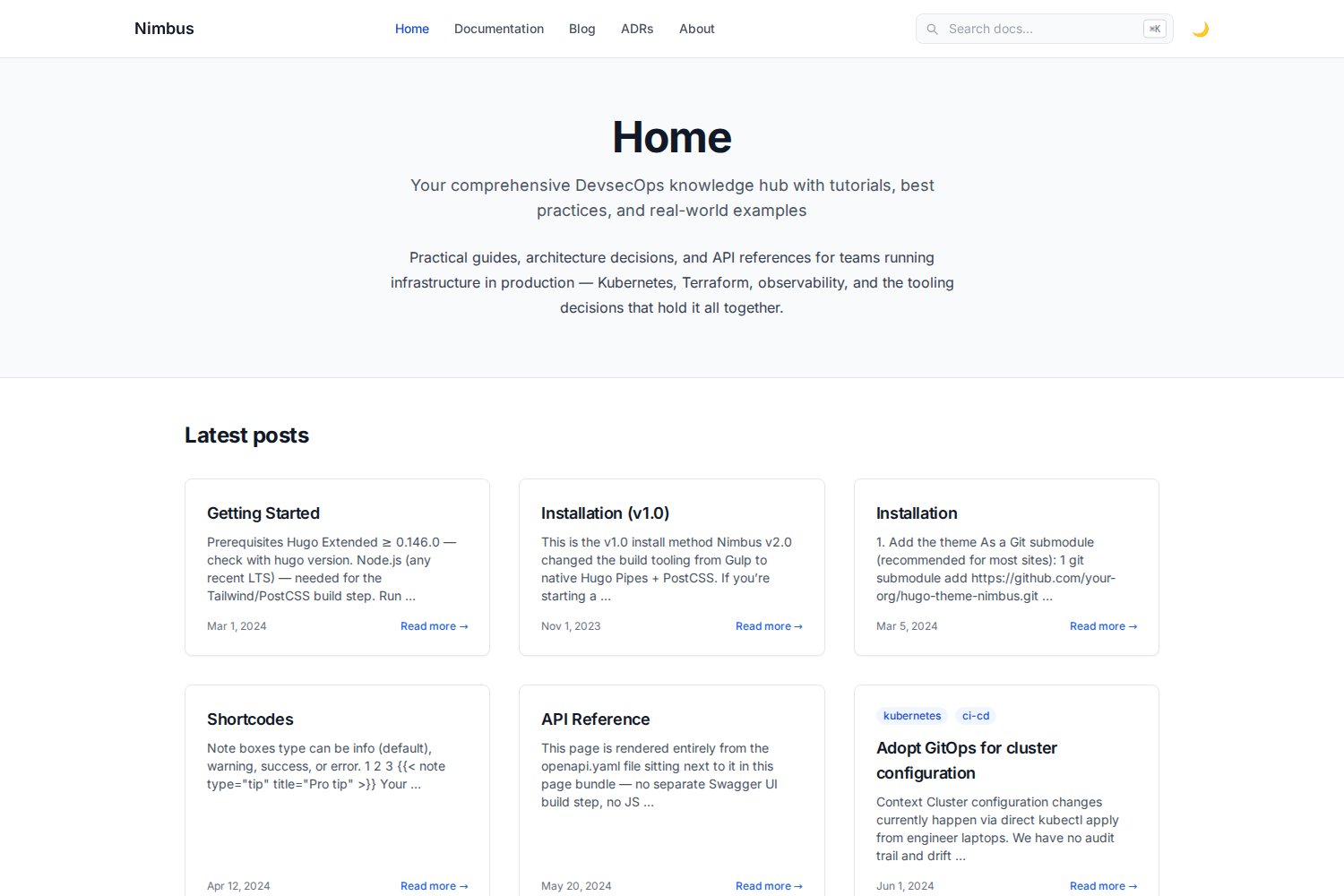 ## Features - ⚪ Clean, white/light-first design by default, with a genuinely working dark mode (persisted via `localStorage`, respects system preference on first visit, no flash-of-wrong-theme on load) - ⌨️ Keyboard-first navigation: `Cmd/Ctrl+K` or `/` to jump to search, `↑`/`↓` to move through results, `Enter` to open, `Esc` to close - 🔍 Client-side search (Lunr.js, vendored locally — no third-party CDN dependency for core search to keep working) - 📚 Sidebar-navigation docs layout with auto table-of-contents and prev/next - 🎨 Syntax-highlighted code blocks (Chroma, light + dark variants) and tabbed multi-language code blocks - 🖥️ Terminal, note/warning/tip callout, badge, and Mermaid-diagram shortcodes - 🏷️ Tags, categories, authors, and technologies taxonomies - 🔗 Open Graph, Twitter Card, and JSON-LD structured data out of the box - 📱 Responsive, accessible (visible focus rings for keyboard users) ### What sets Nimbus apart - 🧩 **Native OpenAPI spec rendering** — drop a spec file into a page bundle and get interactive, collapsible endpoint docs (method badges, parameters, request/response schemas). Rendered entirely by Hugo's own YAML/JSON parser at build time — no Swagger UI bundle, no JS widget, nothing to keep in sync separately. See `/docs/api-reference/`. - 📋 **Architecture Decision Records as a first-class content type** — a dedicated `adr` section with status badges (proposed / accepted / deprecated / superseded), a timeline index, and an archetype so `hugo new adr/000x-title.md` scaffolds the Context/Decision/Consequences format for you. See `/adr/`. - 🔀 **Real diff rendering** — a `diff` shortcode wraps Hugo's built-in Chroma diff lexer with a file-name header bar and full-row red/green backgrounds, for genuine unified-diff syntax (not just a side-by-side code comparison). See the Shortcodes doc page. ## Quickstart ```bash git clone https://github.com/k-s-pavan-kumar/hugo-nimbus.git cd hugo-nimbus/exampleSite npm install hugo server -D ``` Open `http://localhost:1313`. The example site embeds a working copy of the theme at `exampleSite/themes/nimbus`, so no extra flags are needed. See [`exampleSite/content/docs/`](exampleSite/content/docs/) for full installation and usage docs (also rendered live at `/docs/` when you run the example site). ## Requirements - Hugo **Extended** ≥ 0.146.0 - Node.js (any current LTS) — for the Tailwind/PostCSS build step ## Using Nimbus in your own site ```bash cd your-site git submodule add https://github.com/k-s-pavan-kumar/hugo-nimbus.git themes/nimbus ``` Set `theme = "nimbus"` in your `hugo.toml`, then copy `package.json`, `postcss.config.js`, and `tailwind.config.js` from `exampleSite/` into your site root and run `npm install`. Full walkthrough: `/docs/installation/` in the example site. ## How the CSS build works Tailwind is compiled to `assets/css/tailwind.built.css` by a plain, one-shot CLI call — **not** through Hugo's PostCSS pipeline. Hugo only minifies and fingerprints that already-compiled file using its own native (Go) minifier at build time. This means `hugo server -D` and `hugo --minify` have **no Node.js dependency at all** once `tailwind.built.css` exists — it's a plain, portable, committed file, so a fresh clone/unzip works immediately even before running `npm install`. You only need Node when you actually change styles or Tailwind content sources: ```bash npm install npm run watch-css # recompiles on change, run alongside `hugo server -D` # or npm run build-css # one-shot recompile ``` We deliberately avoided Hugo's built-in `css.PostCSS` pipeline (and the "commit a pre-built `/resources` cache" pattern some Hugo showcase submissions use) after hitting two separate classes of fragility with it: a resource-cache content hash that didn't match across OS/npm versions, and an upstream Node 24 permission-model bug in `browserslist` that Hugo's persistent PostCSS process triggers (tracked at [browserslist/browserslist#899](https://github.com/browserslist/browserslist/issues/899)). A plain committed CSS file sidesteps both. ## License MIT — see [LICENSE](LICENSE). ## Submitting to the Hugo themes showcase **Correction:** an earlier version of this README pointed at `gohugoio/hugoThemes` and described adding this repo as a git submodule there. That repo was archived in 2021 and is read-only. The current process lives at [`gohugoio/hugoThemesSiteBuilder`](https://github.com/gohugoio/hugoThemesSiteBuilder) and is much simpler — verified directly against that repo's own README rather than assumed: 1. **Push a tagged release.** The showcase build picks up config/images from your latest semver-tagged release (e.g. `v1.0.0`) if one exists, falling back to the latest commit otherwise. A real tag is more reliable: ```bash git tag v1.0.0 git push --tags ``` 2. **Add the `hugo-theme` topic** to your repo (Settings → gear icon next to About → Topics). 3. **Fork and clone `hugoThemesSiteBuilder`:** ```bash git clone https://github.com/<you>/hugoThemesSiteBuilder.git cd hugoThemesSiteBuilder ``` 4. **Add one line to `themes.txt`** — your repo URL in lexicographical order with the rest of the file, e.g.: ``` github.com/k-s-pavan-kumar/hugo-nimbus ``` 5. **Commit and open a PR:** ```bash git add themes.txt git commit -m "Add theme hugo-nimbus" git push ``` Then open the PR against `gohugoio/hugoThemesSiteBuilder` and confirm the Netlify deploy preview succeeds before asking for review. Requirements this repo already meets, per that README: `theme.toml` in the root with `demosite` set, root-level `hugo.toml` declaring supported Hugo versions, `images/screenshot.png` + `images/tn.png` at 3:2 aspect ratio (1500×1000 and 900×600 here), an OSI-approved LICENSE (MIT), and absolute (not relative) image URLs in this README. A few honest notes for whoever reviews this: - Mermaid diagrams load `mermaid.min.js` from the jsdelivr CDN (only on pages that actually contain a diagram) — this is the one remaining external runtime dependency in the theme. Everything else (search, fonts, syntax highlighting, CSS) is self-hosted with zero CDN calls. - `enableGitInfo` is off by default in `exampleSite/hugo.toml` (commented out) because it hard-fails the build on a non-git checkout — see the comment there before turning it on.
看看同类模板
对比同技术栈与用途的模板,找到更适合的视觉与内容结构。

hugo-xmin
eXtremely Minimal Hugo theme: about 140 lines of code in total, including HTML and CSS (with no dependencies)
Hugo · 启动器

hugo-theme-gallery
Gallery Theme for Hugo
Hugo · 启动器

reveal-hugo
📽️ Create rich HTML-based presentations with Hugo and Reveal.js
Hugo · 启动器

anatole
Anatole is a minimalistic two-column theme for Hugo.
Hugo · 启动器

hugo-theme-diary
Moments piled up. A Hugo theme ported from SumiMakito/hexo-theme-Journal.
Hugo · 启动器

risotto
A minimalist, responsive hugo theme inspired by terminal ricing aesthetics.
Hugo · 启动器