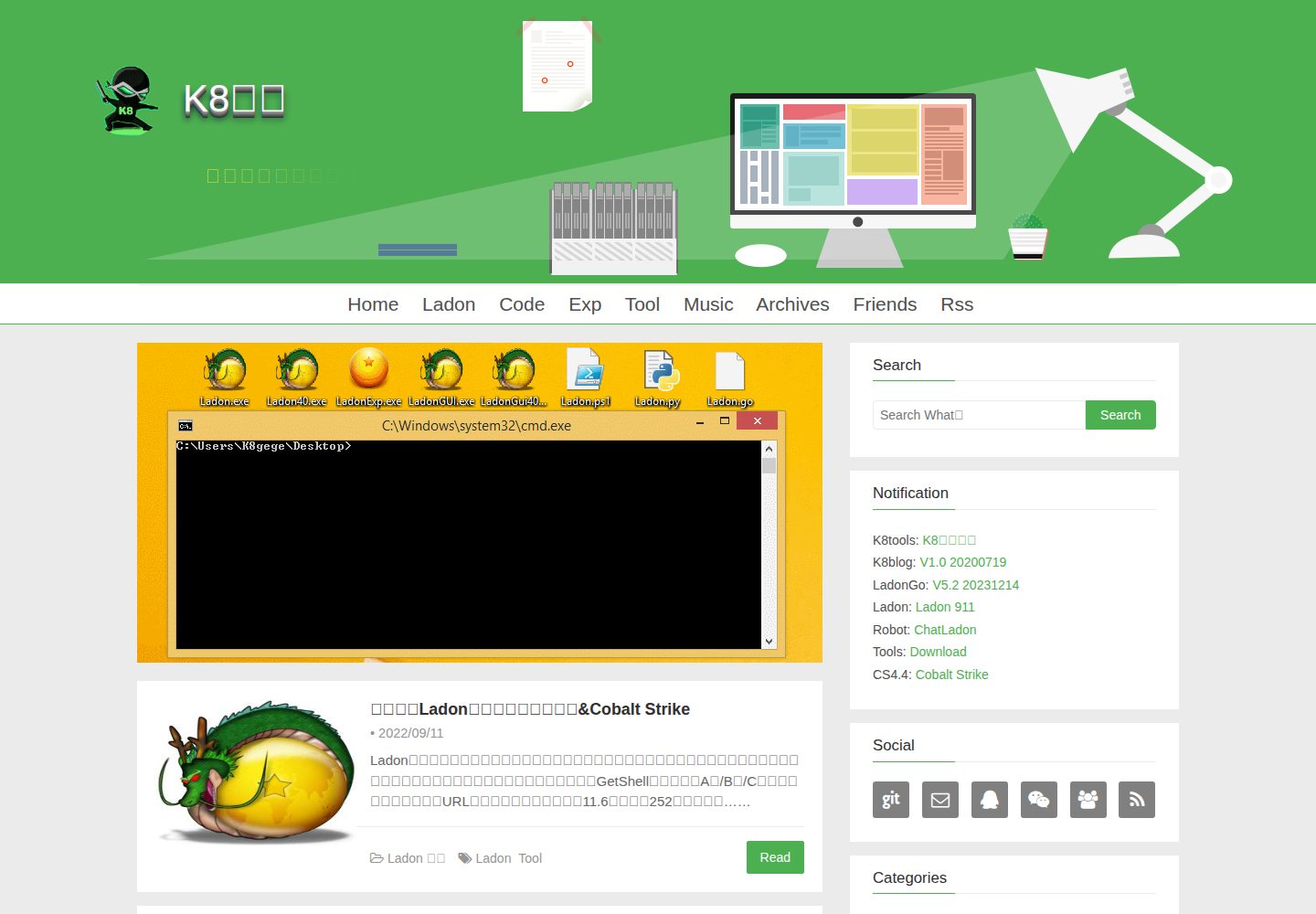
Provides 3D blog titles, 3D navigation buttons, and optional 3D tag clouds
HexoBlog
k8blog — Hexo Blog Template
By k8gege
K8blog is a clean green blog theme based on Hexo, offering 3D titles, navigation buttons, tag clouds, and multiple comment, statistics, and search configurations.
Explore the design
Compare the page layouts and mobile experience. Open any screenshot for a closer look.
Desktop homepage1 / 3
Desktop captureTop of page
Actual screenshot captured by the server browser.
All pages & views 3
Screenshots show visual appearance; interactive behavior may differ.
Recorded 2026-10-01View source
What stands out
A quick read of the recorded project description.
Supports sticky posts, excerpt truncation, thumbnails, code highlighting, and post table of contents
Built-in multiple comment system options: Gitment, Livere, Youyan, Disqus, Changyan, Valine, Gitalk
Includes common blog features such as site search, RSS subscription, visit statistics, rewards, and friendly links
Centralized configuration via _config.yml for menus, widgets, banners, carousels, and statistics
Template Details
K8blog is a theme for the Hexo static blog system, and the repository uses the MIT license. The theme is positioned with a fresh green style, and the demo site is k8gege.org.
In terms of features, the theme provides 3D blog titles, 3D navigation buttons, 3D tag clouds, sticky posts, post excerpts, code highlighting, post thumbnails, friendly links, site search, RSS subscription, image lazy loading, URL persistence, post categories and tags, visit statistics, reward functionality, and mobile adaptation. The comment system supports multiple options such as Gitment, Livere, Youyan, Disqus, Changyan, Valine, and Gitalk, which need to be enabled as needed in the theme configuration and filled with corresponding credentials.
Before use, Node.js, Git, and a Hexo environment are required, and plugins such as hexo-abbrlink, hexo-generator-feed, hexo-generator-sitemap, hexo-generator-baidu-sitemap, hexo-renderer-ejs, hexo-renderer-less, hexo-deployer-git, and hexo-generator-json-content need to be installed. Theme configuration is done through _config.yml, covering options such as menus, widgets, announcements, social links, category archives, tag clouds, friendly links, banner backgrounds, carousels, homepage panels, excerpt length, post table of contents, expiration reminders, reprint notices, rewards, comments, visitor statistics, site statistics, icons, and filing information.
Note that the code highlighting theme configuration is marked as temporarily unavailable in the README and is a future development item; Youyan comments are noted as having unstable service; Disqus requires network conditions; Changyan requires ICP filing. The licenses for third-party materials such as demo images, fonts, and icons need to be checked separately.
HexoBlog
Is it right for your project?
Use Cases
- Building a personal tech blog with Hexo and wanting a green, clean style
- Needing basic writing features such as sticky posts, excerpts, thumbnails, and code highlighting
- Wanting to switch between different comment systems or integrate visit statistics within the same theme
- Needing reading aids such as site search, RSS subscription, and tag clouds
Suitable For
- Bloggers who have installed Node.js, Git, and Hexo
- Personal sites preferring a fresh green visual style
- Users needing a Chinese interface and commonly used domestic statistics and comment services
- Users who can edit _config.yml and install theme plugins themselves
Getting started & customization
Use these recorded setup notes alongside the repository instructions for your chosen version.
- 1
First prepare Node.js, Git, and Hexo environments, then use git clone to place the theme into the themes/k8blog directory
- 2
Install plugins such as hexo-abbrlink, hexo-generator-feed, hexo-generator-sitemap, hexo-generator-baidu-sitemap, hexo-renderer-ejs, hexo-renderer-less, hexo-deployer-git, and hexo-generator-json-content
- 3
Configure options such as menus, widgets, comments, statistics, and rewards in the theme _config.yml; comment services require corresponding credentials
- 4
For local preview, use hexo clean && hexo g && hexo s, then visit http://localhost:4000
- 5
The code highlighting theme configuration is marked as temporarily unavailable in the README; third-party materials such as demo images, fonts, and icons need separate license verification
License & source material
Usage conditions & limitations
Free to use · keep license noticeThis entry covers the free version under the MIT license in the public repository; the free scope is the code of this version and does not mean external services or third-party materials are free.
Must comply with when using
- Free use, modification, commercial use, and distribution of this version's code are allowed.
- When distributing copies or substantial portions of the code, retain the original author's copyright notice and the full MIT license notice.
- The code is provided as is; warranties and limitations of liability are governed by the original license and applicable law.
Additional costs & items to verify
- The article reprint notice template in the theme configuration requires: commercial reprints must contact the author for authorization, and non-commercial reprints must indicate the source; this notice is default configuration content and users can modify it themselves.
- Enabling Changyan comments requires the website to have completed ICP filing.
- Using Disqus comments requires conditions to access overseas networks or a self-built proxy.
- Youyan comment service is unstable and may often fail to load.
- The code highlighting theme configuration item is currently unavailable and is a future development item.
- Enabling Valine comments requires applying for and filling in third-party service credentials such as appId and appKey.
- Enabling Gitalk comments requires creating a GitHub application and providing credentials such as clientID and clientSecret.
- Site statistics functionality requires integrating third-party services such as CNZZ, Baidu Statistics, Google Analytics, or Tencent Analytics and configuring corresponding identifiers.
- Demo images, fonts, icons, and other third-party materials need to be checked according to their respective licenses and cannot be judged solely by the code's MIT license.
- External services such as domain names, hosting, databases, payments, or AI may incur additional charges.
View Original Text Basis
Permission is hereby granted, free of charge
Original License Text
商业转载请联系作者获得授权,非商业转载请注明出处
Original README
畅言评论(需要ICP备案)
Original README
Disqus评论(需要翻墙,或者搭建代理)
Original README
友言评论(服务不稳定,经常无法加载)
Original README
代码高亮配置{@highlightTheme: 主题名称,(配置暂时不可用,后续开发中…)}
Original README
Valine评论 参考网站
Original README
Gitalk评论 参考网站
Original README
https://github.com/k8gege/k8blog/blob/master/LICENSEhttps://github.com/k8gege/k8blog/blob/master/README.md网盟CNZZ统计 参考网站
Original README
Compiled by DeepSeek based on repository license and README ·2026-10-02. Results only cover the materials read; dependencies, images, fonts, and subsequent term changes are subject to their respective original texts.
Project checks & description sources
Template Information
- Source platforms
- GitHub
- Documentation and maintenance reference score
- Partly documented · 72 / 100
- Technologies
- Hexo
- Website type
- Blog
How this score is calculated
Our heuristic uses license records (up to 30), a demo link (12), a preview (10), stars (15), recorded maintenance (15), description completeness (8), feature records (5) and classification data (5). It is not a code, security or performance test, or a Google score. A link does not establish tested functionality.
What to verify for this project
- Repository update recorded
- 2020-12-21
- Screenshot last checked
- 2026-10-02
A demo link is listed. Check it with your own content and viewport sizes; its presence does not confirm that forms, authentication or payments work.
The catalog identifies Hexo as the primary stack. Check the actual dependency manifest and lockfile for versions and hosting requirements. These notes use recorded metadata, not a code audit or a deployment test.
Use a selection guide →How this description was prepared
AI-assisted description based on catalog records and repository material. Repository authors are not automatically the reviewers of this description.
Automatically checked against source and license rules; no manual editorial review.
Inspect the recorded source material
SHA-256: 3e84d92771fc69bbe12cb16e802fc46ff7f2cbd8b32ef9ca6f75fe4922fe4072
2026-10-02T04:18:05.276Z
Source file / repository# K8blog K8blog: A simple Green fresh fashion IT theme for hexo <br> (K8博客: 一款简洁、清爽、绿色、时尚、IT的Hexo主题) ### 演示站点 http://k8gege.org 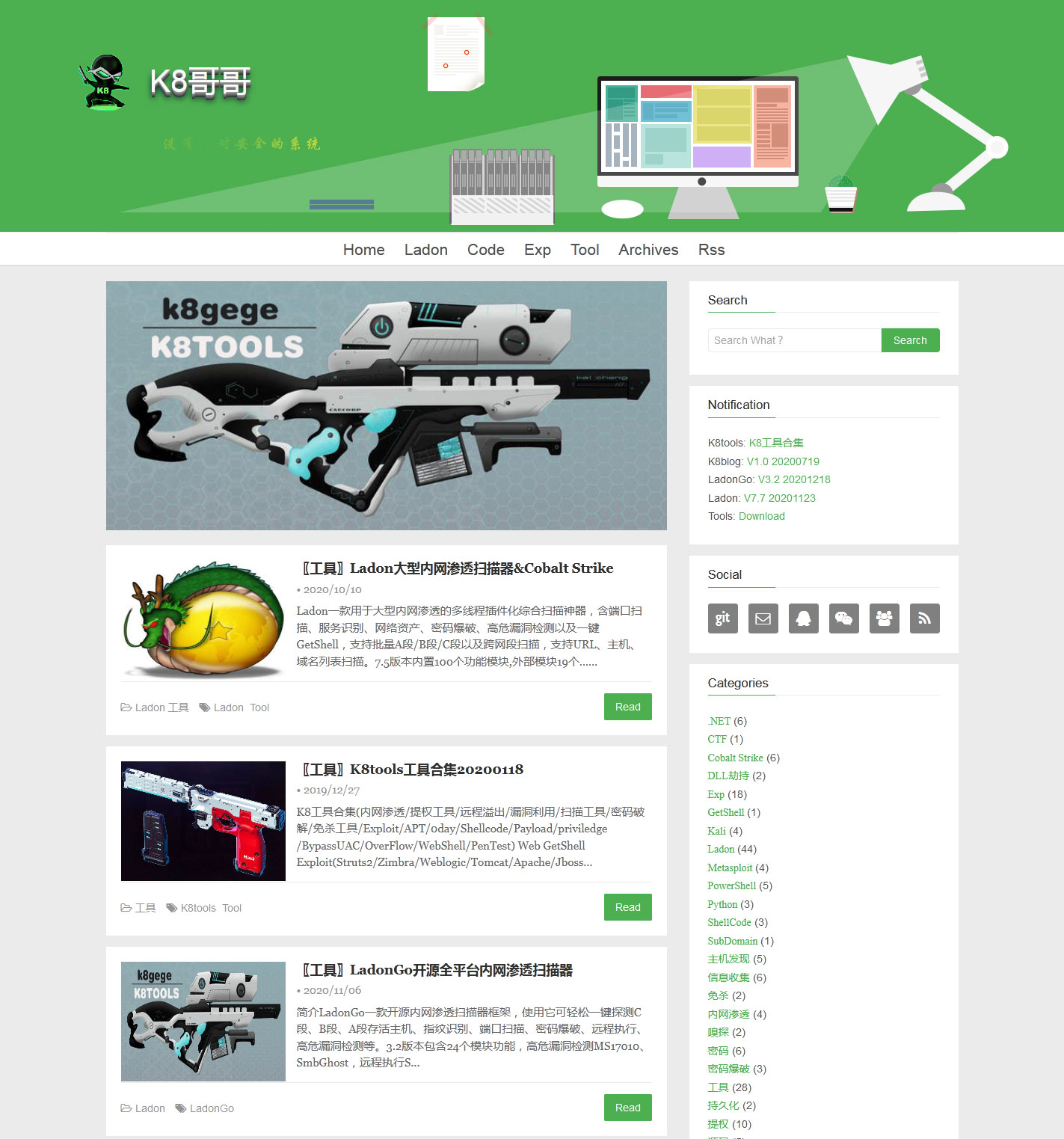 ### 博客功能 - 3D博客标题 - 3D导航按钮 - 支持评论 - 文章置顶 - 文章摘要 - 代码高亮 - 文章缩略图 - 3D云标签 - 友情链接 - 文章搜索 - RSS订阅 - 图片懒加载 - URL持久化 - 文章分类 - 文章标签 - 站内搜索 - 访问统计 - 打赏功能 - 支持移动端 ### 环境搭建 需要Node.js 环境、Git 环境以及 Hexo ,如果你尚未安装或者不了解 Hexo,请参考 官方教程 进行了解以及安装。 ### 下载主题 ```Bash git clone https://github.com/k8gege/k8blog themes/k8blog ``` ### 主题插件 ```Bash npm install hexo-abbrlink --save npm install hexo-generator-feed npm install hexo-generator-sitemap --save npm install hexo-generator-baidu-sitemap --save npm i hexo-renderer-ejs hexo-renderer-less hexo-deployer-git -S npm i [email protected] -S ``` ### 博客预览 ```Bash hexo clean && hexo g && hexo s ``` 使用浏览器打开地址 http://localhost:4000 进行预览。 # **主题篇** ### 1. 主题配置 ``` yaml ## menu -- 导航菜单显示{[@page:名字,@url:地址,@icon:图标]} menu: - page: home url: / icon: fa-home ## favicon -- 网站图标位置{@favicon} favicon: /favicon.ico ## rss --rss文件位置{@rss} rss: /atom.xml # 各个小工具的设置 ## widgets -- 6个左边小工具{@widgets:[notification,category,archive,tagcloud,friends]} widgets: - search - notification - social - category - archive - tagcloud - friends # 各个小工具的设置 ## 搜索 jsonContent: searchLocal: true // 是否启用本地搜索 searchGoogle: true //是否启用谷歌搜索 posts: title: true text: true content: true categories: false tags: false ## notification config --网站公告设置,支持 html 和 纯文本 notification: |- <p> K8tools: <a href="https://github.com/k8gege/K8tools" title="" target="_blank">K8工具合集</a> <br/> K8blog: <a href="https://github.com/k8gege/k8blog" title="" target="_blank">V1.0 20200719</a> <br/> Ladon: <a href="http://k8gege.org/Ladon" title="" target="_blank">V7.0 20200717</a> <br/> Tools: <a href="http://k8gege.org/Download" title="" target="_blank">Download</a> <br/> </p> ## 社交设置{@name:社交工具名字,@icon:社交工具图标,@href:设置工具链接} [参考图标](http://fontawesome.io/icons/) social: - name: Github icon: git href: https://github.com/k8gege ## 文章分类设置{@cate_config:{@show_count:是否显示数字,@show_current: 是否高亮当前category}} cate_config: show_count: true show_current: true ## 文章归档设置{@arch_config:/*参数参考:https://hexo.io/zh-cn/docs/helpers.html#list-archives*/} ## 推荐组合方式:[{type: 'monthly',format: 'YYYY年MM月'},{type: 'yearly',format: 'YYYY年'}] arch_config: type: 'monthly' format: 'YYYY年MM月' show_count: true order: -1 ## 标签云设置{/*参数参考:http://www.goat1000.com/tagcanvas-options.php */} tagcloud: tag3d: false // 是否启用3D标签云 textColour: '#444' // 字体颜色 outlineMethod: 'block' // 选中模式(outline|classic|block|colour|size|none) outlineColour: '#FFDAB9' // 选中模式的颜色 interval: 30 // 动画帧之间的时间间隔,值越大,转动幅度越大 freezeActive: true // 选中的标签是否继续滚动 frontSelect: true // 不选标签云后部的标签 reverse: true // 是否反向触发 wheelZoom: false // 是否启用鼠标滚轮 ## 友链设置{@链接名称:链接地址{@links:[,,,]}} links: - K8gege: http://k8gege.org # 主题自定义个性化配置 ## 网站宣传语 branding: 没有绝对安全的系统 ## 设置banner背景图片{@img:自定义图片地址(支持绝对和相对路径),主题默认{"静态背景":"banner.jpg"},{"动态背景":"banner2.jpg"},{"动态星空背景":"banner3.jpg"}} ## 例如:http://k8gege.org/img/banner|2|3.jpg, 或者 './img/banner-img.jpg'(相对本地资源地址) banner: img: http://k8gege.org/img/banner.jpg ## 设置carousel{@img:图片地址,@url:点击跳转链接(默认值:"javascript:")} carousel: img: 'img/head-img.jpg' url: 'javascript:' ## 首页列表底部面板{@homePanel: 是否开启} homePanel: true ## 首页文章列表缩略图 ### 加载规则: 自定义文章缩略图(在Front-matter中添加的'img'字段) > 文章内的图片 > defaultImgs(随机获取) > 无图模式列表 ## 自定义随机图片 defaultImgs: - http://www.example.jpg //远程图片链接示例 - /img/default-1.jpg //本地图片链接示例 ### 文章摘要{@摘要显示优先级:自定义摘要 > 自动截取摘要 } ### 自定义摘要范围{@<!--more-->:截取more之前的内容为摘要} ### 自动截取摘要{@excerptLength:自动截取文章前多少个字为摘要,不配置默认:120字} excerptLength: 120 ## 是否开启文章目录 toc: true ## 代码高亮配置{@highlightTheme: 主题名称,(配置暂时不可用,后续开发中…)} highlightTheme: default //TODO ## 文章过期提醒功能 {@warning:{days:临界天数(默认300天,设置0关闭功能),text:提醒文字/*%d为过期总天数占位符*/}} warning: days: 300 text: '本文于%d天之前发表,文中内容可能已经过时。' ## 文章内声明{@declaration: {enable:是否开启,title:声明标题,tip:提示内容}} declaration: enable: true title: '转载声明' tip: |- 商业转载请联系作者获得授权,非商业转载请注明出处 © <a href="http://k8gege.org" target="_blank">k8gege</a> ## 文章打赏{@reward: {alipay:支付宝打赏,wepay:微信打赏,tip:打赏提示语; 链接都为空,关闭打赏功能}} reward: alipay: '' wepay: '../img/reward-wepay.jpg' tip: 打赏作者 ## 主题评论 ### gitment gitment: enable: false owner: repo: client_id: client_secret: labels: perPage: maxCommentHeight: ### 来必力(默认选项) livere: enable: true livere_uid: ### 友言评论(服务不稳定,经常无法加载) uyan: enable: false uyan_id: ### Disqus评论(需要翻墙,或者搭建代理) disqus: enable: false shortname: K8blog count: false ### 畅言评论(需要ICP备案) changyan: enable: false appid: conf: ### Valine评论 参考网站: [valine评论](https://valine.js.org/) valine: enable: true appId: appKey: placeholder: 说点什么吧 notify: false // 邮件通知 verify: false // 验证码 avatar: mm // avatar头像 meta: nick,mail // 输入框内容,可选值nick,mail,link pageSize: 10 ## Gitalk评论 参考网站: [一个基于Github Issue和Preact开发的评论插件](https://gitalk.github.io/) gitalk: enable: false clientID: "" // Github 应用ID clientSecret: "" // Github 应用密钥 repo: k8gege.github.io // Github仓库地址 owner: k8gege // Github 用户名(Github仓库拥有者) admin: k8gege // GitHub repository 的所有者和合作者 (对这个 repository 有写权限的用户)可以有一个或多个,如果有多名可使用,例如:admin: admin1,admin2 配置 perPage: 10 // 每次加载的数据大小,最多100 distractionFreeMode: true // 是否启用无干扰模式,类似Facebook评论框的全屏遮罩效果 // 以下参数主题会默认处理,不需要配置 language // 语言类型,默认为站点配置中选项 id // 页面的唯一标识, 已使用md5对pathname转换生成唯一id处理 ## 网站访客统计 [不蒜子统计](http://busuanzi.ibruce.info/) visit_counter: site: true // 总访问量和访问人数统计 page: true // 文章阅读量统计 ## 网站访问统计 ### 网盟CNZZ统计 参考网站: [网盟CNZZ](http://www.umeng.com/) cnzz_anaylytics: ### 百度统计 参考网站: [百度统计](https://tongji.baidu.com/) baidu_anaylytics: ### 谷歌统计 参考网站:[谷歌统计](https://www.google-analytics.com/) google_anaylytics: ### 腾讯分析 参考网站:[腾讯分析](http://ta.qq.com/) tencent_analytics: ### 百度站点认证 baidu-site-verification: ### 百度自动推送(@baidu_push: 是否启用百度自动推送) baidu_push: ## ICON配置 (不配则启用本地Font Icon) fontAwesome: //cdn.bootcss.com/font-awesome/4.7.0/css/font-awesome.min.css ## 网站主题配置 since: 2020 //建站时间 beian: '京ICP备04000001号' //备案号 robot: 'all' //控制搜索引擎的抓取和索引编制行为,默认为all version: 1.0.0 //当前主题版本号 ``` ### 发布文章 进入source\_posts目录,新建ladon.md文件,内容如下 ``` --- title: Ladon大型内网渗透扫描器&Cobalt Strike comments: true top: 5 toc: true categories: - [Ladon] - [工具] tags: - Ladon - Tool #img: img: http://k8gege.org/k8img/Ladon/Dragon.jpg description: "" abbrlink: ladon date: 2020-7-17 22:30:24 --- Ladon一款用于大型网络渗透的多线程插件化综合扫描神器,含端口扫描、服务识别、网络资产、密码爆破、高危漏洞检测以及一键GetShell,支持批量A段/B段/C段以及跨网段扫描,支持URL、主机、域名列表扫描。7.0版本内置83个功能模块,外部模块18个,通过多种协议以及方法快速获取目标网络存活主机IP、计算机名、工作组、共享资源、网卡地址、操作系统版本、网站、子域名、中间件、开放服务、路由器、数据库等信息 <!--more--> ### 程序简介 Ladon一款用于大型网络渗透的多线程插件化综合扫描神器,含端口扫描、服务识别、网络资产、密码爆破、高危漏洞检测以及一键GetShell,支持批量A段/B段/C段以及跨网段扫描,支持URL、主机、域名列表扫描。7.0版本内置83个功能模块,外部模块18个,通过多种协议以及方法快速获取目标网络存活主机IP、计算机名、工作组、共享资源、网卡地址、操作系统版本、网站、子域名、中间件、开放服务、路由器、数据库等信息,漏洞检测包含MS17010、SMBGhost、Weblogic、ActiveMQ、Tomcat、Struts2系列等,密码爆破12种含数据库(Mysql、Oracle、MSSQL)、FTP、SSH、VNC、Windows(LDAP、SMB/IPC、WMI、SmbHash、WmiHash、Winrm)、BasicAuth、Tomcat、Weblogic、Rar等,远程执行命令包含(wmiexe/psexec/atexec/sshexec/jspshell),Web指纹识别模块可识别75种(Web应用、中间件、脚本类型、页面类型)等,可高度自定义插件POC支持.NET程序集、DLL(C#/Delphi/VC)、PowerShell等语言编写的插件,支持通过配置INI批量调用任意外部程序或命令,EXP生成器可一键生成漏洞POC快速扩展扫描能力。Ladon支持Cobalt Strike插件化扫描快速拓展内网进行横向移动。 ```
Explore similar templates
Compare previews and descriptions within the same stack and category.

hexo-theme-matery
hexo-theme-matery is a Material Design, responsive Hexo blog theme with homepage carousel, waterfall post list, timeline archive, word cloud tags, radar chart categories, and an about page.
Hexo · Blog

hexo-theme-cactus
Cactus is a responsive Hexo theme for personal websites and blogs, maintained by probberechts. It offers four color schemes (dark, light, white, classic), configurable navigation, homepage post lists, project lists, social links, and copyright year ranges.
Hexo · Blog

hexo-theme-volantis
Volantis is a blog theme for Hexo, distributed as the npm package hexo-theme-volantis and enabled by setting theme to volantis in the Hexo site's _config.yml. It requires Hexo 7.3+, hexo-cli 4.3+, Node.js 22.x LTS+, and npm 10.x LTS+.
Hexo · Blog

hexo-theme-aurora
Hexo Theme Aurora is a futuristic Hexo blog theme built around aurora gradients and a magazine-style grid layout.
Hexo · Blog

hexo-theme-Claudia
Claudia is a Hexo blog theme focused on a clean look and easy configuration. It automatically follows the device's dark mode and claims a 90+ Lighthouse score.
Hexo · Blog

hexo-theme-A4
hexo-theme-A4 is a minimalist Hexo blog theme that mimics the texture of A4 paper, emphasizing simplicity, small size, and minimal configuration.
Hexo · Blog