Built with Astro, with page markup and styles concentrated in src/pages/index.astro
AstroPortfolio
astro-resume-minimal-template — Astro Portfolio Template
By kanadgupta
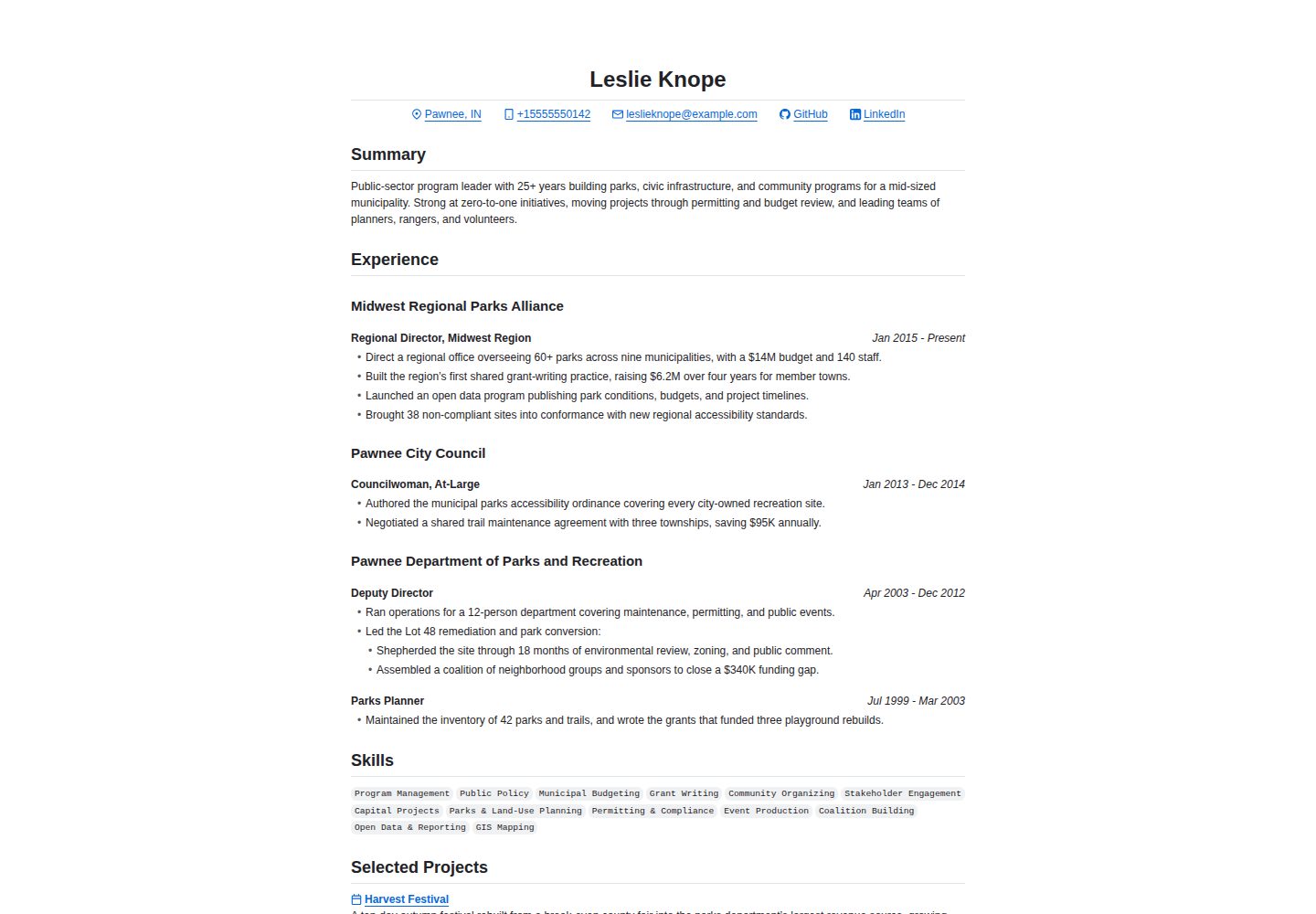
A minimal Astro-based resume template styled after GitHub Markdown, supporting printing and PDF export, with content maintained in Markdown files.
Explore the design
Compare the page layouts and mobile experience. Open any screenshot for a closer look.
Desktop homepage1 / 2
Desktop captureTop of page
Actual screenshot captured by the server browser.
All pages & views 2
Screenshots show visual appearance; interactive behavior may differ.
Recorded 2026-10-02View source
What stands out
A quick read of the recorded project description.
Styles based on github-markdown-css and GitHub Octicons, presenting a GitHub Markdown style
Resume content maintained in Markdown files, with frontmatter constrained by a Zod schema in src/content.config.ts
Projects sorted by filename, work experience sorted by the period field in frontmatter
Provides an npm run build:pdf command to export the locally running page as a PDF
Uses the MIT license, allowing free use, modification, commercial use, and distribution
Template Details
This is a minimal resume template built with Astro, visually referencing GitHub Markdown typography, with main styles from github-markdown-css and GitHub Octicons. The template targets scenarios requiring online display and printing of resumes, with a simple page structure suitable for direct content replacement and publishing.
In terms of content organization, the resume's "Selected Projects" corresponds to Markdown files in the src/content/projects directory, sorted by filename before rendering; "Experience" corresponds to the src/content/work directory, sorted by the period field in frontmatter before rendering, with filenames not affecting output order. The frontmatter structure for both directories is defined by a Zod schema in src/content.config.ts. The main page markup and styles are concentrated in src/pages/index.astro.
The template includes a sample resume with fictional characters; all employers, schools, dates, achievements, contact information, and links are fabricated, with placeholder URLs and emails pointing to example.com, requiring full replacement before publishing. The project provides an npm run build:pdf command that generates a PDF to the pdf-exports directory when the local server runs on localhost:4321, with the filename appended with the current commit SHA. This template uses the MIT license, allowing free use, modification, commercial use, and distribution, provided the copyright notice and license statement are retained; third-party assets such as sample images, fonts, and icons require separate license verification.
AstroPortfolio
Is it right for your project?
Use Cases
- Personal resumes that need online display and support printing or PDF export
- Developers who prefer maintaining resume content in Markdown files and do not want to hand-code page structures
- Job seekers who want their resume page to present a GitHub Markdown reading style
- Those needing a simple, easy-to-modify Astro resume starter template
Suitable For
- Developers familiar with Markdown and basic command-line operations
- Job seekers needing to quickly set up a personal resume page
- Users using Astro and wishing to reuse their existing toolchain
- Template users who accept replacing the fictional sample content themselves
Getting started & customization
Use these recorded setup notes alongside the repository instructions for your chosen version.
- 1
First confirm prerequisites such as Node.js according to the Astro documentation
- 2
Edit the Markdown files in the src/content directory to replace sample content; frontmatter must conform to the Zod schema in src/content.config.ts
- 3
Run npm install to install dependencies, and npm run dev to preview at localhost:4321
- 4
Before generating a PDF, run the site at localhost:4321, then execute npm run build:pdf; output is in the pdf-exports directory
- 5
Employers, schools, dates, achievements, contact information, and links in the sample are fictional and must all be replaced with real information before publishing
License & source material
Usage conditions & limitations
Free to use · keep license noticeThis entry covers the free version under the MIT license from the public repository; the free scope is the code of this version and does not imply that external services or third-party assets are free.
Must comply with when using
- Free use, modification, commercial use, and distribution of this version's code are allowed.
- When distributing copies or substantial portions of the code, retain the original author's copyright notice and the full MIT license statement.
- The code is provided as-is; warranties and limitations of liability are governed by the original license and applicable law.
Additional costs & items to verify
- The template's sample resume contains placeholder content for fictional characters; all employers, schools, dates, achievements, contact information, and links are fabricated and must all be replaced with real information before publishing.
- Placeholder URLs and emails in the sample point to example.com and cannot be used directly for official publishing; replace them with your own real links and emails.
- Before generating a PDF export, the site must be running at localhost:4321; otherwise npm run build:pdf will not work.
- Demo images, fonts, icons, and other third-party assets must be checked against their respective licenses and cannot be judged solely by the code's MIT license.
- External services such as domains, hosting, databases, payments, or AI may incur additional charges.
View Original Text Basis
Permission is hereby granted, free of charge
Original License Text
The example resume shipped with this template is placeholder content built around a fictional character.
Original README
every placeholder URL and email address points at `example.com`
Original README
https://github.com/kanadgupta/astro-resume-minimal-template/blob/main/LICENSEhttps://github.com/kanadgupta/astro-resume-minimal-template/blob/main/README.mdServe the website at `localhost:4321` (either via the dev or build preview server)
Original README
Compiled by DeepSeek based on repository license and README ·2026-10-02. Results only cover the materials read; dependencies, images, fonts, and subsequent term changes are subject to their respective original texts.
Project checks & description sources
Template Information
- Source platforms
- Astro Themes
- Documentation and maintenance reference score
- More documented · 83 / 100
- Technologies
- Astro
- Website type
- Portfolio
How this score is calculated
Our heuristic uses license records (up to 30), a demo link (12), a preview (10), stars (15), recorded maintenance (15), description completeness (8), feature records (5) and classification data (5). It is not a code, security or performance test, or a Google score. A link does not establish tested functionality.
What to verify for this project
- Repository update recorded
- 2026-09-23
- Screenshot last checked
- 2026-10-02
A demo link is listed. Check it with your own content and viewport sizes; its presence does not confirm that forms, authentication or payments work.
The catalog identifies Astro as the primary stack. Check the actual dependency manifest and lockfile for versions and hosting requirements. These notes use recorded metadata, not a code audit or a deployment test.
Use a selection guide →How this description was prepared
AI-assisted description based on catalog records and repository material. Repository authors are not automatically the reviewers of this description.
Automatically checked against source and license rules; no manual editorial review.
Inspect the recorded source material
SHA-256: d399dbd46d3a3095aafb50aed8c77b792223ac76f1a01c9b4efbdff2a7cf24e2
2026-10-02T16:36:39.143Z
Source file / repository# Astro Resume Minimal Template A minimal print-friendly resume template with GitHub Markdown-inspired styling. Built with [Astro](https://astro.build/) and styled primarily with [`github-markdown-css`](https://github.com/sindresorhus/github-markdown-css) and [GitHub Octicons](https://primer.style/octicons/). > [!IMPORTANT] > **Disclaimer:** The example resume shipped with this template is placeholder content built around a fictional character. This project is not affiliated with, endorsed by, or sponsored by the series or any of its respective rights holders, and the character's name is used here only to illustrate how the template renders. All employers, schools, dates, accomplishments, contact details, and links in the example are invented, and every placeholder URL and email address points at `example.com`. Replace all of it with your own information before publishing your resume. ## Getting Started 1. Check out the [Astro docs](https://docs.astro.build/en/install-and-setup/#prerequisites) for prerequisites (e.g., Node.js requirements) 2. Edit the content in the `src/content` directory. The Zod schemas in `src/content.config.ts` describe the frontmatter for the Markdown files in `src/content/projects` and `src/content/work`. > [!NOTE] > The `src/content/projects` directory corresponds to the "Selected Projects" section of your resume. When Astro scans for Markdown files in this directory, the files are sorted by file name prior to rendering. > > The `src/content/work` directory corresponds to the "Experience" section of your resume. When Astro scans for Markdown files in this directory, the files are sorted by the `period` field in the frontmatter prior to rendering. The file name has **no** impact on how these files are rendered in the final output. 3. Install the dependencies and run the development server to preview your content: ```sh npm install npm run dev ``` 4. That's it! All of the main markup and styling is in `src/pages/index.astro` — feel free to tweak it as you see fit. ## Generating a PDF Export To generate a PDF export of your resume: 1. (Optional, but recommended) Commit any changes so your branch is clean. The current commit SHA will be appended to the file name (e.g., `pdf-exports/resume-2026-07-06-3d5e64f.pdf`), so this is a good way to ensure that the file name corresponds to your actual changes. 2. Serve the website at `localhost:4321` (either via the dev or build preview server) 3. Run the following command: ``` npm run build:pdf ``` A new PDF will be created in the `pdf-exports` directory. ## Commands All commands are run from the root of the project, from a terminal: | Command | Action | | :---------------- | :------------------------------------------- | | `npm install` | Installs dependencies | | `npm run dev` | Starts local dev server at `localhost:4321` | | `npm run build` | Build your production site to `./dist/` | | `npm run preview` | Preview your build locally, before deploying | | `npm run check` | Check for formatting/type/etc. errors | ## License [MIT](LICENSE)
Explore similar templates
Compare previews and descriptions within the same stack and category.

astro-theme-cactus
Astro Cactus is an Astro-based blog and portfolio theme that uses Markdown/MDX content collections to manage posts, notes, and tags, with frontmatter type-checked by a schema.
Astro · Portfolio

astrofy
Astrofy is a free and open-source personal portfolio website template built with Astro and TailwindCSS, with built-in blog, CV timeline, project showcase, store, and RSS feed modules.
Astro · Portfolio

astro-nano
Astro Nano is a static, minimalist portfolio and blog template built with Astro, Tailwind, and TypeScript without frontend frameworks. It includes light/dark themes, animated UI, automatic sitemap and RSS feed generation, and Markdown/MDX support with component imports.
Astro · Portfolio

astro-erudite
astro-erudite is an opinionated, unstyled static blog template built with Astro and native CSS, with no UI or CSS framework and minimal dependencies.
Astro · Portfolio

astro-sphere
Astro Sphere is a static, minimalist portfolio and blog theme maintained by markhorn-dev, built mainly with Astro, Tailwind, and TypeScript, with a small amount of SolidJS for stateful components.
Astro · Portfolio

astro-micro
Astro Micro is a framework-free blog and portfolio theme for Astro, forked from Astro Nano. It adds Pagefind search and Giscus comments while retaining type safety, sitemap, RSS, Markdown and MDX support, and TailwindCSS with system, light, and dark themes.
Astro · Portfolio