使用 Astro 构建,页面标记与样式集中在 src/pages/index.astro
Astro作品集
astro-resume-minimal-template — Astro 作品集模板
作者 kanadgupta
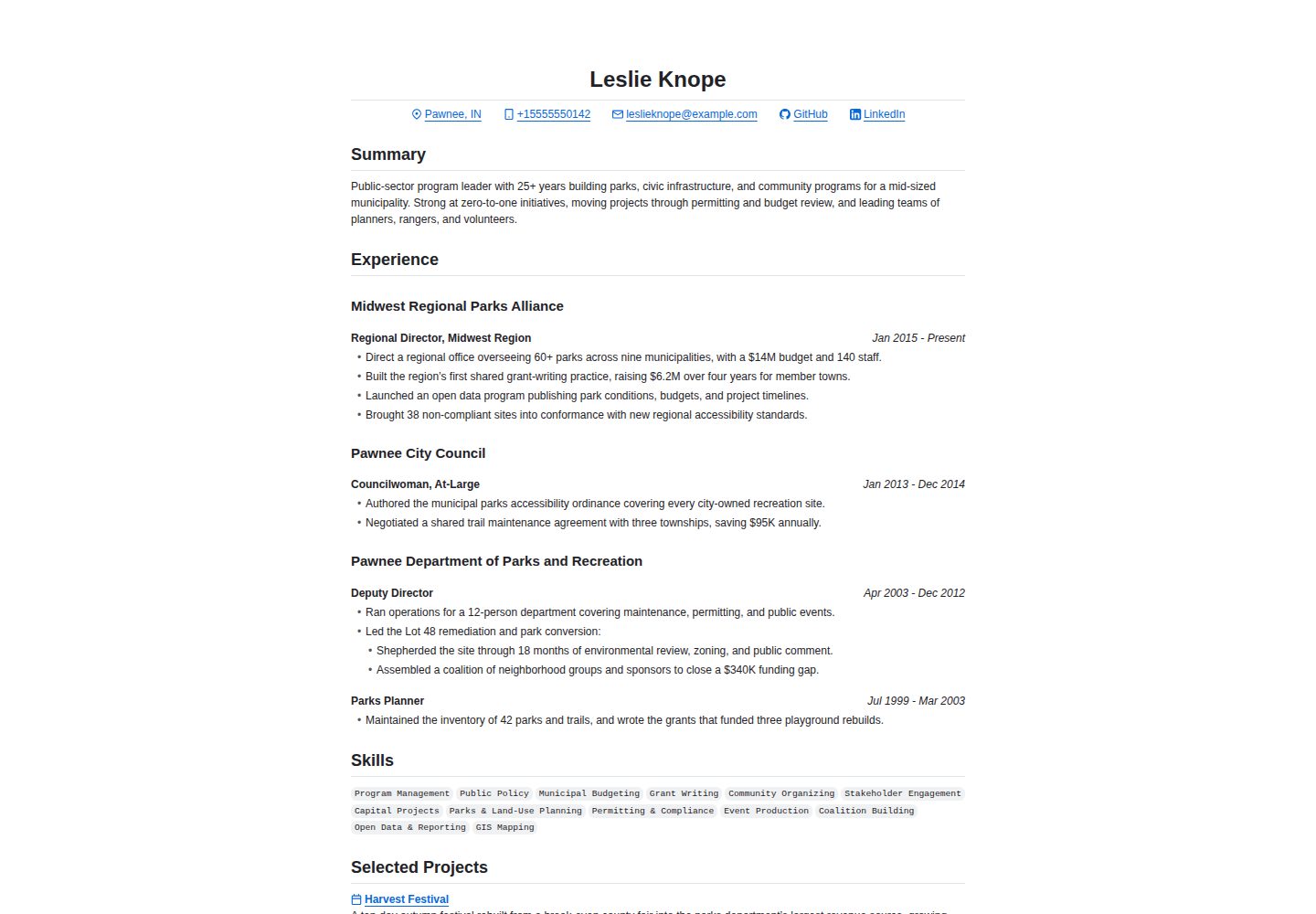
基于 Astro 的极简简历模板,采用 GitHub Markdown 风格样式,支持打印与 PDF 导出,内容以 Markdown 文件维护。
看看你的网站会是什么样
浏览真实页面截图,比较内容排版与手机效果。点击下方缩略图切换,放大查看整页细节。
全部页面与视图 2
截图用于了解视觉与布局,交互效果请以实际项目为准。
采集于 2026-10-02查看来源
值得关注的模板亮点
从已有项目资料中,快速了解它的特点。
样式基于 github-markdown-css 与 GitHub Octicons,呈现 GitHub Markdown 风格
简历内容以 Markdown 文件维护,frontmatter 由 src/content.config.ts 中的 Zod schema 约束
项目按文件名排序,工作经历按 frontmatter 的 period 字段排序
提供 npm run build:pdf 命令,可将本地运行的页面导出为 PDF
采用 MIT 许可,允许免费使用、修改、商用和分发
模板详细介绍
这是一个用 Astro 构建的极简简历模板,视觉上参考 GitHub Markdown 的排版风格,主要样式来自 github-markdown-css 与 GitHub Octicons。模板面向需要在线展示并打印简历的场景,页面结构简单,适合直接替换内容后发布。
内容组织上,简历的「Selected Projects」对应 src/content/projects 目录下的 Markdown 文件,渲染前按文件名排序;「Experience」对应 src/content/work 目录,渲染前按 frontmatter 中的 period 字段排序,文件名不影响输出顺序。两个目录的 frontmatter 结构由 src/content.config.ts 中的 Zod schema 定义。主要页面标记与样式集中在 src/pages/index.astro。
模板内置一份示例简历,内容为虚构角色,所有雇主、学校、日期、成就、联系方式与链接均为编造,占位 URL 与邮箱指向 example.com,发布前需要全部替换。项目提供 npm run build:pdf 命令,在本地服务运行于 localhost:4321 时生成 PDF 到 pdf-exports 目录,文件名会附带当前提交 SHA。该模板采用 MIT 许可,允许免费使用、修改、商用和分发,分发时需保留版权声明与许可声明;示例图片、字体、图标等第三方素材需单独核对许可。
Astro作品集
适合你的项目吗?
适用场景
- 需要在线展示并支持打印或导出 PDF 的个人简历
- 偏好用 Markdown 文件维护简历内容、不想手写页面结构的开发者
- 希望简历页面呈现 GitHub Markdown 阅读风格的求职者
- 需要一份结构简单、便于直接修改的 Astro 简历起步模板
适合人群
- 熟悉 Markdown 与基本命令行操作的开发者
- 需要快速搭建个人简历页面的求职者
- 使用 Astro 并希望复用现有工具链的用户
- 接受以虚构示例内容为基础自行替换的模板使用者
上手与定制指南
结合仓库当前版本的说明,按下面的资料检查内容、配置与运行要求。
- 1
先按 Astro 文档确认 Node.js 等前置条件
- 2
编辑 src/content 目录下的 Markdown 文件替换示例内容,frontmatter 需符合 src/content.config.ts 中的 Zod schema
- 3
运行 npm install 安装依赖,npm run dev 在 localhost:4321 预览
- 4
生成 PDF 前先将网站运行在 localhost:4321,再执行 npm run build:pdf,输出位于 pdf-exports 目录
- 5
示例中的雇主、学校、日期、成就、联系方式与链接均为虚构,发布前需全部替换为真实信息
授权与来源资料
使用条件与限制
免费使用 · 保留许可声明本次收录的是公开仓库中采用 MIT 许可的免费版本;免费范围为该版本代码,不代表外部服务或第三方素材免费。
使用时需要遵守
- 允许免费使用、修改、商用和分发该版本代码。
- 分发代码副本或实质性部分时,保留原作者版权声明和完整 MIT 许可声明。
- 代码按现状提供;担保与责任限制以原许可证及适用法律为准。
额外费用与待核对事项
- 模板自带的示例简历为虚构角色的占位内容,所有雇主、学校、日期、成就、联系方式与链接均为编造,发布前必须全部替换为真实信息。
- 示例中的占位 URL 与邮箱均指向 example.com,不可直接用于正式发布,需替换为自己的真实链接与邮箱。
- 生成 PDF 导出前需先将网站运行在 localhost:4321,否则 npm run build:pdf 无法正常工作。
- 演示图片、字体、图标及其他第三方素材需按各自许可核对,不能仅凭代码的 MIT 许可判断。
- 域名、托管、数据库、支付或 AI 等外部服务可能另外收费。
查看原文依据
Permission is hereby granted, free of charge
许可证原文
The example resume shipped with this template is placeholder content built around a fictional character.
README 原文
every placeholder URL and email address points at `example.com`
README 原文
https://github.com/kanadgupta/astro-resume-minimal-template/blob/main/LICENSEhttps://github.com/kanadgupta/astro-resume-minimal-template/blob/main/README.mdServe the website at `localhost:4321` (either via the dev or build preview server)
README 原文
DeepSeek 根据仓库许可证和 README 整理 ·2026-10-02。结果仅覆盖已读取资料,依赖、图片、字体及后续条款变更以各自原文为准。
项目核对记录与介绍依据
模板资料
- 来源平台
- Astro Themes
- 资料与维护参考分
- 资料较完整 · 83 / 100
- 技术栈
- Astro
- 网站类型
- 作品集
这个分数如何计算
本站按许可资料(最高30分)、演示链接(12分)、预览图(10分)、Star数(15分)、记录的维护时间(15分)、描述完整度(8分)、功能记录(5分)和分类资料(5分)计算。它不是代码、安全或性能测试,也不是 Google 评分;有链接不代表已实测可用。
这个项目需要核对什么
- 记录的仓库更新时间
- 2026-09-23
- 截图检查日期
- 2026-10-02
已收录演示链接。请用你的内容与屏幕尺寸检查;有演示不代表表单、认证或支付已经可用。
目录记录的主要技术栈是 Astro。请通过依赖清单和锁文件核对实际版本与托管要求。这些说明基于收录资料,不代表代码审计或部署实测。
查看具体选型方法 →介绍的制作与核对状态
介绍由 AI 辅助整理目录与仓库资料。仓库作者不等于这篇介绍的审核者。
已完成服务器许可规则与 AI 来源核对;未经过人工编辑审核。
查看当时使用的来源资料
SHA-256: d399dbd46d3a3095aafb50aed8c77b792223ac76f1a01c9b4efbdff2a7cf24e2
2026-10-02T16:36:39.143Z
来源文件 / 仓库# Astro Resume Minimal Template A minimal print-friendly resume template with GitHub Markdown-inspired styling. Built with [Astro](https://astro.build/) and styled primarily with [`github-markdown-css`](https://github.com/sindresorhus/github-markdown-css) and [GitHub Octicons](https://primer.style/octicons/). > [!IMPORTANT] > **Disclaimer:** The example resume shipped with this template is placeholder content built around a fictional character. This project is not affiliated with, endorsed by, or sponsored by the series or any of its respective rights holders, and the character's name is used here only to illustrate how the template renders. All employers, schools, dates, accomplishments, contact details, and links in the example are invented, and every placeholder URL and email address points at `example.com`. Replace all of it with your own information before publishing your resume. ## Getting Started 1. Check out the [Astro docs](https://docs.astro.build/en/install-and-setup/#prerequisites) for prerequisites (e.g., Node.js requirements) 2. Edit the content in the `src/content` directory. The Zod schemas in `src/content.config.ts` describe the frontmatter for the Markdown files in `src/content/projects` and `src/content/work`. > [!NOTE] > The `src/content/projects` directory corresponds to the "Selected Projects" section of your resume. When Astro scans for Markdown files in this directory, the files are sorted by file name prior to rendering. > > The `src/content/work` directory corresponds to the "Experience" section of your resume. When Astro scans for Markdown files in this directory, the files are sorted by the `period` field in the frontmatter prior to rendering. The file name has **no** impact on how these files are rendered in the final output. 3. Install the dependencies and run the development server to preview your content: ```sh npm install npm run dev ``` 4. That's it! All of the main markup and styling is in `src/pages/index.astro` — feel free to tweak it as you see fit. ## Generating a PDF Export To generate a PDF export of your resume: 1. (Optional, but recommended) Commit any changes so your branch is clean. The current commit SHA will be appended to the file name (e.g., `pdf-exports/resume-2026-07-06-3d5e64f.pdf`), so this is a good way to ensure that the file name corresponds to your actual changes. 2. Serve the website at `localhost:4321` (either via the dev or build preview server) 3. Run the following command: ``` npm run build:pdf ``` A new PDF will be created in the `pdf-exports` directory. ## Commands All commands are run from the root of the project, from a terminal: | Command | Action | | :---------------- | :------------------------------------------- | | `npm install` | Installs dependencies | | `npm run dev` | Starts local dev server at `localhost:4321` | | `npm run build` | Build your production site to `./dist/` | | `npm run preview` | Preview your build locally, before deploying | | `npm run check` | Check for formatting/type/etc. errors | ## License [MIT](LICENSE)
看看同类模板
对比同技术栈与用途的模板,找到更适合的视觉与内容结构。

astro-theme-cactus
A simple Astro theme. Use it to create your blog or website.
Astro · 作品集

astrofy
Astrofy is a free and open-source template for your Personal Portfolio Website built with Astro and TailwindCS…
Astro · 作品集

astro-nano
Astro Nano is a static, minimalist, lightweight, lightning fast portfolio and blog.
Astro · 作品集

astro-erudite
An opinionated, unstyled static blogging template built with Astro and native CSS.
Astro · 作品集

astro-sphere
Astro Sphere is a static, minimalist, lightweight, lightning fast portfolio and blog.
Astro · 作品集

astro-micro
Blog theme for Astro with search and comments built-in. Zero frameworks.
Astro · 作品集