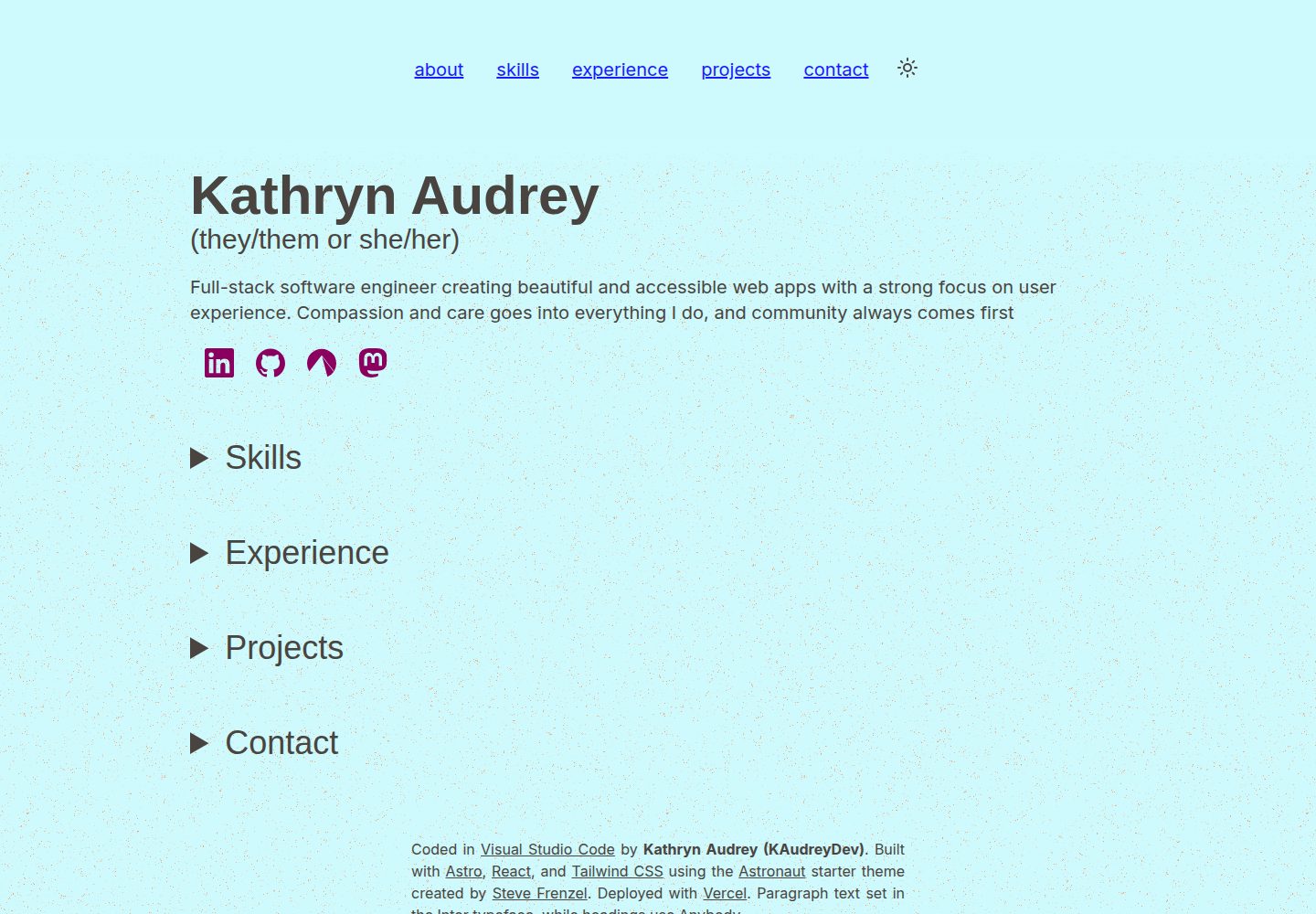
Built with Astro and uses React integration for client-side interactions
AstroReactPortfolioStarter
dev-portfolio — Astro Portfolio Template
By kaudreydev
A personal developer portfolio site based on Astro and React, using the Astronaut theme, with content managed via Markdown and JSON collections, and a contact form that requires Resend configuration.
Explore the design
Compare the page layouts and mobile experience. Open any screenshot for a closer look.
Desktop homepage1 / 2
Desktop captureTop of page
Actual screenshot captured by the server browser.
All pages & views 2
Screenshots show visual appearance; interactive behavior may differ.
Recorded 2026-10-12View source
What stands out
A quick read of the recorded project description.
Content is centralized in Markdown and JSON collections under src/content, with strong typing according to src/types.ts
Uses the Astronaut theme, chosen by the author for its accessibility and usability design
Contact form sends emails via Resend and environment variable configuration
Provides Playwright E2E tests covering snapshots, navigation, and dark mode toggling
Template Details
This project is the personal portfolio website of developer Kathryn Audrey (KAudreyDev), built with Astro and integrating React for client-side interactions, with styling using Tailwind CSS. The site is built on Steve Frenzel's Astronaut theme, chosen for its focus on accessibility and usability.
For content management, most of the site's text and information is stored in Markdown and JSON collections under the src/content directory, including about.md (about section), contact.json (contact links), experience.json (work experience), projects.json (project list), site.json (site metadata), and skills.json (skills list). All data is strongly typed according to the type definitions in src/types.ts. Skill icons are referenced from Simple Icons, but that icon library's brand icons are incomplete, so some icons need to be prepared separately.
The contact form requires additional configuration: using the Resend service and creating a .env file in the project root, setting four environment variables: EMAIL_SITE, EMAIL_OWNER, RESEND_API_KEY, and SITE_URL. For testing, currently only Playwright-based E2E tests exist, covering snapshots, navigation, and dark mode toggling, which can be run via pnpm e2e; the navigation test may be unstable in default headless mode, and the author recommends running with the --ui flag.
AstroReactPortfolioStarter
Is it right for your project?
Use Cases
- Developers building a personal portfolio website to showcase skills, work experience, and projects
- Scenarios where site content is managed via Markdown and JSON collections to avoid directly modifying component code
- Personal sites that need a contact form and are willing to integrate the Resend email service
- Secondary customization starting from the Astronaut theme
Suitable For
- Developers familiar with Astro or willing to learn Astro
- Users who need a personal portfolio starting point with good accessibility and clear structure
- Users who can configure environment variables and third-party email services themselves
- Projects that want to use Playwright for basic E2E testing
Getting started & customization
Use these recorded setup notes alongside the repository instructions for your chosen version.
- 1
After cloning the repository, run pnpm install in the project directory, then run pnpm start to launch the local development server
- 2
The contact form requires registering with Resend and creating an API key, then configuring EMAIL_SITE, EMAIL_OWNER, RESEND_API_KEY, and SITE_URL in the root .env file
- 3
Site content is edited under src/content, with field type definitions in src/types.ts
- 4
Skill icons reference Simple Icons; missing brand icons need to be added manually
- 5
E2E tests are run with pnpm e2e; the navigation test is recommended to be run with the --ui flag
License & source material
Usage conditions & limitations
Free to use · keep license noticeThis entry covers the free version under the MIT license in the public repository; the free scope applies to that version's code and does not imply that external services or third-party assets are free.
Must comply with when using
- Free use, modification, commercial use, and distribution of this version's code are permitted.
- When distributing copies or substantial portions of the code, retain the original author's copyright notice and the full MIT license notice.
- The code is provided as-is; warranties and limitations of liability are governed by the original license and applicable law.
Additional costs & items to verify
- Demo images, fonts, icons, and other third-party assets must be checked against their respective licenses and cannot be judged solely by the code's MIT license.
- External services such as domains, hosting, databases, payments, or AI may incur additional charges.
- The contact form functionality requires registering with the Resend service and creating an API key; this is an external service dependency, and the form cannot be used without configuration.
- Using the contact form requires creating a .env file in the project root and configuring environment variables.
- Skill icons reference Simple Icons; that icon library's brand icons are incomplete, so some icons require users to find sources themselves.
- The navigation E2E test may be unstable in default headless mode; running with the --ui flag is recommended.
View Original Text Basis
Permission is hereby granted, free of charge
Original License Text
1. Sign up with [Resend](https://resend.com) and create an API key.
Original README
Create a file named `.env` in the root of the project directory.
Original README
Note that Simple Icons does not have a complete collection of brand icons so you may need to source some on your own.
Original README
https://github.com/kaudreydev/dev-portfolio/blob/main/LICENSEhttps://github.com/kaudreydev/dev-portfolio/blob/main/README.mdThe navigation tests can be a bit flakey in the default headless mode, so I recommend running with the `--ui` flag.
Original README
Compiled by DeepSeek based on repository license and README ·2026-10-12. Results only cover the materials read; dependencies, images, fonts, and subsequent term changes are subject to their respective original texts.
Project checks & description sources
Template Information
- Source platforms
- GitHub
- Documentation and maintenance reference score
- More documented · 85 / 100
- Technologies
- Astro · React
- Website type
- Portfolio · Starter
How this score is calculated
Our heuristic uses license records (up to 30), a demo link (12), a preview (10), stars (15), recorded maintenance (15), description completeness (8), feature records (5) and classification data (5). It is not a code, security or performance test, or a Google score. A link does not establish tested functionality.
What to verify for this project
- Repository update recorded
- 2026-09-08
- Screenshot last checked
- 2026-10-12
A demo link is listed. Check it with your own content and viewport sizes; its presence does not confirm that forms, authentication or payments work.
The catalog identifies Astro as the primary stack. Check the actual dependency manifest and lockfile for versions and hosting requirements. These notes use recorded metadata, not a code audit or a deployment test.
Use a selection guide →How this description was prepared
AI-assisted description based on catalog records and repository material. Repository authors are not automatically the reviewers of this description.
Review declaration: [email protected] · 2026-10-13
Inspect the recorded source material
SHA-256: 0774491e0850c1f1d252dab149c4ab2152541b531540107828fd4af1fee5f7ef
2026-10-12T22:40:09.365Z
Source file / repository# Dev Portfolio Site This portfolio site, originally created for [KAudreyDev](https://github.com/kaudreydev), is built on [Astro](https://astro.build) using [React integration](https://docs.astro.build/en/guides/integrations-guide/react/) for client interactions. I decided to use Astro for my own learning, as I'd mostly used Next.js before and wanted to try something different this time. I chose to use the [Astronaut](https://astro.build/themes/details/astronaut/) theme created by [Steve Frenzel](https://www.stevefrenzel.dev), as the theme provides a solid base to start an Astro app that includes considerations for accessibility and usability, which are important to me. Check out [the theme on Codeberg](https://codeberg.org/stvfrnzl/astro-naut) for all the details. Sharing is caring so please feel free to use and customize this repo to create your own portfolio site, or start from scratch with Steve's Astronaut theme for Astro :) # Getting Started 1. Clone the repository locally. 2. From the project directory, run `pnpm install`. (See [here](https://pnpm.io/pnpm-vs-npm) for reasons to use pnpm over npm.) 3. Once installation is finished, run `pnpm start` to start the local dev server. # Customizing the Content Most of the text and information displayed on the site is stored in markdown and JSON collections within the `src/content` directory. You can edit these files to populate them with your own information such as skills, experience, and projects. All information is strongly typed according to the types defined in `src/types.ts`. - `about.md` - The content of this file is inserted directly into the About section. For my site, it contains my name and a short blurb about me. - `contact.json` - A list of contact links that will be used to create `IconLink` components. The icons are stored and referenced from the `src/images` directory and must be in SVG format. - `experience.json` - A list of jobs with the company, position title, year(s), and list of job details. - `projects.json` - A list of projects with the company, project name, year(s), list of project details, and list of technologies used. The list of available technologies is found in `src/types.ts` if you need to expand it. - `site.json` - Stores site metadata including title and description. - `skills.json` - A list of skills including the skill name, icon name from [Simple Icons](https://simpleicons.org/), proficiency level from 0-3 (Familiar, Growing, Skilled, Expert), and years of experience. Note that Simple Icons does not have a complete collection of brand icons so you may need to source some on your own. # Configuring the Contact Form The contact form is a more complex component that requires configuration using [environment variables](https://docs.astro.build/en/guides/environment-variables/#env-files). Follow the steps below to get set up. 1. Sign up with [Resend](https://resend.com) and create an API key. 2. Create a file named `.env` in the root of the project directory. 3. Add the following keys with whatever values you wish to use: ``` EMAIL_SITE="Your Name <[email protected]>" [email protected] RESEND_API_KEY=your_Resend_API_key SITE_URL=https://yoursite.url/ ``` - `EMAIL_SITE` will be used as the sender for e-mails sent from the site. - `EMAIL_OWNER` will be used for the 'reply to' address on the confirmation e-mail, and will also be sent a notification containing message details when a contact message is submitted. - `SITE_URL` is used for the Astro config and server headers and defaults to `https://localhost:4321/` Feel free to customize the e-mail settings or format as you see fit! # Testing Currently only E2E tests are available, covering snapshots, navigation, and the dark mode switcher. I found it difficult to test Astro and React together, and since most of the site is static content anyway, I felt snapshots would be largely sufficient. E2E testing uses [Playwright](https://playwright.dev) and can be run with the command `pnpm e2e`. The navigation tests can be a bit flakey in the default headless mode, so I recommend running with the `--ui` flag. # Credits - Site developed using the [Astronaut](https://astro.build/themes/details/astronaut/) theme for Astro created by [Steve Frenzel](https://www.stevefrenzel.dev) - Site header clipped from the [Void](https://astro.build/themes/details/void/) theme for Astro created by [Jorge Rosbel](https://github.com/JorgeRosbel) - Site design inspired by portfolio sites for [Brittany Chiang](https://brittanychiang.com) and [Monica Dinculescu](https://meowni.ca) - My wonderful partner [Kristine Horn](https://www.linkedin.com/in/krin-horn/), who helped me with organization, planning, testing, and accessibility. An extremely caring and talented individual any company would be lucky to have on their staff! - Our darling kitties Felix and Pixel, whose company and emotional support helped make this project happen.
Explore similar templates
Compare previews and descriptions within the same stack and category.

astrowind
AstroWind is a free, open-source Astro starter theme using Astro and Tailwind CSS, released under the MIT license.
Astro · Blog

astro-theme-cactus
Astro Cactus is an Astro-based blog and portfolio theme that uses Markdown/MDX content collections to manage posts, notes, and tags, with frontmatter type-checked by a schema.
Astro · Portfolio

astrofy
Astrofy is a free and open-source personal portfolio website template built with Astro and TailwindCSS, with built-in blog, CV timeline, project showcase, store, and RSS feed modules.
Astro · Portfolio
accessible-astro-starter
An accessibility-focused Astro 6 starter template with WCAG 2.2 AA practices, Tailwind CSS 4, TypeScript, Prettier, ESLint, form validation, blog and portfolio examples, and preference toggles for dark mode, high contrast, and reduced motion.
Astro · Blog

astro-nano
Astro Nano is a static, minimalist portfolio and blog template built with Astro, Tailwind, and TypeScript without frontend frameworks. It includes light/dark themes, animated UI, automatic sitemap and RSS feed generation, and Markdown/MDX support with component imports.
Astro · Portfolio

astro-erudite
astro-erudite is an opinionated, unstyled static blog template built with Astro and native CSS, with no UI or CSS framework and minimal dependencies.
Astro · Portfolio