基于 Astro 并使用 React 集成处理客户端交互
AstroReact作品集启动器
dev-portfolio — Astro 作品集模板
作者 kaudreydev
基于 Astro 与 React 的个人开发者作品集站点,使用 Astronaut 主题,内容以 Markdown 和 JSON 集合管理,并包含需 Resend 配置的联系表单。
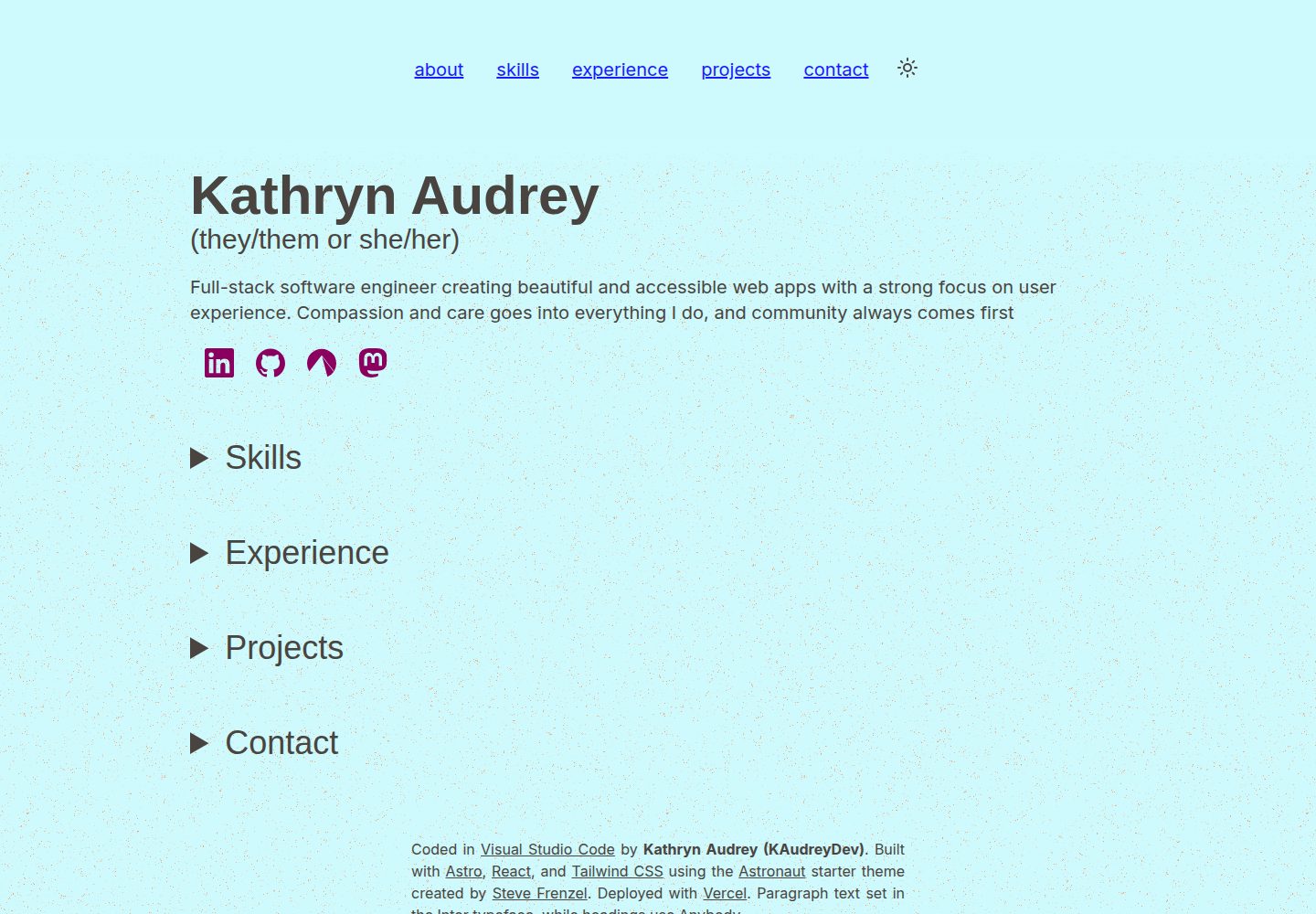
看看你的网站会是什么样
浏览真实页面截图,比较内容排版与手机效果。点击下方缩略图切换,放大查看整页细节。
全部页面与视图 2
截图用于了解视觉与布局,交互效果请以实际项目为准。
采集于 2026-10-12查看来源
值得关注的模板亮点
从已有项目资料中,快速了解它的特点。
内容集中在 src/content 的 Markdown 与 JSON 集合中,并按 src/types.ts 强类型约束
使用 Astronaut 主题,作者看重其可访问性与可用性设计
联系表单通过 Resend 与环境变量配置邮件发送
提供 Playwright E2E 测试,覆盖快照、导航与深色模式切换
模板详细介绍
该项目是开发者 Kathryn Audrey(KAudreyDev)的个人作品集网站,基于 Astro 构建,并通过 React 集成处理客户端交互,样式使用 Tailwind CSS。站点在 Steve Frenzel 的 Astronaut 主题基础上搭建,作者选择该主题是看重其对可访问性与可用性的考虑。
内容管理方面,站点的大部分文本与信息存放在 src/content 目录下的 Markdown 和 JSON 集合中,包括 about.md(关于部分)、contact.json(联系方式链接)、experience.json(工作经历)、projects.json(项目列表)、site.json(站点元数据)和 skills.json(技能列表)。所有数据依据 src/types.ts 中的类型定义进行强类型约束。技能图标引用自 Simple Icons,但该图标库品牌图标并不完整,部分图标需要自行准备。
联系表单需要额外配置:使用 Resend 服务,并在项目根目录创建 .env 文件,设置 EMAIL_SITE、EMAIL_OWNER、RESEND_API_KEY 和 SITE_URL 四个环境变量。测试方面目前只有基于 Playwright 的 E2E 测试,覆盖快照、导航和深色模式切换,可通过 pnpm e2e 运行;导航测试在默认无头模式下可能不稳定,作者建议使用 --ui 标志运行。
AstroReact作品集启动器
适合你的项目吗?
适用场景
- 开发者搭建个人作品集网站,展示技能、工作经历与项目
- 希望以 Markdown 和 JSON 集合管理站点内容、避免直接改组件代码的场景
- 需要联系表单并愿意接入 Resend 邮件服务的个人站点
- 以 Astronaut 主题为起点进行二次定制
适合人群
- 熟悉 Astro 或愿意学习 Astro 的开发者
- 需要可访问性较好、结构清晰的个人作品集起点的用户
- 能自行配置环境变量与第三方邮件服务的用户
- 希望用 Playwright 做基础 E2E 测试的项目
上手与定制指南
结合仓库当前版本的说明,按下面的资料检查内容、配置与运行要求。
- 1
克隆仓库后在项目目录运行 pnpm install,再运行 pnpm start 启动本地开发服务器
- 2
联系表单需注册 Resend 并创建 API key,在根目录 .env 中配置 EMAIL_SITE、EMAIL_OWNER、RESEND_API_KEY 和 SITE_URL
- 3
站点内容在 src/content 下编辑,字段类型定义见 src/types.ts
- 4
技能图标引用 Simple Icons,缺失的品牌图标需自行补充
- 5
E2E 测试使用 pnpm e2e 运行,导航测试建议加 --ui 标志
授权与来源资料
使用条件与限制
免费使用 · 保留许可声明本次收录的是公开仓库中采用 MIT 许可的免费版本;免费范围为该版本代码,不代表外部服务或第三方素材免费。
使用时需要遵守
- 允许免费使用、修改、商用和分发该版本代码。
- 分发代码副本或实质性部分时,保留原作者版权声明和完整 MIT 许可声明。
- 代码按现状提供;担保与责任限制以原许可证及适用法律为准。
额外费用与待核对事项
- 演示图片、字体、图标及其他第三方素材需按各自许可核对,不能仅凭代码的 MIT 许可判断。
- 域名、托管、数据库、支付或 AI 等外部服务可能另外收费。
- 联系表单功能需要注册 Resend 服务并创建 API key,属于外部服务依赖,未配置则无法使用该表单。
- 使用联系表单必须在项目根目录创建 .env 文件并配置环境变量。
- 技能图标引用 Simple Icons,该图标库品牌图标不完整,部分图标需用户自行寻找来源。
- 导航 E2E 测试在默认无头模式下可能不稳定,建议使用 --ui 标志运行。
查看原文依据
Permission is hereby granted, free of charge
许可证原文
1. Sign up with [Resend](https://resend.com) and create an API key.
README 原文
Create a file named `.env` in the root of the project directory.
README 原文
Note that Simple Icons does not have a complete collection of brand icons so you may need to source some on your own.
README 原文
https://github.com/kaudreydev/dev-portfolio/blob/main/LICENSEhttps://github.com/kaudreydev/dev-portfolio/blob/main/README.mdThe navigation tests can be a bit flakey in the default headless mode, so I recommend running with the `--ui` flag.
README 原文
DeepSeek 根据仓库许可证和 README 整理 ·2026-10-12。结果仅覆盖已读取资料,依赖、图片、字体及后续条款变更以各自原文为准。
项目核对记录与介绍依据
模板资料
- 来源平台
- GitHub
- 资料与维护参考分
- 资料较完整 · 85 / 100
- 技术栈
- Astro · React
- 网站类型
- 作品集 · 启动器
这个分数如何计算
本站按许可资料(最高30分)、演示链接(12分)、预览图(10分)、Star数(15分)、记录的维护时间(15分)、描述完整度(8分)、功能记录(5分)和分类资料(5分)计算。它不是代码、安全或性能测试,也不是 Google 评分;有链接不代表已实测可用。
这个项目需要核对什么
- 记录的仓库更新时间
- 2026-09-08
- 截图检查日期
- 2026-10-12
已收录演示链接。请用你的内容与屏幕尺寸检查;有演示不代表表单、认证或支付已经可用。
目录记录的主要技术栈是 Astro。请通过依赖清单和锁文件核对实际版本与托管要求。这些说明基于收录资料,不代表代码审计或部署实测。
查看具体选型方法 →介绍的制作与核对状态
介绍由 AI 辅助整理目录与仓库资料。仓库作者不等于这篇介绍的审核者。
审核声明: [email protected] · 2026-10-13
查看当时使用的来源资料
SHA-256: 0774491e0850c1f1d252dab149c4ab2152541b531540107828fd4af1fee5f7ef
2026-10-12T22:40:09.365Z
来源文件 / 仓库# Dev Portfolio Site This portfolio site, originally created for [KAudreyDev](https://github.com/kaudreydev), is built on [Astro](https://astro.build) using [React integration](https://docs.astro.build/en/guides/integrations-guide/react/) for client interactions. I decided to use Astro for my own learning, as I'd mostly used Next.js before and wanted to try something different this time. I chose to use the [Astronaut](https://astro.build/themes/details/astronaut/) theme created by [Steve Frenzel](https://www.stevefrenzel.dev), as the theme provides a solid base to start an Astro app that includes considerations for accessibility and usability, which are important to me. Check out [the theme on Codeberg](https://codeberg.org/stvfrnzl/astro-naut) for all the details. Sharing is caring so please feel free to use and customize this repo to create your own portfolio site, or start from scratch with Steve's Astronaut theme for Astro :) # Getting Started 1. Clone the repository locally. 2. From the project directory, run `pnpm install`. (See [here](https://pnpm.io/pnpm-vs-npm) for reasons to use pnpm over npm.) 3. Once installation is finished, run `pnpm start` to start the local dev server. # Customizing the Content Most of the text and information displayed on the site is stored in markdown and JSON collections within the `src/content` directory. You can edit these files to populate them with your own information such as skills, experience, and projects. All information is strongly typed according to the types defined in `src/types.ts`. - `about.md` - The content of this file is inserted directly into the About section. For my site, it contains my name and a short blurb about me. - `contact.json` - A list of contact links that will be used to create `IconLink` components. The icons are stored and referenced from the `src/images` directory and must be in SVG format. - `experience.json` - A list of jobs with the company, position title, year(s), and list of job details. - `projects.json` - A list of projects with the company, project name, year(s), list of project details, and list of technologies used. The list of available technologies is found in `src/types.ts` if you need to expand it. - `site.json` - Stores site metadata including title and description. - `skills.json` - A list of skills including the skill name, icon name from [Simple Icons](https://simpleicons.org/), proficiency level from 0-3 (Familiar, Growing, Skilled, Expert), and years of experience. Note that Simple Icons does not have a complete collection of brand icons so you may need to source some on your own. # Configuring the Contact Form The contact form is a more complex component that requires configuration using [environment variables](https://docs.astro.build/en/guides/environment-variables/#env-files). Follow the steps below to get set up. 1. Sign up with [Resend](https://resend.com) and create an API key. 2. Create a file named `.env` in the root of the project directory. 3. Add the following keys with whatever values you wish to use: ``` EMAIL_SITE="Your Name <[email protected]>" [email protected] RESEND_API_KEY=your_Resend_API_key SITE_URL=https://yoursite.url/ ``` - `EMAIL_SITE` will be used as the sender for e-mails sent from the site. - `EMAIL_OWNER` will be used for the 'reply to' address on the confirmation e-mail, and will also be sent a notification containing message details when a contact message is submitted. - `SITE_URL` is used for the Astro config and server headers and defaults to `https://localhost:4321/` Feel free to customize the e-mail settings or format as you see fit! # Testing Currently only E2E tests are available, covering snapshots, navigation, and the dark mode switcher. I found it difficult to test Astro and React together, and since most of the site is static content anyway, I felt snapshots would be largely sufficient. E2E testing uses [Playwright](https://playwright.dev) and can be run with the command `pnpm e2e`. The navigation tests can be a bit flakey in the default headless mode, so I recommend running with the `--ui` flag. # Credits - Site developed using the [Astronaut](https://astro.build/themes/details/astronaut/) theme for Astro created by [Steve Frenzel](https://www.stevefrenzel.dev) - Site header clipped from the [Void](https://astro.build/themes/details/void/) theme for Astro created by [Jorge Rosbel](https://github.com/JorgeRosbel) - Site design inspired by portfolio sites for [Brittany Chiang](https://brittanychiang.com) and [Monica Dinculescu](https://meowni.ca) - My wonderful partner [Kristine Horn](https://www.linkedin.com/in/krin-horn/), who helped me with organization, planning, testing, and accessibility. An extremely caring and talented individual any company would be lucky to have on their staff! - Our darling kitties Felix and Pixel, whose company and emotional support helped make this project happen.
看看同类模板
对比同技术栈与用途的模板,找到更适合的视觉与内容结构。

astrowind
⭕️ AstroWind: A free template using Astro v7 and Tailwind CSS v4. Astro starter theme.
Astro · 博客

astro-theme-cactus
A simple Astro theme. Use it to create your blog or website.
Astro · 作品集

astrofy
Astrofy is a free and open-source template for your Personal Portfolio Website built with Astro and TailwindCS…
Astro · 作品集
accessible-astro-starter
Accessible Astro Starter 是一个以无障碍为核心理念的 Astro 6 启动模板,由 incluud 团队维护。
Astro · 博客

astro-nano
Astro Nano is a static, minimalist, lightweight, lightning fast portfolio and blog.
Astro · 作品集

astro-erudite
An opinionated, unstyled static blogging template built with Astro and native CSS.
Astro · 作品集