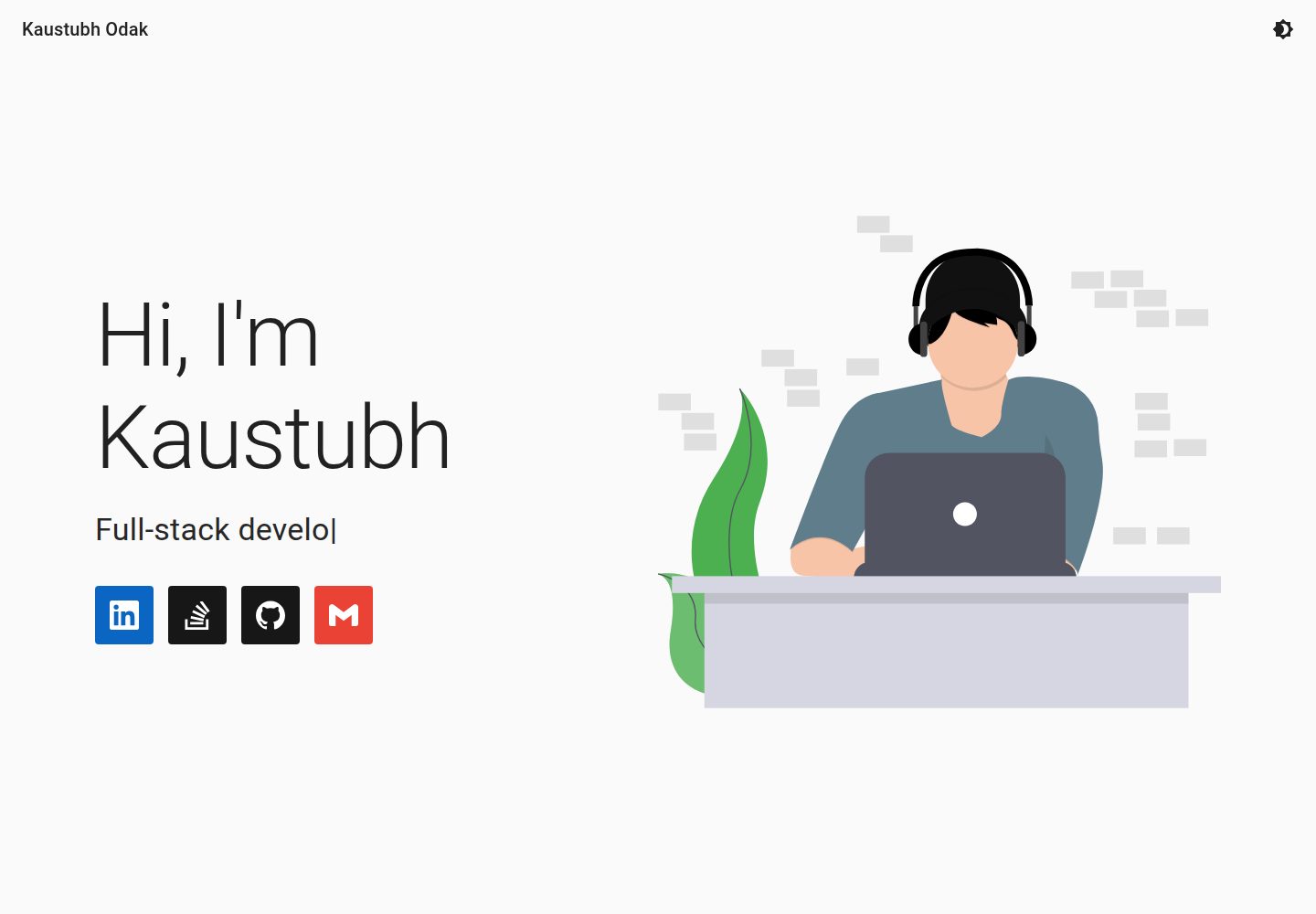
Content is maintained centrally in data.json, covering name, homepage copy, skills, projects, experience, and about information
Next.jsReactPortfolio
Portfolio (kausko) — Next.js Portfolio Template
By kausko
A personal portfolio template built with Next.js and React that manages personal information, skills, projects, and experience centrally through data.json, with light and dark theme support.
Explore the design
Compare the page layouts and mobile experience. Open any screenshot for a closer look.
Desktop homepage1 / 2
Desktop captureTop of page
Actual screenshot captured by the server browser.
All pages & views 2
Screenshots show visual appearance; interactive behavior may differ.
Recorded 2026-10-02View source
What stands out
A quick read of the recorded project description.
Skills and experience use a key-value structure, with keys as group headings and values mapped to simpleicons.org icons
The projects section reads by repository name via the GitHub API and requires configuring a Personal Access Token
Themes are split into light and dark sets, and beyond colors can also adjust breakpoints, typography, and animations
The README provides a Vercel deployment process and local yarn dev run method
Template Details
This is a personal portfolio website template built with Next.js and React; the author also uses it to host their own portfolio. Page content is driven by data.json: the navigation bar displays the name, the homepage includes a main heading, an animated subtitle, and career information with icons and links; skills and experience use a key-value structure, where keys serve as group headings and values map to icons from simpleicons.org; the projects section fetches by repository name via the GitHub API; the about section includes a description, image, and social links. The theme object is split into light and dark sets, and beyond colors it can also adjust breakpoints, typography, and animations.
The template requires configuring a GitHub Personal Access Token to read repository information. The README uses Vercel deployment as an example to explain how to set the PAT environment variable, and also supports running locally with yarn dev. Icon names must be obtained from simpleicons.org; some brand names are converted automatically. The README notes that the author uses LinkedIn CDN images; switching to other sources requires adding the domain to domains in next.config.js.
The repository uses the MIT license, allowing free use, modification, and commercial use, but the licensing of third-party assets such as demo images, fonts, and icons must be verified separately; external services such as domains and hosting may incur costs. The Lighthouse data in the README was measured by the author in a specific environment and will vary with the environment and code changes.
Next.jsReactPortfolio
Is it right for your project?
Use Cases
- Build a personal portfolio website to centrally showcase skills, projects, and work experience
- Use data.json as the sole content entry point to quickly replace with your own information
- Personal sites that need light and dark theme switching
- Deploy to Vercel and automatically update content via GitHub repositories
Suitable For
- Developers with a GitHub account who want to automatically fetch project lists by repository name
- Users familiar with React and Next.js who are willing to edit JSON configuration directly
- Those who need a portfolio template that can be freely modified and used commercially under the MIT license
Getting started & customization
Use these recorded setup notes alongside the repository instructions for your chosen version.
- 1
After cloning the repository, run yarn to install dependencies, and create .env.local to write the PAT environment variable
- 2
Replace the name, homepage copy, skills, project repository names, experience, and about information in data.json
- 3
Icon names must be obtained from simpleicons.org; names such as Node.js and C++ are converted automatically
- 4
When using non-default image sources, add the corresponding domain to domains in next.config.js
- 5
When deploying to Vercel, keep the Next.js framework preset and build settings unchanged, and configure the PAT environment variable
License & source material
Usage conditions & limitations
Free to use · keep license noticeThis entry covers the free version under the MIT license in the public repository; the free scope is the code of this version and does not mean external services or third-party assets are free.
Must comply with when using
- Free use, modification, commercial use, and distribution of this version's code are permitted.
- When distributing copies or substantial portions of the code, retain the original author's copyright notice and the full MIT license notice.
- The code is provided as is; warranties and limitations of liability are governed by the original license and applicable law.
Additional costs & items to verify
- To use the projects section's automatic GitHub repository fetching, you must create a GitHub Personal Access Token with access to all repositories and configure it as the PAT environment variable; otherwise the project list cannot load.
- The deployment process given in the README relies on a Vercel account and requires linking a GitHub account; this is an external service requirement and may be subject to its free tier and terms.
- The experience and about section images in the author's example come from LinkedIn CDN and are third-party assets; their licensing and availability must be verified independently and cannot be assumed to be covered by the MIT code license.
- The example SVG assets come from UnDraw and are third-party resources; their license terms must be confirmed separately before use, and the MIT license does not cover these assets.
- Demo images, fonts, icons, and other third-party assets must be checked against their respective licenses and cannot be judged solely by the code's MIT license.
- External services such as domains, hosting, databases, payments, or AI may incur additional charges.
View Original Text Basis
Permission is hereby granted, free of charge
Original License Text
Create a *Personal Access Token `(PAT)` on Github, with access to all your repositories.
Original README
Create an account on Vercel and connect your Github account
Original README
I used images from [LinkedIn's CDN](media-exp1.licdn.com) for the Experience and About sections.
Original README
https://github.com/kausko/Portfolio/blob/master/LICENSEhttps://github.com/kausko/Portfolio/blob/master/README.mdI used SVGs from [UnDraw](undraw.co).
Original README
Compiled by DeepSeek based on repository license and README ·2026-10-02. Results only cover the materials read; dependencies, images, fonts, and subsequent term changes are subject to their respective original texts.
Project checks & description sources
Template Information
- Source platforms
- GitHub
- Documentation and maintenance reference score
- More documented · 81 / 100
- Technologies
- Next.js · React
- Website type
- Portfolio
How this score is calculated
Our heuristic uses license records (up to 30), a demo link (12), a preview (10), stars (15), recorded maintenance (15), description completeness (8), feature records (5) and classification data (5). It is not a code, security or performance test, or a Google score. A link does not establish tested functionality.
What to verify for this project
- Repository update recorded
- 2023-03-05
- Screenshot last checked
- 2026-10-02
A demo link is listed. Check it with your own content and viewport sizes; its presence does not confirm that forms, authentication or payments work.
The catalog identifies Next.js as the primary stack. Check the actual dependency manifest and lockfile for versions and hosting requirements. These notes use recorded metadata, not a code audit or a deployment test.
Use a selection guide →How this description was prepared
AI-assisted description based on catalog records and repository material. Repository authors are not automatically the reviewers of this description.
Automatically checked against source and license rules; no manual editorial review.
Inspect the recorded source material
SHA-256: ca64d1b00752a7a62339045f48b6b1cc4b79d1bcc782cabadfaa69d97e25fd94
2026-10-02T16:42:49.080Z
Source file / repository# Portfolio

## Tech Stack






## How to personalize
- Press [](https://github.com/kausko/Portfolio/generate) to clone this template to your Github account
- Clone the newly created repository in your account to your local machine
- Customize the following files with your own information
- `data.json` with your
- Name (appears in Navbar)
- Landing content
```
{
"title": String, // Main heading on landing
"subtitles: String[], // Animated Subheaders
"professionalDetails": {
"alt": String, // Tooltip text that appears on hover,
"icon": String, // Icon name from simpleicons.org,
"link": String // To your account/repo/email
}[]
}
```
- Skills
- Keys appear as headings on your porfolio (Ex: languages known)
- Values appear as icons from simpleicons.org
- Value can be a `String` or `Object` with properties: `alt`, `icon` and `backgroundColor` (optional)
```
{
[key1]: [values1],
...
[keyn]: [valuesn],
}
```
- Projects
```
{
"baseURI": "https://api.github.com/repos/<your-Github-username>/",
"repositories": String[] // <Names of your Github repositories>
}
```
- Experience
- Uses the same key-value pair pattern as the `Skills` section
- Refer `data.json` for valid properties of `values`
- About
```
{
"description": String,
"picture": String, // URL
"social": Object[] // Same as professionalDetails from Landing
}
```
- Theme
- The theme object has two properties - light, and dark, for light mode and dark mode respectively.
- Despite the classification, theming is not limited to colors only. Breakpoints, typography, animations, etc. can also be modified. See [link](https://material-ui.com/customization/default-theme/) for more details.
- The theme object contains the default colors applied by MUI as an example. This can be modified or removed entirely.
- **NOTE:**
- Valid icon names can be obtained from simpleicons.org by hovering on the icons. The name appears at the bottom of the page as: `https://simpleicons.org/icons/<icon-name>.svg`
- Original names of the brand may also be provided. Examples on how icon names are automatically corrected (not tested for all cases):
- Node.js -> node-dot-js
- C++ -> cplusplus
- I used images from [LinkedIn's CDN](media-exp1.licdn.com) for the Experience and About sections. To use other sources, see additional configurations below.
- `pages/_document.js` with your Google Analytics code.
- All `.png` icons and `manifest.webmanifest` in the public folder. There are many ways of generating these. I used:
- [Favicon](https://favicon.io/) for generating favicons
- [Simicart](https://www.simicart.com/manifest-generator.html/) for generating manifest information and files
- [Maskable](https://maskable.app/) for masking my icons for a higher PWA score [OPTIONAL]
- For additonal customizations, modify:
- `domains` in `next.config.js` for using images from additional sources
- `.svg` files in `public/` directory for using your own images in the Landing, Skills, Experience, Projects and About sections. I used SVGs from [UnDraw](undraw.co).
- Commit your changes and push to your repository
## Deployment (with Vercel)
- Create a *Personal Access Token `(PAT)` on Github, with access to all your repositories.
- Copy the `PAT` and save it for later use
- Create an account on Vercel and connect your Github account
- Create a [](https://vercel.com/new)
- Choose `Import Git Repository` and choose the cloned repository
- The `Project Name` may be changed but keep the `Framework Preset (Next.js)`, `Root Directory (./)` and `Build Settings` intact
- Add the following environment variable with key: `PAT` and value: `<40-character-PAT>` (replace with actual PAT without the angular <> brackets)
- Press the  button
**PATs must follow GitHub's new authentication token format : `ghp_<37-character-Base62-String>`*
## How to update content
Deployment with Vercel automatically sets up your repository for continuous deployment. Changes committed and pushed to master should reflect in a few minutes on your site. If your deployment fails, check  on Vercel.
## Running locally
- Requirements: Node, NPM and Yarn (LTS)*
- Navigate to your cloned project, and run `yarn` on a terminal
- Create a file named `.env.local` and add the PAT environment variable here (`PAT=<40-character-pat>`)
- Run `yarn dev` to test the Next.js app on `localhost:3000`
- Production builds can also be tested using `yarn build` and `yarn start`
*`npm` commands also work
## Lighthouse stats
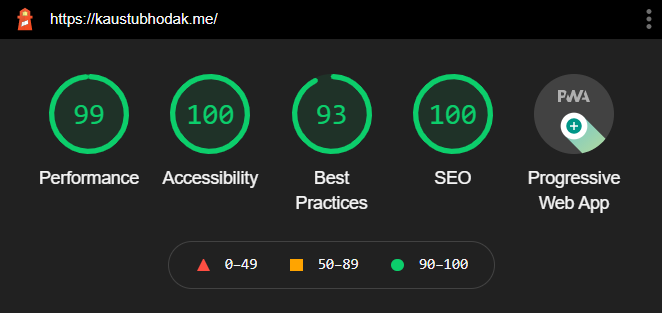
*These stats were recorded on Google Chrome's incognito mode for Desktop. These stats are subject to change and may increase or decrease depending on the tester's environment and/or changes to source code.*
Explore similar templates
Compare previews and descriptions within the same stack and category.

react-resume-template
A personal resume website template for software developers, built with Next.js, React, and TypeScript and styled with Tailwind CSS. Site content is driven by a single data file at /src/data/data.tsx, with types in dataDef.ts and images in src/images/.
Next.js · Portfolio

nxt-lnk
nxt-lnk is a Next.js-based bio link page template that manages personal information and links via BioData.js and LinksData.js, positioned as a self-hosted alternative to Linktree. It groups links by type, supports enabling/disabling individual links, and offers hexagonal or oval avatars.
Next.js · Portfolio

sylph
Sylph is a minimal portfolio and blog template built on Next.js, supporting MDX/Markdown writing, light/dark themes, and automatic OG image generation. It includes sitemap, robots.txt, metadata, and syntax highlighting, with automatic blog timestamps.
Next.js · Portfolio

sleek-portfolio
A modern, responsive portfolio template built with Next.js 15, TypeScript, Tailwind CSS, and Shadcn UI. It includes an MDX blog, project showcase, work experience timeline, and a contact form that receives messages via Telegram Bot.
Next.js · Portfolio

research-website-template
A React + Next.js template for research personal websites, aimed at PhD students and researchers. It centralizes publications, projects, and other content in src/data as arrays of objects, with optional fields automatically generating UI components.
Next.js · Portfolio

shadcn-portfolio
A developer portfolio template built with Next.js 15, shadcn/ui, Tailwind CSS, and Framer Motion, featuring an MDX blog, light and dark modes, responsive design, and SEO meta tags.
Next.js · Portfolio