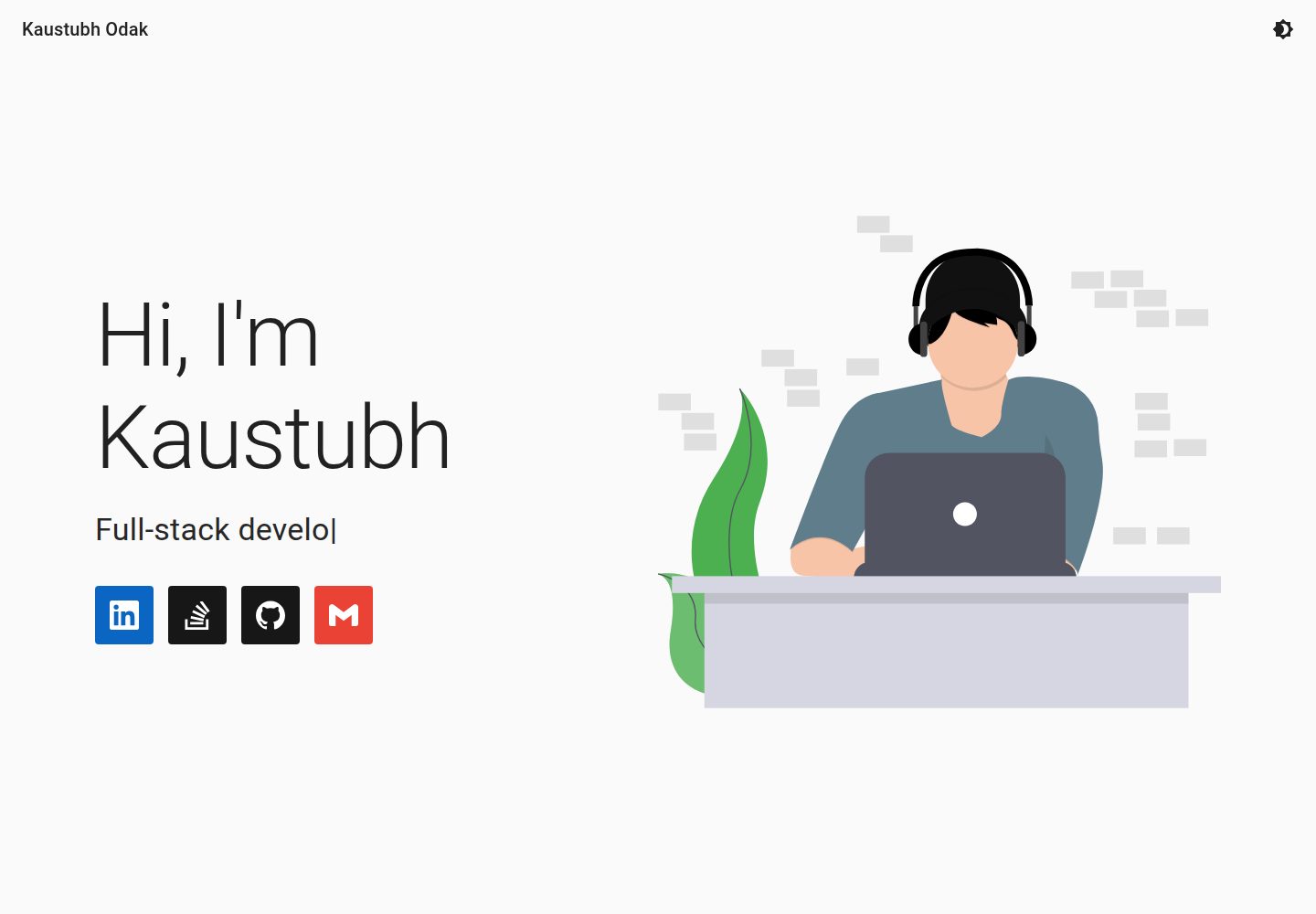
内容集中在 data.json 中维护,覆盖姓名、首页文案、技能、项目、经历与关于信息
Next.jsReact作品集
Portfolio (kausko) — Next.js 作品集模板
作者 kausko
基于 Next.js 与 React 的个人作品集模板,通过 data.json 集中管理个人信息、技能、项目与经历,并支持明暗主题。
看看你的网站会是什么样
浏览真实页面截图,比较内容排版与手机效果。点击下方缩略图切换,放大查看整页细节。
全部页面与视图 2
截图用于了解视觉与布局,交互效果请以实际项目为准。
采集于 2026-10-02查看来源
值得关注的模板亮点
从已有项目资料中,快速了解它的特点。
技能和经历使用键值对结构,键作为分组标题,值映射到 simpleicons.org 图标
项目区通过 GitHub API 按仓库名读取,需要配置 Personal Access Token
主题分为 light 与 dark 两套,除颜色外还可调整断点、排版与动画
README 提供 Vercel 部署流程与本地 yarn dev 运行方式
模板详细介绍
这是一个用 Next.js 和 React 构建的个人作品集网站模板,作者同时用它托管自己的作品集。页面内容由 data.json 驱动:导航栏显示姓名,首页包含主标题、动画副标题以及带图标和链接的职业信息;技能与经历采用键值对结构,键作为分组标题,值对应 simpleicons.org 的图标;项目区通过 GitHub API 按仓库名拉取;关于区包含描述、图片和社交链接。主题对象分为 light 与 dark 两套,除颜色外也可调整断点、排版和动画。
模板需要配置 GitHub Personal Access Token 才能读取仓库信息,README 以 Vercel 部署为例说明环境变量 PAT 的设置方式,也支持本地 yarn dev 运行。图标名称需从 simpleicons.org 获取,部分品牌名会自动转换。README 提到作者使用 LinkedIn CDN 图片,改用其他来源需在 next.config.js 的 domains 中追加域名。
仓库采用 MIT 许可,可免费使用、修改和商用,但演示图片、字体、图标等第三方素材的授权需单独核对;域名、托管等外部服务可能产生费用。README 中的 Lighthouse 数据由作者在特定环境下测得,会随环境和代码变化而变动。
Next.jsReact作品集
适合你的项目吗?
适用场景
- 搭建个人作品集网站,集中展示技能、项目与工作经历
- 以 data.json 为唯一内容入口,快速替换成自己的信息
- 需要明暗主题切换的个人站点
- 部署到 Vercel 并通过 GitHub 仓库自动更新内容
适合人群
- 有 GitHub 账号、希望用仓库名自动拉取项目列表的开发者
- 熟悉 React 与 Next.js、愿意直接编辑 JSON 配置的用户
- 需要 MIT 许可下可自由修改和商用的作品集模板的人
上手与定制指南
结合仓库当前版本的说明,按下面的资料检查内容、配置与运行要求。
- 1
克隆仓库后运行 yarn 安装依赖,并创建 .env.local 写入 PAT 环境变量
- 2
在 data.json 中替换姓名、首页文案、技能、项目仓库名、经历与关于信息
- 3
图标名称需从 simpleicons.org 获取,Node.js、C++ 等名称会自动转换
- 4
使用非默认图片来源时,需在 next.config.js 的 domains 中添加对应域名
- 5
Vercel 部署时保持 Next.js 框架预设与构建设置不变,并配置 PAT 环境变量
授权与来源资料
使用条件与限制
免费使用 · 保留许可声明本次收录的是公开仓库中采用 MIT 许可的免费版本;免费范围为该版本代码,不代表外部服务或第三方素材免费。
使用时需要遵守
- 允许免费使用、修改、商用和分发该版本代码。
- 分发代码副本或实质性部分时,保留原作者版权声明和完整 MIT 许可声明。
- 代码按现状提供;担保与责任限制以原许可证及适用法律为准。
额外费用与待核对事项
- 使用项目区自动拉取 GitHub 仓库功能时,必须创建具有访问全部仓库权限的 GitHub Personal Access Token,并配置为环境变量 PAT,否则项目列表无法加载。
- README 给出的部署流程依赖 Vercel 账号并需关联 GitHub 账号,属于外部服务要求,可能受其免费额度与条款限制。
- 作者示例中的经历与关于区图片来自 LinkedIn CDN,属于第三方素材,其授权与可用性需自行核对,不能默认随 MIT 代码许可一并获得。
- 示例 SVG 素材来自 UnDraw,属于第三方资源,使用前需单独确认其许可条款,MIT 许可不覆盖这些素材。
- 演示图片、字体、图标及其他第三方素材需按各自许可核对,不能仅凭代码的 MIT 许可判断。
- 域名、托管、数据库、支付或 AI 等外部服务可能另外收费。
查看原文依据
Permission is hereby granted, free of charge
许可证原文
Create a *Personal Access Token `(PAT)` on Github, with access to all your repositories.
README 原文
Create an account on Vercel and connect your Github account
README 原文
I used images from [LinkedIn's CDN](media-exp1.licdn.com) for the Experience and About sections.
README 原文
https://github.com/kausko/Portfolio/blob/master/LICENSEhttps://github.com/kausko/Portfolio/blob/master/README.mdI used SVGs from [UnDraw](undraw.co).
README 原文
DeepSeek 根据仓库许可证和 README 整理 ·2026-10-02。结果仅覆盖已读取资料,依赖、图片、字体及后续条款变更以各自原文为准。
项目核对记录与介绍依据
模板资料
- 来源平台
- GitHub
- 资料与维护参考分
- 资料较完整 · 81 / 100
- 技术栈
- Next.js · React
- 网站类型
- 作品集
这个分数如何计算
本站按许可资料(最高30分)、演示链接(12分)、预览图(10分)、Star数(15分)、记录的维护时间(15分)、描述完整度(8分)、功能记录(5分)和分类资料(5分)计算。它不是代码、安全或性能测试,也不是 Google 评分;有链接不代表已实测可用。
这个项目需要核对什么
- 记录的仓库更新时间
- 2023-03-05
- 截图检查日期
- 2026-10-02
已收录演示链接。请用你的内容与屏幕尺寸检查;有演示不代表表单、认证或支付已经可用。
目录记录的主要技术栈是 Next.js。请通过依赖清单和锁文件核对实际版本与托管要求。这些说明基于收录资料,不代表代码审计或部署实测。
查看具体选型方法 →介绍的制作与核对状态
介绍由 AI 辅助整理目录与仓库资料。仓库作者不等于这篇介绍的审核者。
已完成服务器许可规则与 AI 来源核对;未经过人工编辑审核。
查看当时使用的来源资料
SHA-256: ca64d1b00752a7a62339045f48b6b1cc4b79d1bcc782cabadfaa69d97e25fd94
2026-10-02T16:42:49.080Z
来源文件 / 仓库# Portfolio

## Tech Stack






## How to personalize
- Press [](https://github.com/kausko/Portfolio/generate) to clone this template to your Github account
- Clone the newly created repository in your account to your local machine
- Customize the following files with your own information
- `data.json` with your
- Name (appears in Navbar)
- Landing content
```
{
"title": String, // Main heading on landing
"subtitles: String[], // Animated Subheaders
"professionalDetails": {
"alt": String, // Tooltip text that appears on hover,
"icon": String, // Icon name from simpleicons.org,
"link": String // To your account/repo/email
}[]
}
```
- Skills
- Keys appear as headings on your porfolio (Ex: languages known)
- Values appear as icons from simpleicons.org
- Value can be a `String` or `Object` with properties: `alt`, `icon` and `backgroundColor` (optional)
```
{
[key1]: [values1],
...
[keyn]: [valuesn],
}
```
- Projects
```
{
"baseURI": "https://api.github.com/repos/<your-Github-username>/",
"repositories": String[] // <Names of your Github repositories>
}
```
- Experience
- Uses the same key-value pair pattern as the `Skills` section
- Refer `data.json` for valid properties of `values`
- About
```
{
"description": String,
"picture": String, // URL
"social": Object[] // Same as professionalDetails from Landing
}
```
- Theme
- The theme object has two properties - light, and dark, for light mode and dark mode respectively.
- Despite the classification, theming is not limited to colors only. Breakpoints, typography, animations, etc. can also be modified. See [link](https://material-ui.com/customization/default-theme/) for more details.
- The theme object contains the default colors applied by MUI as an example. This can be modified or removed entirely.
- **NOTE:**
- Valid icon names can be obtained from simpleicons.org by hovering on the icons. The name appears at the bottom of the page as: `https://simpleicons.org/icons/<icon-name>.svg`
- Original names of the brand may also be provided. Examples on how icon names are automatically corrected (not tested for all cases):
- Node.js -> node-dot-js
- C++ -> cplusplus
- I used images from [LinkedIn's CDN](media-exp1.licdn.com) for the Experience and About sections. To use other sources, see additional configurations below.
- `pages/_document.js` with your Google Analytics code.
- All `.png` icons and `manifest.webmanifest` in the public folder. There are many ways of generating these. I used:
- [Favicon](https://favicon.io/) for generating favicons
- [Simicart](https://www.simicart.com/manifest-generator.html/) for generating manifest information and files
- [Maskable](https://maskable.app/) for masking my icons for a higher PWA score [OPTIONAL]
- For additonal customizations, modify:
- `domains` in `next.config.js` for using images from additional sources
- `.svg` files in `public/` directory for using your own images in the Landing, Skills, Experience, Projects and About sections. I used SVGs from [UnDraw](undraw.co).
- Commit your changes and push to your repository
## Deployment (with Vercel)
- Create a *Personal Access Token `(PAT)` on Github, with access to all your repositories.
- Copy the `PAT` and save it for later use
- Create an account on Vercel and connect your Github account
- Create a [](https://vercel.com/new)
- Choose `Import Git Repository` and choose the cloned repository
- The `Project Name` may be changed but keep the `Framework Preset (Next.js)`, `Root Directory (./)` and `Build Settings` intact
- Add the following environment variable with key: `PAT` and value: `<40-character-PAT>` (replace with actual PAT without the angular <> brackets)
- Press the  button
**PATs must follow GitHub's new authentication token format : `ghp_<37-character-Base62-String>`*
## How to update content
Deployment with Vercel automatically sets up your repository for continuous deployment. Changes committed and pushed to master should reflect in a few minutes on your site. If your deployment fails, check  on Vercel.
## Running locally
- Requirements: Node, NPM and Yarn (LTS)*
- Navigate to your cloned project, and run `yarn` on a terminal
- Create a file named `.env.local` and add the PAT environment variable here (`PAT=<40-character-pat>`)
- Run `yarn dev` to test the Next.js app on `localhost:3000`
- Production builds can also be tested using `yarn build` and `yarn start`
*`npm` commands also work
## Lighthouse stats
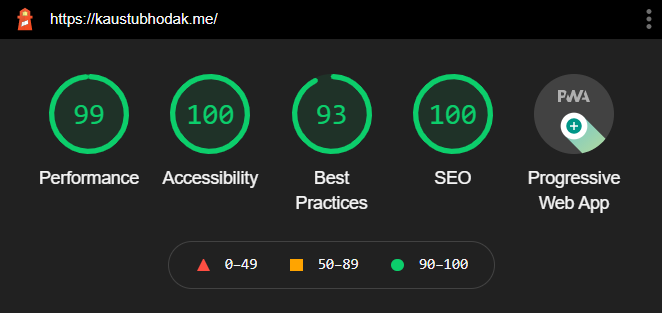
*These stats were recorded on Google Chrome's incognito mode for Desktop. These stats are subject to change and may increase or decrease depending on the tester's environment and/or changes to source code.*
看看同类模板
对比同技术栈与用途的模板,找到更适合的视觉与内容结构。

react-resume-template
A personal resume website template built with React.js, Typescript, Next.js, and styled with Tailwind css
Next.js · 作品集

nxt-lnk
Custom bio links for creatives who love coding. A perfect custom alternative for linktree, bio and other short…
Next.js · 作品集

sylph
A minimal portfolio template.
Next.js · 作品集

sleek-portfolio
sleek-portfolio 是一个面向开发者个人品牌展示的现代作品集模板,基于 Next.js 15、TypeScript、Tailwind CSS 和 Shadcn UI 构建。
Next.js · 作品集

research-website-template
React + Next.js template for research websites (for PhD students, researchers, etc)
Next.js · 作品集

shadcn-portfolio
shadcn-portfolio 是一个面向开发者的作品集模板,技术栈为 Next.js 15、shadcn/ui、Tailwind CSS 和 Framer Motion。
Next.js · 作品集