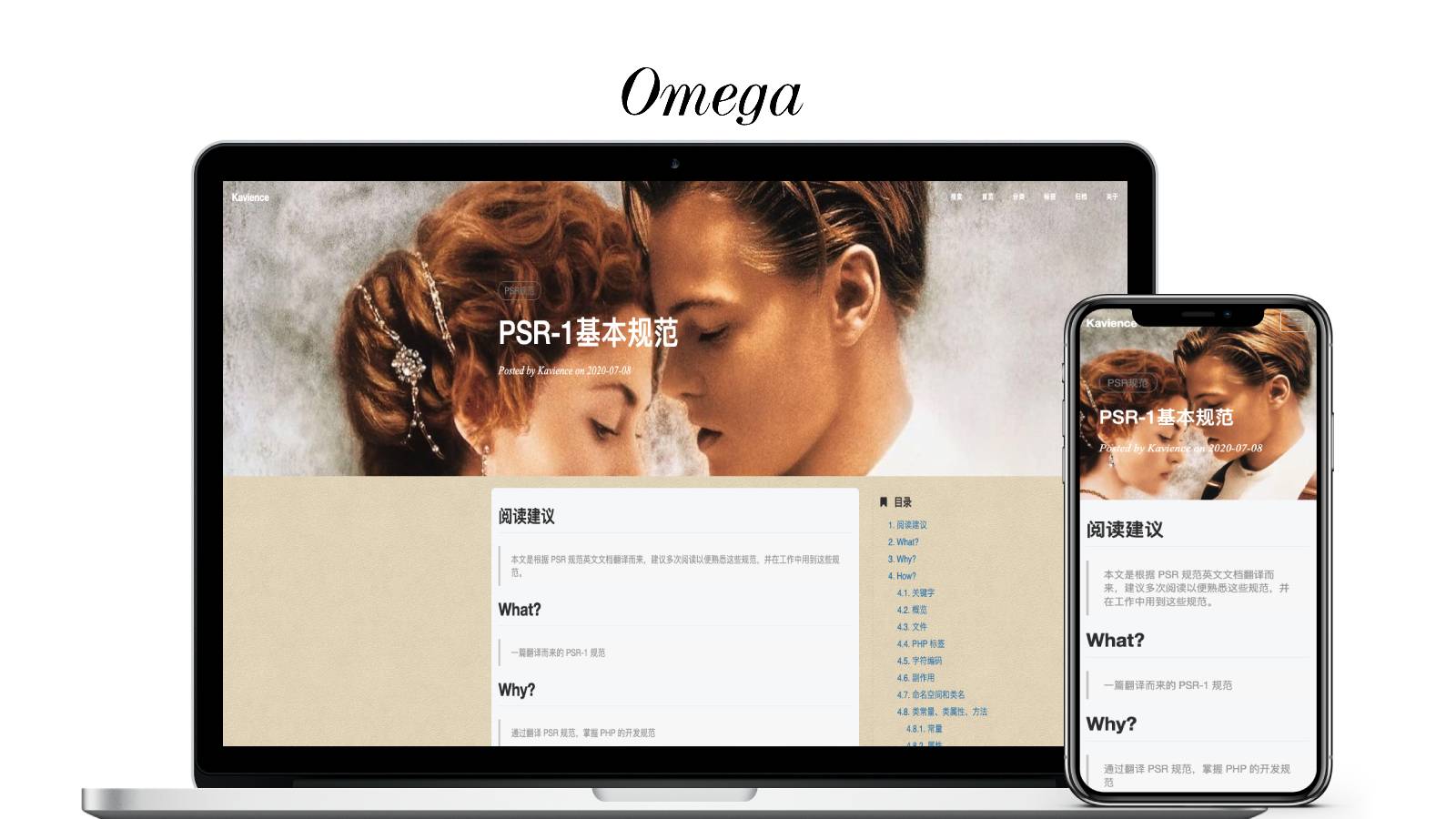
A blog theme based on Hexo, referencing the overall layout of the Hux blog
HexoBlog
hexo-theme-omega — Hexo Blog Template
By kavience
hexo-theme-omega is a blog theme developed by kavience for Hexo, emphasizing lightness, readability, and configuration customization, with multilingual support, under the Apache-2.0 license.
Explore the design
Compare the page layouts and mobile experience. Open any screenshot for a closer look.
Author preview
Author-provided preview
Preview provided in the project README.
One original preview is available. Open the full image to inspect the design.
Screenshots show visual appearance; interactive behavior may differ.
Recorded 2026-10-02View source
What stands out
A quick read of the recorded project description.
Customize site information, Banner, comments, analytics, appreciation, and sidebar widgets through the omega section in the root _config.yml
Supports two comment methods: gitalk or disqus
Supports Baidu Analytics and Google Analytics
Adjust background color, text color, and highlight color scheme through less global variables
Provides multilingual support
Template Details
hexo-theme-omega is a blog theme for the Hexo framework, created by the author with the aim of making a pure, easy-to-read, and easily customizable theme. The theme references the overall layout of the Hux blog, provides page templates for home, post, archive, category, and tag pages, and supports multiple languages.
The theme is customized through the omega section in the root _config.yml, allowing settings for filing information, SEO title, Banner image, contact information, comment method (gitalk or disqus), analytics (Baidu Analytics or Google Analytics), appreciation, sidebar widgets, and less global variables (background color, text color, highlight color scheme, etc.). Sidebar widgets can be selected from short-about, recent-posts, category, archive, featured-tags, and copyright.
The theme depends on a set of Hexo plugins, including hexo-generator-archive, hexo-generator-category, hexo-generator-feed, hexo-generator-index-pin-top, hexo-generator-searchdb, hexo-generator-seo-friendly-sitemap, hexo-generator-tag, hexo-renderer-ejs, hexo-renderer-less, hexo-renderer-markdown-it, hexo-server, hexo-tag-cloud, hexo-translate-title-pro, hexo-wordcount, and cheerio. Before use, dependencies must be installed according to the versions listed in the README, otherwise unknown issues may occur.
Regarding usage limitations, the README mentions that post titles cannot contain special characters such as the plus sign, otherwise translation may fail; they cannot contain English commas and cannot exceed 50 characters, otherwise a GitHub comment issue cannot be generated; post titles cannot be the same as any heading within the post, otherwise a comment issue cannot be generated; and posts must have a title, otherwise searchdb generation will have problems. These limitations are related to the plugins used by the theme and need to be noted during use.
HexoBlog
Is it right for your project?
Use Cases
- Building a personal blog with Hexo and wanting a clean reading-style theme
- Needing to centrally configure blog appearance and functionality by dimensions such as site information, Banner, comments, and analytics
- Wanting to adjust theme colors through less variables without modifying template structure
- Needing a sidebar to display widgets such as about, recent posts, categories, archives, and tags
Suitable For
- Bloggers using Hexo who want to quickly replace their theme
- Users who prefer a lightweight, easy-to-read blog interface
- Sites needing gitalk or disqus comments, Baidu Analytics, or Google Analytics
- Developers willing to install the specified dependencies according to the README and accept the related usage limitations
Getting started & customization
Use these recorded setup notes alongside the repository instructions for your chosen version.
- 1
Place the theme files in the themes directory and change the theme in the root _config.yml to omega
- 2
Install the corresponding Hexo plugins according to the dependency list in the README, keeping versions as consistent as possible
- 3
Configure the omega section in the root _config.yml, including site information, Banner, comments, analytics, appreciation, sidebar, and less variables
- 4
Avoid special characters such as the plus sign and English commas in post titles, keep them within 50 characters, do not duplicate any heading within the post, and ensure posts have titles
- 5
When using gitalk for comments, configure fields such as clientID, clientSecret, repo, owner, and admin
License & source material
Usage conditions & limitations
Free to use · keep license noticeThis entry covers the free version under the Apache-2.0 license in the public repository; the free scope is the code of this version and does not imply that external services or third-party assets are free.
Must comply with when using
- Free use, modification, commercial use, and distribution are permitted; when distributing, the Apache-2.0 license must be included.
- Modified files must prominently indicate changes, and relevant copyright, patent, trademark, and attribution notices must be retained.
- If the original project includes a NOTICE file, applicable attribution notices must be retained when distributing derivative works.
- The license includes an applicable contributor patent grant; initiating patent litigation as described in the license will terminate that patent grant, and no trademark usage rights are granted.
- The code is provided as is; warranties and limitations of liability are governed by the original license and applicable law.
Additional costs & items to verify
- Post titles cannot contain special characters such as the plus sign, otherwise the title translation plugin may not work properly.
- Post titles cannot contain English commas and must not exceed 50 characters, otherwise a GitHub comment issue cannot be generated.
- Post titles cannot be the same as any heading within the post, otherwise a comment issue cannot be generated.
- Posts must have a title, otherwise search database generation will fail.
- Demo images, fonts, icons, and other third-party assets must be checked against their respective licenses and cannot be judged solely by the code's Apache-2.0 license.
- External services such as domains, hosting, databases, payments, or AI may incur additional charges.
View Original Text Basis
no-charge, royalty-free, irrevocable copyright license
Original License Text
文章名字不能带 + 号等特殊文字,否则可能造成翻译无法通过
Original README
文章名字不能带 ',' 且不能超过 50 个字符,因为 GitHub 标签不允许,否则无法生成评论 issue
Original README
文章名字不能与文章内各级标题同名,否则无法生成评论 issue
Original README
https://github.com/kavience/hexo-theme-omega/blob/master/LICENSEhttps://github.com/kavience/hexo-theme-omega/blob/master/README.md文章不能无标题,否则生成 searchdb 有问题
Original README
Compiled by DeepSeek based on repository license and README ·2026-10-02. Results only cover the materials read; dependencies, images, fonts, and subsequent term changes are subject to their respective original texts.
Project checks & description sources
Template Information
- Source platforms
- GitHub
- Documentation and maintenance reference score
- Less documented · 48 / 100
- Technologies
- Hexo
- Website type
- Blog
How this score is calculated
Our heuristic uses license records (up to 30), a demo link (12), a preview (10), stars (15), recorded maintenance (15), description completeness (8), feature records (5) and classification data (5). It is not a code, security or performance test, or a Google score. A link does not establish tested functionality.
What to verify for this project
- Repository update recorded
- 2021-05-18
- Screenshot last checked
- 2026-10-02
No demo link is recorded. Use the repository instructions to evaluate the project locally; the screenshot alone cannot establish interactive behavior.
The catalog identifies Hexo as the primary stack. Check the actual dependency manifest and lockfile for versions and hosting requirements. These notes use recorded metadata, not a code audit or a deployment test.
Use a selection guide →How this description was prepared
AI-assisted description based on catalog records and repository material. Repository authors are not automatically the reviewers of this description.
Automatically checked against source and license rules; no manual editorial review.
Inspect the recorded source material
SHA-256: df47cfb54fb743c6e39b6b5bf425bcf97114a9457ffeaf4d7be9535f8475ae6e
2026-10-02T15:05:16.425Z
Source file / repository<h1 align="center">hexo-theme-omega</h1>
<div>
<p align="center">简单、可读性高的 hexo 主题<p>
</div>
## what
[hexo-theme-omega](https://github.com/kavience/hexo-theme-omega) 是 hexo 框架下的一个博客主题。预览地址:[https://www.kavience.com](https://www.kavience.com)
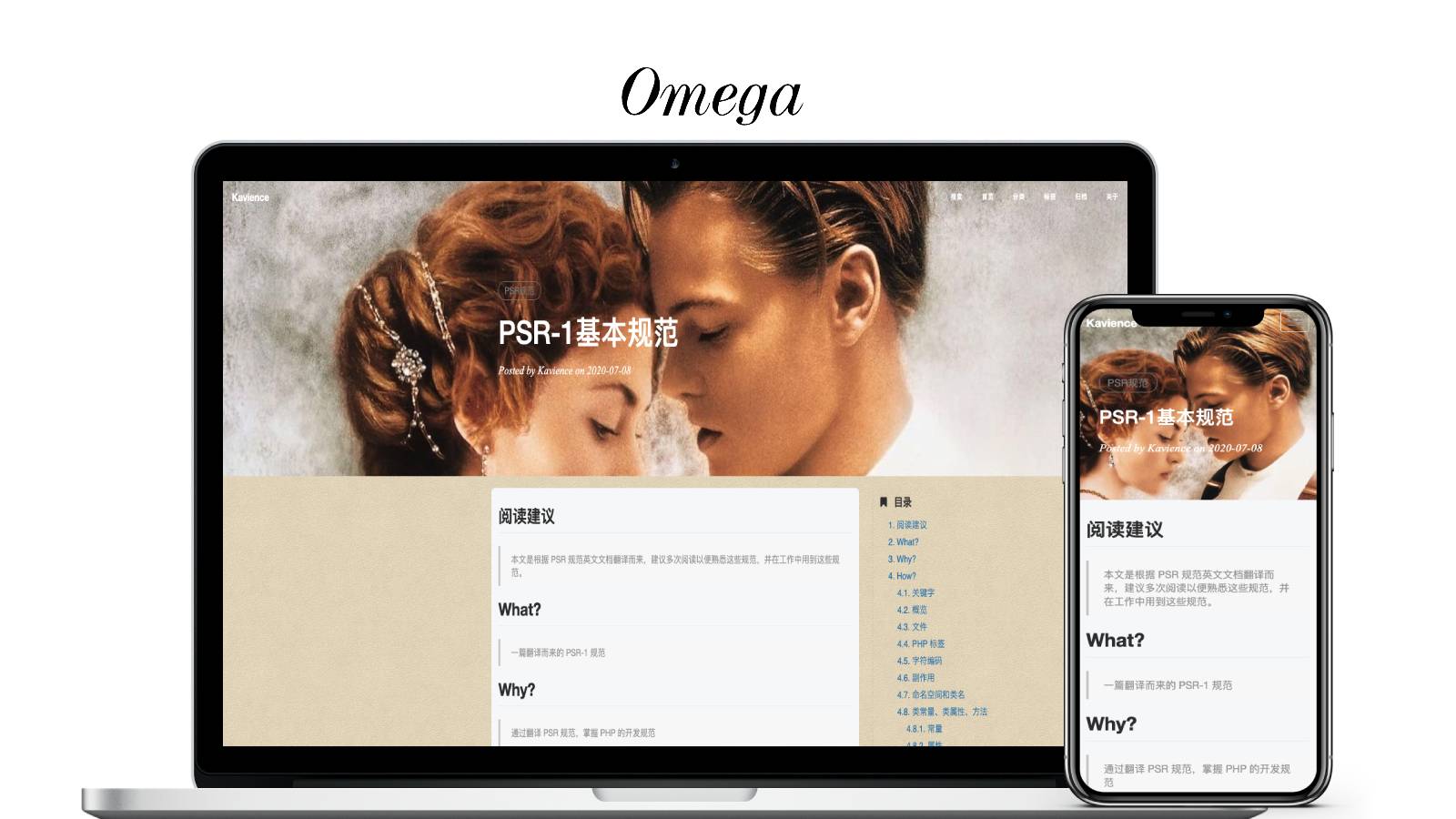
### 特点
- 轻量
- 便于阅读
- 配置定制化
- 多语言支持
## why
使用过各种各样的工具、框架搭建博客,在去年最终选择使用 hexo 来搭建,主要是不用维护服务器,简单方便,然而始终没有找到称心如意的主题。所以决定动手自己做一个。
正如其名,我希望有一个纯粹的、便于阅读、容易定制化的博客主题。现在有很多 hexo 的主题框架,但是都不如我意,这也就是我为什么要做这个主题的初衷。主题参考了 [Hux](http://huangxuan.me/) 的博客整体布局,我也比较喜欢这种布局。
### 纯粹
主题是基于 hexo 框架的,首先我希望博客不需要太多复杂、混乱、无用的功能。我理想的博客就是一个记录生活、提供与志同道合的网友的交流平台。
### 便于阅读
博客最主要的功能就是提供阅读了,所以一个良好的阅读体验是最重要的。
### 容易定制化
如果博客和别人的完全一致,那也不好,不够独特,容易审美疲劳。所以主题具有定制化的功能是必须的。
但是定制化如果过于复杂,又会增加时间成本,就变得如同开发一个主题了,所以简化定制化成本也是必须的。
## how
### 替换主题
将主题文件放置在 themes 目录,修改根目录下的配置文件 _config.yml 的 theme 为 omega
### 安装依赖
主题有以下依赖,尽量保持一致,否则可能会出现未知问题。
```json
"dependencies": {
"cheerio": "^1.0.0-rc.6",
"hexo": "^4.0.0",
"hexo-generator-archive": "^1.0.0",
"hexo-generator-category": "^1.0.0",
"hexo-generator-feed": "^2.2.0",
"hexo-generator-index-pin-top": "^0.2.2",
"hexo-generator-searchdb": "^1.3.3",
"hexo-generator-seo-friendly-sitemap": "0.2.1",
"hexo-generator-tag": "^1.0.0",
"hexo-renderer-ejs": "^1.0.0",
"hexo-renderer-less": "^2.0.2",
"hexo-renderer-markdown-it": "^3.4.1",
"hexo-server": "^1.0.0",
"hexo-tag-cloud": "^2.1.2",
"hexo-translate-title-pro": "^1.0.11",
"hexo-wordcount": "^6.0.1"
}
```
### 修改配置
根目录下的 _config.yml 配置可参考[我的博客](https://www.kavience.com/),主题下的配置变量主要有以下内容:
```yml
# omega setting start
# ----------------------------------------------------------
# Site settings
beian: 赣ICP备17009879号
SEOTitle: kavience | Blog
# ----------------------------------------------------------
# Banner settings
banner: true # close all header banner if false
header_img: /img/header_img/home.jpg
article_img: /img/header_img/article-bg.jpg
archives_img: /img/header_img/archive.jpg
archive_tag_img: /img/header_img/archive-tag.jpg
archive_category_img: /img/header_img/archive-category.jpg
404_img: /img/header_img/404.jpg
# ----------------------------------------------------------
# Contact settings
email: [email protected]
zhihu_username: kavience-xiaofan
github_username: kavience
twitter_username: Mr_Kavience
# weibo_username: xxx
# facebook_username: xxx
# linkedin_username: xxx
sitemapIcon: true
RSS: true
# ----------------------------------------------------------
# Comment settings
comment_method: gitalk # gitalk or disqus
## Method 1: gitalk https://github.com/gitalk/gitalk
gitalk:
clientID: 'd25cda615a572205be1e'
clientSecret: 'faa4cf10f1daea3d4701f8be90d80feb88c818ac'
repo: 'blog'
owner: 'kavience'
admin: ['kavience']
distractionFreeMode: false
## Method 2: disqus
# disqus_username: kavience
# ----------------------------------------------------------
# Analytics settings
## Baidu Analytics
# ba_track_id: xxx
## Google Analytics
ga_track_id: "UA-171834825-2"
ga_domain: www.kavience.com
# ----------------------------------------------------------
# Reward settings
reward: true
reward_comment: 赞赏一下
wechatpay: /img/reward/wechat.png
alipay: /img/reward/alipay.png
# ----------------------------------------------------------
# Sidebar settings
sidebar_about_description: "种一棵树最好的时间是十年前,其次是现在。"
sidebar_avatar: /img/avatar/my-avatar.jpg
widgets:
- short-about
- recent-posts
- category
- archive
- featured-tags
- copyright
# ----------------------------------------------------------
# less vars
less:
options:
globalVars:
bg-color: '#f1e5c9'
main-bg-color: '#f6f8fa'
text-main-color: '#404046'
text-secondary-color: '#a3a3a3'
text-threed-color: '#808080'
hover-color: '#0085a1'
border-color: gray
## highlight vars
# highlight-background: "#f6f8fa"
# highlight-current-line: "#efefef"
# highlight-selection: "#d6d6d6"
# highlight-foreground: "#24292e"
# highlight-comment: "#8e908c"
# highlight-red: "#c82829"
# highlight-orange: "#f5871f"
# highlight-yellow: "#eab700"
# highlight-green: "#718c00"
# highlight-aqua: "#3e999f"
# highlight-blue: "#4271ae"
# highlight-purple: "#8959a8"
highlight-background: "#002451"
highlight-current-line: "#00346e"
highlight-selection: "#003f8e"
highlight-foreground: "#ffffff"
highlight-comment: "#7285b7"
highlight-red: "#ff9da4"
highlight-orange: "#ffc58f"
highlight-yellow: "#ffeead"
highlight-green: "#d1f1a9"
highlight-aqua: "#99ffff"
highlight-blue: "#bbdaff"
highlight-purple: "#ebbbff"
```
## 总结
在主题开发的过程中,踩了很多坑,一方面是因为 hexo 官方的文档实在是太简陋了,感觉很多重要的信息都是一笔带过,反复看了几遍。这里把几个重要的知识点记录一下。
### css 预处理器
hexo 支持多种 css 预处理器,例如 sass、less、stylus 等,需要安装对应的渲染插件,例如 hexo-renderer-less 、hexo-renderer-stylus 。
在引入的过程,使用 css 辅助函数像这样引入就可以了。
```ejs
<%- css('css/omega')%>
```
会自动引入主题下的 source 下的 css 目录下的 omega.css 文件,hexo-renderer-less 在打包的时候,会自动编译 omega.less 成 omega.css。
这里还有个坑,在 stylus 中可以使用 hexo-config 辅助函数获取 hexo 的配置变量,在 less 中,hexo-config 辅助函数是不存在的,只能把变量定义在 less 下面的配置,例如这样:
```yml
less:
options:
globalVars:
bg-color: '#f1e5c9'
```
### 归档
在开发归档的页面过程中,发现生成的 tag、category 都归属于 archive ,也就是说例如你想访问一个分类下的所有文章,像这样 https://www.kavience.com/categories/front-end/, 最终生成的这个页面采用的是 archive 模板。官网文档是这样描述的:
> 模板决定了网站内容的呈现方式,每个主题至少都应包含一个 index 模板,以下是各页面相对应的模板名称:
| 模板 | 用途 | 回退 |
| :------: | :------: | :-----: |
| index | 首页 |
| post | 文章 | index |
| page | 分页 | index |
| archive | 归档 | index |
| category | 分类归档 | archive |
| tag | 标签归档 | archive |
所以必须在 archive 模板中处理这三个页面渲染的方式,可以通过 page 变量下的 category 、tag 来判断到底是属于何种归档。
### 注意
博客采用的一些插件可能会导致一些奇奇怪怪的问题出现,所以请仔细看下面的说明。
- 文章名字不能带 + 号等特殊文字,否则可能造成翻译无法通过
- 文章名字不能带 ',' 且不能超过 50 个字符,因为 GitHub 标签不允许,否则无法生成评论 issue
- 文章名字不能与文章内各级标题同名,否则无法生成评论 issue
- 文章不能无标题,否则生成 searchdb 有问题
Explore similar templates
Compare previews and descriptions within the same stack and category.

hexo-theme-matery
hexo-theme-matery is a Material Design, responsive Hexo blog theme with homepage carousel, waterfall post list, timeline archive, word cloud tags, radar chart categories, and an about page.
Hexo · Blog

hexo-theme-cactus
Cactus is a responsive Hexo theme for personal websites and blogs, maintained by probberechts. It offers four color schemes (dark, light, white, classic), configurable navigation, homepage post lists, project lists, social links, and copyright year ranges.
Hexo · Blog

hexo-theme-volantis
Volantis is a blog theme for Hexo, distributed as the npm package hexo-theme-volantis and enabled by setting theme to volantis in the Hexo site's _config.yml. It requires Hexo 7.3+, hexo-cli 4.3+, Node.js 22.x LTS+, and npm 10.x LTS+.
Hexo · Blog

hexo-theme-aurora
Hexo Theme Aurora is a futuristic Hexo blog theme built around aurora gradients and a magazine-style grid layout.
Hexo · Blog

hexo-theme-Claudia
Claudia is a Hexo blog theme focused on a clean look and easy configuration. It automatically follows the device's dark mode and claims a 90+ Lighthouse score.
Hexo · Blog

hexo-theme-A4
hexo-theme-A4 is a minimalist Hexo blog theme that mimics the texture of A4 paper, emphasizing simplicity, small size, and minimal configuration.
Hexo · Blog