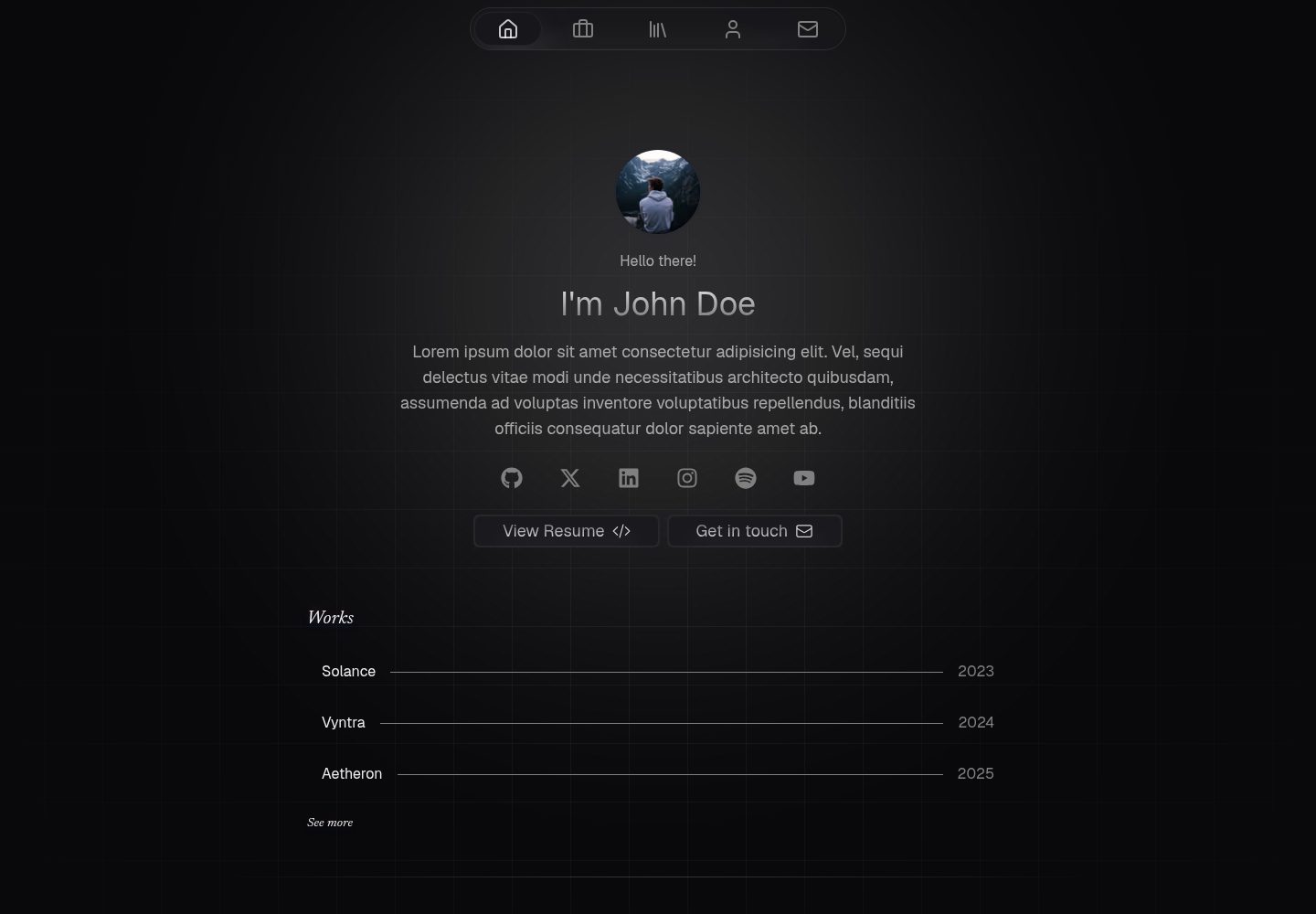
A static portfolio template built with Astro and Svelte components, with interactivity implemented via Svelte islands
AstroSveltePortfolio
astro-canvas — Astro Portfolio Template
By krishna-santosh
A static personal portfolio website template built with Astro and Svelte, including home, works, about, skills, writing, and contact pages, with content managed centrally in the src/data directory.
Explore the design
Compare the page layouts and mobile experience. Open any screenshot for a closer look.
Desktop homepage1 / 3
Desktop captureTop of page
Actual screenshot captured by the server browser.
All pages & views 3
Screenshots show visual appearance; interactive behavior may differ.
Recorded 2026-10-02View source
What stands out
A quick read of the recorded project description.
Includes home, works, about, skills, writing, and contact pages, with corresponding screenshots provided in the repository's preview directory
Writing, project, and tech stack content is centralized in the src/data directory and maintained according to the schema in src/content.config.ts
The contact form is preconfigured with Puffin Forms, but the README marks this part as still W.I.P
Licensed under Apache-2.0, permitting free use, modification, commercial use, and distribution
Template Details
Astro Canvas is a static portfolio website template built with Astro and Svelte components. The author positions it as an Astro rewrite of Hugo Richard's Canvas Nuxt template, with some personal adjustments. The template provides pages for home, works, about, skills, writing, and contact, and screenshots of these pages are included in the repository's preview directory.
Content maintenance is centralized in the src/data directory. Writing, project, and tech stack data are filled in according to the schema defined in src/content.config.ts. Writing, project, and avatar images are stored in src/assets, and files must be replaced with reference paths updated accordingly. The FAQ is modified in src/components/FAQ.svelte, the Cal.com booking link is updated in src/components/MeetingButton.astro, and the signature SVG is replaced in src/components/Signature.astro. Before deployment, the site property in astro.config.mjs must also be changed to the actual deployment address.
The template builds fully statically, requiring no server-side processing or database. It can be deployed to any hosting service that supports static sites, or self-hosted with Nginx or Caddy alongside Docker. The contact form is preconfigured with Puffin Forms, but the README marks it as W.I.P and not yet complete. The project does not include i18n support, and interactivity is handled by Svelte islands. The build time, request size, and JS size comparison data listed in the README come from the author's tests on a specific machine; they are the author's own claims and have not been independently verified in this entry.
AstroSveltePortfolio
Is it right for your project?
Use Cases
- Individual developers or designers building a static portfolio site to showcase works, skills, and articles
- Projects that want to organize pages with Astro and Svelte components and manage content centrally through data files
- Scenarios requiring deployment to static hosting platforms such as GitHub Pages, Cloudflare Pages, Cloudflare Workers static assets, or Vercel
- Scenarios planning to self-host a static site with Nginx or Caddy alongside Docker
Suitable For
- Users who accept manually editing src/data, src/assets, and several component files to customize content
- Sites that do not need i18n multilingual support
- Purely static deployment needs that require no server-side processing or database
- Users who can independently verify the licenses of third-party assets such as demo images, fonts, and icons
Getting started & customization
Use these recorded setup notes alongside the repository instructions for your chosen version.
- 1
After cloning the repository, install dependencies and start the development server; the README example uses bun, but other package managers can be used instead
- 2
Update writing, project, and tech stack content in the src/data directory according to the schema in src/content.config.ts
- 3
Replace images in src/assets and update reference paths accordingly, and modify the corresponding content in FAQ.svelte, MeetingButton.astro, and Signature.astro
- 4
Change the site property in astro.config.mjs to the actual deployment address; the build output can be deployed to any static hosting platform
- 5
The contact form depends on Puffin Forms and is marked as W.I.P in the README; verify its availability before use
License & source material
Usage conditions & limitations
Free to use · keep license noticeThis entry covers the free version in the public repository under the Apache-2.0 license; the free scope applies to that version's code and does not mean external services or third-party assets are free.
Must comply with when using
- Free use, modification, commercial use, and distribution are permitted; the Apache-2.0 license must be included when distributing.
- Modified files must carry prominent notices of changes, and relevant copyright, patent, trademark, and attribution notices must be retained.
- If the original project includes a NOTICE file, applicable attribution notices in it must be retained when distributing derivative works.
- The license includes an applicable contributor patent grant; initiating patent litigation as described in the license terminates that patent grant, and no trademark rights are granted.
- The code is provided as is; warranties and limitations of liability are governed by the original license and applicable law.
Additional costs & items to verify
- The contact form depends on the third-party service Puffin Forms, requiring that external service to handle form submissions and potentially involving account registration or service fees.
- The booking feature depends on the third-party service Cal.com; you must provide your own Cal.com booking link, and using this feature requires registering for or using the Cal.com service.
- The README example uses bun as the package manager, but it explicitly states that other package managers can be used freely, so this is not a mandatory restriction.
- Demo images, fonts, icons, and other third-party assets must be checked against their respective licenses and cannot be judged solely by the code's Apache-2.0 license.
- External services such as domains, hosting, databases, payments, or AI may incur additional charges.
View Original Text Basis
no-charge, royalty-free, irrevocable copyright license
Original License Text
This portfolio template comes pre-configured with [Puffin Forms](https://puffinforms.com) to handle contact form submissions
Original README
Update your Cal.com meeting link in `src/components/MeetingButton.astro`
Original README
https://github.com/krishna-santosh/astro-canvas/blob/main/LICENSEhttps://github.com/krishna-santosh/astro-canvas/blob/main/README.mdThis project uses bun as package manager, feel free to use your preferred one
Original README
Compiled by DeepSeek based on repository license and README ·2026-10-02. Results only cover the materials read; dependencies, images, fonts, and subsequent term changes are subject to their respective original texts.
Project checks & description sources
Template Information
- Source platforms
- GitHub
- Documentation and maintenance reference score
- More documented · 88 / 100
- Technologies
- Astro · Svelte
- Website type
- Portfolio
How this score is calculated
Our heuristic uses license records (up to 30), a demo link (12), a preview (10), stars (15), recorded maintenance (15), description completeness (8), feature records (5) and classification data (5). It is not a code, security or performance test, or a Google score. A link does not establish tested functionality.
What to verify for this project
- Repository update recorded
- 2026-06-30
- Screenshot last checked
- 2026-10-02
A demo link is listed. Check it with your own content and viewport sizes; its presence does not confirm that forms, authentication or payments work.
The catalog identifies Astro as the primary stack. Check the actual dependency manifest and lockfile for versions and hosting requirements. These notes use recorded metadata, not a code audit or a deployment test.
Use a selection guide →How this description was prepared
AI-assisted description based on catalog records and repository material. Repository authors are not automatically the reviewers of this description.
Automatically checked against source and license rules; no manual editorial review.
Inspect the recorded source material
SHA-256: 564a7c0aadd995bc4357a89a6556480f50f2e7f956dcc6f869c5188a97b28703
2026-10-02T08:15:17.426Z
Source file / repository# Astro Canvas
Astro Canvas is a beautiful, blazingly fast portfolio website template built with [Astro](https://astro.build) and [Svelte](https://svelte.dev) components.
<p>
<a href="https://deploy.workers.cloudflare.com/?url=https%3A%2F%2Fgithub.com%2Fkrishna-santosh%2Fastro-canvas" style="margin-right: 8px;">
<img src="https://deploy.workers.cloudflare.com/button" alt="Deploy to Cloudflare" />
</a>
<a href="https://vercel.com/new/clone?repository-url=https%3A%2F%2Fgithub.com%2Fkrishna-santosh%2Fastro-canvas&project-name=astro-canvas&repository-name=astro-canvas">
<img src="https://vercel.com/button" alt="Deploy with Vercel" />
</a>
</p>
---
## Demo
You can see a live demo at [canvas.krish.fyi](https://canvas.krish.fyi)
## Preview
| | |
| :------------------------------------------------------------------: | :------------------------------------------------------------------: |
| <img width="1920" alt="home" src="./preview/home.png"> Home | <img width="1920" alt="works" src="./preview/work.png"> Works |
| <img width="1920" alt="about" src="./preview/about.png"> About | <img width="1920" alt="skills" src="./preview/skills.png"> Skills |
| <img width="1920" alt="writing" src="./preview/writing.png"> Writing | <img width="1920" alt="contact" src="./preview/contact.png"> Contact |
| | |
## Quick Setup
1. Clone this repository locally
```bash
git clone https://github.com/krishna-santosh/astro-canvas.git
```
> This project uses bun as package manager, feel free to use your preferred one
2. Install dependencies
```bash
bun install
```
3. Start development server
```bash
bun dev
```
4. Build the project
```bash
bun run build
```
5. Preview the build output
```bash
bun preview
```
## Deployment
Since this is a completely static build, you can use any hosting provider that supports hosting a static site, like Github Pages, Cloudflare Pages, Cloudflare Workers (Static Assets), Vercel e.t.c
You can also use Nginx or Caddy optionally with docker to host this website :)
## How to Modify the Portfolio Content
- All editable content - writing, projects, and tech stack can be updated in the `src/data` directory, following the schema defined in `src/content.config.ts`
- All images (for your writings, projects, and profile picture) are stored in src/assets.
Replace them as needed and update their paths wherever they’re referenced.
- Update FAQs in `src/components/FAQ.svelte`.
- Update your Cal.com meeting link in `src/components/MeetingButton.astro`
- Update the signature SVG in `src/components/Signature.astro`
> Don’t have one? You can generate it using [text-to-svg](https://text-to-svg.com)
> After generating your SVG, copy it into Signature.astro, add the class **signature** to both the `<svg>` and its `<path>`, and include class:list={[className]} on the `<svg> `element.
- Update the `site` property in `astro.config.mjs` to your deployment URL
- Finally, clone the repo and run it locally to personalize anything else, like your name, bio, resume, social links, and site metadata (title, description, etc.).
- You can safely delete the `preview` directory at the project root which contains preview screenshots
## Setup Contact Form
This portfolio template comes pre-configured with [Puffin Forms](https://puffinforms.com) to handle contact form submissions
W.I.P
## Stats
- This project aims to be a near-perfect replica of the original Canvas Template by Hugo Richard, rebuilt in Astro with a few personal tweaks and improvements.
- This is a fully static site, no server-side processing or database required.
- i18n support isn’t included.
- Interactivity is handled through Svelte islands.
With that out of the way, here are some numbers:
### This rewrite in Astro aims to be faster, smaller and lighter
✨ Build times dropped from **80 seconds** to just **6 seconds**, that’s about 13x speedup!
✨ Initial Home Page request size dropped from **710kb** to **139kb**!
✨ JS on Initial Page load dropped from **343kb** to **35kb**!
✨ The overall build size is now much smaller, meaning faster downloads and quicker page loads.
✨ Thanks to Svelte, there’s **zero runtime overhead**.
> Tested on machine with Ryzen 7 3700X, 2666MT/s DDR4 RAM
## Credits
A huge thanks to [Hugo Richard](https://github.com/HugoRCD), the original creator of the [Canvas Nuxt Template](https://github.com/HugoRCD/canvas).
This project wouldn’t exist without his exceptional design and thoughtful structure.
This Astro version is a rebuilt and optimized adaptation, made with deep respect for the original work, focused on performance, maintainability, and a smoother developer experience.
Explore similar templates
Compare previews and descriptions within the same stack and category.

astro-theme-cactus
Astro Cactus is an Astro-based blog and portfolio theme that uses Markdown/MDX content collections to manage posts, notes, and tags, with frontmatter type-checked by a schema.
Astro · Portfolio

astrofy
Astrofy is a free and open-source personal portfolio website template built with Astro and TailwindCSS, with built-in blog, CV timeline, project showcase, store, and RSS feed modules.
Astro · Portfolio

astro-nano
Astro Nano is a static, minimalist portfolio and blog template built with Astro, Tailwind, and TypeScript without frontend frameworks. It includes light/dark themes, animated UI, automatic sitemap and RSS feed generation, and Markdown/MDX support with component imports.
Astro · Portfolio

astro-erudite
astro-erudite is an opinionated, unstyled static blog template built with Astro and native CSS, with no UI or CSS framework and minimal dependencies.
Astro · Portfolio

astro-sphere
Astro Sphere is a static, minimalist portfolio and blog theme maintained by markhorn-dev, built mainly with Astro, Tailwind, and TypeScript, with a small amount of SolidJS for stateful components.
Astro · Portfolio

astro-micro
Astro Micro is a framework-free blog and portfolio theme for Astro, forked from Astro Nano. It adds Pagefind search and Giscus comments while retaining type safety, sitemap, RSS, Markdown and MDX support, and TailwindCSS with system, light, and dark themes.
Astro · Portfolio