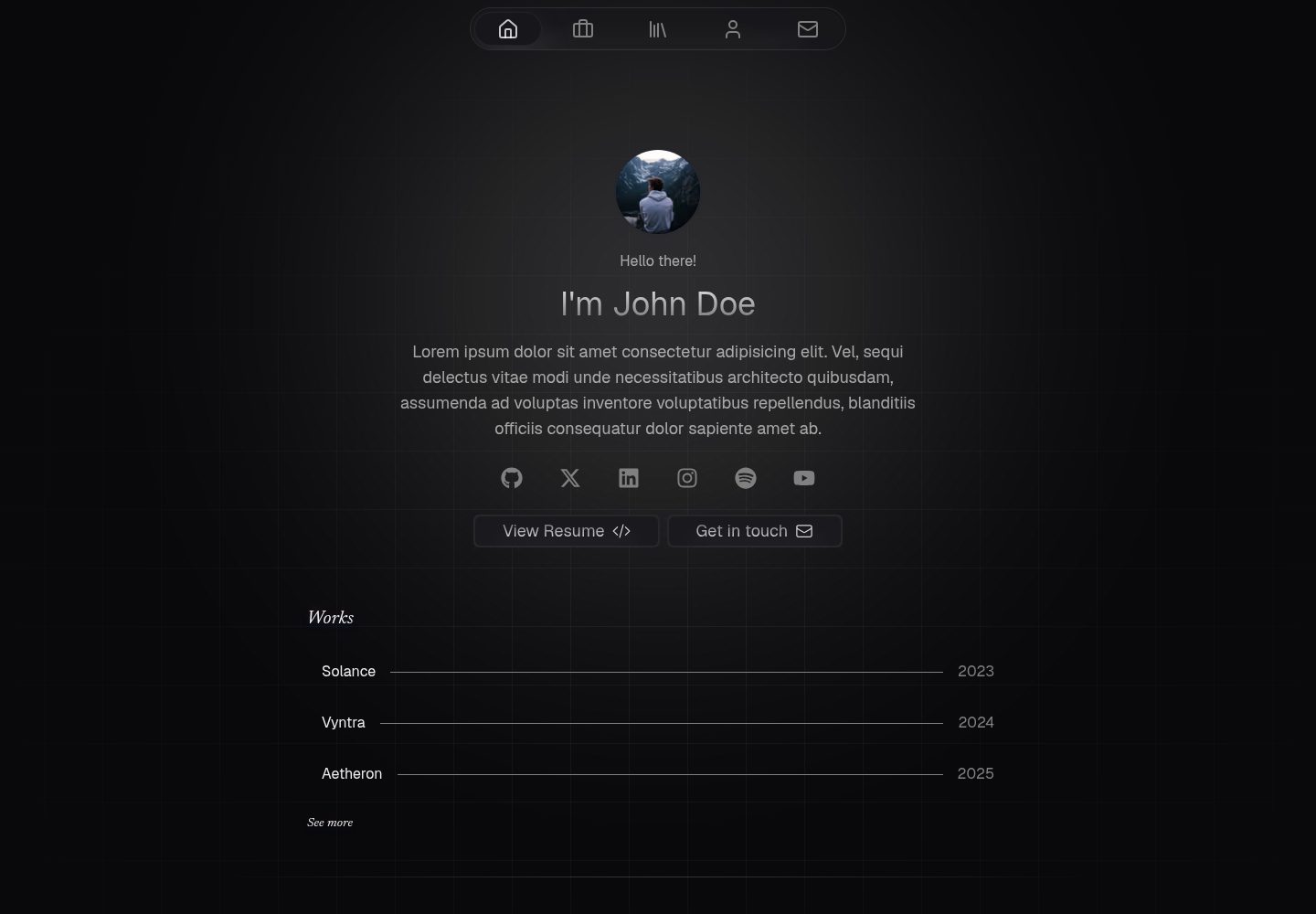
使用 Astro 与 Svelte 组件构建的静态作品集模板,交互部分以 Svelte islands 实现
AstroSvelte作品集
astro-canvas — Astro 作品集模板
作者 krishna-santosh
基于 Astro 与 Svelte 构建的静态个人作品集网站模板,包含首页、作品、关于、技能、写作与联系页面,内容通过 src/data 目录集中管理。
看看你的网站会是什么样
浏览真实页面截图,比较内容排版与手机效果。点击下方缩略图切换,放大查看整页细节。
全部页面与视图 3
截图用于了解视觉与布局,交互效果请以实际项目为准。
采集于 2026-10-02查看来源
值得关注的模板亮点
从已有项目资料中,快速了解它的特点。
包含首页、作品、关于、技能、写作、联系等页面,仓库预览目录提供对应截图
写作、项目与技术栈内容集中在 src/data 目录,按 src/content.config.ts 的 schema 维护
联系表单预配置 Puffin Forms,但 README 标注该部分仍为 W.I.P
采用 Apache-2.0 许可,允许免费使用、修改、商用与分发
模板详细介绍
Astro Canvas 是一个用 Astro 与 Svelte 组件搭建的静态作品集网站模板,作者将其定位为对 Hugo Richard 的 Canvas Nuxt 模板的 Astro 重写版本,并加入了一些个人调整。模板提供首页、作品、关于、技能、写作和联系等页面,仓库预览目录中给出了这些页面的截图。
内容维护集中在 src/data 目录,写作、项目与技术栈数据按 src/content.config.ts 中定义的 schema 填写;写作、项目与头像图片存放在 src/assets,需要替换文件并同步更新引用路径。FAQ 在 src/components/FAQ.svelte 中修改,Cal.com 预约链接在 src/components/MeetingButton.astro 中更新,签名 SVG 在 src/components/Signature.astro 中替换。部署前还需把 astro.config.mjs 中的 site 属性改为实际部署地址。
模板为完全静态构建,不需要服务端处理或数据库,可部署到支持静态站点的托管服务,也可用 Nginx 或 Caddy 配合 Docker 自行托管。联系表单预配置了 Puffin Forms,但 README 中标注为 W.I.P,尚未完成。项目未包含 i18n 支持,交互由 Svelte islands 承担。README 中列出的构建耗时、请求体积和 JS 体积对比数据来自作者在特定机器上的测试,属于其自述,未在本条目中独立验证。
AstroSvelte作品集
适合你的项目吗?
适用场景
- 个人开发者或设计师搭建展示作品、技能与文章的静态作品集站点
- 希望以 Astro 和 Svelte 组件组织页面、并用数据文件集中管理内容的项目
- 需要部署到 GitHub Pages、Cloudflare Pages、Cloudflare Workers 静态资源或 Vercel 等静态托管平台的场景
- 计划用 Nginx 或 Caddy 配合 Docker 自行托管静态站点的场景
适合人群
- 接受手动编辑 src/data、src/assets 与若干组件文件来定制内容的用户
- 不需要 i18n 多语言支持的站点
- 不需要服务端处理或数据库的纯静态部署需求
- 能自行核对演示图片、字体、图标等第三方素材许可的使用者
上手与定制指南
结合仓库当前版本的说明,按下面的资料检查内容、配置与运行要求。
- 1
克隆仓库后安装依赖并启动开发服务器;README 示例使用 bun,也可换用其他包管理器
- 2
在 src/data 目录按 src/content.config.ts 的 schema 更新写作、项目与技术栈内容
- 3
替换 src/assets 中的图片并同步更新引用路径,同时修改 FAQ.svelte、MeetingButton.astro、Signature.astro 中的对应内容
- 4
将 astro.config.mjs 的 site 属性改为实际部署地址,构建产物可部署到任意静态托管平台
- 5
联系表单依赖 Puffin Forms 且 README 标注为 W.I.P,使用前需自行确认其可用性
授权与来源资料
使用条件与限制
免费使用 · 保留许可声明本次收录的是公开仓库中采用 Apache-2.0 许可的免费版本;免费范围为该版本代码,不代表外部服务或第三方素材免费。
使用时需要遵守
- 允许免费使用、修改、商用和分发;分发时需随附 Apache-2.0 许可证。
- 修改过的文件需显著标明改动,并保留相关版权、专利、商标及归属声明。
- 若原项目附有 NOTICE 文件,分发衍生作品时需保留其中适用的归属声明。
- 许可包含适用的贡献者专利授权;发起许可所述专利诉讼会终止该专利授权,且不授予商标使用权。
- 代码按现状提供;担保与责任限制以原许可证及适用法律为准。
额外费用与待核对事项
- 联系表单依赖第三方服务 Puffin Forms,需使用该外部服务处理表单提交,可能涉及注册账号或服务费用。
- 预约功能依赖第三方服务 Cal.com,需自行提供 Cal.com 预约链接,使用该功能需注册或使用 Cal.com 服务。
- README 示例使用 bun 作为包管理器,但明确表示可自由使用其他包管理器,不构成强制限制。
- 演示图片、字体、图标及其他第三方素材需按各自许可核对,不能仅凭代码的 Apache-2.0 许可判断。
- 域名、托管、数据库、支付或 AI 等外部服务可能另外收费。
查看原文依据
no-charge, royalty-free, irrevocable copyright license
许可证原文
This portfolio template comes pre-configured with [Puffin Forms](https://puffinforms.com) to handle contact form submissions
README 原文
Update your Cal.com meeting link in `src/components/MeetingButton.astro`
README 原文
https://github.com/krishna-santosh/astro-canvas/blob/main/LICENSEhttps://github.com/krishna-santosh/astro-canvas/blob/main/README.mdThis project uses bun as package manager, feel free to use your preferred one
README 原文
DeepSeek 根据仓库许可证和 README 整理 ·2026-10-02。结果仅覆盖已读取资料,依赖、图片、字体及后续条款变更以各自原文为准。
项目核对记录与介绍依据
模板资料
- 来源平台
- GitHub
- 资料与维护参考分
- 资料较完整 · 88 / 100
- 技术栈
- Astro · Svelte
- 网站类型
- 作品集
这个分数如何计算
本站按许可资料(最高30分)、演示链接(12分)、预览图(10分)、Star数(15分)、记录的维护时间(15分)、描述完整度(8分)、功能记录(5分)和分类资料(5分)计算。它不是代码、安全或性能测试,也不是 Google 评分;有链接不代表已实测可用。
这个项目需要核对什么
- 记录的仓库更新时间
- 2026-06-30
- 截图检查日期
- 2026-10-02
已收录演示链接。请用你的内容与屏幕尺寸检查;有演示不代表表单、认证或支付已经可用。
目录记录的主要技术栈是 Astro。请通过依赖清单和锁文件核对实际版本与托管要求。这些说明基于收录资料,不代表代码审计或部署实测。
查看具体选型方法 →介绍的制作与核对状态
介绍由 AI 辅助整理目录与仓库资料。仓库作者不等于这篇介绍的审核者。
已完成服务器许可规则与 AI 来源核对;未经过人工编辑审核。
查看当时使用的来源资料
SHA-256: 564a7c0aadd995bc4357a89a6556480f50f2e7f956dcc6f869c5188a97b28703
2026-10-02T08:15:17.426Z
来源文件 / 仓库# Astro Canvas
Astro Canvas is a beautiful, blazingly fast portfolio website template built with [Astro](https://astro.build) and [Svelte](https://svelte.dev) components.
<p>
<a href="https://deploy.workers.cloudflare.com/?url=https%3A%2F%2Fgithub.com%2Fkrishna-santosh%2Fastro-canvas" style="margin-right: 8px;">
<img src="https://deploy.workers.cloudflare.com/button" alt="Deploy to Cloudflare" />
</a>
<a href="https://vercel.com/new/clone?repository-url=https%3A%2F%2Fgithub.com%2Fkrishna-santosh%2Fastro-canvas&project-name=astro-canvas&repository-name=astro-canvas">
<img src="https://vercel.com/button" alt="Deploy with Vercel" />
</a>
</p>
---
## Demo
You can see a live demo at [canvas.krish.fyi](https://canvas.krish.fyi)
## Preview
| | |
| :------------------------------------------------------------------: | :------------------------------------------------------------------: |
| <img width="1920" alt="home" src="./preview/home.png"> Home | <img width="1920" alt="works" src="./preview/work.png"> Works |
| <img width="1920" alt="about" src="./preview/about.png"> About | <img width="1920" alt="skills" src="./preview/skills.png"> Skills |
| <img width="1920" alt="writing" src="./preview/writing.png"> Writing | <img width="1920" alt="contact" src="./preview/contact.png"> Contact |
| | |
## Quick Setup
1. Clone this repository locally
```bash
git clone https://github.com/krishna-santosh/astro-canvas.git
```
> This project uses bun as package manager, feel free to use your preferred one
2. Install dependencies
```bash
bun install
```
3. Start development server
```bash
bun dev
```
4. Build the project
```bash
bun run build
```
5. Preview the build output
```bash
bun preview
```
## Deployment
Since this is a completely static build, you can use any hosting provider that supports hosting a static site, like Github Pages, Cloudflare Pages, Cloudflare Workers (Static Assets), Vercel e.t.c
You can also use Nginx or Caddy optionally with docker to host this website :)
## How to Modify the Portfolio Content
- All editable content - writing, projects, and tech stack can be updated in the `src/data` directory, following the schema defined in `src/content.config.ts`
- All images (for your writings, projects, and profile picture) are stored in src/assets.
Replace them as needed and update their paths wherever they’re referenced.
- Update FAQs in `src/components/FAQ.svelte`.
- Update your Cal.com meeting link in `src/components/MeetingButton.astro`
- Update the signature SVG in `src/components/Signature.astro`
> Don’t have one? You can generate it using [text-to-svg](https://text-to-svg.com)
> After generating your SVG, copy it into Signature.astro, add the class **signature** to both the `<svg>` and its `<path>`, and include class:list={[className]} on the `<svg> `element.
- Update the `site` property in `astro.config.mjs` to your deployment URL
- Finally, clone the repo and run it locally to personalize anything else, like your name, bio, resume, social links, and site metadata (title, description, etc.).
- You can safely delete the `preview` directory at the project root which contains preview screenshots
## Setup Contact Form
This portfolio template comes pre-configured with [Puffin Forms](https://puffinforms.com) to handle contact form submissions
W.I.P
## Stats
- This project aims to be a near-perfect replica of the original Canvas Template by Hugo Richard, rebuilt in Astro with a few personal tweaks and improvements.
- This is a fully static site, no server-side processing or database required.
- i18n support isn’t included.
- Interactivity is handled through Svelte islands.
With that out of the way, here are some numbers:
### This rewrite in Astro aims to be faster, smaller and lighter
✨ Build times dropped from **80 seconds** to just **6 seconds**, that’s about 13x speedup!
✨ Initial Home Page request size dropped from **710kb** to **139kb**!
✨ JS on Initial Page load dropped from **343kb** to **35kb**!
✨ The overall build size is now much smaller, meaning faster downloads and quicker page loads.
✨ Thanks to Svelte, there’s **zero runtime overhead**.
> Tested on machine with Ryzen 7 3700X, 2666MT/s DDR4 RAM
## Credits
A huge thanks to [Hugo Richard](https://github.com/HugoRCD), the original creator of the [Canvas Nuxt Template](https://github.com/HugoRCD/canvas).
This project wouldn’t exist without his exceptional design and thoughtful structure.
This Astro version is a rebuilt and optimized adaptation, made with deep respect for the original work, focused on performance, maintainability, and a smoother developer experience.
看看同类模板
对比同技术栈与用途的模板,找到更适合的视觉与内容结构。

astro-theme-cactus
A simple Astro theme. Use it to create your blog or website.
Astro · 作品集

astrofy
Astrofy is a free and open-source template for your Personal Portfolio Website built with Astro and TailwindCS…
Astro · 作品集

astro-nano
Astro Nano is a static, minimalist, lightweight, lightning fast portfolio and blog.
Astro · 作品集

astro-erudite
An opinionated, unstyled static blogging template built with Astro and native CSS.
Astro · 作品集

astro-sphere
Astro Sphere is a static, minimalist, lightweight, lightning fast portfolio and blog.
Astro · 作品集

astro-micro
Blog theme for Astro with search and comments built-in. Zero frameworks.
Astro · 作品集