Responsive layout based on CSS Flexbox, with no frontend framework
HugoStarter
hugo-flex — Hugo Starter Template
By ldeso
hugo-flex is a lightweight Hugo theme based on CSS Flexbox. It uses no frontend frameworks or JavaScript and supports multilingual content, a dark theme, full-text RSS output, and optional math rendering, syntax highlighting, and comment components.
Explore the design
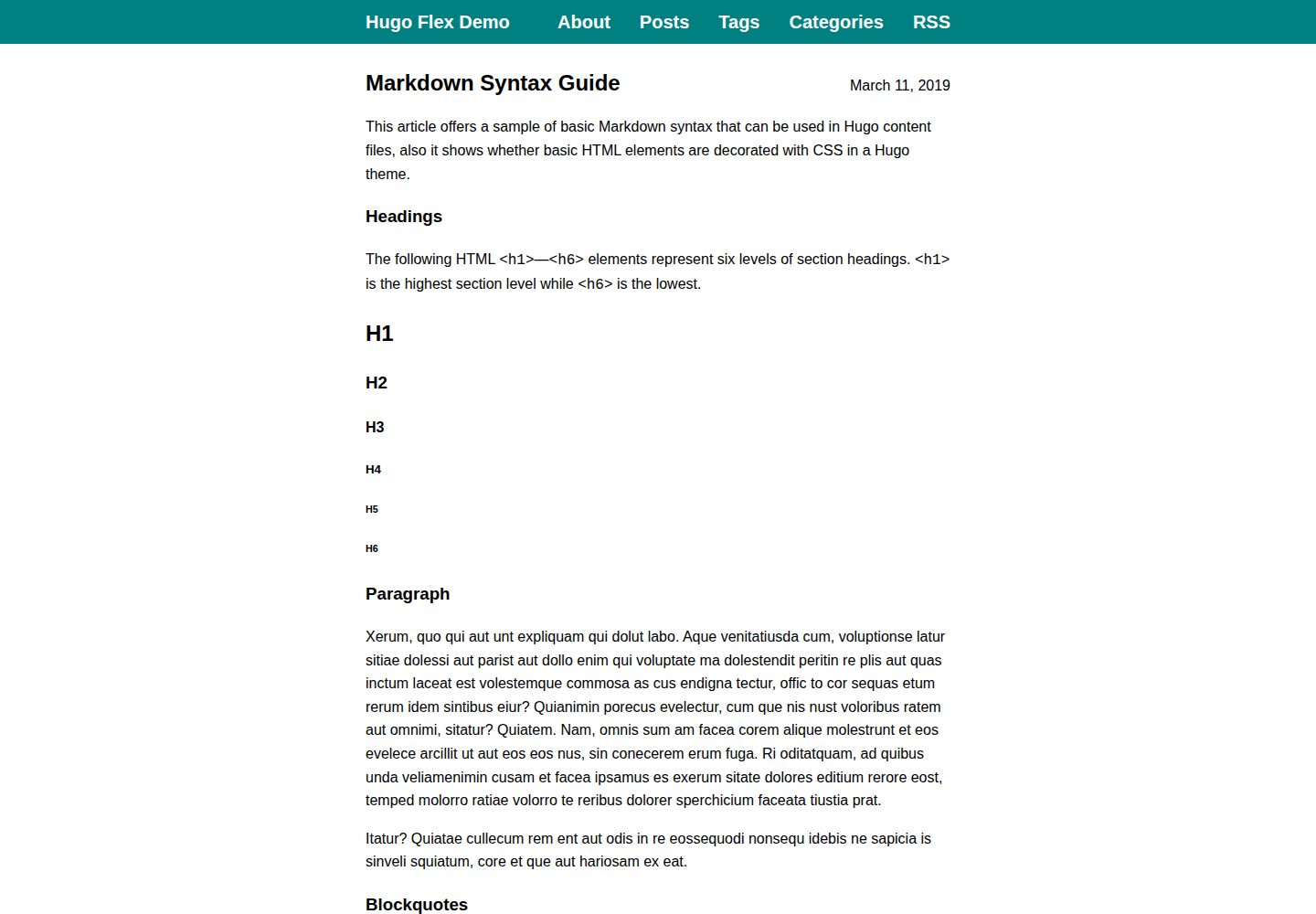
Compare the page layouts and mobile experience. Open any screenshot for a closer look.
Desktop homepage1 / 3
Desktop captureTop of page
Actual screenshot captured by the server browser.
All pages & views 3
Screenshots show visual appearance; interactive behavior may differ.
Recorded 2026-10-02View source
What stands out
A quick read of the recorded project description.
No JavaScript included; supports multilingual content and a dark theme
RSS outputs full text, and RSS pages are styled like regular pages
Optional server-side math rendering with LaTeX syntax and a math shortcode
Optional external stylesheet for syntax highlighting to support strict CSP
Built-in shortcodes for a Netlify contact form and a privacy-friendly SoundCloud player
Template Details
hugo-flex is a theme for Hugo static sites. Its core layout uses CSS Flexbox for responsive typography, with no frontend framework dependency and no JavaScript. The theme provides multilingual support, a dark theme, full-text RSS output, and renders RSS pages with the same styling as regular pages.
The theme includes several optional capabilities: server-side math rendering (LaTeX syntax, which can be enabled globally or used locally via a shortcode), syntax highlighting (switchable to an external stylesheet for strict CSP compatibility), homepage summary display, Schema.org / Open Graph / Twitter Cards metadata, an Utterances comment component, and two built-in shortcodes for a Netlify contact form and a privacy-friendly SoundCloud player. Custom CSS and JS can be loaded globally for the site or dynamically included on specific pages via shortcodes.
To use it, add the theme as a git submodule in the Hugo site's themes directory and set theme: hugo-flex in the site configuration. The theme's default configuration is provided in YAML and can be copied into the site configuration and modified, including colors, content width, delimiters, footer, RSS notice, KaTeX version, heading level offset, link icons, and other parameters. The README states that the theme has been verified to work with Hugo v0.158.0–v0.161.1.
Regarding licensing, the code is under Apache-2.0, permitting free use, modification, commercial use, and distribution; distribution requires including the license and retaining relevant notices. Third-party assets such as demo images, fonts, and icons require separate license verification.
HugoStarter
Is it right for your project?
Use Cases
- Building a text-focused Hugo blog or documentation site
- Static sites that need multilingual content and a dark theme
- Sites that want responsive typography without JavaScript
- Technical writing that needs to render LaTeX math formulas on pages
- Sites that need full-text RSS subscriptions and a customized RSS page appearance
Suitable For
- Developers building static sites with Hugo
- Site authors who prefer a framework-free, JavaScript-free frontend approach
- Teams that need a multilingual blog or technical documentation
- Sites with content security policy requirements that want syntax highlighting via an external stylesheet
Getting started & customization
Use these recorded setup notes alongside the repository instructions for your chosen version.
- 1
First install Hugo and create a site, then run git submodule add https://github.com/ldeso/hugo-flex.git themes/hugo-flex in the site root
- 2
Set theme: hugo-flex in the site configuration; you can copy the theme's default YAML configuration and modify it
- 3
To update the theme, run git submodule update --remote --rebase in the site root
- 4
Math rendering requires enabling the passthrough extension in the site configuration, or using the math shortcode for local rendering
- 5
If syntax highlighting needs an external stylesheet, set markup.highlight.noClasses and params.noClasses to false
License & source material
Usage conditions & limitations
Free to use · keep license noticeThis entry covers the free version under the Apache-2.0 license in the public repository; the free scope applies to that version's code and does not mean external services or third-party assets are free.
Must comply with when using
- Free use, modification, commercial use, and distribution are permitted; distribution requires including the Apache-2.0 license.
- Modified files must prominently indicate changes and retain relevant copyright, patent, trademark, and attribution notices.
- If the original project includes a NOTICE file, distributions of derivative works must retain its applicable attribution notices.
- The license includes an applicable contributor patent grant; initiating patent litigation as described in the license terminates that patent grant, and no trademark rights are granted.
- The code is provided as-is; warranties and limitations of liability are governed by the original license and applicable law.
Additional costs & items to verify
- The built-in contact shortcode depends on the Netlify Forms service and is only available when deployed on Netlify; other hosting environments cannot directly use this form functionality.
- The SoundCloud player shortcode embeds the third-party SoundCloud service; before use, you must verify its terms of service and privacy implications yourself.
- Enabling comments requires configuring an Utterances repository address; comment data is hosted on GitHub Issues, which is an external service dependency.
- Math rendering depends on KaTeX; if left blank, the latest version is used, which may introduce external resources and version change risks.
- Demo images, fonts, icons, and other third-party assets must be checked against their respective licenses; they cannot be judged solely by the code's Apache-2.0 license.
- External services such as domains, hosting, databases, payments, or AI may incur additional charges.
View Original Text Basis
no-charge, royalty-free, irrevocable copyright license
Original License Text
A contact form that works with the [Netlify Forms](https://docs.netlify.com/forms/setup/) service can be inserted with the shortcode
Original README
A privacy-friendly [SoundCloud player](https://help.soundcloud.com/hc/articles/115003449627) can be inserted with the shortcode
Original README
Set to Utterances repo URL to add Utterances comments
Original README
https://github.com/ldeso/hugo-flex/blob/master/LICENSEhttps://github.com/ldeso/hugo-flex/blob/master/README.mdkatex: 0.16.22 # KaTeX version / leave empty to use the latest version
Original README
Compiled by DeepSeek based on repository license and README ·2026-10-02. Results only cover the materials read; dependencies, images, fonts, and subsequent term changes are subject to their respective original texts.
Project checks & description sources
Template Information
- Source platforms
- Hugo Themes
- Documentation and maintenance reference score
- More documented · 91 / 100
- Technologies
- Hugo
- Website type
- Starter
How this score is calculated
Our heuristic uses license records (up to 30), a demo link (12), a preview (10), stars (15), recorded maintenance (15), description completeness (8), feature records (5) and classification data (5). It is not a code, security or performance test, or a Google score. A link does not establish tested functionality.
What to verify for this project
- Repository update recorded
- 2026-05-25
- Screenshot last checked
- 2026-10-02
A demo link is listed. Check it with your own content and viewport sizes; its presence does not confirm that forms, authentication or payments work.
The catalog identifies Hugo as the primary stack. Check the actual dependency manifest and lockfile for versions and hosting requirements. These notes use recorded metadata, not a code audit or a deployment test.
Use a selection guide →How this description was prepared
AI-assisted description based on catalog records and repository material. Repository authors are not automatically the reviewers of this description.
Automatically checked against source and license rules; no manual editorial review.
Inspect the recorded source material
SHA-256: 8ef789943afd172f8cad4260899da625a6d119415904ba160f77c270f72b771a
2026-10-02T23:12:25.393Z
Source file / repository# Hugo Flex
A lightweight Hugo theme leveraging [CSS Flexbox](https://developer.mozilla.org/docs/Web/CSS/CSS_Flexible_Box_Layout).
This theme is verified to work with [Hugo](https://gohugo.io/) versions v0.158.0–v0.161.1.
## Features
- [Flexbox](https://developer.mozilla.org/docs/Web/CSS/CSS_Flexible_Box_Layout)-based responsive layout
- 100% performance and accessibility scores on [PageSpeed Insights](https://pagespeed.web.dev/)
- No framework
- No javascript
- Full posts in RSS feed
- RSS page looks like a normal page
- [Multilingual support](https://gohugo.io/content-management/multilingual/)
- [Dark theme](https://mzl.la/3PVbdQX)
Optional features:
- [Server-side math rendering](#math-rendering)
- [Syntax highlighting](#syntax-highlighting)
- Show [summaries](https://gohugo.io/content-management/summaries/) on homepage
- [Schema.org](https://schema.org/), [Open Graph](https://ogp.me/) and [Twitter Cards](https://developer.twitter.com/cards/) metadata
- [Utterances](https://utteranc.es/) comments widget
- Custom CSS and JS may be added [site-wide](#custom-css-and-js), or [dynamically](#dynamically-embedded) with shortcodes
- Built-in shortcodes:
- [Netlify contact form](#netlify-contact-form)
- Privacy-friendly [SoundCloud player](#soundcloud-player)
## Example
The [demo site](https://ldeso.github.io/hugo-flex-demo/) is built from the [hugo-flex-demo](https://github.com/ldeso/hugo-flex-demo/) repository.
A complete starter template specifically made for this theme is also available at [scivision/hugo-flex-example](https://github.com/scivision/hugo-flex-example/).
## Installation
1. [Install Hugo](https://gohugo.io/installation/).
2. [Create a Hugo site](https://gohugo.io/getting-started/directory-structure/).
3. Open a command prompt at the root of the site and download the theme:
```bash
git init
git submodule add https://github.com/ldeso/hugo-flex.git themes/hugo-flex
```
4. Add the theme to the [site configuration](https://gohugo.io/getting-started/configuration/). If the site configuration is a file called `hugo.yaml`:
```bash
echo 'theme: hugo-flex' >> hugo.yaml
```
## Updating
Open a command prompt at the site's root directory and update the theme:
```bash
git submodule update --remote --rebase
```
## Configuration
Any part of the default theme configuration can be copied to the [site configuration](https://gohugo.io/getting-started/configuration/) to be modified. The default theme configuration is:
```yaml
baseURL: https://example.org/
title: My New Hugo Site
locale: en-US
theme: hugo-flex
params:
color: teal # Any color in CSS syntax
width: 42rem # Any length in CSS syntax / leave empty to span page
divider: \2500\2500 # Any string in CSS syntax / leave empty for no divider
footer: >- # HTML spaces ( ) are needed before HTML elements
Except where otherwise noted, content on this site is licensed under a  
<a href="http://creativecommons.org/licenses/by/4.0/" rel="license">Creative
Commons Attribution 4.0 International License</a>.
rss: To subscribe to this RSS feed, copy its address and paste it into your
favorite feed reader.
favicon: false # Set to true to add a link to the favicon.ico
noClasses: &nc false # Set to true to use inline CSS for syntax highlighting
katex: 0.16.22 # KaTeX version / leave empty to use the latest version
headingoffset: 0 # Change heading levels when rendering markdown
linkicons: false # Set to hover or true to add a link icon to headings
summaries: false # Set to true to show summaries of posts on homepage
schema: false # Set to true to add Schema.org metadata
opengraph: false # Set to true to add Open Graph metadata
twittercards: false # Set to true to add Twitter Cards metadata
utterances:
repo: # Set to Utterances repo URL to add Utterances comments
issueterm: # Leave empty for the default blog post to issue mapping
theme: # Leave empty to use the adaptive Utterances dark theme
netlify:
honeypot: false # Set to true to add honeypot field in contact form
recaptcha: false # Set to true to add recaptcha challenge in contact form
# css: # Uncomment to add custom CSS from the assets directory
# - css/foo.css
# - bar.css
# js: # Uncomment to add custom JS from the assets directory
# - js/foo.js
# - bar.js
markup:
highlight:
noClasses: *nc # Set to same value as params.noClasses
goldmark:
extensions:
passthrough:
enable: false # Set to true to render math in LaTeX notation globally
delimiters:
block:
- ['\[', '\]']
- ['$$', '$$']
inline:
- ['\(', '\)']
menu:
main:
- name: About
pageRef: /about
weight: 1
- name: Posts
pageRef: /post
weight: 2
- name: Tags
pageRef: /tags
weight: 3
- name: Categories
pageRef: /categories
weight: 4
- name: RSS
pageRef: /
weight: 5
params:
- format: rss
outputFormats:
rss:
mediatype: application/rss+xml
baseName: feed # Rename RSS feed URL from rss.xml to feed.xml
```
By default, the date is shown in the headings of all normal pages and hidden on special pages. This can be overriden on specific pages by setting the `showdate` parameter in their [front matter](https://gohugo.io/content-management/front-matter/). For example, the date can be hidden on an "About" page by setting its front matter as follows:
```md
+++
title = "About"
date = 2006-01-02
[params]
showdate = false
+++
```
## Math Rendering
Mathematical formulas written in LaTeX notation can be rendered to HTML without using javascript.
Rendering can take place either globally, or in specific locations using a built-in shortcode.
1. To render math globally, [enable the passthrough extension](https://gohugo.io/content-management/mathematics/) in the site configuration.
```latex
Inline formulas such as $y=ax+b$ are supported, displayed formulas as well:
$$
e^{i\pi}+1=0
$$
```
2. To render mathematical expressions in specific locations, surround them with the `math` shortcode:
```latex
Inline formulas such as {{< math >}}y=ax+b{{< /math >}} are supported, displayed formulas as well:
{{< math displayMode=true >}}
e^{i\pi}+1=0
{{< /math >}}
```
## Syntax Highlighting
By default, [syntax highlighting in Hugo](https://gohugo.io/content-management/syntax-highlighting/) adds inline styles to the HTML code generated by the syntax highlighter.
This can be problematic if the site has a strict [Content Security Policy](https://developer.mozilla.org/docs/Web/HTTP/CSP).
This theme makes it possible to automatically use an external stylesheet for syntax highlighting.
To use an external style sheet instead of inline styles, switch the options [markup.highlight.noClasses](https://gohugo.io/getting-started/configuration-markup/#highlight) and params.noClasses to false in the [site configuration](https://gohugo.io/getting-started/configuration/).
The resulting external style sheet is only included on pages of the site that require it.
The default syntax highlighting style is called [github-dark](https://xyproto.github.io/splash/docs/longer/github-dark.html).
To use a different style, a style sheet can be [generated](https://gohugo.io/commands/hugo_gen_chromastyles/) at the location `assets/css/syntax.css` by running the following command at the site root:
```sh
hugo gen chromastyles --style style-name > assets/css/syntax.css
```
The styles featuring both a high contrast and good compatibility with dark mode are called [average](https://xyproto.github.io/splash/docs/longer/average.html), [doom-one](https://xyproto.github.io/splash/docs/longer/doom-one.html), [doom-one2](https://xyproto.github.io/splash/docs/longer/doom-one2.html), [github-dark](https://xyproto.github.io/splash/docs/longer/github-dark.html), [modus-operandi](https://xyproto.github.io/splash/docs/longer/modus-operandi.html) (light background), [modus-vivendi](https://xyproto.github.io/splash/docs/longer/modus-vivendi.html), [rrt](https://xyproto.github.io/splash/docs/longer/rrt.html), and [witchhazel](https://xyproto.github.io/splash/docs/longer/witchhazel.html).
## Built-In Shortcodes
### Netlify Contact Form
A contact form that works with the [Netlify Forms](https://docs.netlify.com/forms/setup/) service can be inserted with the shortcode:
```
{{< contact >}}
```
A custom URL for the success page may be given as a parameter:
```
{{< contact "/success" >}}
```
### SoundCloud Player
A privacy-friendly [SoundCloud player](https://help.soundcloud.com/hc/articles/115003449627) can be inserted with the shortcode:
```
{{< soundcloud https://soundcloud.com/artist/track >}}
```
The embed player will only load after user input, and will be replaced by a simple link if JavaScript is disabled.
## Custom CSS and JS
This theme offers two ways to add custom CSS or JS assets, allowing minor modifications to be applied without needing to create a fork.
### Site-Wide
Custom CSS and JS files can be loaded as part of the base assets linked by every page.
To do so, their filenames have to be added to the [site configuration](#configuration):
```yaml
params:
css:
- css/foo.css
- bar.css
js:
- js/foo.js
- bar.js
```
The paths are relative to the [asset directory](https://gohugo.io/getting-started/configuration/#assetdir).
In this example, the file paths relative to the site root would be: `assets/css/foo.css`, `assets/bar.css`, `assets/js/foo.js`, and `assets/bar.js`.
### Dynamically Embedded
Sometimes, custom CSS or JS is needed only on specific pages. This theme offers a mechanism to load CSS or JS assets through [shortcodes](https://gohugo.io/content-management/shortcodes/).
The assets are loaded only once per page, even if they are required by several shortcodes in the same page.
To load a CSS or a JS resource on each page where a shortcode is used, the [shortcode template](https://gohugo.io/templates/shortcode-templates/) has to add the resource to the `css` or the `js` key of the page's [scratch pad](https://gohugo.io/methods/page/store/).
For instance, a shortcode template `myshortcode.html` containing the line
```html
{{ resources.Get "myscript.js" | .Page.Store.SetInMap "js" "myscript" }}
```
will cause `myscript.js` to be loaded on every page where `myshortcode` is used.
As a real-life example, this is the template for the built-in SoundCloud shortcode:
```html
{{ resources.Get "css/soundcloud.css" | .Page.Store.SetInMap "css" "soundcloud" }}
{{ resources.Get "js/soundcloud.js" | .Page.Store.SetInMap "js" "soundcloud" }}
<div class="Soundcloud">
<a href="{{ .Get 0 }}" target="_blank" class="Soundcloud-box Soundcloud-box--link"><span class="Soundcloud-ellipsis">{{ .Get 0 }}</span></a>
</div>
```
## License
This theme is licensed under the [Apache License 2.0](https://github.com/ldeso/hugo-flex/raw/master/LICENSE).
Explore similar templates
Compare previews and descriptions within the same stack and category.

hugo-xmin
hugo-xmin is an extremely minimal Hugo theme written by Yihui Xie for template beginners. HTML and CSS total about 140 lines, with no external dependencies, and it uses the MIT license.
Hugo · Starter

hugo-theme-gallery
A Hugo Extended photo gallery theme that organizes images with Page Bundles, automatically generating album lists and gallery pages with a Justified layout and PhotoSwipe lightbox.
Hugo · Starter

reveal-hugo
reveal-hugo is a Hugo theme that converts Markdown content into Reveal.js-based HTML presentations. It supports slide separation with `---`, shortcodes for fragments, slides, sections, notes, Markdown, and MathJax, and organizes content as root or section presentations with order controlled by weight.
Hugo · Starter

anatole
Anatole is a minimalistic two-column Hugo theme ported from farbox-theme-Anatole, featuring dark mode, multilingual and RTL support, and optional portfolio, comments, analytics, KaTeX, and Mermaid integrations. It suits personal blogs, portfolios, or documentation sites built with Hugo.
Hugo · Starter

hugo-theme-diary
A Hugo diary-style theme ported from the Hexo theme Journal, with a grid homepage for essays and daily notes. It supports six languages, dark mode, table-of-contents scroll positioning, reading time, code highlighting, and configurable sidebar, fonts, and colors.
Hugo · Starter

risotto
risotto is a minimalist, responsive Hugo theme inspired by terminal ricing aesthetics. It uses semantic HTML and pure CSS with no JavaScript, and its layout relies on CSS Grid for native responsiveness without manual breakpoints.
Hugo · Starter