基于 CSS Flexbox 的响应式布局,不引入前端框架
Hugo启动器
hugo-flex — Hugo 启动器模板
作者 ldeso
hugo-flex 是一个基于 CSS Flexbox 的轻量 Hugo 主题,不使用前端框架和 JavaScript,支持多语言、暗色主题、RSS 全文输出以及可选的数学渲染、语法高亮和评论组件。
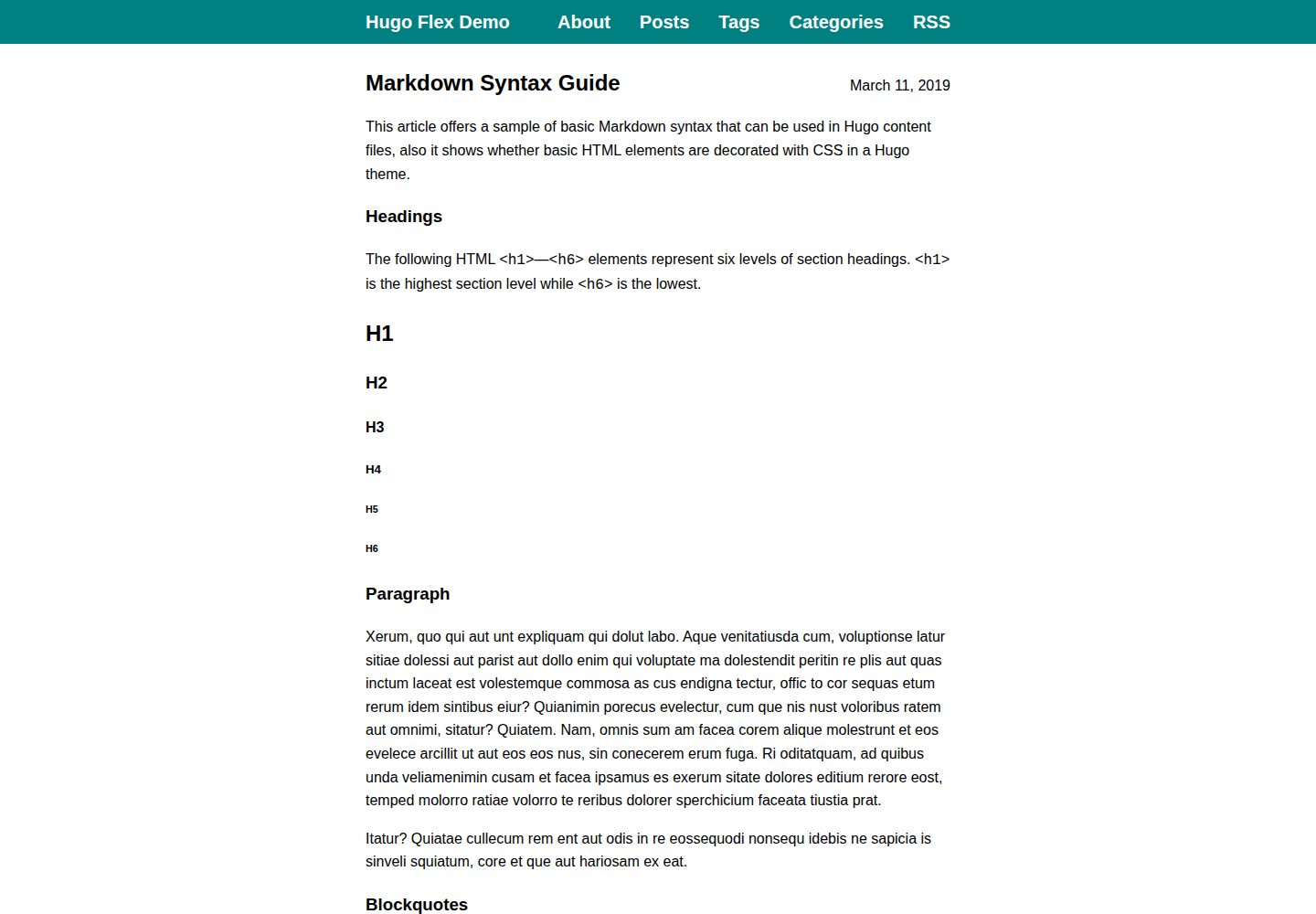
看看你的网站会是什么样
浏览真实页面截图,比较内容排版与手机效果。点击下方缩略图切换,放大查看整页细节。
全部页面与视图 3
截图用于了解视觉与布局,交互效果请以实际项目为准。
采集于 2026-10-02查看来源
值得关注的模板亮点
从已有项目资料中,快速了解它的特点。
不包含 JavaScript,支持多语言与暗色主题
RSS 输出全文,且 RSS 页面以普通页面样式呈现
可选服务端数学渲染,支持 LaTeX 语法与 math shortcode
可选语法高亮外部样式表,便于配合严格 CSP
内置 Netlify 联系表单与隐私友好 SoundCloud 播放器 shortcode
模板详细介绍
hugo-flex 是面向 Hugo 静态站点的主题,核心布局使用 CSS Flexbox 实现响应式排版,不依赖前端框架,也不包含 JavaScript。主题提供多语言支持、暗色主题、RSS 全文输出,并让 RSS 页面以普通页面样式呈现。
主题包含若干可选能力:服务端数学公式渲染(LaTeX 语法,可全局启用或通过 shortcode 局部使用)、语法高亮(可切换为外部样式表以配合严格 CSP)、首页摘要显示、Schema.org / Open Graph / Twitter Cards 元数据、Utterances 评论组件,以及 Netlify 联系表单和隐私友好的 SoundCloud 播放器两个内置 shortcode。自定义 CSS 和 JS 可按站点全局加载,也可通过 shortcode 在特定页面动态引入。
使用方式为将主题作为 git submodule 放入 Hugo 站点的 themes 目录,并在站点配置中设置 theme: hugo-flex。主题默认配置以 YAML 形式给出,可复制到站点配置中修改,包括颜色、内容宽度、分隔符、页脚、RSS 提示、KaTeX 版本、标题层级偏移、链接图标等参数。README 说明该主题已验证可与 Hugo v0.158.0–v0.161.1 配合工作。
许可方面,代码采用 Apache-2.0,允许免费使用、修改、商用和分发,分发时需随附许可证并保留相关声明;演示图片、字体、图标等第三方素材需单独核对许可。
Hugo启动器
适合你的项目吗?
适用场景
- 搭建以文字内容为主的 Hugo 博客或文档站点
- 需要多语言内容与暗色主题的静态站点
- 希望在无 JavaScript 前提下获得响应式排版的站点
- 需要在页面中渲染 LaTeX 数学公式的技术写作
- 需要 RSS 全文订阅并自定义 RSS 页面外观的站点
适合人群
- 使用 Hugo 构建静态站点的开发者
- 偏好无框架、无 JavaScript 前端方案的站点作者
- 需要多语言博客或技术文档的团队
- 对内容安全策略有要求、希望语法高亮使用外部样式表的站点
上手与定制指南
结合仓库当前版本的说明,按下面的资料检查内容、配置与运行要求。
- 1
先安装 Hugo 并创建站点,再在站点根目录执行 git submodule add https://github.com/ldeso/hugo-flex.git themes/hugo-flex
- 2
在站点配置中设置 theme: hugo-flex,可复制主题默认 YAML 配置进行修改
- 3
更新主题可在站点根目录执行 git submodule update --remote --rebase
- 4
数学渲染需在站点配置中启用 passthrough 扩展,或使用 math shortcode 局部渲染
- 5
语法高亮若需外部样式表,需将 markup.highlight.noClasses 与 params.noClasses 设为 false
授权与来源资料
使用条件与限制
免费使用 · 保留许可声明本次收录的是公开仓库中采用 Apache-2.0 许可的免费版本;免费范围为该版本代码,不代表外部服务或第三方素材免费。
使用时需要遵守
- 允许免费使用、修改、商用和分发;分发时需随附 Apache-2.0 许可证。
- 修改过的文件需显著标明改动,并保留相关版权、专利、商标及归属声明。
- 若原项目附有 NOTICE 文件,分发衍生作品时需保留其中适用的归属声明。
- 许可包含适用的贡献者专利授权;发起许可所述专利诉讼会终止该专利授权,且不授予商标使用权。
- 代码按现状提供;担保与责任限制以原许可证及适用法律为准。
额外费用与待核对事项
- 内置 contact shortcode 依赖 Netlify Forms 服务,仅在 Netlify 平台部署时可用,其他托管环境无法直接使用该表单功能。
- SoundCloud 播放器 shortcode 会嵌入 SoundCloud 第三方服务,使用前需自行确认其服务条款与隐私影响。
- 启用评论需配置 Utterances 仓库地址,评论数据托管于 GitHub Issues,属于外部服务依赖。
- 数学渲染依赖 KaTeX,若留空则使用最新版本,可能引入外部资源与版本变动风险。
- 演示图片、字体、图标及其他第三方素材需按各自许可核对,不能仅凭代码的 Apache-2.0 许可判断。
- 域名、托管、数据库、支付或 AI 等外部服务可能另外收费。
查看原文依据
no-charge, royalty-free, irrevocable copyright license
许可证原文
A contact form that works with the [Netlify Forms](https://docs.netlify.com/forms/setup/) service can be inserted with the shortcode
README 原文
A privacy-friendly [SoundCloud player](https://help.soundcloud.com/hc/articles/115003449627) can be inserted with the shortcode
README 原文
Set to Utterances repo URL to add Utterances comments
README 原文
https://github.com/ldeso/hugo-flex/blob/master/LICENSEhttps://github.com/ldeso/hugo-flex/blob/master/README.mdkatex: 0.16.22 # KaTeX version / leave empty to use the latest version
README 原文
DeepSeek 根据仓库许可证和 README 整理 ·2026-10-02。结果仅覆盖已读取资料,依赖、图片、字体及后续条款变更以各自原文为准。
项目核对记录与介绍依据
模板资料
- 来源平台
- Hugo Themes
- 资料与维护参考分
- 资料较完整 · 91 / 100
- 技术栈
- Hugo
- 网站类型
- 启动器
这个分数如何计算
本站按许可资料(最高30分)、演示链接(12分)、预览图(10分)、Star数(15分)、记录的维护时间(15分)、描述完整度(8分)、功能记录(5分)和分类资料(5分)计算。它不是代码、安全或性能测试,也不是 Google 评分;有链接不代表已实测可用。
这个项目需要核对什么
- 记录的仓库更新时间
- 2026-05-25
- 截图检查日期
- 2026-10-02
已收录演示链接。请用你的内容与屏幕尺寸检查;有演示不代表表单、认证或支付已经可用。
目录记录的主要技术栈是 Hugo。请通过依赖清单和锁文件核对实际版本与托管要求。这些说明基于收录资料,不代表代码审计或部署实测。
查看具体选型方法 →介绍的制作与核对状态
介绍由 AI 辅助整理目录与仓库资料。仓库作者不等于这篇介绍的审核者。
已完成服务器许可规则与 AI 来源核对;未经过人工编辑审核。
查看当时使用的来源资料
SHA-256: 8ef789943afd172f8cad4260899da625a6d119415904ba160f77c270f72b771a
2026-10-02T23:12:25.393Z
来源文件 / 仓库# Hugo Flex
A lightweight Hugo theme leveraging [CSS Flexbox](https://developer.mozilla.org/docs/Web/CSS/CSS_Flexible_Box_Layout).
This theme is verified to work with [Hugo](https://gohugo.io/) versions v0.158.0–v0.161.1.
## Features
- [Flexbox](https://developer.mozilla.org/docs/Web/CSS/CSS_Flexible_Box_Layout)-based responsive layout
- 100% performance and accessibility scores on [PageSpeed Insights](https://pagespeed.web.dev/)
- No framework
- No javascript
- Full posts in RSS feed
- RSS page looks like a normal page
- [Multilingual support](https://gohugo.io/content-management/multilingual/)
- [Dark theme](https://mzl.la/3PVbdQX)
Optional features:
- [Server-side math rendering](#math-rendering)
- [Syntax highlighting](#syntax-highlighting)
- Show [summaries](https://gohugo.io/content-management/summaries/) on homepage
- [Schema.org](https://schema.org/), [Open Graph](https://ogp.me/) and [Twitter Cards](https://developer.twitter.com/cards/) metadata
- [Utterances](https://utteranc.es/) comments widget
- Custom CSS and JS may be added [site-wide](#custom-css-and-js), or [dynamically](#dynamically-embedded) with shortcodes
- Built-in shortcodes:
- [Netlify contact form](#netlify-contact-form)
- Privacy-friendly [SoundCloud player](#soundcloud-player)
## Example
The [demo site](https://ldeso.github.io/hugo-flex-demo/) is built from the [hugo-flex-demo](https://github.com/ldeso/hugo-flex-demo/) repository.
A complete starter template specifically made for this theme is also available at [scivision/hugo-flex-example](https://github.com/scivision/hugo-flex-example/).
## Installation
1. [Install Hugo](https://gohugo.io/installation/).
2. [Create a Hugo site](https://gohugo.io/getting-started/directory-structure/).
3. Open a command prompt at the root of the site and download the theme:
```bash
git init
git submodule add https://github.com/ldeso/hugo-flex.git themes/hugo-flex
```
4. Add the theme to the [site configuration](https://gohugo.io/getting-started/configuration/). If the site configuration is a file called `hugo.yaml`:
```bash
echo 'theme: hugo-flex' >> hugo.yaml
```
## Updating
Open a command prompt at the site's root directory and update the theme:
```bash
git submodule update --remote --rebase
```
## Configuration
Any part of the default theme configuration can be copied to the [site configuration](https://gohugo.io/getting-started/configuration/) to be modified. The default theme configuration is:
```yaml
baseURL: https://example.org/
title: My New Hugo Site
locale: en-US
theme: hugo-flex
params:
color: teal # Any color in CSS syntax
width: 42rem # Any length in CSS syntax / leave empty to span page
divider: \2500\2500 # Any string in CSS syntax / leave empty for no divider
footer: >- # HTML spaces ( ) are needed before HTML elements
Except where otherwise noted, content on this site is licensed under a  
<a href="http://creativecommons.org/licenses/by/4.0/" rel="license">Creative
Commons Attribution 4.0 International License</a>.
rss: To subscribe to this RSS feed, copy its address and paste it into your
favorite feed reader.
favicon: false # Set to true to add a link to the favicon.ico
noClasses: &nc false # Set to true to use inline CSS for syntax highlighting
katex: 0.16.22 # KaTeX version / leave empty to use the latest version
headingoffset: 0 # Change heading levels when rendering markdown
linkicons: false # Set to hover or true to add a link icon to headings
summaries: false # Set to true to show summaries of posts on homepage
schema: false # Set to true to add Schema.org metadata
opengraph: false # Set to true to add Open Graph metadata
twittercards: false # Set to true to add Twitter Cards metadata
utterances:
repo: # Set to Utterances repo URL to add Utterances comments
issueterm: # Leave empty for the default blog post to issue mapping
theme: # Leave empty to use the adaptive Utterances dark theme
netlify:
honeypot: false # Set to true to add honeypot field in contact form
recaptcha: false # Set to true to add recaptcha challenge in contact form
# css: # Uncomment to add custom CSS from the assets directory
# - css/foo.css
# - bar.css
# js: # Uncomment to add custom JS from the assets directory
# - js/foo.js
# - bar.js
markup:
highlight:
noClasses: *nc # Set to same value as params.noClasses
goldmark:
extensions:
passthrough:
enable: false # Set to true to render math in LaTeX notation globally
delimiters:
block:
- ['\[', '\]']
- ['$$', '$$']
inline:
- ['\(', '\)']
menu:
main:
- name: About
pageRef: /about
weight: 1
- name: Posts
pageRef: /post
weight: 2
- name: Tags
pageRef: /tags
weight: 3
- name: Categories
pageRef: /categories
weight: 4
- name: RSS
pageRef: /
weight: 5
params:
- format: rss
outputFormats:
rss:
mediatype: application/rss+xml
baseName: feed # Rename RSS feed URL from rss.xml to feed.xml
```
By default, the date is shown in the headings of all normal pages and hidden on special pages. This can be overriden on specific pages by setting the `showdate` parameter in their [front matter](https://gohugo.io/content-management/front-matter/). For example, the date can be hidden on an "About" page by setting its front matter as follows:
```md
+++
title = "About"
date = 2006-01-02
[params]
showdate = false
+++
```
## Math Rendering
Mathematical formulas written in LaTeX notation can be rendered to HTML without using javascript.
Rendering can take place either globally, or in specific locations using a built-in shortcode.
1. To render math globally, [enable the passthrough extension](https://gohugo.io/content-management/mathematics/) in the site configuration.
```latex
Inline formulas such as $y=ax+b$ are supported, displayed formulas as well:
$$
e^{i\pi}+1=0
$$
```
2. To render mathematical expressions in specific locations, surround them with the `math` shortcode:
```latex
Inline formulas such as {{< math >}}y=ax+b{{< /math >}} are supported, displayed formulas as well:
{{< math displayMode=true >}}
e^{i\pi}+1=0
{{< /math >}}
```
## Syntax Highlighting
By default, [syntax highlighting in Hugo](https://gohugo.io/content-management/syntax-highlighting/) adds inline styles to the HTML code generated by the syntax highlighter.
This can be problematic if the site has a strict [Content Security Policy](https://developer.mozilla.org/docs/Web/HTTP/CSP).
This theme makes it possible to automatically use an external stylesheet for syntax highlighting.
To use an external style sheet instead of inline styles, switch the options [markup.highlight.noClasses](https://gohugo.io/getting-started/configuration-markup/#highlight) and params.noClasses to false in the [site configuration](https://gohugo.io/getting-started/configuration/).
The resulting external style sheet is only included on pages of the site that require it.
The default syntax highlighting style is called [github-dark](https://xyproto.github.io/splash/docs/longer/github-dark.html).
To use a different style, a style sheet can be [generated](https://gohugo.io/commands/hugo_gen_chromastyles/) at the location `assets/css/syntax.css` by running the following command at the site root:
```sh
hugo gen chromastyles --style style-name > assets/css/syntax.css
```
The styles featuring both a high contrast and good compatibility with dark mode are called [average](https://xyproto.github.io/splash/docs/longer/average.html), [doom-one](https://xyproto.github.io/splash/docs/longer/doom-one.html), [doom-one2](https://xyproto.github.io/splash/docs/longer/doom-one2.html), [github-dark](https://xyproto.github.io/splash/docs/longer/github-dark.html), [modus-operandi](https://xyproto.github.io/splash/docs/longer/modus-operandi.html) (light background), [modus-vivendi](https://xyproto.github.io/splash/docs/longer/modus-vivendi.html), [rrt](https://xyproto.github.io/splash/docs/longer/rrt.html), and [witchhazel](https://xyproto.github.io/splash/docs/longer/witchhazel.html).
## Built-In Shortcodes
### Netlify Contact Form
A contact form that works with the [Netlify Forms](https://docs.netlify.com/forms/setup/) service can be inserted with the shortcode:
```
{{< contact >}}
```
A custom URL for the success page may be given as a parameter:
```
{{< contact "/success" >}}
```
### SoundCloud Player
A privacy-friendly [SoundCloud player](https://help.soundcloud.com/hc/articles/115003449627) can be inserted with the shortcode:
```
{{< soundcloud https://soundcloud.com/artist/track >}}
```
The embed player will only load after user input, and will be replaced by a simple link if JavaScript is disabled.
## Custom CSS and JS
This theme offers two ways to add custom CSS or JS assets, allowing minor modifications to be applied without needing to create a fork.
### Site-Wide
Custom CSS and JS files can be loaded as part of the base assets linked by every page.
To do so, their filenames have to be added to the [site configuration](#configuration):
```yaml
params:
css:
- css/foo.css
- bar.css
js:
- js/foo.js
- bar.js
```
The paths are relative to the [asset directory](https://gohugo.io/getting-started/configuration/#assetdir).
In this example, the file paths relative to the site root would be: `assets/css/foo.css`, `assets/bar.css`, `assets/js/foo.js`, and `assets/bar.js`.
### Dynamically Embedded
Sometimes, custom CSS or JS is needed only on specific pages. This theme offers a mechanism to load CSS or JS assets through [shortcodes](https://gohugo.io/content-management/shortcodes/).
The assets are loaded only once per page, even if they are required by several shortcodes in the same page.
To load a CSS or a JS resource on each page where a shortcode is used, the [shortcode template](https://gohugo.io/templates/shortcode-templates/) has to add the resource to the `css` or the `js` key of the page's [scratch pad](https://gohugo.io/methods/page/store/).
For instance, a shortcode template `myshortcode.html` containing the line
```html
{{ resources.Get "myscript.js" | .Page.Store.SetInMap "js" "myscript" }}
```
will cause `myscript.js` to be loaded on every page where `myshortcode` is used.
As a real-life example, this is the template for the built-in SoundCloud shortcode:
```html
{{ resources.Get "css/soundcloud.css" | .Page.Store.SetInMap "css" "soundcloud" }}
{{ resources.Get "js/soundcloud.js" | .Page.Store.SetInMap "js" "soundcloud" }}
<div class="Soundcloud">
<a href="{{ .Get 0 }}" target="_blank" class="Soundcloud-box Soundcloud-box--link"><span class="Soundcloud-ellipsis">{{ .Get 0 }}</span></a>
</div>
```
## License
This theme is licensed under the [Apache License 2.0](https://github.com/ldeso/hugo-flex/raw/master/LICENSE).
看看同类模板
对比同技术栈与用途的模板,找到更适合的视觉与内容结构。

hugo-xmin
eXtremely Minimal Hugo theme: about 140 lines of code in total, including HTML and CSS (with no dependencies)
Hugo · 启动器

hugo-theme-gallery
Gallery Theme for Hugo
Hugo · 启动器

reveal-hugo
📽️ Create rich HTML-based presentations with Hugo and Reveal.js
Hugo · 启动器

anatole
Anatole is a minimalistic two-column theme for Hugo.
Hugo · 启动器

hugo-theme-diary
Moments piled up. A Hugo theme ported from SumiMakito/hexo-theme-Journal.
Hugo · 启动器

risotto
A minimalist, responsive hugo theme inspired by terminal ricing aesthetics.
Hugo · 启动器