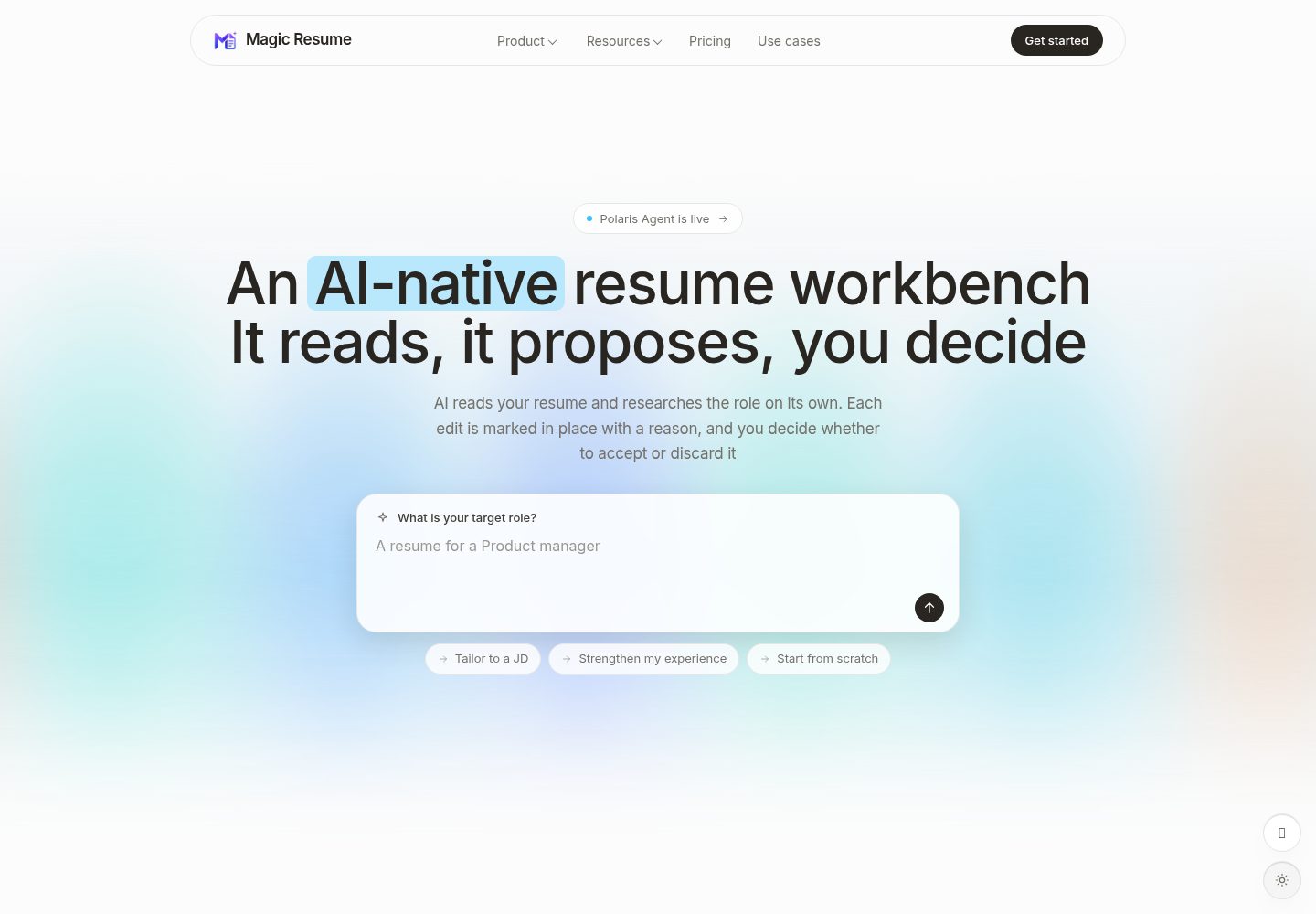
AI proposes edits in place, and the user accepts or skips each one
Next.jsReactPortfolio
Magic-Resume — Next.js Portfolio Template
By Magic-Resume
Magic Resume is an open-source AI resume workbench that provides real-time visual editing, 19 ATS-friendly templates, resume analysis and optimization, translation, mock interviews, and export functionality, along with a native MCP server for AI coding tools to safely read and write resumes.
Explore the design
Compare the page layouts and mobile experience. Open any screenshot for a closer look.
Desktop homepage1 / 3
Desktop captureTop of page
Actual screenshot captured by the server browser.
All pages & views 3
Screenshots show visual appearance; interactive behavior may differ.
Recorded 2026-10-13View source
What stands out
A quick read of the recorded project description.
19 ATS-friendly templates with color, font, spacing, and layout customization
Provides six modes: create, optimize, analyze, translate, interview, export
Self-hosted mode stores data only in the browser's IndexedDB, with no account or backend required
Native MCP server lets AI coding tools safely read and write resumes via JSON Patch
Supports export to high-quality PDF or structured JSON
Template Details
Magic Resume is an open-source AI resume workbench whose core feature is that the AI proposes edits in place, and you accept or skip each one. The README states that it includes 19 templates and six modes (create, optimize, analyze, translate, interview, export), and supports multi-device cloud sync.
It offers both self-hosted and cloud modes with identical functionality; the difference lies in where data is stored and who provides the AI. The self-hosted mode (this repository) is MIT-licensed, requires no account, stores data only in the browser's IndexedDB, does not provide multi-device sync, requires you to bring your own API key for AI, and needs no backend or database; the cloud mode requires an account, has multi-device sync enabled by default, stores version history in the cloud, and provides AI out of the box. The README notes that the self-hosted build runs entirely in the browser, resume data never leaves your machine, and the open-source self-hosted version does not send product analytics data.
Regarding features, the README lists: real-time preview, 19 ATS-friendly templates, 22+ font styles and spacing/layout controls, version history snapshots and restore, link sharing with view/comment/edit permissions; the analysis feature provides an overall score, keyword matching and readability breakdowns, as well as specific improvement suggestions; the optimization feature can read a job description to rewrite content, and supports OpenAI, Google Gemini, Anthropic Claude, DeepSeek, or any OpenAI-compatible API; AI Lab provides mock interviews and one-click translation that preserves formatting; export supports high-quality PDF or structured JSON.
The repository is a Turborepo + pnpm monorepo, containing apps/web (Next.js frontend), packages/mcp (stdio MCP server and CLI), packages/resume-schema (shared Zod schemas, types, and sample data), packages/resume-templates (template DSL, renderer, and registry). The README also provides MCP integration: after configuring a personal access token, AI assistants can read and modify resumes via JSON Patch using tools such as list_resumes, get_resume, get_resume_schema, get_resume_editing_guide, preview_resume_patch, and update_resume_content.
Limitations: the self-hosted mode does not support multi-device sync, version history is only local snapshots, and AI requires your own API key; the cloud mode requires an account and depends on Clerk and a backend API. The README does not describe the specific visual details of the templates, AI output quality, performance, or the complete operational requirements for production deployment.
Next.jsReactPortfolio
Is it right for your project?
Use Cases
- Edit and preview a resume in real time in the browser, adjusting template styles at any time
- Use AI to rewrite resume content to match a job based on its description
- Score and analyze a resume and get specific improvement suggestions
- Use AI for mock interview practice or one-click resume translation
- Let tools such as Claude Code and Cursor read and modify resume data via MCP
Suitable For
- Users who want to self-host and keep resume data local
- Job seekers who need ATS-friendly templates and deep style control
- Developers who want to bring their own AI API key and use multi-model capabilities
- Users who need to integrate resume editing into AI coding tool workflows
Getting started & customization
Use these recorded setup notes alongside the repository instructions for your chosen version.
- 1
Self-hosted mode: after cloning the repository, copy apps/web/.env.example to apps/web/.env.local, set NEXT_PUBLIC_APP_MODE=self-hosted, run pnpm install and pnpm run dev, then open http://localhost:3000
- 2
Cloud mode requires setting NEXT_PUBLIC_APP_MODE=cloud, NEXT_PUBLIC_CLERK_PUBLISHABLE_KEY, and CLERK_SECRET_KEY, and can be deployed with one click via Vercel
- 3
Cloud mode also requires configuring NEXT_PUBLIC_API_URL, pointing to the NestJS Core gateway to route API and AI requests
- 4
MCP integration requires first configuring a personal access token: npx -y @magic-resume/mcp config set --api-url and --pat, then adding the server with claude mcp add
- 5
All environment variables are located in apps/web/.env.local; values with the NEXT_PUBLIC_ prefix are inlined into the browser bundle, so do not place secrets after that prefix
License & source material
Usage conditions & limitations
Free to use · keep license noticeThis listing covers the free version under the MIT license in the public repository; the free scope is the code of that version and does not mean external services or third-party assets are free.
Must comply with when using
- Allows free use, modification, commercial use, and distribution of that version's code.
- When distributing copies or substantial portions of the code, retain the original author's copyright notice and the full MIT license notice.
- The code is provided as is; warranties and limitations of liability are governed by the original license and applicable law.
Additional costs & items to verify
- Project materials mention optional paid versions or features; this listing covers only the public free code and does not include paid upgrades.
- Demo images, fonts, icons, and other third-party assets must be checked against their respective licenses and cannot be judged solely by the code's MIT license.
- External services such as domains, hosting, databases, payments, or AI may incur separate charges.
- The cloud version (magic-resume.cn) is a free tier plus paid plans; the self-hosted version is MIT-licensed and permanently free.
- Cloud mode requires registering an account; self-hosted mode requires no account.
- Self-hosted mode does not support multi-device sync; that feature is available only in cloud mode.
- Self-hosted mode's version history is only local snapshots; cloud version history is stored in the cloud and can be restored.
- Self-hosted mode requires bringing your own AI API key; cloud mode has built-in AI out of the box.
- Clerk authentication is used only in cloud mode; self-hosted mode does not depend on Clerk.
- Cloud mode requires setting NEXT_PUBLIC_APP_MODE=cloud, NEXT_PUBLIC_CLERK_PUBLISHABLE_KEY, and CLERK_SECRET_KEY in Vercel.
- Cloud mode requires a Clerk publishable key (pk_...).
- Cloud mode requires a Clerk secret key (sk_...).
- Cloud mode requires configuring NEXT_PUBLIC_API_URL, which by default points to the local NestJS Core gateway.
- Cloud mode requires two Clerk keys and NEXT_PUBLIC_API_URL; the gateway routes API and AI paths to the corresponding Core services.
- MCP integration requires first configuring a personal access token (PAT) so AI assistants can read and modify resumes.
View Original Text Basis
Permission is hereby granted, free of charge
Original License Text
| License | MIT, free forever | Free tier + paid plans |
Original README
| Account | Not required | Required |
Original README
| Multi-device sync | Not available | On by default |
Original README
| Version history | Local snapshots | Kept in the cloud, restorable |
Original README
| AI | Bring your own API key | Built in, works out of the box |
Original README
| Auth | [Clerk](https://clerk.com/) (cloud mode only) |
Original README
> For cloud mode, set `NEXT_PUBLIC_APP_MODE=cloud`, `NEXT_PUBLIC_CLERK_PUBLISHABLE_KEY`, and `CLERK_SECRET_KEY` in your Vercel dashboard.
Original README
| `NEXT_PUBLIC_CLERK_PUBLISHABLE_KEY` | cloud | — | Clerk publishable key (`pk_...`). |
Original README
| `CLERK_SECRET_KEY` | cloud | — | Clerk secret key (`sk_...`). |
Original README
| `NEXT_PUBLIC_API_URL` | cloud | `http://localhost:3110` | Single NestJS Core gateway for all API and AI routes. |
Original README
- **`cloud`** — requires the two Clerk keys plus `NEXT_PUBLIC_API_URL`; the gateway routes API and AI paths to the appropriate Core service.
Original README
https://github.com/Magic-Resume/Magic-Resume/blob/master/LICENSEhttps://github.com/Magic-Resume/Magic-Resume/blob/master/README.mdConfigure it once with a personal access token, and your AI assistant can read and patch resumes safely, without touching the raw database:
Original README
Compiled by DeepSeek based on repository license and README ·2026-10-13. Results only cover the materials read; dependencies, images, fonts, and subsequent term changes are subject to their respective original texts.
Project checks & description sources
Template Information
- Source platforms
- GitHub
- Documentation and maintenance reference score
- More documented · 96 / 100
- Technologies
- Next.js · React
- Website type
- Portfolio
How this score is calculated
Our heuristic uses license records (up to 30), a demo link (12), a preview (10), stars (15), recorded maintenance (15), description completeness (8), feature records (5) and classification data (5). It is not a code, security or performance test, or a Google score. A link does not establish tested functionality.
What to verify for this project
- Repository update recorded
- 2026-10-13
- Screenshot last checked
- 2026-10-13
A demo link is listed. Check it with your own content and viewport sizes; its presence does not confirm that forms, authentication or payments work.
The catalog identifies Next.js as the primary stack. Check the actual dependency manifest and lockfile for versions and hosting requirements. These notes use recorded metadata, not a code audit or a deployment test.
Use a selection guide →How this description was prepared
AI-assisted description based on catalog records and repository material. Repository authors are not automatically the reviewers of this description.
Review declaration: codex-user-requested-batch-review-20261015 · 2026-10-15
Inspect the recorded source material
SHA-256: 5677ff0e2abab8a9106f97816240fcaad8d1b38f9fa173116275bbd1cf72d194
2026-10-13T13:33:41.391Z
Source file / repository<div align="center">
<a href="https://magic-resume.cn">
<img width="128" alt="Magic Resume" src="./apps/web/public/magic-resume-mark.png">
</a>
<h1>Magic Resume</h1>
<p><strong>The open-source AI resume workbench.</strong><br/>The AI proposes edits in place; you accept or skip each one.</p>
<p>
<a href="https://magic-resume.cn"><strong>Get Started »</strong></a>
·
<a href="./README.zh-CN.md">简体中文</a>
·
<a href="https://magic-resume.cn">Official Site</a>
·
<a href="https://github.com/Magic-Resume/Magic-Resume/issues">Feedback</a>
</p>
<!-- SHIELD GROUP -->
[![][vercel-shield]][vercel-link]
[![][github-stars-shield]][github-stars-link]
[![][github-forks-shield]][github-forks-link]
[![][github-contributors-shield]][github-contributors-link]
[![][github-issues-shield]][github-issues-link]
[![][github-license-shield]][github-license-link]
</div>
<br/>

<br/>
**Magic Resume is an open-source AI resume workbench: the AI proposes edits in place and you accept or skip each one.** MIT-licensed core, 19 templates, six modes (create, optimize, analyze, translate, interview, export), and multi-device cloud sync.
It pairs a real-time visual editor with multi-model AI — and goes one step further with a native **MCP server** that lets AI coding tools (Claude Code, Cursor, Windsurf) read and safely patch your resumes without ever guessing the data shape.
## Self-hosted vs Cloud
Same features either way. The difference is where your data lives and who supplies the AI.
| | Self-hosted (this repo) | Cloud (magic-resume.cn) |
|---|---|---|
| License | MIT, free forever | Free tier + paid plans |
| Account | Not required | Required |
| Data storage | Your browser's IndexedDB only | Encrypted cloud storage, exportable anytime |
| Multi-device sync | Not available | On by default |
| Version history | Local snapshots | Kept in the cloud, restorable |
| AI | Bring your own API key | Built in, works out of the box |
| Backend | No backend or database needed | Hosted for you |
| Templates | 19, identical | 19, identical |
> [!NOTE]
> The self-hosted build runs entirely in your browser; resume data never leaves your machine. The cloud build syncs across devices by default, with encrypted transport and storage, and a full export available at any time.
---
## Features
**Build — visual editing that just works**
- **Real-time preview** — see every change the instant you type.
- **19 professional templates** — ATS-friendly, with full color, font, and layout control.
- **Deep customization** — 22+ font styles, spacing, and layout controls.
- **Version history** — snapshot and restore any previous version.
- **Sharing** — share via a unique link with Viewer / Commenter / Editor permissions.
**Analyze — Lighthouse-style resume health**
- **Overall score** — a single, honest rating of your resume's impact.
- **Detailed breakdown** — keyword matching, actionability, and readability.
- **Actionable fixes** — specific, targeted suggestions, not vague advice.
**Optimize — tailor to any job**
- **JD matching** — AI reads a job description and rewrites content to fit.
- **Bring your own model** — OpenAI, Google Gemini, Anthropic Claude, DeepSeek, or any OpenAI-compatible API.
**AI Lab — beyond editing**
- **Mock interviews** — practice with AI feedback on your answers.
- **One-click translation** — translate a resume into any language, formatting preserved.
**Privacy — your data stays yours**
- **Local-first** — stored in IndexedDB by default, no account needed.
- **Optional cloud sync** — securely sync across devices only if you choose.
- **Export anywhere** — high-quality PDF or structured JSON.
---
## Templates
Nineteen hand-crafted, ATS-friendly templates, each fully customizable (color, font, spacing, layout):
`classic` · `azurill` · `bronzor` · `chikorita` · `ditto` · `gengar` · `orange-modern` · `clean-minimal` · `teal-professional` · `red-accent` · `golden-elegant` · `product-ops-focus` · `compact-cn-photo` · `executive-band` · `timeline-pro` · `skills-first` · `serif-minimal` · `slate-sidebar` · `cn-formal-photo`
---
## MCP Integration
Magic Resume ships a native **Model Context Protocol (MCP) server** (`@magic-resume/mcp`) — a first-class integration for AI coding tools.
Configure it once with a personal access token, and your AI assistant can read and patch resumes safely, without touching the raw database:
```bash
npx -y @magic-resume/mcp config set --api-url "https://your-api.example.com/api" --pat "mr_pat_xxx"
claude mcp add magic-resume -- npx -y @magic-resume/mcp mcp
```
| Tool | Description |
|---|---|
| `list_resumes` | List all resumes in your account |
| `get_resume` | Fetch a resume's full content |
| `get_resume_schema` | Get the JSON schema for validation |
| `get_resume_editing_guide` | AI-readable guide on how to edit resumes |
| `preview_resume_patch` | Preview a JSON Patch without applying it |
| `update_resume_content` | Apply a JSON Patch to update resume content |
> [!TIP]
> The server is schema-aware and patch-based — AI tools make surgical edits rather than risky full rewrites.
---
## Tech Stack
| Layer | Technology |
|---|---|
| Monorepo | [Turborepo](https://turbo.build/), [pnpm](https://pnpm.io/) |
| Framework | [Next.js 15](https://nextjs.org/) (App Router) |
| Language | [TypeScript](https://www.typescriptlang.org/) |
| AI / LLM | [LangChain](https://www.langchain.com/), [LangGraph](https://www.langchain.com/langgraph), [Google GenAI](https://ai.google.dev/), [Anthropic](https://www.anthropic.com/) |
| Auth | [Clerk](https://clerk.com/) (cloud mode only) |
| Styling | [Tailwind CSS 4](https://tailwindcss.com/) |
| UI | [Radix UI](https://www.radix-ui.com/), [Lucide](https://lucide.dev/) |
| Animation | [Framer Motion](https://www.framer.com/motion/), [GSAP](https://gsap.com/) |
| State | [Zustand](https://zustand-demo.pmnd.rs/) |
| Storage | [IndexedDB](https://developer.mozilla.org/en-US/docs/Web/API/IndexedDB_API) |
| Editor | [Tiptap](https://tiptap.dev/), [Monaco](https://microsoft.github.io/monaco-editor/) |
| MCP | [@modelcontextprotocol/sdk](https://modelcontextprotocol.io/) |
| Schema | [Zod](https://zod.dev/) |
| i18n | [i18next](https://www.i18next.com/) |
---
## Quick Start
Magic Resume runs fully in the browser — no backend, no database, no account.
```bash
git clone https://github.com/Magic-Resume/Magic-Resume.git
cd Magic-Resume
cp apps/web/.env.example apps/web/.env.local # set NEXT_PUBLIC_APP_MODE=self-hosted
pnpm install
pnpm run dev
```
Open [http://localhost:3000](http://localhost:3000) and start building.
---
## Self-Hosting
**Self-hosted mode** needs nothing but the browser — set `NEXT_PUBLIC_APP_MODE=self-hosted` (or leave it unset) and all data persists in IndexedDB. The open-source self-hosted build sends no product analytics.
**Cloud mode** (auth, cloud sync, sharing) deploys in one click:
[](https://vercel.com/new/clone?repository-url=https%3A%2F%2Fgithub.com%2FMagic-Resume%2FMagic-Resume)
> [!TIP]
> For cloud mode, set `NEXT_PUBLIC_APP_MODE=cloud`, `NEXT_PUBLIC_CLERK_PUBLISHABLE_KEY`, and `CLERK_SECRET_KEY` in your Vercel dashboard.
<details>
<summary><strong>Environment variables</strong></summary>
<br/>
All variables live in `apps/web/.env.local` (copy from `apps/web/.env.example`). Values prefixed with `NEXT_PUBLIC_` are inlined into the browser bundle — never put secrets behind that prefix.
| Variable | Required in | Default | Purpose |
|---|---|---|---|
| `NEXT_PUBLIC_APP_MODE` | both | auto | `self-hosted` or `cloud`. Auto-detected: `cloud` when `NEXT_PUBLIC_CLERK_PUBLISHABLE_KEY` is set, else `self-hosted`. |
| `NEXT_PUBLIC_APP_URL` | both | `https://magic-resume.cn` | Canonical base URL for OG tags / SEO. Set to your origin (e.g. `http://localhost:3000` in dev). |
| `NEXT_PUBLIC_CLERK_PUBLISHABLE_KEY` | cloud | — | Clerk publishable key (`pk_...`). |
| `CLERK_SECRET_KEY` | cloud | — | Clerk secret key (`sk_...`). |
| `NEXT_PUBLIC_API_URL` | cloud | `http://localhost:3110` | Single NestJS Core gateway for all API and AI routes. |
- **`self-hosted`** — pure browser. No Clerk, no Core API; only `NEXT_PUBLIC_APP_URL` matters.
- **`cloud`** — requires the two Clerk keys plus `NEXT_PUBLIC_API_URL`; the gateway routes API and AI paths to the appropriate Core service.
</details>
---
## Monorepo
This repository is a Turborepo + pnpm monorepo.
| Package | Description |
|---|---|
| `apps/web` | Next.js frontend — editor, dashboard, AI Lab |
| `packages/mcp` | `@magic-resume/mcp` — stdio MCP server and CLI |
| `packages/resume-schema` | Shared Zod schemas, types, and sample data |
| `packages/resume-templates` | Template DSL, renderer, and registry |
```bash
pnpm install # install everything
pnpm run dev # start all workspaces
pnpm run lint # lint
pnpm run test # test
# target a single workspace
pnpm --filter @magic-resume/web dev
pnpm --filter @magic-resume/mcp build
```
---
## Contributing
Contributions of every size are welcome — bug fixes, new templates, docs, translations, or features.
Please read the **[Contributing Guide](./CONTRIBUTING.md)** for local setup, the branch workflow, and the enforced **gitmoji + Conventional Commits** convention. For bugs or ideas, feel free to file an [issue](https://github.com/Magic-Resume/Magic-Resume/issues) first.
<a href="https://github.com/Magic-Resume/Magic-Resume/graphs/contributors">
<img src="https://contrib.rocks/image?repo=Magic-Resume/Magic-Resume" alt="contributors" />
</a>
---
## Star History
<a href="https://star-history.com/#Magic-Resume/Magic-Resume&Date">
<img src="https://api.star-history.com/svg?repos=Magic-Resume/Magic-Resume&type=Date" alt="Star History Chart" width="600" />
</a>
---
<div align="center">
Copyright © 2026 [Magic Resume Team](https://github.com/Magic-Resume) · [MIT](./LICENSE) licensed.
</div>
<!-- LINK GROUP -->
[official-site]: https://magic-resume.cn
[vercel-shield]: https://img.shields.io/badge/vercel-online-55b467?labelColor=black&logo=vercel&style=flat-square
[vercel-link]: https://magic-resume.cn
[github-contributors-shield]: https://img.shields.io/github/contributors/Magic-Resume/Magic-Resume?color=c4f042&labelColor=black&style=flat-square
[github-contributors-link]: https://github.com/Magic-Resume/Magic-Resume/graphs/contributors
[github-forks-shield]: https://img.shields.io/github/forks/Magic-Resume/Magic-Resume?color=8ae8ff&labelColor=black&style=flat-square
[github-forks-link]: https://github.com/Magic-Resume/Magic-Resume/network/members
[github-stars-shield]: https://img.shields.io/github/stars/Magic-Resume/Magic-Resume?color=ffcb47&labelColor=black&style=flat-square
[github-stars-link]: https://github.com/Magic-Resume/Magic-Resume/stargazers
[github-issues-shield]: https://img.shields.io/github/issues/Magic-Resume/Magic-Resume?color=ff80eb&labelColor=black&style=flat-square
[github-issues-link]: https://github.com/Magic-Resume/Magic-Resume/issues
[github-license-shield]: https://img.shields.io/badge/license-MIT-white?labelColor=black&style=flat-square
[github-license-link]: https://github.com/Magic-Resume/Magic-Resume/blob/master/LICENSE
Explore similar templates
Compare previews and descriptions within the same stack and category.

react-resume-template
A personal resume website template for software developers, built with Next.js, React, and TypeScript and styled with Tailwind CSS. Site content is driven by a single data file at /src/data/data.tsx, with types in dataDef.ts and images in src/images/.
Next.js · Portfolio

nxt-lnk
nxt-lnk is a Next.js-based bio link page template that manages personal information and links via BioData.js and LinksData.js, positioned as a self-hosted alternative to Linktree. It groups links by type, supports enabling/disabling individual links, and offers hexagonal or oval avatars.
Next.js · Portfolio

sylph
Sylph is a minimal portfolio and blog template built on Next.js, supporting MDX/Markdown writing, light/dark themes, and automatic OG image generation. It includes sitemap, robots.txt, metadata, and syntax highlighting, with automatic blog timestamps.
Next.js · Portfolio

sleek-portfolio
A modern, responsive portfolio template built with Next.js 15, TypeScript, Tailwind CSS, and Shadcn UI. It includes an MDX blog, project showcase, work experience timeline, and a contact form that receives messages via Telegram Bot.
Next.js · Portfolio

research-website-template
A React + Next.js template for research personal websites, aimed at PhD students and researchers. It centralizes publications, projects, and other content in src/data as arrays of objects, with optional fields automatically generating UI components.
Next.js · Portfolio

shadcn-portfolio
A developer portfolio template built with Next.js 15, shadcn/ui, Tailwind CSS, and Framer Motion, featuring an MDX blog, light and dark modes, responsive design, and SEO meta tags.
Next.js · Portfolio