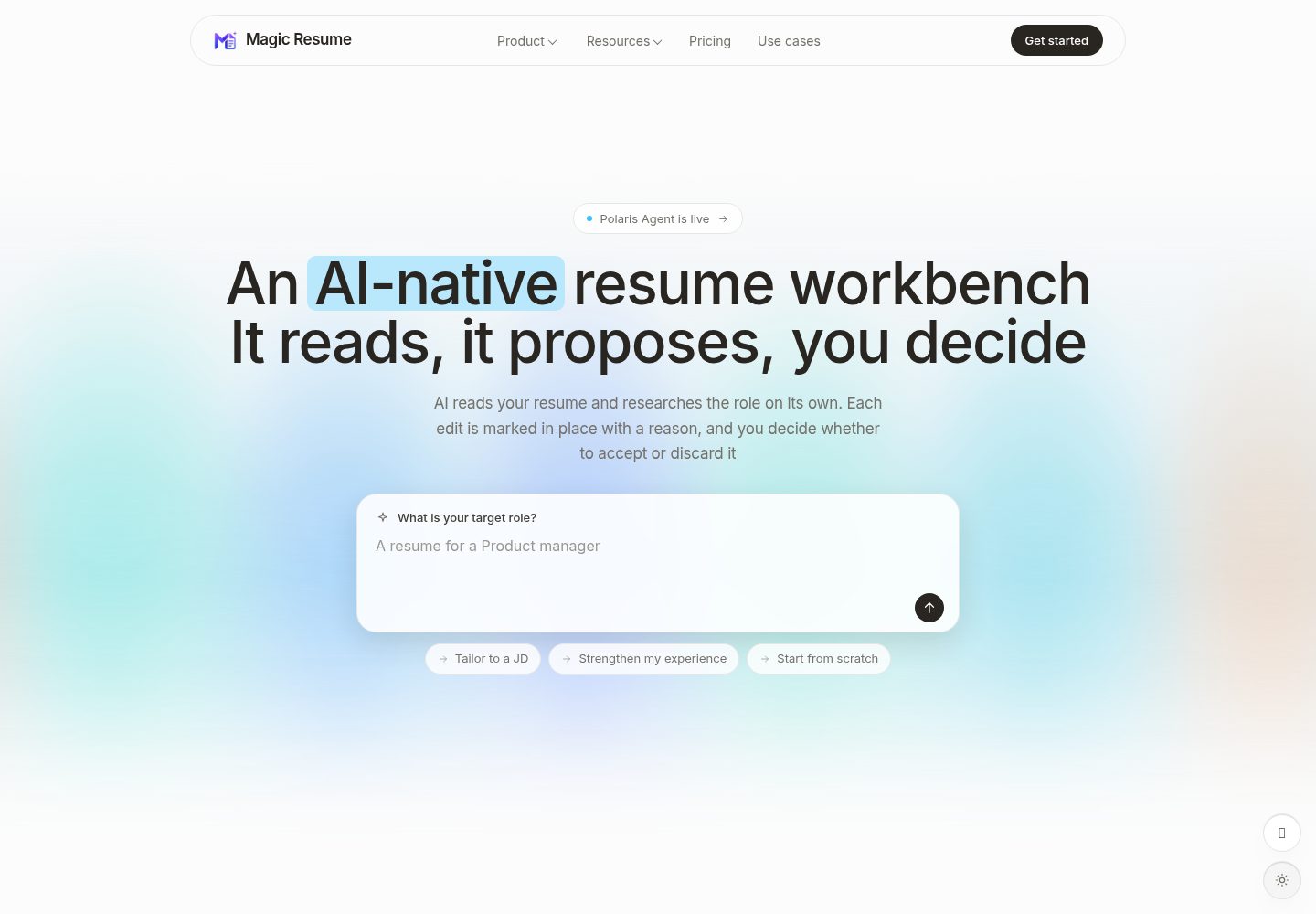
AI 在原位提出修改建议,由用户逐条接受或跳过
Next.jsReact作品集
Magic-Resume — Next.js 作品集模板
作者 Magic-Resume
Magic Resume 是一个开源的 AI 简历工作台,提供实时可视化编辑、19 个 ATS 友好模板、简历分析与优化、翻译、模拟面试和导出功能,并附带原生 MCP 服务器供 AI 编码工具安全读写简历。
看看你的网站会是什么样
浏览真实页面截图,比较内容排版与手机效果。点击下方缩略图切换,放大查看整页细节。
全部页面与视图 3
截图用于了解视觉与布局,交互效果请以实际项目为准。
采集于 2026-10-13查看来源
值得关注的模板亮点
从已有项目资料中,快速了解它的特点。
19 个 ATS 友好模板,支持颜色、字体、间距和布局自定义
提供创建、优化、分析、翻译、面试、导出六种模式
自托管模式数据仅存于浏览器 IndexedDB,无需账号和后端
原生 MCP 服务器让 AI 编码工具以 JSON Patch 方式安全读写简历
支持导出高质量 PDF 或结构化 JSON
模板详细介绍
Magic Resume 是一个开源 AI 简历工作台,核心特点是 AI 在原位提出修改建议,由你逐条接受或跳过。README 说明其包含 19 个模板和六种模式(创建、优化、分析、翻译、面试、导出),并支持多设备云同步。
它提供自托管与云端两种模式,功能相同,区别在于数据存放位置和 AI 由谁提供。自托管模式(本仓库)为 MIT 许可,无需账号,数据仅存于浏览器 IndexedDB,不提供多设备同步,AI 需自带 API key,无需后端或数据库;云端模式需要账号,默认开启多设备同步,版本历史保存在云端,AI 开箱即用。README 注明自托管构建完全在浏览器中运行,简历数据不会离开本机,且开源自托管版本不发送产品分析数据。
功能方面,README 列出:实时预览、19 个 ATS 友好模板、22+ 字体样式与间距布局控制、版本历史快照与恢复、带查看/评论/编辑权限的链接分享;分析功能提供总体评分、关键词匹配与可读性等细分,以及具体修改建议;优化功能可读取职位描述改写内容,并支持 OpenAI、Google Gemini、Anthropic Claude、DeepSeek 或任意 OpenAI 兼容 API;AI Lab 提供模拟面试与保留格式的一键翻译;导出支持高质量 PDF 或结构化 JSON。
仓库为 Turborepo + pnpm 单仓库,包含 apps/web(Next.js 前端)、packages/mcp(stdio MCP 服务器与 CLI)、packages/resume-schema(共享 Zod schema、类型与示例数据)、packages/resume-templates(模板 DSL、渲染器与注册表)。README 还提供 MCP 集成方式:配置个人访问令牌后,AI 助手可通过 list_resumes、get_resume、get_resume_schema、get_resume_editing_guide、preview_resume_patch、update_resume_content 等工具以 JSON Patch 方式读取和修改简历。
限制方面:自托管模式不支持多设备同步,版本历史仅为本地快照,AI 需要自带 API key;云端模式需要账号并依赖 Clerk 与后端 API。README 未说明模板的具体视觉细节、AI 输出质量、性能表现或生产环境部署的完整运维要求。
Next.jsReact作品集
适合你的项目吗?
适用场景
- 在浏览器中实时编辑并预览简历,随时调整模板样式
- 根据职位描述用 AI 改写简历内容以匹配岗位
- 对简历进行评分分析并获取具体修改建议
- 使用 AI 进行模拟面试练习或一键翻译简历
- 通过 MCP 让 Claude Code、Cursor 等工具读取和修改简历数据
适合人群
- 希望自托管并让简历数据留在本地的用户
- 需要 ATS 友好模板和深度样式控制的求职者
- 希望自带 AI API key 使用多模型能力的开发者
- 需要将简历编辑接入 AI 编码工具工作流的用户
上手与定制指南
结合仓库当前版本的说明,按下面的资料检查内容、配置与运行要求。
- 1
自托管模式:克隆仓库后复制 apps/web/.env.example 到 apps/web/.env.local,设置 NEXT_PUBLIC_APP_MODE=self-hosted,执行 pnpm install 和 pnpm run dev,打开 http://localhost:3000
- 2
云端模式需设置 NEXT_PUBLIC_APP_MODE=cloud、NEXT_PUBLIC_CLERK_PUBLISHABLE_KEY 和 CLERK_SECRET_KEY,并可通过 Vercel 一键部署
- 3
云端模式还需配置 NEXT_PUBLIC_API_URL,指向 NestJS Core 网关以路由 API 和 AI 请求
- 4
MCP 集成需先配置个人访问令牌:npx -y @magic-resume/mcp config set --api-url 与 --pat,再用 claude mcp add 添加服务器
- 5
所有环境变量位于 apps/web/.env.local,NEXT_PUBLIC_ 前缀的值会内联到浏览器包中,不要在该前缀后放置密钥
授权与来源资料
使用条件与限制
免费使用 · 保留许可声明本次收录的是公开仓库中采用 MIT 许可的免费版本;免费范围为该版本代码,不代表外部服务或第三方素材免费。
使用时需要遵守
- 允许免费使用、修改、商用和分发该版本代码。
- 分发代码副本或实质性部分时,保留原作者版权声明和完整 MIT 许可声明。
- 代码按现状提供;担保与责任限制以原许可证及适用法律为准。
额外费用与待核对事项
- 项目资料提及可选付费版本或功能;本次仅收录公开免费代码,不包含付费升级。
- 演示图片、字体、图标及其他第三方素材需按各自许可核对,不能仅凭代码的 MIT 许可判断。
- 域名、托管、数据库、支付或 AI 等外部服务可能另外收费。
- 云端版本(magic-resume.cn)为免费套餐加付费计划;自托管版本为 MIT 永久免费。
- 云端模式需要注册账号,自托管模式无需账号。
- 自托管模式不支持多设备同步,该功能仅在云端模式提供。
- 自托管模式的版本历史仅为本地快照,云端版本历史保存在云端并可恢复。
- 自托管模式需自带 AI API key;云端模式内置 AI 开箱即用。
- Clerk 认证仅在云端模式使用,自托管模式不依赖 Clerk。
- 云端模式需在 Vercel 中设置 NEXT_PUBLIC_APP_MODE=cloud、NEXT_PUBLIC_CLERK_PUBLISHABLE_KEY 和 CLERK_SECRET_KEY。
- 云端模式需要 Clerk 可发布密钥(pk_...)。
- 云端模式需要 Clerk 密钥(sk_...)。
- 云端模式需要配置 NEXT_PUBLIC_API_URL,默认指向本地 NestJS Core 网关。
- 云端模式需要两个 Clerk 密钥及 NEXT_PUBLIC_API_URL,网关将 API 与 AI 路径路由到相应 Core 服务。
- MCP 集成需先配置个人访问令牌(PAT)才能让 AI 助手读取和修改简历。
查看原文依据
Permission is hereby granted, free of charge
许可证原文
| License | MIT, free forever | Free tier + paid plans |
README 原文
| Account | Not required | Required |
README 原文
| Multi-device sync | Not available | On by default |
README 原文
| Version history | Local snapshots | Kept in the cloud, restorable |
README 原文
| AI | Bring your own API key | Built in, works out of the box |
README 原文
| Auth | [Clerk](https://clerk.com/) (cloud mode only) |
README 原文
> For cloud mode, set `NEXT_PUBLIC_APP_MODE=cloud`, `NEXT_PUBLIC_CLERK_PUBLISHABLE_KEY`, and `CLERK_SECRET_KEY` in your Vercel dashboard.
README 原文
| `NEXT_PUBLIC_CLERK_PUBLISHABLE_KEY` | cloud | — | Clerk publishable key (`pk_...`). |
README 原文
| `CLERK_SECRET_KEY` | cloud | — | Clerk secret key (`sk_...`). |
README 原文
| `NEXT_PUBLIC_API_URL` | cloud | `http://localhost:3110` | Single NestJS Core gateway for all API and AI routes. |
README 原文
- **`cloud`** — requires the two Clerk keys plus `NEXT_PUBLIC_API_URL`; the gateway routes API and AI paths to the appropriate Core service.
README 原文
https://github.com/Magic-Resume/Magic-Resume/blob/master/LICENSEhttps://github.com/Magic-Resume/Magic-Resume/blob/master/README.mdConfigure it once with a personal access token, and your AI assistant can read and patch resumes safely, without touching the raw database:
README 原文
DeepSeek 根据仓库许可证和 README 整理 ·2026-10-13。结果仅覆盖已读取资料,依赖、图片、字体及后续条款变更以各自原文为准。
项目核对记录与介绍依据
模板资料
- 来源平台
- GitHub
- 资料与维护参考分
- 资料较完整 · 96 / 100
- 技术栈
- Next.js · React
- 网站类型
- 作品集
这个分数如何计算
本站按许可资料(最高30分)、演示链接(12分)、预览图(10分)、Star数(15分)、记录的维护时间(15分)、描述完整度(8分)、功能记录(5分)和分类资料(5分)计算。它不是代码、安全或性能测试,也不是 Google 评分;有链接不代表已实测可用。
这个项目需要核对什么
- 记录的仓库更新时间
- 2026-10-13
- 截图检查日期
- 2026-10-13
已收录演示链接。请用你的内容与屏幕尺寸检查;有演示不代表表单、认证或支付已经可用。
目录记录的主要技术栈是 Next.js。请通过依赖清单和锁文件核对实际版本与托管要求。这些说明基于收录资料,不代表代码审计或部署实测。
查看具体选型方法 →介绍的制作与核对状态
介绍由 AI 辅助整理目录与仓库资料。仓库作者不等于这篇介绍的审核者。
审核声明: codex-user-requested-batch-review-20261015 · 2026-10-15
查看当时使用的来源资料
SHA-256: 5677ff0e2abab8a9106f97816240fcaad8d1b38f9fa173116275bbd1cf72d194
2026-10-13T13:33:41.391Z
来源文件 / 仓库<div align="center">
<a href="https://magic-resume.cn">
<img width="128" alt="Magic Resume" src="./apps/web/public/magic-resume-mark.png">
</a>
<h1>Magic Resume</h1>
<p><strong>The open-source AI resume workbench.</strong><br/>The AI proposes edits in place; you accept or skip each one.</p>
<p>
<a href="https://magic-resume.cn"><strong>Get Started »</strong></a>
·
<a href="./README.zh-CN.md">简体中文</a>
·
<a href="https://magic-resume.cn">Official Site</a>
·
<a href="https://github.com/Magic-Resume/Magic-Resume/issues">Feedback</a>
</p>
<!-- SHIELD GROUP -->
[![][vercel-shield]][vercel-link]
[![][github-stars-shield]][github-stars-link]
[![][github-forks-shield]][github-forks-link]
[![][github-contributors-shield]][github-contributors-link]
[![][github-issues-shield]][github-issues-link]
[![][github-license-shield]][github-license-link]
</div>
<br/>

<br/>
**Magic Resume is an open-source AI resume workbench: the AI proposes edits in place and you accept or skip each one.** MIT-licensed core, 19 templates, six modes (create, optimize, analyze, translate, interview, export), and multi-device cloud sync.
It pairs a real-time visual editor with multi-model AI — and goes one step further with a native **MCP server** that lets AI coding tools (Claude Code, Cursor, Windsurf) read and safely patch your resumes without ever guessing the data shape.
## Self-hosted vs Cloud
Same features either way. The difference is where your data lives and who supplies the AI.
| | Self-hosted (this repo) | Cloud (magic-resume.cn) |
|---|---|---|
| License | MIT, free forever | Free tier + paid plans |
| Account | Not required | Required |
| Data storage | Your browser's IndexedDB only | Encrypted cloud storage, exportable anytime |
| Multi-device sync | Not available | On by default |
| Version history | Local snapshots | Kept in the cloud, restorable |
| AI | Bring your own API key | Built in, works out of the box |
| Backend | No backend or database needed | Hosted for you |
| Templates | 19, identical | 19, identical |
> [!NOTE]
> The self-hosted build runs entirely in your browser; resume data never leaves your machine. The cloud build syncs across devices by default, with encrypted transport and storage, and a full export available at any time.
---
## Features
**Build — visual editing that just works**
- **Real-time preview** — see every change the instant you type.
- **19 professional templates** — ATS-friendly, with full color, font, and layout control.
- **Deep customization** — 22+ font styles, spacing, and layout controls.
- **Version history** — snapshot and restore any previous version.
- **Sharing** — share via a unique link with Viewer / Commenter / Editor permissions.
**Analyze — Lighthouse-style resume health**
- **Overall score** — a single, honest rating of your resume's impact.
- **Detailed breakdown** — keyword matching, actionability, and readability.
- **Actionable fixes** — specific, targeted suggestions, not vague advice.
**Optimize — tailor to any job**
- **JD matching** — AI reads a job description and rewrites content to fit.
- **Bring your own model** — OpenAI, Google Gemini, Anthropic Claude, DeepSeek, or any OpenAI-compatible API.
**AI Lab — beyond editing**
- **Mock interviews** — practice with AI feedback on your answers.
- **One-click translation** — translate a resume into any language, formatting preserved.
**Privacy — your data stays yours**
- **Local-first** — stored in IndexedDB by default, no account needed.
- **Optional cloud sync** — securely sync across devices only if you choose.
- **Export anywhere** — high-quality PDF or structured JSON.
---
## Templates
Nineteen hand-crafted, ATS-friendly templates, each fully customizable (color, font, spacing, layout):
`classic` · `azurill` · `bronzor` · `chikorita` · `ditto` · `gengar` · `orange-modern` · `clean-minimal` · `teal-professional` · `red-accent` · `golden-elegant` · `product-ops-focus` · `compact-cn-photo` · `executive-band` · `timeline-pro` · `skills-first` · `serif-minimal` · `slate-sidebar` · `cn-formal-photo`
---
## MCP Integration
Magic Resume ships a native **Model Context Protocol (MCP) server** (`@magic-resume/mcp`) — a first-class integration for AI coding tools.
Configure it once with a personal access token, and your AI assistant can read and patch resumes safely, without touching the raw database:
```bash
npx -y @magic-resume/mcp config set --api-url "https://your-api.example.com/api" --pat "mr_pat_xxx"
claude mcp add magic-resume -- npx -y @magic-resume/mcp mcp
```
| Tool | Description |
|---|---|
| `list_resumes` | List all resumes in your account |
| `get_resume` | Fetch a resume's full content |
| `get_resume_schema` | Get the JSON schema for validation |
| `get_resume_editing_guide` | AI-readable guide on how to edit resumes |
| `preview_resume_patch` | Preview a JSON Patch without applying it |
| `update_resume_content` | Apply a JSON Patch to update resume content |
> [!TIP]
> The server is schema-aware and patch-based — AI tools make surgical edits rather than risky full rewrites.
---
## Tech Stack
| Layer | Technology |
|---|---|
| Monorepo | [Turborepo](https://turbo.build/), [pnpm](https://pnpm.io/) |
| Framework | [Next.js 15](https://nextjs.org/) (App Router) |
| Language | [TypeScript](https://www.typescriptlang.org/) |
| AI / LLM | [LangChain](https://www.langchain.com/), [LangGraph](https://www.langchain.com/langgraph), [Google GenAI](https://ai.google.dev/), [Anthropic](https://www.anthropic.com/) |
| Auth | [Clerk](https://clerk.com/) (cloud mode only) |
| Styling | [Tailwind CSS 4](https://tailwindcss.com/) |
| UI | [Radix UI](https://www.radix-ui.com/), [Lucide](https://lucide.dev/) |
| Animation | [Framer Motion](https://www.framer.com/motion/), [GSAP](https://gsap.com/) |
| State | [Zustand](https://zustand-demo.pmnd.rs/) |
| Storage | [IndexedDB](https://developer.mozilla.org/en-US/docs/Web/API/IndexedDB_API) |
| Editor | [Tiptap](https://tiptap.dev/), [Monaco](https://microsoft.github.io/monaco-editor/) |
| MCP | [@modelcontextprotocol/sdk](https://modelcontextprotocol.io/) |
| Schema | [Zod](https://zod.dev/) |
| i18n | [i18next](https://www.i18next.com/) |
---
## Quick Start
Magic Resume runs fully in the browser — no backend, no database, no account.
```bash
git clone https://github.com/Magic-Resume/Magic-Resume.git
cd Magic-Resume
cp apps/web/.env.example apps/web/.env.local # set NEXT_PUBLIC_APP_MODE=self-hosted
pnpm install
pnpm run dev
```
Open [http://localhost:3000](http://localhost:3000) and start building.
---
## Self-Hosting
**Self-hosted mode** needs nothing but the browser — set `NEXT_PUBLIC_APP_MODE=self-hosted` (or leave it unset) and all data persists in IndexedDB. The open-source self-hosted build sends no product analytics.
**Cloud mode** (auth, cloud sync, sharing) deploys in one click:
[](https://vercel.com/new/clone?repository-url=https%3A%2F%2Fgithub.com%2FMagic-Resume%2FMagic-Resume)
> [!TIP]
> For cloud mode, set `NEXT_PUBLIC_APP_MODE=cloud`, `NEXT_PUBLIC_CLERK_PUBLISHABLE_KEY`, and `CLERK_SECRET_KEY` in your Vercel dashboard.
<details>
<summary><strong>Environment variables</strong></summary>
<br/>
All variables live in `apps/web/.env.local` (copy from `apps/web/.env.example`). Values prefixed with `NEXT_PUBLIC_` are inlined into the browser bundle — never put secrets behind that prefix.
| Variable | Required in | Default | Purpose |
|---|---|---|---|
| `NEXT_PUBLIC_APP_MODE` | both | auto | `self-hosted` or `cloud`. Auto-detected: `cloud` when `NEXT_PUBLIC_CLERK_PUBLISHABLE_KEY` is set, else `self-hosted`. |
| `NEXT_PUBLIC_APP_URL` | both | `https://magic-resume.cn` | Canonical base URL for OG tags / SEO. Set to your origin (e.g. `http://localhost:3000` in dev). |
| `NEXT_PUBLIC_CLERK_PUBLISHABLE_KEY` | cloud | — | Clerk publishable key (`pk_...`). |
| `CLERK_SECRET_KEY` | cloud | — | Clerk secret key (`sk_...`). |
| `NEXT_PUBLIC_API_URL` | cloud | `http://localhost:3110` | Single NestJS Core gateway for all API and AI routes. |
- **`self-hosted`** — pure browser. No Clerk, no Core API; only `NEXT_PUBLIC_APP_URL` matters.
- **`cloud`** — requires the two Clerk keys plus `NEXT_PUBLIC_API_URL`; the gateway routes API and AI paths to the appropriate Core service.
</details>
---
## Monorepo
This repository is a Turborepo + pnpm monorepo.
| Package | Description |
|---|---|
| `apps/web` | Next.js frontend — editor, dashboard, AI Lab |
| `packages/mcp` | `@magic-resume/mcp` — stdio MCP server and CLI |
| `packages/resume-schema` | Shared Zod schemas, types, and sample data |
| `packages/resume-templates` | Template DSL, renderer, and registry |
```bash
pnpm install # install everything
pnpm run dev # start all workspaces
pnpm run lint # lint
pnpm run test # test
# target a single workspace
pnpm --filter @magic-resume/web dev
pnpm --filter @magic-resume/mcp build
```
---
## Contributing
Contributions of every size are welcome — bug fixes, new templates, docs, translations, or features.
Please read the **[Contributing Guide](./CONTRIBUTING.md)** for local setup, the branch workflow, and the enforced **gitmoji + Conventional Commits** convention. For bugs or ideas, feel free to file an [issue](https://github.com/Magic-Resume/Magic-Resume/issues) first.
<a href="https://github.com/Magic-Resume/Magic-Resume/graphs/contributors">
<img src="https://contrib.rocks/image?repo=Magic-Resume/Magic-Resume" alt="contributors" />
</a>
---
## Star History
<a href="https://star-history.com/#Magic-Resume/Magic-Resume&Date">
<img src="https://api.star-history.com/svg?repos=Magic-Resume/Magic-Resume&type=Date" alt="Star History Chart" width="600" />
</a>
---
<div align="center">
Copyright © 2026 [Magic Resume Team](https://github.com/Magic-Resume) · [MIT](./LICENSE) licensed.
</div>
<!-- LINK GROUP -->
[official-site]: https://magic-resume.cn
[vercel-shield]: https://img.shields.io/badge/vercel-online-55b467?labelColor=black&logo=vercel&style=flat-square
[vercel-link]: https://magic-resume.cn
[github-contributors-shield]: https://img.shields.io/github/contributors/Magic-Resume/Magic-Resume?color=c4f042&labelColor=black&style=flat-square
[github-contributors-link]: https://github.com/Magic-Resume/Magic-Resume/graphs/contributors
[github-forks-shield]: https://img.shields.io/github/forks/Magic-Resume/Magic-Resume?color=8ae8ff&labelColor=black&style=flat-square
[github-forks-link]: https://github.com/Magic-Resume/Magic-Resume/network/members
[github-stars-shield]: https://img.shields.io/github/stars/Magic-Resume/Magic-Resume?color=ffcb47&labelColor=black&style=flat-square
[github-stars-link]: https://github.com/Magic-Resume/Magic-Resume/stargazers
[github-issues-shield]: https://img.shields.io/github/issues/Magic-Resume/Magic-Resume?color=ff80eb&labelColor=black&style=flat-square
[github-issues-link]: https://github.com/Magic-Resume/Magic-Resume/issues
[github-license-shield]: https://img.shields.io/badge/license-MIT-white?labelColor=black&style=flat-square
[github-license-link]: https://github.com/Magic-Resume/Magic-Resume/blob/master/LICENSE
看看同类模板
对比同技术栈与用途的模板,找到更适合的视觉与内容结构。

react-resume-template
A personal resume website template built with React.js, Typescript, Next.js, and styled with Tailwind css
Next.js · 作品集

nxt-lnk
Custom bio links for creatives who love coding. A perfect custom alternative for linktree, bio and other short…
Next.js · 作品集

sylph
A minimal portfolio template.
Next.js · 作品集

sleek-portfolio
sleek-portfolio 是一个面向开发者个人品牌展示的现代作品集模板,基于 Next.js 15、TypeScript、Tailwind CSS 和 Shadcn UI 构建。
Next.js · 作品集

research-website-template
React + Next.js template for research websites (for PhD students, researchers, etc)
Next.js · 作品集

shadcn-portfolio
shadcn-portfolio 是一个面向开发者的作品集模板,技术栈为 Next.js 15、shadcn/ui、Tailwind CSS 和 Framer Motion。
Next.js · 作品集