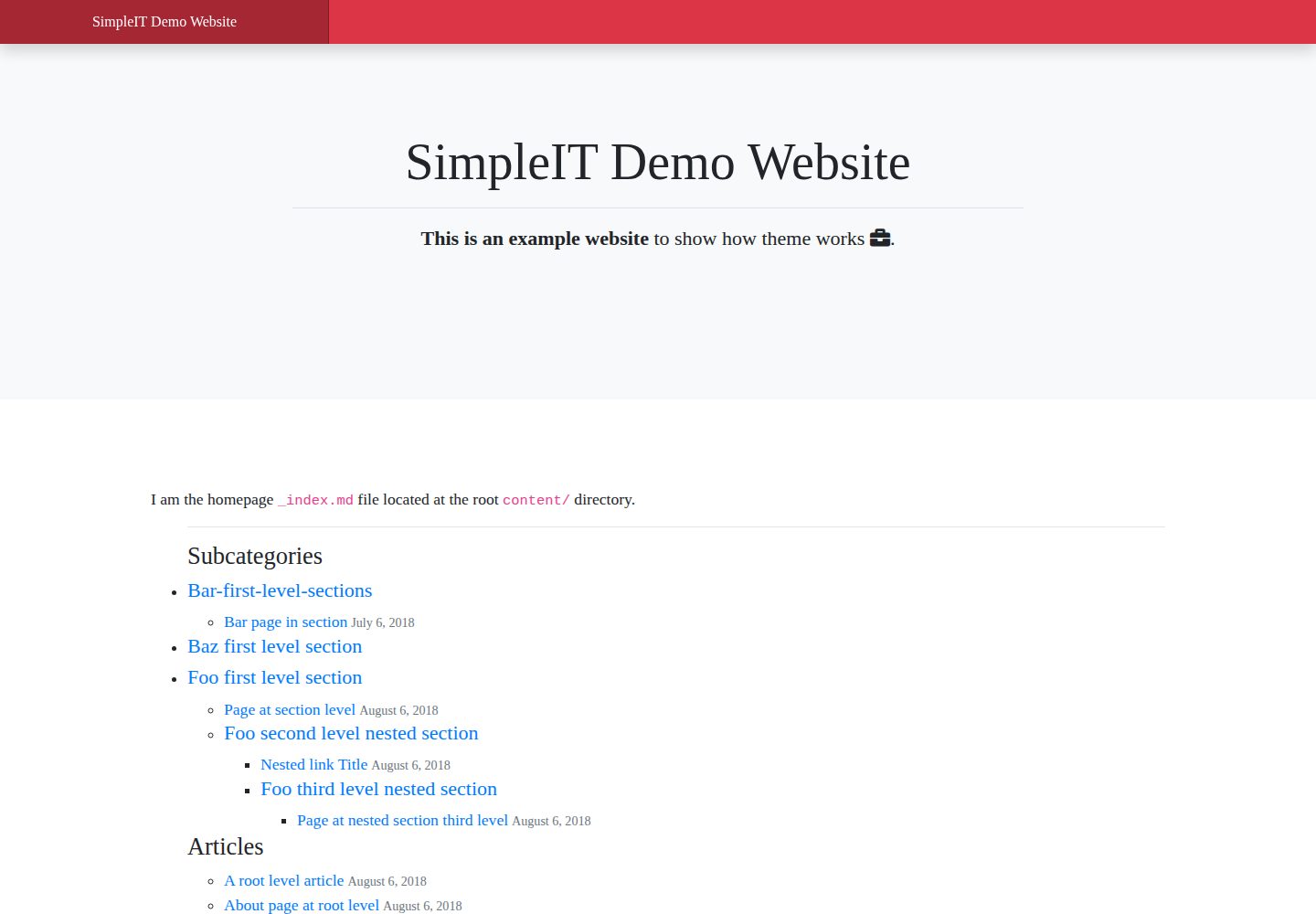
The homepage displays the complete directory tree, and each section and subsection has its own article list and nested subsections
HugoStarter
simpleit-hugo-theme — Hugo Starter Template
By marcanuy
A responsive Hugo theme that organizes articles by directory hierarchy, displays the full directory tree on the homepage, and gives each section and subsection its own article list and nested subsections.
Explore the design
Compare the page layouts and mobile experience. Open any screenshot for a closer look.
Desktop homepage1 / 3
Desktop captureTop of page
Actual screenshot captured by the server browser.
All pages & views 3
Screenshots show visual appearance; interactive behavior may differ.
Recorded 2026-10-03View source
What stands out
A quick read of the recorded project description.
Supports nested directories of arbitrary depth, with URLs corresponding one-to-one to the content directory structure
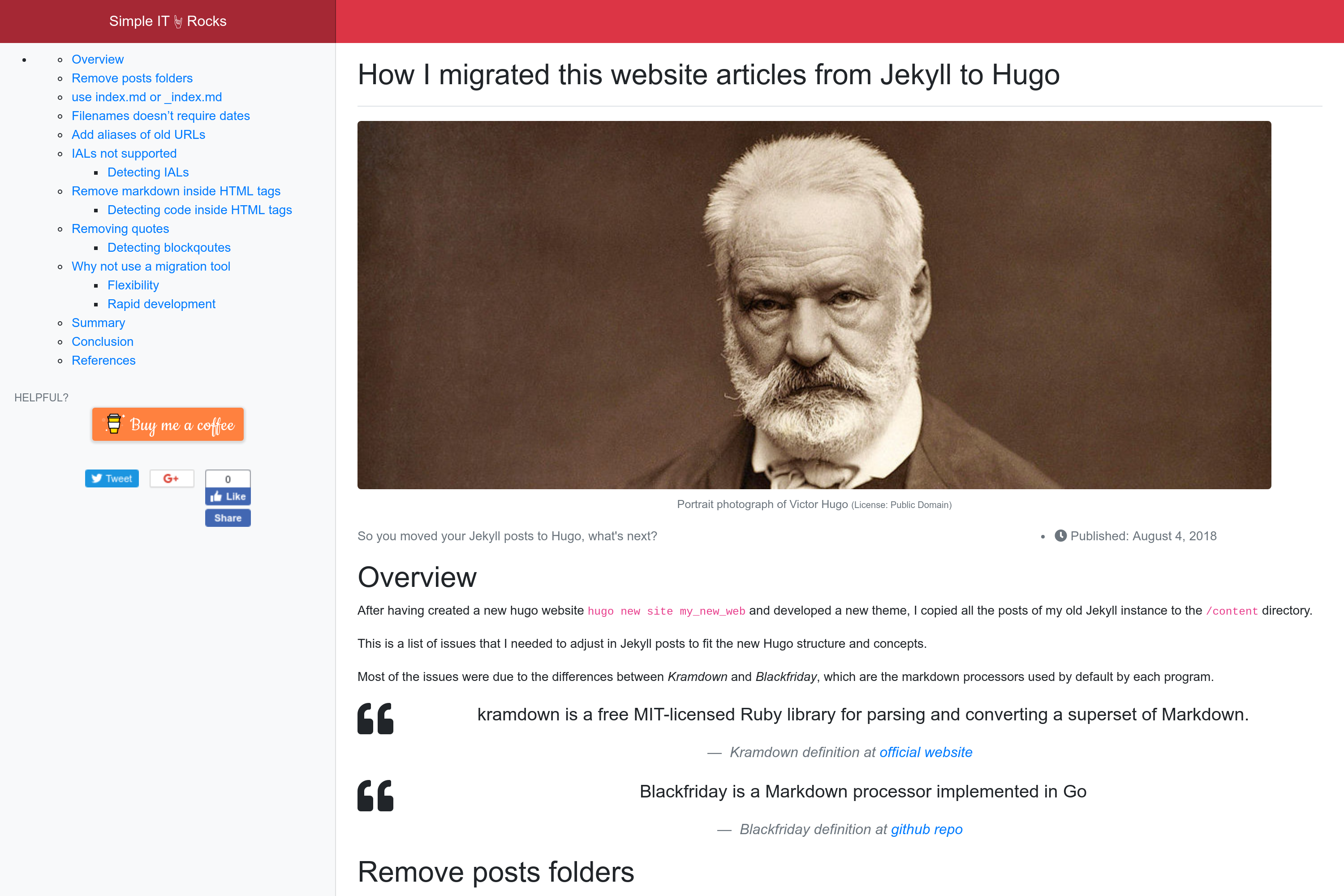
The single-page layout automatically generates a table of contents in the sidebar from body headings, and supports Disqus comments and static share buttons
Built-in Open Graph, Schema meta tags, and Twitter Cards, with last-updated information generated from git data
Multilingual support: hreflang alternate links in the head, translation versions in the footer, and translationKey linking pages across languages
Generates Atom feed files for each directory and subdirectory, and integrates configuration for Google Analytics, Bing, Google Adsense, and support buttons
Template Details
SimpleIT Hugo Theme is a Hugo theme for hierarchical content websites. Its core organizing principle maps the content directory structure to the site URL structure: the homepage displays the complete directory tree, and each section or subsection lists both its own articles and any nested subsections. This design suits sites that archive content under multi-level categories and want those categories to be directly accessible.
The theme provides two main layouts: a single-page layout and a directory/category list layout. The single-page layout automatically generates a table of contents in the sidebar from the body headings, supports configurable share buttons (static buttons generated with sharingbuttons.io), and supports Disqus comments. The list layout uses /static/img/cover.jpg as the homepage header background when that file exists. The theme also includes an author information box, previous/next navigation, and generates Atom feed files for each directory and subdirectory.
For SEO, the theme uses Hugo's built-in templates to output Open Graph, Schema meta tags, and Twitter Cards, and generates dateModified and last-updated information from git repository data when an article is updated. For multilingual sites, pages declare other language versions in the head via link rel=alternate hreflang, and the footer shows available translation links. The theme also provides configuration entry points for Google Analytics, Bing analytics, Google Adsense, and Buy me a coffee and Ko-fi support buttons.
For content organization, the theme supports nested directories of arbitrary depth, and each directory can contain both articles and subdirectories. For articles with images, it is recommended to create a separate directory for each article, use index.md as the content file, name the cover image resource cover, and list the remaining images in the frontmatter images array using their full paths after content; images shared by multiple articles can also be placed under /assets/img/ and referenced via the /img/ path. Multilingual content is implemented through the languages configuration in config.toml and language subdirectories under content, with translationKey linking the same page or section across languages.
The theme depends on third-party front-end resources such as Bootstrap 4 and Fontawesome 5. The build outputs minified HTML, a single CSS file generated from compiled and merged SASS, and a single JavaScript file. The repository uses the MIT license, but third-party assets such as demo images, fonts, and icons must be checked separately under their own licenses.
HugoStarter
Is it right for your project?
Use Cases
- Content sites that need to archive articles under multi-level directories and want category pages themselves to be directly accessible
- Sites that want the homepage to present the complete content directory tree rather than only a list of the latest articles
- Multilingual sites that need corresponding directory structures and translation links for different languages
- Blogs or documentation sites that need a separate Atom feed for each category or subcategory
- Static sites that want to use Hugo's built-in SEO templates and integrate Disqus comments, analytics, and advertising configuration
Suitable For
- Developers or technical writers who use Hugo and habitually organize content with directory structures
- Sites with deep content category hierarchies that need category pages and subcategory pages presented independently
- Websites that need multilingual content and hreflang declarations
- Projects that accept Bootstrap 4 and Fontawesome 5 front-end dependencies and are willing to organize image assets according to the theme's conventions
Getting started & customization
Use these recorded setup notes alongside the repository instructions for your chosen version.
- 1
Can be installed into themes/simpleit-hugo-theme via git submodule, or cloned directly into the theme directory
- 2
For articles with images, it is recommended to create a separate directory for each article and use index.md as the content file, with the cover image resource named cover
- 3
Multilingual sites need to configure languages in the languages section of config.toml and create corresponding language subdirectories under content
- 4
The author information box is displayed only when bio is set in the configured [params.author], and can also be hidden in frontmatter with hide_author: true
- 5
Third-party assets such as demo images, fonts, and icons must be checked separately under their own licenses; the MIT license of the code alone is not sufficient to determine this
License & source material
Usage conditions & limitations
Free to use · keep license noticeThis entry covers the free version in the public repository under the MIT license; the free scope is the code of that version and does not mean that external services or third-party assets are free.
Must comply with when using
- The code of this version may be used, modified, used commercially, and distributed free of charge.
- When distributing copies or substantial portions of the code, retain the original author's copyright notice and the complete MIT license notice.
- The code is provided as is; warranties and limitations of liability are governed by the original license and applicable law.
Additional costs & items to verify
- The comment feature depends on the third-party Disqus service, requires registering a Disqus account and configuring a site shortname, and comment data is hosted by Disqus.
- Analytics requires integration with the external Google Analytics and Bing services, usually requiring corresponding accounts and tracking IDs.
- Advertising monetization depends on Google Adsense, and ads can be served only after applying and passing Google review.
- The donation buttons in articles are optional and depend on accounts with the third-party platforms Buy me a coffee and Ko-fi.
- The theme depends on third-party front-end resources such as Bootstrap 4 and Fontawesome 5, whose licenses must be checked separately.
- Automatic generation of dateModified and last-updated information depends on git repository data, so the site must be built as a git repository.
- Demo images, fonts, icons, and other third-party assets must be checked under their own licenses; the MIT license of the code alone is not sufficient to determine this.
- External services such as domains, hosting, databases, payments, or AI may incur additional charges.
View Original Text Basis
Permission is hereby granted, free of charge
Original License Text
Commenting system - Disqus
Original README
Analytics - Google Analytics - Bing
Original README
Monetization: - Google Adsense:
Original README
Optional support buttons in articles: - [Buy me a coffee](https://buymeacoffee.com) - [Ko-fi id](https://ko-fi.com)
Original README
Third-party apps - Twitter Bootstrap 4 - Icons: Fontawesome 5
Original README
https://github.com/marcanuy/simpleit-hugo-theme/blob/master/LICENSEhttps://github.com/marcanuy/simpleit-hugo-theme/blob/master/README.mdIt obtains the data from the [git repo](https://gohugo.io/variables/git/#lastmod).
Original README
Compiled by DeepSeek based on repository license and README ·2026-10-03. Results only cover the materials read; dependencies, images, fonts, and subsequent term changes are subject to their respective original texts.
Project checks & description sources
Template Information
- Source platforms
- Hugo Themes
- Documentation and maintenance reference score
- More documented · 87 / 100
- Technologies
- Hugo
- Website type
- Starter
How this score is calculated
Our heuristic uses license records (up to 30), a demo link (12), a preview (10), stars (15), recorded maintenance (15), description completeness (8), feature records (5) and classification data (5). It is not a code, security or performance test, or a Google score. A link does not establish tested functionality.
What to verify for this project
- Repository update recorded
- 2026-03-25
- Screenshot last checked
- 2026-10-03
A demo link is listed. Check it with your own content and viewport sizes; its presence does not confirm that forms, authentication or payments work.
The catalog identifies Hugo as the primary stack. Check the actual dependency manifest and lockfile for versions and hosting requirements. These notes use recorded metadata, not a code audit or a deployment test.
Use a selection guide →How this description was prepared
AI-assisted description based on catalog records and repository material. Repository authors are not automatically the reviewers of this description.
Review declaration: [email protected] · 2026-10-04
Inspect the recorded source material
SHA-256: 7235037d0c4ed9073bd11eb029f073c03cd947e28c94210a0c486be46f535b9a
2026-10-03T23:11:37.432Z
Source file / repositorySimpleIT Hugo Theme
========================
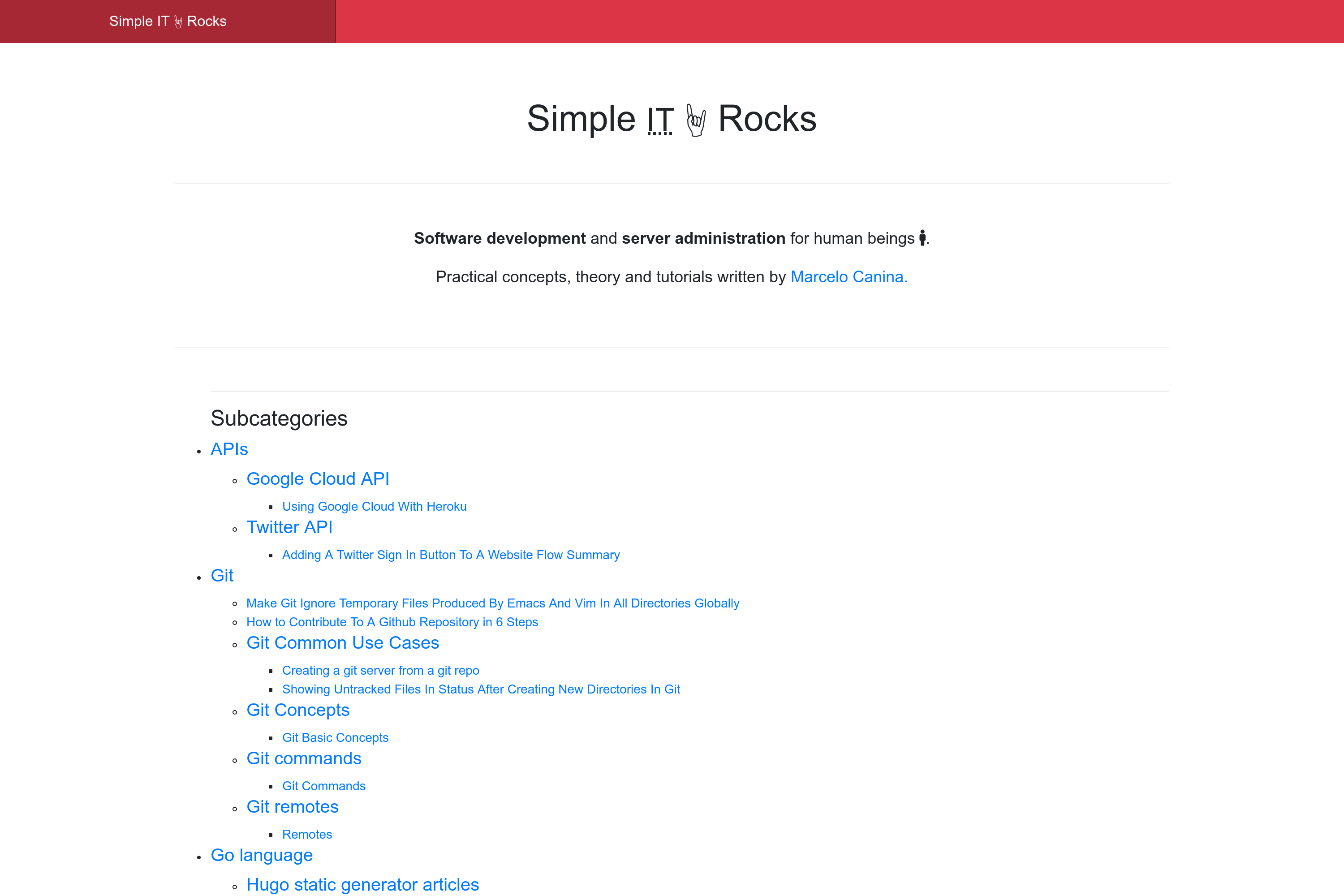
Responsive Hugo theme displaying articles by directory.
Homepage displays the full directory tree structure and each
section/"subsection" its own articles and nested sections.
[](https://github.com/marcanuy/simpleit-hugo-theme/blob/master/LICENSE)
<!-- markdown-toc start - Don't edit this section. Run M-x markdown-toc-refresh-toc -->
**Table of Contents**
- [SimpleIT Hugo Theme](#simpleit-hugo-theme)
- [Features](#features)
- [Nested subcategories](#nested-subcategories)
- [Adding content](#adding-content)
- [Adding posts without images](#adding-posts-without-images)
- [Adding posts with images](#adding-posts-with-images)
- [Adding images used in many posts](#adding-images-used-in-many-posts)
- [Adding pages in multiple languages](#adding-pages-in-multiple-languages)
- [Installation](#installation)
- [As a git submodule](#as-a-git-submodule)
- [If you don't have Hugo with git](#if-you-dont-have-hugo-with-git)
- [Updating the theme](#updating-the-theme)
- [Run locally](#run-locally)
- [Theme config](#theme-config)
- [Website in subdirectory](#website-in-subdirectory)
- [Customizing styles for your website](#customizing-styles-for-your-website)
- [Notes for developers](#notes-for-developers)
- [Build](#build)
- [Screenshots](#screenshots)
- [Contributing](#contributing)
- [Websites using theme](#websites-using-theme)
- [Reference](#reference)
- [License](#license)
<!-- markdown-toc end -->
# Features
Features:
- mobile-first design
- two main layouts:
- single page
- Automatic TOCs based in content headers placed in sidebar
- Choose Share Buttons type
- static buttons optimized for loading speed
- generated with https://sharingbuttons.io/ (fast, minimal footprint)
- Commenting system
- Disqus
- directory/category lists
- If `/static/img/cover.jpg` exists, it is added as the background
of the homepage header section
- SEO
- Hugo internal templates
- Open Graph
- `{{- partial "opengraph.html" . -}}`
- Schema metatags
- `{{- partial "schema.html" . -}}`
- When an article is updated, it automatically generates
`dateModified` *itemprop* and shows the Last Updated info in
the article. It obtains the data from the [git repo](https://gohugo.io/variables/git/#lastmod).
- Twitter Cards
- `{{- partial "twitter_cards.html" . -}}`
- produces
- minified HTML
- SASS compiled in one *CSS* file
- One *javascript* file
- **Multilingual**:
- In `head`: Each page specifies other languages versions in *<head>* meta as specified in [Tell
Google about localized versions of your
page](https://support.google.com/webmasters/answer/189077?hl=en)
like:
- `<link rel="alternate" hreflang="lang_code" href="url_of_page" />`
- In `footer`: Show alternative page translations, falling back to
site available languages if a specific page doesn't have translation
- Analytics
- Google Analytics
- Bing
- Monetization:
- Google Adsense:
- Page level
- Automatic ads just setting up config key
- Optional support buttons in articles:
- [Buy me a coffee](https://buymeacoffee.com)
- [Ko-fi id](https://ko-fi.com)
- Content in tree directory structure of arbitrary depth supported
- nested directories, each directory having its own articles and
possible other directories
- Third-party apps
- Twitter Bootstrap 4
- Icons: Fontawesome 5
- Author box for each article.
- Only shown in pages if `bio` is set at `[params.author]` in configuration.
- Can be hidden with frontmatter: `hide_author: true`
- About me page in footer if `page_about_me_relurl` set in
configuration for each language.
[languages]
[languages.en]
page_about_me_relurl = "/about/"
- Previous/Next article buttons when displaying a single article.
- Generates an `rss+xml` [Atom](https://tools.ietf.org/html/rfc4287)
file, an XML-based Web content and metadata syndication format, for
each *directory/subdirectory*.
- Example for URL: `https://simpleit.rocks/python/django/index.xml"`
includes the `link`: `<link href="https://simpleit.rocks/python/django/index.xml" rel="alternate" title="Simple IT 🤘 Rocks" type="application/rss+xml"/>`
## Nested subcategories
The nested subcategories (aka.:sections/nested sections) get the same
URLs as the directory structure, for example, the following
directory/files would be available at these URLs:
~~~
PATH URL
exampleSite/content/
|-- en
| |-- _index.md /
| |-- a-root-level-article.md /a-root-level-article/
| |-- about.md /about/
| |-- bar-first-level-section /bar-first-level-section/
| | `-- bar-page-in-section.md /bar-first-level-section/bar-page-in-section/
| |-- baz-first-level-section
| | `-- _index.md /baz-first-level-section/
| `-- foo-first-level-section
| |-- _index.md /foo-first-level-section/
| |-- foo-second-level
| | |-- _index.md /foo-first-level-section/foo-second-level/
| | |-- foo-third-level
| | | |-- _index.md /foo-first-level-section/foo-second-level/foo-third-level/
| | | `-- page-at-foo-third-level.md /foo-first-level-section/foo-second-level/foo-third-level/page-at-foo-third-level/
| | `-- page-at-foo-second-level.md /foo-first-level-section/foo-second-level/page-at-foo-second-level/
| `-- page-at-section-level.md /foo-first-level-section/page-at-section-level/
`-- es
|-- _index.md /es/
`-- foo-seccion-primer-nivel
|-- _index.md /es/foo-section-primer-nivel
`-- foo-segundo-nivel
|-- _index.md /es/foo-section-primer-nivel/foo-segundo-nivel
`-- pagina-en-segundo-nivel.md /es/foo-section-primer-nivel/foo-segundo-nivel/pagina-en-segundo-nivel/
~~~
# Adding content
```
$ hugo new <sections>/<article>.md
```
There are two types of Posts, with and without images. The cleanest
way to have them is to create a directory for those posts that have
images, and put all post's images in that directory.
## Adding posts without images
A post without a cover image should be created with the slug as the
filename inside the directory you want, for example, to create the
post
`http://example.com/foo-first-level-section/page-at-foo-first-level`
you should create the file `/content/foo-first-level-section/foo-second-level/page-at-foo-second-level.md`
*slug* will be obtained from post's filename
~~~
---
title: "Post example without images"
date: 2019-01-10
subtitle: ''
description: ''
---
## Overview
Here I don't use any image!
~~~
## Adding posts with images
Posts with images can have two types of images:
- Cover image
- Displayed at the top section of the post
- Used in *Facebook's OpenGraph* / *Twitter cards* metadata (a.k.a.
the
image that will be displayed when sharing the post in those Social
Networks)
- Should be defined at post's frontmatter.
- Content images
- Images used along the post content
For example, to create the post
`http://example.com/foo-first-level-section/page-at-foo-first-level`
you should create the directory with the *slug* name and content
inside the directory as an `index.md` file
`/content/foo-first-level-section/foo-second-level/page-at-foo-second-level/index.md`.
All images used by this post goes inside the above directory (`/content/foo-first-level-section/foo-second-level/page-at-foo-second-level/`)
And *slug* will be obtained from post's directory name.
To add the cover image, so it can be displayed by OpenGraph and
Twitter, add the metadata to the **resources** frontmatter section and
put the image in the newly created directory
`/content/foo-first-level-section/foo-second-level/page-at-foo-second-level/victor_hugo.jpg`.
The featured image resource **name** must be **cover** so it will be
used as the featured image of the article.
This follows the standard name name defined by Hugo for [Twitter Cards
featured image](https://gohugo.io/templates/internal/#twitter-cards).
Rest of images should be configured in an **images** array in front
matter, being the first one the featured image. This will be used in
Facebook's OpenGraph metadata and Twitter Cards image section, so it
is displayed when sharing them.
In *images* array, the full path after *content* directory preppended
to image name should be used, as Hugo loads them preppending the
website's domain.
Then other images in same directory and used in content `/content/foo-first-level-section/foo-second-level/page-at-foo-second-level/dcu_models.jpg`
~~~
---
title: "Post example with images in cover and content"
date: 2019-01-10
subtitle: ''
description: ''
images:
- foo-first-level-section/foo-second-level/page-at-foo-second-level/victor_hugo.jpg
- foo-first-level-section/foo-second-level/page-at-foo-second-level/dcu_models.jpg
resources:
- name: cover # this should be the name if you want it to appear as article's featured image and used by OpenGraph and Twitter cards
src: victor_hugo.jpg
title: "Portrait photograph of Victor Hugo"
params: #can be ommited
license: "Public Domain"
original: "https://commons.wikimedia.org/wiki/File:Victor_Hugo_by_%C3%89tienne_Carjat_1876_-_full.jpg"
---
## Overview
Hey! I have an image that it is not featured, look:
<img class="img-fluid" alt="model diagram" src="dcu_models.jpg" />
~~~
Tree directory structure of
`/content/foo-first-level-section/foo-second-level/page-at-foo-second-level/`
would look like:
~~~
.
|_ index.md
|_ dcu_models.jpg
|_ victor_hugo.jpg
~~~
## Adding images used in many posts
You can also add images to site's root at `/assets/img/` and then use
it directly referring them with full path `/img/....`.
For example, for `my_image.png` at `/assets/img/`
then it can be used in multiple posts:
`<img class="img-fluid" alt="example image" src="/img/my_image.png" />`.
## Adding pages in multiple languages
To add a new language, just specify it in the `[languages]` section of
`config.toml` and create a subdirectory in `/content` as specified at
[Translation by content directory
](https://gohugo.io/content-management/multilingual/#translation-by-content-directory).
Then for each page or section:
Set [translationKey](https://gohugo.io/content-management/multilingual/#bypassing-default-linking) for `_index` and *pages* and their slug as
directory or filename. I use the slug of the section/page I am
translating as the translation key, for example for
`/content/en/foo/_index.md`:
- EN: `/content/en/foo/`
----
translationKey = "foo"
----
- ES: `/content/es/foo-slug-in-spanish/`
----
translationKey = "foo"
----
Same process for pages.
Then each level of the hierarchy will have its corresponding page in
the other language, and *subdirectories* will also be translated.
# Installation
## As a git submodule
$ git submodule add -f https://github.com/marcanuy/simpleit-hugo-theme themes/simpleit-hugo-theme
## If you don't have Hugo with git
Inside the folder of your Hugo site run:
$ cd themes
$ git clone https://github.com/marcanuy/simpleit-hugo-theme
# Updating the theme
After installing the theme, if you added it as a `git submodule`, you
can update it with:
git submodule update --remote --merge
# Run locally
In order to see your site in action, run Hugo's built-in local server.
$ hugo server -t simpleit-hugo-theme
Now enter [`localhost:1313`](http://localhost:1313) in the address bar of your browser.
Or just set `theme="simpleit-hugo-theme"` in your configuration.
# Theme config
Have a look at
[/exampleSite/config.toml](https://github.com/marcanuy/simpleit-hugo-theme/blob/master/exampleSite/config.toml)
for theme customization options.
## Website in subdirectory
If the website is located in a subdirectory like `example.com/blog/`
then URLs should be generated with an absolute path with the following
configuration:
~~~
canonifyURLs = true
~~~
# Customizing styles for your website
If you want to change some styling to fit your own website needs, copy
the following files to your website instance and edit them:
- `assets/sass/custom_variables.scss`: customize variables used by
Bootstrap.
- `assets/sass/styles.scss`: your main website styles with all
Bootstrap variables avaiable.
Or include them with a SCSS include:
- for `custom_variables.scss`:
~~~ sass
@import "../../themes/simpleit-hugo-theme/assets/sass/custom_variables.scss";
~~~
and for `styles.scss`
~~~ sass
@import "../../themes/simpleit-hugo-theme/assets/sass/styles.scss";
~~~
# Notes for developers
If you plan to change something or contribute to theme development
keep in mind that this theme uses
[npm](https://docs.npmjs.com/getting-started/what-is-npm) to handle
packages, to install its dependencies:
$ cd themes/simpleit-hugo-theme
$ make install
All Bootstrap and Fontawesome SASS variables are available to
- customizing the variables
In [assets/sass/custom_variables.scss](https://github.com/marcanuy/simpleit-hugo-theme/blob/master/assets/sass/custom_variables.scss)
you can customize Bootstrap.
- use variables in [assets/sass/styles.css](https://github.com/marcanuy/simpleit-hugo-theme/blob/master/assets/sass/styles.scss)
For example, using Fontawesome variables like `$fa-var-twitter`, in `assets/sass/styles.scss`:
~~~
.twitter {
@include fa-icon;
@extend .fab;
&:before {
content: fa-content($fa-var-twitter);
}
}
~~~
or using Bootstrap variables like `$kbd-bg` , in `assets/sass/styles.scss`:
~~~
.shell {
background-color: $kbd-bg;
}
~~~
## Build
Building or serving the website:
$ cd themes/simpleit-hugo-theme
$ make build
Serving the theme with changes:
$ cd themes/simpleit-hugo-theme
$ make serve
# Screenshots
Single page screenshot:
# Contributing
Did you found a bug or got an idea for a new feature? Feel free to use the [issue tracker](//github.com/marcanu/simpleit-hugo-theme/issues) to let me know. Or make directly a [pull request](//github.com/marcanuy/simpleit-hugo-theme/pulls).
# Websites using theme
Hugo websites using this theme:
- https://simpleit.rocks
- https://therunningsecret.com
Add your own website here with a Pull Request!
# Reference
- Github repo: https://github.com/marcanuy/simpleit-hugo-theme.git
- Page at Hugo themes site: https://themes.gohugo.io/simpleit-hugo-theme/
- Hierarchical content demo: https://marcanuy.github.io/simpleit-hugo-theme/
- Flat demo: https://themes.gohugo.io/theme/simpleit-hugo-theme/
# License
This theme is released under the MIT License. For more information read the [License](//github.com/marcanuy/simpleit-hugo-theme/blob/master/LICENSE).
Explore similar templates
Compare previews and descriptions within the same stack and category.

hugo-xmin
hugo-xmin is an extremely minimal Hugo theme written by Yihui Xie for template beginners. HTML and CSS total about 140 lines, with no external dependencies, and it uses the MIT license.
Hugo · Starter

hugo-theme-gallery
A Hugo Extended photo gallery theme that organizes images with Page Bundles, automatically generating album lists and gallery pages with a Justified layout and PhotoSwipe lightbox.
Hugo · Starter

reveal-hugo
reveal-hugo is a Hugo theme that converts Markdown content into Reveal.js-based HTML presentations. It supports slide separation with `---`, shortcodes for fragments, slides, sections, notes, Markdown, and MathJax, and organizes content as root or section presentations with order controlled by weight.
Hugo · Starter

anatole
Anatole is a minimalistic two-column Hugo theme ported from farbox-theme-Anatole, featuring dark mode, multilingual and RTL support, and optional portfolio, comments, analytics, KaTeX, and Mermaid integrations. It suits personal blogs, portfolios, or documentation sites built with Hugo.
Hugo · Starter

hugo-theme-diary
A Hugo diary-style theme ported from the Hexo theme Journal, with a grid homepage for essays and daily notes. It supports six languages, dark mode, table-of-contents scroll positioning, reading time, code highlighting, and configurable sidebar, fonts, and colors.
Hugo · Starter

risotto
risotto is a minimalist, responsive Hugo theme inspired by terminal ricing aesthetics. It uses semantic HTML and pure CSS with no JavaScript, and its layout relies on CSS Grid for native responsiveness without manual breakpoints.
Hugo · Starter