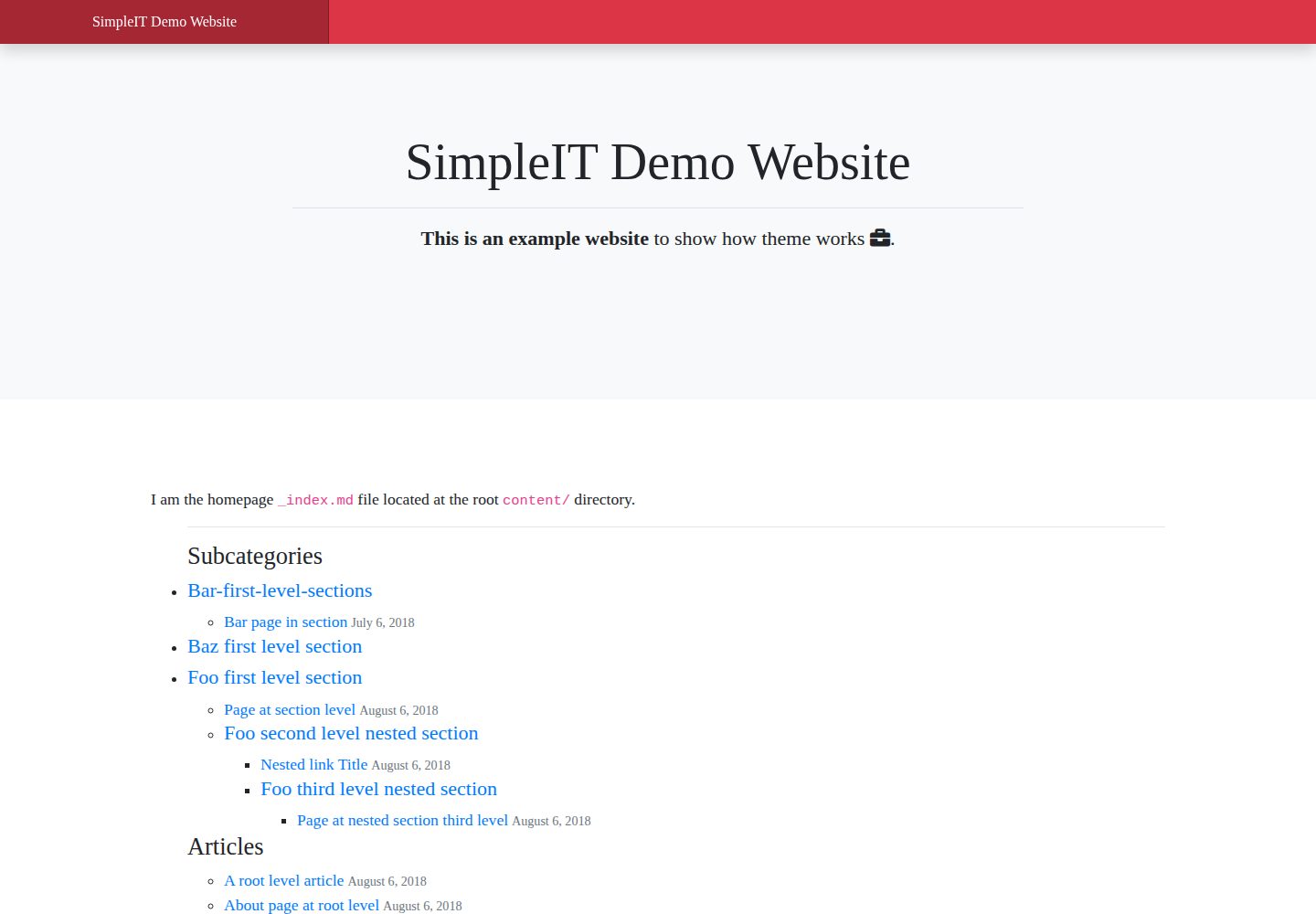
首页展示完整目录树,每个 section 和 subsection 拥有自己的文章列表与嵌套子栏目
Hugo启动器
simpleit-hugo-theme — Hugo 启动器模板
作者 marcanuy
基于 Hugo 的响应式主题,按目录层级组织文章,首页展示完整目录树,每个栏目和子栏目拥有自己的文章列表与嵌套子栏目。
看看你的网站会是什么样
浏览真实页面截图,比较内容排版与手机效果。点击下方缩略图切换,放大查看整页细节。
全部页面与视图 3
截图用于了解视觉与布局,交互效果请以实际项目为准。
采集于 2026-10-03查看来源
值得关注的模板亮点
从已有项目资料中,快速了解它的特点。
支持任意深度的嵌套目录,URL 与内容目录结构一一对应
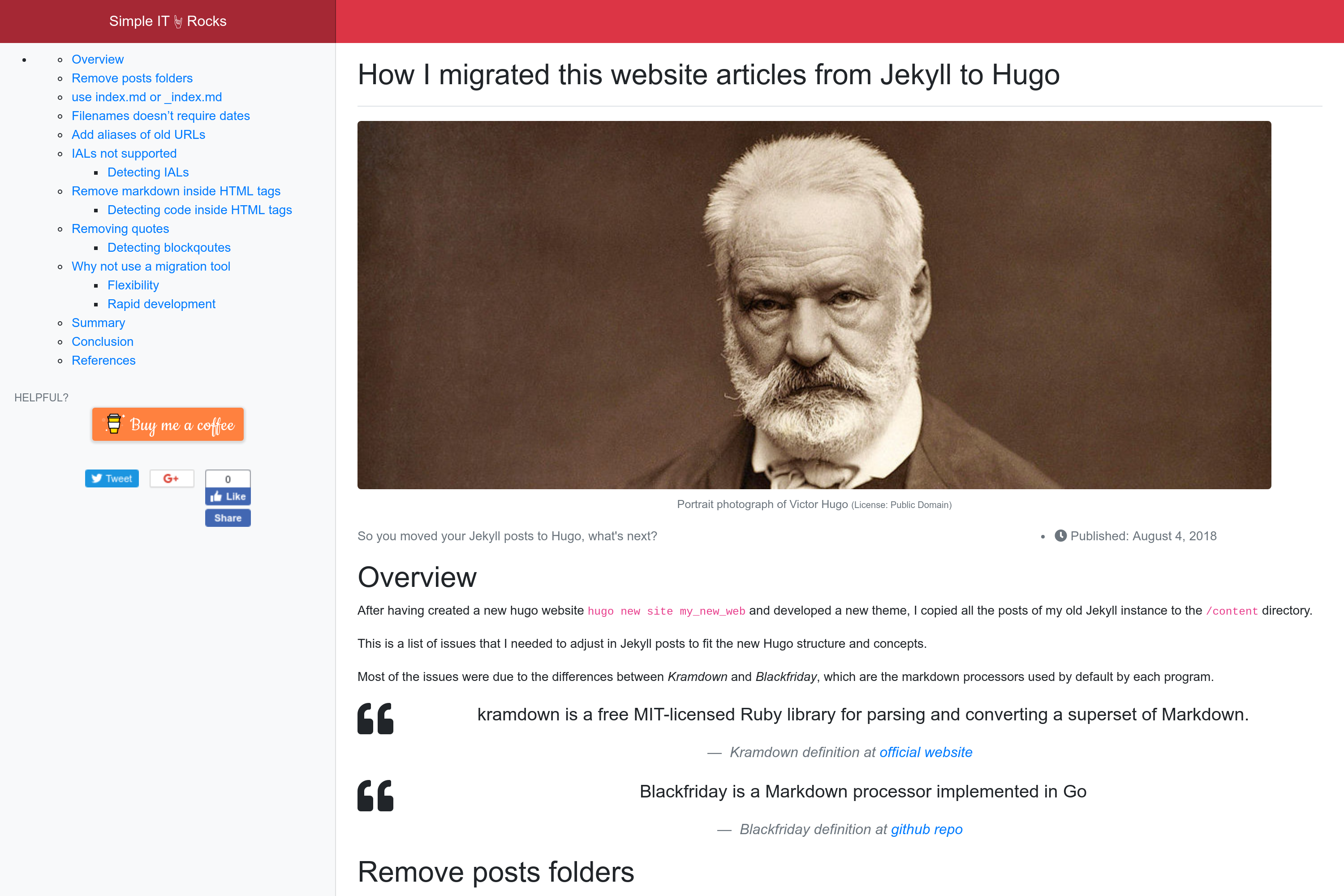
单页布局在侧边栏根据正文标题自动生成目录,并支持 Disqus 评论与静态分享按钮
内置 Open Graph、Schema 元标签和 Twitter Cards,并根据 git 数据生成最后更新信息
多语言支持:head 中输出 hreflang 替代链接,页脚展示翻译版本,用 translationKey 关联不同语言页面
为每个目录和子目录生成 Atom 订阅文件,并集成 Google Analytics、Bing、Google Adsense 与支持按钮配置
模板详细介绍
SimpleIT Hugo Theme 是一个面向层级内容网站的 Hugo 主题。它的核心组织方式是让内容目录结构与站点 URL 结构对应:首页展示完整的目录树,每个 section 或 subsection 既列出自己的文章,也列出嵌套的子栏目。这种设计适合把内容按多级分类归档、并希望分类本身可被直接访问的站点。
主题提供两种主要布局:单页布局和目录/分类列表布局。单页布局会在侧边栏根据正文标题自动生成目录,可配置分享按钮(使用 sharingbuttons.io 生成的静态按钮),并支持 Disqus 评论。列表布局在 /static/img/cover.jpg 存在时会把它作为首页头部背景。主题还包含作者信息框、上一篇/下一篇导航,以及为每个目录和子目录生成 Atom 订阅文件。
在 SEO 方面,主题使用 Hugo 内置模板输出 Open Graph、Schema 元标签和 Twitter Cards,并在文章更新时根据 git 仓库数据生成 dateModified 与最后更新信息。多语言方面,页面在 head 中通过 link rel=alternate hreflang 声明其他语言版本,页脚展示可用的翻译链接。主题还提供 Google Analytics、Bing 分析以及 Google Adsense 和 Buy me a coffee、Ko-fi 支持按钮的配置入口。
内容组织上,主题支持任意深度的嵌套目录,每个目录可同时包含文章和子目录。带图片的文章建议为每篇文章建立独立目录,以 index.md 作为内容文件,封面图资源命名为 cover,其余图片在 frontmatter 的 images 数组中按 content 之后的完整路径列出;也可把多篇文章共用的图片放在 /assets/img/ 下通过 /img/ 路径引用。多语言内容通过 config.toml 的 languages 配置和 content 下的语言子目录实现,并用 translationKey 关联不同语言下的同一页面或栏目。
主题依赖 Bootstrap 4 和 Fontawesome 5 等第三方前端资源,构建时输出压缩后的 HTML、合并编译的 SASS 生成的单个 CSS 文件以及单个 JavaScript 文件。仓库采用 MIT 许可,但演示图片、字体、图标等第三方素材需按各自许可单独核对。
Hugo启动器
适合你的项目吗?
适用场景
- 需要按多级目录归档文章、且希望分类页面本身可直接访问的内容站点
- 希望首页直接呈现完整内容目录树而非仅展示最新文章列表的网站
- 需要为不同语言提供对应目录结构与翻译链接的多语言站点
- 需要为每个分类或子分类单独提供 Atom 订阅源的博客或文档站
- 希望使用 Hugo 内置 SEO 模板并集成 Disqus 评论、分析统计与广告配置的静态站点
适合人群
- 使用 Hugo 并习惯用目录结构组织内容的开发者或技术写作者
- 内容分类层级较深、需要分类页与子分类页独立呈现的站点
- 需要多语言内容与 hreflang 声明的网站
- 接受 Bootstrap 4 与 Fontawesome 5 前端依赖、并愿意按主题约定组织图片资源的项目
上手与定制指南
结合仓库当前版本的说明,按下面的资料检查内容、配置与运行要求。
- 1
可通过 git submodule 方式安装到 themes/simpleit-hugo-theme,或直接克隆到主题目录
- 2
带图片的文章建议为每篇建立独立目录并以 index.md 作为内容文件,封面图资源命名为 cover
- 3
多语言站点需在 config.toml 的 languages 段配置语言,并在 content 下建立对应语言子目录
- 4
作者信息框仅在配置的 [params.author] 中设置了 bio 时显示,也可在 frontmatter 中用 hide_author: true 隐藏
- 5
演示图片、字体、图标等第三方素材需按各自许可单独核对,不能仅凭代码的 MIT 许可判断
授权与来源资料
使用条件与限制
免费使用 · 保留许可声明本次收录的是公开仓库中采用 MIT 许可的免费版本;免费范围为该版本代码,不代表外部服务或第三方素材免费。
使用时需要遵守
- 允许免费使用、修改、商用和分发该版本代码。
- 分发代码副本或实质性部分时,保留原作者版权声明和完整 MIT 许可声明。
- 代码按现状提供;担保与责任限制以原许可证及适用法律为准。
额外费用与待核对事项
- 评论功能依赖第三方 Disqus 服务,需注册 Disqus 账号并配置站点短名,评论数据由 Disqus 托管。
- 分析统计需接入 Google Analytics 与 Bing 外部服务,通常需要相应账号与跟踪 ID。
- 广告变现功能依赖 Google Adsense,需申请并通过 Google 审核后才能投放广告。
- 文章中的打赏按钮为可选功能,依赖 Buy me a coffee 与 Ko-fi 第三方平台账号。
- 主题依赖 Bootstrap 4 与 Fontawesome 5 等第三方前端资源,其许可需单独核对。
- 自动生成 dateModified 与最后更新信息依赖 git 仓库数据,站点需以 git 仓库形式构建。
- 演示图片、字体、图标及其他第三方素材需按各自许可核对,不能仅凭代码的 MIT 许可判断。
- 域名、托管、数据库、支付或 AI 等外部服务可能另外收费。
查看原文依据
Permission is hereby granted, free of charge
许可证原文
Commenting system - Disqus
README 原文
Analytics - Google Analytics - Bing
README 原文
Monetization: - Google Adsense:
README 原文
Optional support buttons in articles: - [Buy me a coffee](https://buymeacoffee.com) - [Ko-fi id](https://ko-fi.com)
README 原文
Third-party apps - Twitter Bootstrap 4 - Icons: Fontawesome 5
README 原文
https://github.com/marcanuy/simpleit-hugo-theme/blob/master/LICENSEhttps://github.com/marcanuy/simpleit-hugo-theme/blob/master/README.mdIt obtains the data from the [git repo](https://gohugo.io/variables/git/#lastmod).
README 原文
DeepSeek 根据仓库许可证和 README 整理 ·2026-10-03。结果仅覆盖已读取资料,依赖、图片、字体及后续条款变更以各自原文为准。
项目核对记录与介绍依据
模板资料
- 来源平台
- Hugo Themes
- 资料与维护参考分
- 资料较完整 · 87 / 100
- 技术栈
- Hugo
- 网站类型
- 启动器
这个分数如何计算
本站按许可资料(最高30分)、演示链接(12分)、预览图(10分)、Star数(15分)、记录的维护时间(15分)、描述完整度(8分)、功能记录(5分)和分类资料(5分)计算。它不是代码、安全或性能测试,也不是 Google 评分;有链接不代表已实测可用。
这个项目需要核对什么
- 记录的仓库更新时间
- 2026-03-25
- 截图检查日期
- 2026-10-03
已收录演示链接。请用你的内容与屏幕尺寸检查;有演示不代表表单、认证或支付已经可用。
目录记录的主要技术栈是 Hugo。请通过依赖清单和锁文件核对实际版本与托管要求。这些说明基于收录资料,不代表代码审计或部署实测。
查看具体选型方法 →介绍的制作与核对状态
介绍由 AI 辅助整理目录与仓库资料。仓库作者不等于这篇介绍的审核者。
审核声明: [email protected] · 2026-10-04
查看当时使用的来源资料
SHA-256: 7235037d0c4ed9073bd11eb029f073c03cd947e28c94210a0c486be46f535b9a
2026-10-03T23:11:37.432Z
来源文件 / 仓库SimpleIT Hugo Theme
========================
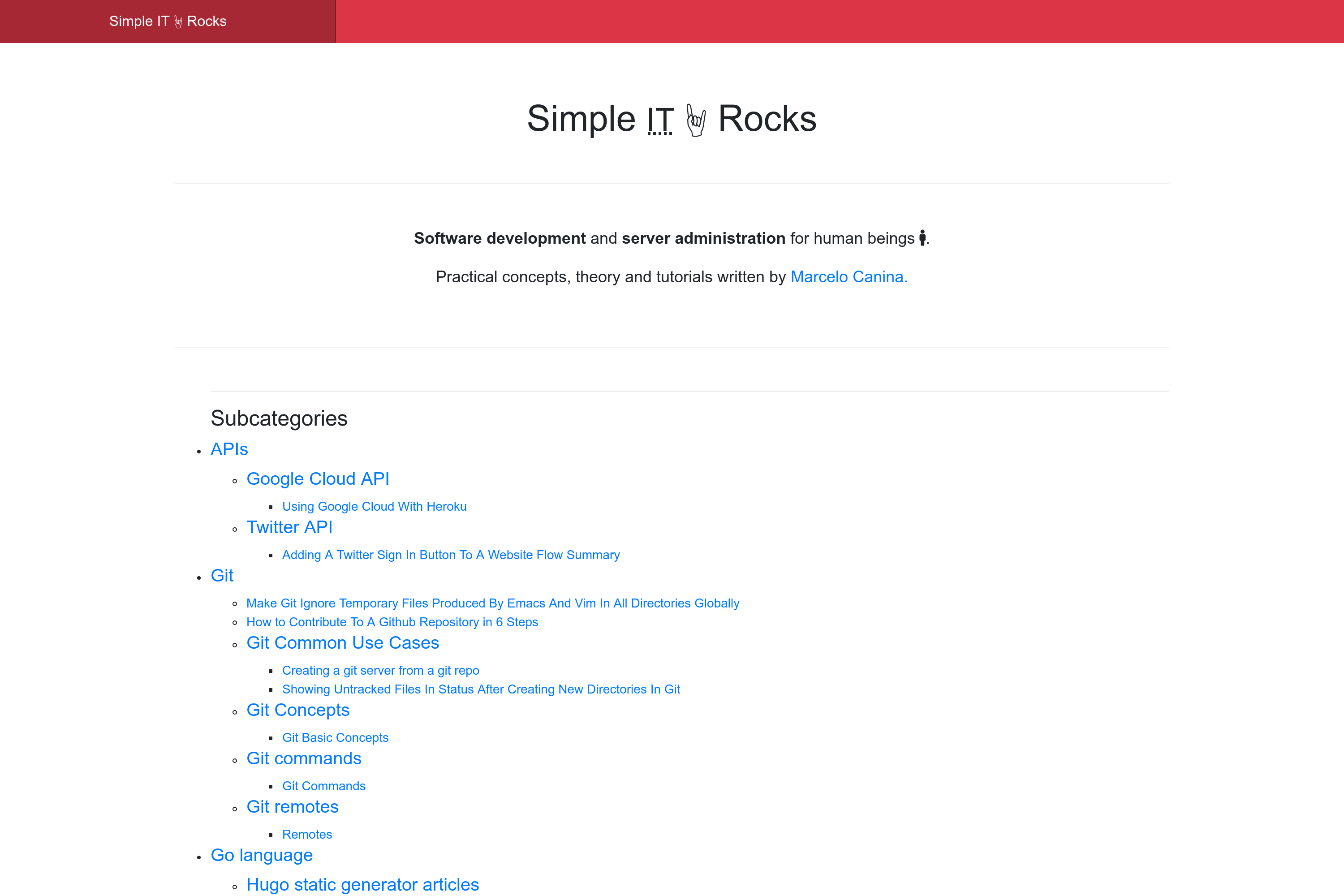
Responsive Hugo theme displaying articles by directory.
Homepage displays the full directory tree structure and each
section/"subsection" its own articles and nested sections.
[](https://github.com/marcanuy/simpleit-hugo-theme/blob/master/LICENSE)
<!-- markdown-toc start - Don't edit this section. Run M-x markdown-toc-refresh-toc -->
**Table of Contents**
- [SimpleIT Hugo Theme](#simpleit-hugo-theme)
- [Features](#features)
- [Nested subcategories](#nested-subcategories)
- [Adding content](#adding-content)
- [Adding posts without images](#adding-posts-without-images)
- [Adding posts with images](#adding-posts-with-images)
- [Adding images used in many posts](#adding-images-used-in-many-posts)
- [Adding pages in multiple languages](#adding-pages-in-multiple-languages)
- [Installation](#installation)
- [As a git submodule](#as-a-git-submodule)
- [If you don't have Hugo with git](#if-you-dont-have-hugo-with-git)
- [Updating the theme](#updating-the-theme)
- [Run locally](#run-locally)
- [Theme config](#theme-config)
- [Website in subdirectory](#website-in-subdirectory)
- [Customizing styles for your website](#customizing-styles-for-your-website)
- [Notes for developers](#notes-for-developers)
- [Build](#build)
- [Screenshots](#screenshots)
- [Contributing](#contributing)
- [Websites using theme](#websites-using-theme)
- [Reference](#reference)
- [License](#license)
<!-- markdown-toc end -->
# Features
Features:
- mobile-first design
- two main layouts:
- single page
- Automatic TOCs based in content headers placed in sidebar
- Choose Share Buttons type
- static buttons optimized for loading speed
- generated with https://sharingbuttons.io/ (fast, minimal footprint)
- Commenting system
- Disqus
- directory/category lists
- If `/static/img/cover.jpg` exists, it is added as the background
of the homepage header section
- SEO
- Hugo internal templates
- Open Graph
- `{{- partial "opengraph.html" . -}}`
- Schema metatags
- `{{- partial "schema.html" . -}}`
- When an article is updated, it automatically generates
`dateModified` *itemprop* and shows the Last Updated info in
the article. It obtains the data from the [git repo](https://gohugo.io/variables/git/#lastmod).
- Twitter Cards
- `{{- partial "twitter_cards.html" . -}}`
- produces
- minified HTML
- SASS compiled in one *CSS* file
- One *javascript* file
- **Multilingual**:
- In `head`: Each page specifies other languages versions in *<head>* meta as specified in [Tell
Google about localized versions of your
page](https://support.google.com/webmasters/answer/189077?hl=en)
like:
- `<link rel="alternate" hreflang="lang_code" href="url_of_page" />`
- In `footer`: Show alternative page translations, falling back to
site available languages if a specific page doesn't have translation
- Analytics
- Google Analytics
- Bing
- Monetization:
- Google Adsense:
- Page level
- Automatic ads just setting up config key
- Optional support buttons in articles:
- [Buy me a coffee](https://buymeacoffee.com)
- [Ko-fi id](https://ko-fi.com)
- Content in tree directory structure of arbitrary depth supported
- nested directories, each directory having its own articles and
possible other directories
- Third-party apps
- Twitter Bootstrap 4
- Icons: Fontawesome 5
- Author box for each article.
- Only shown in pages if `bio` is set at `[params.author]` in configuration.
- Can be hidden with frontmatter: `hide_author: true`
- About me page in footer if `page_about_me_relurl` set in
configuration for each language.
[languages]
[languages.en]
page_about_me_relurl = "/about/"
- Previous/Next article buttons when displaying a single article.
- Generates an `rss+xml` [Atom](https://tools.ietf.org/html/rfc4287)
file, an XML-based Web content and metadata syndication format, for
each *directory/subdirectory*.
- Example for URL: `https://simpleit.rocks/python/django/index.xml"`
includes the `link`: `<link href="https://simpleit.rocks/python/django/index.xml" rel="alternate" title="Simple IT 🤘 Rocks" type="application/rss+xml"/>`
## Nested subcategories
The nested subcategories (aka.:sections/nested sections) get the same
URLs as the directory structure, for example, the following
directory/files would be available at these URLs:
~~~
PATH URL
exampleSite/content/
|-- en
| |-- _index.md /
| |-- a-root-level-article.md /a-root-level-article/
| |-- about.md /about/
| |-- bar-first-level-section /bar-first-level-section/
| | `-- bar-page-in-section.md /bar-first-level-section/bar-page-in-section/
| |-- baz-first-level-section
| | `-- _index.md /baz-first-level-section/
| `-- foo-first-level-section
| |-- _index.md /foo-first-level-section/
| |-- foo-second-level
| | |-- _index.md /foo-first-level-section/foo-second-level/
| | |-- foo-third-level
| | | |-- _index.md /foo-first-level-section/foo-second-level/foo-third-level/
| | | `-- page-at-foo-third-level.md /foo-first-level-section/foo-second-level/foo-third-level/page-at-foo-third-level/
| | `-- page-at-foo-second-level.md /foo-first-level-section/foo-second-level/page-at-foo-second-level/
| `-- page-at-section-level.md /foo-first-level-section/page-at-section-level/
`-- es
|-- _index.md /es/
`-- foo-seccion-primer-nivel
|-- _index.md /es/foo-section-primer-nivel
`-- foo-segundo-nivel
|-- _index.md /es/foo-section-primer-nivel/foo-segundo-nivel
`-- pagina-en-segundo-nivel.md /es/foo-section-primer-nivel/foo-segundo-nivel/pagina-en-segundo-nivel/
~~~
# Adding content
```
$ hugo new <sections>/<article>.md
```
There are two types of Posts, with and without images. The cleanest
way to have them is to create a directory for those posts that have
images, and put all post's images in that directory.
## Adding posts without images
A post without a cover image should be created with the slug as the
filename inside the directory you want, for example, to create the
post
`http://example.com/foo-first-level-section/page-at-foo-first-level`
you should create the file `/content/foo-first-level-section/foo-second-level/page-at-foo-second-level.md`
*slug* will be obtained from post's filename
~~~
---
title: "Post example without images"
date: 2019-01-10
subtitle: ''
description: ''
---
## Overview
Here I don't use any image!
~~~
## Adding posts with images
Posts with images can have two types of images:
- Cover image
- Displayed at the top section of the post
- Used in *Facebook's OpenGraph* / *Twitter cards* metadata (a.k.a.
the
image that will be displayed when sharing the post in those Social
Networks)
- Should be defined at post's frontmatter.
- Content images
- Images used along the post content
For example, to create the post
`http://example.com/foo-first-level-section/page-at-foo-first-level`
you should create the directory with the *slug* name and content
inside the directory as an `index.md` file
`/content/foo-first-level-section/foo-second-level/page-at-foo-second-level/index.md`.
All images used by this post goes inside the above directory (`/content/foo-first-level-section/foo-second-level/page-at-foo-second-level/`)
And *slug* will be obtained from post's directory name.
To add the cover image, so it can be displayed by OpenGraph and
Twitter, add the metadata to the **resources** frontmatter section and
put the image in the newly created directory
`/content/foo-first-level-section/foo-second-level/page-at-foo-second-level/victor_hugo.jpg`.
The featured image resource **name** must be **cover** so it will be
used as the featured image of the article.
This follows the standard name name defined by Hugo for [Twitter Cards
featured image](https://gohugo.io/templates/internal/#twitter-cards).
Rest of images should be configured in an **images** array in front
matter, being the first one the featured image. This will be used in
Facebook's OpenGraph metadata and Twitter Cards image section, so it
is displayed when sharing them.
In *images* array, the full path after *content* directory preppended
to image name should be used, as Hugo loads them preppending the
website's domain.
Then other images in same directory and used in content `/content/foo-first-level-section/foo-second-level/page-at-foo-second-level/dcu_models.jpg`
~~~
---
title: "Post example with images in cover and content"
date: 2019-01-10
subtitle: ''
description: ''
images:
- foo-first-level-section/foo-second-level/page-at-foo-second-level/victor_hugo.jpg
- foo-first-level-section/foo-second-level/page-at-foo-second-level/dcu_models.jpg
resources:
- name: cover # this should be the name if you want it to appear as article's featured image and used by OpenGraph and Twitter cards
src: victor_hugo.jpg
title: "Portrait photograph of Victor Hugo"
params: #can be ommited
license: "Public Domain"
original: "https://commons.wikimedia.org/wiki/File:Victor_Hugo_by_%C3%89tienne_Carjat_1876_-_full.jpg"
---
## Overview
Hey! I have an image that it is not featured, look:
<img class="img-fluid" alt="model diagram" src="dcu_models.jpg" />
~~~
Tree directory structure of
`/content/foo-first-level-section/foo-second-level/page-at-foo-second-level/`
would look like:
~~~
.
|_ index.md
|_ dcu_models.jpg
|_ victor_hugo.jpg
~~~
## Adding images used in many posts
You can also add images to site's root at `/assets/img/` and then use
it directly referring them with full path `/img/....`.
For example, for `my_image.png` at `/assets/img/`
then it can be used in multiple posts:
`<img class="img-fluid" alt="example image" src="/img/my_image.png" />`.
## Adding pages in multiple languages
To add a new language, just specify it in the `[languages]` section of
`config.toml` and create a subdirectory in `/content` as specified at
[Translation by content directory
](https://gohugo.io/content-management/multilingual/#translation-by-content-directory).
Then for each page or section:
Set [translationKey](https://gohugo.io/content-management/multilingual/#bypassing-default-linking) for `_index` and *pages* and their slug as
directory or filename. I use the slug of the section/page I am
translating as the translation key, for example for
`/content/en/foo/_index.md`:
- EN: `/content/en/foo/`
----
translationKey = "foo"
----
- ES: `/content/es/foo-slug-in-spanish/`
----
translationKey = "foo"
----
Same process for pages.
Then each level of the hierarchy will have its corresponding page in
the other language, and *subdirectories* will also be translated.
# Installation
## As a git submodule
$ git submodule add -f https://github.com/marcanuy/simpleit-hugo-theme themes/simpleit-hugo-theme
## If you don't have Hugo with git
Inside the folder of your Hugo site run:
$ cd themes
$ git clone https://github.com/marcanuy/simpleit-hugo-theme
# Updating the theme
After installing the theme, if you added it as a `git submodule`, you
can update it with:
git submodule update --remote --merge
# Run locally
In order to see your site in action, run Hugo's built-in local server.
$ hugo server -t simpleit-hugo-theme
Now enter [`localhost:1313`](http://localhost:1313) in the address bar of your browser.
Or just set `theme="simpleit-hugo-theme"` in your configuration.
# Theme config
Have a look at
[/exampleSite/config.toml](https://github.com/marcanuy/simpleit-hugo-theme/blob/master/exampleSite/config.toml)
for theme customization options.
## Website in subdirectory
If the website is located in a subdirectory like `example.com/blog/`
then URLs should be generated with an absolute path with the following
configuration:
~~~
canonifyURLs = true
~~~
# Customizing styles for your website
If you want to change some styling to fit your own website needs, copy
the following files to your website instance and edit them:
- `assets/sass/custom_variables.scss`: customize variables used by
Bootstrap.
- `assets/sass/styles.scss`: your main website styles with all
Bootstrap variables avaiable.
Or include them with a SCSS include:
- for `custom_variables.scss`:
~~~ sass
@import "../../themes/simpleit-hugo-theme/assets/sass/custom_variables.scss";
~~~
and for `styles.scss`
~~~ sass
@import "../../themes/simpleit-hugo-theme/assets/sass/styles.scss";
~~~
# Notes for developers
If you plan to change something or contribute to theme development
keep in mind that this theme uses
[npm](https://docs.npmjs.com/getting-started/what-is-npm) to handle
packages, to install its dependencies:
$ cd themes/simpleit-hugo-theme
$ make install
All Bootstrap and Fontawesome SASS variables are available to
- customizing the variables
In [assets/sass/custom_variables.scss](https://github.com/marcanuy/simpleit-hugo-theme/blob/master/assets/sass/custom_variables.scss)
you can customize Bootstrap.
- use variables in [assets/sass/styles.css](https://github.com/marcanuy/simpleit-hugo-theme/blob/master/assets/sass/styles.scss)
For example, using Fontawesome variables like `$fa-var-twitter`, in `assets/sass/styles.scss`:
~~~
.twitter {
@include fa-icon;
@extend .fab;
&:before {
content: fa-content($fa-var-twitter);
}
}
~~~
or using Bootstrap variables like `$kbd-bg` , in `assets/sass/styles.scss`:
~~~
.shell {
background-color: $kbd-bg;
}
~~~
## Build
Building or serving the website:
$ cd themes/simpleit-hugo-theme
$ make build
Serving the theme with changes:
$ cd themes/simpleit-hugo-theme
$ make serve
# Screenshots
Single page screenshot:
# Contributing
Did you found a bug or got an idea for a new feature? Feel free to use the [issue tracker](//github.com/marcanu/simpleit-hugo-theme/issues) to let me know. Or make directly a [pull request](//github.com/marcanuy/simpleit-hugo-theme/pulls).
# Websites using theme
Hugo websites using this theme:
- https://simpleit.rocks
- https://therunningsecret.com
Add your own website here with a Pull Request!
# Reference
- Github repo: https://github.com/marcanuy/simpleit-hugo-theme.git
- Page at Hugo themes site: https://themes.gohugo.io/simpleit-hugo-theme/
- Hierarchical content demo: https://marcanuy.github.io/simpleit-hugo-theme/
- Flat demo: https://themes.gohugo.io/theme/simpleit-hugo-theme/
# License
This theme is released under the MIT License. For more information read the [License](//github.com/marcanuy/simpleit-hugo-theme/blob/master/LICENSE).
看看同类模板
对比同技术栈与用途的模板,找到更适合的视觉与内容结构。

hugo-xmin
eXtremely Minimal Hugo theme: about 140 lines of code in total, including HTML and CSS (with no dependencies)
Hugo · 启动器

hugo-theme-gallery
Gallery Theme for Hugo
Hugo · 启动器

reveal-hugo
📽️ Create rich HTML-based presentations with Hugo and Reveal.js
Hugo · 启动器

anatole
Anatole is a minimalistic two-column theme for Hugo.
Hugo · 启动器

hugo-theme-diary
Moments piled up. A Hugo theme ported from SumiMakito/hexo-theme-Journal.
Hugo · 启动器

risotto
A minimalist, responsive hugo theme inspired by terminal ricing aesthetics.
Hugo · 启动器