Deploy a Next.js app to Cloudflare Workers using the OpenNext Cloudflare adapter
Next.jsReactCorporate WebsiteStarter
waitlist-cloudflare — Next.js Business Template
By Metareignity
A Next.js-based waitlist template that uses Cloudflare Workers, D1 SQL, and the OpenNext adapter to handle signups, referral code tracking, and D1-based IP rate limiting at the edge.
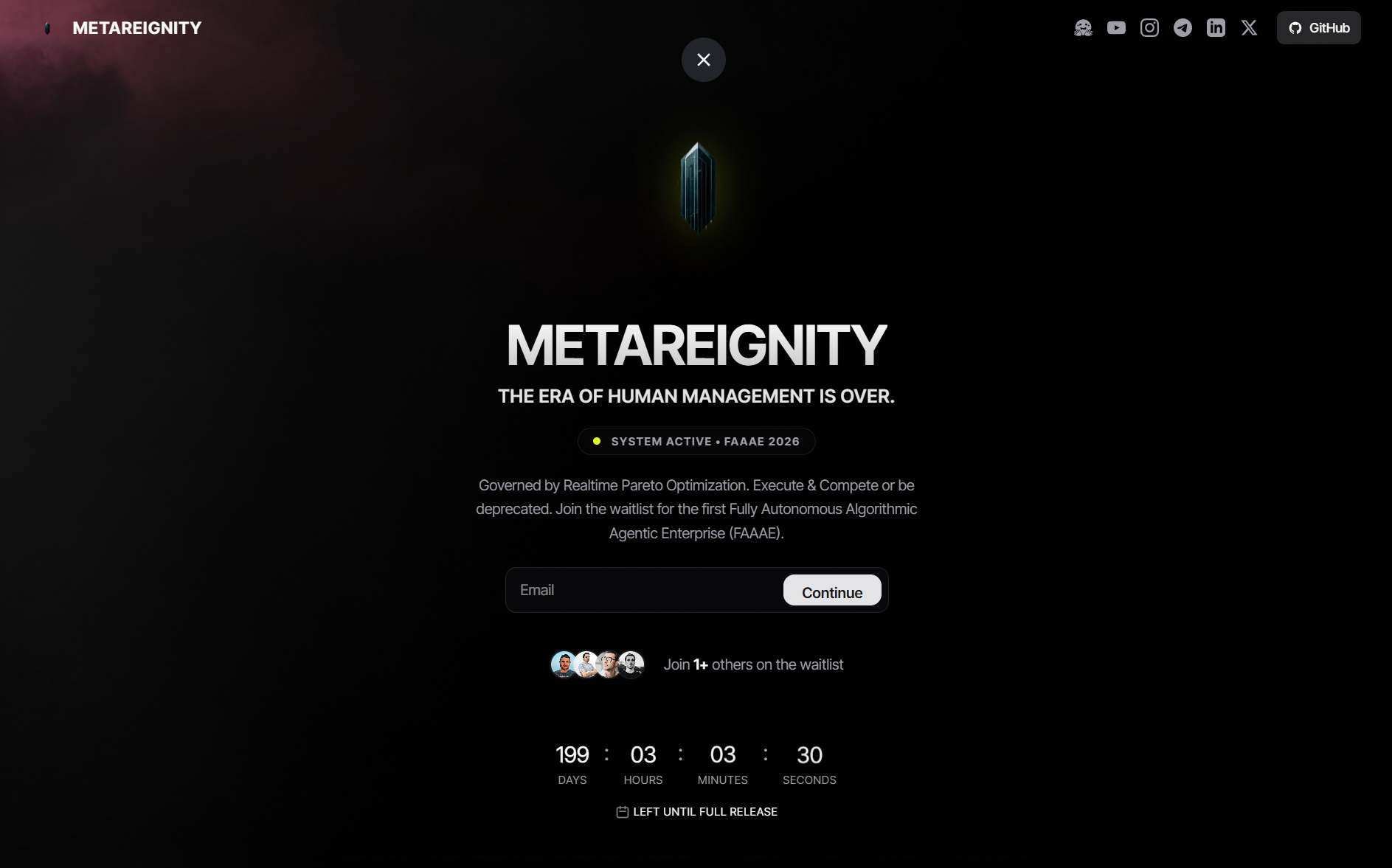
Explore the design
Compare the page layouts and mobile experience. Open any screenshot for a closer look.
Author preview
Author-provided preview
Preview provided in the project README.
One original preview is available. Open the full image to inspect the design.
Screenshots show visual appearance; interactive behavior may differ.
Recorded 2026-10-03View source
What stands out
A quick read of the recorded project description.
Store waitlist records in a Cloudflare D1 SQL database; the repository includes schema.sql and migration commands
Automatically generate referral codes for registrants and record referral source nodes
Implement an IP-based rate limiting table in D1 to reduce spam submissions
The README provides wrangler command steps for local development, remote migration, and deployment to Cloudflare
Includes an llm.txt file that provides architecture and directory context for coding tools such as Cursor and Copilot
Template Details
waitlist-cloudflare is a waitlist page template designed for Cloudflare edge deployment. It builds the frontend with Next.js and React, deploys to Cloudflare Workers via the OpenNext Cloudflare adapter, and stores data in a Cloudflare D1 SQL database without relying on external databases, Redis, or similar services.
The template includes waitlist signup, automatic referral code generation with referral source tracking, and a D1-based IP rate limiting table to reduce duplicate submissions. The repository provides schema.sql and wrangler commands to initialize the database schema locally and in production. The README also covers two configuration management approaches for multi-domain deployments, plus an llm.txt file for LLM coding tools to read.
Note: this project is positioned as a waitlist template, not a complete corporate website system. Before use, you must create your own Cloudflare account and D1 database, and configure the bindings and routes in wrangler.jsonc. Licensing for third-party assets such as demo images and fonts must be verified separately.
Next.jsReactCorporate websiteStarter
Is it right for your project?
Use Cases
- Build a waitlist collection page for a new product or service and deploy it at the Cloudflare edge
- Registration scenarios that need to record referral sources and track invitation relationships via referral codes
- Projects that want to use Cloudflare D1 as the sole data store and avoid introducing external databases or Redis
- Maintain waitlist pages for multiple domains under the same code repository using different wrangler configurations
Suitable For
- Developers who already have a Cloudflare account and are familiar with the wrangler CLI
- Teams building frontends with Next.js and React that want to deploy to Cloudflare Workers
- Projects that need a lightweight waitlist page and accept D1 as the data layer
- Individuals or organizations that want to modify and extend the code under the MIT license
Getting started & customization
Use these recorded setup notes alongside the repository instructions for your chosen version.
- 1
A Cloudflare account is required; complete local authentication with npx wrangler login
- 2
Create a D1 database with npx wrangler d1 create waitlist-db, then fill the generated database_id and name into wrangler.jsonc
- 3
Before local development, run npx wrangler d1 execute waitlist-db --file=schema.sql --local to initialize the local SQLite schema
- 4
Before online deployment, run npx wrangler d1 execute waitlist-db --file=schema.sql --remote to apply the production database schema
- 5
Deploy with pnpm run deploy; the README states that no production environment variables or secrets need to be configured in the Cloudflare Dashboard
License & source material
Usage conditions & limitations
Free to use · keep license noticeThis entry covers the free version of the public repository under the MIT license; the free scope applies to that version's code and does not mean external services or third-party assets are free.
Must comply with when using
- You may use, modify, commercialize, and distribute this version's code for free.
- When distributing copies or substantial portions of the code, retain the original author's copyright notice and the full MIT license notice.
- The code is provided as is; warranties and limitations of liability are governed by the original license and applicable law.
Additional costs & items to verify
- Using this template requires a Cloudflare account and depends on Cloudflare Workers and D1 services; it cannot run independently outside the Cloudflare environment.
- You must create your own Cloudflare D1 database and fill the generated database_id and name into wrangler.jsonc before it can run.
- Before local development, you need to authenticate by logging into your Cloudflare account via the wrangler CLI.
- Before online deployment, you need to run migrations against the production D1 instance to create the database schema.
- Demo images, fonts, icons, and other third-party assets must be checked against their respective licenses; the code's MIT license alone cannot be used to judge them.
- External services such as domains, hosting, databases, payments, or AI may incur separate charges.
View Original Text Basis
Permission is hereby granted, free of charge
Original License Text
To run this boilerplate, you only need a Cloudflare Account.
Original README
npx wrangler d1 create waitlist-db
Original README
npx wrangler login
Original README
https://github.com/Metareignity/waitlist-cloudflare/blob/main/LICENSEhttps://github.com/Metareignity/waitlist-cloudflare/blob/main/README.mdnpx wrangler d1 execute waitlist-db --file=schema.sql --remote
Original README
Compiled by DeepSeek based on repository license and README ·2026-10-03. Results only cover the materials read; dependencies, images, fonts, and subsequent term changes are subject to their respective original texts.
Project checks & description sources
Template Information
- Source platforms
- GitHub
- Documentation and maintenance reference score
- More documented · 92 / 100
- Technologies
- Next.js · React
- Website type
- Corporate Website · Starter
How this score is calculated
Our heuristic uses license records (up to 30), a demo link (12), a preview (10), stars (15), recorded maintenance (15), description completeness (8), feature records (5) and classification data (5). It is not a code, security or performance test, or a Google score. A link does not establish tested functionality.
What to verify for this project
- Repository update recorded
- 2026-07-20
- Screenshot last checked
- 2026-10-03
A demo link is listed. Check it with your own content and viewport sizes; its presence does not confirm that forms, authentication or payments work.
The catalog identifies Next.js as the primary stack. Check the actual dependency manifest and lockfile for versions and hosting requirements. These notes use recorded metadata, not a code audit or a deployment test.
Use a selection guide →How this description was prepared
AI-assisted description based on catalog records and repository material. Repository authors are not automatically the reviewers of this description.
Review declaration: [email protected] · 2026-10-04
Inspect the recorded source material
SHA-256: f9db04b60c6ed95128bd46d9b4dcac76e7b2c6ee3e7263f799f76bc42c046849
2026-10-03T21:03:46.044Z
Source file / repository# waitlist-cloudflare

`waitlist-cloudflare` is a lightweight, high-performance, and secure Next.js 15 waitlist boilerplate designed for native serverless edge deployment on **Cloudflare Workers** using the **OpenNext Cloudflare adapter**.
The stack is **100% Cloudflare-only** and requires zero external service configurations.
**Live Demo:** [waitlist.metareignity.com](https://waitlist.metareignity.com)
---
## Core Features
- **Next.js 15 & React 19:** Built on Next.js `15.5.18` to guarantee compatibility and prevent handler bundling errors on Cloudflare Workers.
- **Cloudflare D1 Database:** Primary SQL database mapping waitlist records natively at the edge. Includes schema files and quick D1 migration commands.
- **Referral Tracking Swarm:** Auto-generates unique, lightweight referral codes for registrants and tracks referring nodes.
- **Native D1 Rate Limiting:** Implements IP rate limiting natively inside Cloudflare D1 with a `rate_limits` table to prevent spam submissions, requiring no external databases or Redis instances.
---
## Prerequisites & Setup
To run this boilerplate, you only need a Cloudflare Account.
### Cloudflare Account & D1 Database
1. Create a Cloudflare account.
2. Authenticate the wrangler CLI locally:
```bash
npx wrangler login
```
3. Initialize your D1 SQL database:
```bash
npx wrangler d1 create waitlist-db
```
4. Copy the generated `database_id` and name into your `wrangler.jsonc` file.
---
## Local Development Setup
1. **Clone the Repository:**
```bash
git clone https://github.com/Metareignity/waitlist-cloudflare.git
cd waitlist-cloudflare
```
2. **Install Dependencies:**
```bash
pnpm install
```
3. **Configure D1 Local Schema:**
Apply the migration to initialize the SQLite database locally:
```bash
npx wrangler d1 execute waitlist-db --file=schema.sql --local
```
4. **Start Development Server:**
```bash
pnpm dev
```
Open `http://localhost:3000` in your browser. (Note: No local `.env` or `.dev.vars` environment variables are needed!).
---
## Production Deployment
1. **Apply D1 Production Migration:**
Create the database schema on your live Cloudflare D1 instance:
```bash
npx wrangler d1 execute waitlist-db --file=schema.sql --remote
```
2. **Configure wrangler.jsonc Bindings:**
Add D1 binding details and your custom domain target:
```jsonc
"d1_databases": [
{
"binding": "DB",
"database_name": "waitlist-db",
"database_id": "<your-cloudflare-d1-db-uuid>"
}
],
"routes": [
{
"pattern": "waitlist.yourdomain.com",
"custom_domain": true
}
]
```
3. **Deploy live to Cloudflare:**
Compile the Next.js bundle and upload the worker to Cloudflare:
```bash
pnpm run deploy
```
No production environment variables or secret keys are needed in the Cloudflare Dashboard!
---
## LLM Compatibility
This repository includes an [llm.txt](llm.txt) file at the root containing standardized markdown context about the architecture, folder layout, and parameters for LLM-based coding agents (like Cursor, Gemini, Copilot) to ingest.
---
## GitHub Repository Recommendations
To optimize your repository on GitHub, configure the **About** section on the right side of the repository page as follows:
* **Description:** ⚡ 100% Cloudflare-Native Next.js 15 Waitlist Boilerplate. Powered by Cloudflare D1 SQL, edge rate-limiting, referral swarms, and interactive WebGL shaders. Zero external dependencies.
* **Website:** `https://waitlist.metareignity.com`
* **Topics:** `nextjs`, `react`, `cloudflare-workers`, `cloudflare-pages`, `cloudflare-d1`, `sqlite`, `waitlist`, `boilerplate`, `tailwindcss`, `webgl`
---
## Multi-Domain Deployment Strategy
If you want to maintain two separate sites (e.g., `waitlist.metareignity.com` as the waitlist boilerplate, and `metareignity.com` as your primary brand website) using the same code repository but with different configurations (`llm.txt`, custom domains, text copy), here are the two standard ways to manage this systematically:
### Option A: Config-Based Builds (Single Git Branch — Recommended)
Instead of maintaining separate git branches (which leads to merge conflicts over time), you keep all changes in a single branch (`main`) and split domain configurations into distinct files:
1. **Create Environment Configuration Files:**
* Rename `wrangler.jsonc` to `wrangler.waitlist.jsonc` (for waitlist) and create a `wrangler.brand.jsonc` (for `metareignity.com`).
* Create `public/llm.waitlist.txt` and `public/llm.brand.txt`.
2. **Add Custom Deploy Commands to `package.json`:**
Add target deployment scripts that copy the correct configuration before running the OpenNext/Wrangler build:
```json
"scripts": {
"deploy:waitlist": "node scripts/switch-env.js waitlist && opennextjs-cloudflare build && opennextjs-cloudflare deploy",
"deploy:brand": "node scripts/switch-env.js brand && opennextjs-cloudflare build && opennextjs-cloudflare deploy"
}
```
This guarantees that you can deploy either site with a single command from `main`, without managing code drift across Git branches.
### Option B: Branch-Specific Commits (Multi-Branch Git Strategy)
If the two sites are highly divergent in content, use git branch staging:
1. **Branch Layout:**
* `main`: Serves as the boilerplate and deploys to `waitlist.metareignity.com`.
* `brand-site`: Derived from `main` but contains custom configurations and custom landing page text, deploying to `metareignity.com`.
2. **Git Workflow:**
* Make core feature additions, security updates, and bug fixes on `main`.
* When features are complete, merge `main` into `brand-site`:
```bash
git checkout brand-site
git merge main
```
* **Handling Config Drift:** Use a `.gitattributes` merge driver (e.g., setting `wrangler.jsonc merge=ours` and `public/llm.txt merge=ours` inside a `.gitattributes` file) to ensure Git never overwrites the branch-specific configurations during merges.
---
## License
Open-sourced and maintained by [METAREIGNITY](https://metareignity.com). Distributed under the [MIT License](LICENSE).
Explore similar templates
Compare previews and descriptions within the same stack and category.

Next.js SaaS Starter
The official Next.js SaaS starter template, integrating email/password authentication, Stripe Checkout subscriptions, a dashboard with user/team CRUD, basic Owner/Member RBAC, and activity logging.
Next.js · SaaS

Next.js Commerce
Vercel's officially maintained Next.js App Router ecommerce starter with deep Shopify integration, offering a complete product catalog, cart, and checkout flow. Core logic is modular for swapping backends, and community provider versions exist for BigCommerce, Medusa, and Saleor.
Next.js · E-commerce

Next-js-Boilerplate
A developer-first Next.js 16 starter with Tailwind CSS 4 and TypeScript, supporting both App Router and Page Router.
Next.js · Starter

tailwind-nextjs-starter-blog
A Next.js and Tailwind CSS blog starter template using Contentlayer for Markdown/MDX, with built-in SEO, code highlighting, and tags. It targets personal technical blogs and migration from Jekyll/Hugo to React, and supports one-click Vercel deployment.
Next.js · Blog

next-forge
next-forge is a Turborepo-based Next.js template maintained by Vercel, positioned as a starting point for SaaS products.
Next.js · Starter

SaaS-Boilerplate
SaaS-Boilerplate is an open-source SaaS starter template built with Next.js App Router, React 19, TypeScript, Tailwind CSS, and Shadcn UI.
Next.js · SaaS