Content and presentation are separated: profile, tech stack, statistics and project entries are configured centrally in config/site.ts and config/projects.ts
Next.jsReactPortfolio
next-lumina-dev-portfolio — Next.js Portfolio Template
By MF-Rozi
A developer portfolio template built on Next.js App Router, React and Tailwind CSS, with content centralized in the config directory, including dynamic project detail routes and a VPS status tracking component.
Explore the design
Compare the page layouts and mobile experience. Open any screenshot for a closer look.
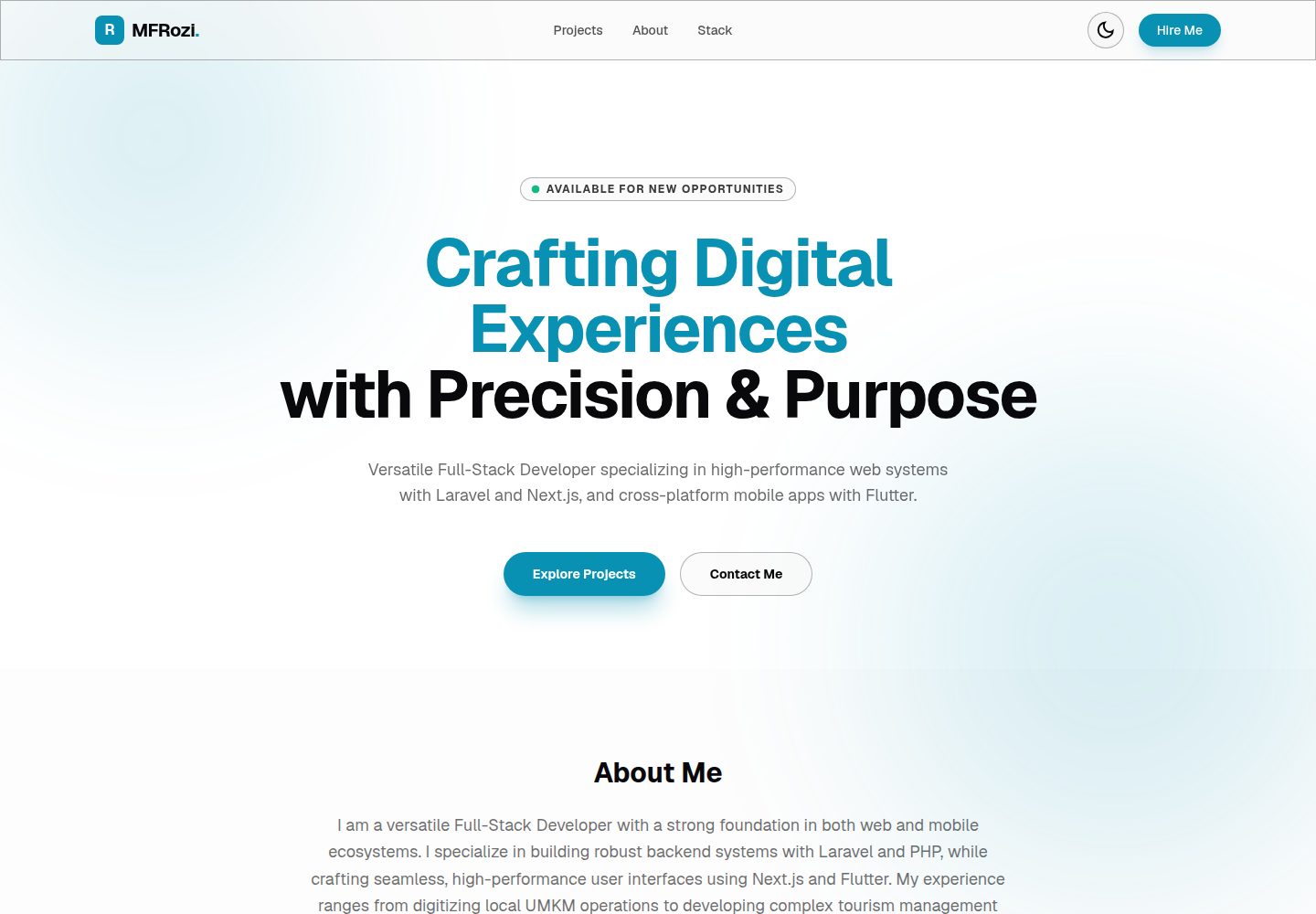
Desktop homepage1 / 3
Desktop captureTop of page
Actual screenshot captured by the server browser.
All pages & views 3
Screenshots show visual appearance; interactive behavior may differ.
Recorded 2026-10-14View source
What stands out
A quick read of the recorded project description.
Detail pages are generated automatically for the project list via the /projects/[slug] dynamic route
A built-in VPS status tracking component reads the VPS_TARGET_IP environment variable to display connection status and latency
Theme persistence is implemented with next-themes; the README states there is no layout shift or hydration flicker
The README states support for keyboard arrow-key grid navigation, WCAG 2.1 AA contrast and prefers-reduced-motion fallback
Template Details
Next Lumina Dev Portfolio is a developer portfolio and project showcase template built with Next.js 16 (App Router), React 19 and Tailwind CSS 4, following the "The Digital Observatory" dark design system described in the README. The template decouples the personal bio, social links, tech stack icons, statistics and project entries from the presentation layer, centralizing them in config/site.ts and config/projects.ts; the README states that customization can be done without modifying React code.
In terms of features, the README lists: automatic generation of detail pages for the project list via the Next.js dynamic route segment /projects/[slug]; an interactive VPS status tracker that probes a target configured through an environment variable IP or URL and displays connection status and latency; theme persistence implemented with next-themes, which the README says avoids layout shift or hydration mismatch flicker. The design system section notes that accent colors are limited to within 10% of the layout, uses translucent glass panels and code-driven borders, monospace font labels, and states support for WCAG 2.1 AA contrast, keyboard arrow-key navigation for the project grid, and prefers-reduced-motion animation fallback.
For usage, the repository is published as a GitHub template, and the README steps are: use "Use this template" to generate a new repository, clone it, run npm install and npm run dev, starting at http://localhost:3000; copy .env.example to .env.local and fill in VPS_TARGET_IP to enable status tracking; then edit config/site.ts and config/projects.ts to replace content. The project structure includes app/ (routes, layout, styles and the VPS telemetry API), components/ (layout, ui, domain), config/, public/, as well as PRODUCT.md and DESIGN.md.
Limitations and unspecified points: the README does not provide deployment steps or hosting platform instructions, does not list specific dependencies or version pinning methods, and does not explain the VPS tracker's probe frequency, timeout or failure handling logic; the preview screenshots only prove the pages exist and do not represent the actual behavior of the above features in the screenshots.
Next.jsReactPortfolio
Is it right for your project?
Use Cases
- Developers building a personal portfolio and centrally showcasing project entries and detail pages
- Updating the bio, social links and tech stack through configuration files rather than modifying component code
- Adding a server or infrastructure status panel to a portfolio
- Quickly generating a personal repository as a GitHub template and running a local preview
Suitable For
- Developers using Next.js App Router and Tailwind CSS
- Personal portfolio authors who prefer maintaining site content through centralized configuration files
- Showcase sites that need project lists to generate detail pages automatically
- Developers concerned with accessibility settings such as keyboard navigation and reduced motion
Getting started & customization
Use these recorded setup notes alongside the repository instructions for your chosen version.
- 1
Click "Use this template" on the GitHub repository page to generate your own copy
- 2
After cloning the repository, run npm install, then start with npm run dev, with the default address at http://localhost:3000
- 3
Copy .env.example to .env.local and set VPS_TARGET_IP in it to enable VPS status tracking
- 4
Edit config/site.ts to change the role, bio, statistics, navigation links and tech stack icons; icons can be found in Google Fonts Material Symbols
- 5
Add or remove project entries in config/projects.ts; the grid and dynamic detail pages will update accordingly
License & source material
Usage conditions & limitations
Free to use · keep license noticeThis entry covers the free version under the MIT license in the public repository; the free scope is the code of that version and does not mean external services or third-party assets are free.
Must comply with when using
- Free use, modification, commercial use and distribution of that version's code are permitted.
- When distributing copies or substantial portions of the code, retain the original author's copyright notice and the full MIT license notice.
- The code is provided as is; warranties and liability limitations are governed by the original license and applicable law.
Additional costs & items to verify
- Demo images, fonts, icons and other third-party assets must be checked against their respective licenses and cannot be judged solely by the code's MIT license.
- External services such as domains, hosting, databases, payments or AI may incur separate charges.
- Enabling the VPS status tracking feature requires copying .env.example to .env.local and configuring the VPS target IP or public server API address.
- VPS status tracking depends on the VPS_TARGET_IP environment variable, which must be filled with the actual server IP or API address, otherwise the feature will not work.
- Tech stack icons need to be obtained from Google Fonts Material Symbols; using that icon resource requires attention to its external service and licensing conditions.
View Original Text Basis
Permission is hereby granted, free of charge
Original License Text
Copy the example environment file to `.env.local` and add your VPS IP address (or any public server API) to enable the VPS status tracker:
Original README
VPS_TARGET_IP=https://your-server-ip-or-api
Original README
https://github.com/MF-Rozi/next-lumina-dev-portfolio/blob/main/LICENSEhttps://github.com/MF-Rozi/next-lumina-dev-portfolio/blob/main/README.md* **Personal Branding & Stack**: Edit [config/site.ts](config/site.ts) to change your role, biography, statistics list, navigation links, and tech stack icons. (Find available icons at [Google Fonts Material Symbols](https://fonts.google.com/icons)).
Original README
Compiled by DeepSeek based on repository license and README ·2026-10-14. Results only cover the materials read; dependencies, images, fonts, and subsequent term changes are subject to their respective original texts.
Project checks & description sources
Template Information
- Source platforms
- GitHub
- Documentation and maintenance reference score
- More documented · 85 / 100
- Technologies
- Next.js · React
- Website type
- Portfolio
How this score is calculated
Our heuristic uses license records (up to 30), a demo link (12), a preview (10), stars (15), recorded maintenance (15), description completeness (8), feature records (5) and classification data (5). It is not a code, security or performance test, or a Google score. A link does not establish tested functionality.
What to verify for this project
- Repository update recorded
- 2026-06-28
- Screenshot last checked
- 2026-10-14
A demo link is listed. Check it with your own content and viewport sizes; its presence does not confirm that forms, authentication or payments work.
The catalog identifies Next.js as the primary stack. Check the actual dependency manifest and lockfile for versions and hosting requirements. These notes use recorded metadata, not a code audit or a deployment test.
Use a selection guide →How this description was prepared
AI-assisted description based on catalog records and repository material. Repository authors are not automatically the reviewers of this description.
Review declaration: codex-user-requested-batch-review-20261015 · 2026-10-15
Inspect the recorded source material
SHA-256: 5e346345e16143fd5167b11b1fa7293c77c345ca471efe6777167eaf44636652
2026-10-14T20:39:54.762Z
Source file / repository# Next Lumina Dev Portfolio Next Lumina Dev Portfolio is a high-performance, visually stunning developer portfolio and project showcase template built using **Next.js 16 (App Router)**, **React 19**, and **Tailwind CSS 4**. It features an elegant dark-theme design aligned with **"The Digital Observatory"** design system. The project decouples user-specific content from the presentation layers, adhering to Clean Architecture principles. Developers can customize the entire template without touching the React code. --- ## 🎨 Design System: The Digital Observatory This portfolio is styled under **The Digital Observatory** guidelines, prioritizing visual precision, clean hierarchies, and semantic feedback: * **Restrained & Purposeful Accent Colors**: Color is used as a functional tool rather than raw decoration. Observatory Cyan (`#22d3ee` / `#0891b2`) and Telemetry Emerald (`#34d399` / `#10b981`) accents are restricted to <= 10% of any layout to steer visitor focus. * **Volumetric Glassmorphism**: Cards and navigation containers use custom translucent panels (`glass-surface`) combined with code-driven borders (`gem-border`). Hovering on elements shifts them into a floating state with a soft, color-tuned ambient shadow. * **Grotesque & Monospace Typographic Rhythm**: Displays use bold, tight-grotesque styles with letter-spacing constraints (>= -0.04em) to prevent characters from overlapping, paired with high-precision monospace labels (`Geist Mono`) for technical telemetry. * **Full Keyboard & Screen Reader Accessibility**: Built with WCAG 2.1 AA compliant color contrast. The project grid supports native keyboard focus states and sequencing via Arrow keys (`Left`/`Right`/`Up`/`Down`/`Home`/`End`). * **Respects Motion Preferences**: All animations respect `prefers-reduced-motion` settings, falling back to clean crossfades or instant state transitions. --- ## ✨ Features * **🚀 React 19 & Next.js 16 (App Router)**: Leverages React Server Components (RSC), optimized edge rendering, and Next.js Turbopack dev speeds. * **🛠️ Configuration-Driven Architecture**: Decouples data from visual logic. The entire application—personal bio, social links, technology stack icons, metrics, and project logs—is managed inside [config/site.ts](config/site.ts) and [config/projects.ts](config/projects.ts). * **📊 Live VPS Tracker**: Renders an interactive server health tracker that pings infrastructure targets (configured via IP in environmental variables) to show connection status and latency. * **🌗 Hydration-Safe Dark Mode**: Sleek theme persistence using `next-themes` with zero layout shift or hydration mismatch flashes. * **📂 Dynamic Routing**: Automatically generates dedicated project detail pages for an arbitrary list of projects via Next.js dynamic routing segments (`/projects/[slug]`). --- ## 🏗️ Quick Start This repository is designed as a GitHub template, allowing you to bootstrap your portfolio in seconds. ### 1. Generate Your Repository Click the **"Use this template"** button at the top of the GitHub repository page to create a new copy in your personal GitHub account. ### 2. Install & Run Locally Clone your new repository, install dependencies, and start the development server: ```bash git clone https://github.com/your-username/your-portfolio-repo.git cd your-portfolio-repo npm install npm run dev ``` The app will start at `http://localhost:3000`. ### 3. Configure Environments Copy the example environment file to `.env.local` and add your VPS IP address (or any public server API) to enable the VPS status tracker: ```bash cp .env.example .env.local ``` Inside `.env.local`: ```env # IP or URL to target for VPS status telemetry VPS_TARGET_IP=https://your-server-ip-or-api ``` ### 4. Customizing Your Portfolio Modify the central config files to update the data rendered on your site: * **Personal Branding & Stack**: Edit [config/site.ts](config/site.ts) to change your role, biography, statistics list, navigation links, and tech stack icons. (Find available icons at [Google Fonts Material Symbols](https://fonts.google.com/icons)). * **Projects Details**: Add or remove entries in [config/projects.ts](config/projects.ts). Each entry automatically populates the grid and generates a dynamic detailed page. --- ## 📜 Project Structure ```text ├── app/ # App Router routes, layouts, and styles │ ├── api/ # API endpoints (VPS telemetry checks) │ ├── projects/[slug]/ # SSG dynamic project detail pages │ ├── globals.css # Core Tailwind CSS & custom scrollbar directives │ └── layout.tsx # Global shell and font providers ├── components/ # UI Components │ ├── layout/ # Global Navbar & Footer components │ ├── ui/ # Reusable UI elements (ProjectCard) │ └── domain/ # Feature components (VpsStatusTracker) ├── config/ # Centralized Data Configuration (Content & Projects) ├── public/ # Static assets & placeholders └── PRODUCT.md / DESIGN.md # Strategic and Visual Design Guidelines ``` --- ## 📄 License This project is open-source and licensed under the MIT License. See [LICENSE](LICENSE) for details.
Explore similar templates
Compare previews and descriptions within the same stack and category.

react-resume-template
A personal resume website template for software developers, built with Next.js, React, and TypeScript and styled with Tailwind CSS. Site content is driven by a single data file at /src/data/data.tsx, with types in dataDef.ts and images in src/images/.
Next.js · Portfolio

nxt-lnk
nxt-lnk is a Next.js-based bio link page template that manages personal information and links via BioData.js and LinksData.js, positioned as a self-hosted alternative to Linktree. It groups links by type, supports enabling/disabling individual links, and offers hexagonal or oval avatars.
Next.js · Portfolio

sylph
Sylph is a minimal portfolio and blog template built on Next.js, supporting MDX/Markdown writing, light/dark themes, and automatic OG image generation. It includes sitemap, robots.txt, metadata, and syntax highlighting, with automatic blog timestamps.
Next.js · Portfolio

sleek-portfolio
A modern, responsive portfolio template built with Next.js 15, TypeScript, Tailwind CSS, and Shadcn UI. It includes an MDX blog, project showcase, work experience timeline, and a contact form that receives messages via Telegram Bot.
Next.js · Portfolio

research-website-template
A React + Next.js template for research personal websites, aimed at PhD students and researchers. It centralizes publications, projects, and other content in src/data as arrays of objects, with optional fields automatically generating UI components.
Next.js · Portfolio

shadcn-portfolio
A developer portfolio template built with Next.js 15, shadcn/ui, Tailwind CSS, and Framer Motion, featuring an MDX blog, light and dark modes, responsive design, and SEO meta tags.
Next.js · Portfolio