内容与展示分离:个人资料、技术栈、统计与项目条目集中在 config/site.ts 和 config/projects.ts 配置
Next.jsReact作品集
next-lumina-dev-portfolio — Next.js 作品集模板
作者 MF-Rozi
基于 Next.js App Router、React 与 Tailwind CSS 的开发者作品集模板,内容集中在 config 目录,含项目详情动态路由与 VPS 状态追踪组件。
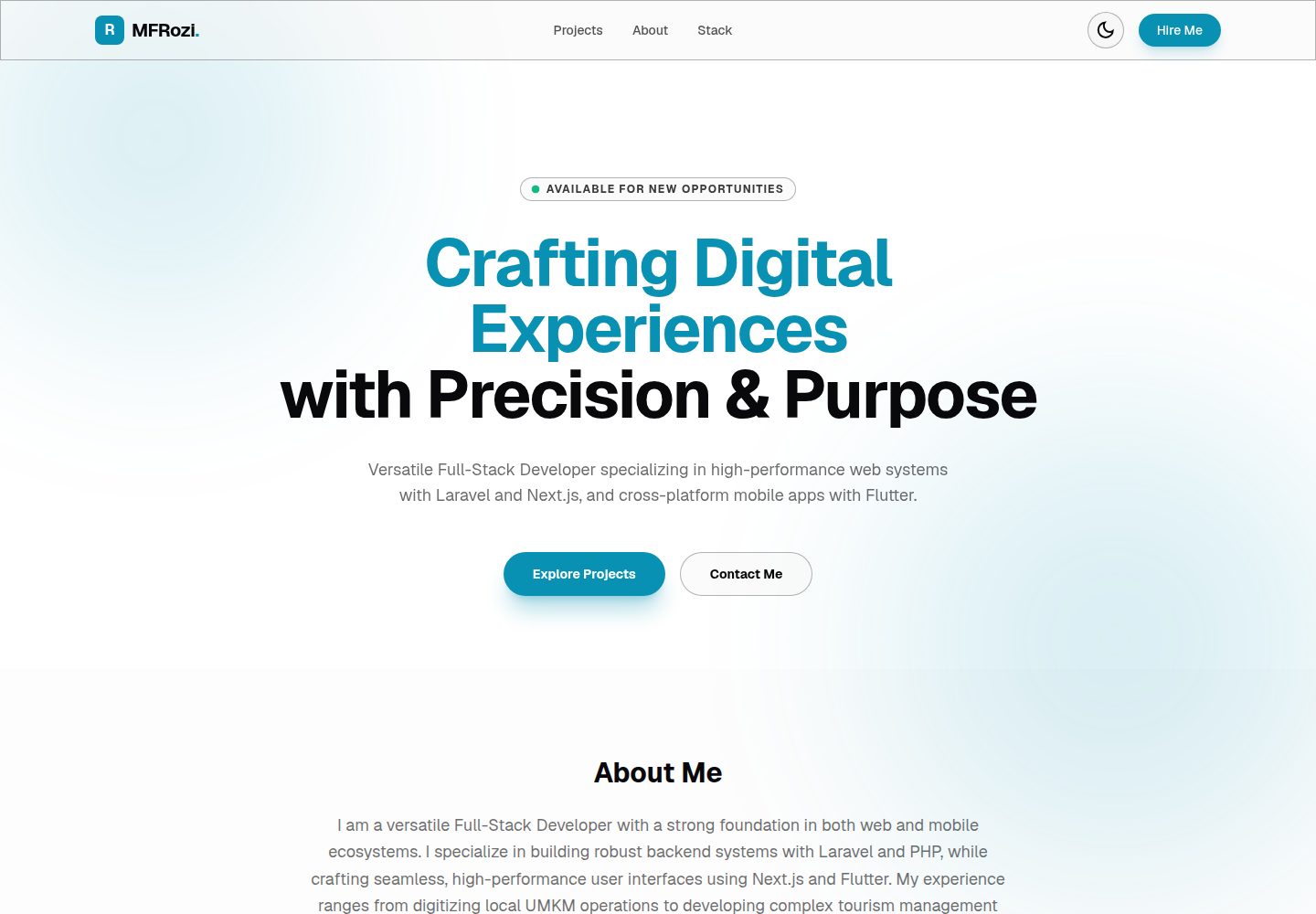
看看你的网站会是什么样
浏览真实页面截图,比较内容排版与手机效果。点击下方缩略图切换,放大查看整页细节。
全部页面与视图 3
截图用于了解视觉与布局,交互效果请以实际项目为准。
采集于 2026-10-14查看来源
值得关注的模板亮点
从已有项目资料中,快速了解它的特点。
通过 /projects/[slug] 动态路由为项目列表自动生成详情页
内置 VPS 状态追踪组件,读取环境变量 VPS_TARGET_IP 显示连接状态与延迟
使用 next-themes 实现主题持久化,README 称无布局偏移与 hydration 闪烁
README 声明支持键盘方向键网格导航、WCAG 2.1 AA 对比度与 prefers-reduced-motion 降级
模板详细介绍
Next Lumina Dev Portfolio 是一个开发者作品集与项目展示模板,采用 Next.js 16(App Router)、React 19 和 Tailwind CSS 4 构建,遵循 README 所述的“The Digital Observatory”深色设计系统。模板把个人简介、社交链接、技术栈图标、统计数据与项目条目从展示层解耦,集中在 config/site.ts 和 config/projects.ts 中配置,README 称其无需改动 React 代码即可完成定制。
功能方面,README 列出:基于 Next.js 动态路由段 /projects/[slug] 为项目列表自动生成详情页;一个可交互的 VPS 状态追踪器,通过环境变量中配置的 IP 或 URL 探测目标并显示连接状态与延迟;使用 next-themes 实现的主题持久化,README 称其不会出现布局偏移或 hydration 不匹配闪烁。设计系统部分说明强调色限制在布局的 10% 以内、使用半透明玻璃面板与代码驱动边框、等宽字体标签,并声明支持 WCAG 2.1 AA 对比度、项目网格的键盘方向键导航以及 prefers-reduced-motion 动效降级。
使用方式上,仓库作为 GitHub 模板发布,README 给出的步骤是:用“Use this template”生成新仓库,克隆后执行 npm install 与 npm run dev,在 http://localhost:3000 启动;复制 .env.example 为 .env.local 并填入 VPS_TARGET_IP 以启用状态追踪;随后编辑 config/site.ts 与 config/projects.ts 替换内容。项目结构包含 app/(路由、布局、样式与 VPS 遥测 API)、components/(layout、ui、domain)、config/、public/ 以及 PRODUCT.md 与 DESIGN.md。
限制与未说明之处:README 未提供部署步骤或托管平台说明,未列出具体依赖清单与版本锁定方式,也未说明 VPS 追踪器的探测频率、超时或失败处理逻辑;预览截图仅证明页面存在,不代表上述功能在截图中的实际表现。
Next.jsReact作品集
适合你的项目吗?
适用场景
- 开发者搭建个人作品集并集中展示项目条目与详情页
- 需要以配置文件而非改动组件代码来更新简介、社交链接与技术栈
- 希望在作品集中附带一个服务器或基础设施状态面板
- 作为 GitHub 模板快速生成个人仓库并本地运行预览
适合人群
- 使用 Next.js App Router 与 Tailwind CSS 的开发者
- 偏好通过集中配置文件维护站点内容的个人作品集作者
- 需要项目列表自动生成详情页的展示型站点
- 关注键盘导航与减少动效等可访问性设置的开发者
上手与定制指南
结合仓库当前版本的说明,按下面的资料检查内容、配置与运行要求。
- 1
在 GitHub 仓库页点击“Use this template”生成自己的副本
- 2
克隆仓库后执行 npm install,再用 npm run dev 启动,默认地址为 http://localhost:3000
- 3
复制 .env.example 为 .env.local,并在其中设置 VPS_TARGET_IP 以启用 VPS 状态追踪
- 4
编辑 config/site.ts 修改角色、简介、统计数据、导航链接与技术栈图标,图标可在 Google Fonts Material Symbols 中查找
- 5
在 config/projects.ts 中增删项目条目,网格与动态详情页会随之更新
授权与来源资料
使用条件与限制
免费使用 · 保留许可声明本次收录的是公开仓库中采用 MIT 许可的免费版本;免费范围为该版本代码,不代表外部服务或第三方素材免费。
使用时需要遵守
- 允许免费使用、修改、商用和分发该版本代码。
- 分发代码副本或实质性部分时,保留原作者版权声明和完整 MIT 许可声明。
- 代码按现状提供;担保与责任限制以原许可证及适用法律为准。
额外费用与待核对事项
- 演示图片、字体、图标及其他第三方素材需按各自许可核对,不能仅凭代码的 MIT 许可判断。
- 域名、托管、数据库、支付或 AI 等外部服务可能另外收费。
- 启用 VPS 状态追踪功能需要复制 .env.example 为 .env.local,并配置 VPS 目标 IP 或公共服务器 API 地址。
- VPS 状态追踪依赖环境变量 VPS_TARGET_IP,需填入实际服务器 IP 或 API 地址,否则该功能无法工作。
- 技术栈图标需从 Google Fonts Material Symbols 获取,使用该图标资源时需注意其外部服务与许可条件。
查看原文依据
Permission is hereby granted, free of charge
许可证原文
Copy the example environment file to `.env.local` and add your VPS IP address (or any public server API) to enable the VPS status tracker:
README 原文
VPS_TARGET_IP=https://your-server-ip-or-api
README 原文
https://github.com/MF-Rozi/next-lumina-dev-portfolio/blob/main/LICENSEhttps://github.com/MF-Rozi/next-lumina-dev-portfolio/blob/main/README.md* **Personal Branding & Stack**: Edit [config/site.ts](config/site.ts) to change your role, biography, statistics list, navigation links, and tech stack icons. (Find available icons at [Google Fonts Material Symbols](https://fonts.google.com/icons)).
README 原文
DeepSeek 根据仓库许可证和 README 整理 ·2026-10-14。结果仅覆盖已读取资料,依赖、图片、字体及后续条款变更以各自原文为准。
项目核对记录与介绍依据
模板资料
- 来源平台
- GitHub
- 资料与维护参考分
- 资料较完整 · 85 / 100
- 技术栈
- Next.js · React
- 网站类型
- 作品集
这个分数如何计算
本站按许可资料(最高30分)、演示链接(12分)、预览图(10分)、Star数(15分)、记录的维护时间(15分)、描述完整度(8分)、功能记录(5分)和分类资料(5分)计算。它不是代码、安全或性能测试,也不是 Google 评分;有链接不代表已实测可用。
这个项目需要核对什么
- 记录的仓库更新时间
- 2026-06-28
- 截图检查日期
- 2026-10-14
已收录演示链接。请用你的内容与屏幕尺寸检查;有演示不代表表单、认证或支付已经可用。
目录记录的主要技术栈是 Next.js。请通过依赖清单和锁文件核对实际版本与托管要求。这些说明基于收录资料,不代表代码审计或部署实测。
查看具体选型方法 →介绍的制作与核对状态
介绍由 AI 辅助整理目录与仓库资料。仓库作者不等于这篇介绍的审核者。
审核声明: codex-user-requested-batch-review-20261015 · 2026-10-15
查看当时使用的来源资料
SHA-256: 5e346345e16143fd5167b11b1fa7293c77c345ca471efe6777167eaf44636652
2026-10-14T20:39:54.762Z
来源文件 / 仓库# Next Lumina Dev Portfolio Next Lumina Dev Portfolio is a high-performance, visually stunning developer portfolio and project showcase template built using **Next.js 16 (App Router)**, **React 19**, and **Tailwind CSS 4**. It features an elegant dark-theme design aligned with **"The Digital Observatory"** design system. The project decouples user-specific content from the presentation layers, adhering to Clean Architecture principles. Developers can customize the entire template without touching the React code. --- ## 🎨 Design System: The Digital Observatory This portfolio is styled under **The Digital Observatory** guidelines, prioritizing visual precision, clean hierarchies, and semantic feedback: * **Restrained & Purposeful Accent Colors**: Color is used as a functional tool rather than raw decoration. Observatory Cyan (`#22d3ee` / `#0891b2`) and Telemetry Emerald (`#34d399` / `#10b981`) accents are restricted to <= 10% of any layout to steer visitor focus. * **Volumetric Glassmorphism**: Cards and navigation containers use custom translucent panels (`glass-surface`) combined with code-driven borders (`gem-border`). Hovering on elements shifts them into a floating state with a soft, color-tuned ambient shadow. * **Grotesque & Monospace Typographic Rhythm**: Displays use bold, tight-grotesque styles with letter-spacing constraints (>= -0.04em) to prevent characters from overlapping, paired with high-precision monospace labels (`Geist Mono`) for technical telemetry. * **Full Keyboard & Screen Reader Accessibility**: Built with WCAG 2.1 AA compliant color contrast. The project grid supports native keyboard focus states and sequencing via Arrow keys (`Left`/`Right`/`Up`/`Down`/`Home`/`End`). * **Respects Motion Preferences**: All animations respect `prefers-reduced-motion` settings, falling back to clean crossfades or instant state transitions. --- ## ✨ Features * **🚀 React 19 & Next.js 16 (App Router)**: Leverages React Server Components (RSC), optimized edge rendering, and Next.js Turbopack dev speeds. * **🛠️ Configuration-Driven Architecture**: Decouples data from visual logic. The entire application—personal bio, social links, technology stack icons, metrics, and project logs—is managed inside [config/site.ts](config/site.ts) and [config/projects.ts](config/projects.ts). * **📊 Live VPS Tracker**: Renders an interactive server health tracker that pings infrastructure targets (configured via IP in environmental variables) to show connection status and latency. * **🌗 Hydration-Safe Dark Mode**: Sleek theme persistence using `next-themes` with zero layout shift or hydration mismatch flashes. * **📂 Dynamic Routing**: Automatically generates dedicated project detail pages for an arbitrary list of projects via Next.js dynamic routing segments (`/projects/[slug]`). --- ## 🏗️ Quick Start This repository is designed as a GitHub template, allowing you to bootstrap your portfolio in seconds. ### 1. Generate Your Repository Click the **"Use this template"** button at the top of the GitHub repository page to create a new copy in your personal GitHub account. ### 2. Install & Run Locally Clone your new repository, install dependencies, and start the development server: ```bash git clone https://github.com/your-username/your-portfolio-repo.git cd your-portfolio-repo npm install npm run dev ``` The app will start at `http://localhost:3000`. ### 3. Configure Environments Copy the example environment file to `.env.local` and add your VPS IP address (or any public server API) to enable the VPS status tracker: ```bash cp .env.example .env.local ``` Inside `.env.local`: ```env # IP or URL to target for VPS status telemetry VPS_TARGET_IP=https://your-server-ip-or-api ``` ### 4. Customizing Your Portfolio Modify the central config files to update the data rendered on your site: * **Personal Branding & Stack**: Edit [config/site.ts](config/site.ts) to change your role, biography, statistics list, navigation links, and tech stack icons. (Find available icons at [Google Fonts Material Symbols](https://fonts.google.com/icons)). * **Projects Details**: Add or remove entries in [config/projects.ts](config/projects.ts). Each entry automatically populates the grid and generates a dynamic detailed page. --- ## 📜 Project Structure ```text ├── app/ # App Router routes, layouts, and styles │ ├── api/ # API endpoints (VPS telemetry checks) │ ├── projects/[slug]/ # SSG dynamic project detail pages │ ├── globals.css # Core Tailwind CSS & custom scrollbar directives │ └── layout.tsx # Global shell and font providers ├── components/ # UI Components │ ├── layout/ # Global Navbar & Footer components │ ├── ui/ # Reusable UI elements (ProjectCard) │ └── domain/ # Feature components (VpsStatusTracker) ├── config/ # Centralized Data Configuration (Content & Projects) ├── public/ # Static assets & placeholders └── PRODUCT.md / DESIGN.md # Strategic and Visual Design Guidelines ``` --- ## 📄 License This project is open-source and licensed under the MIT License. See [LICENSE](LICENSE) for details.
看看同类模板
对比同技术栈与用途的模板,找到更适合的视觉与内容结构。

react-resume-template
A personal resume website template built with React.js, Typescript, Next.js, and styled with Tailwind css
Next.js · 作品集

nxt-lnk
Custom bio links for creatives who love coding. A perfect custom alternative for linktree, bio and other short…
Next.js · 作品集

sylph
A minimal portfolio template.
Next.js · 作品集

sleek-portfolio
sleek-portfolio 是一个面向开发者个人品牌展示的现代作品集模板,基于 Next.js 15、TypeScript、Tailwind CSS 和 Shadcn UI 构建。
Next.js · 作品集

research-website-template
React + Next.js template for research websites (for PhD students, researchers, etc)
Next.js · 作品集

shadcn-portfolio
shadcn-portfolio 是一个面向开发者的作品集模板,技术栈为 Next.js 15、shadcn/ui、Tailwind CSS 和 Framer Motion。
Next.js · 作品集