RTL and Arabic-first: paragraphs, lists, headings, quotes, and tables each use dir="auto", code remains LTR, and the direction can be forced for the entire article in front matter
HugoStarter
zahi — Hugo Starter Template
By mohamedelhefni
Zahi is a Hugo theme for Arabic content with RTL layout, positioned as a digital garden and personal knowledge base, featuring bidirectional links, a knowledge graph, series articles, and project showcases.
Explore the design
Compare the page layouts and mobile experience. Open any screenshot for a closer look.
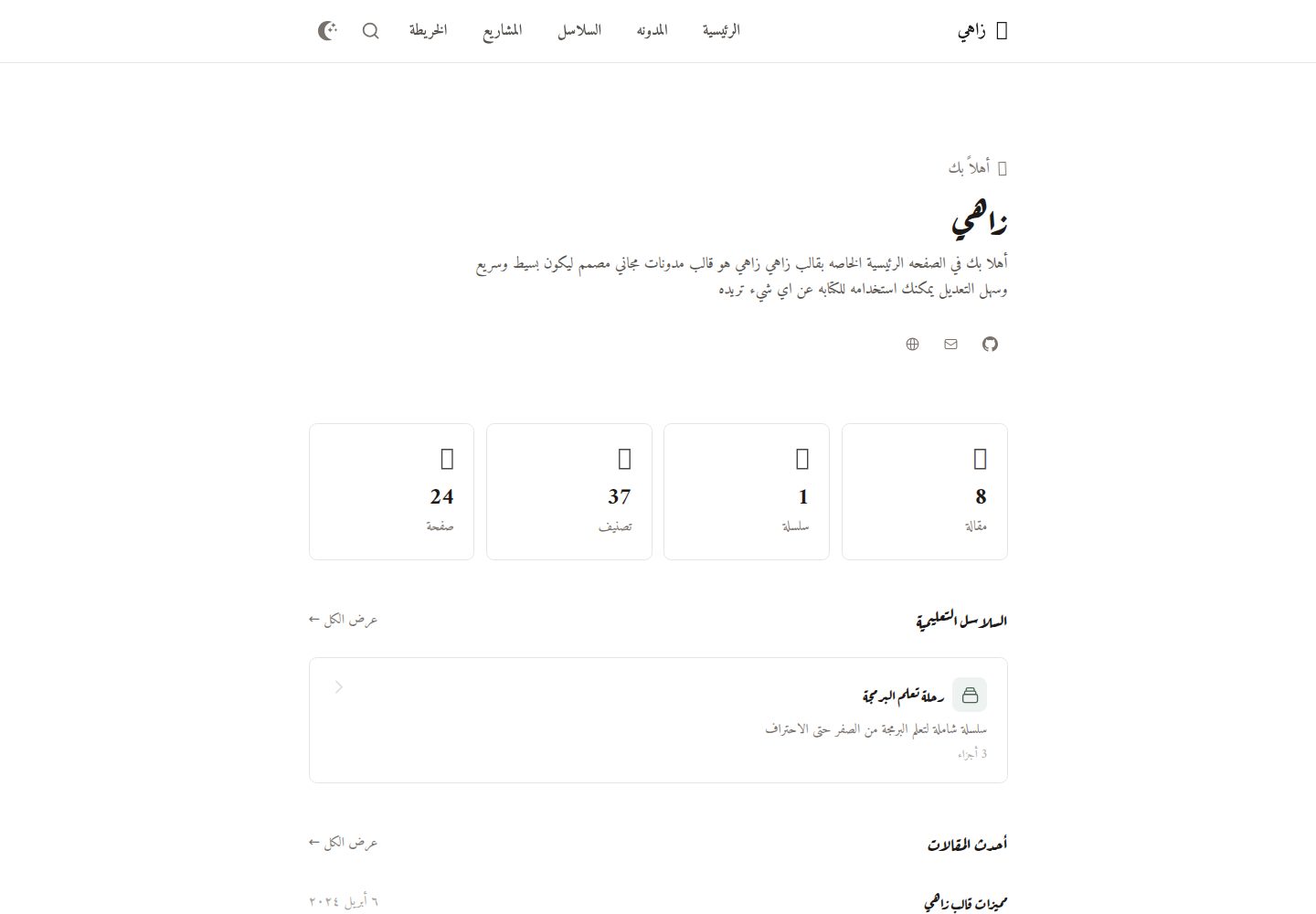
Desktop homepage1 / 3
Desktop captureTop of page
Actual screenshot captured by the server browser.
All pages & views 3
Screenshots show visual appearance; interactive behavior may differ.
Recorded 2026-10-03View source
What stands out
A quick read of the recorded project description.
Wiki-style bidirectional links: [[page title]] syntax matches titles or filenames, valid links are green and broken links red, and backlinks are generated automatically
Interactive knowledge graph: mini graphs within articles and a full graph at /graph/, supporting filtering, search, zoom, pan, fullscreen, and node navigation
Series and project showcase: series are ordered by seriesOrder and display progress; projects support type, status, featured flag, technology tags, and filtering by type
Obsidian starter configuration: edit the site directory as a vault to gain [[ autocompletion, backlinks, graph, and drag-and-drop images
Template Details
Zahi is a Hugo theme primarily for Arabic content, supporting RTL at the layout level and allowing Arabic and English to be mixed within the same article. It positions itself as a digital garden/personal knowledge base, centered on connections between notes: it uses [[page title]] syntax to create wiki-style links between articles, with valid links shown in green and broken links in red, and referenced pages automatically receive backlinks. The theme also provides an interactive knowledge graph powered by D3.js, with a mini graph of related content on each article and a full graph on the /graph/ page, supporting filtering by page, tag, or connected nodes only, as well as search, zoom, pan, fullscreen, and click-to-navigate. For content organization, it supports tags, series (ordered via series and seriesOrder with progress display), pinned articles, table of contents, reading time, and client-side search based on Fuse.js (Ctrl+K / Cmd+K). The project showcase uses a grid layout; projects can be labeled with type (personal, open-source, client, contribution), status (completed, in-progress, maintained, archived), featured flag, and technology tags, and can be filtered by type. The theme also includes code highlighting with copy buttons, optional Disqus comments, and SEO output such as Open Graph, Twitter Cards, JSON-LD, sitemap, and RSS. The theme ships with an Obsidian starter configuration that lets you edit the site directory as a vault, gaining [[ autocompletion, backlinks, graph, and drag-and-drop images. Usage limitations: Hugo Extended and Node.js are required to build Tailwind CSS; third-party assets such as demo images, fonts, and icons require separate license verification; external services like Disqus may incur additional charges.
HugoStarter
Is it right for your project?
Use Cases
- Writing a blog or notes in Arabic and wanting articles to be interconnected through bidirectional links and backlinks
- Building a personal knowledge base or digital garden that needs a knowledge graph to view connections between content and tags
- Publishing a multi-part tutorial series and tracking reading progress in order
- Showcasing personal, open-source, client, or contribution projects in a grid layout with status and technology stack labels
Suitable For
- Hugo site authors whose primary content language is Arabic
- People accustomed to Obsidian-style bidirectional note-taking who want to publish notes as a website
- Blogs or documentation sites that need RTL layout and mixed Arabic/English text
- Developers who want to display a project portfolio on their site with type and status labels
Getting started & customization
Use these recorded setup notes alongside the repository instructions for your chosen version.
- 1
Requires Hugo Extended and Node.js (for building Tailwind CSS); the theme documentation states a minimum Hugo version of v0.112.0
- 2
Can be installed via git submodule, Hugo Module, or direct download to themes/zahi
- 3
In hugo.toml, set theme = "zahi", languageCode = "ar", and configure the tag and series taxonomies as well as home outputs HTML, RSS, and JSON
- 4
During development, run the Tailwind watch command separately to compile static/css/style.css to output.css
- 5
Third-party assets such as demo images, fonts, and icons must be checked against their respective licenses; external services like Disqus may incur additional charges
License & source material
Usage conditions & limitations
Free to use · keep license noticeThis listing covers the free version under the MIT license in the public repository; the free scope is the code of this version and does not mean external services or third-party assets are free.
Must comply with when using
- Free use, modification, commercial use, and distribution of this version's code are permitted.
- When distributing copies or substantial portions of the code, retain the original author's copyright notice and the full MIT license notice.
- The code is provided as is; warranties and limitations of liability are governed by the original license and applicable law.
Additional costs & items to verify
- Demo images, fonts, icons, and other third-party assets must be checked against their respective licenses and cannot be judged solely by the code's MIT license.
- External services such as domains, hosting, databases, payments, or AI may incur additional charges.
- Building the theme requires Hugo Extended v0.112.0 or higher and Node.js to compile Tailwind CSS; without these toolchains, styles cannot be built properly.
- Disqus comments are an optional integration; when enabled, they rely on the external third-party service Disqus, which may involve that service's account, terms, or fees.
- Files embedded via wiki links (images, videos, etc.) are only looked up in the article's page bundle or the static/attachments/ directory; files in other locations will not be resolved.
- The [[...]] syntax inside code blocks is not parsed as wiki links, so bidirectional links cannot be created in code examples.
- When creating a new note with the Obsidian template, the template front matter must be inserted because Hugo requires articles to include title and date fields.
View Original Text Basis
Permission is hereby granted, free of charge
Original License Text
- Hugo Extended v0.112.0+ - Node.js (for Tailwind CSS)
Original README
- **Disqus Comments** - Optional comment integration
Original README
Embedded files are looked up in the post's page bundle, then in `static/attachments/`.
Original README
Links inside code blocks are ignored.
Original README
https://github.com/mohamedelhefni/zahi/blob/main/LICENSEhttps://github.com/mohamedelhefni/zahi/blob/main/readme.mdalways insert it, since Hugo needs `title` and `date`.
Original README
Compiled by DeepSeek based on repository license and README ·2026-10-04. Results only cover the materials read; dependencies, images, fonts, and subsequent term changes are subject to their respective original texts.
Project checks & description sources
Template Information
- Source platforms
- Hugo Themes
- Documentation and maintenance reference score
- More documented · 79 / 100
- Technologies
- Hugo
- Website type
- Starter
How this score is calculated
Our heuristic uses license records (up to 30), a demo link (12), a preview (10), stars (15), recorded maintenance (15), description completeness (8), feature records (5) and classification data (5). It is not a code, security or performance test, or a Google score. A link does not establish tested functionality.
What to verify for this project
- Repository update recorded
- 2026-10-01
- Screenshot last checked
- 2026-10-04
A demo link is listed. Check it with your own content and viewport sizes; its presence does not confirm that forms, authentication or payments work.
The catalog identifies Hugo as the primary stack. Check the actual dependency manifest and lockfile for versions and hosting requirements. These notes use recorded metadata, not a code audit or a deployment test.
Use a selection guide →How this description was prepared
AI-assisted description based on catalog records and repository material. Repository authors are not automatically the reviewers of this description.
Review declaration: [email protected] · 2026-10-05
Inspect the recorded source material
SHA-256: 7d3584c97729de127e4251621a4e1e9b61600cf3ae61dde8a3c53dd4e08c6c52
2026-10-04T19:50:24.886Z
Source file / repository# Zahi - Arabic Digital Garden Hugo Theme
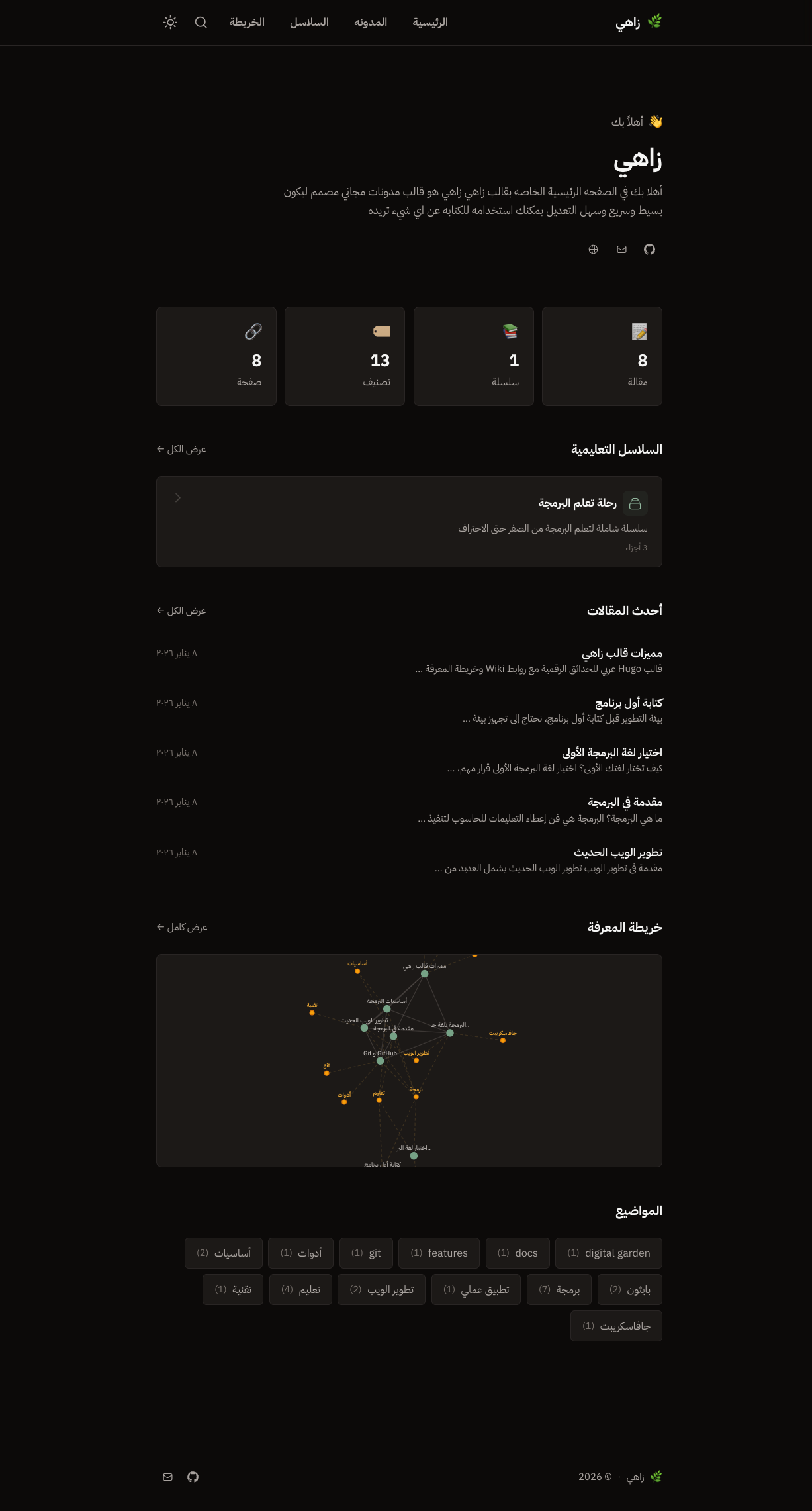
Zahi (زاهي) is a modern, fast Hugo theme designed for Arabic content with RTL support. It's built as a digital garden / personal knowledge base with Obsidian-like features.
## Features
### Core Features
- **RTL & Arabic Optimized** - Built from the ground up for Arabic content with proper RTL layout
- **Dark/Light Mode** - Toggle between themes with smooth transitions, no flash on page load
- **Responsive Design** - Looks great on all devices
- **Fast Performance** - Minimal JavaScript, optimized assets
### Digital Garden Features
- **Wiki-style Links** - Use `[[Page Title]]` syntax to link between notes (green = valid, red = broken)
- **Knowledge Graph** - Interactive D3.js force-directed graph showing connections between posts and tags
- **Enhanced Graph Page** - Full-page graph with filtering (pages/tags/connected), search, zoom controls, and fullscreen mode
- **Backlinks** - Automatically shows which pages link to the current page
- **Series Support** - Group related posts into ordered collections with progress tracking
### Portfolio / Projects Section
- **Project Showcase** - Beautiful grid layout for displaying your projects
- **Project Types** - Support for personal, open-source, client, and contribution projects with color-coded badges
- **Project Status** - Track project status (completed, in-progress, maintained, archived)
- **Featured Projects** - Highlight your best work with featured badges
- **Technology Tags** - Display tech stack with stylish badges
- **Filtering** - Filter projects by type with smooth animations
- **Responsive Cards** - Project cards with thumbnails, descriptions, and action buttons
### Content Features
- **Table of Contents** - Collapsible TOC for easy navigation
- **Reading Time** - Auto-calculated based on word count
- **Search** - Fast client-side search with Fuse.js (Ctrl+K / Cmd+K)
- **Tags** - Organize content with tags
- **Syntax Highlighting** - Beautiful code blocks with Dracula theme (Chroma-based)
- **Copy Code Button** - One-click code copying
- **Disqus Comments** - Optional comment integration
### SEO Features
- **Open Graph** - Full social media preview support
- **Twitter Cards** - Optimized Twitter sharing
- **JSON-LD** - Structured data for articles and breadcrumbs
- **Sitemap & RSS** - Auto-generated feeds
- **Canonical URLs** - Proper URL handling
## Demo
Live demo: [https://zahi.netlify.app/](https://zahi.netlify.app/)
## Installation
### Method 1: Git Submodule (Recommended)
```bash
cd your-hugo-site
git submodule add https://github.com/mohamedelhefni/zahi.git themes/zahi
```
### Method 2: Hugo Module
Add to your `hugo.toml`:
```toml
[module]
[[module.imports]]
path = "github.com/mohamedelhefni/zahi"
```
Then run:
```bash
hugo mod get -u
```
### Method 3: Direct Download
Download the theme and extract it to `themes/zahi` in your Hugo site.
## Configuration
Add to your `hugo.toml`:
```toml
theme = "zahi"
languageCode = "ar"
defaultContentLanguage = "ar"
[taxonomies]
tag = "tags"
series = "series"
enableRobotsTXT = true # theme provides robots.txt with the sitemap link
[outputs]
home = ["HTML", "RSS", "JSON"]
[params]
description = "وصف موقعك"
author = "اسمك"
# SEO / Google Search Console (all optional)
# ogImage = "images/og-default.png" # default share image, 1200x630, in static/
[params.verification]
google = "code-from-search-console" # HTML-tag verification: only the content value
# bing = ""
# yandex = ""
[params.social]
twitter = "username"
github = "username"
linkedin = "username"
[menu]
[[menu.main]]
name = "الرئيسية"
url = "/"
weight = 1
[[menu.main]]
name = "المقالات"
url = "/posts/"
weight = 2
[[menu.main]]
name = "المشاريع"
url = "/projects/"
weight = 3
[[menu.main]]
name = "الوسوم"
url = "/tags/"
weight = 4
[[menu.main]]
name = "السلاسل"
url = "/series/"
weight = 5
[[menu.main]]
name = "الشبكة"
url = "/graph/"
weight = 6
```
## Content
### Basic Post
```yaml
---
title: "عنوان المقالة"
date: 2024-01-15
tags: ["وسم1", "وسم2"]
toc: true
---
محتوى المقالة...
```
### Wiki Links
Link to other posts using wiki-style syntax. A link matches a post's title **or** its filename (case-insensitive):
```markdown
اقرأ المزيد في [[عنوان صفحة أخرى]]
[[عنوان صفحة أخرى|نص مختلف]]
[[عنوان صفحة أخرى#عنوان فرعي]]
![[photo.png]] ![[photo.png|300]] ![[clip.mp4]]
```
Embedded files are looked up in the post's page bundle, then in `static/attachments/`. Links inside code blocks are ignored. Pages that link to a post appear as backlinks and in the graph.
### Writing in Obsidian
Edit your site like an Obsidian vault (`[[` autocomplete, backlinks, graph, drag-and-drop images):
```bash
cp -r themes/zahi/obsidian-starter/. . # adds .obsidian/ and templates/
```
Then open the site folder as a vault. New notes land in `content/posts/`, images in `static/attachments/`, and the **Templates** plugin inserts the front matter (`templates/post.md`) - always insert it, since Hugo needs `title` and `date`.
### Arabic / RTL
Every paragraph, list, heading, quote and table picks its own direction (`dir="auto"`), so mixed Arabic/English text and fully English posts render correctly; code stays LTR. Set `Direction: ltr` (or `rtl`) in front matter to force a whole post.
### Series
Create a series by adding to frontmatter:
```yaml
---
title: "الجزء الأول: المقدمة"
series: "اسم السلسلة"
seriesOrder: 1
seriesDescription: "وصف السلسلة"
---
```
### Pinned Posts
Pin posts to the homepage:
```yaml
---
title: "مقالة مثبتة"
pinned: true
---
```
### Projects
Create projects in `content/projects/`:
```yaml
---
title: "اسم المشروع"
date: 2024-01-15
description: "وصف قصير للمشروع"
thumbnail: "/images/project-thumb.png"
type: "personal" # personal, open-source, client, contribution
status: "completed" # completed, in-progress, maintained, archived
featured: true
technologies: ["Hugo", "Tailwind CSS", "JavaScript"]
demoUrl: "https://demo.example.com"
repoUrl: "https://github.com/user/repo"
websiteUrl: "https://example.com"
---
وصف تفصيلي للمشروع...
```
## Knowledge Graph
The theme includes an interactive knowledge graph that visualizes connections between your content:
- **Article Graph**: Each post shows a mini-graph of related content
- **Full Graph Page**: Navigate to `/graph/` for the complete knowledge map
- **Features**:
- Filter by pages, tags, or connected nodes only
- Search for specific content
- Zoom and pan controls
- Fullscreen mode
- Click nodes to navigate
- Hover to highlight connections
## Development
### Prerequisites
- Hugo Extended v0.112.0+
- Node.js (for Tailwind CSS)
### Setup
```bash
# Clone the repository
git clone https://github.com/mohamedelhefni/zahi.git
cd zahi
# Install dependencies
pnpm install
# Start Hugo server
cd exampleSite && hugo server
# Watch Tailwind CSS (in another terminal)
npx tailwindcss -i ./static/css/style.css -o ./static/css/output.css --watch
```
### Build CSS
```bash
npx tailwindcss -i ./static/css/style.css -o ./static/css/output.css --minify
```
## Directory Structure
```
zahi/
├── archetypes/
│ ├── default.md
│ └── projects.md # Project template
├── exampleSite/ # Demo site
├── images/
│ ├── screenshot.png # Theme screenshot
│ └── tn.png # Thumbnail
├── layouts/
│ ├── _default/
│ ├── graph/ # Knowledge graph pages
│ ├── partials/
│ ├── projects/ # Projects section
│ ├── series/ # Series taxonomy
│ └── shortcodes/
├── static/
│ ├── css/
│ │ ├── style.css # Source styles
│ │ ├── output.css # Compiled Tailwind
│ │ └── syntax.css # Code highlighting
│ └── js/
├── hugo.toml # Hugo version requirements
├── theme.toml # Theme metadata
└── README.md
```
## Credits
- [IBM Plex Sans Arabic](https://fonts.google.com/specimen/IBM+Plex+Sans+Arabic) - Font
- [Tailwind CSS](https://tailwindcss.com/) - Styling
- [D3.js](https://d3js.org/) - Knowledge graph
- [Fuse.js](https://fusejs.io/) - Search
## License
[MIT License](LICENSE)
## Author
**Mohamed Elhefni**
- GitHub: [@mohamedelhefni](https://github.com/mohamedelhefni)
Explore similar templates
Compare previews and descriptions within the same stack and category.

hugo-xmin
hugo-xmin is an extremely minimal Hugo theme written by Yihui Xie for template beginners. HTML and CSS total about 140 lines, with no external dependencies, and it uses the MIT license.
Hugo · Starter

hugo-theme-gallery
A Hugo Extended photo gallery theme that organizes images with Page Bundles, automatically generating album lists and gallery pages with a Justified layout and PhotoSwipe lightbox.
Hugo · Starter

reveal-hugo
reveal-hugo is a Hugo theme that converts Markdown content into Reveal.js-based HTML presentations. It supports slide separation with `---`, shortcodes for fragments, slides, sections, notes, Markdown, and MathJax, and organizes content as root or section presentations with order controlled by weight.
Hugo · Starter

anatole
Anatole is a minimalistic two-column Hugo theme ported from farbox-theme-Anatole, featuring dark mode, multilingual and RTL support, and optional portfolio, comments, analytics, KaTeX, and Mermaid integrations. It suits personal blogs, portfolios, or documentation sites built with Hugo.
Hugo · Starter

hugo-theme-diary
A Hugo diary-style theme ported from the Hexo theme Journal, with a grid homepage for essays and daily notes. It supports six languages, dark mode, table-of-contents scroll positioning, reading time, code highlighting, and configurable sidebar, fonts, and colors.
Hugo · Starter

risotto
risotto is a minimalist, responsive Hugo theme inspired by terminal ricing aesthetics. It uses semantic HTML and pure CSS with no JavaScript, and its layout relies on CSS Grid for native responsiveness without manual breakpoints.
Hugo · Starter