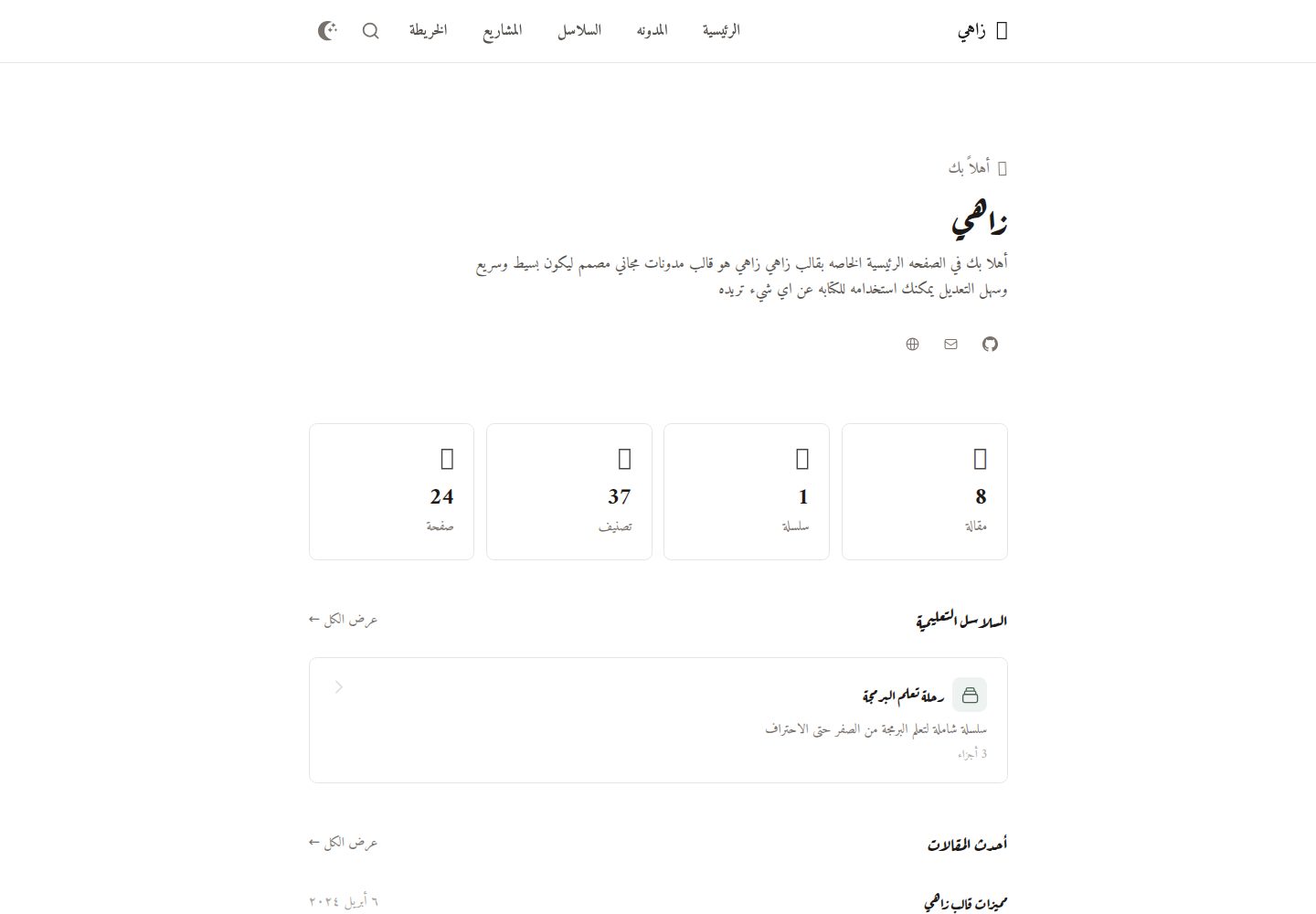
RTL 与阿拉伯语优先:段落、列表、标题、引用和表格各自使用 dir="auto",代码保持 LTR,可在 front matter 中强制整篇方向
Hugo启动器
zahi — Hugo 启动器模板
作者 mohamedelhefni
Zahi 是一个面向阿拉伯语内容的 Hugo 主题,采用 RTL 布局,定位为数字花园与个人知识库,内置双链、知识图谱、系列文章和项目展示等功能。
看看你的网站会是什么样
浏览真实页面截图,比较内容排版与手机效果。点击下方缩略图切换,放大查看整页细节。
全部页面与视图 3
截图用于了解视觉与布局,交互效果请以实际项目为准。
采集于 2026-10-03查看来源
值得关注的模板亮点
从已有项目资料中,快速了解它的特点。
Wiki 式双链:[[页面标题]] 语法匹配标题或文件名,有效为绿色、失效为红色,并自动生成反向链接
交互式知识图谱:文章内迷你图与 /graph/ 完整图谱,支持过滤、搜索、缩放、平移、全屏和节点跳转
系列与项目展示:系列按 seriesOrder 排序并显示进度;项目支持类型、状态、精选、技术标签和按类型过滤
Obsidian 起步配置:把站点目录作为 vault 编辑,获得 [[ 自动补全、反向链接、图谱和拖拽图片
模板详细介绍
Zahi 是一个 Hugo 主题,主要面向阿拉伯语内容,从布局层面支持 RTL,并允许在同一篇文章中混排阿拉伯语与英语。它把自己定位为数字花园/个人知识库,核心是笔记之间的关联:使用 [[页面标题]] 语法在文章间建立 wiki 式链接,链接有效显示绿色、失效显示红色,被引用的页面会自动出现反向链接。主题还提供基于 D3.js 的交互式知识图谱,每篇文章带有相关内容的迷你图,/graph/ 页面提供完整图谱,支持按页面、标签或仅已连接节点过滤,以及搜索、缩放、平移、全屏和点击跳转。内容组织上支持标签、系列(通过 series 与 seriesOrder 排序并显示进度)、置顶文章、目录、阅读时长和基于 Fuse.js 的客户端搜索(Ctrl+K / Cmd+K)。项目展示区使用网格布局,项目可标注类型(personal、open-source、client、contribution)、状态(completed、in-progress、maintained、archived)、精选标记和技术标签,并可按类型过滤。主题还包含代码高亮与复制按钮、可选的 Disqus 评论,以及 Open Graph、Twitter Cards、JSON-LD、站点地图和 RSS 等 SEO 输出。主题附带 Obsidian 起步配置,可将站点目录作为 vault 编辑,获得 [[ 自动补全、反向链接、图谱和拖拽图片。使用限制方面:需要 Hugo Extended 与 Node.js 来构建 Tailwind CSS;演示图片、字体、图标等第三方素材需单独核对许可;Disqus 等外部服务可能另行收费。
Hugo启动器
适合你的项目吗?
适用场景
- 用阿拉伯语撰写博客或笔记,并希望文章之间通过双链和反向链接互相关联
- 搭建个人知识库或数字花园,需要知识图谱来查看内容与标签之间的连接
- 发布分章节的系列教程,并按顺序跟踪阅读进度
- 用网格布局展示个人、开源、客户或贡献类项目,并标注状态与技术栈
适合人群
- 以阿拉伯语为主要内容语言的 Hugo 站点作者
- 习惯 Obsidian 式双链笔记、希望把笔记发布为网站的人
- 需要 RTL 布局与混排阿拉伯语/英语文本的博客或文档站点
- 想要在站点中展示项目作品集并标注类型与状态的开发者
上手与定制指南
结合仓库当前版本的说明,按下面的资料检查内容、配置与运行要求。
- 1
需要 Hugo Extended 与 Node.js(用于构建 Tailwind CSS),主题文档给出的最低 Hugo 版本为 v0.112.0
- 2
可通过 git submodule、Hugo Module 或直接下载到 themes/zahi 三种方式安装
- 3
在 hugo.toml 中设置 theme = "zahi"、languageCode = "ar",并配置 tag 与 series 分类法以及 home 输出 HTML、RSS、JSON
- 4
开发时需单独运行 Tailwind 监听命令,将 static/css/style.css 编译为 output.css
- 5
演示图片、字体、图标等第三方素材需按各自许可核对,Disqus 等外部服务可能另行收费
授权与来源资料
使用条件与限制
免费使用 · 保留许可声明本次收录的是公开仓库中采用 MIT 许可的免费版本;免费范围为该版本代码,不代表外部服务或第三方素材免费。
使用时需要遵守
- 允许免费使用、修改、商用和分发该版本代码。
- 分发代码副本或实质性部分时,保留原作者版权声明和完整 MIT 许可声明。
- 代码按现状提供;担保与责任限制以原许可证及适用法律为准。
额外费用与待核对事项
- 演示图片、字体、图标及其他第三方素材需按各自许可核对,不能仅凭代码的 MIT 许可判断。
- 域名、托管、数据库、支付或 AI 等外部服务可能另外收费。
- 构建主题需要 Hugo Extended v0.112.0 或更高版本,并需要 Node.js 来编译 Tailwind CSS;缺少这些工具链将无法正常构建样式。
- Disqus 评论为可选集成,启用后依赖 Disqus 这一外部第三方服务,可能涉及该服务的账号、条款或费用。
- wiki 链接嵌入的文件(图片、视频等)只会在文章 page bundle 或 static/attachments/ 目录中查找,其他位置的文件不会被解析。
- 代码块内的 [[...]] 语法不会被解析为 wiki 链接,因此无法在代码示例中建立双链。
- 使用 Obsidian 模板新建笔记时必须插入模板 front matter,因为 Hugo 要求文章包含 title 与 date 字段。
查看原文依据
Permission is hereby granted, free of charge
许可证原文
- Hugo Extended v0.112.0+ - Node.js (for Tailwind CSS)
README 原文
- **Disqus Comments** - Optional comment integration
README 原文
Embedded files are looked up in the post's page bundle, then in `static/attachments/`.
README 原文
Links inside code blocks are ignored.
README 原文
https://github.com/mohamedelhefni/zahi/blob/main/LICENSEhttps://github.com/mohamedelhefni/zahi/blob/main/readme.mdalways insert it, since Hugo needs `title` and `date`.
README 原文
DeepSeek 根据仓库许可证和 README 整理 ·2026-10-04。结果仅覆盖已读取资料,依赖、图片、字体及后续条款变更以各自原文为准。
项目核对记录与介绍依据
模板资料
- 来源平台
- Hugo Themes
- 资料与维护参考分
- 资料较完整 · 79 / 100
- 技术栈
- Hugo
- 网站类型
- 启动器
这个分数如何计算
本站按许可资料(最高30分)、演示链接(12分)、预览图(10分)、Star数(15分)、记录的维护时间(15分)、描述完整度(8分)、功能记录(5分)和分类资料(5分)计算。它不是代码、安全或性能测试,也不是 Google 评分;有链接不代表已实测可用。
这个项目需要核对什么
- 记录的仓库更新时间
- 2026-10-01
- 截图检查日期
- 2026-10-04
已收录演示链接。请用你的内容与屏幕尺寸检查;有演示不代表表单、认证或支付已经可用。
目录记录的主要技术栈是 Hugo。请通过依赖清单和锁文件核对实际版本与托管要求。这些说明基于收录资料,不代表代码审计或部署实测。
查看具体选型方法 →介绍的制作与核对状态
介绍由 AI 辅助整理目录与仓库资料。仓库作者不等于这篇介绍的审核者。
审核声明: [email protected] · 2026-10-05
查看当时使用的来源资料
SHA-256: 7d3584c97729de127e4251621a4e1e9b61600cf3ae61dde8a3c53dd4e08c6c52
2026-10-04T19:50:24.886Z
来源文件 / 仓库# Zahi - Arabic Digital Garden Hugo Theme
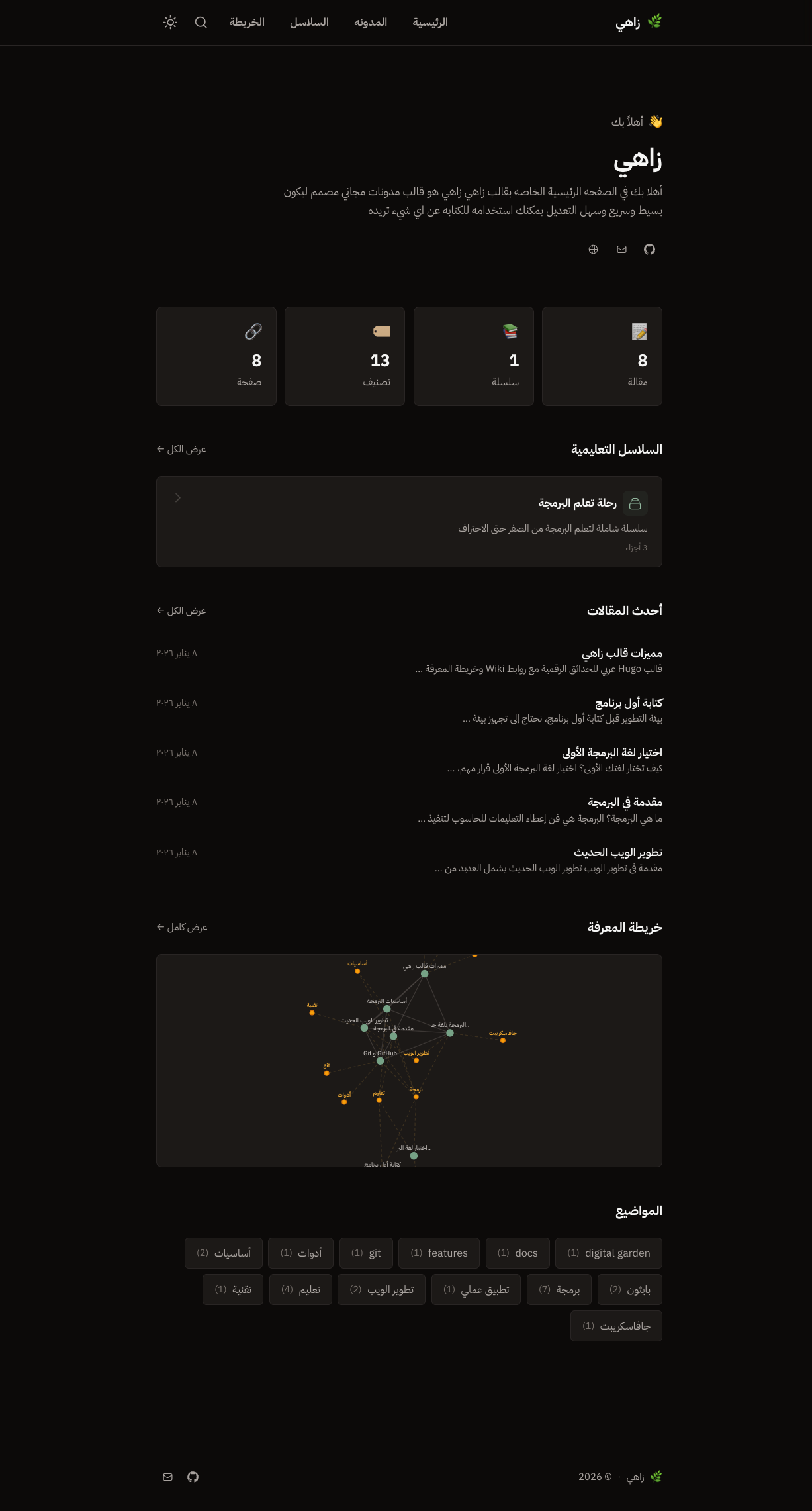
Zahi (زاهي) is a modern, fast Hugo theme designed for Arabic content with RTL support. It's built as a digital garden / personal knowledge base with Obsidian-like features.
## Features
### Core Features
- **RTL & Arabic Optimized** - Built from the ground up for Arabic content with proper RTL layout
- **Dark/Light Mode** - Toggle between themes with smooth transitions, no flash on page load
- **Responsive Design** - Looks great on all devices
- **Fast Performance** - Minimal JavaScript, optimized assets
### Digital Garden Features
- **Wiki-style Links** - Use `[[Page Title]]` syntax to link between notes (green = valid, red = broken)
- **Knowledge Graph** - Interactive D3.js force-directed graph showing connections between posts and tags
- **Enhanced Graph Page** - Full-page graph with filtering (pages/tags/connected), search, zoom controls, and fullscreen mode
- **Backlinks** - Automatically shows which pages link to the current page
- **Series Support** - Group related posts into ordered collections with progress tracking
### Portfolio / Projects Section
- **Project Showcase** - Beautiful grid layout for displaying your projects
- **Project Types** - Support for personal, open-source, client, and contribution projects with color-coded badges
- **Project Status** - Track project status (completed, in-progress, maintained, archived)
- **Featured Projects** - Highlight your best work with featured badges
- **Technology Tags** - Display tech stack with stylish badges
- **Filtering** - Filter projects by type with smooth animations
- **Responsive Cards** - Project cards with thumbnails, descriptions, and action buttons
### Content Features
- **Table of Contents** - Collapsible TOC for easy navigation
- **Reading Time** - Auto-calculated based on word count
- **Search** - Fast client-side search with Fuse.js (Ctrl+K / Cmd+K)
- **Tags** - Organize content with tags
- **Syntax Highlighting** - Beautiful code blocks with Dracula theme (Chroma-based)
- **Copy Code Button** - One-click code copying
- **Disqus Comments** - Optional comment integration
### SEO Features
- **Open Graph** - Full social media preview support
- **Twitter Cards** - Optimized Twitter sharing
- **JSON-LD** - Structured data for articles and breadcrumbs
- **Sitemap & RSS** - Auto-generated feeds
- **Canonical URLs** - Proper URL handling
## Demo
Live demo: [https://zahi.netlify.app/](https://zahi.netlify.app/)
## Installation
### Method 1: Git Submodule (Recommended)
```bash
cd your-hugo-site
git submodule add https://github.com/mohamedelhefni/zahi.git themes/zahi
```
### Method 2: Hugo Module
Add to your `hugo.toml`:
```toml
[module]
[[module.imports]]
path = "github.com/mohamedelhefni/zahi"
```
Then run:
```bash
hugo mod get -u
```
### Method 3: Direct Download
Download the theme and extract it to `themes/zahi` in your Hugo site.
## Configuration
Add to your `hugo.toml`:
```toml
theme = "zahi"
languageCode = "ar"
defaultContentLanguage = "ar"
[taxonomies]
tag = "tags"
series = "series"
enableRobotsTXT = true # theme provides robots.txt with the sitemap link
[outputs]
home = ["HTML", "RSS", "JSON"]
[params]
description = "وصف موقعك"
author = "اسمك"
# SEO / Google Search Console (all optional)
# ogImage = "images/og-default.png" # default share image, 1200x630, in static/
[params.verification]
google = "code-from-search-console" # HTML-tag verification: only the content value
# bing = ""
# yandex = ""
[params.social]
twitter = "username"
github = "username"
linkedin = "username"
[menu]
[[menu.main]]
name = "الرئيسية"
url = "/"
weight = 1
[[menu.main]]
name = "المقالات"
url = "/posts/"
weight = 2
[[menu.main]]
name = "المشاريع"
url = "/projects/"
weight = 3
[[menu.main]]
name = "الوسوم"
url = "/tags/"
weight = 4
[[menu.main]]
name = "السلاسل"
url = "/series/"
weight = 5
[[menu.main]]
name = "الشبكة"
url = "/graph/"
weight = 6
```
## Content
### Basic Post
```yaml
---
title: "عنوان المقالة"
date: 2024-01-15
tags: ["وسم1", "وسم2"]
toc: true
---
محتوى المقالة...
```
### Wiki Links
Link to other posts using wiki-style syntax. A link matches a post's title **or** its filename (case-insensitive):
```markdown
اقرأ المزيد في [[عنوان صفحة أخرى]]
[[عنوان صفحة أخرى|نص مختلف]]
[[عنوان صفحة أخرى#عنوان فرعي]]
![[photo.png]] ![[photo.png|300]] ![[clip.mp4]]
```
Embedded files are looked up in the post's page bundle, then in `static/attachments/`. Links inside code blocks are ignored. Pages that link to a post appear as backlinks and in the graph.
### Writing in Obsidian
Edit your site like an Obsidian vault (`[[` autocomplete, backlinks, graph, drag-and-drop images):
```bash
cp -r themes/zahi/obsidian-starter/. . # adds .obsidian/ and templates/
```
Then open the site folder as a vault. New notes land in `content/posts/`, images in `static/attachments/`, and the **Templates** plugin inserts the front matter (`templates/post.md`) - always insert it, since Hugo needs `title` and `date`.
### Arabic / RTL
Every paragraph, list, heading, quote and table picks its own direction (`dir="auto"`), so mixed Arabic/English text and fully English posts render correctly; code stays LTR. Set `Direction: ltr` (or `rtl`) in front matter to force a whole post.
### Series
Create a series by adding to frontmatter:
```yaml
---
title: "الجزء الأول: المقدمة"
series: "اسم السلسلة"
seriesOrder: 1
seriesDescription: "وصف السلسلة"
---
```
### Pinned Posts
Pin posts to the homepage:
```yaml
---
title: "مقالة مثبتة"
pinned: true
---
```
### Projects
Create projects in `content/projects/`:
```yaml
---
title: "اسم المشروع"
date: 2024-01-15
description: "وصف قصير للمشروع"
thumbnail: "/images/project-thumb.png"
type: "personal" # personal, open-source, client, contribution
status: "completed" # completed, in-progress, maintained, archived
featured: true
technologies: ["Hugo", "Tailwind CSS", "JavaScript"]
demoUrl: "https://demo.example.com"
repoUrl: "https://github.com/user/repo"
websiteUrl: "https://example.com"
---
وصف تفصيلي للمشروع...
```
## Knowledge Graph
The theme includes an interactive knowledge graph that visualizes connections between your content:
- **Article Graph**: Each post shows a mini-graph of related content
- **Full Graph Page**: Navigate to `/graph/` for the complete knowledge map
- **Features**:
- Filter by pages, tags, or connected nodes only
- Search for specific content
- Zoom and pan controls
- Fullscreen mode
- Click nodes to navigate
- Hover to highlight connections
## Development
### Prerequisites
- Hugo Extended v0.112.0+
- Node.js (for Tailwind CSS)
### Setup
```bash
# Clone the repository
git clone https://github.com/mohamedelhefni/zahi.git
cd zahi
# Install dependencies
pnpm install
# Start Hugo server
cd exampleSite && hugo server
# Watch Tailwind CSS (in another terminal)
npx tailwindcss -i ./static/css/style.css -o ./static/css/output.css --watch
```
### Build CSS
```bash
npx tailwindcss -i ./static/css/style.css -o ./static/css/output.css --minify
```
## Directory Structure
```
zahi/
├── archetypes/
│ ├── default.md
│ └── projects.md # Project template
├── exampleSite/ # Demo site
├── images/
│ ├── screenshot.png # Theme screenshot
│ └── tn.png # Thumbnail
├── layouts/
│ ├── _default/
│ ├── graph/ # Knowledge graph pages
│ ├── partials/
│ ├── projects/ # Projects section
│ ├── series/ # Series taxonomy
│ └── shortcodes/
├── static/
│ ├── css/
│ │ ├── style.css # Source styles
│ │ ├── output.css # Compiled Tailwind
│ │ └── syntax.css # Code highlighting
│ └── js/
├── hugo.toml # Hugo version requirements
├── theme.toml # Theme metadata
└── README.md
```
## Credits
- [IBM Plex Sans Arabic](https://fonts.google.com/specimen/IBM+Plex+Sans+Arabic) - Font
- [Tailwind CSS](https://tailwindcss.com/) - Styling
- [D3.js](https://d3js.org/) - Knowledge graph
- [Fuse.js](https://fusejs.io/) - Search
## License
[MIT License](LICENSE)
## Author
**Mohamed Elhefni**
- GitHub: [@mohamedelhefni](https://github.com/mohamedelhefni)
看看同类模板
对比同技术栈与用途的模板,找到更适合的视觉与内容结构。

hugo-xmin
eXtremely Minimal Hugo theme: about 140 lines of code in total, including HTML and CSS (with no dependencies)
Hugo · 启动器

hugo-theme-gallery
Gallery Theme for Hugo
Hugo · 启动器

reveal-hugo
📽️ Create rich HTML-based presentations with Hugo and Reveal.js
Hugo · 启动器

anatole
Anatole is a minimalistic two-column theme for Hugo.
Hugo · 启动器

hugo-theme-diary
Moments piled up. A Hugo theme ported from SumiMakito/hexo-theme-Journal.
Hugo · 启动器

risotto
A minimalist, responsive hugo theme inspired by terminal ricing aesthetics.
Hugo · 启动器