
Single-page layout with smooth scrolling, and a header with a particles.js particle animation background
JekyllPortfolio
jekyll-theme-minimal-resume — Jekyll Portfolio Template
By murraco
A Jekyll-based single-page minimal resume theme whose content is driven by _config.yml and YAML data files, suitable for developers building a personal resume page.
Explore the design
Compare the page layouts and mobile experience. Open any screenshot for a closer look.
Author preview
Author-provided preview
Preview provided in the project README.
One original preview is available. Open the full image to inspect the design.
Screenshots show visual appearance; interactive behavior may differ.
Recorded 2026-10-01View source
What stands out
A quick read of the recorded project description.
Site information and the skills section are driven by _config.yml and _data/expertise.yml respectively, with no need to edit large blocks of HTML
Sass is split by section, with colors and breakpoints centralized in src/styles/_vars.scss for easy adjustment
Self-hosted Font Awesome and Devicon fonts; the page requests no third-party resources
Includes a Docker Compose preview configuration, so you can view the result without installing Ruby and Node
Outputs pure static files that can be deployed to GitHub Pages, Netlify, or any static host
Template Details
This is a single-page resume theme built with Jekyll. The page uses a smooth-scrolling single-page layout, with a header area featuring a particles.js particle animation at the top that displays name, title, and social links, followed by About and an optional stats bar. Content is not hardcoded in HTML: site and personal information go in _config.yml, the three-column "What I Do" skills section is rendered from _data/expertise.yml, and the stats bar is rendered from _data/stats.yml (disabled by default). Styles are written in Sass and split by section into partials such as _header, _about, _stats, and _footer, with colors and breakpoints centralized in src/styles/_vars.scss. The front end does not depend on frameworks or jQuery; anchor scrolling is handled by sweet-scroll, icons use self-hosted Font Awesome and Devicon, and the page makes no third-party requests. The build process is that Gulp first compiles Sass and JavaScript under src/ into assets/, then Jekyll outputs the static site; assets/ is a generated directory and is committed, making it easy to host directly on GitHub Pages. The theme uses Jekyll 3.10 via the github-pages gem, so local build results match GitHub Pages. The repository has no automated tests; after changes, you need to build with npm run build and open the pages under _site/ to verify them yourself.
JekyllPortfolio
Is it right for your project?
Use Cases
- Developers building a personal online resume or portfolio homepage
- Maintaining the skills section and stats information with YAML data files instead of editing HTML directly
- Quickly previewing the theme via Docker without installing Ruby and Node locally
- Deploying to GitHub Pages or Netlify as a static site
Suitable For
- Developers familiar with Jekyll or willing to use a static site generator
- Individuals who need a single-page minimal resume and do not want a multi-page structure
- Site maintainers who want to maintain content with data files rather than HTML
- Users who need pure static output and want to choose their own hosting platform
Getting started & customization
Use these recorded setup notes alongside the repository instructions for your chosen version.
- 1
Local development requires Ruby 3.3.6 (pinned by .ruby-version), Bundler, and Node.js 20 or newer
- 2
First run bundle install and npm install, then build with npm run build, and start a preview with live reload using npm run serve
- 3
assets/ is a Gulp-generated directory; you should modify source files under src/ and rebuild, otherwise changes will be overwritten
- 4
Before deployment, correctly fill in url and baseurl in _config.yml, otherwise absolute image URLs for Open Graph and JSON-LD cannot be resolved
- 5
The repository has no automated tests; after changes, build and open the pages under _site/ for manual verification
License & source material
Usage conditions & limitations
Free to use · keep license noticeThis entry covers the free version in the public repository under the MIT license; the free scope is the code of that version and does not mean external services or third-party assets are free.
Must comply with when using
- You may use, modify, commercially use, and distribute the code of this version for free.
- When distributing copies or substantial portions of the code, retain the original author's copyright notice and the full MIT license notice.
- The code is provided as is; warranties and limitations of liability are governed by the original license and applicable law.
Additional costs & items to verify
- The support section in the README is only a voluntary donation request; it does not constitute a usage restriction and does not affect free use under the MIT license.
- The theme itself does not require API keys or .env files; all customization is done through _config.yml and HTML includes.
- The Docker preview method requires Docker and Docker Compose V2 installed locally; if not using Docker, you can build locally with Ruby/Node instead.
- Demo images, fonts, icons, and other third-party assets need to be checked against their respective licenses; you cannot judge solely by the code's MIT license.
- External services such as domains, hosting, databases, payments, or AI may incur separate charges.
View Original Text Basis
Permission is hereby granted, free of charge
Original License Text
If this project helped you, consider buying me a coffee
Original README
This theme does not require API keys or `.env` files.
Original README
https://github.com/murraco/jekyll-theme-minimal-resume/blob/master/LICENSEhttps://github.com/murraco/jekyll-theme-minimal-resume/blob/master/README.mdRequirements: [Docker](https://docs.docker.com/get-docker/) and [Docker Compose V2]
Original README
Compiled by DeepSeek based on repository license and README ·2026-10-01. Results only cover the materials read; dependencies, images, fonts, and subsequent term changes are subject to their respective original texts.
Project checks & description sources
Template Information
- Source platforms
- GitHub
- Documentation and maintenance reference score
- More documented · 91 / 100
- Technologies
- Jekyll
- Website type
- Portfolio
How this score is calculated
Our heuristic uses license records (up to 30), a demo link (12), a preview (10), stars (15), recorded maintenance (15), description completeness (8), feature records (5) and classification data (5). It is not a code, security or performance test, or a Google score. A link does not establish tested functionality.
What to verify for this project
- Repository update recorded
- 2026-08-24
- Screenshot last checked
- 2026-10-01
A demo link is listed. Check it with your own content and viewport sizes; its presence does not confirm that forms, authentication or payments work.
The catalog identifies Jekyll as the primary stack. Check the actual dependency manifest and lockfile for versions and hosting requirements. These notes use recorded metadata, not a code audit or a deployment test.
Use a selection guide →How this description was prepared
AI-assisted description based on catalog records and repository material. Repository authors are not automatically the reviewers of this description.
Automatically checked against source and license rules; no manual editorial review.
Inspect the recorded source material
SHA-256: 028e08fd944d9fe5224a855b83cb88ccdff29aea2bc6f07f63e3be922c44b95a
2026-10-01T04:18:16.207Z
Source file / repository# Minimal Resume -- Jekyll Theme
A clean, single-page resume theme built with Jekyll. Designed for developers who want a professional minimal resume without the bloat.
[Live Demo](https://jekyll-theme-minimal-resume.netlify.app) -- [Report a Bug](https://github.com/murraco/jekyll-theme-minimal-resume/issues)
[](https://app.netlify.com/sites/jekyll-theme-minimal-resume/deploys)
[](https://jekyll-theme-minimal-resume.netlify.app)
## Features
- Single-page layout with smooth scrolling
- Particle.js animated header
- Data-driven expertise section (no HTML editing needed)
- Responsive design (mobile-first)
- Social/SEO meta tags and JSON-LD structured data
- Sass-based styling with simple color customization
- Docker support for quick preview
- Deploys to GitHub Pages, Netlify, or any static host
## Stack
- **Site generator:** Jekyll 3.10 via the `github-pages` gem, so what builds locally is what GitHub Pages builds. Content comes from `_config.yml` and YAML data files, not hardcoded HTML.
- **Styling:** Sass, one partial per section (`_header`, `_about`, `_stats`, `_footer`), with colors and breakpoints in `src/styles/_vars.scss`.
- **Build:** Gulp compiles Sass and JavaScript from `src/` into `assets/`, then hands off to Jekyll. `npm run serve` watches both and reloads the browser.
- **Front-end:** no framework and no jQuery. particles.js draws the animated hero background, sweet-scroll handles anchor scrolling.
- **Icons:** Font Awesome for social links, Devicon for the technology logos in the expertise grid. Both are self-hosted from `assets/fonts`, so the page makes no third-party requests.
- **Deployment:** plain static output. Netlify, GitHub Pages, or any static host. Docker Compose is included for a preview with no Ruby or Node installed.
## File structure
```
jekyll-theme-minimal-resume/
│
├── _config.yml # site and user settings (name, title, bio, social handles)
├── index.html # entry page; layout does the work
│
├── _data/
│ ├── expertise.yml # "What I Do" panels: titles, copy, Devicon icon names
│ └── stats.yml # optional stat band (disabled by default in the layout)
│
├── _includes/
│ ├── head.html # meta tags, Open Graph, JSON-LD structured data
│ ├── header.html # hero: name, title, social icons
│ ├── about.html # renders _data/expertise.yml
│ ├── stats.html # renders _data/stats.yml
│ └── footer.html # footer and script tags
│
├── _layouts/
│ └── default.html # assembles the includes
│
├── src/ # sources; edit these, not assets/
│ ├── styles/ # Sass partials + main.scss
│ ├── js/app.js # particles.js and sweet-scroll config
│ └── fonts/ # Font Awesome and Devicon webfonts
│
├── assets/ # Gulp output; committed so GitHub Pages can serve it
├── gulpfile.js # sass, js, fonts, and jekyll tasks
└── docker-compose.yml # preview stack (see docker-compose.dev.yml for live edits)
```
> `assets/` is generated. Edit `src/` and run `npm run build`, otherwise your changes are overwritten on the next build.
## Quick start
1. Install Ruby 3.3.6 (pinned in `.ruby-version`), [Bundler](https://bundler.io/), and Node.js 20 or newer.
2. Fork this repository and clone your fork.
3. Copy or edit `_config.yml` to personalize your site (see [Settings](#settings)).
## Development (local)
Styles and scripts are built from `src/` into `assets/` with **Gulp**; Jekyll then copies them into `_site`.
1. **Ruby dependencies:** the repo pins **Ruby 3.3.6** in `.ruby-version` so Bundler can resolve `github-pages`. With rbenv or asdf, `rbenv install` / `asdf install` picks it up automatically, then:
```bash
bundle install
```
`Gemfile.lock` is committed and the Docker image installs from it too, so local builds, container builds, and GitHub Pages all resolve the same gem versions. If `bundle` complains it cannot find the bundler version the lockfile was built with, install it (`gem install bundler:2.5.22`) or run `bundle update --bundler`. Running against your system Ruby instead of the pinned one is the usual cause.
2. **Node dependencies**:
```bash
npm install
```
3. **One-off build** (compile Sass/JS, then Jekyll):
```bash
npm run build
```
4. **Live reload** (Gulp compiles `src/` into `assets/`; `jekyll serve --livereload` serves the
site and refreshes the browser):
```bash
npm run serve
```
Or preview without the asset watcher after a build:
```bash
npm run build && bundle exec jekyll serve
```
## Docker
Requirements: [Docker](https://docs.docker.com/get-docker/) and [Docker Compose V2](https://docs.docker.com/compose/install/) (`docker compose`).
### Quick preview (site built inside the image)
Use this to try the theme without installing Ruby or Node on your machine.
```bash
docker compose up --build
```
Open [http://localhost:4000](http://localhost:4000). The site is baked into the image, so restart the container to pick up changes, or use the [local workflow with `npm run serve`](#development-local) for live reload.
- **Build only** (output stays in the container, no HTTP server):
```bash
docker compose run --rm site bundle exec jekyll build
```
To write `_site` on the host:
```bash
docker compose run --rm -v "$(pwd)/_site:/out" site \
sh -c "bundle exec jekyll build --destination /out"
```
### Development with the repo bind-mounted
Edits to `_config.yml`, `_includes/`, `src/`, etc. apply after you **restart** the container (the entrypoint runs `bundle install`, `npm ci`, and `npm run build` again). Named volumes cache gems and `node_modules` so the host tree does not need local `node_modules`.
```bash
docker compose -f docker-compose.yml -f docker-compose.dev.yml up --build
```
Stop with `Ctrl+C` or `docker compose down`. Volumes `jekyll_bundle` and `jekyll_node_modules` persist until you remove them (e.g. `docker volume rm`).
### Optional environment variables (development)
| Variable | Default | Description |
|---------------|---------|--------------------------|
| `JEKYLL_PORT` | `4000` | HTTP port for Jekyll |
Example:
```bash
JEKYLL_PORT=8080 docker compose -f docker-compose.yml -f docker-compose.dev.yml up
```
If you change the port, map it in `docker-compose.yml` as well (e.g. `"8080:8080"`).
### Environment variables
This theme does not require API keys or `.env` files. All customization is done via `_config.yml` and HTML includes.
## Settings
Fill in the following in `_config.yml` to customize your site.
### Site settings
```yml
description: A short description for meta tags
baseurl: "" # subpath of your site, e.g. /blog/
url: "https://your-domain.example" # full site URL including protocol (needed for canonical URLs, Open Graph, and JSON-LD)
lang: en # document language (<html lang="...">)
social_image: /assets/favicon.png # Open Graph / Twitter preview image (path from site root)
og_locale: en_US # optional; og:locale meta tag
theme_color: "#1a222c" # optional; mobile browser chrome color
```
### User settings
```yml
username: Your Name
user_description: Short bio shown on the page
user_title: Your headline
email: [email protected]
linkedin_username: yourprofile
github_username: yourprofile
```
> Set `url` and `baseurl` correctly before you deploy (GitHub Pages, Netlify, etc.). Social preview tags (`og:image`, etc.) need a valid `url` so absolute image URLs resolve.
### Expertise section (skills columns)
The three columns under "What I Do" are driven by **`_data/expertise.yml`**: the section heading, plus a title, body copy, optional highlight caption, and Devicon class names per column (see [Devicon](https://devicon.dev/) for available icons bundled in the theme CSS). Edit that file instead of large HTML blocks.
After changing `_data/expertise.yml`, rebuild with Jekyll (or `npm run build` / `npm run serve`).
### Color and particle customization
- **Colors:** edit Sass variables under `src/styles/` (for example `src/styles/_vars.scss`).
- **Particles:** edit the configuration in `src/js/app.js` (see [particles.js](https://github.com/VincentGarreau/particles.js/) for options). After changes, run `npm run build` or `npm run serve` so `assets/js/main.js` is regenerated.
### Content
Edit `_includes/header.html` and `_includes/footer.html` for social links and layout. Use **`_data/expertise.yml`** for the expertise grid (see above). Add more pages via `index.html` or new files in the project root. Example link markup:
```html
<a aria-label="My Github" target="_blank" rel="noopener noreferrer" href="https://github.com/youruser">
<i class="icon fa fa-github-alt" aria-hidden="true"></i>
</a>
```
## Testing
There are no automated tests in this repository; verify changes with `npm run build` and by opening the generated site under `_site/`.
## Author
**Mauricio Urraco** -- Software Engineer with 10+ years of experience.
- [GitHub](https://github.com/murraco)
- [LinkedIn](https://www.linkedin.com/in/murraco)
## Credits
- [Nathan Randecker](https://github.com/nrandecker)
## Contribution
- Report issues
- Open pull request with improvements
- Spread the word
- Reach out to me directly at <[email protected]>
## License
Released under the [MIT License](LICENSE).
## Support
If this project helped you, consider buying me a coffee ☕️
[](https://ko-fi.com/murraco)
Explore similar templates
Compare previews and descriptions within the same stack and category.

al-folio
A Jekyll academic homepage theme for scholars and researchers, with a clean responsive design and out-of-the-box support for publication lists, project showcases, CVs, and blogs.
Jekyll · Portfolio

minimal-mistakes
Minimal Mistakes is a two-column Jekyll theme for personal sites, blogs, project documentation, or portfolios.
Jekyll · Portfolio

Beautiful Jekyll
Beautiful Jekyll is a mature, easy-to-use Jekyll blog theme maintained by Dean Attali since 2015, with over 50,000 users.
Jekyll · Blog

So Simple
A minimal reading-oriented Jekyll theme by Michael Rose for personal blogs, portfolios, and long-form reading. It offers multiple layouts, microformat markup, Disqus comments, Google Analytics, Jekyll SEO Tag, three skins, and aggregation by year, category, and tag with a grid view.
Jekyll · Blog
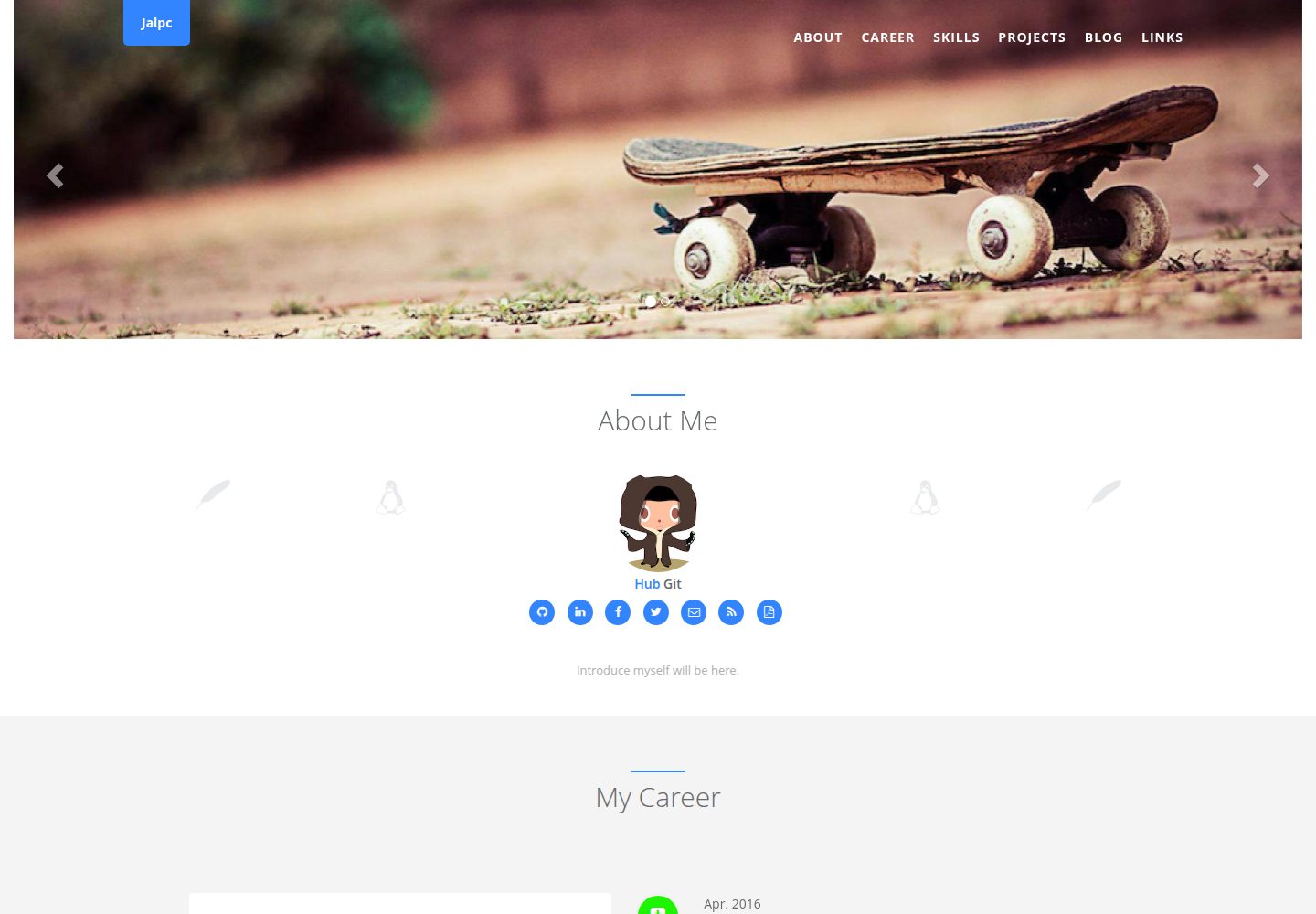
Jalpc
Jalpc is a Jekyll theme for a combined personal homepage and blog. The homepage is split into sections driven by YAML files under _data, so content changes usually do not require editing HTML.
Jekyll · Portfolio
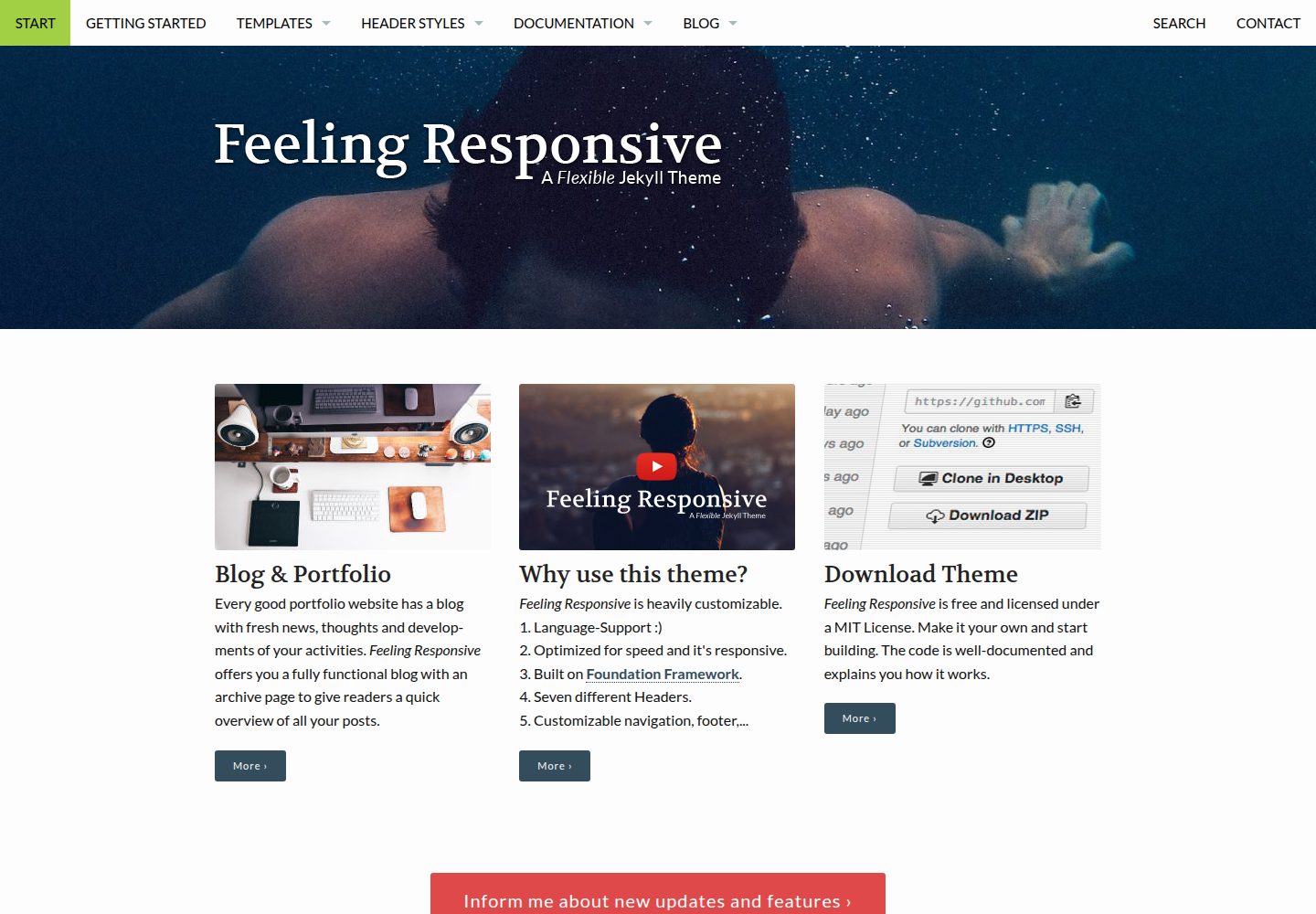
feeling-responsive
A free responsive Jekyll theme built on the Foundation framework, suitable for company sites, portfolios, or blogs. It offers language support, six header styles, customizable navigation and footer, plus documentation and an online demo.
Jekyll · Portfolio