Dual-mode interface with CLI terminal and GUI dashboard, switchable at any time
AstroPortfolio
astro-tui-portfolio — Astro Portfolio Template
By nivinvysakh
An Astro-based retro TUI/CLI personal portfolio template with a built-in terminal command line, CRT themes, mini-games, and GitHub data display.
Explore the design
Compare the page layouts and mobile experience. Open any screenshot for a closer look.
Author preview
Author-provided preview
Preview provided in the project README.
One original preview is available. Open the full image to inspect the design.
Screenshots show visual appearance; interactive behavior may differ.
Recorded 2026-10-02View source
What stands out
A quick read of the recorded project description.
6 CRT themes, switchable in real time via a dropdown menu or the theme command
Built-in retro cassette radio supporting built-in tracks, a 24/7 YouTube live stream, and custom URLs
Two HTML5 Canvas mini-games, Snake and Pong, with sound effects and localStorage high scores
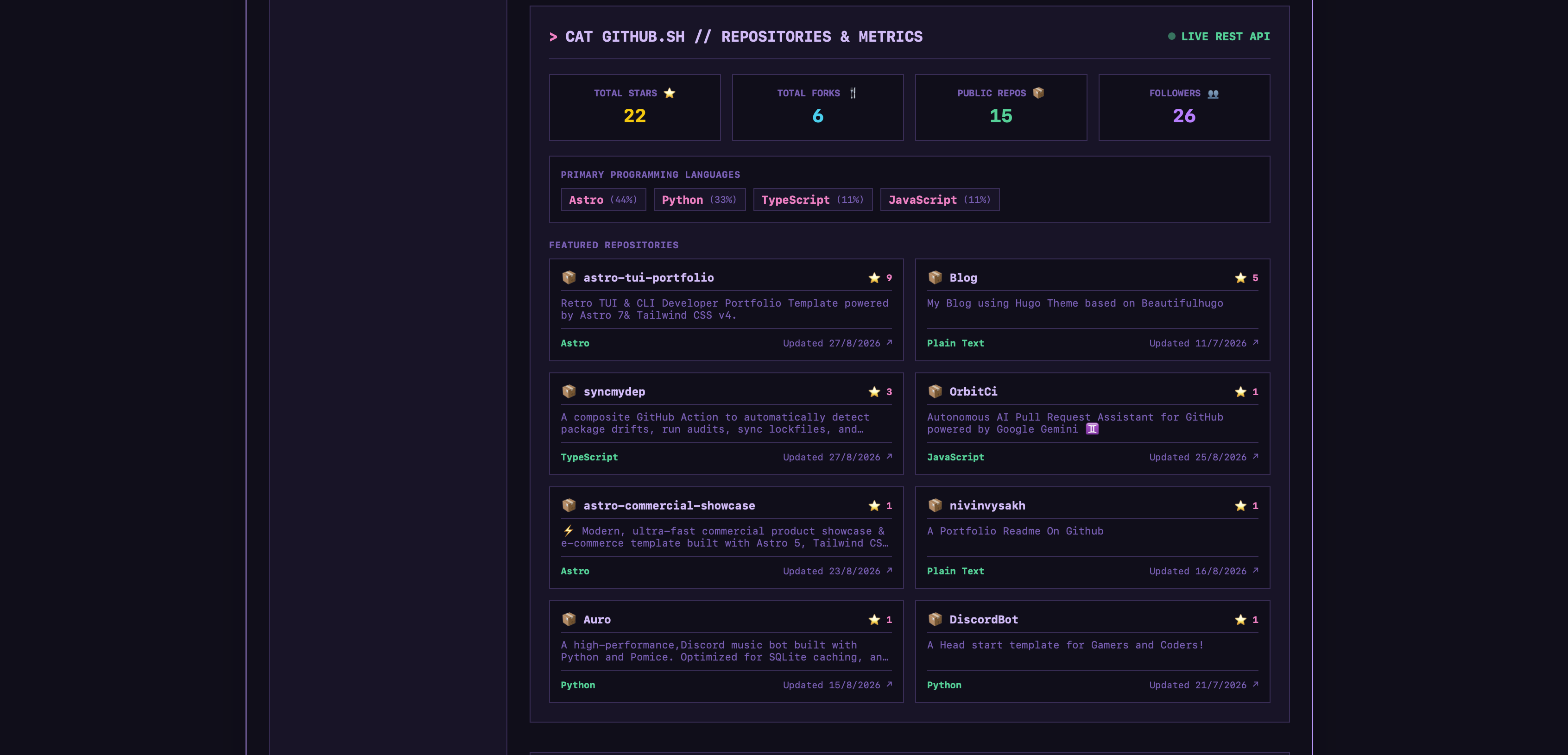
Displays stars, forks, followers, language distribution, and featured repositories via the GitHub REST API
CRT scanlines, vignette effects, keypress sound effects, and a custom 404 terminal error page
Template Details
This is a personal portfolio template built around a terminal interface, constructed with Astro and styled with Tailwind CSS. The page offers two switchable browsing modes: an interactive CLI terminal (with history and Tab autocompletion) and a GUI dashboard, allowing users to switch between them.
In terms of content, the template centrally manages personal bio, skill matrix, hardware information, collaborative projects, and contact details through src/data/portfolio.ts; the CLI corresponds to commands such as about, skills, collabs, neofetch, and links. The GitHub section fetches stars, forks, followers, language distribution, and featured repositories in real time via the REST API, displaying them in GUI cards and CLI commands (github/repos).
The template includes several entertainment and atmospheric modules: 6 CRT themes (Phosphor Green, Amber, Cyber Cyan, Dracula Synth, Monochrome, Cappuccino) can be switched at runtime; a retro cassette radio supports built-in tracks, a 24/7 YouTube live stream, and adding custom songs via URL; two HTML5 Canvas mini-games, Snake and Pong, come with sound effects and local high score records; there are also CRT visual effects such as scanlines and vignette, plus keypress sound effects. The contact form sends emails via FormSubmit.co using AJAX, requiring no self-hosted backend.
Note that the Spotify and game status components depend on the Discord Lanyard WebSocket and are disabled by default; they require configuring lanyardUserId to enable. The radio, games, and GitHub data all rely on browser-side capabilities and external services, so actual availability is affected by network and third-party interfaces. The template is purely static output and contains no server-side logic.
AstroPortfolio
Is it right for your project?
Use Cases
- Building a terminal-style online portfolio for developers or technical professionals
- Showcasing real-time GitHub metrics and featured repositories on a personal homepage
- Learning how to implement terminal-style interactive interfaces and theme switching as an Astro project
- Demonstrating or testing CRT visual styles, Web Audio sound effects, and Canvas mini-games
Suitable For
- Developers who want their portfolio to present a retro terminal or CLI style
- Personal sites that need to display GitHub data and skill information
- Astro users who accept static hosting and do not need a self-hosted backend
- Creators interested in CRT themes and browser-side mini-games
Getting started & customization
Use these recorded setup notes alongside the repository instructions for your chosen version.
- 1
After cloning the repository, run npm install, then start the local development server with npm run dev (default http://localhost:4321).
- 2
Edit personal bio, skills, collaborations, and contact information in src/data/portfolio.ts.
- 3
Theme, radio, Spotify, and game configurations are located in the src/config/ directory; the Spotify and game status components require a Discord Lanyard User ID to be enabled.
- 4
Radio tracks can be added in RADIO_PLAYLIST in src/config/radioConfig.ts, or temporarily added in the interface or CLI with radio add <url>.
- 5
The contact form uses FormSubmit.co to send emails; configure the recipient address according to that service's requirements. Docker users can run docker compose up tui-portfolio-dev.
License & source material
Usage conditions & limitations
Free to use · keep license noticeThis entry covers the free version under the MIT license in the public repository; the free scope is the code of that version and does not mean external services or third-party assets are free.
Must comply with when using
- Free use, modification, commercial use, and distribution of this version's code are permitted.
- When distributing copies or substantial portions of the code, retain the original author's copyright notice and the full MIT license notice.
- The code is provided as is; warranties and limitations of liability are governed by the original license and applicable law.
Additional costs & items to verify
- The Spotify and game status components are disabled by default and require configuring a Discord Lanyard User ID to enable, depending on the third-party Lanyard service.
- The contact form relies on the third-party service FormSubmit.co to send emails; configure the recipient address according to that service's requirements.
- The radio's 24/7 live stream and custom song playback depend on the external YouTube service, and availability is affected by third-party interfaces and the network.
- GitHub metrics and repository display depend on the GitHub REST API and are subject to its rate limits and availability.
- Demo images, fonts, icons, and other third-party assets must be checked against their respective licenses and cannot be judged solely by the code's MIT license.
- External services such as domains, hosting, databases, payments, or AI may incur additional charges.
View Original Text Basis
Permission is hereby granted, free of charge
Original License Text
Spotify and Gaming live activity widgets are disabled by default until configured with your Discord Lanyard User ID
Original README
Working AJAX email transmission via FormSubmit.co
Original README
Includes 24/7 live YouTube radio streams
Original README
https://github.com/nivinvysakh/astro-tui-portfolio/blob/main/LICENSE.MDhttps://github.com/nivinvysakh/astro-tui-portfolio/blob/main/README.mdReal-time integration with the GitHub REST API
Original README
Compiled by DeepSeek based on repository license and README ·2026-10-02. Results only cover the materials read; dependencies, images, fonts, and subsequent term changes are subject to their respective original texts.
Project checks & description sources
Template Information
- Source platforms
- Astro Themes
- Documentation and maintenance reference score
- More documented · 87 / 100
- Technologies
- Astro
- Website type
- Portfolio
How this score is calculated
Our heuristic uses license records (up to 30), a demo link (12), a preview (10), stars (15), recorded maintenance (15), description completeness (8), feature records (5) and classification data (5). It is not a code, security or performance test, or a Google score. A link does not establish tested functionality.
What to verify for this project
- Repository update recorded
- 2026-10-01
- Screenshot last checked
- 2026-10-02
A demo link is listed. Check it with your own content and viewport sizes; its presence does not confirm that forms, authentication or payments work.
The catalog identifies Astro as the primary stack. Check the actual dependency manifest and lockfile for versions and hosting requirements. These notes use recorded metadata, not a code audit or a deployment test.
Use a selection guide →How this description was prepared
AI-assisted description based on catalog records and repository material. Repository authors are not automatically the reviewers of this description.
Automatically checked against source and license rules; no manual editorial review.
Inspect the recorded source material
SHA-256: 48debeb86941d214b1b77aa022665649ac5468e368d056ca40b4622cc5e1732e
2026-10-02T16:34:53.274Z
Source file / repository<div align="center"> # 🖥️ Retro TUI Portfolio A minimal, high-aesthetic Terminal User Interface portfolio template. Built with **Astro.js v7** & **Tailwind CSS v4**. <br /> [](https://astro.build) [](https://tailwindcss.com) [](https://www.typescriptlang.org) [](https://portal.astro.build/themes/retro-tui-portfolio/) [](LICENSE.MD) <br /> <br /> [](https://app.netlify.com/start/deploy?repository=https%3A%2F%2Fgithub.com%2Fnivinvysakh%2Fastro-tui-portfolio) <br /> <br /> <p align="center"> <a href="https://astro-tui-portfolio.netlify.app"><strong>🌐 Launch Live Demo</strong></a> • <a href="https://portal.astro.build/themes/retro-tui-portfolio/"><strong>🌟 Available on Astro Themes</strong></a> </p> </div> <br /> > 🌟 **Available on Astro Themes:** This theme is officially listed and available on the [Astro Theme Directory](https://portal.astro.build/themes/retro-tui-portfolio/). --- ## 🌐 Live Preview Experience the interactive retro terminal portfolio live in your browser: - 🔗 **Live Demo**: [https://astro-tui-portfolio.netlify.app](https://astro-tui-portfolio.netlify.app) - 🌟 **Astro Themes Directory**: [retro-tui-portfolio on Astro Themes](https://portal.astro.build/themes/retro-tui-portfolio/) --- ## 🎮 Video Demo https://github.com/user-attachments/assets/b48b7e89-4402-48b1-a201-9028e0d75327 --- ## 🎨 Retro CRT Themes Switch between **6 built-in CRT themes** in real-time via the header dropdown or the `theme <name>` CLI command: | **🟢 Phosphor Green** | **🟠 Amber CRT** | | :---: | :---: | |  |  | | **🔵 Cyber Cyan** | **🟣 Dracula Synth** | | :---: | :---: | |  |  | | **⚪ Monochrome** | **☕ Cappuccino** | | :---: | :---: | |  |  | <p align="center"> <em>Includes a custom retro 404 terminal error screen:</em> </p> <div align="center"> <img src="themes/404.png" alt="404 Terminal Page" width="70%" /> </div> --- ## 📻 Retro Cassette Radio & 24/7 Live Streams An interactive retro cassette tape player with real-time Web Audio API spectrum visualization: - **Curated Tracks**: Built-in Lo-Fi, Chiptune, Synthwave, and Ambient tracks. - **24/7 Live Streams**: Includes 24/7 live YouTube radio streams (Lofi Girl 🔴 LIVE, Synthwave 🔴 LIVE, Chillhop 🔴 LIVE). - **Custom Song Streaming**: Stream any song or live radio from YouTube by pasting the video URL into the player or executing `radio add <url>` in CLI. - **Infinite Live Duration**: Displays `00:00 / ∞` for 24/7 live stream stations. <div align="center"><img src="themes/radio.png" alt="Retro Radio Player" width="50%" /></div> --- ## 🐍 Retro Arcade Snake (`./snake.sh`) A classic 60 FPS HTML5 Canvas Snake arcade mini-game built right into the terminal: - **Controls**: Play using `W/A/S/D`, Arrow keys, or mobile D-Pad touch buttons (▲ ◀ ▼ ▶). - **Sound Effects**: Web Audio API sound synthesis for eating apples, steering, and game-over alerts. - **High Scores**: Persistent high-score tracking stored in browser `localStorage`. <div align="center"><img src="themes/Snake.png" alt="Retro Snake Game" width="70%" /></div> --- ## 🕹️ Retro Arcade Pong (`./pong.sh`) A 1972-style 60 FPS HTML5 Canvas Pong arcade mini-game vs CPU AI: - **Controls**: Steer your paddle using `W/S`, `↑/↓` Arrow keys, Mouse drag, or mobile touch controls. - **Rally & Score Counter**: Real-time rally counter and persistent high-score tracking. <div align="center"><img src="themes/Pong.png" alt="Retro Pong Game" width="80%" /></div> --- ## 🐙 Live GitHub Repositories & Metrics Real-time integration with the GitHub REST API: - **Live Metrics**: Automatically fetches total stars ⭐, total forks 🍴, followers count 👥, and public repository statistics. - **Language Breakdown**: Displays primary programming languages across all public repositories. - **Featured Repositories Grid**: Interactive cards displaying repository stars, description, and direct links. <div align="center"><img src="themes/Github%20GUI.png" alt="Live GitHub Stats & Repositories" width="80%" /></div> ### 🖥️ GitHub CLI Integration (`github` / `repos`) Access live GitHub metrics and featured repositories directly inside the terminal CLI: - **CLI Commands**: Execute `github` (or `gh` / `stats`) to view live profile metrics, or `repos` (or `projects`) to browse top repositories. - **Interactive Terminal Cards**: Formatted terminal output displaying repository stars, forks, language badges, and direct links. <div align="center"><img src="themes/Github%20CLI.png" alt="GitHub CLI Integration" width="80%" /></div> --- ## ✨ Key Features - **Dual-Mode UI** — Switch between an interactive **`>_ CLI Terminal`** (history, tab autocomplete) and a **`[#] GUI Dashboard`**. - **📻 Retro Lo-Fi Radio + 24/7 Live Radio Streams** — Cassette radio with Web Audio API real-time spectrum visualizer, 24/7 Live Lofi Girl / Synthwave streams, & custom YouTube URL loader. - **🐍 Retro Arcade Snake & 🕹️ Pong** — Fully playable 60 FPS HTML5 Canvas arcade games with sound synthesis, zero-latency touch controls, and persistent high-scores. - **📱 100% Mobile & Touch Optimized** — Pinned window headers, touch D-Pad controls, centered cassette player, and responsive layout for mobile screens (Samsung Galaxy S23 FE, iPhones, Android). - **🐙 Live GitHub Stats & Repos** — Real-time GitHub REST API metrics: total stars ⭐, forks 🍴, followers, languages breakdown & repositories. - **6 Vintage CRT Themes** — Phosphor Green, Amber, Cyber Cyan, Dracula Synth, Monochrome, and Cappuccino with dynamic runtime CSS variables. - **CRT Shader & Audio FX** — Scanline overlays, vignette shadows, and Web Audio API keypress sounds. - **Live Activity Streaming** — Optional Discord Lanyard WebSocket integration for Spotify activity and live gaming status (disabled by default). - **Zero-Backend Contact Form** — Working AJAX email transmission via FormSubmit.co with confetti celebration. - **100% Static & Fast** — Built with Astro v7 for instant load times and zero overhead. --- ## 🚀 Quick Start ```bash # Clone and install git clone https://github.com/nivinvysakh/astro-tui-portfolio.git cd astro-tui-portfolio npm install # Start local dev server npm run dev ``` Open **`http://localhost:4321`** to view your live portfolio. > **🐳 Docker:** Run `docker compose up tui-portfolio-dev` for live development with hot-reloading. --- ## ⚙️ Customization - **Content & Bio** → [`src/data/portfolio.ts`](src/data/portfolio.ts) *Update bio, skills matrix, hardware specs, collaborations, and contact details.* - **Themes, Radio & Integrations** → [`src/config/`](src/config/) *Configure custom CRT themes (`themeConfig.ts`), Radio tracks & 24/7 Live Streams (`radioConfig.ts`), Spotify RPC (`spotifyConfig.ts`), and live Gaming presence (`gamesConfig.ts`).* > 💡 **Note:** Spotify and Gaming live activity widgets are disabled by default until configured with your Discord Lanyard User ID (`lanyardUserId: ""`). - **🎵 Adding Custom Radio Tracks & Streams**: - **Permanent Playlist (Config)**: Add MP3 URLs or YouTube links to the `RADIO_PLAYLIST` array in [`src/config/radioConfig.ts`](src/config/radioConfig.ts). - **Runtime via UI / CLI**: Paste any YouTube URL into the Radio window's *STREAM CUSTOM SONG VIA YOUTUBE URL* input field, or execute `radio add <youtube_url>` directly in the CLI terminal. Custom streams persist in browser `localStorage`. --- ## 💻 CLI Commands | Command | Description | | :--- | :--- | | `help` | List available commands (`man`) | | `about` | Bio, background & location (`cat bio.txt`) | | `skills` | Interactive proficiency meters (`cat skills.sh`) | | `collabs` | Projects & collaborations (`cat collabs.md`) | | `neofetch` | System specs & ASCII art logo | | `github` | Live GitHub profile metrics, stars & language stats (`stats`, `gh`) | | `repos` | Explore featured repositories with stars & links (`projects`) | | `links` | Display quick links to LinkedIn, X (Twitter), GitHub & Email (`socials`) | | `snake` | Play classic retro Snake arcade game (`./snake.sh`) | | `pong` | Play retro arcade Pong vs CPU (`game`, `play`, `./pong.sh`) | | `radio` | Play Lo-Fi radio or stream 24/7 Live YouTube stations (`radio add <yt_url>`, `radio play`) | | `spotify` | Live Spotify track & progress bar (`np`) | | `theme <name>` | Switch theme (`green`, `amber`, `cyan`, `dracula`, `mono`, `cappuccino`) | | `matrix` | Toggle digital rain canvas animation | | `crt` / `sfx` | Toggle CRT shader / Keypress sound effects | | `gui` / `cli` | Switch layout mode | | `clear` | Clear terminal screen buffer (`cls`) | --- ## 📄 License Distributed under the [MIT License](LICENSE.MD). © 2026 Nivin
Explore similar templates
Compare previews and descriptions within the same stack and category.

astro-theme-cactus
Astro Cactus is an Astro-based blog and portfolio theme that uses Markdown/MDX content collections to manage posts, notes, and tags, with frontmatter type-checked by a schema.
Astro · Portfolio

astrofy
Astrofy is a free and open-source personal portfolio website template built with Astro and TailwindCSS, with built-in blog, CV timeline, project showcase, store, and RSS feed modules.
Astro · Portfolio

astro-nano
Astro Nano is a static, minimalist portfolio and blog template built with Astro, Tailwind, and TypeScript without frontend frameworks. It includes light/dark themes, animated UI, automatic sitemap and RSS feed generation, and Markdown/MDX support with component imports.
Astro · Portfolio

astro-erudite
astro-erudite is an opinionated, unstyled static blog template built with Astro and native CSS, with no UI or CSS framework and minimal dependencies.
Astro · Portfolio

astro-sphere
Astro Sphere is a static, minimalist portfolio and blog theme maintained by markhorn-dev, built mainly with Astro, Tailwind, and TypeScript, with a small amount of SolidJS for stateful components.
Astro · Portfolio

astro-micro
Astro Micro is a framework-free blog and portfolio theme for Astro, forked from Astro Nano. It adds Pagefind search and Giscus comments while retaining type safety, sitemap, RSS, Markdown and MDX support, and TailwindCSS with system, light, and dark themes.
Astro · Portfolio