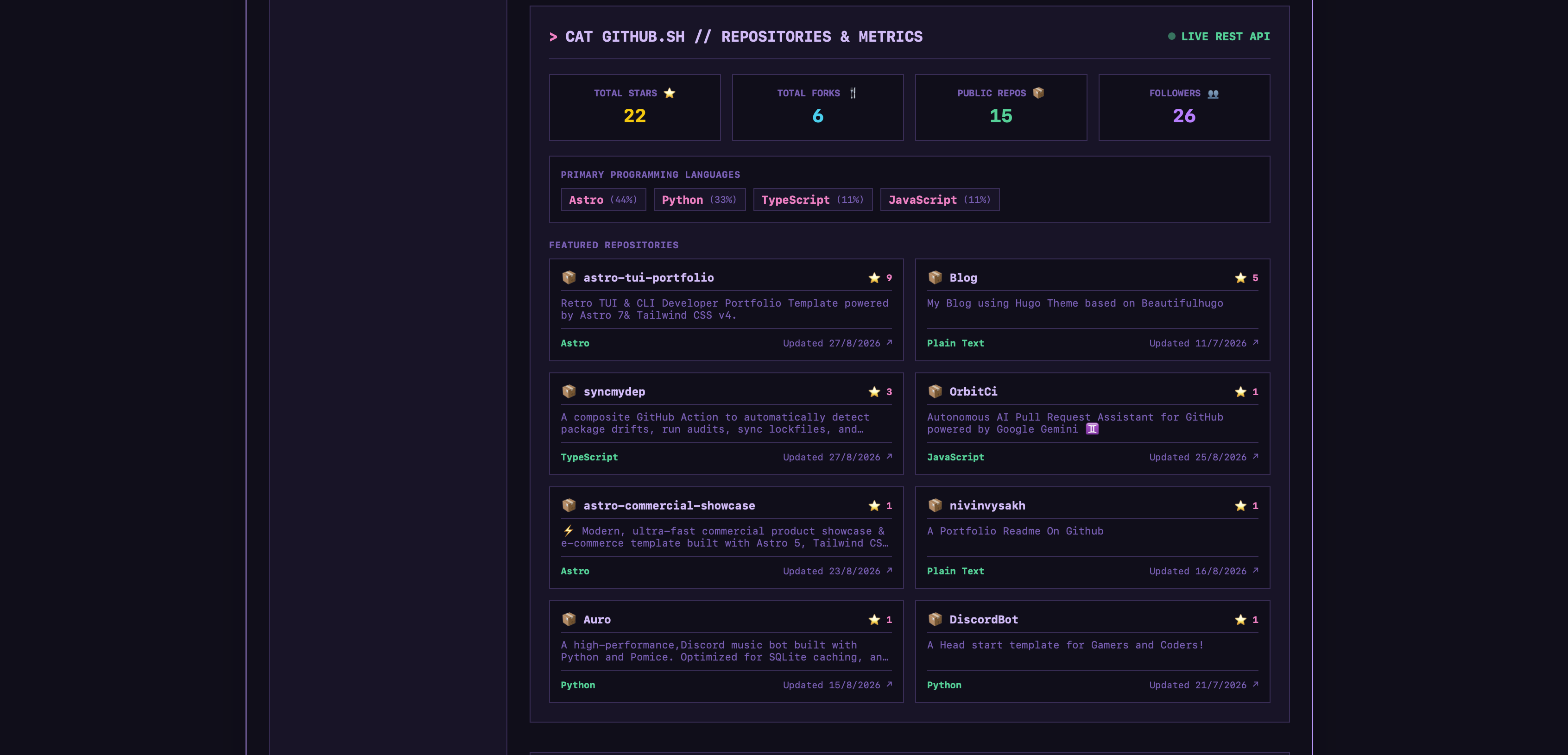
CLI 终端与 GUI 仪表盘双模式界面,可随时切换
Astro作品集
astro-tui-portfolio — Astro 作品集模板
作者 nivinvysakh
基于 Astro 的复古 TUI/CLI 风格个人作品集模板,内置终端命令行、CRT 主题、迷你游戏与 GitHub 数据展示。
看看你的网站会是什么样
浏览真实页面截图,比较内容排版与手机效果。点击下方缩略图切换,放大查看整页细节。
目前有 1 张原始预览,可打开完整图片查看设计细节。
截图用于了解视觉与布局,交互效果请以实际项目为准。
采集于 2026-10-02查看来源
值得关注的模板亮点
从已有项目资料中,快速了解它的特点。
6 套 CRT 主题,支持通过下拉菜单或 theme 命令实时切换
内置复古磁带收音机,支持内置曲目、24/7 YouTube 直播流和自定义 URL
Snake 与 Pong 两个 HTML5 Canvas 小游戏,含音效和 localStorage 最高分
通过 GitHub REST API 展示星标、Fork、关注者、语言分布与精选仓库
CRT 扫描线、暗角效果与按键音效,以及自定义 404 终端错误页
模板详细介绍
这是一个以终端界面为视觉核心的个人作品集模板,使用 Astro 构建,样式由 Tailwind CSS 处理。页面提供两套可切换的浏览方式:交互式 CLI 终端(支持历史记录与 Tab 自动补全)和 GUI 仪表盘,用户可以在两者之间切换。
内容层面,模板通过 src/data/portfolio.ts 集中管理个人简介、技能矩阵、硬件信息、合作项目与联系方式;CLI 中对应 about、skills、collabs、neofetch、links 等命令。GitHub 部分通过 REST API 实时拉取星标、Fork、关注者、语言分布和精选仓库,并在 GUI 卡片与 CLI 命令(github/repos)中展示。
模板附带若干娱乐与氛围模块:6 套 CRT 主题(Phosphor Green、Amber、Cyber Cyan、Dracula Synth、Monochrome、Cappuccino)可在运行时切换;复古磁带收音机支持内置曲目、24/7 YouTube 直播流以及通过 URL 添加自定义歌曲;Snake 和 Pong 两个 HTML5 Canvas 小游戏带音效与本地最高分记录;另有扫描线、暗角等 CRT 视觉效果和按键音效。联系表单通过 FormSubmit.co 以 AJAX 方式发送邮件,无需自建后端。
需要留意的是,Spotify 与游戏状态组件依赖 Discord Lanyard WebSocket,默认关闭,需配置 lanyardUserId 后才能启用。收音机、游戏和 GitHub 数据均依赖浏览器端能力与外部服务,实际可用性受网络与第三方接口影响。模板为纯静态输出,不包含服务端逻辑。
Astro作品集
适合你的项目吗?
适用场景
- 为开发者或技术从业者搭建带有终端风格的在线作品集
- 在个人主页中展示实时 GitHub 指标与精选仓库
- 作为 Astro 项目学习终端式交互界面与主题切换的实现方式
- 用于演示或测试 CRT 视觉风格、Web Audio 音效与 Canvas 小游戏
适合人群
- 希望作品集呈现复古终端或 CLI 风格的开发者
- 需要展示 GitHub 数据与技能信息的个人站点
- 接受静态托管、无需自建后端的 Astro 用户
- 对 CRT 主题与浏览器端小游戏感兴趣的创作者
上手与定制指南
结合仓库当前版本的说明,按下面的资料检查内容、配置与运行要求。
- 1
克隆仓库后执行 npm install,再用 npm run dev 启动本地开发服务器(默认 http://localhost:4321)。
- 2
个人简介、技能、合作与联系方式在 src/data/portfolio.ts 中修改。
- 3
主题、收音机、Spotify 与游戏配置位于 src/config/ 目录;Spotify 与游戏状态组件需填入 Discord Lanyard User ID 才会启用。
- 4
收音机曲目可在 src/config/radioConfig.ts 的 RADIO_PLAYLIST 中添加,也可在界面或 CLI 中用 radio add <url> 临时添加。
- 5
联系表单使用 FormSubmit.co 发送邮件,需按该服务要求配置收件地址;Docker 用户可运行 docker compose up tui-portfolio-dev。
授权与来源资料
使用条件与限制
免费使用 · 保留许可声明本次收录的是公开仓库中采用 MIT 许可的免费版本;免费范围为该版本代码,不代表外部服务或第三方素材免费。
使用时需要遵守
- 允许免费使用、修改、商用和分发该版本代码。
- 分发代码副本或实质性部分时,保留原作者版权声明和完整 MIT 许可声明。
- 代码按现状提供;担保与责任限制以原许可证及适用法律为准。
额外费用与待核对事项
- Spotify 与游戏状态组件默认关闭,需配置 Discord Lanyard User ID 才能启用,依赖第三方 Lanyard 服务。
- 联系表单依赖第三方服务 FormSubmit.co 发送邮件,需按该服务要求配置收件地址。
- 收音机的 24/7 直播流与自定义歌曲播放依赖 YouTube 外部服务,可用性受第三方接口与网络影响。
- GitHub 指标与仓库展示依赖 GitHub REST API,受其速率限制与可用性影响。
- 演示图片、字体、图标及其他第三方素材需按各自许可核对,不能仅凭代码的 MIT 许可判断。
- 域名、托管、数据库、支付或 AI 等外部服务可能另外收费。
查看原文依据
Permission is hereby granted, free of charge
许可证原文
Spotify and Gaming live activity widgets are disabled by default until configured with your Discord Lanyard User ID
README 原文
Working AJAX email transmission via FormSubmit.co
README 原文
Includes 24/7 live YouTube radio streams
README 原文
https://github.com/nivinvysakh/astro-tui-portfolio/blob/main/LICENSE.MDhttps://github.com/nivinvysakh/astro-tui-portfolio/blob/main/README.mdReal-time integration with the GitHub REST API
README 原文
DeepSeek 根据仓库许可证和 README 整理 ·2026-10-02。结果仅覆盖已读取资料,依赖、图片、字体及后续条款变更以各自原文为准。
项目核对记录与介绍依据
模板资料
- 来源平台
- Astro Themes
- 资料与维护参考分
- 资料较完整 · 87 / 100
- 技术栈
- Astro
- 网站类型
- 作品集
这个分数如何计算
本站按许可资料(最高30分)、演示链接(12分)、预览图(10分)、Star数(15分)、记录的维护时间(15分)、描述完整度(8分)、功能记录(5分)和分类资料(5分)计算。它不是代码、安全或性能测试,也不是 Google 评分;有链接不代表已实测可用。
这个项目需要核对什么
- 记录的仓库更新时间
- 2026-10-01
- 截图检查日期
- 2026-10-02
已收录演示链接。请用你的内容与屏幕尺寸检查;有演示不代表表单、认证或支付已经可用。
目录记录的主要技术栈是 Astro。请通过依赖清单和锁文件核对实际版本与托管要求。这些说明基于收录资料,不代表代码审计或部署实测。
查看具体选型方法 →介绍的制作与核对状态
介绍由 AI 辅助整理目录与仓库资料。仓库作者不等于这篇介绍的审核者。
已完成服务器许可规则与 AI 来源核对;未经过人工编辑审核。
查看当时使用的来源资料
SHA-256: 48debeb86941d214b1b77aa022665649ac5468e368d056ca40b4622cc5e1732e
2026-10-02T16:34:53.274Z
来源文件 / 仓库<div align="center"> # 🖥️ Retro TUI Portfolio A minimal, high-aesthetic Terminal User Interface portfolio template. Built with **Astro.js v7** & **Tailwind CSS v4**. <br /> [](https://astro.build) [](https://tailwindcss.com) [](https://www.typescriptlang.org) [](https://portal.astro.build/themes/retro-tui-portfolio/) [](LICENSE.MD) <br /> <br /> [](https://app.netlify.com/start/deploy?repository=https%3A%2F%2Fgithub.com%2Fnivinvysakh%2Fastro-tui-portfolio) <br /> <br /> <p align="center"> <a href="https://astro-tui-portfolio.netlify.app"><strong>🌐 Launch Live Demo</strong></a> • <a href="https://portal.astro.build/themes/retro-tui-portfolio/"><strong>🌟 Available on Astro Themes</strong></a> </p> </div> <br /> > 🌟 **Available on Astro Themes:** This theme is officially listed and available on the [Astro Theme Directory](https://portal.astro.build/themes/retro-tui-portfolio/). --- ## 🌐 Live Preview Experience the interactive retro terminal portfolio live in your browser: - 🔗 **Live Demo**: [https://astro-tui-portfolio.netlify.app](https://astro-tui-portfolio.netlify.app) - 🌟 **Astro Themes Directory**: [retro-tui-portfolio on Astro Themes](https://portal.astro.build/themes/retro-tui-portfolio/) --- ## 🎮 Video Demo https://github.com/user-attachments/assets/b48b7e89-4402-48b1-a201-9028e0d75327 --- ## 🎨 Retro CRT Themes Switch between **6 built-in CRT themes** in real-time via the header dropdown or the `theme <name>` CLI command: | **🟢 Phosphor Green** | **🟠 Amber CRT** | | :---: | :---: | |  |  | | **🔵 Cyber Cyan** | **🟣 Dracula Synth** | | :---: | :---: | |  |  | | **⚪ Monochrome** | **☕ Cappuccino** | | :---: | :---: | |  |  | <p align="center"> <em>Includes a custom retro 404 terminal error screen:</em> </p> <div align="center"> <img src="themes/404.png" alt="404 Terminal Page" width="70%" /> </div> --- ## 📻 Retro Cassette Radio & 24/7 Live Streams An interactive retro cassette tape player with real-time Web Audio API spectrum visualization: - **Curated Tracks**: Built-in Lo-Fi, Chiptune, Synthwave, and Ambient tracks. - **24/7 Live Streams**: Includes 24/7 live YouTube radio streams (Lofi Girl 🔴 LIVE, Synthwave 🔴 LIVE, Chillhop 🔴 LIVE). - **Custom Song Streaming**: Stream any song or live radio from YouTube by pasting the video URL into the player or executing `radio add <url>` in CLI. - **Infinite Live Duration**: Displays `00:00 / ∞` for 24/7 live stream stations. <div align="center"><img src="themes/radio.png" alt="Retro Radio Player" width="50%" /></div> --- ## 🐍 Retro Arcade Snake (`./snake.sh`) A classic 60 FPS HTML5 Canvas Snake arcade mini-game built right into the terminal: - **Controls**: Play using `W/A/S/D`, Arrow keys, or mobile D-Pad touch buttons (▲ ◀ ▼ ▶). - **Sound Effects**: Web Audio API sound synthesis for eating apples, steering, and game-over alerts. - **High Scores**: Persistent high-score tracking stored in browser `localStorage`. <div align="center"><img src="themes/Snake.png" alt="Retro Snake Game" width="70%" /></div> --- ## 🕹️ Retro Arcade Pong (`./pong.sh`) A 1972-style 60 FPS HTML5 Canvas Pong arcade mini-game vs CPU AI: - **Controls**: Steer your paddle using `W/S`, `↑/↓` Arrow keys, Mouse drag, or mobile touch controls. - **Rally & Score Counter**: Real-time rally counter and persistent high-score tracking. <div align="center"><img src="themes/Pong.png" alt="Retro Pong Game" width="80%" /></div> --- ## 🐙 Live GitHub Repositories & Metrics Real-time integration with the GitHub REST API: - **Live Metrics**: Automatically fetches total stars ⭐, total forks 🍴, followers count 👥, and public repository statistics. - **Language Breakdown**: Displays primary programming languages across all public repositories. - **Featured Repositories Grid**: Interactive cards displaying repository stars, description, and direct links. <div align="center"><img src="themes/Github%20GUI.png" alt="Live GitHub Stats & Repositories" width="80%" /></div> ### 🖥️ GitHub CLI Integration (`github` / `repos`) Access live GitHub metrics and featured repositories directly inside the terminal CLI: - **CLI Commands**: Execute `github` (or `gh` / `stats`) to view live profile metrics, or `repos` (or `projects`) to browse top repositories. - **Interactive Terminal Cards**: Formatted terminal output displaying repository stars, forks, language badges, and direct links. <div align="center"><img src="themes/Github%20CLI.png" alt="GitHub CLI Integration" width="80%" /></div> --- ## ✨ Key Features - **Dual-Mode UI** — Switch between an interactive **`>_ CLI Terminal`** (history, tab autocomplete) and a **`[#] GUI Dashboard`**. - **📻 Retro Lo-Fi Radio + 24/7 Live Radio Streams** — Cassette radio with Web Audio API real-time spectrum visualizer, 24/7 Live Lofi Girl / Synthwave streams, & custom YouTube URL loader. - **🐍 Retro Arcade Snake & 🕹️ Pong** — Fully playable 60 FPS HTML5 Canvas arcade games with sound synthesis, zero-latency touch controls, and persistent high-scores. - **📱 100% Mobile & Touch Optimized** — Pinned window headers, touch D-Pad controls, centered cassette player, and responsive layout for mobile screens (Samsung Galaxy S23 FE, iPhones, Android). - **🐙 Live GitHub Stats & Repos** — Real-time GitHub REST API metrics: total stars ⭐, forks 🍴, followers, languages breakdown & repositories. - **6 Vintage CRT Themes** — Phosphor Green, Amber, Cyber Cyan, Dracula Synth, Monochrome, and Cappuccino with dynamic runtime CSS variables. - **CRT Shader & Audio FX** — Scanline overlays, vignette shadows, and Web Audio API keypress sounds. - **Live Activity Streaming** — Optional Discord Lanyard WebSocket integration for Spotify activity and live gaming status (disabled by default). - **Zero-Backend Contact Form** — Working AJAX email transmission via FormSubmit.co with confetti celebration. - **100% Static & Fast** — Built with Astro v7 for instant load times and zero overhead. --- ## 🚀 Quick Start ```bash # Clone and install git clone https://github.com/nivinvysakh/astro-tui-portfolio.git cd astro-tui-portfolio npm install # Start local dev server npm run dev ``` Open **`http://localhost:4321`** to view your live portfolio. > **🐳 Docker:** Run `docker compose up tui-portfolio-dev` for live development with hot-reloading. --- ## ⚙️ Customization - **Content & Bio** → [`src/data/portfolio.ts`](src/data/portfolio.ts) *Update bio, skills matrix, hardware specs, collaborations, and contact details.* - **Themes, Radio & Integrations** → [`src/config/`](src/config/) *Configure custom CRT themes (`themeConfig.ts`), Radio tracks & 24/7 Live Streams (`radioConfig.ts`), Spotify RPC (`spotifyConfig.ts`), and live Gaming presence (`gamesConfig.ts`).* > 💡 **Note:** Spotify and Gaming live activity widgets are disabled by default until configured with your Discord Lanyard User ID (`lanyardUserId: ""`). - **🎵 Adding Custom Radio Tracks & Streams**: - **Permanent Playlist (Config)**: Add MP3 URLs or YouTube links to the `RADIO_PLAYLIST` array in [`src/config/radioConfig.ts`](src/config/radioConfig.ts). - **Runtime via UI / CLI**: Paste any YouTube URL into the Radio window's *STREAM CUSTOM SONG VIA YOUTUBE URL* input field, or execute `radio add <youtube_url>` directly in the CLI terminal. Custom streams persist in browser `localStorage`. --- ## 💻 CLI Commands | Command | Description | | :--- | :--- | | `help` | List available commands (`man`) | | `about` | Bio, background & location (`cat bio.txt`) | | `skills` | Interactive proficiency meters (`cat skills.sh`) | | `collabs` | Projects & collaborations (`cat collabs.md`) | | `neofetch` | System specs & ASCII art logo | | `github` | Live GitHub profile metrics, stars & language stats (`stats`, `gh`) | | `repos` | Explore featured repositories with stars & links (`projects`) | | `links` | Display quick links to LinkedIn, X (Twitter), GitHub & Email (`socials`) | | `snake` | Play classic retro Snake arcade game (`./snake.sh`) | | `pong` | Play retro arcade Pong vs CPU (`game`, `play`, `./pong.sh`) | | `radio` | Play Lo-Fi radio or stream 24/7 Live YouTube stations (`radio add <yt_url>`, `radio play`) | | `spotify` | Live Spotify track & progress bar (`np`) | | `theme <name>` | Switch theme (`green`, `amber`, `cyan`, `dracula`, `mono`, `cappuccino`) | | `matrix` | Toggle digital rain canvas animation | | `crt` / `sfx` | Toggle CRT shader / Keypress sound effects | | `gui` / `cli` | Switch layout mode | | `clear` | Clear terminal screen buffer (`cls`) | --- ## 📄 License Distributed under the [MIT License](LICENSE.MD). © 2026 Nivin
看看同类模板
对比同技术栈与用途的模板,找到更适合的视觉与内容结构。

astro-theme-cactus
A simple Astro theme. Use it to create your blog or website.
Astro · 作品集

astrofy
Astrofy is a free and open-source template for your Personal Portfolio Website built with Astro and TailwindCS…
Astro · 作品集

astro-nano
Astro Nano is a static, minimalist, lightweight, lightning fast portfolio and blog.
Astro · 作品集

astro-erudite
An opinionated, unstyled static blogging template built with Astro and native CSS.
Astro · 作品集

astro-sphere
Astro Sphere is a static, minimalist, lightweight, lightning fast portfolio and blog.
Astro · 作品集

astro-micro
Blog theme for Astro with search and comments built-in. Zero frameworks.
Astro · 作品集