The companion Hippo tool extracts metadata from photos, including title, description, copyright, capture time, keywords, focal length, aperture, exposure time, ISO, and camera make and model
HugoStarter
hugo-foto-theme — Hugo Starter Template
By nux-li
A Hugo-based photo gallery theme that works with the Kotlin-written Hippo tool to read photo metadata, resize images, and generate content pages.
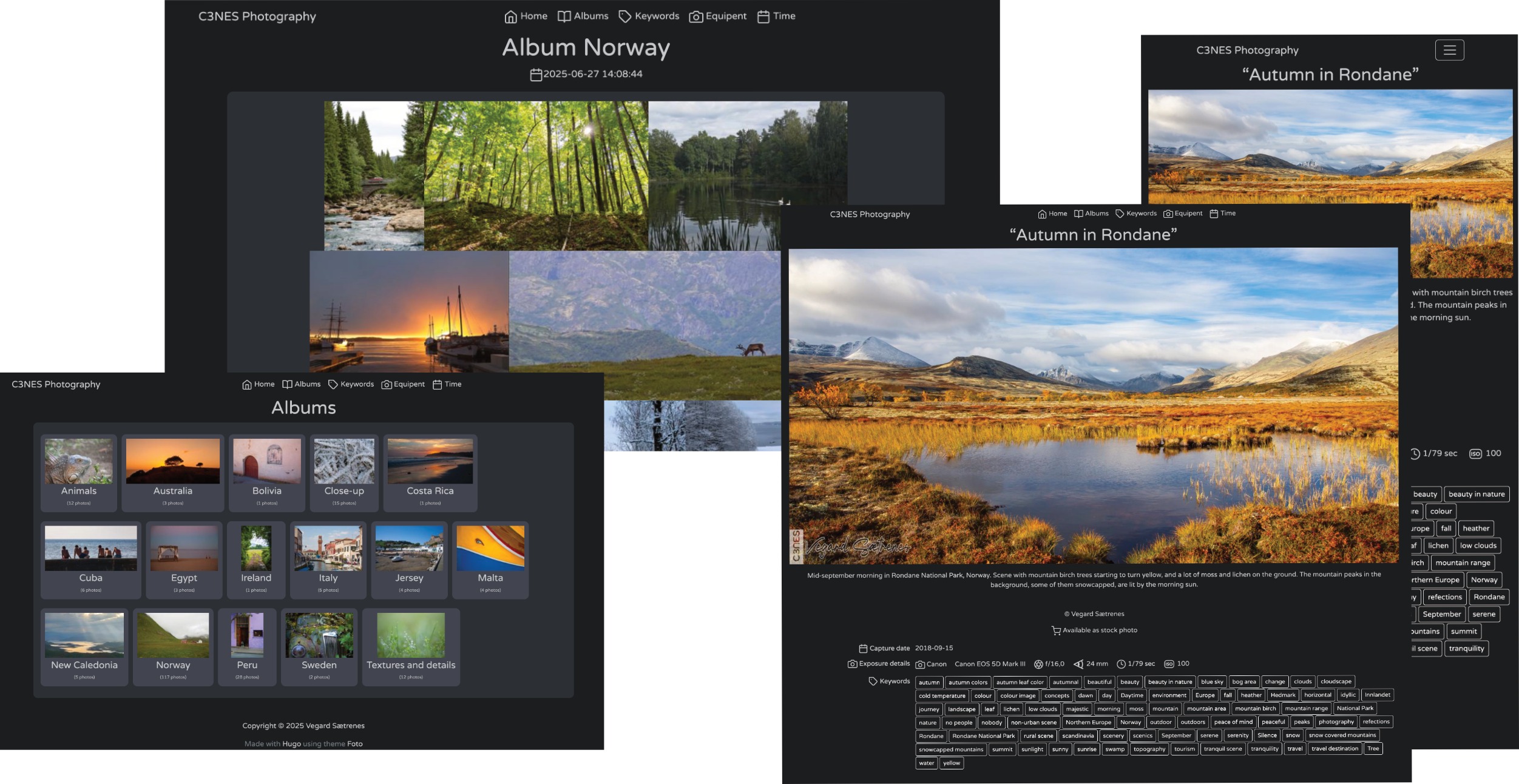
Explore the design
Compare the page layouts and mobile experience. Open any screenshot for a closer look.
Author preview
Author-provided preview
Preview provided in the project README.
One original preview is available. Open the full image to inspect the design.
Screenshots show visual appearance; interactive behavior may differ.
Recorded 2026-10-04View source
What stands out
A quick read of the recorded project description.
Hippo handles image resizing and generates front matter content pages for each image and album
Supports placing two types of watermarks, watermark_main.png and watermark_subtle.png, under assets/watermarks, with positions specified via UL, UR, LL, LR and _C combinations
Photos are organized by album under content/albums, with support for multiple levels of subfolders/subalbums
Provides --demo to generate a sample site and --clear to remove sample pages
The theme code is MIT licensed
Template Details
This is a Hugo theme for photographers to publish photos as galleries. It does not process images itself; instead, it relies on the companion tool Hippo (Hugo Image Preprocessor) to do three things: extract metadata from photos, resize images as needed (with optional watermarks), and generate front matter content pages for each image and each album.
The metadata fields the theme reads from each photo include title, description, copyright credit, capture date and time, keywords, focal length, aperture, exposure time, ISO equivalent, and camera make and model. These fields go into Hugo content pages, so before use it is best to write metadata such as titles and descriptions for photos using software like Darktable, Adobe Lightroom, or On1 Photo Raw.
In terms of usage, the theme is added to a project's themes/foto directory via Git Submodule, and theme and params.credit are set in hugo.toml. Photos are organized by album under content/albums, and can have multiple levels of subfolders/subalbums, grouped by region, style, or date. Hippo provides options such as --demo to generate sample pages, --clear to remove sample pages, and --watermark to add watermarks. Watermark files are placed under assets/watermarks, divided into a corner-visible watermark watermark_main.png and a centered subtle watermark watermark_subtle.png, with positions specified via UL, UR, LL, LR and combinations with _C.
Limitations: a Java 21 or higher runtime must be installed locally to run Hippo; on Windows, hippo.sh must be replaced with hippo.bat; --clear is destructive and should not be run once you start using your own photos. The theme code is MIT licensed, but third-party assets such as demo images, fonts, and icons must be checked separately under their own licenses, and external services such as domains and hosting may incur additional charges.
HugoStarter
Is it right for your project?
Use Cases
- Photographers organizing photos with metadata into a publishable online gallery
- Grouping photos into multi-level albums by region, style, or date
- Batch-adding corner-visible or centered subtle watermarks to photos
- Running a demo site with sample photos first, then replacing them with your own work after confirming the result
Suitable For
- Photographers building a personal portfolio site with Hugo
- Users whose photos already have metadata such as titles and descriptions and who want to reuse it directly in page content
- Photography projects that need uniform image resizing and watermarking before publishing
- Developers who can install and run a Java 21 or higher runtime themselves
Getting started & customization
Use these recorded setup notes alongside the repository instructions for your chosen version.
- 1
A Java 21 or higher runtime must be installed locally; Hippo is written in Kotlin and depends on it to run
- 2
Add the theme to themes/foto via git submodule add, and set theme = "foto" and params.credit in hugo.toml
- 3
On Windows, replace hippo.sh in commands with hippo.bat, keeping options and arguments the same
- 4
Run ./hippo.sh --demo to generate sample pages, then preview with hugo server -D; --clear deletes sample pages and should not be run once you start using your own photos
- 5
Place watermark PNGs under assets/watermarks and enable them when running hippo with --watermark plus a position code (e.g., LL_C)
License & source material
Usage conditions & limitations
Free to use · keep license noticeThis entry covers the free version in the public repository under the MIT license; the free scope is the code of that version and does not mean external services or third-party assets are free.
Must comply with when using
- Free use, modification, commercial use, and distribution of this version's code are permitted.
- When distributing copies or substantial portions of the code, retain the original author's copyright notice and the full MIT license notice.
- The code is provided as is; warranties and limitations of liability are governed by the original license and applicable law.
Additional costs & items to verify
- Using this theme requires installing a Java 21 or higher runtime locally; otherwise the companion Hippo tool cannot run for metadata extraction, image resizing, and content page generation.
- On Windows, all hippo.sh commands must be replaced with hippo.bat, keeping options and arguments the same.
- --clear is destructive and deletes sample pages; it should not be run once you start using your own photos.
- The author offers purchasing their photos as a way to support the project; this is voluntary sponsorship and does not affect free use of the theme.
- Demo images, fonts, icons, and other third-party assets must be checked under their respective licenses and cannot be judged solely by the code's MIT license.
- External services such as domains, hosting, databases, payments, or AI may incur additional charges.
View Original Text Basis
Permission is hereby granted, free of charge
Original License Text
you will need Java Runtime Environment (Java version 21 or newer) on your machine in order to run it
Original README
If you are using Windows operating system - replace all usage of `hippo.sh` with `hippo.bat`
Original README
This operation is a bit destructive, and you should probably not use it once you start using your own images.
Original README
https://github.com/nux-li/hugo-foto-theme/blob/main/LICENSEhttps://github.com/nux-li/hugo-foto-theme/blob/main/README.mdConsider supporting by [purchasing one of my photos](https://c3n.es/marketplace/picfair/)
Original README
Compiled by DeepSeek based on repository license and README ·2026-10-04. Results only cover the materials read; dependencies, images, fonts, and subsequent term changes are subject to their respective original texts.
Project checks & description sources
Template Information
- Source platforms
- Hugo Themes
- Documentation and maintenance reference score
- Partly documented · 65 / 100
- Technologies
- Hugo
- Website type
- Starter
How this score is calculated
Our heuristic uses license records (up to 30), a demo link (12), a preview (10), stars (15), recorded maintenance (15), description completeness (8), feature records (5) and classification data (5). It is not a code, security or performance test, or a Google score. A link does not establish tested functionality.
What to verify for this project
- Repository update recorded
- 2025-08-28
- Screenshot last checked
- 2026-10-04
No demo link is recorded. Use the repository instructions to evaluate the project locally; the screenshot alone cannot establish interactive behavior.
The catalog identifies Hugo as the primary stack. Check the actual dependency manifest and lockfile for versions and hosting requirements. These notes use recorded metadata, not a code audit or a deployment test.
Use a selection guide →How this description was prepared
AI-assisted description based on catalog records and repository material. Repository authors are not automatically the reviewers of this description.
Review declaration: [email protected] · 2026-10-04
Inspect the recorded source material
SHA-256: 358080b0fa18b4c51209321a97a586cbf1945c0b414955903e5eb396dfd3065a
2026-10-04T02:47:44.698Z
Source file / repository# Foto, a theme for [Hugo](https://gohugo.io/), the world famous static site generator
The intent of this theme is to provide a gallery solution for photographers wanting to publish their work as a photo gallery. Together with the bundled software Hippo (Hugo Image Preprocessor) images placed in the content folder will be resized, with or without watermark. Metadata is extracted and placed in Hugo content pages.

[EXAMPLE SITE](https://c3n.es/)
Features
## Prerequisites
This theme uses [Hippo](https://github.com/nux-li/hippo) for extraction of metadata, resizing of images, and for generating front matters for every image and album.
Hippo is written in Kotlin, and you will need Java Runtime Environment (Java version 21 or newer) on your machine in order to run it.
In order to take full advantage of this theme, you should have a selection of photos with metadata attached.
For preparing photos one can use software such as
[Darktable](https://www.darktable.org/),
[Adobe Lightroom](https://lightroom.adobe.com/),
[On1 Photo Raw](https://www.on1.com/products/photo-raw/),
or similar. These programs can be used to add titles and descriptions as metadata for your photos.
The following metadata fields are extracted from each photo:
* title
* description
* credit
* capture date and time
* keywords
* focal length
* aperture / f-number
* exposure time
* iso equivalent
* camera make and model
## Installation
Make sure you have Java version 21 or newer on your machine. https://jdk.java.net/24/
### Add theme as a Git Submodule
```sh
git init
git submodule add --depth=1 https://github.com/nux-li/hugo-foto-theme.git themes/foto
```
Then update your `hugo.toml` with the name of the theme:
```toml
theme = "foto"
```
Also add this to the end of the `hugo.toml` file:
```toml
[params]
credit = '** Your name **'
```
Replace `** Your name **` with your name.
## Getting started
If you are using Windows operating system - replace all usage of `hippo.sh` with `hippo.bat`,
but use same options and parameters.
### Run demo site
In order to test the theme with example photos, do this:
* Go to the theme directory
```sh
cd theme/foto
```
* Use `hippo` to create demo pages
```shell
./hippo.sh --demo
```
* Go to back to your project's root directory
```sh
cd ../..
```
* Start Hugo
```shell
hugo server -D
```
In order to see your demo site, enter [`localhost:1313`](http://localhost:1313/) in the address bar of your browser.
### Remove demo pages
In order to delete the demo pages, use the clear flag with `hippo`:
```shell
cd theme/foto
./hippo.sh --clear
```
This operation is a bit destructive, and you should probably not use it once you start using your own images.
### Start using your own photos
Now you can copy your own images into different albums within the `content/albums` directory.
Is it possible to have several levels of subfolders / sub-albums. Choose how you will group your photos:
by geography, by style, by date etc.
When you have copied your images to different subfolders within `content/albums`, you can run `hippo` again (but if you want watermarks, please read further):
```shell
cd theme/foto
./hippo.sh
```
### Use your own watermark with your photos
There is two kinds of watermarks that can be added to your photos. The watermark files should be placed
under `assets/watermarks`:
| Filename | Description |
|----------------------|-------------------------------------------------------------------|
| watermark_main.png | Visible watermark to be placed in one of the image's four corners |
| watermark_subtle.png | Barely visible watermark placed in the middle of the image |
You can use your own watermarks by preparing two PNGs in the above mentioned location.
By using an extra option when running `hippo`, your watermark will be placed in a corner of every
image (Certain size requirements apply here). The watermark option requires one of the following placement codes:
| Placement code | Watermark placement |
|----------------|----------------------------|
| UL | Upper left corner |
| UR | Upper right corner |
| LL | Lower left corner |
| LR | Lower right corner |
| UL_C | Upper left corner + center |
| UR_C | Upper right corner + center |
| LL_C | Lower left corner + center |
| LR_C | Lower right corner + center |
In order to add a watermark in the lower left corner and a barely visible watermark in the middle, add
option `--watermark LL_C` to the `hippo` command:
Example:
```shell
cd theme/foto
./hippo.sh --watermark LL_C
```
Start Hugo from Hugo projects root folder
```shell
hugo server -D
```
And watch your site In order to see your demo site, by entering [`localhost:1313`](http://localhost:1313/) in the address bar of your browser.
Or if you site is ready for production, and you have specified your domain in the baseURL setting, you can generate files for production:
```shell
hugo --environment production --cleanDestinationDir
```
## Contributing
If you find a bug feel free to use the [issue tracker](https://github.com/nux-li/hugo-foto-theme/issues) to let me know.
## Do you like the theme?
Consider supporting by [purchasing one of my photos](https://c3n.es/marketplace/picfair/). Explore similar templates
Compare previews and descriptions within the same stack and category.

hugo-xmin
hugo-xmin is an extremely minimal Hugo theme written by Yihui Xie for template beginners. HTML and CSS total about 140 lines, with no external dependencies, and it uses the MIT license.
Hugo · Starter

hugo-theme-gallery
A Hugo Extended photo gallery theme that organizes images with Page Bundles, automatically generating album lists and gallery pages with a Justified layout and PhotoSwipe lightbox.
Hugo · Starter

reveal-hugo
reveal-hugo is a Hugo theme that converts Markdown content into Reveal.js-based HTML presentations. It supports slide separation with `---`, shortcodes for fragments, slides, sections, notes, Markdown, and MathJax, and organizes content as root or section presentations with order controlled by weight.
Hugo · Starter

anatole
Anatole is a minimalistic two-column Hugo theme ported from farbox-theme-Anatole, featuring dark mode, multilingual and RTL support, and optional portfolio, comments, analytics, KaTeX, and Mermaid integrations. It suits personal blogs, portfolios, or documentation sites built with Hugo.
Hugo · Starter

hugo-theme-diary
A Hugo diary-style theme ported from the Hexo theme Journal, with a grid homepage for essays and daily notes. It supports six languages, dark mode, table-of-contents scroll positioning, reading time, code highlighting, and configurable sidebar, fonts, and colors.
Hugo · Starter

risotto
risotto is a minimalist, responsive Hugo theme inspired by terminal ricing aesthetics. It uses semantic HTML and pure CSS with no JavaScript, and its layout relies on CSS Grid for native responsiveness without manual breakpoints.
Hugo · Starter