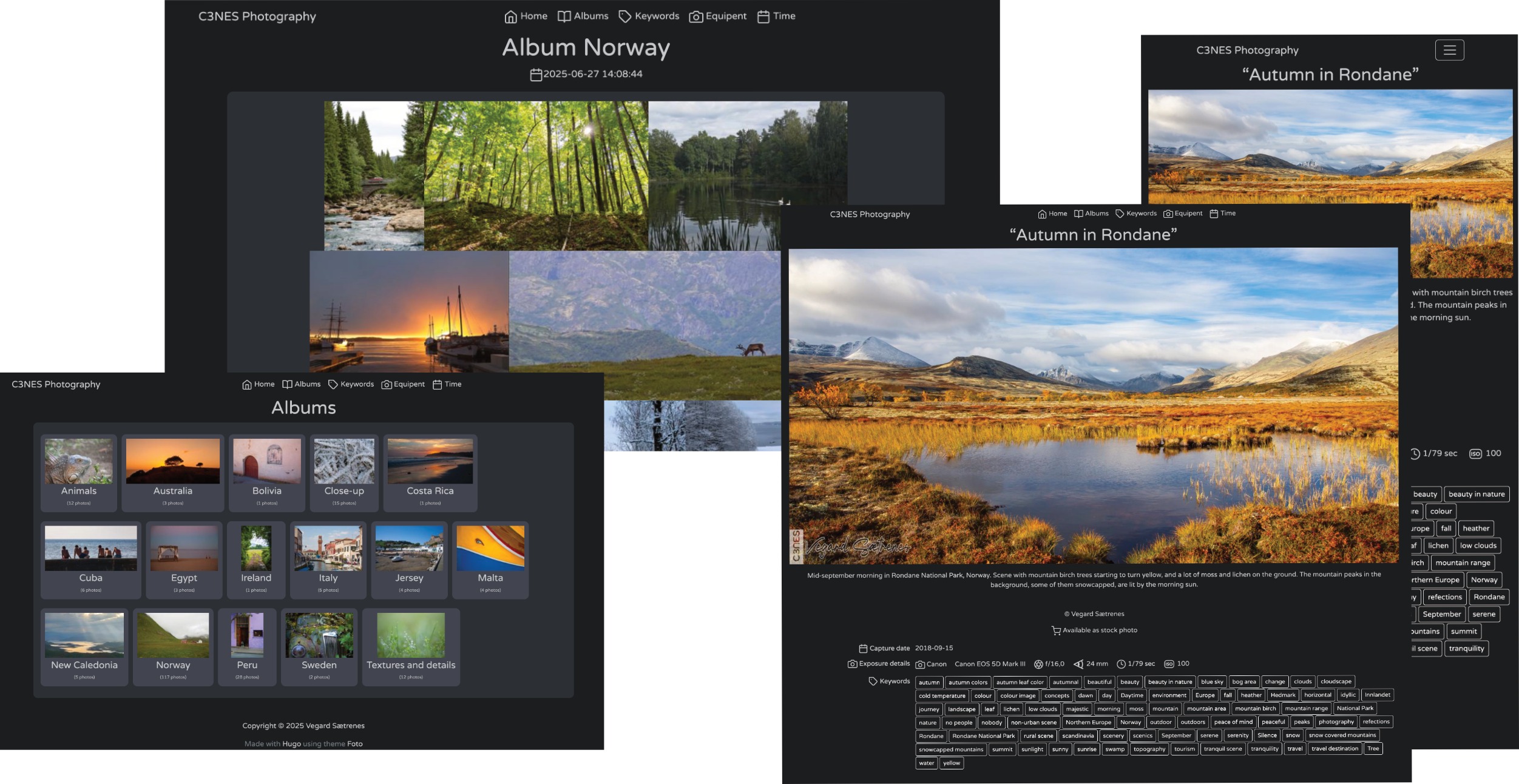
配套 Hippo 工具从照片提取标题、描述、版权、拍摄时间、关键词、焦距、光圈、曝光时间、ISO、相机厂商与型号等元数据
Hugo启动器
hugo-foto-theme — Hugo 启动器模板
作者 nux-li
基于 Hugo 的摄影作品画廊主题,配合 Kotlin 编写的 Hippo 工具读取照片元数据、缩放图片并生成内容页。
看看你的网站会是什么样
浏览真实页面截图,比较内容排版与手机效果。点击下方缩略图切换,放大查看整页细节。
目前有 1 张原始预览,可打开完整图片查看设计细节。
截图用于了解视觉与布局,交互效果请以实际项目为准。
采集于 2026-10-04查看来源
值得关注的模板亮点
从已有项目资料中,快速了解它的特点。
Hippo 负责图片缩放并为每张图片和相册生成 front matter 内容页
支持在 assets/watermarks 放置 watermark_main.png 与 watermark_subtle.png 两类水印,并通过 UL、UR、LL、LR 及 _C 组合代码指定位置
照片按相册组织在 content/albums 下,支持多层子文件夹/子相册
提供 --demo 生成示例站点、--clear 清除示例页面
主题代码采用 MIT 许可
模板详细介绍
这是一个面向摄影师的 Hugo 主题,用于把照片发布成画廊。它本身不直接处理图片,而是依赖配套工具 Hippo(Hugo Image Preprocessor)完成三件事:从照片中提取元数据、按需缩放图片(可加水印)、为每张图片和每个相册生成 front matter 内容页。
主题从每张照片中读取的元数据字段包括标题、描述、版权署名、拍摄日期与时间、关键词、焦距、光圈值、曝光时间、ISO 等效值以及相机厂商与型号。这些字段会进入 Hugo 内容页,因此使用前最好先用 Darktable、Adobe Lightroom、On1 Photo Raw 等软件为照片写好标题和描述等元数据。
使用方式上,主题通过 Git Submodule 加入项目的 themes/foto 目录,并在 hugo.toml 中设置 theme 与 params.credit。照片按相册组织,放在 content/albums 下,可有多层子文件夹/子相册,按地域、风格或日期分组。Hippo 提供 --demo 生成示例页面、--clear 清除示例页面、--watermark 添加水印等选项。水印文件放在 assets/watermarks 下,分为角落可见水印 watermark_main.png 和居中弱化水印 watermark_subtle.png,通过 UL、UR、LL、LR 及带 _C 的组合代码指定位置。
限制方面:需要本机安装 Java 21 或更高版本的运行时才能运行 Hippo;Windows 下需把 hippo.sh 换成 hippo.bat;--clear 具有破坏性,开始使用自己的照片后不宜再执行。主题代码采用 MIT 许可,但演示图片、字体、图标等第三方素材需按各自许可单独核对,域名、托管等外部服务也可能另外收费。
Hugo启动器
适合你的项目吗?
适用场景
- 摄影师把带元数据的照片整理成可发布的在线画廊
- 按地域、风格或日期把照片分组为多级相册
- 为照片批量添加角落可见水印或居中弱化水印
- 先用示例照片运行演示站点,确认效果后再替换为自己的作品
适合人群
- 使用 Hugo 搭建个人作品展示站的摄影师
- 照片已带有标题、描述等元数据,希望直接复用到页面内容的用户
- 需要在发布前统一缩放图片并加水印的摄影项目
- 能自行安装并运行 Java 21 或更高版本运行时的开发者
上手与定制指南
结合仓库当前版本的说明,按下面的资料检查内容、配置与运行要求。
- 1
本机需安装 Java 21 或更高版本的运行时,Hippo 由 Kotlin 编写并依赖它运行
- 2
通过 git submodule add 把主题加入 themes/foto,并在 hugo.toml 中设置 theme = "foto" 和 params.credit
- 3
Windows 环境下把命令中的 hippo.sh 替换为 hippo.bat,选项与参数保持一致
- 4
运行 ./hippo.sh --demo 生成示例页面后用 hugo server -D 预览;--clear 会删除示例页面,开始使用自己的照片后不宜再执行
- 5
水印 PNG 放在 assets/watermarks 下,运行 hippo 时用 --watermark 加位置代码(如 LL_C)启用
授权与来源资料
使用条件与限制
免费使用 · 保留许可声明本次收录的是公开仓库中采用 MIT 许可的免费版本;免费范围为该版本代码,不代表外部服务或第三方素材免费。
使用时需要遵守
- 允许免费使用、修改、商用和分发该版本代码。
- 分发代码副本或实质性部分时,保留原作者版权声明和完整 MIT 许可声明。
- 代码按现状提供;担保与责任限制以原许可证及适用法律为准。
额外费用与待核对事项
- 使用该主题需在本机安装 Java 21 或更高版本的运行时,否则无法运行配套的 Hippo 工具进行元数据提取、图片缩放和内容页生成。
- 在 Windows 系统上使用时,需将所有 hippo.sh 命令替换为 hippo.bat,选项与参数保持一致。
- --clear 操作具有破坏性,会删除示例页面;开始使用自己的照片后不宜再执行该命令。
- 作者提供购买其照片作为支持方式,属自愿赞助,不影响主题的免费使用。
- 演示图片、字体、图标及其他第三方素材需按各自许可核对,不能仅凭代码的 MIT 许可判断。
- 域名、托管、数据库、支付或 AI 等外部服务可能另外收费。
查看原文依据
Permission is hereby granted, free of charge
许可证原文
you will need Java Runtime Environment (Java version 21 or newer) on your machine in order to run it
README 原文
If you are using Windows operating system - replace all usage of `hippo.sh` with `hippo.bat`
README 原文
This operation is a bit destructive, and you should probably not use it once you start using your own images.
README 原文
https://github.com/nux-li/hugo-foto-theme/blob/main/LICENSEhttps://github.com/nux-li/hugo-foto-theme/blob/main/README.mdConsider supporting by [purchasing one of my photos](https://c3n.es/marketplace/picfair/)
README 原文
DeepSeek 根据仓库许可证和 README 整理 ·2026-10-04。结果仅覆盖已读取资料,依赖、图片、字体及后续条款变更以各自原文为准。
项目核对记录与介绍依据
模板资料
- 来源平台
- Hugo Themes
- 资料与维护参考分
- 资料一般 · 65 / 100
- 技术栈
- Hugo
- 网站类型
- 启动器
这个分数如何计算
本站按许可资料(最高30分)、演示链接(12分)、预览图(10分)、Star数(15分)、记录的维护时间(15分)、描述完整度(8分)、功能记录(5分)和分类资料(5分)计算。它不是代码、安全或性能测试,也不是 Google 评分;有链接不代表已实测可用。
这个项目需要核对什么
- 记录的仓库更新时间
- 2025-08-28
- 截图检查日期
- 2026-10-04
目前没有记录演示链接。请依据仓库说明在本地评估;仅凭截图无法确认交互行为。
目录记录的主要技术栈是 Hugo。请通过依赖清单和锁文件核对实际版本与托管要求。这些说明基于收录资料,不代表代码审计或部署实测。
查看具体选型方法 →介绍的制作与核对状态
介绍由 AI 辅助整理目录与仓库资料。仓库作者不等于这篇介绍的审核者。
审核声明: [email protected] · 2026-10-04
查看当时使用的来源资料
SHA-256: 358080b0fa18b4c51209321a97a586cbf1945c0b414955903e5eb396dfd3065a
2026-10-04T02:47:44.698Z
来源文件 / 仓库# Foto, a theme for [Hugo](https://gohugo.io/), the world famous static site generator
The intent of this theme is to provide a gallery solution for photographers wanting to publish their work as a photo gallery. Together with the bundled software Hippo (Hugo Image Preprocessor) images placed in the content folder will be resized, with or without watermark. Metadata is extracted and placed in Hugo content pages.

[EXAMPLE SITE](https://c3n.es/)
Features
## Prerequisites
This theme uses [Hippo](https://github.com/nux-li/hippo) for extraction of metadata, resizing of images, and for generating front matters for every image and album.
Hippo is written in Kotlin, and you will need Java Runtime Environment (Java version 21 or newer) on your machine in order to run it.
In order to take full advantage of this theme, you should have a selection of photos with metadata attached.
For preparing photos one can use software such as
[Darktable](https://www.darktable.org/),
[Adobe Lightroom](https://lightroom.adobe.com/),
[On1 Photo Raw](https://www.on1.com/products/photo-raw/),
or similar. These programs can be used to add titles and descriptions as metadata for your photos.
The following metadata fields are extracted from each photo:
* title
* description
* credit
* capture date and time
* keywords
* focal length
* aperture / f-number
* exposure time
* iso equivalent
* camera make and model
## Installation
Make sure you have Java version 21 or newer on your machine. https://jdk.java.net/24/
### Add theme as a Git Submodule
```sh
git init
git submodule add --depth=1 https://github.com/nux-li/hugo-foto-theme.git themes/foto
```
Then update your `hugo.toml` with the name of the theme:
```toml
theme = "foto"
```
Also add this to the end of the `hugo.toml` file:
```toml
[params]
credit = '** Your name **'
```
Replace `** Your name **` with your name.
## Getting started
If you are using Windows operating system - replace all usage of `hippo.sh` with `hippo.bat`,
but use same options and parameters.
### Run demo site
In order to test the theme with example photos, do this:
* Go to the theme directory
```sh
cd theme/foto
```
* Use `hippo` to create demo pages
```shell
./hippo.sh --demo
```
* Go to back to your project's root directory
```sh
cd ../..
```
* Start Hugo
```shell
hugo server -D
```
In order to see your demo site, enter [`localhost:1313`](http://localhost:1313/) in the address bar of your browser.
### Remove demo pages
In order to delete the demo pages, use the clear flag with `hippo`:
```shell
cd theme/foto
./hippo.sh --clear
```
This operation is a bit destructive, and you should probably not use it once you start using your own images.
### Start using your own photos
Now you can copy your own images into different albums within the `content/albums` directory.
Is it possible to have several levels of subfolders / sub-albums. Choose how you will group your photos:
by geography, by style, by date etc.
When you have copied your images to different subfolders within `content/albums`, you can run `hippo` again (but if you want watermarks, please read further):
```shell
cd theme/foto
./hippo.sh
```
### Use your own watermark with your photos
There is two kinds of watermarks that can be added to your photos. The watermark files should be placed
under `assets/watermarks`:
| Filename | Description |
|----------------------|-------------------------------------------------------------------|
| watermark_main.png | Visible watermark to be placed in one of the image's four corners |
| watermark_subtle.png | Barely visible watermark placed in the middle of the image |
You can use your own watermarks by preparing two PNGs in the above mentioned location.
By using an extra option when running `hippo`, your watermark will be placed in a corner of every
image (Certain size requirements apply here). The watermark option requires one of the following placement codes:
| Placement code | Watermark placement |
|----------------|----------------------------|
| UL | Upper left corner |
| UR | Upper right corner |
| LL | Lower left corner |
| LR | Lower right corner |
| UL_C | Upper left corner + center |
| UR_C | Upper right corner + center |
| LL_C | Lower left corner + center |
| LR_C | Lower right corner + center |
In order to add a watermark in the lower left corner and a barely visible watermark in the middle, add
option `--watermark LL_C` to the `hippo` command:
Example:
```shell
cd theme/foto
./hippo.sh --watermark LL_C
```
Start Hugo from Hugo projects root folder
```shell
hugo server -D
```
And watch your site In order to see your demo site, by entering [`localhost:1313`](http://localhost:1313/) in the address bar of your browser.
Or if you site is ready for production, and you have specified your domain in the baseURL setting, you can generate files for production:
```shell
hugo --environment production --cleanDestinationDir
```
## Contributing
If you find a bug feel free to use the [issue tracker](https://github.com/nux-li/hugo-foto-theme/issues) to let me know.
## Do you like the theme?
Consider supporting by [purchasing one of my photos](https://c3n.es/marketplace/picfair/). 看看同类模板
对比同技术栈与用途的模板,找到更适合的视觉与内容结构。

hugo-xmin
eXtremely Minimal Hugo theme: about 140 lines of code in total, including HTML and CSS (with no dependencies)
Hugo · 启动器

hugo-theme-gallery
Gallery Theme for Hugo
Hugo · 启动器

reveal-hugo
📽️ Create rich HTML-based presentations with Hugo and Reveal.js
Hugo · 启动器

anatole
Anatole is a minimalistic two-column theme for Hugo.
Hugo · 启动器

hugo-theme-diary
Moments piled up. A Hugo theme ported from SumiMakito/hexo-theme-Journal.
Hugo · 启动器

risotto
A minimalist, responsive hugo theme inspired by terminal ricing aesthetics.
Hugo · 启动器