A clean theme built with Hugo and Tailwind CSS
HugoStarter
Blonde — Hugo Starter Template
By opera7133
Blonde is a clean Hugo theme built with Tailwind CSS, offering a responsive layout, dark mode, widgets, pagination, syntax highlighting, RSS, tag and category archives, plus optional search and comments.
Explore the design
Compare the page layouts and mobile experience. Open any screenshot for a closer look.
Desktop homepage1 / 3
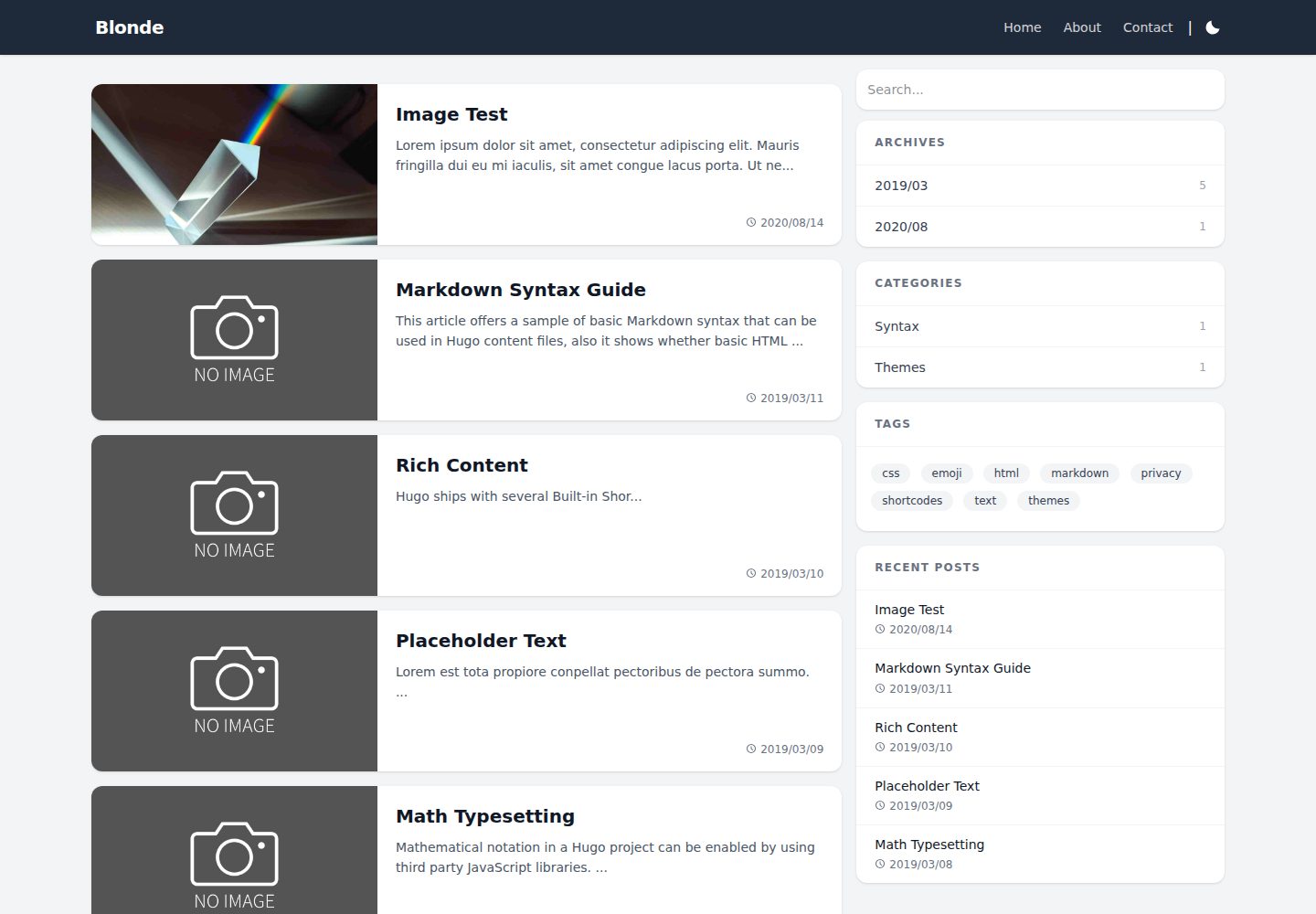
Desktop captureTop of page
Actual screenshot captured by the server browser.
All pages & views 3
Screenshots show visual appearance; interactive behavior may differ.
Recorded 2026-10-02View source
What stands out
A quick read of the recorded project description.
Responsive layout with dark and light modes
Built-in widgets, pagination, syntax highlighting, and RSS feeds
Support for tags, categories, and archive pages
Search can use Google Search or Pagefind; comments can use Disqus or Gisqus
Google Analytics and Google AdSense can be integrated
Template Details
Blonde is a Hugo theme published on Hugo Themes, maintained by opera7133 in a repository under the MIT license. It builds its interface with Tailwind CSS and is positioned as a clean theme for blogs or content sites. The demo site is blonde.pages.dev, and the repository currently has about 124 stars.
The theme includes a responsive layout, dark/light mode toggle, widgets, pagination, code syntax highlighting, RSS feeds, and support for tags, categories, and archive pages. For search, you can choose between Google Search and Pagefind; for comments, Disqus and Gisqus are supported. Google Analytics and Google AdSense can also be integrated through configuration. The perfect Lighthouse scores listed in the README are the author's own claims; this introduction makes no performance guarantees.
There are two installation methods: clone the repository into the themes/Blonde directory of your Hugo site, or add it as a git submodule. Before use, copy package.json from exampleSite to the site root and run npm install, because the theme depends on a locally installed Tailwind CSS. The README states that Hugo 0.161.0 or later requires Node.js 22 or later, and that the standalone Tailwind CSS executable is no longer supported.
For configuration, copy hugo.toml from exampleSite to the site root and modify it as needed. The example configuration uses locale (introduced in Hugo 0.158.0); older Hugo versions need to use languageCode instead, and the templates support both forms. If you merge the example configuration into an existing hugo.toml, keep the [build], [module], and [security] sections; Hugo 0.165.0 or later requires [security.exec] to be configured so Hugo can invoke the locally installed Tailwind CSS CLI. To enable Pagefind, replace search in widgets with pagefind and run npx -y pagefind --site public after building.
The license scope is limited to the code of this version itself; third-party assets such as demo images, fonts, and icons must be checked against their respective licenses. In the repository, Material Icons under assets/icons are Apache 2.0, and Bootstrap Icons are MIT.
HugoLauncher
Is it right for your project?
Use Cases
- Building a personal blog or content site
- Hugo sites that need dark mode and a responsive reading experience
- Projects that want to customize styles with Tailwind CSS
- Documentation or article sites that need tags, categories, archives, and search
Suitable For
- Developers building sites with Hugo
- Users who prefer a Tailwind CSS workflow
- Personal or team projects that need an MIT-licensed theme
- Bloggers who need dark mode and RSS
Getting started & customization
Use these recorded setup notes alongside the repository instructions for your chosen version.
- 1
Clone the repository or add it as a git submodule to the themes/Blonde directory
- 2
Copy package.json from exampleSite to the site root and run npm install
- 3
Copy hugo.toml from exampleSite to the site root and modify it as needed
- 4
Hugo 0.161.0 and above require Node.js 22 or later, and the standalone Tailwind CSS executable is not supported
- 5
To enable Pagefind, modify the widgets configuration and run npx -y pagefind --site public after building
License & source material
Usage conditions & limitations
Free to use · keep license noticeThis entry covers the free version under the MIT license in the public repository; the free scope is the code of this version and does not mean external services or third-party assets are free.
Must comply with when using
- You may use, modify, commercialize, and distribute the code of this version for free.
- When distributing copies or substantial portions of the code, retain the original author's copyright notice and the full MIT license notice.
- The code is provided as is; warranties and limitations of liability are governed by the original license and applicable law.
Additional costs & items to verify
- When using Hugo 0.161.0 or later, Node.js 22 or later must be installed, otherwise the build will not work properly.
- Hugo 0.161.0 and above do not support the standalone Tailwind CSS executable; Tailwind CSS must be installed as a local Node.js package.
- When using Hugo 0.165.0 or later, [security.exec] must be set in the configuration, otherwise Hugo cannot invoke the locally installed Tailwind CSS CLI.
- The example configuration uses locale, introduced in Hugo 0.158.0; if you use an earlier Hugo version, replace it with languageCode.
- When enabling Pagefind search, you must additionally run npx -y pagefind --site public after building the site to generate the search index.
- The icons under assets/icons in the repository are third-party assets: Material Icons are Apache 2.0 and Bootstrap Icons are MIT, and must be used under their respective licenses.
- Demo images, fonts, icons, and other third-party assets must be checked against their respective licenses; the code's MIT license alone is not sufficient to judge them.
- External services such as domains, hosting, databases, payments, or AI may incur separate charges.
View Original Text Basis
Permission is hereby granted, free of charge
Original License Text
Blonde requires Node.js 22 or later when used with Hugo 0.161.0 or later.
Original README
The standalone Tailwind CSS executable is not supported by Hugo 0.161.0 or later.
Original README
The `[security.exec]` setting is required with Hugo 0.165.0 or later so Hugo can run the locally installed Tailwind CSS CLI.
Original README
The example configuration uses `locale`, which was introduced in Hugo 0.158.0. When using an older Hugo release, replace `locale` with `languageCode`.
Original README
Then run the following command after building your site: ``` npx -y pagefind --site public ```
Original README
https://github.com/opera7133/Blonde/blob/master/LICENSEhttps://github.com/opera7133/Blonde/blob/master/README.mdRegarding the icons in assets/icons, Material Icons are licensed under the Apache 2.0 License, and Bootstrap Icons are licensed under the MIT License.
Original README
Compiled by DeepSeek based on repository license and README ·2026-10-02. Results only cover the materials read; dependencies, images, fonts, and subsequent term changes are subject to their respective original texts.
Project checks & description sources
Template Information
- Source platforms
- Hugo Themes
- Documentation and maintenance reference score
- More documented · 91 / 100
- Technologies
- Hugo
- Website type
- Starter
How this score is calculated
Our heuristic uses license records (up to 30), a demo link (12), a preview (10), stars (15), recorded maintenance (15), description completeness (8), feature records (5) and classification data (5). It is not a code, security or performance test, or a Google score. A link does not establish tested functionality.
What to verify for this project
- Repository update recorded
- 2026-08-30
- Screenshot last checked
- 2026-10-02
A demo link is listed. Check it with your own content and viewport sizes; its presence does not confirm that forms, authentication or payments work.
The catalog identifies Hugo as the primary stack. Check the actual dependency manifest and lockfile for versions and hosting requirements. These notes use recorded metadata, not a code audit or a deployment test.
Use a selection guide →How this description was prepared
AI-assisted description based on catalog records and repository material. Repository authors are not automatically the reviewers of this description.
Automatically checked against source and license rules; no manual editorial review.
Inspect the recorded source material
SHA-256: 4f1722b6277579d8a6c03fa0d7676c5de22a6cdc5fceb4c0aa22a4eedde4bf29
2026-10-02T21:37:17.207Z
Source file / repository# Blonde  Blonde, A simple theme using Tailwind CSS. The demo can be seen here: https://blonde.pages.dev ## Features - Responsive - Dark/Light mode - Google Analytics - Google AdSense - Widgets - Pagination - Syntax Highlight - RSS feeds - Support tags and categories and archives - Page search (with Google Search or Pagefind) - Disqus / Gisqus - [100/100 Google Lighthouse speed score](https://pagespeed.web.dev/analysis/https-blonde-pages-dev/jiu5fx88oj?form_factor=mobile) ## Installation ### Method 1 Inside the folder of your Hugo site run: ```bash git clone https://github.com/opera7133/Blonde themes/Blonde ``` Updating theme: ```bash cd themes/Blonde git pull ``` ### Method 2 Inside the folder of your Hugo site run: ```bash git submodule add https://github.com/opera7133/Blonde.git themes/Blonde ``` Updating theme: ```bash git submodule update --remote --merge ``` ### Install dependencies Copy at least the following files from `themes/Blonde/exampleSite` to the root folder of your site. - package.json Blonde requires Node.js 22 or later when used with Hugo 0.161.0 or later. After copying the file, install the dependencies from the root folder of your site: ```bash npm install ``` The standalone Tailwind CSS executable is not supported by Hugo 0.161.0 or later. The included `package.json` installs Tailwind CSS as a local Node.js package instead. For more information read the official [installation guide](https://gohugo.io/installation/) for Hugo. ## Getting started After installing the theme successfully it requires a just a few more steps to get your site running. ### Update config file Copy the `hugo.toml` in the exampleSite to the root of your Hugo site. Change strings as you like. The example configuration uses `locale`, which was introduced in Hugo 0.158.0. When using an older Hugo release, replace `locale` with `languageCode`. The theme templates support both forms. If you merge the example configuration into an existing `hugo.toml` instead of copying it, include the `[build]`, `[module]`, and `[security]` sections. The `[security.exec]` setting is required with Hugo 0.165.0 or later so Hugo can run the locally installed Tailwind CSS CLI. ### Check your site In order to see your site in action, run Hugo's built-in local server. ```bash hugo server ``` Now enter `localhost:1313` in the address bar of your browser. ### Build your site ```bash hugo ``` ### Using Pagefind (optional) You can use pagefind by changing following line in `hugo.toml`: ```diff - widgets = ["search", "archive", "category", "tags", "recent"] + widgets = ["pagefind", "archive", "category", "tags", "recent"] ``` Then run the following command after building your site: ``` npx -y pagefind --site public ``` ## Contributing If you find a bug or have an idea for a feature, feel free to write an [issue](https://github.com/opera7133/Blonde/issues) or make a PR. ## License This theme is released under the [MIT license](https://github.com/opera7133/Blonde/blob/master/LICENSE). Regarding the icons in assets/icons, Material Icons are licensed under the Apache 2.0 License, and Bootstrap Icons are licensed under the MIT License. - [Material Icons : Google](https://github.com/google/material-design-icons) - [Bootstrap Icons : The Bootstrap Authors](https://github.com/twbs/icons)
Explore similar templates
Compare previews and descriptions within the same stack and category.

hugo-xmin
hugo-xmin is an extremely minimal Hugo theme written by Yihui Xie for template beginners. HTML and CSS total about 140 lines, with no external dependencies, and it uses the MIT license.
Hugo · Starter

hugo-theme-gallery
A Hugo Extended photo gallery theme that organizes images with Page Bundles, automatically generating album lists and gallery pages with a Justified layout and PhotoSwipe lightbox.
Hugo · Starter

reveal-hugo
reveal-hugo is a Hugo theme that converts Markdown content into Reveal.js-based HTML presentations. It supports slide separation with `---`, shortcodes for fragments, slides, sections, notes, Markdown, and MathJax, and organizes content as root or section presentations with order controlled by weight.
Hugo · Starter

anatole
Anatole is a minimalistic two-column Hugo theme ported from farbox-theme-Anatole, featuring dark mode, multilingual and RTL support, and optional portfolio, comments, analytics, KaTeX, and Mermaid integrations. It suits personal blogs, portfolios, or documentation sites built with Hugo.
Hugo · Starter

hugo-theme-diary
A Hugo diary-style theme ported from the Hexo theme Journal, with a grid homepage for essays and daily notes. It supports six languages, dark mode, table-of-contents scroll positioning, reading time, code highlighting, and configurable sidebar, fonts, and colors.
Hugo · Starter

risotto
risotto is a minimalist, responsive Hugo theme inspired by terminal ricing aesthetics. It uses semantic HTML and pure CSS with no JavaScript, and its layout relies on CSS Grid for native responsiveness without manual breakpoints.
Hugo · Starter