基于 Hugo 与 Tailwind CSS 构建的简洁主题
Hugo启动器
Blonde — Hugo 启动器模板
作者 opera7133
Blonde 是一个基于 Hugo 与 Tailwind CSS 的简洁主题,提供响应式布局、深色模式、小工具、分页、语法高亮、RSS、标签与分类归档,以及搜索和评论等可选功能。
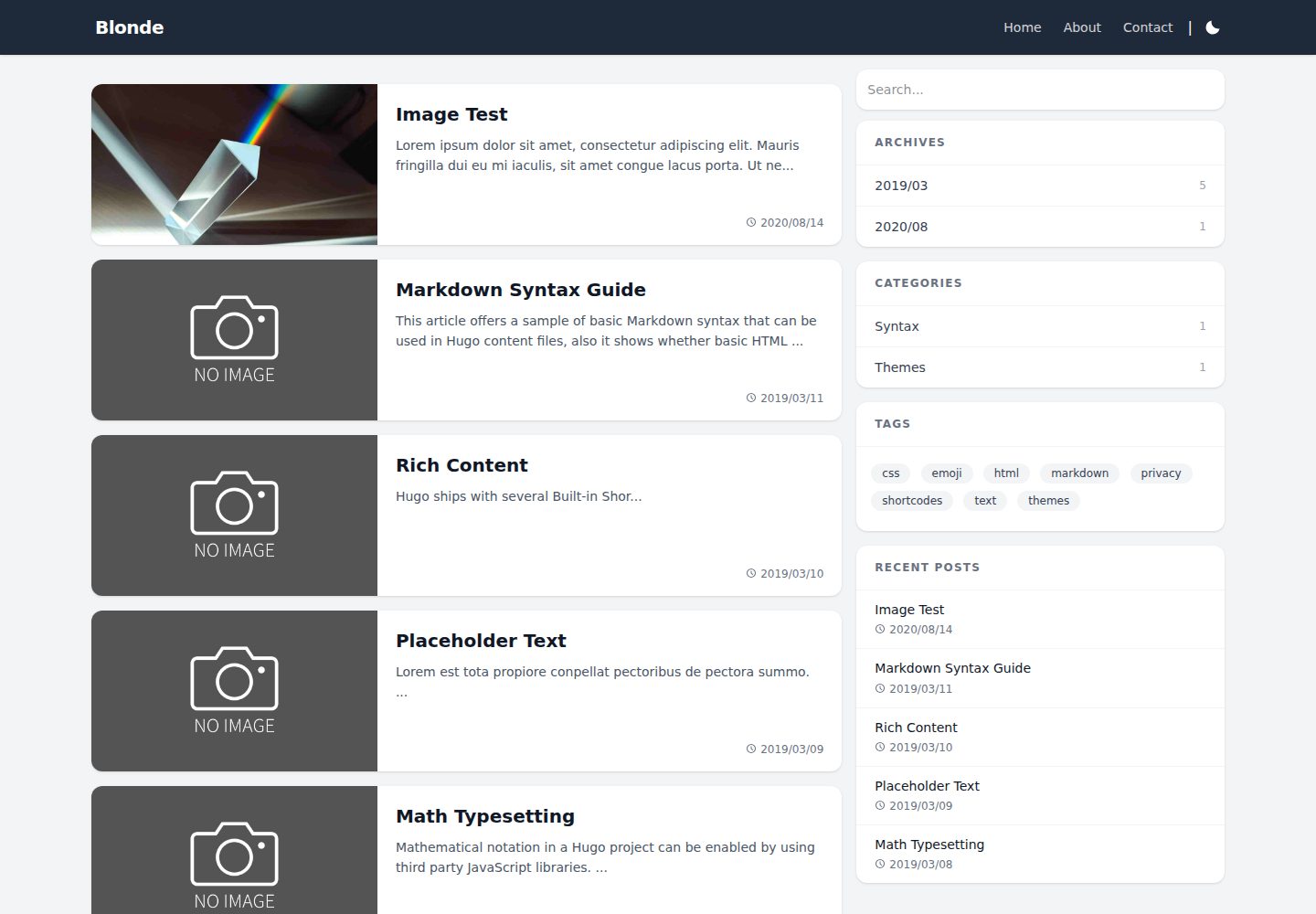
看看你的网站会是什么样
浏览真实页面截图,比较内容排版与手机效果。点击下方缩略图切换,放大查看整页细节。
全部页面与视图 3
截图用于了解视觉与布局,交互效果请以实际项目为准。
采集于 2026-10-02查看来源
值得关注的模板亮点
从已有项目资料中,快速了解它的特点。
响应式布局,支持深色与浅色模式
内置小工具、分页、语法高亮与 RSS 订阅
支持标签、分类与归档页面
搜索可选 Google 搜索或 Pagefind,评论可选 Disqus 或 Gisqus
可接入 Google Analytics 与 Google AdSense
模板详细介绍
Blonde 是发布在 Hugo Themes 上的 Hugo 主题,仓库由 opera7133 维护,采用 MIT 许可。它使用 Tailwind CSS 构建界面,定位为简洁的博客或内容站点主题。演示站点为 blonde.pages.dev,仓库当前获得约 124 颗星。
主题自带响应式布局、深色/浅色模式切换、小工具(widgets)、分页、代码语法高亮、RSS 订阅,并支持标签、分类与归档页面。搜索方面可在 Google 搜索与 Pagefind 之间选择;评论方面支持 Disqus 与 Gisqus。配置中还可接入 Google Analytics 与 Google AdSense。README 中列出的 Lighthouse 满分属于作者自述,本介绍不作性能保证。
安装方式有两种:将仓库克隆到 Hugo 站点的 themes/Blonde 目录,或作为 git submodule 添加。使用前需要从 exampleSite 复制 package.json 到站点根目录并执行 npm install,因为主题依赖本地安装的 Tailwind CSS。README 说明在 Hugo 0.161.0 或更高版本下需要 Node.js 22 或更高版本,且不再支持独立的 Tailwind CSS 可执行文件。
配置方面,需要把 exampleSite 中的 hugo.toml 复制到站点根目录并按需修改。示例配置使用 locale(Hugo 0.158.0 引入),旧版本 Hugo 需改用 languageCode,模板同时支持两种写法。若把示例配置合并进已有 hugo.toml,需保留 [build]、[module] 与 [security] 段;Hugo 0.165.0 或更高版本要求配置 [security.exec],以便 Hugo 调用本地安装的 Tailwind CSS CLI。启用 Pagefind 时,把 widgets 中的 search 换成 pagefind,并在构建后运行 npx -y pagefind --site public。
许可范围限于该版本代码本身;演示图片、字体、图标等第三方素材需按各自许可核对。仓库内 assets/icons 下的 Material Icons 采用 Apache 2.0,Bootstrap Icons 采用 MIT。
Hugo启动器
适合你的项目吗?
适用场景
- 搭建个人博客或内容型站点
- 需要深色模式与响应式阅读体验的 Hugo 站点
- 希望用 Tailwind CSS 自定义样式的项目
- 需要标签、分类、归档与搜索的文档或文章站
适合人群
- 使用 Hugo 建站的开发者
- 偏好 Tailwind CSS 工作流的用户
- 需要 MIT 许可主题的个人或团队项目
- 需要深色模式与 RSS 的博客作者
上手与定制指南
结合仓库当前版本的说明,按下面的资料检查内容、配置与运行要求。
- 1
将仓库克隆或作为 git submodule 添加到 themes/Blonde 目录
- 2
从 exampleSite 复制 package.json 到站点根目录并运行 npm install
- 3
复制 exampleSite 的 hugo.toml 到站点根目录并按需修改
- 4
Hugo 0.161.0 及以上需 Node.js 22 或更高版本,且不支持独立 Tailwind CSS 可执行文件
- 5
启用 Pagefind 需修改 widgets 配置并在构建后运行 npx -y pagefind --site public
授权与来源资料
使用条件与限制
免费使用 · 保留许可声明本次收录的是公开仓库中采用 MIT 许可的免费版本;免费范围为该版本代码,不代表外部服务或第三方素材免费。
使用时需要遵守
- 允许免费使用、修改、商用和分发该版本代码。
- 分发代码副本或实质性部分时,保留原作者版权声明和完整 MIT 许可声明。
- 代码按现状提供;担保与责任限制以原许可证及适用法律为准。
额外费用与待核对事项
- 使用 Hugo 0.161.0 或更高版本时,必须安装 Node.js 22 或更高版本,否则无法正常构建。
- Hugo 0.161.0 及以上版本不支持独立的 Tailwind CSS 可执行文件,必须通过本地 Node.js 包方式安装 Tailwind CSS。
- 使用 Hugo 0.165.0 或更高版本时,必须在配置中设置 [security.exec],否则 Hugo 无法调用本地安装的 Tailwind CSS CLI。
- 示例配置使用 Hugo 0.158.0 引入的 locale;若使用更早版本的 Hugo,需将其替换为 languageCode。
- 启用 Pagefind 搜索时,需在构建站点后额外运行 npx -y pagefind --site public 命令生成搜索索引。
- 仓库内 assets/icons 下的图标为第三方素材:Material Icons 采用 Apache 2.0 许可,Bootstrap Icons 采用 MIT 许可,需按各自许可使用。
- 演示图片、字体、图标及其他第三方素材需按各自许可核对,不能仅凭代码的 MIT 许可判断。
- 域名、托管、数据库、支付或 AI 等外部服务可能另外收费。
查看原文依据
Permission is hereby granted, free of charge
许可证原文
Blonde requires Node.js 22 or later when used with Hugo 0.161.0 or later.
README 原文
The standalone Tailwind CSS executable is not supported by Hugo 0.161.0 or later.
README 原文
The `[security.exec]` setting is required with Hugo 0.165.0 or later so Hugo can run the locally installed Tailwind CSS CLI.
README 原文
The example configuration uses `locale`, which was introduced in Hugo 0.158.0. When using an older Hugo release, replace `locale` with `languageCode`.
README 原文
Then run the following command after building your site: ``` npx -y pagefind --site public ```
README 原文
https://github.com/opera7133/Blonde/blob/master/LICENSEhttps://github.com/opera7133/Blonde/blob/master/README.mdRegarding the icons in assets/icons, Material Icons are licensed under the Apache 2.0 License, and Bootstrap Icons are licensed under the MIT License.
README 原文
DeepSeek 根据仓库许可证和 README 整理 ·2026-10-02。结果仅覆盖已读取资料,依赖、图片、字体及后续条款变更以各自原文为准。
项目核对记录与介绍依据
模板资料
- 来源平台
- Hugo Themes
- 资料与维护参考分
- 资料较完整 · 91 / 100
- 技术栈
- Hugo
- 网站类型
- 启动器
这个分数如何计算
本站按许可资料(最高30分)、演示链接(12分)、预览图(10分)、Star数(15分)、记录的维护时间(15分)、描述完整度(8分)、功能记录(5分)和分类资料(5分)计算。它不是代码、安全或性能测试,也不是 Google 评分;有链接不代表已实测可用。
这个项目需要核对什么
- 记录的仓库更新时间
- 2026-08-30
- 截图检查日期
- 2026-10-02
已收录演示链接。请用你的内容与屏幕尺寸检查;有演示不代表表单、认证或支付已经可用。
目录记录的主要技术栈是 Hugo。请通过依赖清单和锁文件核对实际版本与托管要求。这些说明基于收录资料,不代表代码审计或部署实测。
查看具体选型方法 →介绍的制作与核对状态
介绍由 AI 辅助整理目录与仓库资料。仓库作者不等于这篇介绍的审核者。
已完成服务器许可规则与 AI 来源核对;未经过人工编辑审核。
查看当时使用的来源资料
SHA-256: 4f1722b6277579d8a6c03fa0d7676c5de22a6cdc5fceb4c0aa22a4eedde4bf29
2026-10-02T21:37:17.207Z
来源文件 / 仓库# Blonde  Blonde, A simple theme using Tailwind CSS. The demo can be seen here: https://blonde.pages.dev ## Features - Responsive - Dark/Light mode - Google Analytics - Google AdSense - Widgets - Pagination - Syntax Highlight - RSS feeds - Support tags and categories and archives - Page search (with Google Search or Pagefind) - Disqus / Gisqus - [100/100 Google Lighthouse speed score](https://pagespeed.web.dev/analysis/https-blonde-pages-dev/jiu5fx88oj?form_factor=mobile) ## Installation ### Method 1 Inside the folder of your Hugo site run: ```bash git clone https://github.com/opera7133/Blonde themes/Blonde ``` Updating theme: ```bash cd themes/Blonde git pull ``` ### Method 2 Inside the folder of your Hugo site run: ```bash git submodule add https://github.com/opera7133/Blonde.git themes/Blonde ``` Updating theme: ```bash git submodule update --remote --merge ``` ### Install dependencies Copy at least the following files from `themes/Blonde/exampleSite` to the root folder of your site. - package.json Blonde requires Node.js 22 or later when used with Hugo 0.161.0 or later. After copying the file, install the dependencies from the root folder of your site: ```bash npm install ``` The standalone Tailwind CSS executable is not supported by Hugo 0.161.0 or later. The included `package.json` installs Tailwind CSS as a local Node.js package instead. For more information read the official [installation guide](https://gohugo.io/installation/) for Hugo. ## Getting started After installing the theme successfully it requires a just a few more steps to get your site running. ### Update config file Copy the `hugo.toml` in the exampleSite to the root of your Hugo site. Change strings as you like. The example configuration uses `locale`, which was introduced in Hugo 0.158.0. When using an older Hugo release, replace `locale` with `languageCode`. The theme templates support both forms. If you merge the example configuration into an existing `hugo.toml` instead of copying it, include the `[build]`, `[module]`, and `[security]` sections. The `[security.exec]` setting is required with Hugo 0.165.0 or later so Hugo can run the locally installed Tailwind CSS CLI. ### Check your site In order to see your site in action, run Hugo's built-in local server. ```bash hugo server ``` Now enter `localhost:1313` in the address bar of your browser. ### Build your site ```bash hugo ``` ### Using Pagefind (optional) You can use pagefind by changing following line in `hugo.toml`: ```diff - widgets = ["search", "archive", "category", "tags", "recent"] + widgets = ["pagefind", "archive", "category", "tags", "recent"] ``` Then run the following command after building your site: ``` npx -y pagefind --site public ``` ## Contributing If you find a bug or have an idea for a feature, feel free to write an [issue](https://github.com/opera7133/Blonde/issues) or make a PR. ## License This theme is released under the [MIT license](https://github.com/opera7133/Blonde/blob/master/LICENSE). Regarding the icons in assets/icons, Material Icons are licensed under the Apache 2.0 License, and Bootstrap Icons are licensed under the MIT License. - [Material Icons : Google](https://github.com/google/material-design-icons) - [Bootstrap Icons : The Bootstrap Authors](https://github.com/twbs/icons)
看看同类模板
对比同技术栈与用途的模板,找到更适合的视觉与内容结构。

hugo-xmin
eXtremely Minimal Hugo theme: about 140 lines of code in total, including HTML and CSS (with no dependencies)
Hugo · 启动器

hugo-theme-gallery
Gallery Theme for Hugo
Hugo · 启动器

reveal-hugo
📽️ Create rich HTML-based presentations with Hugo and Reveal.js
Hugo · 启动器

anatole
Anatole is a minimalistic two-column theme for Hugo.
Hugo · 启动器

hugo-theme-diary
Moments piled up. A Hugo theme ported from SumiMakito/hexo-theme-Journal.
Hugo · 启动器

risotto
A minimalist, responsive hugo theme inspired by terminal ricing aesthetics.
Hugo · 启动器