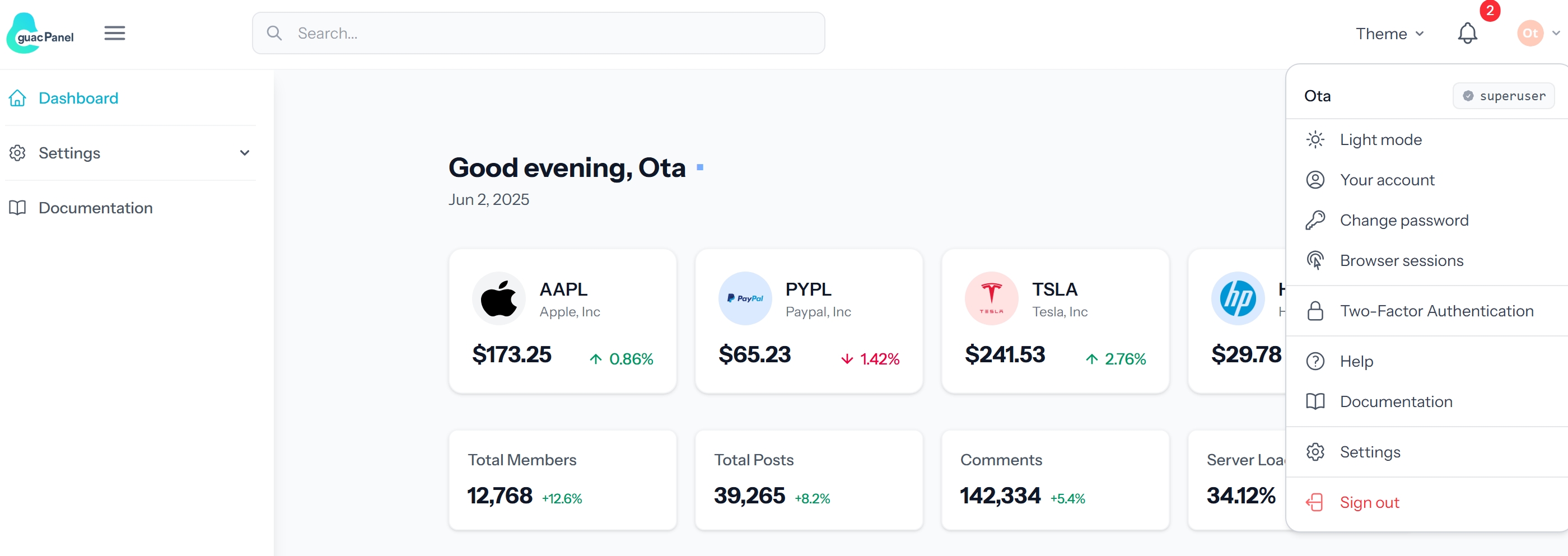
Built-in audit logs, login history, active session termination, and traceable impersonation cover the security capabilities needed for long-running admin panels
VueLaravelAdmin dashboardStarter
guacpanel-tailwind — Vue Admin dashboard Template
By otatechie
GuacPanel is a backend starter kit built on Laravel, Vue.js, Inertia.js, and Tailwind CSS, with built-in authentication, permissions, auditing, backups, and real-time notifications—common features for admin panels.
Explore the design
Compare the page layouts and mobile experience. Open any screenshot for a closer look.
Author preview
Author-provided preview
Preview provided in the project README.
One original preview is available. Open the full image to inspect the design.
Screenshots show visual appearance; interactive behavior may differ.
Recorded 2026-10-01View source
What stands out
A quick read of the recorded project description.
The frontend consists of directly editable Vue files, with shadcn-vue components behind a documented contract wrapper layer, making the component library easy to replace
Features are removed along documented seams, and tests verify that routes called by the frontend match actual routes
Provides a Cmd/Ctrl+K command palette that can search pages, actions, and data
Integrates TanStack Table server-side pagination, sorting, filtering, CSV export, and bulk actions
Provides real-time in-app notifications via Laravel Reverb, with a demo mode switchable via environment variables
Template Details
GuacPanel is an opinionated Laravel backend starter kit with a frontend composed of Vue.js, Inertia.js, and Tailwind CSS. It goes beyond providing just login and a dashboard, incorporating elements that admin panels need over the long term: audit logs that record who changed what, login history, terminable active sessions, protected and traceable impersonation, scheduled backups, health checks, and a command palette invoked with Cmd/Ctrl+K that can search pages, actions, and data.
Structurally, it emphasizes two points. The frontend consists of directly editable Vue files rather than components rendered by PHP; shadcn-vue components are placed behind a wrapper layer with a documented contract, allowing the component library to be replaced without touching pages. Second, it is designed to be trimmable: features are removed along documented seams, and tests cross-check every route called by the frontend against the routes that actually exist, preventing issues from surfacing only when a user makes a request after a feature is removed.
Feature coverage includes authentication and security (Fortify login, passwordless magic links, Socialite social login, two-factor authentication, Spatie Permission roles and permissions, session and login history management), interface (shadcn-vue wrapper layer, light/dark mode, responsive design, command palette, automatic avatars, theme settings), data visualization (Unovis line, area, bar, donut, and sparkline charts), data tables (TanStack Table server-side pagination, sorting, search filtering, CSV export, and bulk actions), file management (FilePond drag-and-drop upload, image preview, type and size validation), system features (Spatie Backup backups, Laravel Auditing activity logs, security event monitoring), and real-time in-app notifications via Laravel Reverb.
Before use, note the following: the runtime requires PHP 8.3 or higher, Node.js, and Composer; the database must be configured in .env; seed data creates two default accounts—a super user and a regular user—both with the password "password", suitable only for local starting and not to be used as-is in production. Third-party assets such as demo images, fonts, and icons must be checked against their respective licenses, and external services such as domains, hosting, databases, payments, or AI may incur separate charges.
VueLaravelAdmin panelStarter kit
Is it right for your project?
Use Cases
- Quickly building a Laravel admin panel with authentication, permissions, and auditing capabilities
- Maintaining the admin interface directly in Vue single-file components instead of PHP-rendered components
- Adding common modules such as data tables, charts, file uploads, and backups to an admin backend
- Requiring security-related features such as active session management, login history, and operation traceability
- Using it as a trimmable starting point and removing unneeded feature modules as required by the project
Suitable For
- Full-stack developers familiar with Laravel, Vue.js, and Inertia.js
- Technical teams that need a backend starter kit and plan to trim features themselves
- Projects that want a replaceable frontend component layer and decoupling between pages and the component library
- Mid-to-back-office projects that need foundational backend capabilities such as auditing, session management, and backups
Getting started & customization
Use these recorded setup notes alongside the repository instructions for your chosen version.
- 1
Requires PHP 8.3 or higher, the latest Node.js LTS, and Composer
- 2
Run composer install and npm install in sequence, copy .env.example to .env, and generate the application key
- 3
Configure the database connection in .env, then run php artisan migrate and php artisan db:seed
- 4
Run npm run dev and php artisan serve separately to start the development environment, then visit http://localhost:8000
- 5
Seed data creates two accounts, [email protected] and [email protected], both with the password "password", for local starting only
License & source material
Usage conditions & limitations
Free to use · keep license noticeThis entry covers the free version under the MIT license in the public repository; the free scope applies to that version's code and does not imply that external services or third-party assets are free.
Must comply with when using
- The code of this version may be used, modified, used commercially, and distributed free of charge.
- When distributing copies or substantial portions of the code, retain the original author's copyright notice and the full MIT license notice.
- The code is provided as-is; warranties and limitations of liability are governed by the original license and applicable law.
Additional costs & items to verify
- Social login depends on Laravel Socialite; you must register applications on platforms such as Google, GitHub, Facebook, and LinkedIn and configure client IDs and secrets, which are external service account requirements.
- You must prepare and configure a database connection yourself (e.g., MySQL host, port, database name, username, and password); the project itself does not provide a database service.
- Real-time notifications depend on the Laravel Reverb WebSocket service, which must be started separately; deployment requires running and maintaining this service additionally.
- Seed data creates two default accounts, [email protected] and [email protected], both with the password "password", suitable only for local starting and not to be used as-is in production.
- Demo images, fonts, icons, and other third-party assets must be checked against their respective licenses and cannot be judged solely by the code's MIT license.
- External services such as domains, hosting, databases, payments, or AI may incur separate charges.
View Original Text Basis
Permission is hereby granted, free of charge
Original License Text
Social Authentication with [Laravel Socialite](https://laravel.com/docs/socialite)
Original README
Configure your database in `.env`
Original README
Run locally with `php artisan reverb:start`
Original README
https://github.com/otatechie/guacpanel-tailwind/blob/main/LICENSE.mdhttps://github.com/otatechie/guacpanel-tailwind/blob/main/README.mdSeeding creates two accounts (configurable via the `SEED_*` variables in `.env`)
Original README
Compiled by DeepSeek based on repository license and README ·2026-10-01. Results only cover the materials read; dependencies, images, fonts, and subsequent term changes are subject to their respective original texts.
Project checks & description sources
Template Information
- Source platforms
- GitHub
- Documentation and maintenance reference score
- More documented · 96 / 100
- Technologies
- Vue · Laravel
- Website type
- Admin dashboard · Starter
How this score is calculated
Our heuristic uses license records (up to 30), a demo link (12), a preview (10), stars (15), recorded maintenance (15), description completeness (8), feature records (5) and classification data (5). It is not a code, security or performance test, or a Google score. A link does not establish tested functionality.
What to verify for this project
- Repository update recorded
- 2026-08-31
- Screenshot last checked
- 2026-10-01
A demo link is listed. Check it with your own content and viewport sizes; its presence does not confirm that forms, authentication or payments work.
The catalog identifies Vue as the primary stack. Check the actual dependency manifest and lockfile for versions and hosting requirements. These notes use recorded metadata, not a code audit or a deployment test.
Use a selection guide →How this description was prepared
AI-assisted description based on catalog records and repository material. Repository authors are not automatically the reviewers of this description.
Automatically checked against source and license rules; no manual editorial review.
Inspect the recorded source material
SHA-256: dd5aa00ef4d1eb46e0895ff037d3f3b2baabc29eeabb488600bcf922a809be54
2026-10-01T02:30:43.834Z
Source file / repository<div align="center">
<img src="https://github.com/user-attachments/assets/d1256dda-6820-4e21-bcee-36c82ffab1fc" alt="GuacPanel Logo" width="200">
</div>
# GuacPanel - Laravel Vue Admin Starter Kit
[](https://laravel.com)
[](https://vuejs.org)
[](https://tailwindcss.com)
[](https://opensource.org/license/MIT)
An opinionated Laravel admin starter kit built with Vue.js, Inertia.js and Tailwind CSS.
Most starter kits give you authentication and a dashboard. This one gives you the
things an admin panel needs on day 90: an audit trail of who changed what, login
history, live sessions you can terminate, guarded and logged impersonation,
scheduled backups, health checks, and a `Cmd/Ctrl+K` palette that searches your
pages, actions and data.
Two things make it different from the alternatives:
- **You own the frontend.** These are Vue files you edit, not PHP that renders
someone else's components. The shadcn-vue layer sits behind wrappers with a
documented contract ([docs/ui-contract.md](docs/ui-contract.md)), so the
component library is replaceable without touching a single page.
- **It is built to be cut down.** A starter kit is forked and stripped. Features
come out along documented seams ([REMOVING.md](REMOVING.md)), and a test
cross-checks every route the frontend calls against the ones that exist, so a
removal that breaks something fails your build instead of a user's request.
<table>
<tr>
<td><img src="https://github.com/user-attachments/assets/fa319d6a-695f-4d6f-95ea-16b72d128647" alt="Dashboard" width="100%"></td>
<td><img src="https://github.com/user-attachments/assets/7e32de33-8001-425f-a2bb-b08399005335" alt="Dark Mode" width="100%"></td>
</tr>
<tr>
<td><img src="https://github.com/user-attachments/assets/0bb0354f-b565-40f9-9cc8-9787ecd9a632" alt="Settings" width="100%"></td>
<td><img src="https://github.com/user-attachments/assets/e438b751-ad01-455a-93f4-04e37e1c9537" alt="Personalization" width="100%"></td>
</tr>
</table>
## Features
- 🔐 **Authentication & Security**
- Secure login with [Laravel Fortify](https://laravel.com/docs/fortify)
- Passwordless magic link authentication
- Social Authentication with [Laravel Socialite](https://laravel.com/docs/socialite)
- [Google](https://console.developers.google.com/)
- [GitHub](https://github.com/settings/applications/new) (Will work with local dev callback)
- [Facebook](https://developers.facebook.com/) (Will work with local dev callback)
- [LinkedIn](https://www.linkedin.com/developers/apps/) (Will work with local dev callback)
- Two-factor authentication (2FA) via [Laravel Fortify](https://laravel.com/docs/fortify#two-factor-authentication)
- Role-based permissions with [Spatie Permission](https://spatie.be/docs/laravel-permission)
- Visual role and permission management
- User role assignment interface
- Session and security management
- Active sessions overview
- Login history tracking
- Password policies enforcement
- 🎨 **Interface & Design**
- [shadcn-vue](https://www.shadcn-vue.com) primitives behind a wrapper layer, so pages
stay decoupled from the component library — see [docs/ui-contract.md](docs/ui-contract.md)
- Dark/Light mode with system preference detection
- Responsive design with [Tailwind CSS v4](https://tailwindcss.com/docs)
- Command palette on `Cmd/Ctrl+K`, searching pages, actions and your data
- Auto-generated avatars via [Laravel Avatar](https://github.com/laravolt/avatar)
- Customizable theme settings
- 📊 **Data Visualization**
- Interactive charts with [Unovis v1.6](https://unovis.dev)
- Line, Area, Bar, Donut and Sparkline
- Responsive and mobile-friendly
- Themed by the app's design tokens, so charts follow light/dark mode
- Shared legend, tooltip and axis formatting
- 📊 **Data Tables**
- Modern tables with [@tanstack/vue-table v8](https://tanstack.com/table/v8/docs)
- Server-side pagination
- Column sorting
- Search and filtering
- CSV export and bulk actions
- Row action menus with confirmation dialogs
- 📁 **File Management**
- Drag & drop uploads with [FilePond v4](https://pqina.nl/filepond/docs/)
- Image preview
- File type validation
- Size restrictions
- Multiple file selection
- 🔄 **System Features**
- Backup management via [Spatie Backup](https://spatie.be/docs/laravel-backup)
- User-friendly dashboard
- One-click backup creation
- Backup download
- Activity logging with [Laravel Auditing](https://laravel-auditing.com)
- User action tracking
- Data change history
- Security event monitoring
- 🔔 **Real-time Notifications (Laravel Reverb)**
- Live, in-app notifications via WebSockets (Reverb)
- Demo mode toggle via `APP_NOTIFICATIONS_IN_DEMO_MODE`
- Run locally with `php artisan reverb:start`
## Quick Start
### Prerequisites
- PHP >= 8.3
- Node.js & NPM (Latest LTS)
- Composer
### Installation
1. Clone the repository
```bash
git clone https://github.com/otatechie/guacpanel-tailwind.git
cd guacpanel-tailwind
```
2. Install dependencies
```bash
composer install
npm install
```
3. Set up environment
```bash
cp .env.example .env
php artisan key:generate
```
4. Configure your database in `.env`
```
DB_CONNECTION=mysql
DB_HOST=127.0.0.1
DB_PORT=3306
DB_DATABASE=your_database
DB_USERNAME=your_username
DB_PASSWORD=your_password
```
5. Run migrations and seed
```bash
php artisan migrate
php artisan db:seed
```
6. Start development servers
```bash
npm run dev
php artisan serve
```
**🎉 That's it!** Visit `http://localhost:8000` to see the app in action.
### Default login
Seeding creates two accounts (configurable via the `SEED_*` variables in `.env`):
| Account | Email | Password |
|---|---|---|
| Superuser | `[email protected]` | `password` |
| Regular user | `[email protected]` | `password` |
**🔗 External Resources**
- [Removing features](REMOVING.md) — what to delete, and the shared files to edit
- [UI component contract](docs/ui-contract.md) — the wrapper layer and its rules
- [GuacPanel Documentation](https://guacpanel.com)
- [Laravel Documentation](https://laravel.com/docs)
- [Fortify Documentation](https://laravel.com/docs/fortify)
- [Socialite Documentation](https://laravel.com/docs/socialite)
- [Vue.js Documentation](https://vuejs.org/guide/introduction.html)
- [Tailwind CSS Documentation](https://tailwindcss.com/docs)
- [Inertia.js Documentation](https://inertiajs.com/)
- [TanStack Table Documentation](https://tanstack.com/table/v8)
- [FilePond Documentation](https://pqina.nl/filepond/)
- [Unovis Documentation](https://unovis.dev/docs/intro)
- [shadcn-vue Documentation](https://www.shadcn-vue.com/docs/introduction.html)
## Contributing
We welcome contributions! Please see our [Contributing Guide](CONTRIBUTING.md) for details.
## License
[MIT License](https://opensource.org/license/MIT)
Explore similar templates
Compare previews and descriptions within the same stack and category.

vuestic-admin
Vuestic Admin is an open-source Vue 3 admin template maintained by Epicmax, built on Vuestic UI with Vite, Pinia, and Tailwind CSS. It provides a ready-to-run dashboard with a dark theme, global configuration, i18n internationalization, and responsive layout.
Vue · Admin dashboard

vitesse
Vitesse is an opinionated Vite + Vue 3 starter template maintained by antfu-collective, offering file-based routing, component and API auto-import, Pinia, UnoCSS, PWA, i18n, Markdown, vite-ssg, TypeScript, Vitest, and Cypress.
Vue · Starter

v3-admin-vite
v3-admin-vite is an AI-friendly Vue3 admin template built on Vue3, Vite, TypeScript, and Element Plus. It keeps a lean structure with detailed comments, supports backend-controlled dynamic route permissions, page-level and button-level permissions, multiple themes and layouts, and mobile compatibility.
Vue · Admin dashboard

vue-typescript-admin-template
A Vue 2.6 + TypeScript + Element UI admin template ported from vue-element-admin, offering type safety and enterprise features like permission authentication, internationalization, dynamic themes, editors, charts, Excel/PDF handling, and PWA support.
Vue · Admin dashboard

vue-antd-admin
Vue Antd Admin is the Vue implementation of Ant Design Pro, providing an out-of-the-box front-end and design solution for admin dashboards.
Vue · Admin dashboard

coreui-free-vue-admin-template
CoreUI's official free Vue admin template, MIT licensed, built on Vue 3 and the CoreUI component library with Vue Router, Pinia, and Vite.
Vue · Admin dashboard