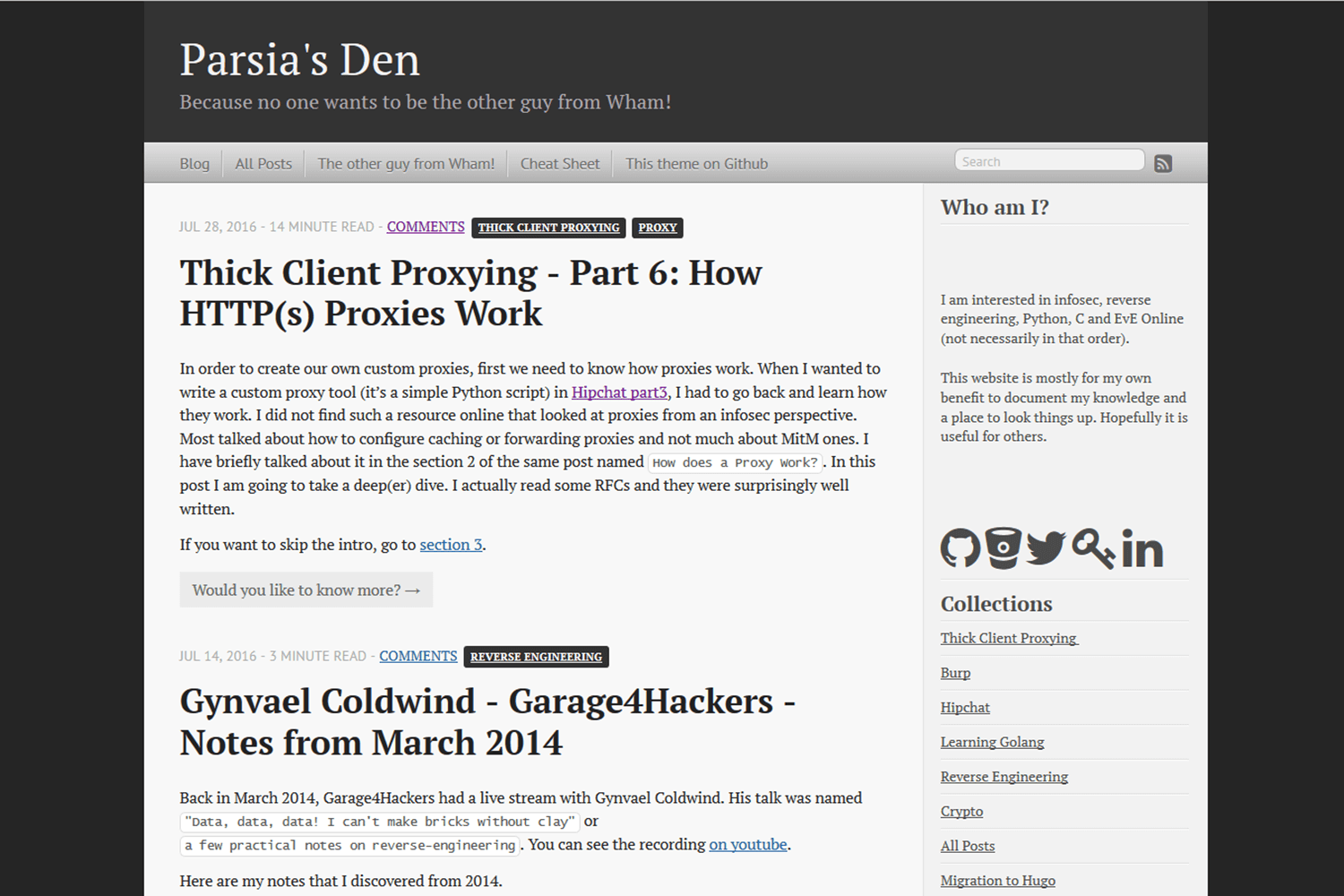
Ports the classic Octopress theme to Hugo, retaining structures such as the sidebar and navigation menu
HugoStarter
Hugo-Octopress — Hugo Starter Template
By parsiya
Hugo-Octopress is a starter template that ports the classic Octopress theme to Hugo, offering configuration options for the sidebar, navigation menu, code highlighting, and shortcodes.
Explore the design
Compare the page layouts and mobile experience. Open any screenshot for a closer look.
Author preview
Author-provided previewTop of page
Preview provided in the project README.
One original preview is available. Open the full image to inspect the design.
Screenshots show visual appearance; interactive behavior may differ.
Recorded 2026-10-02View source
What stands out
A quick read of the recorded project description.
Provides two runnable configuration examples: sample-config.toml and exampleSite/config.toml
Includes built-in shortcodes for code captions, image captions, and table of contents, located in layouts/shortcodes/
The sidebar contains four optional blocks: title text, social icons, sidebar menu, and recent posts
Supports overriding built-in styles via the customCSS parameter in the site's static directory
Code highlighting uses Chroma, defaulting to solarized-dark, and the style can be changed in the configuration
Template Details
Hugo-Octopress is a port of the classic Octopress theme to Hugo, maintained by parsiya and released under the MIT license. It targets existing or new Hugo sites and can be used by placing it in the themes directory via git submodule or cloning. The repository includes an exampleSite demo site, which can be previewed locally with hugo serve -vw --source=exampleSite.
The theme's configuration is centralized in the site configuration file, and the repository provides two runnable examples: sample-config.toml and exampleSite/config.toml. Configurable items include the navigation menu (sorted by weight, with an option to open in a new window), sidebar (title and text, social icons, sidebar menu, number of recent posts), custom CSS overrides, custom favicon, search URL, Disqus, and Twitter Card. The sidebar social icon sequence is hardcoded in the template; to modify it, copy social.html to the site's layouts directory and edit it there.
Code highlighting uses Hugo's built-in Chroma, with the default style solarized-dark, which can be switched to other supported styles in the configuration. The theme also provides shortcodes for code captions, image captions, and table of contents, and addresses differences between the Goldmark and Blackfriday Markdown engines: Blackfriday's hrefTargetBlank requires a render hook under Goldmark and does not apply to linkify links or image links. The README also includes Troubleshooting and Issues/TODO sections, indicating known issues and pending tasks.
HugoStarter
Is it right for your project?
Use Cases
- Applying an Octopress-style appearance to an existing Hugo site
- Previewing the theme's default appearance locally via exampleSite
- Configuring top navigation menu and sidebar menu links by weight
- Using shortcodes to add captions to code blocks and images in posts
Suitable For
- Sites using Hugo that want the classic Octopress look
- Blogs that need a sidebar showing social icons and recent posts
- Users comfortable adjusting menus, sidebar, and code highlighting through configuration files
- Projects that need to freely modify and distribute theme code under the MIT license
Getting started & customization
Use these recorded setup notes alongside the repository instructions for your chosen version.
- 1
In the site root, run git submodule add https://github.com/parsiya/Hugo-Octopress themes/Hugo-Octopress, or clone directly into the themes directory
- 2
To view the example site: enter themes/Hugo-Octopress/ and run hugo serve -vw --source=exampleSite, then visit http://localhost:1313
- 3
Modify the site configuration by referring to sample-config.toml or exampleSite/config.toml
- 4
Place custom CSS in the site's static directory and list it in params.customCSS using paths relative to static
- 5
To change the order of sidebar social icons, copy layouts/partials/social.html to the site's layouts/partials and then edit it
License & source material
Usage conditions & limitations
Free to use · keep license noticeThis entry covers the free version available in the public repository under the MIT license; the free scope applies to that version's code and does not imply that external services or third-party assets are free.
Must comply with when using
- You may freely use, modify, commercialize, and distribute the code of this version.
- When distributing copies or substantial portions of the code, retain the original author's copyright notice and the full MIT license notice.
- The code is provided as is; warranties and limitations of liability are governed by the original license and applicable law.
Additional costs & items to verify
- The sidebar icons come from two third-party icon projects, Font Awesome and Fork Awesome; their icon assets are subject to their own licenses and are not granted along with the theme's MIT license. If you need to use or redistribute these icons, you should verify and comply with the respective icon licenses.
- The comment feature relies on the third-party service Disqus, requiring a Disqus shortname in the configuration file, which means you need to register and hold a Disqus account; this service is provided externally and may involve its own terms and fees.
- Twitter Card support requires enabling and filling in parameters such as twitterCardDomain and twitterCardAuthor in the configuration; it is a feature dependent on an external platform (Twitter/X), and you should confirm the platform's relevant requirements before use.
- The search feature points to an external search engine (Google by default) via the searchEngineURL parameter; search requests are sent to that third-party service, and you should assess its availability and privacy implications yourself.
- Demo images, fonts, icons, and other third-party assets must be checked against their respective licenses; they cannot be judged solely by the code's MIT license.
- External services such as domains, hosting, databases, payments, or AI may incur additional charges.
View Original Text Basis
Permission is hereby granted, free of charge
Original License Text
Sidebar icons are from [Font Awesome][font-awesome] by Dave Gandy and [Fork Awesome][fork-awesome].
Original README
Hugo supports Disqus. Note Disqus shortname is directly in the config file.
Original README
Twitter card support can be enabled in the config file under `Params`:
Original README
https://github.com/parsiya/Hugo-Octopress/blob/master/LICENSE.mdhttps://github.com/parsiya/Hugo-Octopress/blob/master/README.mdSearch engine customization:
Original README
Compiled by DeepSeek based on repository license and README ·2026-10-02. Results only cover the materials read; dependencies, images, fonts, and subsequent term changes are subject to their respective original texts.
Project checks & description sources
Template Information
- Source platforms
- Hugo Themes
- Documentation and maintenance reference score
- More documented · 79 / 100
- Technologies
- Hugo
- Website type
- Starter
How this score is calculated
Our heuristic uses license records (up to 30), a demo link (12), a preview (10), stars (15), recorded maintenance (15), description completeness (8), feature records (5) and classification data (5). It is not a code, security or performance test, or a Google score. A link does not establish tested functionality.
What to verify for this project
- Repository update recorded
- 2026-06-09
- Screenshot last checked
- 2026-10-02
No demo link is recorded. Use the repository instructions to evaluate the project locally; the screenshot alone cannot establish interactive behavior.
The catalog identifies Hugo as the primary stack. Check the actual dependency manifest and lockfile for versions and hosting requirements. These notes use recorded metadata, not a code audit or a deployment test.
Use a selection guide →How this description was prepared
AI-assisted description based on catalog records and repository material. Repository authors are not automatically the reviewers of this description.
Automatically checked against source and license rules; no manual editorial review.
Inspect the recorded source material
SHA-256: 77e671a2c05d9a96a6eef781368708bfb19fc0599cad5297d948d372fbbd3bfc
2026-10-02T20:19:44.736Z
Source file / repository# Hugo-Octopress <!-- omit in toc -->
Hugo-Octopress is a port of the classic [Octopress][octopress-link] theme to
[Hugo][hugo-link].
Live demo using the unmodified theme:
* [http://hugo-octopress-test.s3-website-us-east-1.amazonaws.com/][live-demo].
* Source: [https://github.com/parsiya/Hugo-Octopress-Test][test-repo].
[live-demo]: http://hugo-octopress-test.s3-website-us-east-1.amazonaws.com/
[test-repo]: https://github.com/parsiya/Hugo-Octopress-Test
My personal website with the compact index (see below):
* [https://parsiya.net](https://parsiya.net).
* Source: [https://github.com/parsiya/parsiya.net](https://github.com/parsiya/parsiya.net)
## Contents <!-- omit in toc -->
- [Quick start](#quick-start)
- [Configuration](#configuration)
- [Code highlight](#code-highlight)
- [Goldmark vs. Blackfriday Markdown Engines](#goldmark-vs-blackfriday-markdown-engines)
- [CSS override](#css-override)
- [Navigation menu](#navigation-menu)
- [Extending Headers and Footers](#extending-headers-and-footers)
- [Sidebar](#sidebar)
- [Sidebar text](#sidebar-text)
- [Social network icons](#social-network-icons)
- [Sidebar menu](#sidebar-menu)
- [Recent posts](#recent-posts)
- [Shortcodes](#shortcodes)
- [Code caption](#code-caption)
- [Image caption](#image-caption)
- [Table of Contents](#table-of-contents)
- [Pages](#pages)
- [License page](#license-page)
- [Not Found or 404.html](#not-found-or-404html)
- [Taxonomy pages](#taxonomy-pages)
- [Individual pages](#individual-pages)
- [Table of contents](#table-of-contents-1)
- [toc configuration](#toc-configuration)
- [Use toc in Frontmatter](#use-toc-in-frontmatter)
- [Use the toc Shortcode](#use-the-toc-shortcode)
- [Editor Plugins](#editor-plugins)
- [Disqus](#disqus)
- [Twitter Card](#twitter-card)
- [Compact Index](#compact-index)
- [mainSections](#mainsections)
- [Custom favicon](#custom-favicon)
- [Troubleshooting](#troubleshooting)
- [Hugo page summary bug](#hugo-page-summary-bug)
- [Empty Posts Link on Homepage](#empty-posts-link-on-homepage)
- [Issues/TODO](#issuestodo)
- [Attribution](#attribution)
- [Ported by](#ported-by)
- [Theme license](#theme-license)
## Quick start
Add the theme to your existing site or [Hugo's quick start][hugo-quickstart].
All commands are run from the root directory of your website.
[hugo-quickstart]: https://gohugo.io/getting-started/quick-start/
If using git to manage your website, add the theme as a git submodule:
```
git submodule add https://github.com/parsiya/Hugo-Octopress themes/Hugo-Octopress
```
Or you can clone it:
```
git clone https://github.com/parsiya/Hugo-Octopress themes/Hugo-Octopress
```
To view the theme with the example site:
```
cd themes/Hugo-Octopress/
hugo serve -vw --source=exampleSite
```
And view the example website at http://localhost:1313.
Example site was originally created by
[https://github.com/nonumeros][nonumeros]. I reviewed the
[pull request][examplesite-pr] almost two years late and had to copy/paste the
website instead of resolving merge conflicts. The example website also has a
page with the theme's shortcodes.
[nonumeros]: https://github.com/nonumeros
[examplesite-pr]: https://github.com/parsiya/Hugo-Octopress/pull/57
## Configuration
Hugo-Octopress can be configured by modifying the parameters in the
[configuration file](https://gohugo.io/overview/configuration/).
[sample-config.toml](sample-config.toml) and
[exampleSite/config.toml](exampleSite/config.toml) are both working examples.
## Code highlight
This theme uses the built-in [Chroma][chroma-link] highlighter with the
`solarized-dark` theme. See all supported styles at
[https://xyproto.github.io/splash/docs/all.html](https://xyproto.github.io/splash/docs/all.html).
To change the style, change it in the config file like below to one of the
supported styles.
[chroma-link]: https://github.com/alecthomas/chroma
Some options to control code highlighting post version `0.60`.
``` toml
[markup]
[markup.tableOfContents]
endLevel = 8
startLevel = 1
[markup.highlight]
style = "solarized-dark"
```
For more configuration options please see
[https://gohugo.io/getting-started/configuration-markup/#highlight][hugo-configuration-markup]
and [https://gohugo.io/extras/highlighting/][hugo-syntax-highlighting] in Hugo's
documentation.
[hugo-syntax-highlighting]: https://gohugo.io/extras/highlighting/
[hugo-configuration-markup]: https://gohugo.io/getting-started/configuration-markup/#highlight
## Goldmark vs. Blackfriday Markdown Engines
Prior to version `0.60`, Hugo used Blackfriday. Now it uses Goldmark by default.
See https://gohugo.io/getting-started/configuration-markup#highlight for
information about setting it up.
There are trade-offs. Mainly, the `hrefTargetBlank` Blackfriday extension. It
was set to true to open external links in a new browser tab. Unfortunately,
Goldmark does not have this built-in. To make it happen, we need to use a render
hook. I used the one in Hugo docs at
https://gohugo.io/getting-started/configuration-markup#link-with-title-markdown-example.
This works for markdown links but not linkify or image links. Linkify links are
straight URLs pasted into the document (e.g., `https://example.net`). A
workaround is not having links similar to this (which is not in the markdown
standard anyways) and use normal links. For example,
`[example.net](https://example.net)` or reference links.
You can keep using Blackfriday like this:
``` toml
[markup]
defaultMarkdownHandler = "blackfriday"
[markup.blackFriday]
hrefTargetBlank = true
```
## CSS override
You can override the built-in CSS and add your own. Put your CSS files in the
`static` directory of your website. While storing them inside the
`themes/Hugo-Octopress/static` directory works, it's not recommended (keep your
website and theme as separated as possible to be able to switch themes easily).
Then modify the `customCSS` parameter. The path should be relative to the
`static` folder. These CSS files will be added through the `header` partial
after the built-in CSS file.
For example, if custom CSS files are `static/css/custom.css` and
`static/css/custom2.css` then `customCSS` will look like this:
``` toml
[params]
customCSS = ["css/custom.css","css/custom2.css"]
```
## Navigation menu
Links in the navigation menu (everything other than Google search and RSS icon)
can be customized. The navigation menu is generated using the
`layouts/partials/navigation.html` partial.
By default, navigation menu links will open in the same window. You can change
this behavior by setting the `navigationNewWindow` parameter to true. Links to
root ("/") will always open in the same window. Currently, Hugo does not support
adding custom attributes to menus.
Links are sorted according to weight from left to right. For example, a link
with weight of `-10` will appear to the left of links with weights `0` or `10`.
Links can be added to the config file:
``` toml
[[menu.main]]
Name = "Blog"
URL = "/"
weight = -10
[[menu.main]]
Name = "The other guy from Wham!"
URL = "https://www.google.com/search?q=andrew+ridgeley"
weight = -5
[[menu.main]]
Name = "This theme - add link"
URL = "https://www.github.com"
[params]
# If set to true, navigation menu links will open in a new window with the exception of links to root ("/")
# If this item does not exist or is set to false, then navigation menu links will open in the same window
navigationNewWindow = true
```
Search engine customization:
``` toml
[params]
searchEngineURL = "https://www.google.com/search"
```
## Extending Headers and Footers
Copy these files from `theme/Hugo-Octopress/layouts/partials/` into
`your-site/layouts/partials` and modify them:
* `extend_header.html`: Everything will be added to the end of the `head` tag on
every page.
* `extend_footer.html`: Everything will be added after the `footer` tag on every
page.
## Sidebar
The sidebar has four sections, from top to bottom:
* Sidebar header and text (optional).
* Social network icons (optional): Icons and links to GitHub, Mastodon, and more.
* Sidebar menu (optional): Links in sidebar.
* Recent posts: Displays last X posts (default is 5).
The sidebar is generated using the partial at `layouts/partials/sidebar.html`.
### Sidebar text
The sidebar text has two parts and both can be configured. Both are passed to
`markdownify` so you can use markdown (e.g. add links or new lines).
* Sidebar header appears first in an `<h1>` tag. It can be configured with
`sidebarHeader`.
* Sidebar text appears under the header and is in `sidebarText`.
You can add new lines can be added with two spaces at the end of line. New
paragraphs can be added with two an empty line. when adding two new lines,
remember to remove the indentation otherwise the new line will be treated as a
codeblock.
``` toml
sidebarHeader = "Sidebar Header"
sidebarText = """Here's a [link to google](https://www.google.com)
New paragraph
Another paragraph which has two spaces in the end to create a new line using markdown
New line but not a new paragraph
"""
```
If you want to use `</br>` here and not just markdown, you need to enable unsafe
rendering of HTML in Goldmark. You can do this like this.
``` toml
[markup]
[markup.goldmark]
[markup.goldmark.renderer]
unsafe = true
```
Blackfriday renders the `</br>` tags and does not need extra configuration.
### Social network icons
Sidebar social network icons are configured as follows:
``` toml
[params]
github = "https://github.com/parsiya/Hugo-Octopress/"
bitbucket = ""
gitlab = ""
twitter = ""
keybase = ""
linkedin = ""
mastodon = ""
stackoverflow = ""
youtube = ""
facebook = ""
instagram = ""
bitcoin = ""
```
Icon sequence is unfortunately hardcoded. To modify, copy
`your-website/themes/Hugo-Octopress/layouts/partials/social.html` to
`your-website/layouts/partials/social.html` and modify the sequence. Use `</br>`
to create a new line.
Code to display links (and the idea to use these icons) is from
[Hyde-x][hyde-x-theme].
[hyde-x-theme]: https://github.com/zyro/hyde-x/
Icons are from [Font Awesome][font-awesome] and [Fork Awesome][fork-awesome]. To
use icons with square dark backgrounds add `-square`. For example,
`<i class="fa fa-twitter-square fa-3x"></i>`. Size can be from 1 to 5 use
`fa-lg` to make them adaptive.
[font-awesome]: https://fontawesome.com/
[fork-awesome]: https://github.com/ForkAwesome/Fork-Awesome
### Sidebar menu
This menu can be enabled by setting `sidebarMenuEnabled` to `true`. It has two
sections:
* A header that appears inside the `<h1>` tag on top. It can be set by
`sidebarMenuHeader`. This part only supports text.
* A set of links. They can be configured similar to the navigation menu items by
using the `[[menu.sidebar]]` tag. Set `sidebarNewWindow` to `true` to open
these links in a new window
``` toml
[[menu.sidebar]]
Name = "Google"
URL = "https://www.google.com"
weight = 0
[[menu.sidebar]]
Name = "Hugo"
URL = "/categories/hugo/"
weight = 1
```
### Recent posts
Last x posts can be displayed in the sidebar. This number is controlled by
`sidebarRecentLimit`. To hide this section you can remove `sidebarRecentLimit`
from the config file or set it to zero.
## Shortcodes
Creating [shortcodes][hugo-shortcodes] in Hugo is very easy and one of the
reasons I switched to it. I recreated a few plugins from Octopress. They add
captions to code blocks and images. These shortcodes are in
`layouts/shortcodes/`.
For all my Hugo shortcodes see
[https://github.com/parsiya/Hugo-Shortcodes][my-shortcodes].
[hugo-shortcodes]: https://gohugo.io/extras/shortcodes
[my-shortcodes]: https://github.com/parsiya/Hugo-Shortcode
### Code caption
This shortcode adds a caption to codeblocks. The codeblock is wrapped in a
`<figure>` tag and caption is added using `<figcaption>`. It has two parameters,
`title` which is the caption of the code block and `lang` which is the language
that is passed to the Hugo's `highlight` function along with `linenos=true` to
enable line numbers.
Usage and source (parameters are named and not positional):
``` html
{{< codecaption lang="html" title="Code caption shortcode" >}}
<figure class="code">
<figcaption>
<span>{{ .Get "title" }}</span>
</figcaption>
<div class="codewrapper">
{{ highlight .Inner (.Get "lang") "linenos=true" }}
</div>
</figure>
{{< /codecaption >}}
```
And will look like:
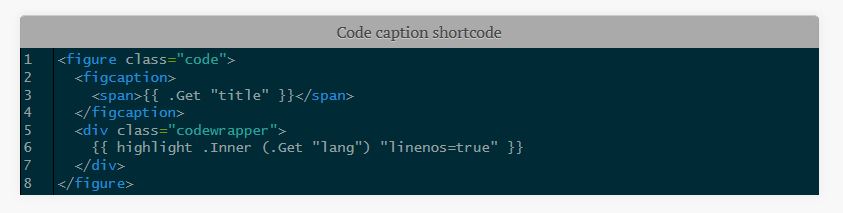.
If the code inside the tag overflows, a horizontal sidebar will be added to the
table. It took me a while to achieve this as the `highlight` function created
tables that were out of my control. The output from `highlight` is wrapped in
`<div class="codewrapper">` and the scroll bar will be added for the whole
`div`. The following in the CSS file (starting from line 2225) enables this
behavior:
``` css
div.codewrapper {
overflow-x: auto;
overflow-y: hidden;
background-color: #002B36;
}
```
### Image caption
This shortcode adds captions to pictures. Due to the way the original CSS file
was organized, this shortcode does not use `<figure>` and `<figcaption>`. `Alt`
tag is also set to `title`.
Usage (parameters are named and not positional):
``` go
{{< imgcap title="Sample caption" src="/images/2016/thetheme/1.png" >}}
```
Results in:
``` html
<span class="caption-wrapper">
<img class="caption" src="/images/2016/thetheme/1.png" title="Sample caption" alt="Sample caption">
<span class="caption-text">Sample caption</span>
</span>
```
### Table of Contents
This shortcode adds table of contents to the theme. You can use it to add the
toc to anywhere in the page with `{{< toc >}}`.
## Pages
This section discusses the different kind of pages that are supported by the
theme.
### License page
License page address is `baseurl/license/`. Create a markdown file containing
the text for the license page under `content` and set its type to `license` in
frontmatter:
``` yaml
---
title: "License"
type: license
---
License text
```
License page template is: `layouts/license/single.html`.
### Not Found or 404.html
The `404.html` page has two optional parameters and both support markdown:
* `notFoundHeader`: 404 page title
* `notFoundText`: 404 page text
If they are not set in the config file, theme's default page is used
(`layouts/404.html`).
### Taxonomy pages
You can create taxonomy lists (e.g. categories and tags). Set
`generateTaxonomyList = true` to get generate them at `baseURL/tags/` and
`baseURL/categories`. By default items are sorted by count.
`sortTaxonomyAlphabetical = true` changes the sort to alphabetical.
``` toml
[Params]
generateTaxonomyList = true
# Alphabetical sort
# sortTaxonomyAlphabetical = true
```
To revert, remove `sortTaxonomyAlphabetical` or set it to false.
Note: As of Hugo 0.33, `indexes` has been removed. If your taxonomy pages are
not rendered, please update to the latest version of Hugo. Templates are now at:
* `/layouts/category/category.html`
* `/layouts/tag/tag.html`
### Individual pages
You can create individual pages in at least two ways:
* Create a new content file in `content/page`.
* Create a page anywhere inside `content` and set the type to `page` in
frontmatter. E.g. `type: page`.
The template for individual pages is at
`Hugo-Octopress/layouts/page/single.html`. It can be overridden by a file in the
website's `layouts/page/single.html`. For more information see
[Single Page Templates in Hugodocs][hugo-single-page-templates].
[hugo-single-page-templates]: https://gohugo.io/templates/single-page-templates/
## Table of contents
There are three ways to add `Table of Contents (ToC)` to pages.
### toc configuration
With Goldmark, you need to change the defaults for the table of contents
renderer in your site's config. The defaults only render markdown headings level
2 and 3.
``` toml
[markup]
[markup.tableOfContents]
endLevel = 8
startLevel = 1
```
Please see more at
[https://gohugo.io/getting-started/configuration-markup/#table-of-contents][toc-config].
[toc-config]: https://gohugo.io/getting-started/configuration-markup/#table-of-contents
### Use toc in Frontmatter
This ToC is on top of the page and does not appear in the summary. You can
customize the ToC for each page or globally:
1. Add a variable named `toc` to the frontmatter of the post/page and set it to `true`.
``` yaml
title: "title"
date: 2016-04-01T20:22:37-04:00
draft: false
toc: true
```
2. Enable it globally by setting `tableOfContents` under `[Params]` to `true`.
``` toml
[Params]
tableOfContents = true
```
The `toc` variable in the frontmatter has priority. If it is set to `false` the
global setting is ignored for that page.
### Use the toc Shortcode
If you want the table to appear in a different location use the shortcode. For
example, in [the cheatsheet on my website][website-cheatsheet] it appears after
the summary.
```
---
frontmatter
---
summary or whatever.
{{< toc >}}
```
[website-cheatsheet]: https://raw.githubusercontent.com/parsiya/parsiya.net/master/content/page/CheatSheet.markdown
### Editor Plugins
There are various editor plugins that create a table of contents in markdown
using markdown links. This approach is self-contained and not reliant on the
theme or the shortcode. I used the VS Code plugins
[Markdown All in One][markdown-vscode-toc].
[markdown-vscode-toc]: https://github.com/yzhang-gh/vscode-markdown#table-of-contents
## Disqus
Hugo supports Disqus. Note Disqus shortname is directly in the config file. As
of at least v0.134.0, the location has changed and this old one will be
deprecated in a bit. For now, (before v0.135.0), the theme still supports this
location, but you should switch it if you want to keep using the latest Hugo
versions.
Reference: https://gohugo.io/content-management/comments/#configure-disqus.
``` toml
# new location
# [services]
# [services.disqus]
# shortname = "Your disqus shortname"
# old one.
disqusShortname = "whatever"
```
You can disable comments for individual pages by adding `comments: false` to
the frontmatter.
## Twitter Card
Twitter card support can be enabled in the config file under `Params`:
``` toml
[params]
# Twitter card config
# Enable.
twitterCardEnabled = true
# Don't include the @.
# twitterCardSite =
twitterCardDomain = "parsiya.net"
# Don't include the @.
twitterCardAuthor = "CryptoGangsta"
```
After Twitter card is enabled, you can add summary images to your posts in front
matter with `twitterImage`:
``` yaml
twitterImage: 02-fuzzer-crash.png
```
**Note:** Image URL should be relative to the page, otherwise the final URL will
not be correct. In short, image URL should be part of the page bundle. In this
case, both `index.md` and `02-fuzzer-crash.png` are in the same root directory.
If the image is in a subdirectory of page bundle, it can be added like this:
``` yaml
twitterImage: images/02-fuzzer-crash.png
```
To modify this template, copy
`your-website/themes/Hugo-Octopress/layouts/partials/custom_twitter_card.html`
to `your-website/layouts/partials/custom-twitter-card.html` and make changes.
## Compact Index
The original theme renders each post's summary in the main page. I prefer a more
compact index and use it for my own website. You can enable it by adding this to
the config file:
``` toml
[params]
# Set to true to enable compact index. Set to false or remove to go back to classic view.
compactIndex = true
```
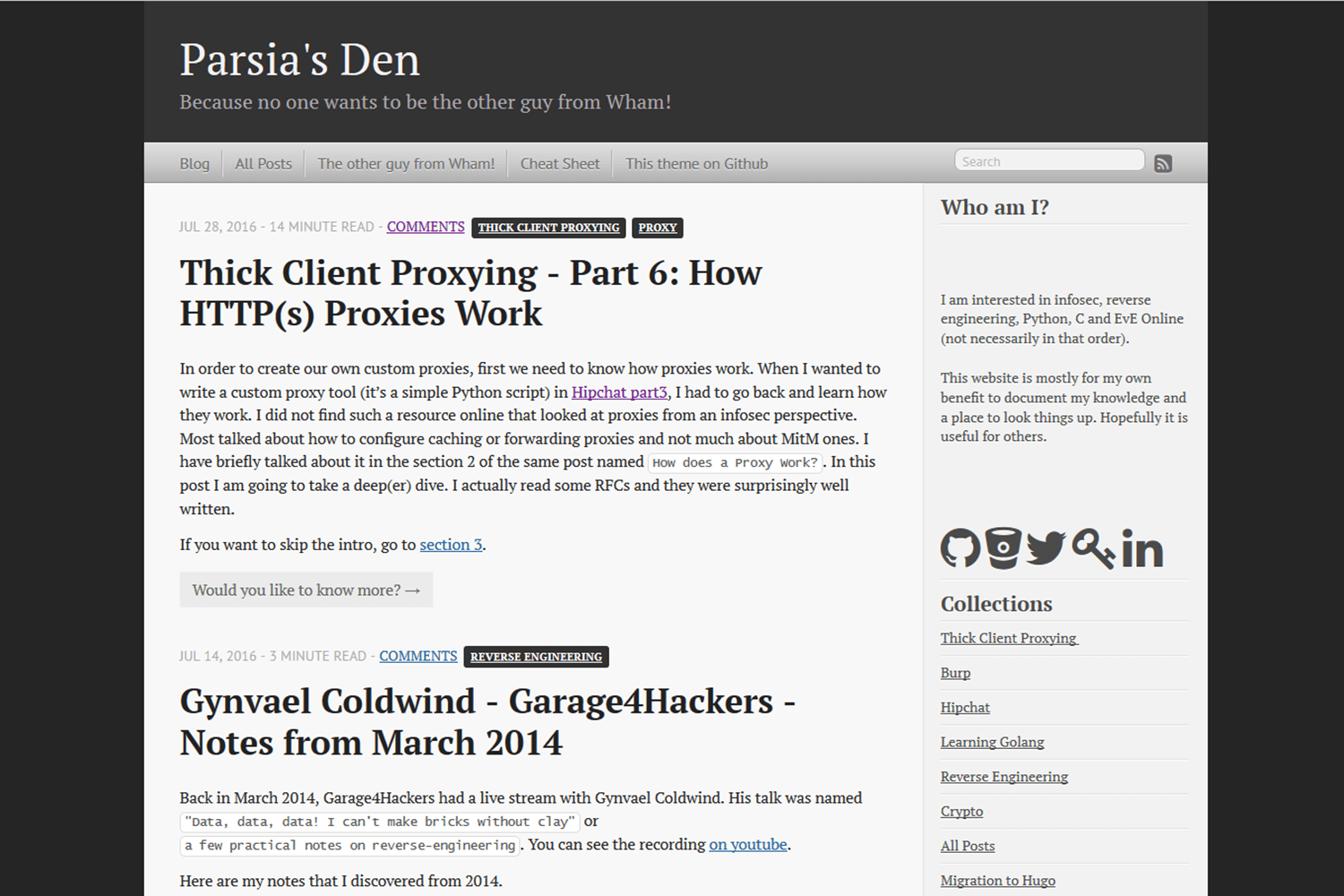
Compare the views (classic - compact) - click for full-size image:
[](https://raw.githubusercontent.com/parsiya/Hugo-Octopress/master/images/classicindex.png) [](https://raw.githubusercontent.com/parsiya/Hugo-Octopress/master/images/compactindex.png)
## mainSections
Hugo-Octopress supports using the [mainSections][hugo-mainsections] property in
the config file to display different kinds of posts on the main page. If not
defined, `mainSection` will default to the section with the most number of
pages. In a vanilla Hugo-Octopress setup, it will be under `post`. But, you can
add your own sections in the config file:
```toml
[params]
mainSections = ["posts", "blogs"]
```
[hugo-mainsections]: https://gohugo.io/functions/where/#mainsections
See the code in `layouts/partials/classic_index.html`:
```html
<div class="blog-index">
{{ $paginator := where site.RegularPages "Type" "in" site.Params.mainSections | .Paginate }}
{{ range $paginator.Pages }}
<article>
...
```
## Custom Favicon
The theme uses the [default Octopress favicon](static/favicon.png). You can
modify it:
1. Add `favicon` to the config file under `params`. This path is relative to the
`static` directory.
```toml
[params]
favicon = "myicon.png"
```
2. Store the file in **your site's** static directory:
`your-site/static/myicon.png`.
# Troubleshooting
Common issues when dealing with the theme.
## Hugo page summary bug
Without a summary divider `<!--more-->`, Hugo uses the first 70 words of the
post. The result is usually not pretty and contains raw HTML. Always use the
summary divider `<!--more-->` in your posts. This does not matter if you
use the compact index because it does not use the summary.
Hugo does not display render style links in the page summary if the link is also
not before the summary divider. You can read more
[here](https://discuss.gohugo.io/t/markdown-content-renders-as-regular-text-in-summary/1396/12).
Reference style links look like this:
``` markdown
This is a link to [Example][example-link].
[example-link]: https://www.example.com
```
There are two workarounds:
1. Do not use reference style links in summary. Use normal links like `[Example](https://www.example.com)`.
2. Put the reference links before the summary divider.
### Empty Posts Link on Homepage
After rebuilding the blog with Hugo `0.57`, you may see a single `Posts` link in
the classic index. Update to Hugo `0.57.2+` (there is an issue with `0.57.1`)
and it should work.
For more information please see:
* https://github.com/gohugoio/hugoThemes/issues/682
This should not be an issue anymore because the theme's minimum version of Hugo
has been bumped.
## Issues/TODO
If you discover any issues/bugs or want new features please use the GitHub issue
tracker. Please keep in my mind that development has not been my day job for
quite a while and I may be slow in fixing things (don't be surprised if I ask
you about details).
**The css is a mess.** The CSS file is taken directly from the classic Octopress
theme. I found it easier to just modify the templates to generate HTML code
similar to Octopress' output and use the existing CSS file. It's bulky (around
53KBs and 2300 lines) and it probably has code for elements that are never used
(also duplicates).
## Attribution
* [Octopress][octopress-link] is created by [Brandon Mathis][mathis-link].
Octopress source can be found on
[https://github.com/imathis/octopress][octopress-github].
* Some code was taken from the [Hyde-x][hyde-x-theme] Hugo theme by [Andrei Mihu][andrei-mihu-link].
* Sidebar icons are from [Font Awesome][font-awesome] by Dave Gandy and [Fork Awesome][fork-awesome].
* Special thanks to [contributors][theme-contributors] and everyone who has
helped with issues.
[octopress-github]: https://github.com/octopress/octopress
[mathis-link]: https://github.com/imathis
[theme-contributors]: https://github.com/parsiya/Hugo-Octopress/graphs/contributors
[andrei-mihu-link]: http://andreimihu.com/
## Ported by
Ported by [Parsia](https://parsiya.net).
## Theme license
Open sourced under the [MIT license](LICENSE.md).
<!-- Links -->
[octopress-link]: http://octopress.org
[hugo-link]: https://gohugo.io
Explore similar templates
Compare previews and descriptions within the same stack and category.

hugo-xmin
hugo-xmin is an extremely minimal Hugo theme written by Yihui Xie for template beginners. HTML and CSS total about 140 lines, with no external dependencies, and it uses the MIT license.
Hugo · Starter

hugo-theme-gallery
A Hugo Extended photo gallery theme that organizes images with Page Bundles, automatically generating album lists and gallery pages with a Justified layout and PhotoSwipe lightbox.
Hugo · Starter

reveal-hugo
reveal-hugo is a Hugo theme that converts Markdown content into Reveal.js-based HTML presentations. It supports slide separation with `---`, shortcodes for fragments, slides, sections, notes, Markdown, and MathJax, and organizes content as root or section presentations with order controlled by weight.
Hugo · Starter

anatole
Anatole is a minimalistic two-column Hugo theme ported from farbox-theme-Anatole, featuring dark mode, multilingual and RTL support, and optional portfolio, comments, analytics, KaTeX, and Mermaid integrations. It suits personal blogs, portfolios, or documentation sites built with Hugo.
Hugo · Starter

hugo-theme-diary
A Hugo diary-style theme ported from the Hexo theme Journal, with a grid homepage for essays and daily notes. It supports six languages, dark mode, table-of-contents scroll positioning, reading time, code highlighting, and configurable sidebar, fonts, and colors.
Hugo · Starter

risotto
risotto is a minimalist, responsive Hugo theme inspired by terminal ricing aesthetics. It uses semantic HTML and pure CSS with no JavaScript, and its layout relies on CSS Grid for native responsiveness without manual breakpoints.
Hugo · Starter