将经典 Octopress 主题移植到 Hugo,保留侧边栏、导航菜单等结构
Hugo启动器
Hugo-Octopress — Hugo 启动器模板
作者 parsiya
Hugo-Octopress 是把经典 Octopress 主题移植到 Hugo 的启动器模板,提供侧边栏、导航菜单、代码高亮与短代码等配置项。
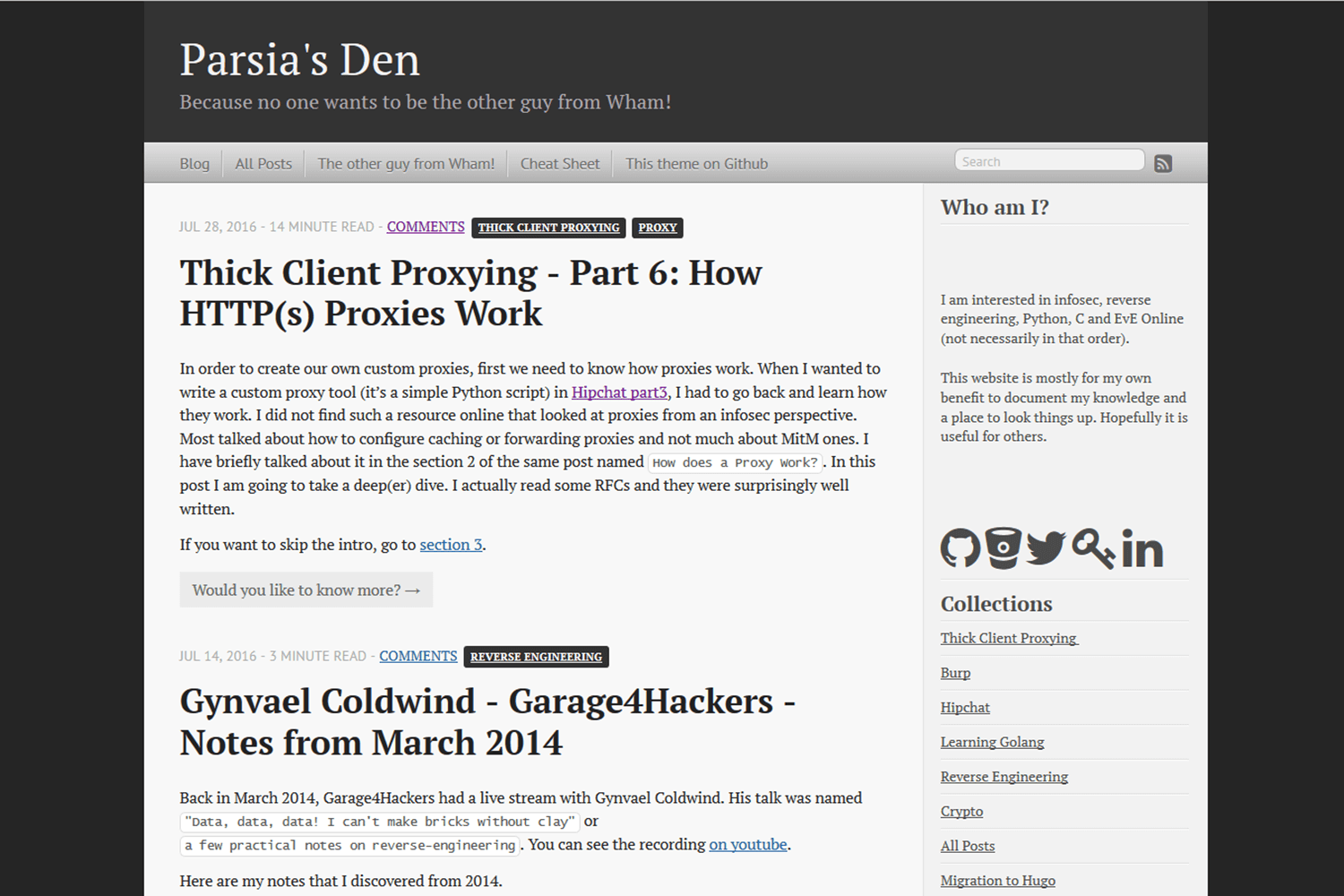
看看你的网站会是什么样
浏览真实页面截图,比较内容排版与手机效果。点击下方缩略图切换,放大查看整页细节。
目前有 1 张原始预览,可打开完整图片查看设计细节。
截图用于了解视觉与布局,交互效果请以实际项目为准。
采集于 2026-10-02查看来源
值得关注的模板亮点
从已有项目资料中,快速了解它的特点。
提供 sample-config.toml 与 exampleSite/config.toml 两份可运行配置示例
内置代码标题、图片标题、目录等短代码,位于 layouts/shortcodes/
侧边栏包含标题文本、社交图标、侧边栏菜单与最近文章四个可选区块
支持通过 customCSS 参数在站点 static 目录覆盖内置样式
代码高亮使用 Chroma,默认 solarized-dark,可在配置中更换样式
模板详细介绍
Hugo-Octopress 是经典 Octopress 主题向 Hugo 的移植版本,由 parsiya 维护,采用 MIT 许可。它面向已有或新建的 Hugo 站点,通过 git submodule 或克隆方式放入 themes 目录即可使用,仓库内附带 exampleSite 示例站点,可用 hugo serve -vw --source=exampleSite 在本地预览。
主题的配置集中在站点配置文件中,仓库提供 sample-config.toml 与 exampleSite/config.toml 两份可运行示例。可配置内容包括导航菜单(按 weight 排序、可设置是否新窗口打开)、侧边栏(标题与文本、社交图标、侧边栏菜单、最近文章数量)、自定义 CSS 覆盖、自定义 favicon、搜索地址、Disqus 与 Twitter Card 等。侧边栏社交图标序列在模板中硬编码,需要复制 social.html 到站点 layouts 目录后修改。
代码高亮使用 Hugo 内置的 Chroma,默认样式为 solarized-dark,可在配置中切换为其他受支持样式。主题还提供代码标题、图片标题、目录等短代码,并涉及 Goldmark 与 Blackfriday 两种 Markdown 引擎的差异:Blackfriday 的 hrefTargetBlank 在 Goldmark 下需借助 render hook 实现,且对 linkify 链接与图片链接不生效。README 中另设有 Troubleshooting 与 Issues/TODO 章节,说明存在已知问题与待办事项。
Hugo启动器
适合你的项目吗?
适用场景
- 为已有 Hugo 站点套用 Octopress 风格外观
- 在本地通过 exampleSite 预览主题默认效果
- 按 weight 配置顶部导航菜单与侧边栏菜单链接
- 使用短代码为文章中的代码块和图片添加标题说明
适合人群
- 使用 Hugo 并希望获得 Octopress 经典外观的站点
- 需要侧边栏展示社交图标与最近文章的博客
- 接受通过配置文件调整菜单、侧边栏与代码高亮的用户
- 需要 MIT 许可下可自由修改与分发主题代码的项目
上手与定制指南
结合仓库当前版本的说明,按下面的资料检查内容、配置与运行要求。
- 1
在网站根目录执行 git submodule add https://github.com/parsiya/Hugo-Octopress themes/Hugo-Octopress,或直接克隆到 themes 目录
- 2
查看示例站点:进入 themes/Hugo-Octopress/ 后运行 hugo serve -vw --source=exampleSite,访问 http://localhost:1313
- 3
参考 sample-config.toml 或 exampleSite/config.toml 修改站点配置
- 4
自定义 CSS 放入站点 static 目录,并在 params.customCSS 中按相对 static 的路径列出
- 5
如需修改侧边栏社交图标顺序,将 layouts/partials/social.html 复制到站点 layouts/partials 后再改
授权与来源资料
使用条件与限制
免费使用 · 保留许可声明本次收录的是公开仓库中采用 MIT 许可的免费版本;免费范围为该版本代码,不代表外部服务或第三方素材免费。
使用时需要遵守
- 允许免费使用、修改、商用和分发该版本代码。
- 分发代码副本或实质性部分时,保留原作者版权声明和完整 MIT 许可声明。
- 代码按现状提供;担保与责任限制以原许可证及适用法律为准。
额外费用与待核对事项
- 侧边栏图标来自 Font Awesome 与 Fork Awesome 两个第三方图标项目,其图标资源受各自许可约束,并非随主题的 MIT 许可一并授予;若需使用或再分发这些图标,应自行核实并遵守相应图标许可。
- 评论功能依赖第三方服务 Disqus,需在配置文件中填写 Disqus shortname,即需要注册并持有 Disqus 账号;该服务由外部提供,可能涉及其自身条款与费用。
- Twitter Card 支持需在配置中启用并填写 twitterCardDomain、twitterCardAuthor 等参数,属于依赖外部平台(Twitter/X)的功能,使用前需确认该平台的相关要求。
- 搜索功能通过 searchEngineURL 参数指向外部搜索引擎(默认 Google),搜索请求会发送至该第三方服务,需自行评估其可用性与隐私影响。
- 演示图片、字体、图标及其他第三方素材需按各自许可核对,不能仅凭代码的 MIT 许可判断。
- 域名、托管、数据库、支付或 AI 等外部服务可能另外收费。
查看原文依据
Permission is hereby granted, free of charge
许可证原文
Sidebar icons are from [Font Awesome][font-awesome] by Dave Gandy and [Fork Awesome][fork-awesome].
README 原文
Hugo supports Disqus. Note Disqus shortname is directly in the config file.
README 原文
Twitter card support can be enabled in the config file under `Params`:
README 原文
https://github.com/parsiya/Hugo-Octopress/blob/master/LICENSE.mdhttps://github.com/parsiya/Hugo-Octopress/blob/master/README.mdSearch engine customization:
README 原文
DeepSeek 根据仓库许可证和 README 整理 ·2026-10-02。结果仅覆盖已读取资料,依赖、图片、字体及后续条款变更以各自原文为准。
项目核对记录与介绍依据
模板资料
- 来源平台
- Hugo Themes
- 资料与维护参考分
- 资料较完整 · 79 / 100
- 技术栈
- Hugo
- 网站类型
- 启动器
这个分数如何计算
本站按许可资料(最高30分)、演示链接(12分)、预览图(10分)、Star数(15分)、记录的维护时间(15分)、描述完整度(8分)、功能记录(5分)和分类资料(5分)计算。它不是代码、安全或性能测试,也不是 Google 评分;有链接不代表已实测可用。
这个项目需要核对什么
- 记录的仓库更新时间
- 2026-06-09
- 截图检查日期
- 2026-10-02
目前没有记录演示链接。请依据仓库说明在本地评估;仅凭截图无法确认交互行为。
目录记录的主要技术栈是 Hugo。请通过依赖清单和锁文件核对实际版本与托管要求。这些说明基于收录资料,不代表代码审计或部署实测。
查看具体选型方法 →介绍的制作与核对状态
介绍由 AI 辅助整理目录与仓库资料。仓库作者不等于这篇介绍的审核者。
已完成服务器许可规则与 AI 来源核对;未经过人工编辑审核。
查看当时使用的来源资料
SHA-256: 77e671a2c05d9a96a6eef781368708bfb19fc0599cad5297d948d372fbbd3bfc
2026-10-02T20:19:44.736Z
来源文件 / 仓库# Hugo-Octopress <!-- omit in toc -->
Hugo-Octopress is a port of the classic [Octopress][octopress-link] theme to
[Hugo][hugo-link].
Live demo using the unmodified theme:
* [http://hugo-octopress-test.s3-website-us-east-1.amazonaws.com/][live-demo].
* Source: [https://github.com/parsiya/Hugo-Octopress-Test][test-repo].
[live-demo]: http://hugo-octopress-test.s3-website-us-east-1.amazonaws.com/
[test-repo]: https://github.com/parsiya/Hugo-Octopress-Test
My personal website with the compact index (see below):
* [https://parsiya.net](https://parsiya.net).
* Source: [https://github.com/parsiya/parsiya.net](https://github.com/parsiya/parsiya.net)
## Contents <!-- omit in toc -->
- [Quick start](#quick-start)
- [Configuration](#configuration)
- [Code highlight](#code-highlight)
- [Goldmark vs. Blackfriday Markdown Engines](#goldmark-vs-blackfriday-markdown-engines)
- [CSS override](#css-override)
- [Navigation menu](#navigation-menu)
- [Extending Headers and Footers](#extending-headers-and-footers)
- [Sidebar](#sidebar)
- [Sidebar text](#sidebar-text)
- [Social network icons](#social-network-icons)
- [Sidebar menu](#sidebar-menu)
- [Recent posts](#recent-posts)
- [Shortcodes](#shortcodes)
- [Code caption](#code-caption)
- [Image caption](#image-caption)
- [Table of Contents](#table-of-contents)
- [Pages](#pages)
- [License page](#license-page)
- [Not Found or 404.html](#not-found-or-404html)
- [Taxonomy pages](#taxonomy-pages)
- [Individual pages](#individual-pages)
- [Table of contents](#table-of-contents-1)
- [toc configuration](#toc-configuration)
- [Use toc in Frontmatter](#use-toc-in-frontmatter)
- [Use the toc Shortcode](#use-the-toc-shortcode)
- [Editor Plugins](#editor-plugins)
- [Disqus](#disqus)
- [Twitter Card](#twitter-card)
- [Compact Index](#compact-index)
- [mainSections](#mainsections)
- [Custom favicon](#custom-favicon)
- [Troubleshooting](#troubleshooting)
- [Hugo page summary bug](#hugo-page-summary-bug)
- [Empty Posts Link on Homepage](#empty-posts-link-on-homepage)
- [Issues/TODO](#issuestodo)
- [Attribution](#attribution)
- [Ported by](#ported-by)
- [Theme license](#theme-license)
## Quick start
Add the theme to your existing site or [Hugo's quick start][hugo-quickstart].
All commands are run from the root directory of your website.
[hugo-quickstart]: https://gohugo.io/getting-started/quick-start/
If using git to manage your website, add the theme as a git submodule:
```
git submodule add https://github.com/parsiya/Hugo-Octopress themes/Hugo-Octopress
```
Or you can clone it:
```
git clone https://github.com/parsiya/Hugo-Octopress themes/Hugo-Octopress
```
To view the theme with the example site:
```
cd themes/Hugo-Octopress/
hugo serve -vw --source=exampleSite
```
And view the example website at http://localhost:1313.
Example site was originally created by
[https://github.com/nonumeros][nonumeros]. I reviewed the
[pull request][examplesite-pr] almost two years late and had to copy/paste the
website instead of resolving merge conflicts. The example website also has a
page with the theme's shortcodes.
[nonumeros]: https://github.com/nonumeros
[examplesite-pr]: https://github.com/parsiya/Hugo-Octopress/pull/57
## Configuration
Hugo-Octopress can be configured by modifying the parameters in the
[configuration file](https://gohugo.io/overview/configuration/).
[sample-config.toml](sample-config.toml) and
[exampleSite/config.toml](exampleSite/config.toml) are both working examples.
## Code highlight
This theme uses the built-in [Chroma][chroma-link] highlighter with the
`solarized-dark` theme. See all supported styles at
[https://xyproto.github.io/splash/docs/all.html](https://xyproto.github.io/splash/docs/all.html).
To change the style, change it in the config file like below to one of the
supported styles.
[chroma-link]: https://github.com/alecthomas/chroma
Some options to control code highlighting post version `0.60`.
``` toml
[markup]
[markup.tableOfContents]
endLevel = 8
startLevel = 1
[markup.highlight]
style = "solarized-dark"
```
For more configuration options please see
[https://gohugo.io/getting-started/configuration-markup/#highlight][hugo-configuration-markup]
and [https://gohugo.io/extras/highlighting/][hugo-syntax-highlighting] in Hugo's
documentation.
[hugo-syntax-highlighting]: https://gohugo.io/extras/highlighting/
[hugo-configuration-markup]: https://gohugo.io/getting-started/configuration-markup/#highlight
## Goldmark vs. Blackfriday Markdown Engines
Prior to version `0.60`, Hugo used Blackfriday. Now it uses Goldmark by default.
See https://gohugo.io/getting-started/configuration-markup#highlight for
information about setting it up.
There are trade-offs. Mainly, the `hrefTargetBlank` Blackfriday extension. It
was set to true to open external links in a new browser tab. Unfortunately,
Goldmark does not have this built-in. To make it happen, we need to use a render
hook. I used the one in Hugo docs at
https://gohugo.io/getting-started/configuration-markup#link-with-title-markdown-example.
This works for markdown links but not linkify or image links. Linkify links are
straight URLs pasted into the document (e.g., `https://example.net`). A
workaround is not having links similar to this (which is not in the markdown
standard anyways) and use normal links. For example,
`[example.net](https://example.net)` or reference links.
You can keep using Blackfriday like this:
``` toml
[markup]
defaultMarkdownHandler = "blackfriday"
[markup.blackFriday]
hrefTargetBlank = true
```
## CSS override
You can override the built-in CSS and add your own. Put your CSS files in the
`static` directory of your website. While storing them inside the
`themes/Hugo-Octopress/static` directory works, it's not recommended (keep your
website and theme as separated as possible to be able to switch themes easily).
Then modify the `customCSS` parameter. The path should be relative to the
`static` folder. These CSS files will be added through the `header` partial
after the built-in CSS file.
For example, if custom CSS files are `static/css/custom.css` and
`static/css/custom2.css` then `customCSS` will look like this:
``` toml
[params]
customCSS = ["css/custom.css","css/custom2.css"]
```
## Navigation menu
Links in the navigation menu (everything other than Google search and RSS icon)
can be customized. The navigation menu is generated using the
`layouts/partials/navigation.html` partial.
By default, navigation menu links will open in the same window. You can change
this behavior by setting the `navigationNewWindow` parameter to true. Links to
root ("/") will always open in the same window. Currently, Hugo does not support
adding custom attributes to menus.
Links are sorted according to weight from left to right. For example, a link
with weight of `-10` will appear to the left of links with weights `0` or `10`.
Links can be added to the config file:
``` toml
[[menu.main]]
Name = "Blog"
URL = "/"
weight = -10
[[menu.main]]
Name = "The other guy from Wham!"
URL = "https://www.google.com/search?q=andrew+ridgeley"
weight = -5
[[menu.main]]
Name = "This theme - add link"
URL = "https://www.github.com"
[params]
# If set to true, navigation menu links will open in a new window with the exception of links to root ("/")
# If this item does not exist or is set to false, then navigation menu links will open in the same window
navigationNewWindow = true
```
Search engine customization:
``` toml
[params]
searchEngineURL = "https://www.google.com/search"
```
## Extending Headers and Footers
Copy these files from `theme/Hugo-Octopress/layouts/partials/` into
`your-site/layouts/partials` and modify them:
* `extend_header.html`: Everything will be added to the end of the `head` tag on
every page.
* `extend_footer.html`: Everything will be added after the `footer` tag on every
page.
## Sidebar
The sidebar has four sections, from top to bottom:
* Sidebar header and text (optional).
* Social network icons (optional): Icons and links to GitHub, Mastodon, and more.
* Sidebar menu (optional): Links in sidebar.
* Recent posts: Displays last X posts (default is 5).
The sidebar is generated using the partial at `layouts/partials/sidebar.html`.
### Sidebar text
The sidebar text has two parts and both can be configured. Both are passed to
`markdownify` so you can use markdown (e.g. add links or new lines).
* Sidebar header appears first in an `<h1>` tag. It can be configured with
`sidebarHeader`.
* Sidebar text appears under the header and is in `sidebarText`.
You can add new lines can be added with two spaces at the end of line. New
paragraphs can be added with two an empty line. when adding two new lines,
remember to remove the indentation otherwise the new line will be treated as a
codeblock.
``` toml
sidebarHeader = "Sidebar Header"
sidebarText = """Here's a [link to google](https://www.google.com)
New paragraph
Another paragraph which has two spaces in the end to create a new line using markdown
New line but not a new paragraph
"""
```
If you want to use `</br>` here and not just markdown, you need to enable unsafe
rendering of HTML in Goldmark. You can do this like this.
``` toml
[markup]
[markup.goldmark]
[markup.goldmark.renderer]
unsafe = true
```
Blackfriday renders the `</br>` tags and does not need extra configuration.
### Social network icons
Sidebar social network icons are configured as follows:
``` toml
[params]
github = "https://github.com/parsiya/Hugo-Octopress/"
bitbucket = ""
gitlab = ""
twitter = ""
keybase = ""
linkedin = ""
mastodon = ""
stackoverflow = ""
youtube = ""
facebook = ""
instagram = ""
bitcoin = ""
```
Icon sequence is unfortunately hardcoded. To modify, copy
`your-website/themes/Hugo-Octopress/layouts/partials/social.html` to
`your-website/layouts/partials/social.html` and modify the sequence. Use `</br>`
to create a new line.
Code to display links (and the idea to use these icons) is from
[Hyde-x][hyde-x-theme].
[hyde-x-theme]: https://github.com/zyro/hyde-x/
Icons are from [Font Awesome][font-awesome] and [Fork Awesome][fork-awesome]. To
use icons with square dark backgrounds add `-square`. For example,
`<i class="fa fa-twitter-square fa-3x"></i>`. Size can be from 1 to 5 use
`fa-lg` to make them adaptive.
[font-awesome]: https://fontawesome.com/
[fork-awesome]: https://github.com/ForkAwesome/Fork-Awesome
### Sidebar menu
This menu can be enabled by setting `sidebarMenuEnabled` to `true`. It has two
sections:
* A header that appears inside the `<h1>` tag on top. It can be set by
`sidebarMenuHeader`. This part only supports text.
* A set of links. They can be configured similar to the navigation menu items by
using the `[[menu.sidebar]]` tag. Set `sidebarNewWindow` to `true` to open
these links in a new window
``` toml
[[menu.sidebar]]
Name = "Google"
URL = "https://www.google.com"
weight = 0
[[menu.sidebar]]
Name = "Hugo"
URL = "/categories/hugo/"
weight = 1
```
### Recent posts
Last x posts can be displayed in the sidebar. This number is controlled by
`sidebarRecentLimit`. To hide this section you can remove `sidebarRecentLimit`
from the config file or set it to zero.
## Shortcodes
Creating [shortcodes][hugo-shortcodes] in Hugo is very easy and one of the
reasons I switched to it. I recreated a few plugins from Octopress. They add
captions to code blocks and images. These shortcodes are in
`layouts/shortcodes/`.
For all my Hugo shortcodes see
[https://github.com/parsiya/Hugo-Shortcodes][my-shortcodes].
[hugo-shortcodes]: https://gohugo.io/extras/shortcodes
[my-shortcodes]: https://github.com/parsiya/Hugo-Shortcode
### Code caption
This shortcode adds a caption to codeblocks. The codeblock is wrapped in a
`<figure>` tag and caption is added using `<figcaption>`. It has two parameters,
`title` which is the caption of the code block and `lang` which is the language
that is passed to the Hugo's `highlight` function along with `linenos=true` to
enable line numbers.
Usage and source (parameters are named and not positional):
``` html
{{< codecaption lang="html" title="Code caption shortcode" >}}
<figure class="code">
<figcaption>
<span>{{ .Get "title" }}</span>
</figcaption>
<div class="codewrapper">
{{ highlight .Inner (.Get "lang") "linenos=true" }}
</div>
</figure>
{{< /codecaption >}}
```
And will look like:
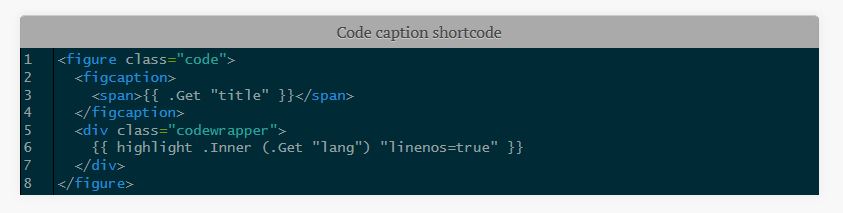.
If the code inside the tag overflows, a horizontal sidebar will be added to the
table. It took me a while to achieve this as the `highlight` function created
tables that were out of my control. The output from `highlight` is wrapped in
`<div class="codewrapper">` and the scroll bar will be added for the whole
`div`. The following in the CSS file (starting from line 2225) enables this
behavior:
``` css
div.codewrapper {
overflow-x: auto;
overflow-y: hidden;
background-color: #002B36;
}
```
### Image caption
This shortcode adds captions to pictures. Due to the way the original CSS file
was organized, this shortcode does not use `<figure>` and `<figcaption>`. `Alt`
tag is also set to `title`.
Usage (parameters are named and not positional):
``` go
{{< imgcap title="Sample caption" src="/images/2016/thetheme/1.png" >}}
```
Results in:
``` html
<span class="caption-wrapper">
<img class="caption" src="/images/2016/thetheme/1.png" title="Sample caption" alt="Sample caption">
<span class="caption-text">Sample caption</span>
</span>
```
### Table of Contents
This shortcode adds table of contents to the theme. You can use it to add the
toc to anywhere in the page with `{{< toc >}}`.
## Pages
This section discusses the different kind of pages that are supported by the
theme.
### License page
License page address is `baseurl/license/`. Create a markdown file containing
the text for the license page under `content` and set its type to `license` in
frontmatter:
``` yaml
---
title: "License"
type: license
---
License text
```
License page template is: `layouts/license/single.html`.
### Not Found or 404.html
The `404.html` page has two optional parameters and both support markdown:
* `notFoundHeader`: 404 page title
* `notFoundText`: 404 page text
If they are not set in the config file, theme's default page is used
(`layouts/404.html`).
### Taxonomy pages
You can create taxonomy lists (e.g. categories and tags). Set
`generateTaxonomyList = true` to get generate them at `baseURL/tags/` and
`baseURL/categories`. By default items are sorted by count.
`sortTaxonomyAlphabetical = true` changes the sort to alphabetical.
``` toml
[Params]
generateTaxonomyList = true
# Alphabetical sort
# sortTaxonomyAlphabetical = true
```
To revert, remove `sortTaxonomyAlphabetical` or set it to false.
Note: As of Hugo 0.33, `indexes` has been removed. If your taxonomy pages are
not rendered, please update to the latest version of Hugo. Templates are now at:
* `/layouts/category/category.html`
* `/layouts/tag/tag.html`
### Individual pages
You can create individual pages in at least two ways:
* Create a new content file in `content/page`.
* Create a page anywhere inside `content` and set the type to `page` in
frontmatter. E.g. `type: page`.
The template for individual pages is at
`Hugo-Octopress/layouts/page/single.html`. It can be overridden by a file in the
website's `layouts/page/single.html`. For more information see
[Single Page Templates in Hugodocs][hugo-single-page-templates].
[hugo-single-page-templates]: https://gohugo.io/templates/single-page-templates/
## Table of contents
There are three ways to add `Table of Contents (ToC)` to pages.
### toc configuration
With Goldmark, you need to change the defaults for the table of contents
renderer in your site's config. The defaults only render markdown headings level
2 and 3.
``` toml
[markup]
[markup.tableOfContents]
endLevel = 8
startLevel = 1
```
Please see more at
[https://gohugo.io/getting-started/configuration-markup/#table-of-contents][toc-config].
[toc-config]: https://gohugo.io/getting-started/configuration-markup/#table-of-contents
### Use toc in Frontmatter
This ToC is on top of the page and does not appear in the summary. You can
customize the ToC for each page or globally:
1. Add a variable named `toc` to the frontmatter of the post/page and set it to `true`.
``` yaml
title: "title"
date: 2016-04-01T20:22:37-04:00
draft: false
toc: true
```
2. Enable it globally by setting `tableOfContents` under `[Params]` to `true`.
``` toml
[Params]
tableOfContents = true
```
The `toc` variable in the frontmatter has priority. If it is set to `false` the
global setting is ignored for that page.
### Use the toc Shortcode
If you want the table to appear in a different location use the shortcode. For
example, in [the cheatsheet on my website][website-cheatsheet] it appears after
the summary.
```
---
frontmatter
---
summary or whatever.
{{< toc >}}
```
[website-cheatsheet]: https://raw.githubusercontent.com/parsiya/parsiya.net/master/content/page/CheatSheet.markdown
### Editor Plugins
There are various editor plugins that create a table of contents in markdown
using markdown links. This approach is self-contained and not reliant on the
theme or the shortcode. I used the VS Code plugins
[Markdown All in One][markdown-vscode-toc].
[markdown-vscode-toc]: https://github.com/yzhang-gh/vscode-markdown#table-of-contents
## Disqus
Hugo supports Disqus. Note Disqus shortname is directly in the config file. As
of at least v0.134.0, the location has changed and this old one will be
deprecated in a bit. For now, (before v0.135.0), the theme still supports this
location, but you should switch it if you want to keep using the latest Hugo
versions.
Reference: https://gohugo.io/content-management/comments/#configure-disqus.
``` toml
# new location
# [services]
# [services.disqus]
# shortname = "Your disqus shortname"
# old one.
disqusShortname = "whatever"
```
You can disable comments for individual pages by adding `comments: false` to
the frontmatter.
## Twitter Card
Twitter card support can be enabled in the config file under `Params`:
``` toml
[params]
# Twitter card config
# Enable.
twitterCardEnabled = true
# Don't include the @.
# twitterCardSite =
twitterCardDomain = "parsiya.net"
# Don't include the @.
twitterCardAuthor = "CryptoGangsta"
```
After Twitter card is enabled, you can add summary images to your posts in front
matter with `twitterImage`:
``` yaml
twitterImage: 02-fuzzer-crash.png
```
**Note:** Image URL should be relative to the page, otherwise the final URL will
not be correct. In short, image URL should be part of the page bundle. In this
case, both `index.md` and `02-fuzzer-crash.png` are in the same root directory.
If the image is in a subdirectory of page bundle, it can be added like this:
``` yaml
twitterImage: images/02-fuzzer-crash.png
```
To modify this template, copy
`your-website/themes/Hugo-Octopress/layouts/partials/custom_twitter_card.html`
to `your-website/layouts/partials/custom-twitter-card.html` and make changes.
## Compact Index
The original theme renders each post's summary in the main page. I prefer a more
compact index and use it for my own website. You can enable it by adding this to
the config file:
``` toml
[params]
# Set to true to enable compact index. Set to false or remove to go back to classic view.
compactIndex = true
```
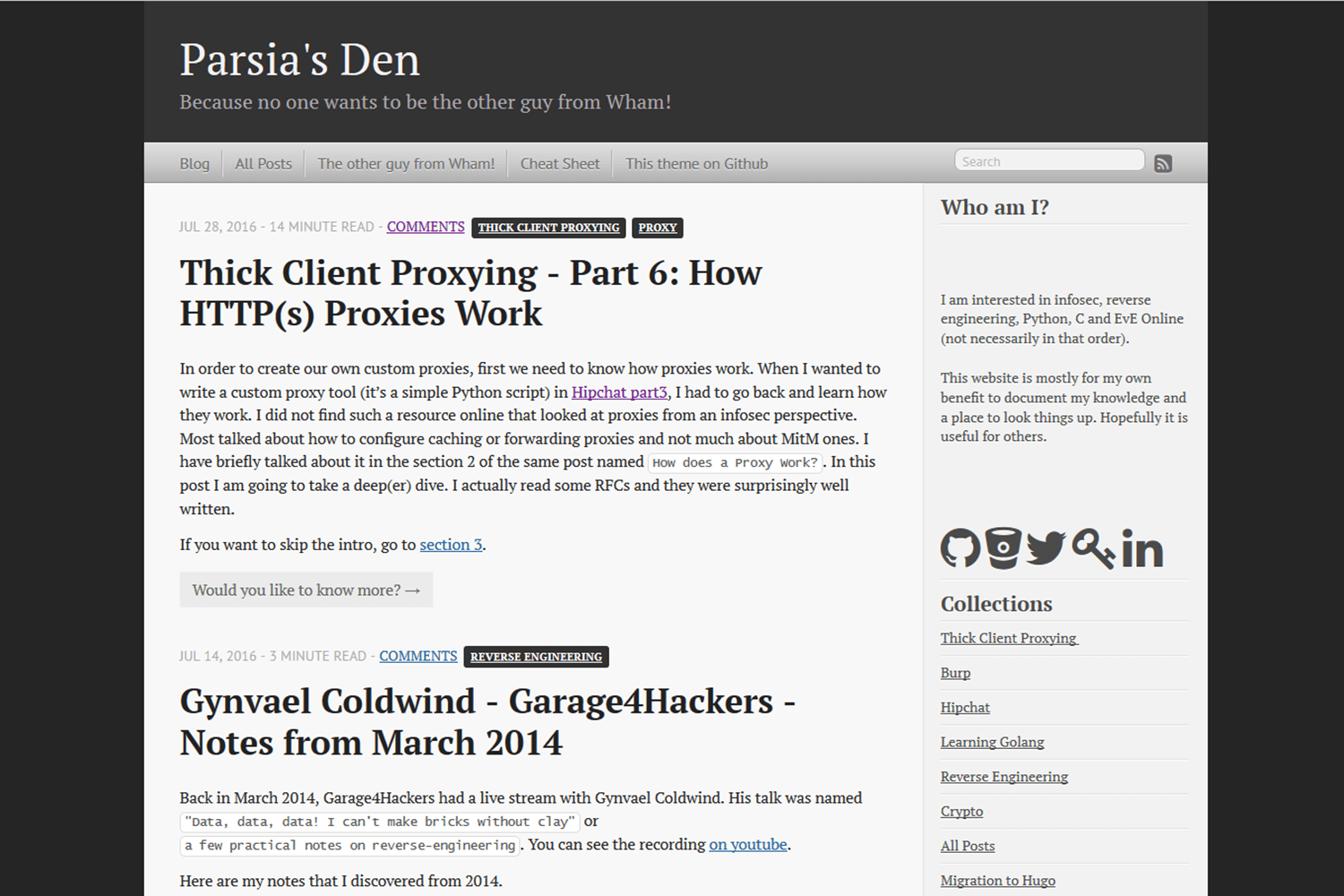
Compare the views (classic - compact) - click for full-size image:
[](https://raw.githubusercontent.com/parsiya/Hugo-Octopress/master/images/classicindex.png) [](https://raw.githubusercontent.com/parsiya/Hugo-Octopress/master/images/compactindex.png)
## mainSections
Hugo-Octopress supports using the [mainSections][hugo-mainsections] property in
the config file to display different kinds of posts on the main page. If not
defined, `mainSection` will default to the section with the most number of
pages. In a vanilla Hugo-Octopress setup, it will be under `post`. But, you can
add your own sections in the config file:
```toml
[params]
mainSections = ["posts", "blogs"]
```
[hugo-mainsections]: https://gohugo.io/functions/where/#mainsections
See the code in `layouts/partials/classic_index.html`:
```html
<div class="blog-index">
{{ $paginator := where site.RegularPages "Type" "in" site.Params.mainSections | .Paginate }}
{{ range $paginator.Pages }}
<article>
...
```
## Custom Favicon
The theme uses the [default Octopress favicon](static/favicon.png). You can
modify it:
1. Add `favicon` to the config file under `params`. This path is relative to the
`static` directory.
```toml
[params]
favicon = "myicon.png"
```
2. Store the file in **your site's** static directory:
`your-site/static/myicon.png`.
# Troubleshooting
Common issues when dealing with the theme.
## Hugo page summary bug
Without a summary divider `<!--more-->`, Hugo uses the first 70 words of the
post. The result is usually not pretty and contains raw HTML. Always use the
summary divider `<!--more-->` in your posts. This does not matter if you
use the compact index because it does not use the summary.
Hugo does not display render style links in the page summary if the link is also
not before the summary divider. You can read more
[here](https://discuss.gohugo.io/t/markdown-content-renders-as-regular-text-in-summary/1396/12).
Reference style links look like this:
``` markdown
This is a link to [Example][example-link].
[example-link]: https://www.example.com
```
There are two workarounds:
1. Do not use reference style links in summary. Use normal links like `[Example](https://www.example.com)`.
2. Put the reference links before the summary divider.
### Empty Posts Link on Homepage
After rebuilding the blog with Hugo `0.57`, you may see a single `Posts` link in
the classic index. Update to Hugo `0.57.2+` (there is an issue with `0.57.1`)
and it should work.
For more information please see:
* https://github.com/gohugoio/hugoThemes/issues/682
This should not be an issue anymore because the theme's minimum version of Hugo
has been bumped.
## Issues/TODO
If you discover any issues/bugs or want new features please use the GitHub issue
tracker. Please keep in my mind that development has not been my day job for
quite a while and I may be slow in fixing things (don't be surprised if I ask
you about details).
**The css is a mess.** The CSS file is taken directly from the classic Octopress
theme. I found it easier to just modify the templates to generate HTML code
similar to Octopress' output and use the existing CSS file. It's bulky (around
53KBs and 2300 lines) and it probably has code for elements that are never used
(also duplicates).
## Attribution
* [Octopress][octopress-link] is created by [Brandon Mathis][mathis-link].
Octopress source can be found on
[https://github.com/imathis/octopress][octopress-github].
* Some code was taken from the [Hyde-x][hyde-x-theme] Hugo theme by [Andrei Mihu][andrei-mihu-link].
* Sidebar icons are from [Font Awesome][font-awesome] by Dave Gandy and [Fork Awesome][fork-awesome].
* Special thanks to [contributors][theme-contributors] and everyone who has
helped with issues.
[octopress-github]: https://github.com/octopress/octopress
[mathis-link]: https://github.com/imathis
[theme-contributors]: https://github.com/parsiya/Hugo-Octopress/graphs/contributors
[andrei-mihu-link]: http://andreimihu.com/
## Ported by
Ported by [Parsia](https://parsiya.net).
## Theme license
Open sourced under the [MIT license](LICENSE.md).
<!-- Links -->
[octopress-link]: http://octopress.org
[hugo-link]: https://gohugo.io
看看同类模板
对比同技术栈与用途的模板,找到更适合的视觉与内容结构。

hugo-xmin
eXtremely Minimal Hugo theme: about 140 lines of code in total, including HTML and CSS (with no dependencies)
Hugo · 启动器

hugo-theme-gallery
Gallery Theme for Hugo
Hugo · 启动器

reveal-hugo
📽️ Create rich HTML-based presentations with Hugo and Reveal.js
Hugo · 启动器

anatole
Anatole is a minimalistic two-column theme for Hugo.
Hugo · 启动器

hugo-theme-diary
Moments piled up. A Hugo theme ported from SumiMakito/hexo-theme-Journal.
Hugo · 启动器

risotto
A minimalist, responsive hugo theme inspired by terminal ricing aesthetics.
Hugo · 启动器