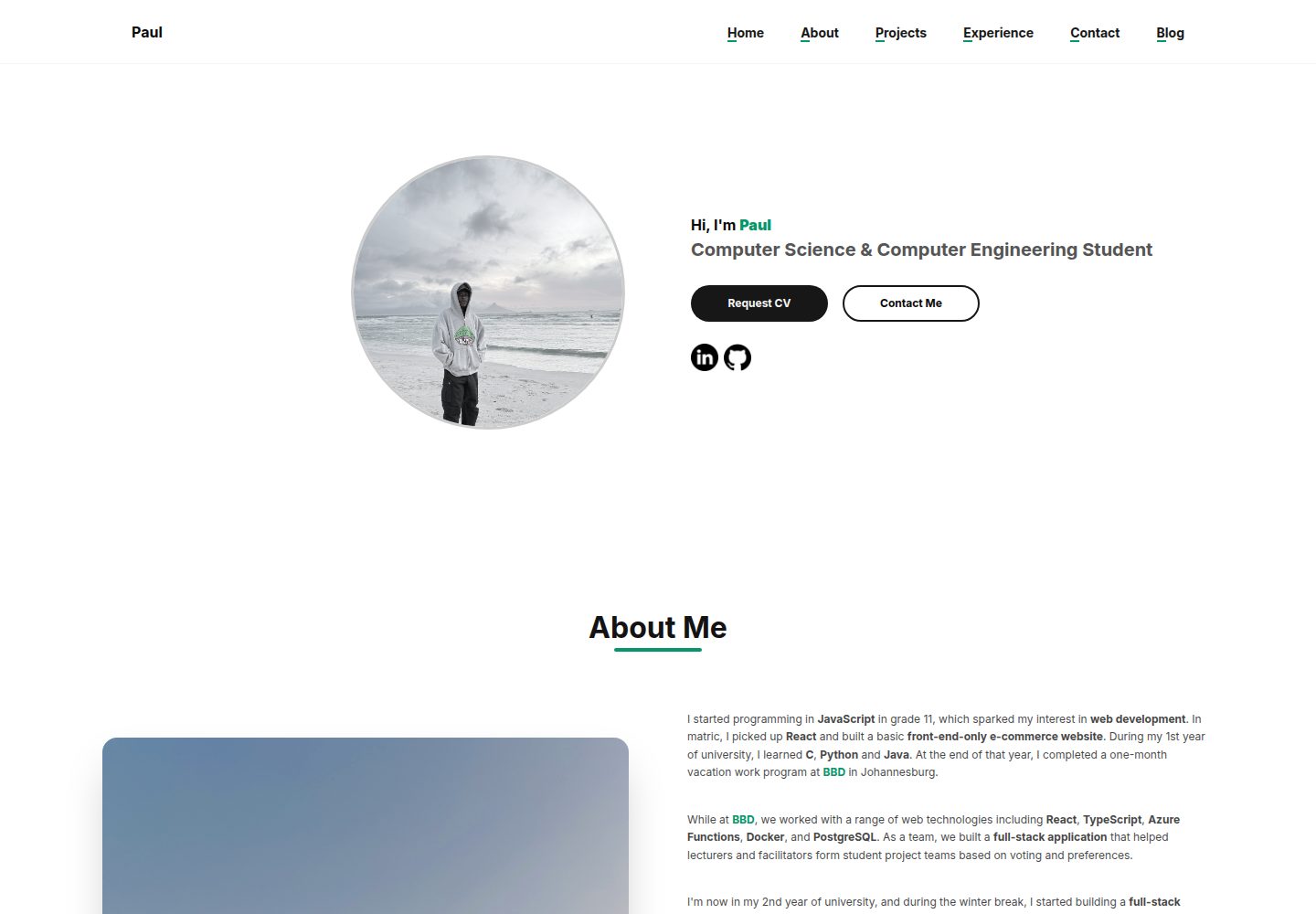
The public portfolio pages include Hero, About Me, Projects and Experience sections, with content provided dynamically by Appwrite
Next.jsReactAdmin dashboardPortfolio
portfolio (paulkabzz) — Next.js Admin dashboard Template
By paulkabzz
A personal portfolio website template built on Next.js and Appwrite, comprising a public showcase page and a protected admin dashboard for managing personal information, projects and work experience.
Explore the design
Compare the page layouts and mobile experience. Open any screenshot for a closer look.
Desktop homepage1 / 3
Desktop captureTop of page
Actual screenshot captured by the server browser.
All pages & views 3
Screenshots show visual appearance; interactive behavior may differ.
Recorded 2026-10-14View source
What stands out
A quick read of the recorded project description.
The protected /dashboard admin dashboard allows adding, deleting and modifying personal information, projects and work experience, with search and filtering support
Uses Appwrite for database, storage and authentication; content can be managed after logging in
Supports a custom text format syntax: **bold**, {{green}}, ~italic~ and links in the form ["url": text]
Uses Shadcn UI components (Card, Button, Input, Textarea, Badge, Switch, AlertDialog, Tooltip, Toast, Separator, Sheet, Skeleton)
Supports light and dark themes, and includes image upload validation and Toast operation feedback
Template Details
This template is a personal portfolio website built with Next.js (App Router), with Appwrite as the backend providing database, storage and authentication. The public pages consist of four sections: Hero, About Me, Projects and Experience, with content read dynamically from Appwrite; the protected /dashboard route provides an admin dashboard for maintaining personal information, projects and work experience, with search and filtering support.
The README explains environment variable configuration, the requirements for creating Appwrite database collections and storage buckets, and the login, build and start commands. The template supports light/dark themes, uses Shadcn UI components, and implements a custom Markdown-like text format (bold, green, italic, internal and external links). The README does not mention deployment platforms, performance metrics or specific production environment configuration; these aspects need to be evaluated by the user.
Next.jsAdmin dashboardPortfolio
Is it right for your project?
Use Cases
- Building a personal portfolio website to showcase projects and work experience in one place
- Updating personal information and content through the admin dashboard without modifying code
- Using Appwrite as the backend to store portfolio data and manage login authentication
- Serving as a learning reference project for integrating Next.js with Appwrite
Suitable For
- Developers who want to quickly build a personal portfolio and manage content themselves
- Users familiar with Next.js and Tailwind CSS who are willing to configure an Appwrite backend
- Scenarios requiring a static content showcase personal website with an admin dashboard
Getting started & customization
Use these recorded setup notes alongside the repository instructions for your chosen version.
- 1
After cloning the repository, install dependencies using npm, yarn, pnpm or bun
- 2
Configure the Appwrite environment variables listed in the README in .env.local, including project ID, URL, database ID, collection ID and bucket ID
- 3
Create the corresponding database, collections and bucket in Appwrite, and configure read/write permissions
- 4
Register an admin user in Appwrite for logging into /login and /dashboard
- 5
Run npm run dev to start the development server, or use npm run build and npm start for production build and start
License & source material
Usage conditions & limitations
Free to use · keep license noticeThis entry covers the free version under the MIT license in the public repository; the free scope is the code of this version and does not mean that external services or third-party assets are free.
Must comply with when using
- The code of this version may be used, modified, used commercially and distributed free of charge.
- When distributing copies or substantial portions of the code, retain the original author's copyright notice and the full MIT license notice.
- The code is provided as is; warranties and limitations of liability are governed by the original license and applicable law.
Additional costs & items to verify
- Demo images, fonts, icons and other third-party assets must be checked against their respective licenses; they cannot be judged solely by the MIT license of the code.
- External services such as domains, hosting, databases, payments or AI may incur additional charges.
- Before use, you must create .env.local in the project root and configure the Appwrite-related environment variables, otherwise the backend cannot be connected.
- You need to set up an Appwrite project yourself, create the database, collections and bucket, and configure the corresponding read/write permissions.
- The Appwrite Cloud free tier is limited; students can obtain higher usage and storage quotas through the GitHub Student Developer Pack.
- An admin user must be registered in the Appwrite project to log into the admin dashboard.
View Original Text Basis
Permission is hereby granted, free of charge
Original License Text
Create a `.env.local` file in the root of your project and add the following environment variables. These are crucial for connecting to your Appwrite backend.
Original README
**Note**: You will need to set up your Appwrite project, create a database, and define collections and storage buckets as per the variables above. Ensure you configure appropriate read/write permissions for your collections and buckets.
Original README
If you are a student, you can significantly enhance your Appwrite experience by applying for the **GitHub Student Developer Pack**. This pack often includes credits for Appwrite Cloud, which can provide higher usage limits, more storage, and other benefits, allowing you to build and deploy your portfolio without worrying about resource constraints.
Original README
https://github.com/paulkabzz/portfolio/blob/main/LICENSEhttps://github.com/paulkabzz/portfolio/blob/main/README.md2. **Create an Admin User**: Register a user in your Appwrite project. This user will be used to log in to the admin dashboard.
Original README
Compiled by DeepSeek based on repository license and README ·2026-10-14. Results only cover the materials read; dependencies, images, fonts, and subsequent term changes are subject to their respective original texts.
Project checks & description sources
Template Information
- Source platforms
- GitHub
- Documentation and maintenance reference score
- More documented · 85 / 100
- Technologies
- Next.js · React
- Website type
- Admin dashboard · Portfolio
How this score is calculated
Our heuristic uses license records (up to 30), a demo link (12), a preview (10), stars (15), recorded maintenance (15), description completeness (8), feature records (5) and classification data (5). It is not a code, security or performance test, or a Google score. A link does not establish tested functionality.
What to verify for this project
- Repository update recorded
- 2026-08-16
- Screenshot last checked
- 2026-10-14
A demo link is listed. Check it with your own content and viewport sizes; its presence does not confirm that forms, authentication or payments work.
The catalog identifies Next.js as the primary stack. Check the actual dependency manifest and lockfile for versions and hosting requirements. These notes use recorded metadata, not a code audit or a deployment test.
Use a selection guide →How this description was prepared
AI-assisted description based on catalog records and repository material. Repository authors are not automatically the reviewers of this description.
Review declaration: codex-user-requested-batch-review-20261015 · 2026-10-15
Inspect the recorded source material
SHA-256: 433d5d4689308bdfce8206133c5fca5dd67ad6f868b3f8d52094f47089f5875d
2026-10-14T11:28:36.983Z
Source file / repository
# Portfolio Website Template
This project is a personal portfolio website built with Next.js, designed to showcase your projects and work experience with an integrated admin dashboard for easy content management. It's bootstrapped with `create-next-app` and uses Appwrite as a backend for data storage and authentication.
## Demo Video
[](https://www.youtube.com/watch?v=d25cCiEL8uo)
## Features
* **Responsive Design**: The website is built to be responsive and work seamlessly across various devices.
* **Admin Dashboard**: A secure, protected route `/dashboard` allows you to:
* Manage your personal information (name, contact, about, images).
* Add, edit, and delete portfolio projects, including project images, descriptions, and technologies.
* Add, edit, and delete work experiences, including company details, dates, skills, and images.
* Search and filter through your projects and experiences.
* **Public-Facing Portfolio**: Displays your curated content dynamically:
* **Hero Section**: Customizable headline, name, occupation, and social links (LinkedIn, GitHub).
* **About Me Section**: Detailed information about yourself with a dedicated image.
* **Projects Section**: Showcases your projects with images, descriptions, technologies, and links to live demos or GitHub repositories. Includes a loading skeleton for better UX.
* **Experience Section**: Highlights your work history with company details, job titles, duration, and associated skills. Features an image carousel for multiple visuals per experience.
* **Authentication**: Secure login system for the admin dashboard.
* **Dynamic Content Formatting**: Supports basic text formatting (bold, green, italic) and internal/external links within descriptions using custom markdown-like syntax (`**text**`, `{{text}}`, `~text~`, `[["url": text]]`).
* **Image Management**: Upload and display profile pictures, project cover images, and multiple images for experiences, with validation for size and type.
* **Toast Notifications**: Provides user feedback for successful operations or errors.
* **UI Components**: Utilizes Shadcn UI components (Card, Button, Input, Textarea, Badge, Switch, AlertDialog, Tooltip, Toast, Separator, Sheet, Skeleton) for a consistent and modern look.
* **Theming**: Supports light and dark modes.
## Technologies Used
* **Framework**: Next.js (App Router)
* **Styling**: Tailwind CSS
* **UI Components**: Radix UI, integrated via Shadcn UI
* **Icons**: Lucide React
* **Backend**: Appwrite (for database, storage, and authentication)
* **State Management**: React Context API for managing authentication, projects, and experiences
* **Utilities**: `clsx` and `tailwind-merge` for utility classes
## Getting Started
Follow these steps to get your portfolio website up and running:
### 1\. Clone the repository
```bash
git clone [https://github.com/paulkabzz/portfolio](https://github.com/paulkabzz/portfolio) .
````
### 2\. Install dependencies
```bash
npm install
# or
yarn install
# or
pnpm install
# or
bun install
```
### 3\. Set up Environment Variables
Create a `.env.local` file in the root of your project and add the following environment variables. These are crucial for connecting to your Appwrite backend.
```
NEXT_PUBLIC_APPWRITE_PROJECT_ID=your_appwrite_project_id
NEXT_PUBLIC_APPWRITE_URL=[https://cloud.appwrite.io/v1](https://cloud.appwrite.io/v1) # or your custom Appwrite endpoint
NEXT_PUBLIC_APPWRITE_DATBASE_ID=your_database_id
NEXT_PUBLIC_APPWRITE_USER_IMG_STORAGE_ID=your_user_image_storage_id
NEXT_PUBLIC_APPWRITE_USER_COLLECTION_ID=your_user_collection_id
NEXT_PUBLIC_APPWRITE_USER_DOCUMENT_ID=your_user_document_id # usually '60d0fe2c000000000000' for a single user profile
NEXT_PUBLIC_APPWRITE_PROJECT_COVER_STORAGE_ID=your_project_cover_storage_id
NEXT_PUBLIC_APPWRITE_PROJECT_COLLECTION_ID=your_project_collection_id
NEXT_PUBLIC_APPWRITE_EXPERIENCE_STORAGE_ID=your_experience_storage_id
NEXT_PUBLIC_APPWRITE_EXPERINCE_COLLECTION_ID=your_experience_collection_id
NEXT_PUBLIC_APPWRITE_MESSAGES_COLLECTION_ID=your_messages_collection_id
```
**Note**: You will need to set up your Appwrite project, create a database, and define collections and storage buckets as per the variables above. Ensure you configure appropriate read/write permissions for your collections and buckets.
**How to find these values in your Appwrite Console:**
* **Project ID (`NEXT_PUBLIC_APPWRITE_PROJECT_ID`)**: Navigate to your Appwrite project. The Project ID can be found on the **Overview** page under "Project ID".
* **Appwrite URL (`NEXT_PUBLIC_APPWRITE_URL`)**: This is typically `https://cloud.appwrite.io/v1` for Appwrite Cloud. If you're self-hosting, it will be your custom Appwrite endpoint.
* **Database ID (`NEXT_PUBLIC_APPWRITE_DATBASE_ID`)**: In your Appwrite project, go to **Databases**. Create a new database if you don't have one, then click on it. The Database ID will be displayed at the top.
* **Collection IDs (`NEXT_PUBLIC_APPWRITE_USER_COLLECTION_ID`, `NEXT_PUBLIC_APPWRITE_PROJECT_COLLECTION_ID`, `NEXT_PUBLIC_APPWRITE_EXPERINCE_COLLECTION_ID`, `NEXT_PUBLIC_APPWRITE_MESSAGES_COLLECTION_ID`)**: Within your chosen database, go to **Collections**. Create the necessary collections (e.g., `users`, `projects`, `experiences`, `messages`). The Collection ID for each will be visible when you select it.
* **Storage IDs (`NEXT_PUBLIC_APPWRITE_USER_IMG_STORAGE_ID`, `NEXT_PUBLIC_APPWRITE_PROJECT_COVER_STORAGE_ID`, `NEXT_PUBLIC_APPWRITE_EXPERIENCE_STORAGE_ID`)**: In your Appwrite project, go to **Storage**. Create the necessary buckets (e.g., `user_images`, `project_covers`, `experience_images`). The Bucket ID for each will be visible when you select it.
* **User Document ID (`NEXT_PUBLIC_APPWRITE_USER_DOCUMENT_ID`)**: After creating your `users` collection and logging into your dashboard for the first time (which will create a user document), or by manually creating a document for your personal info within the `users` collection, you can find its Document ID by clicking on the document itself. This is typically a unique ID for your single user profile document.
### **Appwrite & GitHub Student Developer Pack**
If you are a student, you can significantly enhance your Appwrite experience by applying for the **GitHub Student Developer Pack**. This pack often includes credits for Appwrite Cloud, which can provide higher usage limits, more storage, and other benefits, allowing you to build and deploy your portfolio without worrying about resource constraints.
To learn more and apply, visit the GitHub Student Developer Pack website.
### 4\. Run the development server
```bash
npm run dev
# or
yarn dev
# or
pnpm dev
# or
bun dev
```
Open [http://localhost:3000](https://www.google.com/search?q=http://localhost:3000) with your browser to see the public-facing portfolio.
To access the admin dashboard, navigate to [http://localhost:3000/login](https://www.google.com/search?q=http://localhost.com/login) and log in with your Appwrite user credentials.
### 5\. Build for production
```bash
npm run build
# or
yarn build
# or
pnpm build
# or
bun build
```
### 6\. Start the production server
```bash
npm start
# or
yarn start
# or
pnpm start
# or
bun start
```
## How to Use as a Template
This repository can be easily adapted to create your own personal portfolio website:
1. **Set up Appwrite**: Create an Appwrite project and configure the database collections and storage buckets as specified in the "Environment Variables" section.
2. **Create an Admin User**: Register a user in your Appwrite project. This user will be used to log in to the admin dashboard.
3. **Update `NEXT_PUBLIC_APPWRITE_USER_DOCUMENT_ID`**: After creating a document in your `userCollectionId` (e.g., named `personal_info`) for your personal profile data, replace `your_user_document_id` in `.env.local` with its actual ID from Appwrite. This allows the site to fetch your unique profile information.
4. **Populate Content via Dashboard**: Log in to the `/dashboard` to add your personal information, projects, and work experiences. The public site will automatically reflect these updates.
5. **Customize Styling**: Modify `tailwind.config.js` and `app/globals.css` to adjust colors, fonts, and other styles to match your personal branding.
6. **Extend Functionality**: Explore the `app/` and `components/` directories to add new sections, features, or integrate with other services.
## Project Structure Highlights
* `app/`: Contains the main application routes and pages, including public (`page.tsx`) and authenticated dashboard routes (`dashboard/`).
* `components/`: Reusable UI components, including the custom Shadcn UI components (`ui/`) and public-facing sections (`public-components/`).
* `lib/`: Utility functions and Appwrite configurations (`appwrite.ts`, `project.ts`).
* `contexts/`: React Context API for global state management (e.g., `auth-context.tsx`, `project-context.tsx`, `experience-context.tsx`).
* `hooks/`: Custom React hooks (`use-mobile.ts`, `use-toast.tsx`).
* `public/`: Static assets like images.
## Learn More
To learn more about Next.js, take a look at the following resources:
* [Next.js Documentation](https://nextjs.org/docs) - learn about Next.js features and API.
* [Learn Next.js](https://nextjs.org/learn) - an interactive Next.js tutorial.
You can check out [the Next.js GitHub repository](https://github.com/vercel/next.js) - your feedback and contributions are welcome\!
Email: [email protected]
Explore similar templates
Compare previews and descriptions within the same stack and category.

next-shadcn-dashboard-starter
An MIT-licensed admin dashboard starter built with Next.js 16, shadcn/ui, Tailwind CSS v4, and TypeScript.
Next.js · Admin dashboard

Studio Admin · Radix UI
Studio Admin is an admin dashboard template built with Next.js 16, TypeScript, Tailwind CSS v4, and Shadcn UI.
Next.js · Admin dashboard

free-nextjs-admin-dashboard
A free, open-source admin dashboard template built on Next.js 16, React 19, TypeScript, and Tailwind CSS v4. It provides a collapsible sidebar, charts, tables, authentication forms, modals, dropdowns, and dark mode, with internationalization and RTL support since version 2.4.0.
Next.js · Admin dashboard

react-resume-template
A personal resume website template for software developers, built with Next.js, React, and TypeScript and styled with Tailwind CSS. Site content is driven by a single data file at /src/data/data.tsx, with types in dataDef.ts and images in src/images/.
Next.js · Portfolio

materio-mui-nextjs-admin-template-free
Materio Free is a Next.js admin dashboard template based on App Router and MUI, integrating Tailwind CSS and available in TypeScript and JavaScript versions.
Next.js · Admin dashboard
nextjs-postgres-nextauth-tailwindcss-template
A Vercel-maintained Next.js App Router admin dashboard starter with Auth.js GitHub OAuth, Postgres, Tailwind CSS, and Shadcn UI, plus a sample products table, seed endpoint, and CRUD interface.
Next.js · Admin dashboard