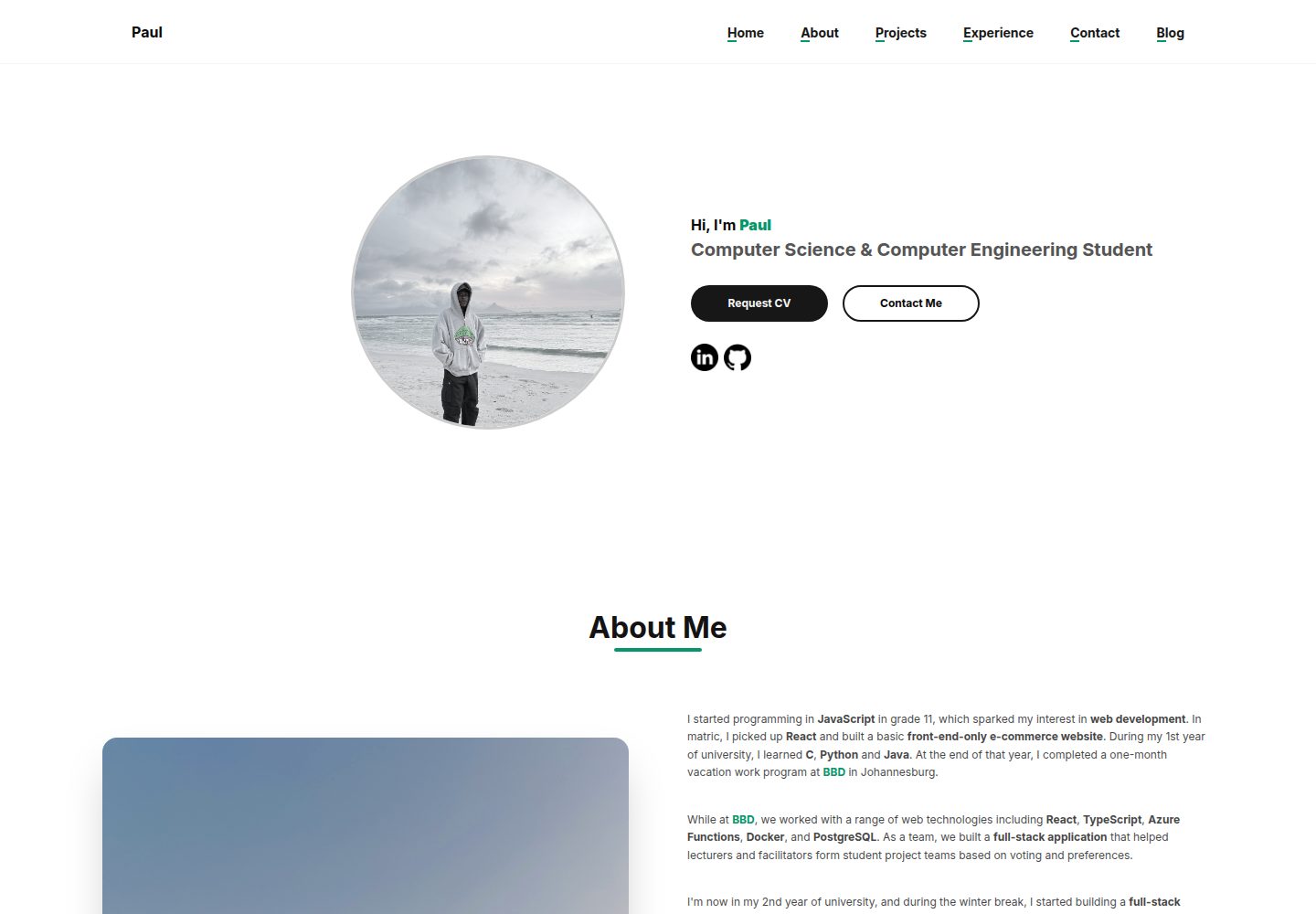
公开作品集页面包含 Hero、About Me、Projects 和 Experience 区块,内容由 Appwrite 动态提供
Next.jsReact后台作品集
portfolio (paulkabzz) — Next.js 后台模板
作者 paulkabzz
基于 Next.js 与 Appwrite 的个人作品集网站模板,包含公开展示页和受保护的管理后台,可管理个人信息、项目与工作经历。
看看你的网站会是什么样
浏览真实页面截图,比较内容排版与手机效果。点击下方缩略图切换,放大查看整页细节。
全部页面与视图 3
截图用于了解视觉与布局,交互效果请以实际项目为准。
采集于 2026-10-14查看来源
值得关注的模板亮点
从已有项目资料中,快速了解它的特点。
受保护的 /dashboard 管理后台可增删改个人信息、项目和工作经历,并支持搜索与筛选
使用 Appwrite 处理数据库、存储和认证,登录后可管理内容
支持自定义文本格式语法:**加粗**、{{绿色}}、~斜体~ 以及 ["url": 文本] 形式的链接
使用 Shadcn UI 组件(Card、Button、Input、Textarea、Badge、Switch、AlertDialog、Tooltip、Toast、Separator、Sheet、Skeleton)
支持浅色和深色主题,并包含图片上传校验与 Toast 操作反馈
模板详细介绍
该模板是一个使用 Next.js(App Router)构建的个人作品集网站,后端采用 Appwrite 提供数据库、存储和认证。公开页面包含 Hero、About Me、Projects 和 Experience 四个区块,内容从 Appwrite 动态读取;受保护的 /dashboard 路由提供管理后台,可维护个人信息、项目和工作经历,并支持搜索与筛选。
README 说明了环境变量配置、Appwrite 数据库集合与存储桶的创建要求,以及登录、构建和启动命令。模板支持浅色/深色主题,使用 Shadcn UI 组件,并实现了一套自定义的类 Markdown 文本格式(加粗、绿色、斜体、内外链接)。README 未提及部署平台、性能指标或生产环境的具体配置,这些方面需要使用者自行评估。
Next.js后台作品集
适合你的项目吗?
适用场景
- 搭建个人作品集网站,集中展示项目与工作经历
- 通过管理后台在不修改代码的情况下更新个人信息和内容
- 使用 Appwrite 作为后端存储作品集数据并管理登录认证
- 作为 Next.js 与 Appwrite 集成的学习参考项目
适合人群
- 希望快速搭建个人作品集并自行管理内容的开发者
- 熟悉 Next.js 和 Tailwind CSS,愿意配置 Appwrite 后端的使用者
- 需要带管理后台的静态内容展示型个人网站的场景
上手与定制指南
结合仓库当前版本的说明,按下面的资料检查内容、配置与运行要求。
- 1
克隆仓库后使用 npm、yarn、pnpm 或 bun 安装依赖
- 2
在 .env.local 中配置 README 列出的 Appwrite 环境变量,包括项目 ID、URL、数据库 ID、集合 ID 和存储桶 ID
- 3
需在 Appwrite 中创建对应的数据库、集合和存储桶,并配置读写权限
- 4
在 Appwrite 中注册管理员用户,用于登录 /login 和 /dashboard
- 5
运行 npm run dev 启动开发服务器,或使用 npm run build 与 npm start 进行生产构建与启动
授权与来源资料
使用条件与限制
免费使用 · 保留许可声明本次收录的是公开仓库中采用 MIT 许可的免费版本;免费范围为该版本代码,不代表外部服务或第三方素材免费。
使用时需要遵守
- 允许免费使用、修改、商用和分发该版本代码。
- 分发代码副本或实质性部分时,保留原作者版权声明和完整 MIT 许可声明。
- 代码按现状提供;担保与责任限制以原许可证及适用法律为准。
额外费用与待核对事项
- 演示图片、字体、图标及其他第三方素材需按各自许可核对,不能仅凭代码的 MIT 许可判断。
- 域名、托管、数据库、支付或 AI 等外部服务可能另外收费。
- 使用前必须在项目根目录创建 .env.local 并配置 Appwrite 相关环境变量,否则无法连接后端。
- 需要自行搭建 Appwrite 项目,创建数据库、集合与存储桶,并配置相应的读写权限。
- Appwrite Cloud 免费额度有限,学生可通过 GitHub Student Developer Pack 获取更高用量与存储额度。
- 需在 Appwrite 项目中注册管理员用户,才能登录管理后台。
查看原文依据
Permission is hereby granted, free of charge
许可证原文
Create a `.env.local` file in the root of your project and add the following environment variables. These are crucial for connecting to your Appwrite backend.
README 原文
**Note**: You will need to set up your Appwrite project, create a database, and define collections and storage buckets as per the variables above. Ensure you configure appropriate read/write permissions for your collections and buckets.
README 原文
If you are a student, you can significantly enhance your Appwrite experience by applying for the **GitHub Student Developer Pack**. This pack often includes credits for Appwrite Cloud, which can provide higher usage limits, more storage, and other benefits, allowing you to build and deploy your portfolio without worrying about resource constraints.
README 原文
https://github.com/paulkabzz/portfolio/blob/main/LICENSEhttps://github.com/paulkabzz/portfolio/blob/main/README.md2. **Create an Admin User**: Register a user in your Appwrite project. This user will be used to log in to the admin dashboard.
README 原文
DeepSeek 根据仓库许可证和 README 整理 ·2026-10-14。结果仅覆盖已读取资料,依赖、图片、字体及后续条款变更以各自原文为准。
项目核对记录与介绍依据
模板资料
- 来源平台
- GitHub
- 资料与维护参考分
- 资料较完整 · 85 / 100
- 技术栈
- Next.js · React
- 网站类型
- 后台 · 作品集
这个分数如何计算
本站按许可资料(最高30分)、演示链接(12分)、预览图(10分)、Star数(15分)、记录的维护时间(15分)、描述完整度(8分)、功能记录(5分)和分类资料(5分)计算。它不是代码、安全或性能测试,也不是 Google 评分;有链接不代表已实测可用。
这个项目需要核对什么
- 记录的仓库更新时间
- 2026-08-16
- 截图检查日期
- 2026-10-14
已收录演示链接。请用你的内容与屏幕尺寸检查;有演示不代表表单、认证或支付已经可用。
目录记录的主要技术栈是 Next.js。请通过依赖清单和锁文件核对实际版本与托管要求。这些说明基于收录资料,不代表代码审计或部署实测。
查看具体选型方法 →介绍的制作与核对状态
介绍由 AI 辅助整理目录与仓库资料。仓库作者不等于这篇介绍的审核者。
审核声明: codex-user-requested-batch-review-20261015 · 2026-10-15
查看当时使用的来源资料
SHA-256: 433d5d4689308bdfce8206133c5fca5dd67ad6f868b3f8d52094f47089f5875d
2026-10-14T11:28:36.983Z
来源文件 / 仓库
# Portfolio Website Template
This project is a personal portfolio website built with Next.js, designed to showcase your projects and work experience with an integrated admin dashboard for easy content management. It's bootstrapped with `create-next-app` and uses Appwrite as a backend for data storage and authentication.
## Demo Video
[](https://www.youtube.com/watch?v=d25cCiEL8uo)
## Features
* **Responsive Design**: The website is built to be responsive and work seamlessly across various devices.
* **Admin Dashboard**: A secure, protected route `/dashboard` allows you to:
* Manage your personal information (name, contact, about, images).
* Add, edit, and delete portfolio projects, including project images, descriptions, and technologies.
* Add, edit, and delete work experiences, including company details, dates, skills, and images.
* Search and filter through your projects and experiences.
* **Public-Facing Portfolio**: Displays your curated content dynamically:
* **Hero Section**: Customizable headline, name, occupation, and social links (LinkedIn, GitHub).
* **About Me Section**: Detailed information about yourself with a dedicated image.
* **Projects Section**: Showcases your projects with images, descriptions, technologies, and links to live demos or GitHub repositories. Includes a loading skeleton for better UX.
* **Experience Section**: Highlights your work history with company details, job titles, duration, and associated skills. Features an image carousel for multiple visuals per experience.
* **Authentication**: Secure login system for the admin dashboard.
* **Dynamic Content Formatting**: Supports basic text formatting (bold, green, italic) and internal/external links within descriptions using custom markdown-like syntax (`**text**`, `{{text}}`, `~text~`, `[["url": text]]`).
* **Image Management**: Upload and display profile pictures, project cover images, and multiple images for experiences, with validation for size and type.
* **Toast Notifications**: Provides user feedback for successful operations or errors.
* **UI Components**: Utilizes Shadcn UI components (Card, Button, Input, Textarea, Badge, Switch, AlertDialog, Tooltip, Toast, Separator, Sheet, Skeleton) for a consistent and modern look.
* **Theming**: Supports light and dark modes.
## Technologies Used
* **Framework**: Next.js (App Router)
* **Styling**: Tailwind CSS
* **UI Components**: Radix UI, integrated via Shadcn UI
* **Icons**: Lucide React
* **Backend**: Appwrite (for database, storage, and authentication)
* **State Management**: React Context API for managing authentication, projects, and experiences
* **Utilities**: `clsx` and `tailwind-merge` for utility classes
## Getting Started
Follow these steps to get your portfolio website up and running:
### 1\. Clone the repository
```bash
git clone [https://github.com/paulkabzz/portfolio](https://github.com/paulkabzz/portfolio) .
````
### 2\. Install dependencies
```bash
npm install
# or
yarn install
# or
pnpm install
# or
bun install
```
### 3\. Set up Environment Variables
Create a `.env.local` file in the root of your project and add the following environment variables. These are crucial for connecting to your Appwrite backend.
```
NEXT_PUBLIC_APPWRITE_PROJECT_ID=your_appwrite_project_id
NEXT_PUBLIC_APPWRITE_URL=[https://cloud.appwrite.io/v1](https://cloud.appwrite.io/v1) # or your custom Appwrite endpoint
NEXT_PUBLIC_APPWRITE_DATBASE_ID=your_database_id
NEXT_PUBLIC_APPWRITE_USER_IMG_STORAGE_ID=your_user_image_storage_id
NEXT_PUBLIC_APPWRITE_USER_COLLECTION_ID=your_user_collection_id
NEXT_PUBLIC_APPWRITE_USER_DOCUMENT_ID=your_user_document_id # usually '60d0fe2c000000000000' for a single user profile
NEXT_PUBLIC_APPWRITE_PROJECT_COVER_STORAGE_ID=your_project_cover_storage_id
NEXT_PUBLIC_APPWRITE_PROJECT_COLLECTION_ID=your_project_collection_id
NEXT_PUBLIC_APPWRITE_EXPERIENCE_STORAGE_ID=your_experience_storage_id
NEXT_PUBLIC_APPWRITE_EXPERINCE_COLLECTION_ID=your_experience_collection_id
NEXT_PUBLIC_APPWRITE_MESSAGES_COLLECTION_ID=your_messages_collection_id
```
**Note**: You will need to set up your Appwrite project, create a database, and define collections and storage buckets as per the variables above. Ensure you configure appropriate read/write permissions for your collections and buckets.
**How to find these values in your Appwrite Console:**
* **Project ID (`NEXT_PUBLIC_APPWRITE_PROJECT_ID`)**: Navigate to your Appwrite project. The Project ID can be found on the **Overview** page under "Project ID".
* **Appwrite URL (`NEXT_PUBLIC_APPWRITE_URL`)**: This is typically `https://cloud.appwrite.io/v1` for Appwrite Cloud. If you're self-hosting, it will be your custom Appwrite endpoint.
* **Database ID (`NEXT_PUBLIC_APPWRITE_DATBASE_ID`)**: In your Appwrite project, go to **Databases**. Create a new database if you don't have one, then click on it. The Database ID will be displayed at the top.
* **Collection IDs (`NEXT_PUBLIC_APPWRITE_USER_COLLECTION_ID`, `NEXT_PUBLIC_APPWRITE_PROJECT_COLLECTION_ID`, `NEXT_PUBLIC_APPWRITE_EXPERINCE_COLLECTION_ID`, `NEXT_PUBLIC_APPWRITE_MESSAGES_COLLECTION_ID`)**: Within your chosen database, go to **Collections**. Create the necessary collections (e.g., `users`, `projects`, `experiences`, `messages`). The Collection ID for each will be visible when you select it.
* **Storage IDs (`NEXT_PUBLIC_APPWRITE_USER_IMG_STORAGE_ID`, `NEXT_PUBLIC_APPWRITE_PROJECT_COVER_STORAGE_ID`, `NEXT_PUBLIC_APPWRITE_EXPERIENCE_STORAGE_ID`)**: In your Appwrite project, go to **Storage**. Create the necessary buckets (e.g., `user_images`, `project_covers`, `experience_images`). The Bucket ID for each will be visible when you select it.
* **User Document ID (`NEXT_PUBLIC_APPWRITE_USER_DOCUMENT_ID`)**: After creating your `users` collection and logging into your dashboard for the first time (which will create a user document), or by manually creating a document for your personal info within the `users` collection, you can find its Document ID by clicking on the document itself. This is typically a unique ID for your single user profile document.
### **Appwrite & GitHub Student Developer Pack**
If you are a student, you can significantly enhance your Appwrite experience by applying for the **GitHub Student Developer Pack**. This pack often includes credits for Appwrite Cloud, which can provide higher usage limits, more storage, and other benefits, allowing you to build and deploy your portfolio without worrying about resource constraints.
To learn more and apply, visit the GitHub Student Developer Pack website.
### 4\. Run the development server
```bash
npm run dev
# or
yarn dev
# or
pnpm dev
# or
bun dev
```
Open [http://localhost:3000](https://www.google.com/search?q=http://localhost:3000) with your browser to see the public-facing portfolio.
To access the admin dashboard, navigate to [http://localhost:3000/login](https://www.google.com/search?q=http://localhost.com/login) and log in with your Appwrite user credentials.
### 5\. Build for production
```bash
npm run build
# or
yarn build
# or
pnpm build
# or
bun build
```
### 6\. Start the production server
```bash
npm start
# or
yarn start
# or
pnpm start
# or
bun start
```
## How to Use as a Template
This repository can be easily adapted to create your own personal portfolio website:
1. **Set up Appwrite**: Create an Appwrite project and configure the database collections and storage buckets as specified in the "Environment Variables" section.
2. **Create an Admin User**: Register a user in your Appwrite project. This user will be used to log in to the admin dashboard.
3. **Update `NEXT_PUBLIC_APPWRITE_USER_DOCUMENT_ID`**: After creating a document in your `userCollectionId` (e.g., named `personal_info`) for your personal profile data, replace `your_user_document_id` in `.env.local` with its actual ID from Appwrite. This allows the site to fetch your unique profile information.
4. **Populate Content via Dashboard**: Log in to the `/dashboard` to add your personal information, projects, and work experiences. The public site will automatically reflect these updates.
5. **Customize Styling**: Modify `tailwind.config.js` and `app/globals.css` to adjust colors, fonts, and other styles to match your personal branding.
6. **Extend Functionality**: Explore the `app/` and `components/` directories to add new sections, features, or integrate with other services.
## Project Structure Highlights
* `app/`: Contains the main application routes and pages, including public (`page.tsx`) and authenticated dashboard routes (`dashboard/`).
* `components/`: Reusable UI components, including the custom Shadcn UI components (`ui/`) and public-facing sections (`public-components/`).
* `lib/`: Utility functions and Appwrite configurations (`appwrite.ts`, `project.ts`).
* `contexts/`: React Context API for global state management (e.g., `auth-context.tsx`, `project-context.tsx`, `experience-context.tsx`).
* `hooks/`: Custom React hooks (`use-mobile.ts`, `use-toast.tsx`).
* `public/`: Static assets like images.
## Learn More
To learn more about Next.js, take a look at the following resources:
* [Next.js Documentation](https://nextjs.org/docs) - learn about Next.js features and API.
* [Learn Next.js](https://nextjs.org/learn) - an interactive Next.js tutorial.
You can check out [the Next.js GitHub repository](https://github.com/vercel/next.js) - your feedback and contributions are welcome\!
Email: [email protected]
看看同类模板
对比同技术栈与用途的模板,找到更适合的视觉与内容结构。

next-shadcn-dashboard-starter
Free, open source, AI-friendly admin dashboard template built with Next.js 16, shadcn/ui, Tailwind CSS, and Ty…
Next.js · 后台

Studio Admin · Radix UI
Modern Admin Dashboard Template built with Shadcn UI and Next.js 16
Next.js · 后台

free-nextjs-admin-dashboard
TailAdmin is a Next.js and Tailwind CSS free, open-source admin dashboard template. Provides developers with t…
Next.js · 后台

react-resume-template
A personal resume website template built with React.js, Typescript, Next.js, and styled with Tailwind css
Next.js · 作品集

materio-mui-nextjs-admin-template-free
An enterprise-grade Next.js admin dashboard template. Made with developer experience first: Next.js v14 (App R…
Next.js · 后台
nextjs-postgres-nextauth-tailwindcss-template
Admin dashboard template.
Next.js · 后台