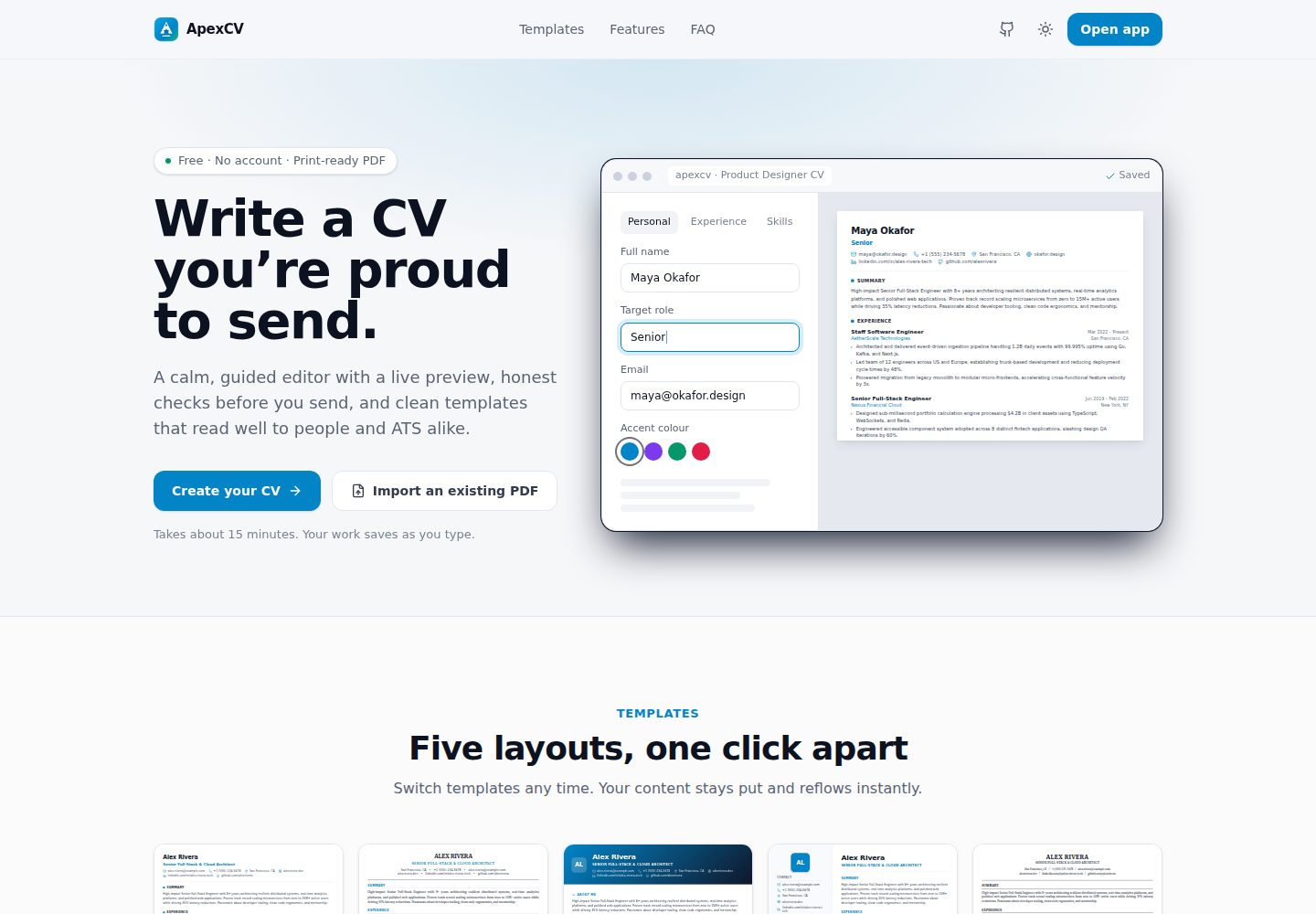
Split-screen live editing: the editor and CV preview update in sync, with A4 page boundaries marked by dashed lines
Next.jsReactPortfolio
ApexCV — Next.js Portfolio Template
By pawiromitchel
ApexCV is a free resume and CV builder built on Next.js, offering split-screen live preview, 5 ATS-friendly templates, PDF import/export, and share links.
Explore the design
Compare the page layouts and mobile experience. Open any screenshot for a closer look.
Desktop homepage1 / 2
Desktop captureTop of page
Actual screenshot captured by the server browser.
All pages & views 2
Screenshots show visual appearance; interactive behavior may differ.
Recorded 2026-10-03View source
What stands out
A quick read of the recorded project description.
5 ATS-optimized templates: Modern Tech, Executive, Creative, Sidebar, ATS Classic
Import contact details, work experience, education, and technical skills from an existing PDF resume
Export a vector PDF with selectable text via the browser's native print function
Optional public share link /view/[id], read-only and with an optional expiration time
Resume isolation based on anonymous device ID and debounced SQLite autosave
Template Details
ApexCV is a resume and CV writing platform built with Next.js 14 (App Router), TypeScript, Tailwind CSS, and the built-in node:sqlite module in Node 22. The editor uses a split-screen layout: editing on the left and live preview on the right. It supports drag-and-drop reordering of sections, dynamic adjustment of font size and page margins, and displays A4 page boundaries as dashed lines in the editor. It includes 5 ATS-optimized templates (Modern Tech, Executive, Creative, Sidebar, ATS Classic), and entry text supports native Markdown syntax.
On the data side, resumes are isolated using an anonymous device ID as a bearer credential. Each /api/resumes/** route can only be read and written by the owning device, and debounced SQLite autosave is used. Sharing is optional; when enabled, it generates a read-only /view/[id] link with an optional expiration time. It also supports extracting contact details, work experience, education, and technical skills from an existing PDF resume, and exporting a vector PDF with selectable text via the browser's native print function.
The project requires Node.js 22 or higher to use the built-in node:sqlite, and the development server runs on port 3001 by default. It provides Docker deployment using a multi-stage Node 22 Alpine image. The SQLite database file is located at /usr/src/app/data inside the container and is persisted through the named volume apexcv_data. The code is MIT licensed, but third-party assets such as demo images, fonts, and icons, as well as external services such as domains and hosting, require separate verification of licensing and costs.
Next.jsReactPortfolio
Is it right for your project?
Use Cases
- When tailoring a resume for different roles, temporarily hide specific work or project entries without deleting the data
- Import an existing PDF resume, continue editing it, and export it as an ATS-friendly PDF
- Send a read-only resume directly to recruiters via a share link, with an optional link expiration time
- Self-host a resume writing tool locally or in a Docker environment
Suitable For
- Job seekers who need to frequently adjust resume content for different positions
- Developers or teams who want to self-host and control their resume data
- Users who prefer Markdown syntax and a live-preview editing experience
- Users who need ATS-friendly templates and PDF export with selectable text
Getting started & customization
Use these recorded setup notes alongside the repository instructions for your chosen version.
- 1
Requires Node.js 22.x or higher to use the built-in node:sqlite module
- 2
The development server runs on port 3001 by default and can be started with npm run dev
- 3
Production deployment requires setting NEXT_PUBLIC_SITE_URL so Open Graph link previews use absolute URLs
- 4
When deploying with Docker, the SQLite database is located at /usr/src/app/data inside the container and is persisted through the named volume apexcv_data
- 5
The cloudflared service in docker-compose.yml is optional and can be removed when not using a tunnel
License & source material
Usage conditions & limitations
Free to use · keep license noticeThis entry covers the free version in the public repository under the MIT license; the free scope is the code of this version and does not mean that external services or third-party assets are free.
Must comply with when using
- You may use, modify, commercialize, and distribute the code of this version for free.
- When distributing copies or substantial portions of the code, retain the original author's copyright notice and the complete MIT license notice.
- The code is provided as is; warranties and limitations of liability are governed by the original license and applicable law.
Additional costs & items to verify
- Runtime limitation: Node.js 22.x or higher is required because the project depends on the built-in node:sqlite module in Node 22, and lower Node versions cannot run it.
- External service limitation: the cloudflared tunnel service in docker-compose.yml is optional. If used, you must provide the CLOUDFLARE_TUNNEL_TOKEN environment variable yourself and bear the Cloudflare-related services; the service can be removed when not using a tunnel.
- Deployment configuration limitation: in production, you must set NEXT_PUBLIC_SITE_URL to a public domain yourself; otherwise, Open Graph link previews cannot use absolute URLs.
- Demo images, fonts, icons, and other third-party assets must be checked against their respective licenses and cannot be judged solely by the code's MIT license.
- External services such as domains, hosting, databases, payments, or AI may incur additional charges.
View Original Text Basis
Permission is hereby granted, free of charge
Original License Text
**Node.js 22.x or later** (required for built-in `node:sqlite` support)
Original README
The optional `cloudflared` service in `docker-compose.yml` reads `CLOUDFLARE_TUNNEL_TOKEN` from your environment; remove it if you don't use a tunnel.
Original README
https://github.com/pawiromitchel/ApexCV/blob/main/LICENSEhttps://github.com/pawiromitchel/ApexCV/blob/main/README.mdSet `NEXT_PUBLIC_SITE_URL` to your public origin so link previews (Open Graph) use absolute URLs.
Original README
Compiled by DeepSeek based on repository license and README ·2026-10-03. Results only cover the materials read; dependencies, images, fonts, and subsequent term changes are subject to their respective original texts.
Project checks & description sources
Template Information
- Source platforms
- GitHub
- Documentation and maintenance reference score
- More documented · 85 / 100
- Technologies
- Next.js · React
- Website type
- Portfolio
How this score is calculated
Our heuristic uses license records (up to 30), a demo link (12), a preview (10), stars (15), recorded maintenance (15), description completeness (8), feature records (5) and classification data (5). It is not a code, security or performance test, or a Google score. A link does not establish tested functionality.
What to verify for this project
- Repository update recorded
- 2026-10-03
- Screenshot last checked
- 2026-10-03
A demo link is listed. Check it with your own content and viewport sizes; its presence does not confirm that forms, authentication or payments work.
The catalog identifies Next.js as the primary stack. Check the actual dependency manifest and lockfile for versions and hosting requirements. These notes use recorded metadata, not a code audit or a deployment test.
Use a selection guide →How this description was prepared
AI-assisted description based on catalog records and repository material. Repository authors are not automatically the reviewers of this description.
Review declaration: [email protected] · 2026-10-04
Inspect the recorded source material
SHA-256: 8e664dbc67d5ba2439c921ed7847b0c52898bf50627bbffcea9dc1d8d18f24d3
2026-10-03T16:54:20.058Z
Source file / repository<p align="center"> <img src="public/favicon.svg" alt="ApexCV logo" width="88" height="88" /> </p> <h1 align="center">ApexCV</h1> <p align="center"><b>Write a CV you're proud to send.</b></p> <p align="center"> <img src="docs/screenshot.png" alt="ApexCV editor with live CV preview" width="900" /> </p> ApexCV is a modern resume and CV authoring platform built with **Next.js 14 (App Router)**, **TypeScript**, **Tailwind CSS**, and **Node 22 `node:sqlite`**. It features split-screen live editing, five ATS-optimized templates, drag-and-drop section reordering, PDF importing, and vector PDF exporting. --- ## Features - **Live Split-Screen Editing:** Real-time preview updates alongside the editor. - **5 ATS-Optimized Templates:** Includes Modern Tech, Executive, Creative, Sidebar, and ATS Classic. - **Layout Controls:** Dynamically adjust Font Size (Small, Base, Large) and Page Margins (Compact, Standard, Spacious). - **Rich Text Support:** Native markdown support (`**bold**`, `*italic*`, `[links](url)`) within bullet points. - **Section Visibility:** Temporarily hide specific jobs or projects to tailor a CV to a specific role without deleting data. - **A4 Page Boundaries:** Visual dashed-line indicators in the editor to prevent unexpected PDF page-breaks. - **Public Share Links:** Opt-in, read-only `/view/[id]` links with an optional expiry, to send directly to employers. - **Light & Dark Theme:** Follows the system setting, with a manual toggle. - **PDF Resume Import:** Extract contact info, work experience, education, and technical skills from existing PDF resumes. - **Vector PDF Export:** High-quality, text-selectable PDF export via native browser print. - **Debounced SQLite Autosave:** Built with Node 22 native `node:sqlite`. - **Dynamic Section Reordering:** Drag and drop sections to rearrange. --- ## Tech Stack - **Framework:** [Next.js 14.2](https://nextjs.org/) (App Router) - **UI & Styling:** [React 18](https://react.dev/), [Tailwind CSS 3.4](https://tailwindcss.com/), [Lucide React](https://lucide.dev/) - **Database:** Node 22 `node:sqlite` (`DatabaseSync`) - **PDF Parsing:** `pdf-parse` - **Testing:** `puppeteer-core` for headless E2E verification --- ## Getting Started ### Prerequisites - **Node.js 22.x or later** (required for built-in `node:sqlite` support) - **npm** (v10+) ### 1. Installation ```bash git clone [email protected]:pawiromitchel/ApexCV.git cd ApexCV npm install ``` ### 2. Run the Development Server The application runs on port **3001** by default: ```bash npm run dev ``` Open [http://localhost:3001](http://localhost:3001) in your browser. - Landing page: `http://localhost:3001/` - Dashboard: `http://localhost:3001/app` - Live Editor: `http://localhost:3001/app/<resume-id>` --- ## Production & Docker Set `NEXT_PUBLIC_SITE_URL` to your public origin so link previews (Open Graph) use absolute URLs. The optional `cloudflared` service in `docker-compose.yml` reads `CLOUDFLARE_TUNNEL_TOKEN` from your environment; remove it if you don't use a tunnel. ### Local Build & Start ```bash npm run build npm run start ``` ## Docker Deployment ApexCV is containerized using a multi-stage Node 22 Alpine image. ### Quick Start with Docker Compose To build the image and start ApexCV in detached mode: ```bash docker compose up -d --build docker compose ps ``` ### Data Persistence & SQLite Volume The embedded SQLite database (`cv_builder.db`) is stored inside `/usr/src/app/data` within the container, which is mounted to a named Docker volume `apexcv_data`: - **Named Volume:** `apexcv_data` - **Container Path:** `/usr/src/app/data/cv_builder.db` --- ## Project Structure ``` ApexCV/ ├── app/ # Next.js app router pages and API ├── components/ # UI components, forms, and preview templates ├── lib/ # Database, types, and utilities ├── scripts/ # Testing and automation scripts ├── package.json # Dependencies and scripts └── cv_builder.db # Local SQLite database (created on first run) ``` --- ## API Reference Every `/api/resumes/**` route is scoped to the requesting browser: the anonymous device ID is sent as a bearer credential, and a resume can only be read or changed by the device that owns it. | Method | Endpoint | Description | |---|---|---| | `GET` | `/api/resumes` | List your resumes | | `POST` | `/api/resumes` | Create a new resume | | `GET` | `/api/resumes/:id` | Fetch one of your resumes | | `PUT` | `/api/resumes/:id` | Update one of your resumes | | `DELETE` | `/api/resumes/:id` | Delete one of your resumes | | `POST` | `/api/resumes/:id/duplicate` | Duplicate a resume | | `PUT` | `/api/resumes/:id/share` | Turn sharing on/off and set the link expiry | | `POST` | `/api/resumes/parse-pdf` | Extract data from a PDF | | `GET` | `/api/view/:identifier` | Public read of a shared resume (sharing must be enabled) | Sharing is opt-in: a resume is private until its owner enables a share link. --- ## Automated Testing ```bash # Start server in one terminal npm run dev # Run E2E test suite node scripts/test-e2e.mjs # Run PDF parsing test suite node scripts/test-pdf-import.mjs ``` --- --- ## License [MIT](./LICENSE)
Explore similar templates
Compare previews and descriptions within the same stack and category.

react-resume-template
A personal resume website template for software developers, built with Next.js, React, and TypeScript and styled with Tailwind CSS. Site content is driven by a single data file at /src/data/data.tsx, with types in dataDef.ts and images in src/images/.
Next.js · Portfolio

nxt-lnk
nxt-lnk is a Next.js-based bio link page template that manages personal information and links via BioData.js and LinksData.js, positioned as a self-hosted alternative to Linktree. It groups links by type, supports enabling/disabling individual links, and offers hexagonal or oval avatars.
Next.js · Portfolio

sylph
Sylph is a minimal portfolio and blog template built on Next.js, supporting MDX/Markdown writing, light/dark themes, and automatic OG image generation. It includes sitemap, robots.txt, metadata, and syntax highlighting, with automatic blog timestamps.
Next.js · Portfolio

sleek-portfolio
A modern, responsive portfolio template built with Next.js 15, TypeScript, Tailwind CSS, and Shadcn UI. It includes an MDX blog, project showcase, work experience timeline, and a contact form that receives messages via Telegram Bot.
Next.js · Portfolio

research-website-template
A React + Next.js template for research personal websites, aimed at PhD students and researchers. It centralizes publications, projects, and other content in src/data as arrays of objects, with optional fields automatically generating UI components.
Next.js · Portfolio

shadcn-portfolio
A developer portfolio template built with Next.js 15, shadcn/ui, Tailwind CSS, and Framer Motion, featuring an MDX blog, light and dark modes, responsive design, and SEO meta tags.
Next.js · Portfolio