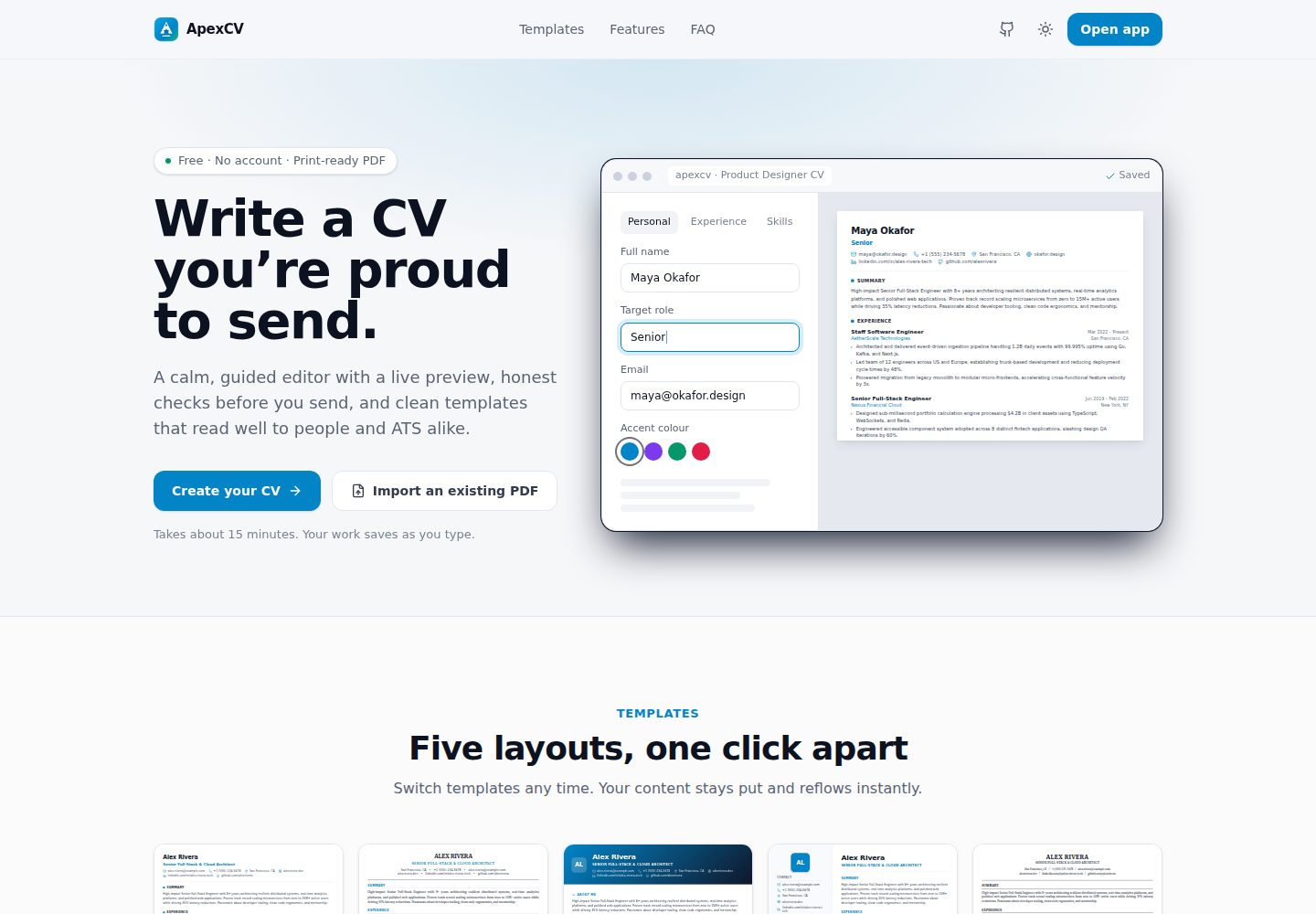
分屏实时编辑:编辑器与 CV 预览同步更新,并用虚线标出 A4 分页边界
Next.jsReact作品集
ApexCV — Next.js 作品集模板
作者 pawiromitchel
ApexCV 是一个基于 Next.js 的免费简历与 CV 编写工具,提供分屏实时预览、5 套 ATS 友好模板、PDF 导入导出与分享链接。
看看你的网站会是什么样
浏览真实页面截图,比较内容排版与手机效果。点击下方缩略图切换,放大查看整页细节。
全部页面与视图 2
截图用于了解视觉与布局,交互效果请以实际项目为准。
采集于 2026-10-03查看来源
值得关注的模板亮点
从已有项目资料中,快速了解它的特点。
5 套 ATS 优化模板:Modern Tech、Executive、Creative、Sidebar、ATS Classic
支持从现有 PDF 简历导入联系方式、工作经历、教育背景与技术技能
通过浏览器原生打印导出可选中文本的矢量 PDF
可选公开分享链接 /view/[id],只读并可设置过期时间
基于匿名设备 ID 的简历隔离与防抖 SQLite 自动保存
模板详细介绍
ApexCV 是一个用 Next.js 14(App Router)、TypeScript、Tailwind CSS 和 Node 22 内置 node:sqlite 构建的简历与 CV 编写平台。编辑界面采用分屏布局,左侧编辑、右侧实时预览,支持拖拽调整区块顺序、动态调整字号与页边距,并在编辑器中用虚线标出 A4 分页边界。内置 5 套 ATS 优化模板(Modern Tech、Executive、Creative、Sidebar、ATS Classic),条目文本支持原生 Markdown 语法。
数据层面,简历通过匿名设备 ID 作为 bearer 凭据进行隔离,每个 /api/resumes/** 路由只能被所属设备读写,并采用防抖 SQLite 自动保存。分享为可选功能,开启后生成只读的 /view/[id] 链接,可设置过期时间。此外支持从已有 PDF 简历中提取联系方式、工作经历、教育背景和技术技能,并通过浏览器原生打印导出可选中文本的矢量 PDF。
项目要求 Node.js 22 或更高版本以使用内置 node:sqlite,开发服务器默认运行在 3001 端口。提供多阶段 Node 22 Alpine 镜像的 Docker 部署方式,SQLite 数据库文件位于容器内 /usr/src/app/data,通过命名卷 apexcv_data 持久化。代码采用 MIT 许可,但演示图片、字体、图标等第三方素材以及域名、托管等外部服务需另行核对许可与费用。
Next.jsReact作品集
适合你的项目吗?
适用场景
- 为不同岗位定制简历时,临时隐藏特定工作或项目条目而不删除数据
- 将已有 PDF 简历导入后继续编辑,并导出为 ATS 友好的 PDF
- 通过分享链接把只读简历直接发给招聘方,并可设置链接有效期
- 在本地或 Docker 环境中自行部署一套简历编写工具
适合人群
- 需要频繁针对不同职位调整简历内容的求职者
- 希望自行部署并掌控简历数据的开发者或团队
- 偏好 Markdown 语法与实时预览编辑体验的用户
- 需要 ATS 友好模板和可选中文本 PDF 导出的用户
上手与定制指南
结合仓库当前版本的说明,按下面的资料检查内容、配置与运行要求。
- 1
需要 Node.js 22.x 或更高版本,以使用内置 node:sqlite 模块
- 2
开发服务器默认运行在 3001 端口,可通过 npm run dev 启动
- 3
生产部署需设置 NEXT_PUBLIC_SITE_URL,以便 Open Graph 链接预览使用绝对地址
- 4
Docker 部署时 SQLite 数据库位于容器内 /usr/src/app/data,通过命名卷 apexcv_data 持久化
- 5
docker-compose.yml 中的 cloudflared 服务为可选,不使用隧道时可移除
授权与来源资料
使用条件与限制
免费使用 · 保留许可声明本次收录的是公开仓库中采用 MIT 许可的免费版本;免费范围为该版本代码,不代表外部服务或第三方素材免费。
使用时需要遵守
- 允许免费使用、修改、商用和分发该版本代码。
- 分发代码副本或实质性部分时,保留原作者版权声明和完整 MIT 许可声明。
- 代码按现状提供;担保与责任限制以原许可证及适用法律为准。
额外费用与待核对事项
- 运行环境限制:必须使用 Node.js 22.x 或更高版本,因为项目依赖 Node 22 内置的 node:sqlite 模块,低版本 Node 无法运行。
- 外部服务限制:docker-compose.yml 中的 cloudflared 隧道服务为可选,若使用需自行提供 CLOUDFLARE_TUNNEL_TOKEN 环境变量并承担 Cloudflare 相关服务;不使用隧道时可移除该服务。
- 部署配置限制:生产环境需自行设置 NEXT_PUBLIC_SITE_URL 为公开域名,否则 Open Graph 链接预览无法使用绝对地址。
- 演示图片、字体、图标及其他第三方素材需按各自许可核对,不能仅凭代码的 MIT 许可判断。
- 域名、托管、数据库、支付或 AI 等外部服务可能另外收费。
查看原文依据
Permission is hereby granted, free of charge
许可证原文
**Node.js 22.x or later** (required for built-in `node:sqlite` support)
README 原文
The optional `cloudflared` service in `docker-compose.yml` reads `CLOUDFLARE_TUNNEL_TOKEN` from your environment; remove it if you don't use a tunnel.
README 原文
https://github.com/pawiromitchel/ApexCV/blob/main/LICENSEhttps://github.com/pawiromitchel/ApexCV/blob/main/README.mdSet `NEXT_PUBLIC_SITE_URL` to your public origin so link previews (Open Graph) use absolute URLs.
README 原文
DeepSeek 根据仓库许可证和 README 整理 ·2026-10-03。结果仅覆盖已读取资料,依赖、图片、字体及后续条款变更以各自原文为准。
项目核对记录与介绍依据
模板资料
- 来源平台
- GitHub
- 资料与维护参考分
- 资料较完整 · 85 / 100
- 技术栈
- Next.js · React
- 网站类型
- 作品集
这个分数如何计算
本站按许可资料(最高30分)、演示链接(12分)、预览图(10分)、Star数(15分)、记录的维护时间(15分)、描述完整度(8分)、功能记录(5分)和分类资料(5分)计算。它不是代码、安全或性能测试,也不是 Google 评分;有链接不代表已实测可用。
这个项目需要核对什么
- 记录的仓库更新时间
- 2026-10-03
- 截图检查日期
- 2026-10-03
已收录演示链接。请用你的内容与屏幕尺寸检查;有演示不代表表单、认证或支付已经可用。
目录记录的主要技术栈是 Next.js。请通过依赖清单和锁文件核对实际版本与托管要求。这些说明基于收录资料,不代表代码审计或部署实测。
查看具体选型方法 →介绍的制作与核对状态
介绍由 AI 辅助整理目录与仓库资料。仓库作者不等于这篇介绍的审核者。
审核声明: [email protected] · 2026-10-04
查看当时使用的来源资料
SHA-256: 8e664dbc67d5ba2439c921ed7847b0c52898bf50627bbffcea9dc1d8d18f24d3
2026-10-03T16:54:20.058Z
来源文件 / 仓库<p align="center"> <img src="public/favicon.svg" alt="ApexCV logo" width="88" height="88" /> </p> <h1 align="center">ApexCV</h1> <p align="center"><b>Write a CV you're proud to send.</b></p> <p align="center"> <img src="docs/screenshot.png" alt="ApexCV editor with live CV preview" width="900" /> </p> ApexCV is a modern resume and CV authoring platform built with **Next.js 14 (App Router)**, **TypeScript**, **Tailwind CSS**, and **Node 22 `node:sqlite`**. It features split-screen live editing, five ATS-optimized templates, drag-and-drop section reordering, PDF importing, and vector PDF exporting. --- ## Features - **Live Split-Screen Editing:** Real-time preview updates alongside the editor. - **5 ATS-Optimized Templates:** Includes Modern Tech, Executive, Creative, Sidebar, and ATS Classic. - **Layout Controls:** Dynamically adjust Font Size (Small, Base, Large) and Page Margins (Compact, Standard, Spacious). - **Rich Text Support:** Native markdown support (`**bold**`, `*italic*`, `[links](url)`) within bullet points. - **Section Visibility:** Temporarily hide specific jobs or projects to tailor a CV to a specific role without deleting data. - **A4 Page Boundaries:** Visual dashed-line indicators in the editor to prevent unexpected PDF page-breaks. - **Public Share Links:** Opt-in, read-only `/view/[id]` links with an optional expiry, to send directly to employers. - **Light & Dark Theme:** Follows the system setting, with a manual toggle. - **PDF Resume Import:** Extract contact info, work experience, education, and technical skills from existing PDF resumes. - **Vector PDF Export:** High-quality, text-selectable PDF export via native browser print. - **Debounced SQLite Autosave:** Built with Node 22 native `node:sqlite`. - **Dynamic Section Reordering:** Drag and drop sections to rearrange. --- ## Tech Stack - **Framework:** [Next.js 14.2](https://nextjs.org/) (App Router) - **UI & Styling:** [React 18](https://react.dev/), [Tailwind CSS 3.4](https://tailwindcss.com/), [Lucide React](https://lucide.dev/) - **Database:** Node 22 `node:sqlite` (`DatabaseSync`) - **PDF Parsing:** `pdf-parse` - **Testing:** `puppeteer-core` for headless E2E verification --- ## Getting Started ### Prerequisites - **Node.js 22.x or later** (required for built-in `node:sqlite` support) - **npm** (v10+) ### 1. Installation ```bash git clone [email protected]:pawiromitchel/ApexCV.git cd ApexCV npm install ``` ### 2. Run the Development Server The application runs on port **3001** by default: ```bash npm run dev ``` Open [http://localhost:3001](http://localhost:3001) in your browser. - Landing page: `http://localhost:3001/` - Dashboard: `http://localhost:3001/app` - Live Editor: `http://localhost:3001/app/<resume-id>` --- ## Production & Docker Set `NEXT_PUBLIC_SITE_URL` to your public origin so link previews (Open Graph) use absolute URLs. The optional `cloudflared` service in `docker-compose.yml` reads `CLOUDFLARE_TUNNEL_TOKEN` from your environment; remove it if you don't use a tunnel. ### Local Build & Start ```bash npm run build npm run start ``` ## Docker Deployment ApexCV is containerized using a multi-stage Node 22 Alpine image. ### Quick Start with Docker Compose To build the image and start ApexCV in detached mode: ```bash docker compose up -d --build docker compose ps ``` ### Data Persistence & SQLite Volume The embedded SQLite database (`cv_builder.db`) is stored inside `/usr/src/app/data` within the container, which is mounted to a named Docker volume `apexcv_data`: - **Named Volume:** `apexcv_data` - **Container Path:** `/usr/src/app/data/cv_builder.db` --- ## Project Structure ``` ApexCV/ ├── app/ # Next.js app router pages and API ├── components/ # UI components, forms, and preview templates ├── lib/ # Database, types, and utilities ├── scripts/ # Testing and automation scripts ├── package.json # Dependencies and scripts └── cv_builder.db # Local SQLite database (created on first run) ``` --- ## API Reference Every `/api/resumes/**` route is scoped to the requesting browser: the anonymous device ID is sent as a bearer credential, and a resume can only be read or changed by the device that owns it. | Method | Endpoint | Description | |---|---|---| | `GET` | `/api/resumes` | List your resumes | | `POST` | `/api/resumes` | Create a new resume | | `GET` | `/api/resumes/:id` | Fetch one of your resumes | | `PUT` | `/api/resumes/:id` | Update one of your resumes | | `DELETE` | `/api/resumes/:id` | Delete one of your resumes | | `POST` | `/api/resumes/:id/duplicate` | Duplicate a resume | | `PUT` | `/api/resumes/:id/share` | Turn sharing on/off and set the link expiry | | `POST` | `/api/resumes/parse-pdf` | Extract data from a PDF | | `GET` | `/api/view/:identifier` | Public read of a shared resume (sharing must be enabled) | Sharing is opt-in: a resume is private until its owner enables a share link. --- ## Automated Testing ```bash # Start server in one terminal npm run dev # Run E2E test suite node scripts/test-e2e.mjs # Run PDF parsing test suite node scripts/test-pdf-import.mjs ``` --- --- ## License [MIT](./LICENSE)
看看同类模板
对比同技术栈与用途的模板,找到更适合的视觉与内容结构。

react-resume-template
A personal resume website template built with React.js, Typescript, Next.js, and styled with Tailwind css
Next.js · 作品集

nxt-lnk
Custom bio links for creatives who love coding. A perfect custom alternative for linktree, bio and other short…
Next.js · 作品集

sylph
A minimal portfolio template.
Next.js · 作品集

sleek-portfolio
sleek-portfolio 是一个面向开发者个人品牌展示的现代作品集模板,基于 Next.js 15、TypeScript、Tailwind CSS 和 Shadcn UI 构建。
Next.js · 作品集

research-website-template
React + Next.js template for research websites (for PhD students, researchers, etc)
Next.js · 作品集

shadcn-portfolio
shadcn-portfolio 是一个面向开发者的作品集模板,技术栈为 Next.js 15、shadcn/ui、Tailwind CSS 和 Framer Motion。
Next.js · 作品集