A single resume.json drives both the bilingual web portfolio and six PDF resume templates
Next.jsReactPortfolio
resume-site — Next.js Portfolio Template
By pietro1704
A static site system that generates a bilingual portfolio website and six PDF resume templates from a single resume.json, with the data layer separated from the renderer and support for pulling personal data from a private repository at build time.
Explore the design
Compare the page layouts and mobile experience. Open any screenshot for a closer look.
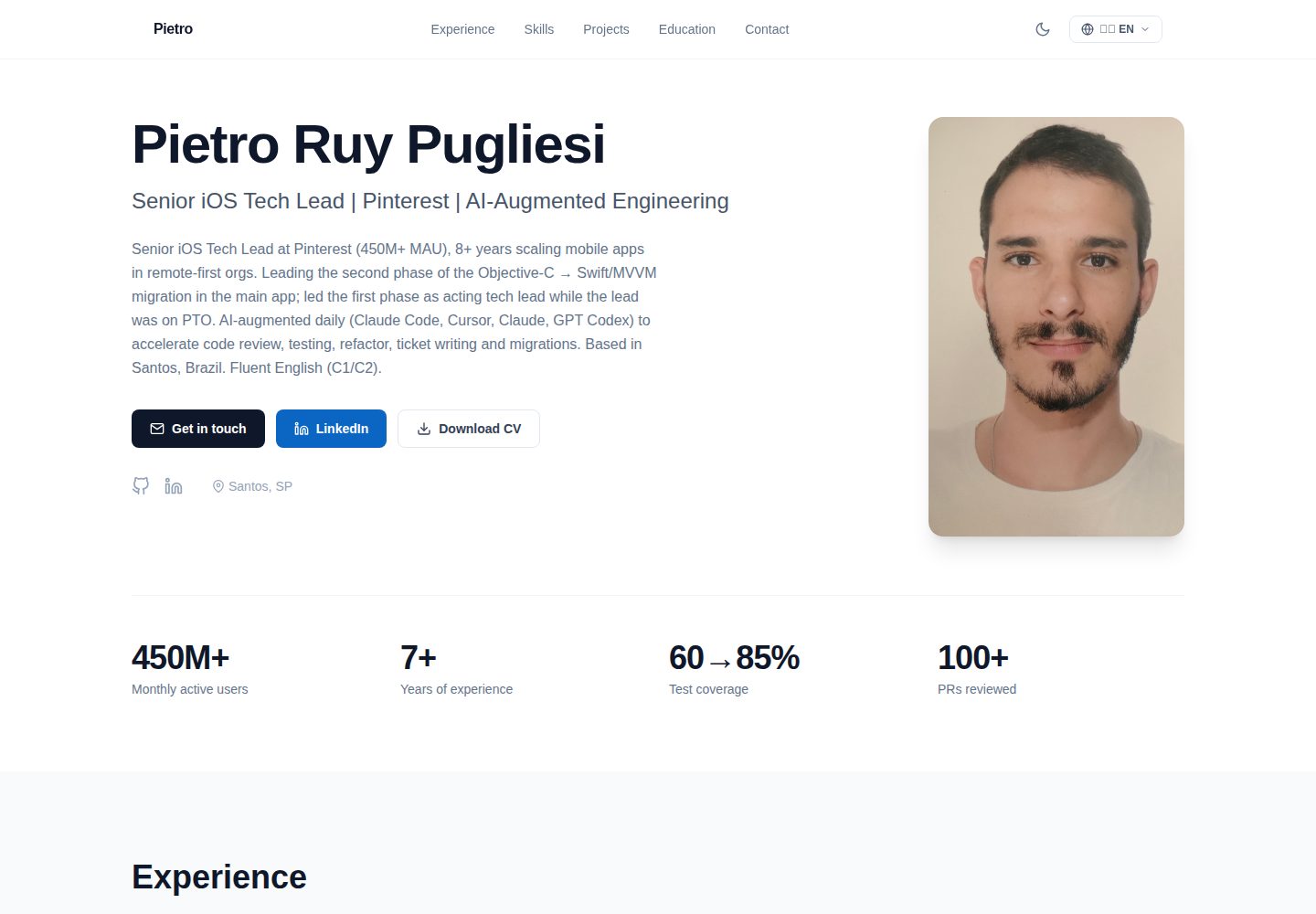
Desktop homepage1 / 2
Desktop captureTop of page
Actual screenshot captured by the server browser.
All pages & views 2
Screenshots show visual appearance; interactive behavior may differ.
Recorded 2026-10-14View source
What stands out
A quick read of the recorded project description.
The web side is based on Next.js static export and Tailwind CSS, supporting dark/light themes and a mobile-first layout
PDF templates are centralized in scripts/generate-resumes.js and defined by composing helper functions such as renderHeader and renderExperience; you can add generateXxx() and register it in the templates array
The build generates manifest.json recording a timestamp, used to automatically refresh caches for download links
The data layer is decoupled from templates, supporting cloning a private data repository at build time via the RESUME_DATA_REPO, RESUME_DATA_TOKEN, and RESUME_DATA_REF environment variables
Template Details
This is a resume publishing system whose core idea is a single source of truth: you maintain only one resume.json (containing Portuguese and English content), and the build process produces a bilingual web portfolio and six PDF resume variants aimed at different recruiting scenarios. The web side uses Next.js and Tailwind CSS, supports dark/light themes and a mobile-first layout; PDFs are generated by Puppeteer converting HTML to PDF, and a manifest.json records the build timestamp so download links automatically invalidate caches. The data layer is decoupled from templates: this repository contains only the renderer, while the personal resume.json is usually kept in a separate private repository and pulled at build time. The README explains that the build looks for data/private/resume.json, data/resume.json, and data/resume.example.json in order, taking the first file that exists; photos also have a fallback mechanism, defaulting to public/photo.placeholder.jpg. The README does not provide page interaction details, accessibility notes, or browser compatibility information.
Next.jsPortfolio
Is it right for your project?
Use Cases
- Maintaining a personal portfolio website and PDF resumes for multiple purposes from one JSON dataset
- Job search scenarios requiring Portuguese and English bilingual resume output
- Deployment approaches where personal resume data is kept in a private repository and only the renderer code is public
- Scenarios requiring different PDF versions for different recruiting channels (such as ATS keyword screening, technical management case studies, and skills matrices)
Suitable For
- Developers willing to maintain structured JSON resume data and deploy a static site themselves
- Job seekers needing a bilingual portfolio and multiple PDF resume variants
- Users deploying statically on Cloudflare Pages or similar platforms and wanting to pull private data at build time
Getting started & customization
Use these recorded setup notes alongside the repository instructions for your chosen version.
- 1
After cloning the repository, run npm install; use npm run dev to preview sample data locally, and npm run pdf to generate ./pdfs/*.pdf and ./public/pdfs/*.pdf
- 2
Prepare personal data: you can symlink or copy the real resume.json to data/resume.json, or pull it from a private repository at build time via the RESUME_DATA_REPO, RESUME_DATA_TOKEN, and RESUME_DATA_REF environment variables
- 3
Photos fall back to public/photo.placeholder.jpg by default; you must replace it with public/photo.jpg to display a personal photo
- 4
When deploying to Cloudflare Pages, the build command is npm run build and the output directory is out; prebuild runs scripts/fetch-private-data.js, and when environment variables are not set the script silently skips and falls back to local data
- 5
To add a PDF template, write a new generateXxx() function in scripts/generate-resumes.js and register it in the templates array at the bottom of the file, then run npm run pdf to check the output
License & source material
Usage conditions & limitations
Free to use · keep license noticeThis listing covers the free version under the MIT license in the public repository; the free scope is the code of that version and does not mean external services or third-party assets are free.
Must comply with when using
- You may use, modify, commercialize, and distribute the code of this version for free.
- When distributing copies or substantial portions of the code, retain the original author's copyright notice and the complete MIT license notice.
- The code is provided as is; warranties and limitations of liability are governed by the original license and applicable law.
Additional costs & items to verify
- Demo images, fonts, icons, and other third-party assets must be checked against their respective licenses and cannot be judged solely by the code's MIT license.
- External services such as domains, hosting, databases, payments, or AI may incur separate charges.
- Personal resume.json data is usually kept in a separate private repository and pulled at build time; this repository contains only the renderer, so you must prepare the data source yourself.
- When using the private data repository approach, you need to set the RESUME_DATA_REPO and RESUME_DATA_TOKEN environment variables and create data/private/resume.json.
- It is recommended to point to a private Git repository via environment variables to pull data during CI/Cloudflare/Vercel deployment; you must configure the corresponding credentials yourself.
- The recommended deployment target is Cloudflare Pages, and Puppeteer runs during the build phase; you need a platform that supports this build process.
- RESUME_DATA_TOKEN must be a fine-grained GitHub PAT with read access to the target private repository, which is an external service credential requirement.
View Original Text Basis
Permission is hereby granted, free of charge
Original License Text
The data layer is decoupled from the template: this repo contains the renderer; your personal `resume.json` lives in a separate (typically private) repository and is fetched at build time.
Original README
1. `data/private/resume.json` (created automatically when `RESUME_DATA_REPO`/`RESUME_DATA_TOKEN` env vars are set; see [Deploy](#deploy))
Original README
- **(c)** point the build at a private Git repo via env vars (recommended for CI/Cloudflare/Vercel deploys)
Original README
Recommended target: **Cloudflare Pages** (works free for personal sites; Puppeteer runs in build).
Original README
https://github.com/pietro1704/resume-site/blob/master/LICENSEhttps://github.com/pietro1704/resume-site/blob/master/README.md- `RESUME_DATA_TOKEN` — a fine-grained GitHub PAT with read access to that repo
Original README
Compiled by DeepSeek based on repository license and README ·2026-10-14. Results only cover the materials read; dependencies, images, fonts, and subsequent term changes are subject to their respective original texts.
Project checks & description sources
Template Information
- Source platforms
- GitHub
- Documentation and maintenance reference score
- More documented · 80 / 100
- Technologies
- Next.js · React
- Website type
- Portfolio
How this score is calculated
Our heuristic uses license records (up to 30), a demo link (12), a preview (10), stars (15), recorded maintenance (15), description completeness (8), feature records (5) and classification data (5). It is not a code, security or performance test, or a Google score. A link does not establish tested functionality.
What to verify for this project
- Repository update recorded
- 2026-08-04
- Screenshot last checked
- 2026-10-14
A demo link is listed. Check it with your own content and viewport sizes; its presence does not confirm that forms, authentication or payments work.
The catalog identifies Next.js as the primary stack. Check the actual dependency manifest and lockfile for versions and hosting requirements. These notes use recorded metadata, not a code audit or a deployment test.
Use a selection guide →How this description was prepared
AI-assisted description based on catalog records and repository material. Repository authors are not automatically the reviewers of this description.
Review declaration: codex-user-requested-batch-review-20261015 · 2026-10-15
Inspect the recorded source material
SHA-256: a911fe339c9f960b6cf3a09fc12ca4be72359dea24c72ba8bfb0391b9a6d63c6
2026-10-14T12:46:06.109Z
Source file / repository# resume-site
> One JSON, one bilingual portfolio site, six ATS-friendly PDF templates.
A single-source-of-truth resume system. You edit one `resume.json` (PT/EN), and the build produces:
- A bilingual web portfolio (Next.js + Tailwind, dark/light, mobile-first)
- Six PDF resume variants tuned for different recruiting funnels (ATS keyword scans, technical leadership case studies, dense skill matrices)
- A `manifest.json` with the build timestamp so download links bust cache automatically
The data layer is decoupled from the template: this repo contains the renderer; your personal `resume.json` lives in a separate (typically private) repository and is fetched at build time.
## Screenshots
| Light | Dark |
|---|---|
|  |  |
The screenshots above are rendered from [`data/resume.example.json`](data/resume.example.json).
## How it works
```
┌─────────────────────┐ fetched at build ┌──────────────────────┐
│ resume-data (priv) │ ────────────────────► │ resume-site (this) │
│ resume.json │ │ templates + Next.js │
│ photo.jpg │ └──────────┬───────────┘
└─────────────────────┘ │
▼
┌────────────────────────────────┐
│ out/ │
│ ├ index.html (web portfolio) │
│ ├ download/ (file index) │
│ └ pdfs/ │
│ ├ pietro-cv-pt.pdf │
│ ├ pietro-cv-en.pdf │
│ └ ... (6 variants) │
└────────────────────────────────┘
```
## Getting started
```bash
git clone https://github.com/pietro1704/resume-site.git
cd resume-site
npm install
# Quick preview using the example data
npm run dev # → http://localhost:3000
npm run pdf # → ./pdfs/*.pdf, ./public/pdfs/*.pdf
```
By default the build looks for resume data in this order, picking the first that exists:
1. `data/private/resume.json` (created automatically when `RESUME_DATA_REPO`/`RESUME_DATA_TOKEN` env vars are set; see [Deploy](#deploy))
2. `data/resume.json` (a local-only file you create yourself; gitignored)
3. `data/resume.example.json` (committed placeholder)
So you can either:
- **(a)** symlink your real data: `ln -s ~/path/to/your/resume.json data/resume.json`
- **(b)** paste it directly: `cp ~/path/to/your/resume.json data/resume.json`
- **(c)** point the build at a private Git repo via env vars (recommended for CI/Cloudflare/Vercel deploys)
The same fallback applies to your photo (`public/photo.jpg`). A neutral `public/photo.placeholder.jpg` ships as the safe default.
## Customizing templates
PDF templates live in `scripts/generate-resumes.js`. They share helpers (`renderHeader`, `renderExperience`, `renderEducation`, …) and a single CSS block. Each template is just a composition:
```js
function generateATSTemplate(data, lang) {
const isPt = lang === 'pt';
return renderHead(`${data.basics.name} — Resume`) +
renderHeader(data) +
renderSummary(data, isPt) +
renderExperience(data, lang, isPt) +
renderSkills(data, isPt, { layout: 'inline' }) +
renderProjects(data, isPt) +
renderEducation(data, isPt) +
renderLanguages(data, isPt) +
`</body></html>`;
}
```
Add a new variant by writing a new `generateXxx()` function and registering it in the `templates` array near the bottom of the file. Run `npm run pdf` and check the output in `pdfs/`.
The web portfolio (`app/page.js`) reads the same `data/resume.json`. All copy is parameterized — there's no name, label, or summary hardcoded outside of `resume.json`.
## Deploy
Recommended target: **Cloudflare Pages** (works free for personal sites; Puppeteer runs in build).
1. Connect your `resume-site` fork to Cloudflare Pages.
2. Build command: `npm run build`
3. Build output directory: `out`
4. Environment variables (if you want the build to pull data from a private repo):
- `RESUME_DATA_REPO` — e.g. `your-handle/resume-data`
- `RESUME_DATA_TOKEN` — a fine-grained GitHub PAT with read access to that repo
- `RESUME_DATA_REF` — branch/tag/sha (optional; defaults to `master`)
The `prebuild` step runs `scripts/fetch-private-data.js`, which clones the private repo into `data/private/` (gitignored) before the rest of the build kicks in. If the env vars aren't set, the script silently no-ops and the build falls back to whatever data is on disk.
## Tech
- [Next.js 14](https://nextjs.org/) (static export)
- [Tailwind CSS](https://tailwindcss.com/)
- [Puppeteer](https://pptr.dev/) for HTML → PDF
- [archiver](https://www.npmjs.com/package/archiver) for the all-in-one ZIP
## License
[MIT](LICENSE) — free to fork and adapt for your own resume.
Explore similar templates
Compare previews and descriptions within the same stack and category.

react-resume-template
A personal resume website template for software developers, built with Next.js, React, and TypeScript and styled with Tailwind CSS. Site content is driven by a single data file at /src/data/data.tsx, with types in dataDef.ts and images in src/images/.
Next.js · Portfolio

nxt-lnk
nxt-lnk is a Next.js-based bio link page template that manages personal information and links via BioData.js and LinksData.js, positioned as a self-hosted alternative to Linktree. It groups links by type, supports enabling/disabling individual links, and offers hexagonal or oval avatars.
Next.js · Portfolio

sylph
Sylph is a minimal portfolio and blog template built on Next.js, supporting MDX/Markdown writing, light/dark themes, and automatic OG image generation. It includes sitemap, robots.txt, metadata, and syntax highlighting, with automatic blog timestamps.
Next.js · Portfolio

sleek-portfolio
A modern, responsive portfolio template built with Next.js 15, TypeScript, Tailwind CSS, and Shadcn UI. It includes an MDX blog, project showcase, work experience timeline, and a contact form that receives messages via Telegram Bot.
Next.js · Portfolio

research-website-template
A React + Next.js template for research personal websites, aimed at PhD students and researchers. It centralizes publications, projects, and other content in src/data as arrays of objects, with optional fields automatically generating UI components.
Next.js · Portfolio

shadcn-portfolio
A developer portfolio template built with Next.js 15, shadcn/ui, Tailwind CSS, and Framer Motion, featuring an MDX blog, light and dark modes, responsive design, and SEO meta tags.
Next.js · Portfolio