单一 resume.json 同时驱动双语 Web 作品集与六套 PDF 简历模板
Next.jsReact作品集
resume-site — Next.js 作品集模板
作者 pietro1704
基于单个 resume.json 生成双语作品集网站与六套 PDF 简历模板的静态站点系统,数据层与渲染器分离,支持在构建时从私有仓库拉取个人数据。
看看你的网站会是什么样
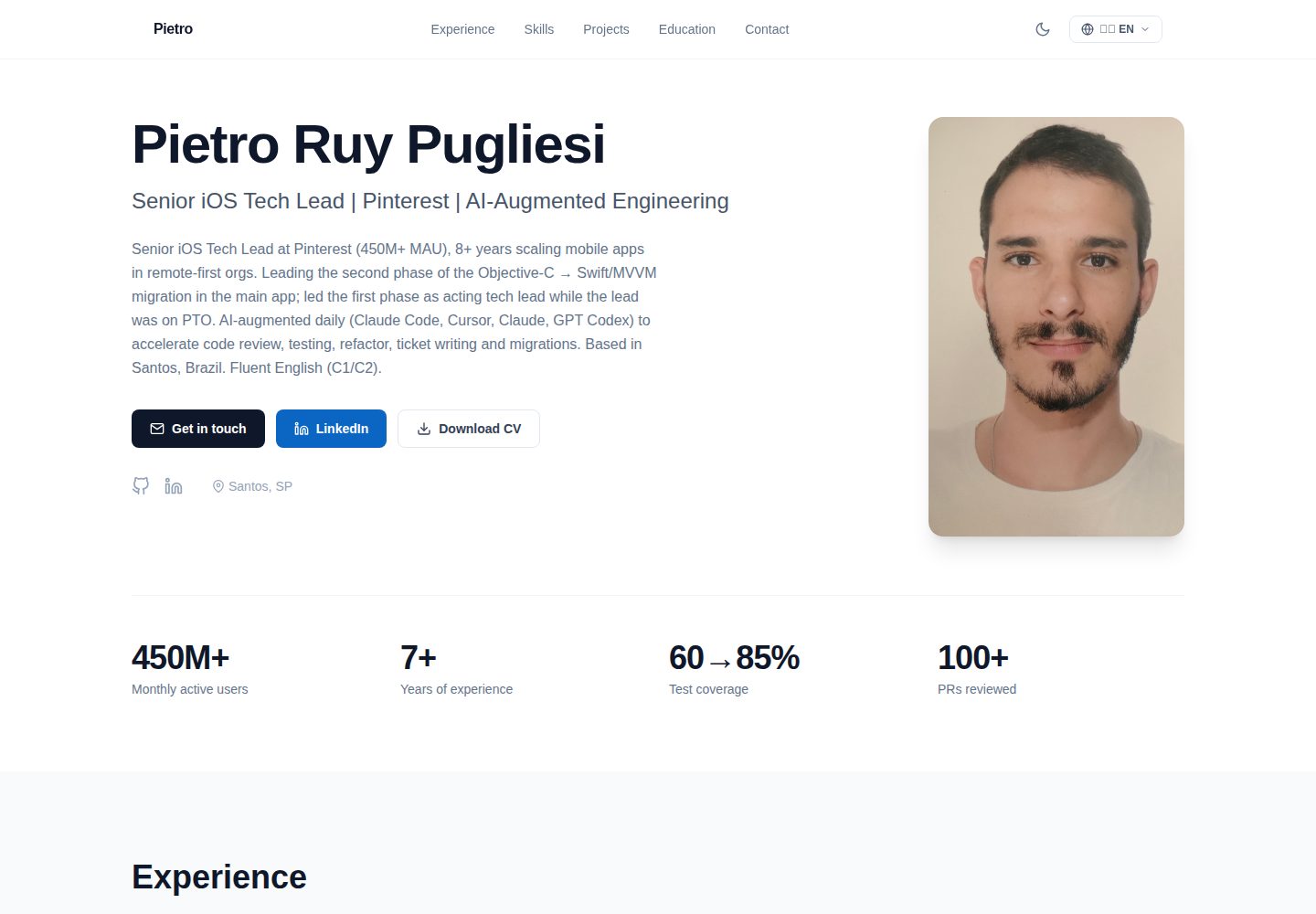
浏览真实页面截图,比较内容排版与手机效果。点击下方缩略图切换,放大查看整页细节。
全部页面与视图 2
截图用于了解视觉与布局,交互效果请以实际项目为准。
采集于 2026-10-14查看来源
值得关注的模板亮点
从已有项目资料中,快速了解它的特点。
Web 端基于 Next.js 静态导出与 Tailwind CSS,支持深色/浅色主题和移动优先布局
PDF 模板集中在 scripts/generate-resumes.js,通过组合 renderHeader、renderExperience 等辅助函数定义,可新增 generateXxx() 并注册到 templates 数组
构建生成 manifest.json 记录时间戳,用于下载链接自动刷新缓存
数据层与模板解耦,支持通过 RESUME_DATA_REPO、RESUME_DATA_TOKEN、RESUME_DATA_REF 环境变量在构建时克隆私有数据仓库
模板详细介绍
这是一个简历发布系统,核心思路是单一数据源:你只维护一份 resume.json(含葡萄牙语和英语内容),构建过程会产出双语 Web 作品集和六套面向不同招聘场景的 PDF 简历变体。Web 端使用 Next.js 与 Tailwind CSS,支持深色/浅色主题和移动优先布局;PDF 由 Puppeteer 将 HTML 转为 PDF 生成,另有 manifest.json 记录构建时间戳以便下载链接自动失效缓存。数据层与模板解耦:本仓库只包含渲染器,个人 resume.json 通常放在独立的私有仓库,在构建时被拉取。README 说明构建按顺序查找 data/private/resume.json、data/resume.json、data/resume.example.json,取第一个存在的文件;照片同样有回退机制,默认使用 public/photo.placeholder.jpg。README 未提供页面交互细节、可访问性说明或浏览器兼容性信息。
Next.js作品集
适合你的项目吗?
适用场景
- 用一份 JSON 数据同时维护个人作品集网站和多种用途的 PDF 简历
- 需要葡萄牙语与英语双语简历输出的求职场景
- 希望把个人简历数据放在私有仓库、只公开渲染器代码的部署方式
- 需要针对不同招聘渠道(如 ATS 关键词筛选、技术管理案例、技能矩阵)输出不同 PDF 版本的场景
适合人群
- 愿意维护结构化 JSON 简历数据并自行部署静态站点的开发者
- 需要双语作品集与多套 PDF 简历变体的求职者
- 使用 Cloudflare Pages 或类似平台进行静态部署、并希望构建时拉取私有数据的用户
上手与定制指南
结合仓库当前版本的说明,按下面的资料检查内容、配置与运行要求。
- 1
克隆仓库后执行 npm install;用 npm run dev 在本地预览示例数据,用 npm run pdf 生成 ./pdfs/*.pdf 与 ./public/pdfs/*.pdf
- 2
准备个人数据:可将真实 resume.json 软链接或复制到 data/resume.json,或通过 RESUME_DATA_REPO、RESUME_DATA_TOKEN、RESUME_DATA_REF 环境变量在构建时从私有仓库拉取
- 3
照片默认回退到 public/photo.placeholder.jpg,需替换为 public/photo.jpg 才能显示个人照片
- 4
部署到 Cloudflare Pages 时,构建命令为 npm run build,输出目录为 out;prebuild 会运行 scripts/fetch-private-data.js,未设置环境变量时该脚本静默跳过并回退到本地数据
- 5
新增 PDF 模板需在 scripts/generate-resumes.js 中编写新的 generateXxx() 函数并注册到文件底部的 templates 数组,然后运行 npm run pdf 检查输出
授权与来源资料
使用条件与限制
免费使用 · 保留许可声明本次收录的是公开仓库中采用 MIT 许可的免费版本;免费范围为该版本代码,不代表外部服务或第三方素材免费。
使用时需要遵守
- 允许免费使用、修改、商用和分发该版本代码。
- 分发代码副本或实质性部分时,保留原作者版权声明和完整 MIT 许可声明。
- 代码按现状提供;担保与责任限制以原许可证及适用法律为准。
额外费用与待核对事项
- 演示图片、字体、图标及其他第三方素材需按各自许可核对,不能仅凭代码的 MIT 许可判断。
- 域名、托管、数据库、支付或 AI 等外部服务可能另外收费。
- 个人 resume.json 数据通常存放在独立的私有仓库,构建时拉取;本仓库仅包含渲染器,需自行准备数据源。
- 使用私有数据仓库方式时,需设置 RESUME_DATA_REPO 与 RESUME_DATA_TOKEN 环境变量,并创建 data/private/resume.json。
- 推荐通过环境变量指向私有 Git 仓库以在 CI/Cloudflare/Vercel 部署时拉取数据,需自行配置相应凭据。
- 推荐部署目标为 Cloudflare Pages,Puppeteer 在构建阶段运行;需使用支持该构建流程的平台。
- RESUME_DATA_TOKEN 需为具有目标私有仓库读取权限的细粒度 GitHub PAT,属于外部服务凭据要求。
查看原文依据
Permission is hereby granted, free of charge
许可证原文
The data layer is decoupled from the template: this repo contains the renderer; your personal `resume.json` lives in a separate (typically private) repository and is fetched at build time.
README 原文
1. `data/private/resume.json` (created automatically when `RESUME_DATA_REPO`/`RESUME_DATA_TOKEN` env vars are set; see [Deploy](#deploy))
README 原文
- **(c)** point the build at a private Git repo via env vars (recommended for CI/Cloudflare/Vercel deploys)
README 原文
Recommended target: **Cloudflare Pages** (works free for personal sites; Puppeteer runs in build).
README 原文
https://github.com/pietro1704/resume-site/blob/master/LICENSEhttps://github.com/pietro1704/resume-site/blob/master/README.md- `RESUME_DATA_TOKEN` — a fine-grained GitHub PAT with read access to that repo
README 原文
DeepSeek 根据仓库许可证和 README 整理 ·2026-10-14。结果仅覆盖已读取资料,依赖、图片、字体及后续条款变更以各自原文为准。
项目核对记录与介绍依据
模板资料
- 来源平台
- GitHub
- 资料与维护参考分
- 资料较完整 · 80 / 100
- 技术栈
- Next.js · React
- 网站类型
- 作品集
这个分数如何计算
本站按许可资料(最高30分)、演示链接(12分)、预览图(10分)、Star数(15分)、记录的维护时间(15分)、描述完整度(8分)、功能记录(5分)和分类资料(5分)计算。它不是代码、安全或性能测试,也不是 Google 评分;有链接不代表已实测可用。
这个项目需要核对什么
- 记录的仓库更新时间
- 2026-08-04
- 截图检查日期
- 2026-10-14
已收录演示链接。请用你的内容与屏幕尺寸检查;有演示不代表表单、认证或支付已经可用。
目录记录的主要技术栈是 Next.js。请通过依赖清单和锁文件核对实际版本与托管要求。这些说明基于收录资料,不代表代码审计或部署实测。
查看具体选型方法 →介绍的制作与核对状态
介绍由 AI 辅助整理目录与仓库资料。仓库作者不等于这篇介绍的审核者。
审核声明: codex-user-requested-batch-review-20261015 · 2026-10-15
查看当时使用的来源资料
SHA-256: a911fe339c9f960b6cf3a09fc12ca4be72359dea24c72ba8bfb0391b9a6d63c6
2026-10-14T12:46:06.109Z
来源文件 / 仓库# resume-site
> One JSON, one bilingual portfolio site, six ATS-friendly PDF templates.
A single-source-of-truth resume system. You edit one `resume.json` (PT/EN), and the build produces:
- A bilingual web portfolio (Next.js + Tailwind, dark/light, mobile-first)
- Six PDF resume variants tuned for different recruiting funnels (ATS keyword scans, technical leadership case studies, dense skill matrices)
- A `manifest.json` with the build timestamp so download links bust cache automatically
The data layer is decoupled from the template: this repo contains the renderer; your personal `resume.json` lives in a separate (typically private) repository and is fetched at build time.
## Screenshots
| Light | Dark |
|---|---|
|  |  |
The screenshots above are rendered from [`data/resume.example.json`](data/resume.example.json).
## How it works
```
┌─────────────────────┐ fetched at build ┌──────────────────────┐
│ resume-data (priv) │ ────────────────────► │ resume-site (this) │
│ resume.json │ │ templates + Next.js │
│ photo.jpg │ └──────────┬───────────┘
└─────────────────────┘ │
▼
┌────────────────────────────────┐
│ out/ │
│ ├ index.html (web portfolio) │
│ ├ download/ (file index) │
│ └ pdfs/ │
│ ├ pietro-cv-pt.pdf │
│ ├ pietro-cv-en.pdf │
│ └ ... (6 variants) │
└────────────────────────────────┘
```
## Getting started
```bash
git clone https://github.com/pietro1704/resume-site.git
cd resume-site
npm install
# Quick preview using the example data
npm run dev # → http://localhost:3000
npm run pdf # → ./pdfs/*.pdf, ./public/pdfs/*.pdf
```
By default the build looks for resume data in this order, picking the first that exists:
1. `data/private/resume.json` (created automatically when `RESUME_DATA_REPO`/`RESUME_DATA_TOKEN` env vars are set; see [Deploy](#deploy))
2. `data/resume.json` (a local-only file you create yourself; gitignored)
3. `data/resume.example.json` (committed placeholder)
So you can either:
- **(a)** symlink your real data: `ln -s ~/path/to/your/resume.json data/resume.json`
- **(b)** paste it directly: `cp ~/path/to/your/resume.json data/resume.json`
- **(c)** point the build at a private Git repo via env vars (recommended for CI/Cloudflare/Vercel deploys)
The same fallback applies to your photo (`public/photo.jpg`). A neutral `public/photo.placeholder.jpg` ships as the safe default.
## Customizing templates
PDF templates live in `scripts/generate-resumes.js`. They share helpers (`renderHeader`, `renderExperience`, `renderEducation`, …) and a single CSS block. Each template is just a composition:
```js
function generateATSTemplate(data, lang) {
const isPt = lang === 'pt';
return renderHead(`${data.basics.name} — Resume`) +
renderHeader(data) +
renderSummary(data, isPt) +
renderExperience(data, lang, isPt) +
renderSkills(data, isPt, { layout: 'inline' }) +
renderProjects(data, isPt) +
renderEducation(data, isPt) +
renderLanguages(data, isPt) +
`</body></html>`;
}
```
Add a new variant by writing a new `generateXxx()` function and registering it in the `templates` array near the bottom of the file. Run `npm run pdf` and check the output in `pdfs/`.
The web portfolio (`app/page.js`) reads the same `data/resume.json`. All copy is parameterized — there's no name, label, or summary hardcoded outside of `resume.json`.
## Deploy
Recommended target: **Cloudflare Pages** (works free for personal sites; Puppeteer runs in build).
1. Connect your `resume-site` fork to Cloudflare Pages.
2. Build command: `npm run build`
3. Build output directory: `out`
4. Environment variables (if you want the build to pull data from a private repo):
- `RESUME_DATA_REPO` — e.g. `your-handle/resume-data`
- `RESUME_DATA_TOKEN` — a fine-grained GitHub PAT with read access to that repo
- `RESUME_DATA_REF` — branch/tag/sha (optional; defaults to `master`)
The `prebuild` step runs `scripts/fetch-private-data.js`, which clones the private repo into `data/private/` (gitignored) before the rest of the build kicks in. If the env vars aren't set, the script silently no-ops and the build falls back to whatever data is on disk.
## Tech
- [Next.js 14](https://nextjs.org/) (static export)
- [Tailwind CSS](https://tailwindcss.com/)
- [Puppeteer](https://pptr.dev/) for HTML → PDF
- [archiver](https://www.npmjs.com/package/archiver) for the all-in-one ZIP
## License
[MIT](LICENSE) — free to fork and adapt for your own resume.
看看同类模板
对比同技术栈与用途的模板,找到更适合的视觉与内容结构。

react-resume-template
A personal resume website template built with React.js, Typescript, Next.js, and styled with Tailwind css
Next.js · 作品集

nxt-lnk
Custom bio links for creatives who love coding. A perfect custom alternative for linktree, bio and other short…
Next.js · 作品集

sylph
A minimal portfolio template.
Next.js · 作品集

sleek-portfolio
sleek-portfolio 是一个面向开发者个人品牌展示的现代作品集模板,基于 Next.js 15、TypeScript、Tailwind CSS 和 Shadcn UI 构建。
Next.js · 作品集

research-website-template
React + Next.js template for research websites (for PhD students, researchers, etc)
Next.js · 作品集

shadcn-portfolio
shadcn-portfolio 是一个面向开发者的作品集模板,技术栈为 Next.js 15、shadcn/ui、Tailwind CSS 和 Framer Motion。
Next.js · 作品集