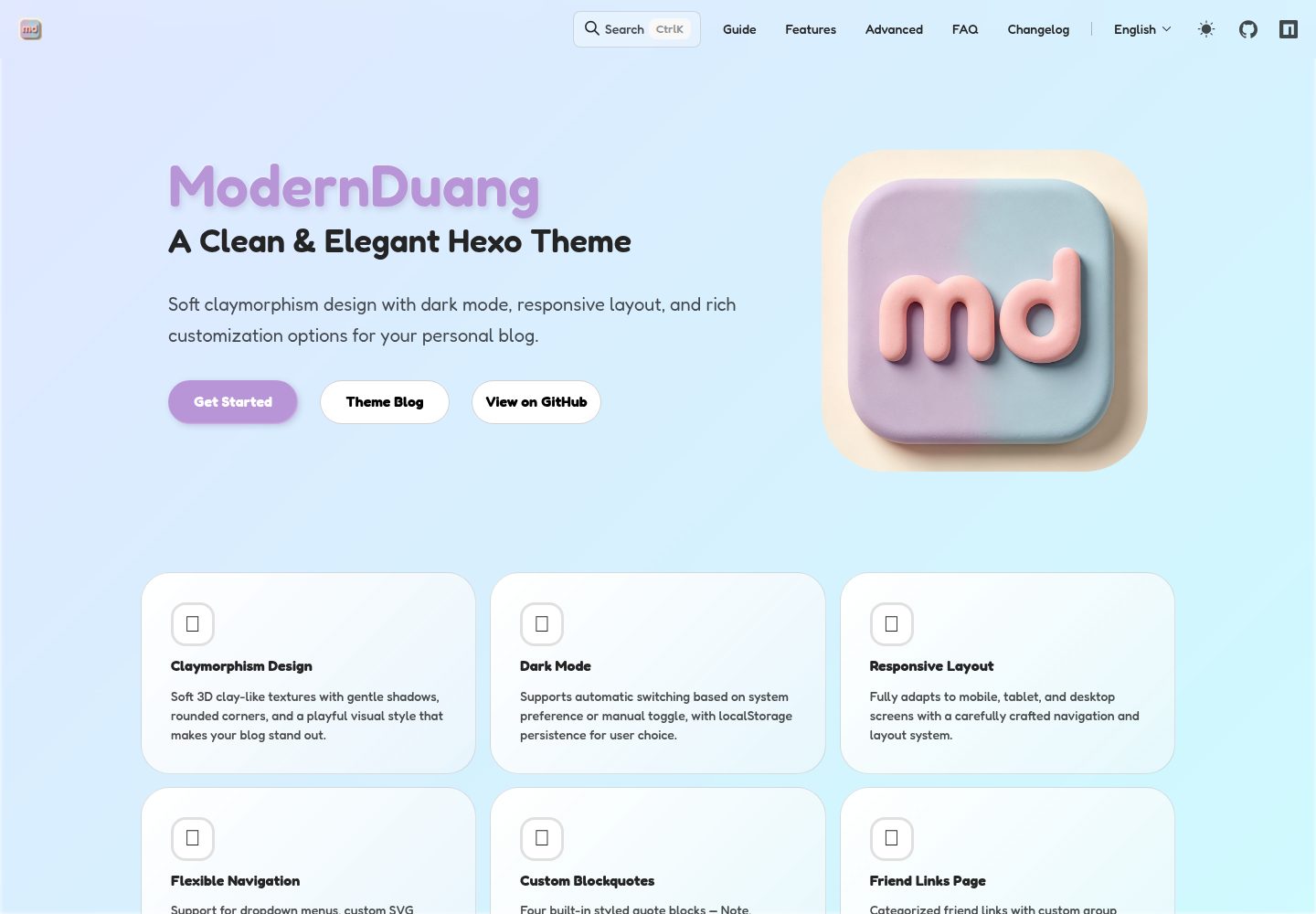
Soft Claymorphism clay-like visual style
HexoBlog
hexo-theme-modernduang — Hexo Blog Template
By PlayWithAndyJin
A Hexo blog theme with a soft Claymorphism clay-like texture, supporting dark mode, responsive layout, Twikoo comments, and annual plan modules.
Explore the design
Compare the page layouts and mobile experience. Open any screenshot for a closer look.
Desktop homepage1 / 3
Desktop captureTop of page
Actual screenshot captured by the server browser.
All pages & views 3
Screenshots show visual appearance; interactive behavior may differ.
Recorded 2026-10-01View source
What stands out
A quick read of the recorded project description.
Dark mode support that follows the system or can be toggled manually
Homepage includes annual plan progress, site uptime, and a ten-year promise countdown
Built-in Twikoo comments, Mermaid diagrams, and four custom quote blocks
Supports article visibility control (hidden from lists or completely hidden)
Provides Claude Code Agent Skills to assist with configuration and customization
Template Details
hexo-theme-modernduang is a blog theme for Hexo. Visually, it adopts a soft Claymorphism design style, giving an overall clean, puffy, card-based look. The theme requires Hexo 6.0 or above and Node.js 14.0.0 or above. After installing via npm, point the theme in the site's _config.yml to modernduang to enable it.
Functionally, the theme covers common blog pages: homepage Hero, latest posts, site statistics, archives, categories, tags, friends links, and an about page. The homepage can display annual plan progress and subtask progress bars, as well as site uptime and a ten-year promise countdown. Navigation supports dropdown menus, custom SVG icons, and opening external links in new windows; the categories page can be configured with icons, colors, and descriptions; friends links support grouped display. Article pages include built-in Mermaid diagram rendering and four custom quote blocks (note, warning, statement, danger), and support controlling whether an article is hidden from the front end or completely hidden via the visibility field in Front Matter.
For configuration, the theme provides a separate _config.modernduang.yml, where you can set the default dark mode value, homepage personal info card, footer social icons, ICP filing information, and more. Comments use Twikoo, requiring you to deploy the backend yourself and fill in the envId. The theme also comes with Claude Code Agent Skills to assist with installation, configuration, and source code customization.
Usage limitations: The theme code is under the MIT license, allowing free use, modification, commercial use, and distribution, but third-party assets such as demo images, fonts, and icons must be checked against their respective licenses; external services such as Twikoo may incur additional costs.
HexoBlog
Is it right for your project?
Use Cases
- Building a personal blog with Hexo and wanting a card-based clay-texture interface
- Blogs that need to display annual plan progress and site operation data on the homepage
- Sites that want to use Twikoo as the comment system and deploy the backend themselves
- Blogs that need complete content organization pages such as categories, tags, and grouped friends links
Suitable For
- Sites using Hexo 6.0 or above and Node.js 14.0.0 or above
- Bloggers who prefer a soft 3D clay style over minimalist or business styles
- Users willing to deploy the Twikoo backend themselves and maintain third-party services
- Domestic blogs that need a Chinese interface and ICP filing display
Getting started & customization
Use these recorded setup notes alongside the repository instructions for your chosen version.
- 1
Run npm install hexo-theme-modernduang --save in the site directory, and set theme in _config.yml to modernduang
- 2
If the Hexo version is below 6.0, manually copy the theme to themes/modernduang
- 3
Copy the theme's default configuration to _config.modernduang.yml in the site root directory and modify as needed
- 4
To use the comment feature, first deploy the Twikoo backend and fill in the envId in the configuration
- 5
The theme code is under the MIT license, but third-party assets such as demo images, fonts, and icons require separate license verification
License & source material
Usage conditions & limitations
Free to use · keep license noticeThis entry covers the free version under the MIT license in the public repository; the free scope is the code of this version and does not mean that external services or third-party assets are free.
Must comply with when using
- Free use, modification, commercial use, and distribution of this version's code are permitted.
- When distributing copies or substantial portions of the code, retain the original author's copyright notice and the complete MIT license notice.
- The code is provided as is; warranties and limitations of liability are governed by the original license and applicable law.
Additional costs & items to verify
- The comment feature relies on the third-party Twikoo service, requiring you to deploy the backend yourself and obtain an envId to fill in the configuration; this external service may incur additional costs and is not covered by the MIT authorization of the theme code.
- The accompanying Claude Code Agent Skills are in a separate repository, modernduang-skills, and must be installed separately; they are not covered by the MIT authorization of this theme repository.
- Usage requires Hexo >= 6.0.0 and Node.js >= 14.0.0; if below Hexo 6.0, you must manually copy the theme directory to themes/modernduang for it to take effect.
- Demo images, fonts, icons, and other third-party assets must be checked against their respective licenses; they cannot be judged solely by the code's MIT license.
- External services such as domains, hosting, databases, payments, or AI may incur additional charges.
View Original Text Basis
Permission is hereby granted, free of charge
Original License Text
前往 [Twikoo](https://twikoo.js.org/) 部署后端并获取 `envId`,然后填入配置
Original README
npx skills add PlayWithAndyJin/modernduang-skills --all
Original README
https://github.com/PlayWithAndyJin/hexo-theme-modernduang/blob/main/LICENSEhttps://github.com/PlayWithAndyJin/hexo-theme-modernduang/blob/main/README.md如果你的 Hexo 版本低于 6.0,需额外执行:`cp -r node_modules/hexo-theme-modernduang themes/modernduang`
Original README
Compiled by DeepSeek based on repository license and README ·2026-10-01. Results only cover the materials read; dependencies, images, fonts, and subsequent term changes are subject to their respective original texts.
Project checks & description sources
Template Information
- Source platforms
- GitHub
- Documentation and maintenance reference score
- More documented · 83 / 100
- Technologies
- Hexo
- Website type
- Blog
How this score is calculated
Our heuristic uses license records (up to 30), a demo link (12), a preview (10), stars (15), recorded maintenance (15), description completeness (8), feature records (5) and classification data (5). It is not a code, security or performance test, or a Google score. A link does not establish tested functionality.
What to verify for this project
- Repository update recorded
- 2026-07-19
- Screenshot last checked
- 2026-10-01
A demo link is listed. Check it with your own content and viewport sizes; its presence does not confirm that forms, authentication or payments work.
The catalog identifies Hexo as the primary stack. Check the actual dependency manifest and lockfile for versions and hosting requirements. These notes use recorded metadata, not a code audit or a deployment test.
Use a selection guide →How this description was prepared
AI-assisted description based on catalog records and repository material. Repository authors are not automatically the reviewers of this description.
Automatically checked against source and license rules; no manual editorial review.
Inspect the recorded source material
SHA-256: 7259321570e6ba3f9e5273f85a701c80a6d3332e0a782dbd2ac2a21d1ad74344
2026-10-01T03:15:08.022Z
Source file / repository<h1 align="center">Modern Duang</h1>
<p align="center"><img src="./samples/logo.png" width="120" alt="logo" /></p>
<p align="center">
<a title="Hexo Version" target="_blank" href="https://hexo.io/zh-cn/"><img alt="Hexo Version" src="https://img.shields.io/badge/Hexo-%3E%3D%206.0-blue?style=flat"></a>
<a title="Node Version" target="_blank" href="https://nodejs.org/zh-cn/"><img alt="Node Version" src="https://img.shields.io/badge/Node-%3E%3D%2014.21.3-green?style=flat"></a>
<a title="License" target="_blank" href="https://github.com/PlayWithAndyJin/hexo-theme-modernduang/LICENSE"><img alt="License" src="https://img.shields.io/github/license/PlayWithAndyJin/hexo-theme-modernduang.svg?style=flat"></a>
<br>
<a title="GitHub Release" target="_blank" href="https://github.com/PlayWithAndyJin/hexo-theme-modernduang"><img alt="GitHub Release" src="https://img.shields.io/github/v/release/PlayWithAndyJin/hexo-theme-modernduang?style=flat"></a>
<a title="Npm Downloads" target="_blank" href="https://www.npmjs.com/package/hexo-theme-modernduang"><img alt="Npm Downloads" src="https://img.shields.io/npm/dt/hexo-theme-modernduang?color=red&label=npm"></a>
<a title="GitHub Commits" target="_blank" href="https://github.com/PlayWithAndyJin/hexo-theme-modernduang"><img alt="GitHub Commits" src="https://img.shields.io/github/commit-activity/m/PlayWithAndyJin/hexo-theme-modernduang.svg?style=flat&color=purple&label=commits"></a>
<a title="Agent Skills" target="_blank" href="https://github.com/PlayWithAndyJin/modernduang-skills"><img alt="Agent Skills" src="https://img.shields.io/badge/skills-2-orange?style=flat"></a>
</p>
<p align="center"><a href="https://themeblog.andyjin.website">主题博客</a> | <a href="https://theme.andyjin.website/zh/index.html">中文指南</a> | <a href="./README_en.md">English README</a> | <a href="https://github.com/PlayWithAndyJin/modernduang-skills">Agent Skills</a></p>
<p align="center">一款简洁优雅的 <a href="https://hexo.io/">Hexo</a> 博客主题,采用柔和的 Claymorphism 设计风格。</p>

## 特性
- **Claymorphism 设计** — 柔和的 3D 粘土质感,蓬松俏皮的视觉风格
- **暗色模式** — 支持跟随系统自动切换或手动切换
- **响应式布局** — 完美适配手机、平板、桌面端
- **灵活导航** — 支持下拉菜单、自定义 SVG 图标、外链新窗口打开
- **分类 & 标签** — 分类页支持自定义图标、颜色和描述
- **友链页面** — 支持友链分组展示,自定义分组图标
- **年度计划** — 首页进度追踪,支持子任务进度条
- **站点数据** — 展示站点运行时长与十年之约倒计时
- **首页 Hero** — 副标题支持固定模式或随机刷新模式
- **自定义引用块** — 内置提示、警告、声明、危险四种风格,带鼠标追踪光效
- **Mermaid 支持** — 文章页内置 Mermaid 图表渲染
- **ICP 备案** — 支持工信部、萌/茶 ICP 备案号与图标
- **Twikoo 评论** — 内置 Twikoo 评论系统,开箱即用
- **自定义页脚** — 支持自定义 HTML 内容、内置社交图标及自定义社交图标
- **文章可见性** — 支持文章前台隐藏或全局隐藏
- **文章搜索** - 支持通过关键词搜索相关的文章
- **RSS 支持** — 头部内置 RSS 链接,支持 RSS 图标
## 样图
| 首页 Hero | 最新文章 | 年度计划 |
|-----------|---------|----------|
|  |  |  |
| 站点数据 | 博客文章 |
|---------|---------|
|  |  |
| 归档 | 分类 | 标签 |
|------|------|------|
|  |  |  |
| 分类详情 | 标签详情 |
|---------|---------|
|  |  |
| 友链 | 友链详情 | 关于 |
|------|---------|------|
|  |  |  |
## 安装
> 要求:Node.js >= 14.0.0,Hexo >= 6.0.0
```bash
cd your-site
npm install hexo-theme-modernduang --save
```
然后修改 Hexo 站点根目录的 `_config.yml`:
```yaml
theme: modernduang
```
> 如果你的 Hexo 版本低于 6.0,需额外执行:`cp -r node_modules/hexo-theme-modernduang themes/modernduang`
## Claude Code 技能
主题配套了 Claude Code Agent Skills,安装后即可用 AI 配置和自定义主题:
```bash
# 安装全部技能
npx skills add PlayWithAndyJin/modernduang-skills --all
# 或单独安装
npx skills add PlayWithAndyJin/modernduang-skills --skill modernduang-theme-setup
```
- `modernduang-theme-setup` — 帮你安装、配置、排查主题
- `modernduang-theme-custom` — 告诉你每个源文件的作用,按需修改
> 技能仓库:[PlayWithAndyJin/modernduang-skills](https://github.com/PlayWithAndyJin/modernduang-skills)
之后在 Claude Code 中直接说「帮我配置 Modern Duang 主题」即可。
## 配置
将主题的默认配置复制到站点的 `_config.modernduang.yml` 中,按需修改:
```bash
cp themes/modernduang/_config.yml _config.modernduang.yml
```
所有配置项说明见主题目录下的 `_config.yml`。
### 快速上手
```yaml
# 站点信息(自动从 Hexo 主配置的 title 和 description 继承)
# 暗色模式
dark_mode:
enable: true
default: light # 可选 'dark'
# 首页个人信息卡片
profile:
avatar: https://your-avatar-url.png
motto: 你的座右铭
social:
- name: GitHub
url: https://github.com/yourname
icon: github
# 页脚
footer:
since: 2024
author: 你的名字
powered: true
social:
travelling: true
github: true
email: true
custom: []
```
## 第三方服务
### 评论系统(Twikoo)
前往 [Twikoo](https://twikoo.js.org/) 部署后端并获取 `envId`,然后填入配置:
```yaml
comments:
enable: true
twikoo:
envId: https://your-twikoo-envid
```
> 自部署(Vercel 等)的 Twikoo 无需填写 `region`。
### 友链配置
在 `_config.modernduang.yml` 中配置友链分组和链接:
```yaml
friendGroups:
技术: 🌟
生活: 🎨
friends:
- name: 示例博客
url: https://example.com
desc: 一个很棒的博客
avatar: https://example.com/avatar.png
group: 技术
```
### ICP 备案
```yaml
footer:
beian:
icp: "京ICP备12345678号" # 工信部备案,完整格式
moe: "123456" # 萌备案,只填数字,显示为"萌ICP备123456号"
chabei: "123456" # 茶备案,只填数字,显示为"茶ICP备123456号"
```
## 内置社交图标
`profile.social` 和 `footer.social.custom` 支持以下内置图标名:
`github`、`bilibili`、`email`、`blog`、`tiktok`、`kuaishou`、`xiaohongshu`、`wechat`、`qq`、`gitee`、`rss`
也可以直接传入自定义 SVG 字符串:
```yaml
social:
- name: 我的站点
url: https://mysite.com
icon: '<svg viewBox="0 0 24 24">...</svg>'
```
## 自定义引用块
在 Markdown 文章中使用以下标签:
```markdown
{%note%}
这是一条提示信息。
{%endnote%}
{%warning%}
这是一条警告信息。
{%endwarning%}
{%declare%}
这是一条声明信息。
{%enddeclare%}
{%danger%}
这是一条危险警告。
{%enddanger%}
```
## 自定义页脚
可以在页脚插入自定义 HTML 内容:
```yaml
footer:
custom: '<p>你的自定义 HTML 内容</p>'
```
## 文章可见性
在文章 Front Matter 中配置 `visibility` 字段:
```yaml
---
title: 某某文章
visibility: local # 列表隐藏,直接访问可见
---
---
title: 某某文章
visibility: global # 完全隐藏,直接访问也 404
---
```
不填则正常显示。
## 自定义友链申请内容
编辑 `themes/modernduang/layout/_link-apply.md` 即可自定义友链页面的"交换友链"板块。支持以下语法:
- `{%card%}内容{%card%}` — 带样式的提示卡片
- `<!-- siteinfo -->` — 自动替换为站点信息(名称、简介、网址、头像、Atom 订阅)
- 标准 Markdown(标题、列表、链接、加粗、斜体)
- `---` — 分割线
## 开源协议
MIT
Explore similar templates
Compare previews and descriptions within the same stack and category.

hexo-theme-matery
hexo-theme-matery is a Material Design, responsive Hexo blog theme with homepage carousel, waterfall post list, timeline archive, word cloud tags, radar chart categories, and an about page.
Hexo · Blog

hexo-theme-cactus
Cactus is a responsive Hexo theme for personal websites and blogs, maintained by probberechts. It offers four color schemes (dark, light, white, classic), configurable navigation, homepage post lists, project lists, social links, and copyright year ranges.
Hexo · Blog

hexo-theme-volantis
Volantis is a blog theme for Hexo, distributed as the npm package hexo-theme-volantis and enabled by setting theme to volantis in the Hexo site's _config.yml. It requires Hexo 7.3+, hexo-cli 4.3+, Node.js 22.x LTS+, and npm 10.x LTS+.
Hexo · Blog

hexo-theme-aurora
Hexo Theme Aurora is a futuristic Hexo blog theme built around aurora gradients and a magazine-style grid layout.
Hexo · Blog

hexo-theme-Claudia
Claudia is a Hexo blog theme focused on a clean look and easy configuration. It automatically follows the device's dark mode and claims a 90+ Lighthouse score.
Hexo · Blog

hexo-theme-A4
hexo-theme-A4 is a minimalist Hexo blog theme that mimics the texture of A4 paper, emphasizing simplicity, small size, and minimal configuration.
Hexo · Blog